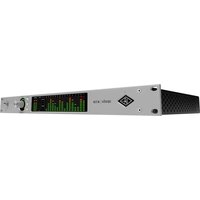
Apollo x16D - Audio Interface Universal Audio - Free user manual and instructions
Find the device manual for free Apollo x16D Universal Audio in PDF.


Pick your language and provide your email: we'll send you a specifically translated version.
| Product Type | Thunderbolt Audio Interface |
| Number of Channels | 16 x 16 |
| Analog Inputs | 8 x XLR-1/4\" combo (mic/line), 2 x Hi-Z |
| Analog Outputs | 8 x 1/4\" TRS |
| Digital I/O | 2x ADAT, 1x S/PDIF |
| Sample Rates | Up to 192 kHz |
| UAD DSP | Quad Core processing |
| Preamps | Unison preamps with mic/line/Hi-Z |
| Form Factor | 19\" rackmount, 1U |
| Dimensions (W x D x H) | 19 x 8.6 x 1.75 inches |
| Weight | 7.7 lbs (3.5 kg) |
| Power Supply | External AC adapter |
| Computer Connectivity | Thunderbolt 2 (compatible with Thunderbolt 3 via adapter) |
| Monitor Control | Integrated monitor mixing via Console software |
| Security | Kensington lock slot |
| Maintenance & Cleaning | Disconnect power, wipe with dry, lint-free cloth |
| Repairability | Refer to authorized service centers; no user-serviceable parts inside |
| Included Accessories | Thunderbolt cable, power supply, rack ears |
Frequently Asked Questions - Apollo x16D Universal Audio
What operating systems are supported?
The Apollo x16D supports macOS (10.10 and later) and Windows (7 and later) via Thunderbolt 2 with appropriate driver support.
Can I use it with a Thunderbolt 3 port?
Yes, you can use an Apple Thunderbolt 3 to Thunderbolt 2 adapter to connect to Thunderbolt 3 ports.
How do I install the drivers?
Download the latest UAD software from the Universal Audio website. Run the installer and follow on-screen instructions. After installation, restart your computer.
What is Unison technology?
Unison allows the preamps to mimic the impedance, gain staging, and circuit behavior of classic preamps and effect pedals for authentic tone shaping.
Can I use the Apollo without UAD plugins?
Yes, the Apollo x16D functions as a standard audio interface. However, its UAD DSP provides near-zero latency monitoring and access to a suite of high-quality plugins.
How do I set up cue mixes?
Use the included Console software to create separate monitor mixes for each output pair. You can adjust levels, pan, and add UAD effects with low latency.
What sample rates are supported?
The Apollo x16D supports sample rates from 44.1 kHz to 192 kHz.
How often should I update firmware?
Check the Universal Audio website periodically for new firmware updates. Use the UAD Meter & Control Panel to install updates.
What should I do if the unit doesn't power on?
Ensure the power supply is securely connected and the outlet works. Try a different AC cable. If still not working, contact Universal Audio support.
Is the Apollo x16D rackmountable?
Yes, it is a standard 1U 19-inch rackmount unit. Rack ears are included.
User questions about Apollo x16D Universal Audio
0 question about this device. Answer the ones you know or ask your own.
Ask a new question about this device
No questions yet. Be the first to ask one.
Download the instructions for your Audio Interface in PDF format for free! Find your manual Apollo x16D - Universal Audio and take your electronic device back in hand. On this page are published all the documents necessary for the use of your device. Apollo x16D by Universal Audio.
USER MANUAL Apollo x16D Universal Audio


Manual assistant
Powered by Anthropic
Waiting for your message
Product information
Brand : Universal Audio
Model : Apollo x16D
Category : Audio Interface