
Sound miracle V - Loudspeaker MEGASAT - Free user manual and instructions
Find the device manual for free Sound miracle V MEGASAT in PDF.


| Product Type | Portable Speaker |
| Brand | Megasat |
| Model | Sound Miracle V |
| Power Source | Built-in rechargeable battery (Lithium-ion, 2000 mAh) |
| Battery Life | Up to 8 hours at medium volume |
| Charging Time | Approximately 3 hours |
| Connectivity | Bluetooth 5.0 |
| Bluetooth Range | Up to 10 meters (33 feet) |
| Speaker Type | Full-range stereo |
| Output Power | 10W (2 x 5W) |
| Frequency Response | 80 Hz – 20 kHz |
| Impedance | 4 Ohms |
| Audio Inputs | 3.5mm AUX, Bluetooth |
| Dimensions (W x H x D) | 200 x 70 x 70 mm |
| Weight | 0.5 kg |
| Color | Black |
| Features | Hands-free calling, TWS pairing |
| Controls | Buttons: Power, Volume +/-, Play/Pause, Next, Previous |
| LED Indicator | Blue LED for Bluetooth pairing |
| Water Resistance | IPX5 (splash proof) |
| Included Accessories | USB charging cable, AUX cable, User manual |
| Cleaning Instructions | Wipe with a soft, dry cloth. Do not use liquids. |
| Safety | Do not expose to extreme heat or moisture. Keep away from children. |
| Spare Parts / Repairability | Battery replaceable by professional. No other user-serviceable parts. |
Frequently Asked Questions - Sound miracle V MEGASAT
User questions about Sound miracle V MEGASAT
0 question about this device. Answer the ones you know or ask your own.
Ask a new question about this device
Download the instructions for your Loudspeaker in PDF format for free! Find your manual Sound miracle V - MEGASAT and take your electronic device back in hand. On this page are published all the documents necessary for the use of your device. Sound miracle V by MEGASAT.
USER MANUAL Sound miracle V MEGASAT
natural_image
Black Mega807 audio amplifier with control buttons and speaker grille (no visible text or symbols on body)Klangwunder V (Ver. 2.0)
Bedienungsanleitung
Sicherheitshinweise
natural_image
Technical diagram of a mechanical assembly with no visible text or symbolsnatural_image
Technical diagram of a mechanical assembly with no visible text or symbols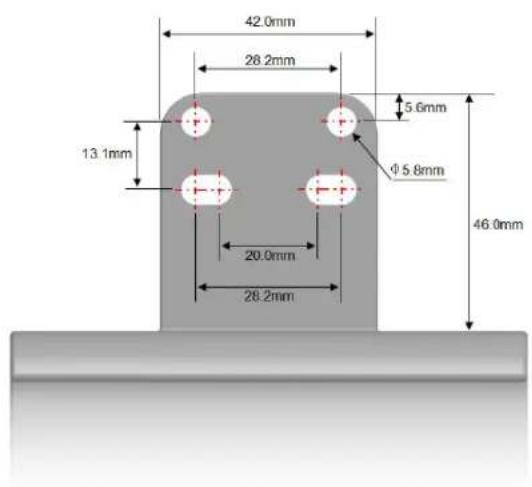
natural_image
Illustration of a desktop computer with monitor, tower, and wireless signal icon (no text or symbols)natural_image
Close-up of a dark textured surface with a small blue dot (no text or symbols)Version: 2.0 (November 2019)
natural_image
Black portable electronic device with speaker grille and control buttons (no visible text or symbols)Klangwunder V (Ver. 2.0)
user manual
Safety instructions
- Make sure that the connection cables of the power supply are not busy. If so, have it repaired or replaced by the manufacturer or a qualified person.
- The device and the power supply should always be easily accessible.
- The device should not be exposed to dripping or splashing water.
- Do not place any objects filled with liquids such as vases on the device.
• Always leave a space of at least 10 cm around the unit to ensure adequate ventilation. - Open flame sources such as candles should not be placed on or on the device.
- At full volume, prolonged hearing through the device may damage the user's hearing. (Hearing disorders such as temporary or permanent deafness, tinnitus,...).
• We therefore recommend that you do not use the device at high volume and for more than one hour per day at medium volume. - Do not let children play with films or other packaging, there is danger of suffocation.
- Do not open the case to avoid the risk of electric shock. Contact qualified and licensed service personnel to repair the unit or contact your dealer.
Delivery
• Megasat Klangwunder V (Ver. 2.0)
- Screw sets
- Remote Control
• Audio cable (3.5 mm jack)
- Mounting bracket for TV installation
• 240 volts AC / 12 volts DC power supply
- Wall and ceiling mount
- User manual
Features
- 30 watts (RMS) of power over two full-range speakers.
• Audio connection for the headphone jack on the IV or mobile device. - Bluetooth® 4.0 for a wireless connection to the TV or mobile device.
- Incl. Bracket for easy installation on the TV.
- USB port for direct playback of MP3 music files.
- Remote control with all common functions
(Volume control, navigation buttons for MP3 operation, Bluetooth® connection, ...)
• Simple and compact design - suitable for all Megasal Camping televisions (16 – 24 inch).
Specifications
- Material: plastic / metal mesh
• 2 full range speakers (stereo)
• Speaker size: 2 inches (5 cm)
• Power: max. 30 watts RMS (2x 15 watts)
• Frequency response: 50 Hz - 18 Khz
• Audio input: 3.5 mm jack
• USB port for direct playback of MP3 files - Bluetooth® version 4.0 for a wireless connection to the TV
• Power supply: AC 230 Volt / DC 12 Volt, 2A
• Dimensions (W/H/D): 420 x 60 x 60 mm
• Weight: 788 g
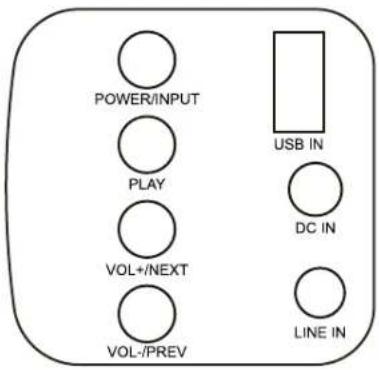
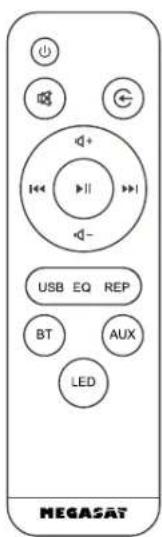
Overview of the buttons on the soundbar Overview of the buttons on the remote control
POWER / INPUT Press for 3-5 seconds to turn the device on or off. Press briefly to change the audio connection.
PLAY Start / Pause button in MP3 mode.
VOL+ / NEXT Press for 3-5 seconds to increase the volume. Press briefly to switch to the next track in MP3 mode.
VOL-/PREV Press for 3-5 seconds to decrease the volume. Press briefly to change to the previous track in MP3 mode.
USB IN USB port for media playback.
LINE IN 3.5 mm audio port for connecting to the TV if no Bluetooth® is available.
DC IN Connection for the power supply.
POWER Switches the device on / off
MUTE Turns off the sound.
INPUT Selects the input source.
VOL+/VOL-Adjusts the volume up / down.
TITEL ZURÜCK Switch to the previous track.
TITEL VOR Go to the next title.
START / PAUSE Starts or stops the title.
USB Switches to USB mode.
EQ Changes the sound settings (only possible in USB model)
REP Switches between one time playback and repeat mode
BT Switches to Bluetooth® mode.
AUX Switch to AUX mode (3.5mm audio connection)
LED Switch the LEDs on or off.
Mounting types of the TV bracket Mounting the TV holder
Depending on the TV type, you must use different screws to mount the bracket on the TV. The following screws are supplied with the TV:
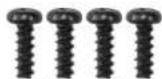
Screw set A
4,8 x 14 mm coarse thread (blunt) Use these screws if the mounting holes of the TV are made of plastic. The thread is screwed in through the screws.

Screw set B
3 x 12 mm Coarse thread (pointed) Use these screws if you want to mount the wall bracket adaptors directly to the sound bar.
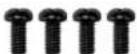
Screw set C
M4 x 14 mm fine thread (washer) Use these screws if the mounting holes of the TV have a metal thread.


Wall bracket adapter (alternative mounting)
Use the screw set B and screw the following screws the two adapters directly into the housing of the sound bar.

Before fixing the holes must be pre-drilled (2 mm) The mounting is possible on the top or on the back. The distance from the wall mount adapter to the outside of the soundbar is 1 cm.
Attention: Only pierce the housing wall.

Screw / Dowel set D
3,9 x 35 mm coarse thread (pointed) / ∅ 6 mm dowel Use these screws for wall mounting to attach the two wall bracket adapters. For stone walls, you must first drill dowel holes and fasten the screws using the dowels.
- Insert the sound bar into the TV holder as shown below. Make sure that the soundbar with the speakers (metal grille) is facing forward.
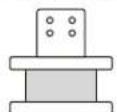

-
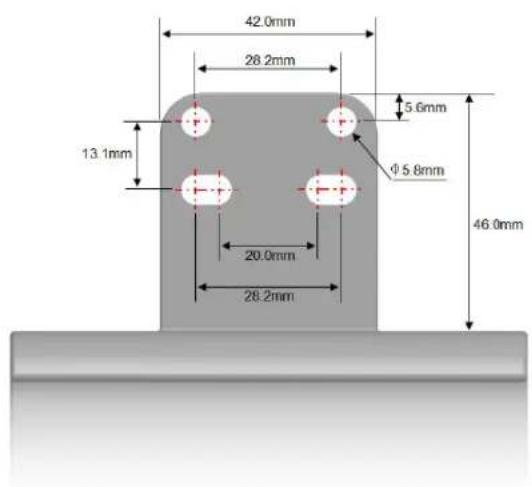
The holes in the bracket must match the holes on the back of the TV and be fastened with four screws as shown (depending on the model, with 2 or 4 screws).
-
Depending on the model, the bracket may not rest flat on some TVs. Use the supplied adapter plate for this purpose. This is placed between the holes of the TV and the holder.
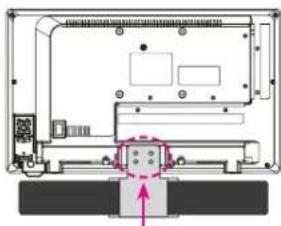
natural_image
Technical diagram of a mechanical assembly with no visible text or symbolsFastening with the respective screws
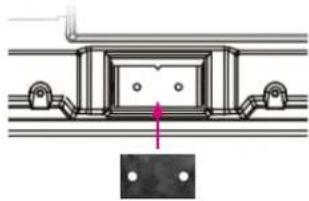
natural_image
Technical diagram of a mechanical assembly with mounting holes and a central component (no text or symbols)Borehole dimensions of the TV mount
08 09 ENGLISH ENGLISH
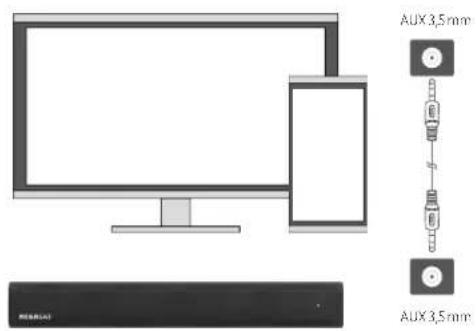
Connection to the TV/mobile device via 3.5 mm audio cable
- To connect the TV to the soundbar, please check the necessary TV audio output jacks (AUX output / headphone jack).
- Then connect the TV to the soundbar via the supplied 3.5 mm audio cable.
- Switch to AUX mode with the remote control or the button on the soundbar.
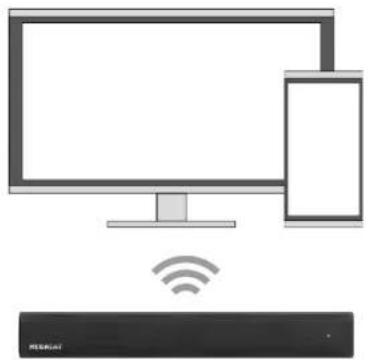
Connection to the TV / mobile device via Bluetooth®
- Open the Bluetooth ^® connection from your TV or mobile device.
- Switch to Bluetooth® mode on the soundbar.
- Look for the name ,Klangwunder V' in your Bluetooth® device
(For some Bluetooth ^® devices, the name is displayed correctly only after the connection). - Now confirm the Bluetooth® connection.
natural_image
Illustration of a desktop computer with a smartphone and Wi-Fi symbol (no text or labels)The various displays of the LEDs
Standby-Mode
When the POWER button on the sound bar or remote control is pressed, a voice message, Power off is played and the LED lights up red.
Bluetooth ^® -input mode
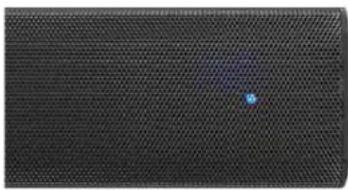
The LED flashes quickly in blue/red colour with voice announcement: „Bluetooth“-Mode has been on*. After a successful connection, the LED lights up blue with voice announcement: „paired”.
AUX-input mode
The LED lights blue with voice announcement: "Line in".
USB-input mode
The LED lights blue with voice announcement: U disc playback.
natural_image
Close-up of a dark textured surface with a small blue dot, possibly indicating a spot or artifact (no text or symbols visible)Note: The LED display mode goes out after approx. 1 minute in the respective operating mode.
Troubleshooting Troubleshooting
-
There is a delay of the audio track. The picture from the TV does not match the sound.
-
Repeat the Bluetooth ^® connection on the soundbar.
- Disconnect the Bluetooth® connection from your TV or mobile device and reconnect.
- Try to use another Bluetooth® device to rule out an error on the device itself.
-
Adjust the delay on the TV via the "Audio Delay" mode.
-
No connection with Bluetooth ^4 .
-
Make sure the soundbar is not connected to any other device.
-
Make sure that no other interference sources (eg WLAN, 2.4 GHz) are within reach
(Try to connect to another location to avoid the source of the error).
Try to use another Bluetooth® device to rule out an error on the device itself. -
No audio playback / no sound.
Please check the power supply for any damage.
- Make sure the audio cable is plugged into the correct port on the soundbar.
- Make sure the audio cable is plugged into the TV in the correct audio output.
-
Remote control doesn't work.
-
The remote control must be aligned with the soundbar.
- Check the batteries if necessary.
-
The distance between the remote control and soundbar must not exceed 6-8 meters.
-
The soundbar often disconnects when connected to Bluetooth ^® .
-
Bluetooth® usually can not transmit more than 10 meters. Check the distance between
Soundbar and TV / mobile device. - Make sure that no other interference sources (eg WI AN, 2.4 GHz) are within reach
(Try to connect to another location to avoid the source of the error). -
Try to use another Bluetooth® device to rule out an error on the device itself.
-
No function of the volume control via the remote control.
-
The remote control must be aligned with the soundbar.
- Check the batteries if necessary
-
The distance between the remote control and soundbar must not exceed 6-8 meters.
-
The audio is very quiet or rusty.
-
Make sure that the volume of the TV / mobile device is not quieter.
- If there is any noise, turn up the volume on the TV / mobile device and the Volume down the soundbar to avoid overdriving.
-
The soundbar is designed for indoor use. Outdoor use can be the quality reduce the audio playback (extraneous noise, too large area of sound, _).
-
Not compatible with the TV.
Make sure the audio cable is plugged into the correct port on the soundbar.
- Make sure the audio cable is plugged into the TV in the correct audio output.
- Make sure the device is A2DP compatible (Advanced Audio Distribution Profile).
- Noises from the soundbar.
- There may be a slight hum in a quiet, quiet environment.
This is the integrated amplifier of the soundbar, which is usually barely audible.
Conformity information
Hereby, Megasat Werke GmbH declares that the following product is in compliance with the essential requirements and other relevant provisions of directives 2014/30/EU (EMC), 2014/35/EU (LVD) and 2014/53/EU (RED):
Megasat Klangwunder V (Art.-No. 0900164)
The declaration of conformity for this product is available at the company: Megasat Werke GmbH, Industriestraße 4a, D-97618 Niederlauer
The declaration of conformity can be downloaded from our homepage: www.megasat.tv/support/downloads
Version: 2.0 (November 2019)
Technical changes, misprints and errors reserved.
- Bedienungsanleitung
- Sicherheitshinweise
- Safety instructions
- Delivery
- Features
- Specifications
- Overview of the buttons on the soundbar Overview of the buttons on the remote control
- Mounting types of the TV bracket Mounting the TV holder
- Connection to the TV/mobile device via 3.5 mm audio cable
- Connection to the TV / mobile device via Bluetooth®
- The various displays of the LEDs
- Standby-Mode
- Bluetooth ® -input mode
- AUX-input mode
- USB-input mode
- Troubleshooting Troubleshooting
- Conformity information
Brand : MEGASAT
Model : Sound miracle V
Category : Loudspeaker