
BCS300 - Loudspeaker Bluesound - Free user manual and instructions
Find the device manual for free BCS300 Bluesound in PDF.


| Product Type | Network Streaming Ceiling Speaker |
| Brand | Bluesound |
| Model | BCS300 |
| Connectivity | Wired Ethernet (RJ45) |
| Power Supply | Power over Ethernet (PoE) IEEE 802.3at Type 2 (30W) |
| Network Protocol | Ethernet |
| Streaming Services | Via BluOS App (internet radio, music services, networked music) |
| Control App | BluOS Controller (iOS, Android, Windows, macOS) |
| Grille Options | Round White (included), Round Black (sold separately), Square White/Black (sold separately) |
| Mounting | In-ceiling with adjustable doglegs |
| Installation Requirements | PoE switch or injector (not included) |
| LED Indicators | Status indicator for network and operation (blue, red, green, white) |
| Compliance | FCC Part 15, Industry Canada, CE |
| Operating Temperature | 0 to 40°C (32 to 104°F) |
| Safety Features | Overload protection, ventilation requirements |
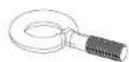
| What's in the Box | BCS300 speaker, round grille, hook screw, safety sheet, quick setup guide |
| Warranty | Refer to manufacturer |
| Dimensions | Not specified |
| Weight | Not specified |
Frequently Asked Questions - BCS300 Bluesound
User questions about BCS300 Bluesound
0 question about this device. Answer the ones you know or ask your own.
Ask a new question about this device
Download the instructions for your Loudspeaker in PDF format for free! Find your manual BCS300 - Bluesound and take your electronic device back in hand. On this page are published all the documents necessary for the use of your device. BCS300 by Bluesound.
USER MANUAL BCS300 Bluesound
natural_image
Technical line drawing of a mechanical component with mounting flanges and internal components (no text or symbols)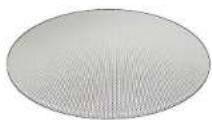

https://www.bluesoundprofessional.com/product/BCS300-network-streaming-ceiling-speaker
https://support.bluesoundprofessional.com
CONNECT
1 Factory default settings
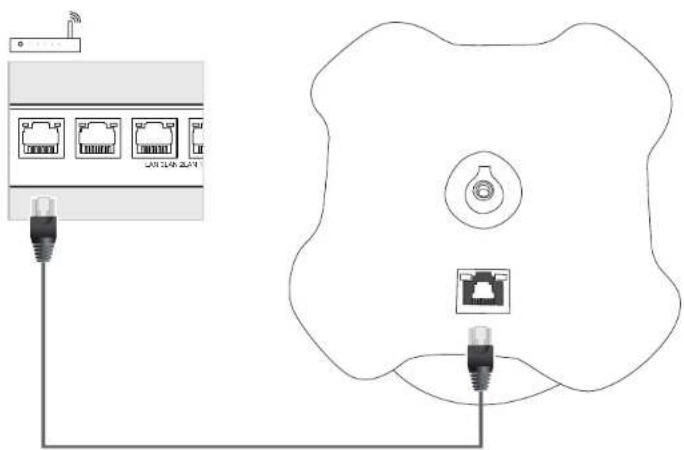
2 Ethernet
PoE Data/Power supply - Power over Ethernet (POE) IEEE 802.3at Type 2 (30W)
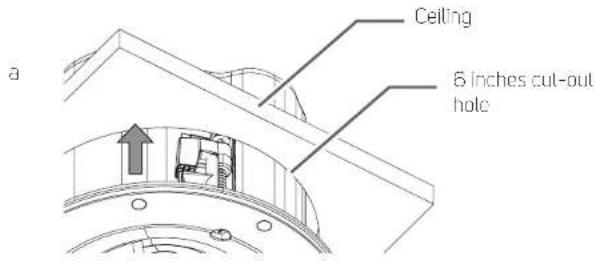
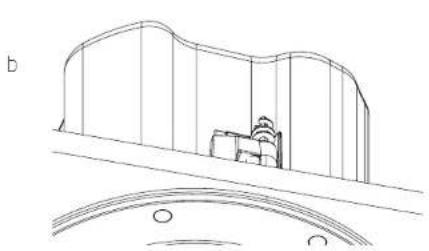
1 Position in-ceiling
natural_image
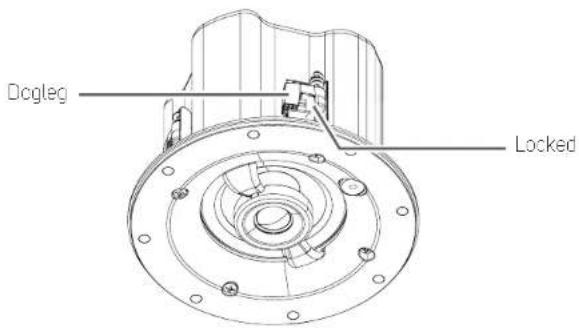
Technical line drawing of a mechanical component or bracket (no text or symbols)2 Loosen dogleg to unlock
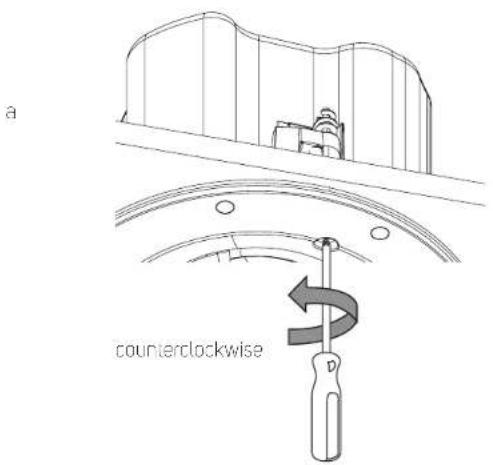
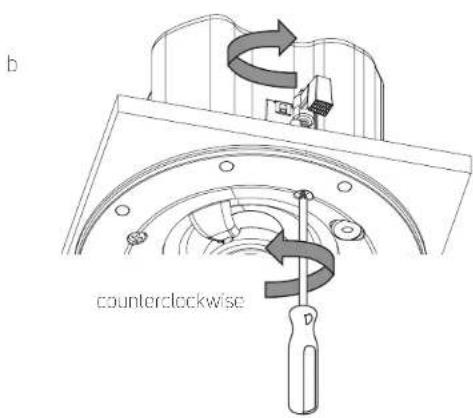
3 Tighten dogleg. Be sure not to tighten too fast or too tight.
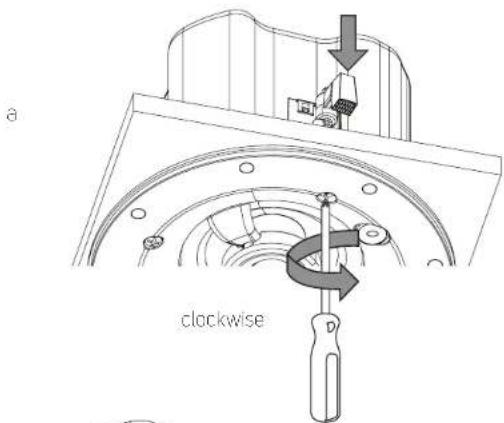
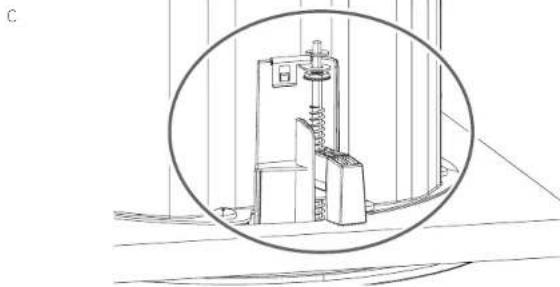
natural_image
Technical line drawing of a mechanical device inside a circular frame (no text or symbols)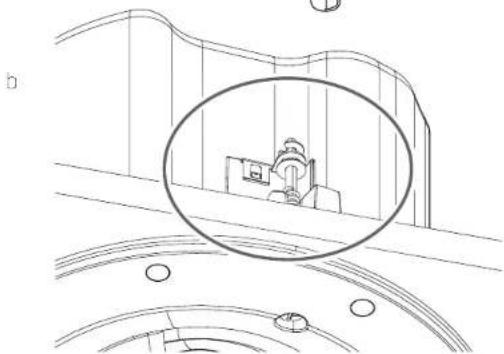
natural_image
Line drawing of a car interior with a circular inset showing a vehicle and road (no text or symbols)4 Repeat Step 2 and 3 for the three other doglegs.
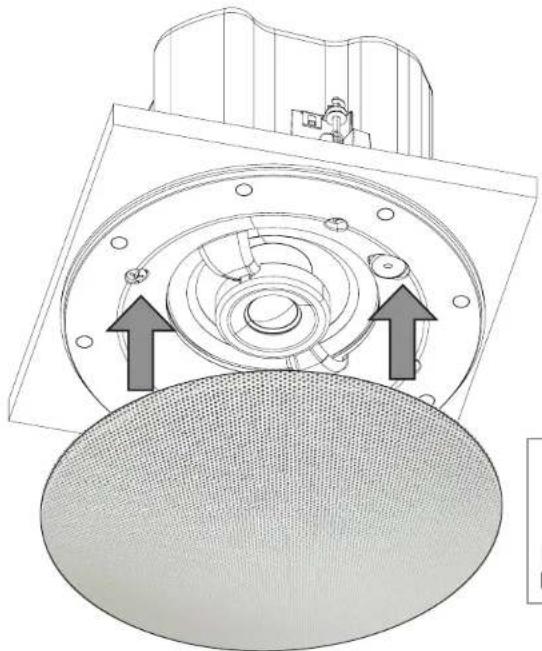
5 Install grille
natural_image
Technical diagram of a mechanical component with two directional arrows indicating assembly or movement (no text or symbols present)BCS Round Grille White
Grille Options
BCS Round Grille White (Supplied) BCS Round Grille Black (Sold Separately) BCS Square Grille Black (Sold Separately) BCS Square Grille White (Sold Separately)
DOWNLOAD
The BluOS Controller App for iOS and Android devices as well as Windows or macOS desktops are available for download from their respective App stores and BluOS downloads.
https://bluos.io/downloads
Launch the BluOS Controller App to configure your BCS300 as well as explore everything from your streaming music services, internet radio stations, networked music collections and favorites with quick and easy single-search discovery.
BCS300
Network Streaming Ceiling Speaker
Owner's Manual
natural_image
Technical line drawing of a mechanical component with internal gears and mounting holes (no text or symbols)- Read instructions - All the safety and operating instructions should be read before the product is operated.
- Retain instructions - The safety and operating instructions should be retained for future reference.
- Heed Warnings - All warnings on the product and in the operating instructions should be adhered to.
• Follow Instructions - All operating and use instructions should be followed. - Cleaning - Unplug this product from the wall outlet before cleaning. Do not use liquid cleaners or aerosol cleaners. Use a damp cloth for cleaning.
- Attachments - Do not use attachments not recommended by the product manufacturer as they may cause hazards.
- Water and Moisture - Do not use this product near water-for example, near a bath tub, wash bowl, kitchen sink, or laundry tub; in a wet basement; or near a swimming pool; and the like.
- Accessories Do not place this product on an unstable cart, stand, tripod, bracket, or table. The product may fall, causing serious injury to a child or adult and serious damage to the product. Use only, with a cart, stand, tripod, bracket, or table recommended by the manufacturer, or sold with the product. Any mounting of the product should follow the manufacturer's instructions, and should use a mounting accessory recommended by the manufacturer.
- Cart product and cart combination should be moved with care. Quick stops, excessive force, and uneven surfaces may cause the product and cart combination to overturn.
- Ventilation - Slots and openings in the cabinet are provided for ventilation to ensure reliable operation of the product and to project it from overheating. These openings must not be blocked or covered. The openings should never be blocked by placing the product on a bed, sofa, rug, or other similar surface. This product should not be placed in a built-in installation such as a bookcase or rack unless proper ventilation is provided or the manufacturer's instructions have been adhered to.
- Power Sources - This product should be operated from the type of power source specified. Connect standard straight-through Ethernet cable (not supplied) to LAV/USB (RJ45) port in back section of BCS300 and the other end to corresponding port of PoE Data/Power supply Power over Ethernet (POF) IEEE 802Jat Type 2 (3DW) (not supplied).
- Lightning - For added protection for this product during a lightning storm, or when it is left unattended and unused for long periods of time, unplug it from the wall outlet and disconnect the antenna or cable system. This will prevent damage to the product due to lightning and power-line surges.
• Overloading - Do not overload wall outlets, extension cords, or integral convenience receptacles as this can result in a risk of fire or electric shock. - Flame Sources - No naked flame sources, such as lighted candles, should be placed on the product.
- Object and Liquid Entry - Never push objects of any kind into this product through openings as they may touch dangerous voltage points or short-out parts that could result in a fire or electric shock. Never split liquid of any kind on the product.
- Damage Requiring Service - Unplug this product from the wall outlet and refer servicing to qualified service personnel under the following conditions:
- When the power-supply cord or plug is damaged.
- If licuid has been spilled, or objects have fallen into the product.
- If the product has been exposed to rain or water.
- If the product does not operate normally by following the operating instructions. Adjust only those controls that are covered by the operating instructions as an improper adjustment of other controls may result in damage and will often require extensive work by a qualified technician to restore the product to its normal operation. - If the product has been dropped or damaged in any way.
- When the product exhibits a distinct change in performance—this indicates a need for service.
- Replacement Parts – When replacement parts are required, be sure the service technician has used replacement parts specified by the manufacturer or have the same characteristics as the original part. Unauthorized substitutions may result in fire, electric shock, or other hazards.
- Safety Check - Upon completion of any service or repairs to this product, ask the service technician to perform safety checks to determine that the product is in proper operating condition.
- Ceiling Mounting - The product should be mounted to a ceiling only as recommended by the manufacturer. Ensure successful setup and installation process without causing any damage by thoroughly roading and following the instructions outlined in the supplied BCS3DD Quick Setup Guide.
WARNING

THE LIGHTNING FLASH WITH ARROWHEAD SYMBOL, WITHIN AN EQUILATERAL TRIANGLE, IS INTENDED TO ALERT THE USER TO THE PRESENCE OF UNINSULATED "DANGEROUS VOLTAGE" WITHIN THE PRODUCT'S ENCLOSURE THAT MAY BE OF SUFFICIENT MAGNITUDE TO CONSTITUTE A RISK OF ELECTRIC SHOCK TO PERSONS

THE EXCLAMATION POINT WITHIN AN EQUILATERAL TRIANGLE IS INTENDED TO ALERT THE USER TO THE PRESENCE OF IMPORTANT OPERATING AND MAINTENANCE (SERVICING) INSTRUCTIONS IN THE LITERATURE ACCOMPANYING THE APPLIANCE.

CAUTION RISK OF ELECTRIC SHOCK DO NOT OPEN

WARNING : SHOCK HAZARD - DO NOT OPEN ATTENTION : RISQUE DE CHOC ELECTRIQUE-NE PAS OUVRIR
CAUTION REGARDING PLACEMENT
To maintain proper ventilation, be sure to leave a space around the unit (from the largest outer dimensions including projections) than is equal to, or greater than shown below.
Left and Right Panels: 10 cm
Rear Panel: 10 cm
Top Panel: 10 cm
Do not install near any heat sources such as radiators, heat registers, sloves, or other apparatus (including amplifiers) that produce heat.
The apparatus should only be used in moderate climates.
FCC STATEMENT
This equipment has been tested and found to comply with the limits for Class B digital device, pursuant to Part 15 of the FCC Rules. These limits are designed to provide reasonable protection against harmful interference in a residential installation. This equipment generates, uses, and can radiate radio frequency, energy and, if not installed and used in accordance with the instructions, may cause harmful interference to radio communications. However, there is no guarantee that interference will not occur in a particular installation. If this equipment does cause harmful interference to radio or television reception, which can be determined by turning the equipment off and on, the user is encouraged to try to correct the interference by one or more of the following measures:
• Reorient or relocate the receiving antenna.
- Increase the separation between the equipment and receiver.
- Connect the equipment into an outlet on a circuit different from that to which the receiver is connected.
- Consult the dealer or an experienced radio TV technician for help.
CAUTION
- Changes or modifications to this equipment not expressly approved by NAD Electronics for compliance could void the user's authority to operate this equipment.
- This device complies with Part 15 of the FCC Rules / Industry Canada licence-exempt RSS standard(s). Operation is subject to the following two conditions: 1. This device may not cause harmful interference, and
2 This device must accept any interference received, including interference that may cause undesired operation. - This device contains licence-exempt transmitter(s)/receiver(s) that comply with Innovation, Science and Economic Development. Canada's licence-exempt RSS(s). Operation is subject to the following two conditions:
- This device may not cause interference.
2 This device must accept any interference, including interference that may cause undesired operation of the device. - Marking and rating plate can be found at the bottom enclosure of the apparatus.
- To reduce the risk of fire or electric shock, do not expose this apparatus to rain or moisture. The apparatus shall not be exposed to dripping or splashing and that no objects filled with liquids, such as vases, shall be placed on apparatus.
- Operating temperature: 0 \~ 40 degrees Celsius
RESPONSIBLE PARTY
Lenbrook International 633 Granite Court
Pickering, ON L1W 3K1
Canada
Tel: 1905 8316555
MPE REMINDER
To satisfy FCC/IC RF exposure requirements, a separation distance of 20 cm or more should be maintained between the antenna of this device and persons during device operation. To ensure compliance, operations at closer than this distance is not recommended.
IF IN DOUBT CONSULT A COMPETENT ELECTRICIAN.

This product is manufactured to comply with the radio interference requirements of EEC DIRECTIVE 2004/108/EC.
NOTES ON ENVIRONMENTAL PROTECTION
At the end of its useful life, this product must not be disposed of with regular household waste but must be returned to a collection point for the recycling of electrical and electronic equipment. The symbol on the product, user's manual and packaging point this out.

The materials can be reused in accordance with their markings.
Through re-use, recycling of raw materials, or other forms of recycling of old products, you are making an important contribution to the protection of our environment.
Your local administrative office can advise you of the responsible waste disposal point.
WHAT'S IN THE BOX
Packed with your BCS300 you will find
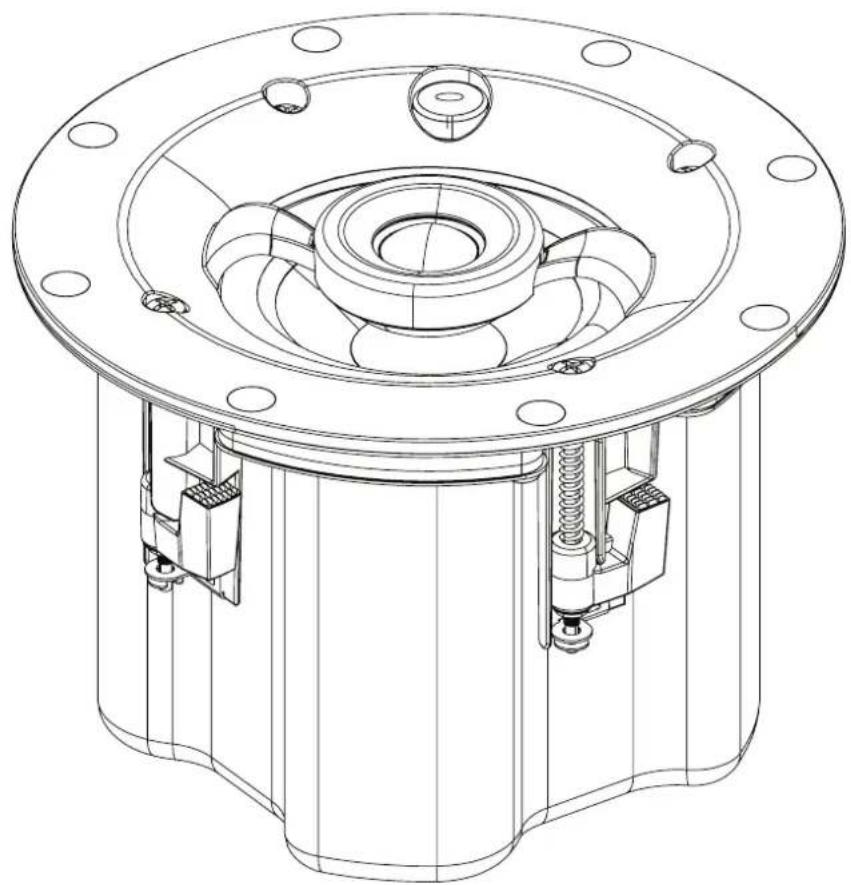
- BCS300 speaker
- BCS round grille
- Hook screw
• Important Safety Instruction sheet - Quick Setup Guide
SAVE THE PACKAGING
Please save the box and all of the packaging in which your BCS300 arrived. Should you move or otherwise need to transport your BCS300, this is by far the safest container to do so. We've seen too many otherwise perfect components damaged in transit for lack of a proper shipping carton, so please: Save that box!
IDENTIFICATION OF PARTS
STATUS INDICATOR
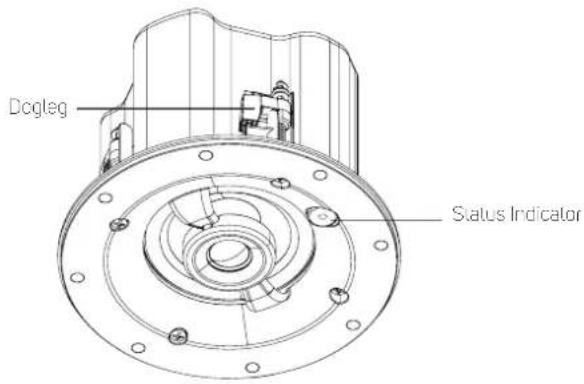
Below is a table of the LED blink codes and their corresponding descriptions.
| BLINK CODES | DESCRIPTION |
| Short blue flash, then red Powering up, rebooting the unit | |
| Alternate flashing red and green Upgrading... | |
| Flashing green Connecting to network shares | |
| Solid green No network connection | |
| Solid red Cannot boot; drive error | Upgrade mode |
| Red pulse No internet gateway | |
| Flashing red Factory reset in progress | |
| Solid white Indoxing | |
| White pulse Software update available | |
| Solid blue Connected to Network – ready to use with BluOS App | |
| Flashing blue Mute mode | |
| Solid green No network connection |
DOWNLOAD BluOS APP
1 Tablets, smartphones and other applicable devices that support iOS (Apple) or Android operating system can be used as mobile device controller. These devices are not supplied with your BCS300.
2 Download and install the corresponding BuOS App for your device.
3 The BluOS Apps for iOS and Android devices as well as Windows and macOS desktops are available for download from their respective Application stores and BluOS downloads.
https://cluos.io/downloads
INSTALLATION GUIDELINES
1 Network setup
The network setup process is very easy but slightly differs between iOS (Apple) and Android devices.
WIRED (ETHERNET) CONNECTION
Using an Ethernet cable (not supplied), connect one end to BCS300's LAN port and the other end directly to the POE port of a PoE Data/Power supply - Power over Ethernet (POE) IEEE 802.3at Type 2 (30W).
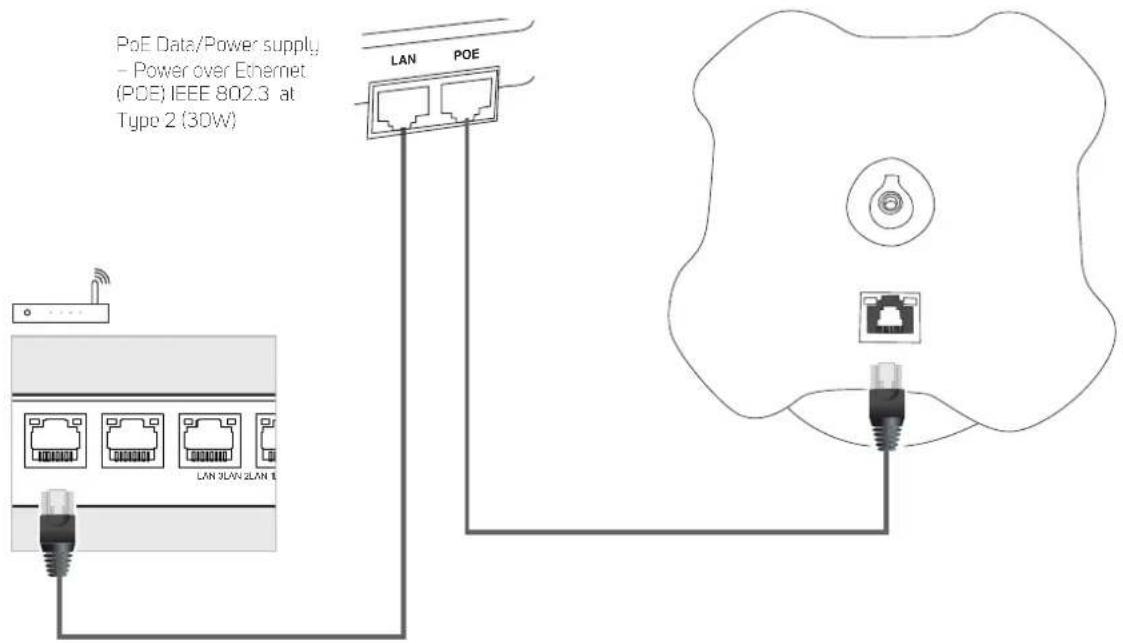
a Open BluOS App. The BluOS App may immediately show a screen prompt indicating "New Players detected", "Setup Now" or "Needs Setup".
b Select your BCS300's unique network ID* from the "Players" window.
c Select or enter preferred "Name" to customize your BCS300 for easier identification in the Player Drawer. Network setup connection proceeds automatically.
d Network setup connection is completed when "All Done" or "Setup Complete" is shown in the App.
* The BCS300's unique network ID is listed as the product name (i.e. BCS300) immediately followed by the last four digits in the MAC (Machine Access Control) address (example: BCS300-1803).
Launch the BluOS Controller App to configure your BCS300 as well as explore everything from your streaming music services, internet radio stations, networked music collections and favorites with quick and easy single-search discovery.
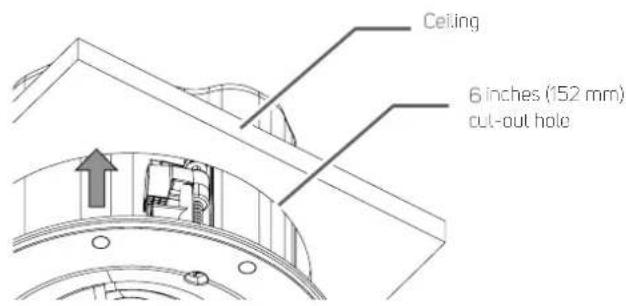
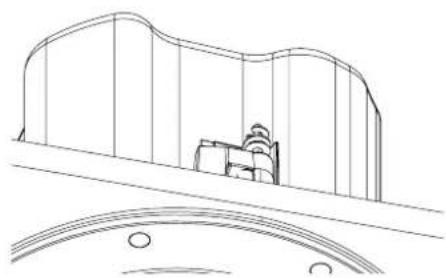
2 Position BCS300 in-ceiling
a b
natural_image
Line drawing of a car interior with curved roof and window, no text or symbols present3 Locsen dogleg to unlock
a b
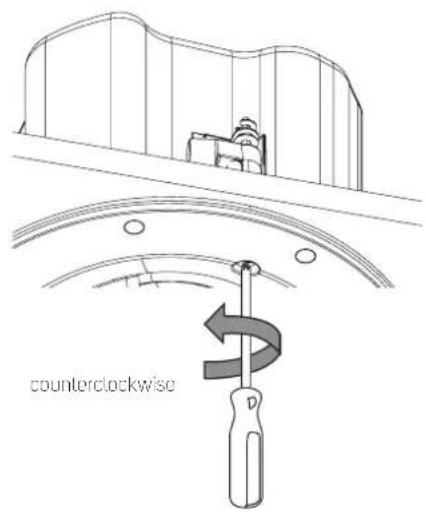
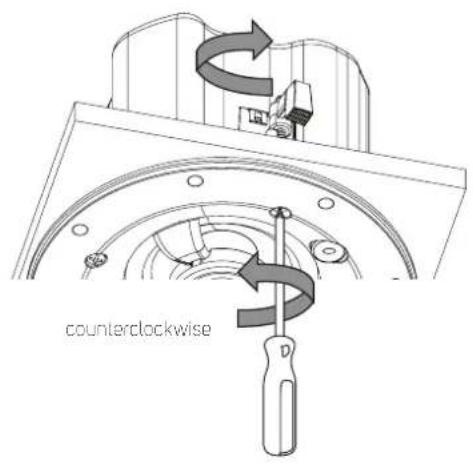
4 Tighten dogleg. Be sure not to tighten too fast or too tight.
a
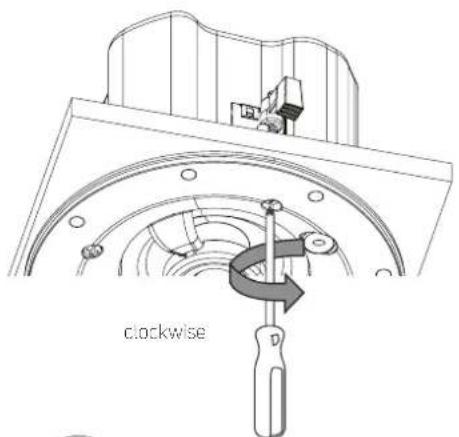
b c
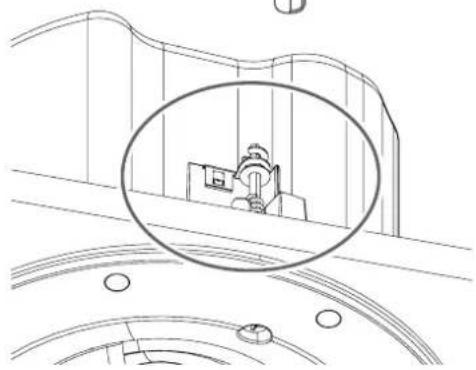
natural_image
Line drawing of a mechanical component inside a structural frame, with no visible text or symbols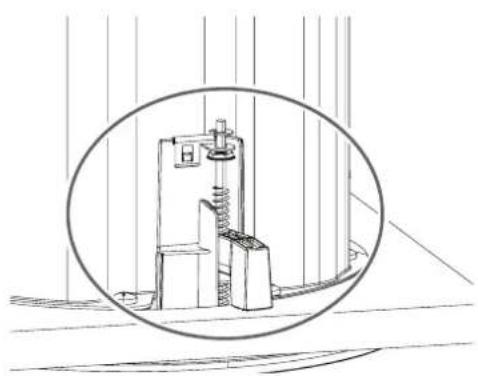
natural_image
Technical line drawing of a mechanical device with a circular inset view (no text or symbols)5 Repeat Step 3 and 4 for the three other doglegs.
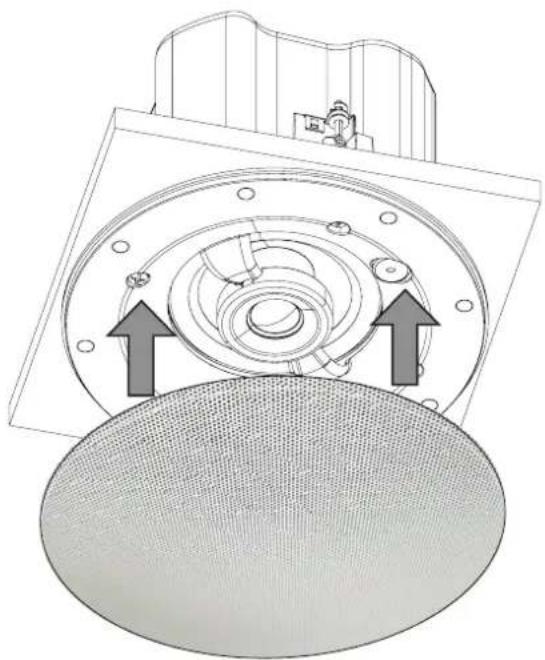
6 Install supplied grille
Grill Options
• BCS Round Grille White (supplied)
• BCS Round Grille Black (sold separately)
• BCS Square Grille White (sold separately)
• BCS Square Grille Black (sold separately)
natural_image
Technical diagram of a mechanical component with two directional arrows indicating movement or force (no text or symbols present)
- CONNECT
- Position in-ceiling
- Loosen dogleg to unlock
- Tighten dogleg. Be sure not to tighten too fast or too tight.
- Grille Options
- DOWNLOAD
- BCS300
- Network Streaming Ceiling Speaker
- WARNING
- WARNING : SHOCK HAZARD - DO NOT OPEN ATTENTION : RISQUE DE CHOC ELECTRIQUE-NE PAS OUVRIR
- CAUTION REGARDING PLACEMENT
- FCC STATEMENT
- CAUTION
- RESPONSIBLE PARTY
- MPE REMINDER
- IF IN DOUBT CONSULT A COMPETENT ELECTRICIAN.
- NOTES ON ENVIRONMENTAL PROTECTION
- WHAT'S IN THE BOX
- SAVE THE PACKAGING
- IDENTIFICATION OF PARTS
- STATUS INDICATOR
- DOWNLOAD BluOS APP
- INSTALLATION GUIDELINES
- WIRED (ETHERNET) CONNECTION
- Position BCS300 in-ceiling
- Locsen dogleg to unlock
- Tighten dogleg. Be sure not to tighten too fast or too tight.
- Repeat Step 3 and 4 for the three other doglegs.
- Install supplied grille
- Grill Options
Brand : Bluesound
Model : BCS300
Category : Loudspeaker