
BSP500 - Loudspeaker Bluesound - Free user manual and instructions
Find the device manual for free BSP500 Bluesound in PDF.


| Product Type | Indoor/Outdoor Powered Network Speaker |
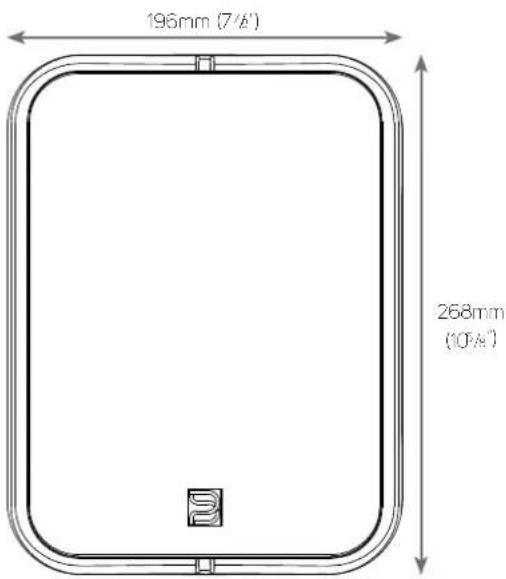
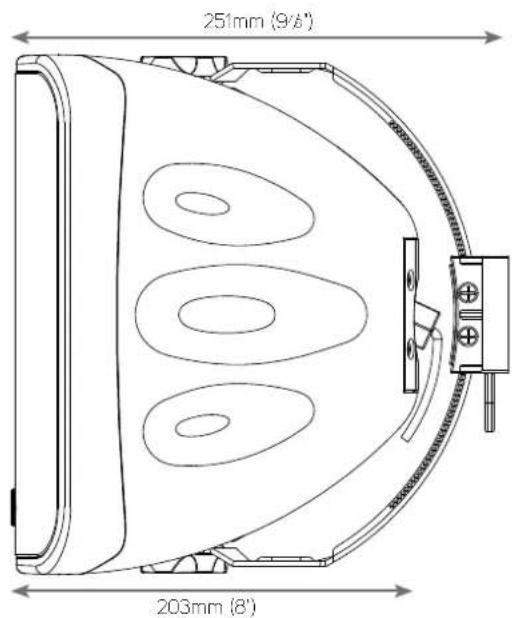
| Dimensions (W x H x D) | 196 x 268 x 251 mm (7 7/8 x 10 5/8 x 9 7/8 in) |
| Weight | 3.2 kg (7.1 lbs) |
| Power Supply | PoE+ IEEE 802.3at Type 2 (30 W) or PoE++ IEEE 802.3bt Type 3 (60 W) |
| Power Output | 20 W (30 W PoE) / 40 W (60 W PoE) |
| Idle Power Consumption | 3.3 W |
| Speaker Drivers | 1 x 133 mm (5.25 in) woofer, 1 x 25 mm (1 in) tweeter |
| Frequency Response | 63 Hz – 23 kHz |
| Total Harmonic Distortion (THD+N) | 0.095% (ref. 20 Hz – 20 kHz at rated power) |
| Supported Audio Formats | MP3, AAC, WMA, OGG, FLAC, ALAC, OPUS, WMA-L, MQA, WAV, AIFF |
| Network Connectivity | Gigabit Ethernet (RJ45) via PoE |
| USB Port | 1 x Type-A for USB mass storage (FAT32, NTFS, ext4) |
| Control App | BluOS Controller App (iOS, Android, Kindle, Windows, macOS) |
| Supported Streaming Services | Spotify, Amazon Music, TIDAL, Deezer, Qobuz, TuneIn Radio, iHeartRadio, and more |
| Operating Temperature | 0°C – 40°C (32°F – 104°F) |
| Storage Temperature | -10°C – 50°C (14°F – 122°F) |
| Cleaning | Unplug and wipe with a dry cloth only |
| Safety Certifications | FCC Part 15, IC RSS, CE (EEC 2004/108/EC) |
| Included Accessories | Grille puller, port plug, bracket screws, Quick Setup Guide |
| Mounting | Wall or ceiling mount (bracket not included) |
Frequently Asked Questions - BSP500 Bluesound
User questions about BSP500 Bluesound
0 question about this device. Answer the ones you know or ask your own.
Ask a new question about this device
Download the instructions for your Loudspeaker in PDF format for free! Find your manual BSP500 - Bluesound and take your electronic device back in hand. On this page are published all the documents necessary for the use of your device. BSP500 by Bluesound.
USER MANUAL BSP500 Bluesound
natural_image
Line drawing of a modern kitchen appliance with a button and lid (no text or symbols)- Read instructions - All the safety and operating instructions should be read before the product is operated.
- Retain instructions - The safety and operating instructions should be retained for future reference.
- Heed Warnings - At warnings on the product and in the operating instructions should be adhered to.
- Follow Instructions - All operating and use instructions should be followed.
- Cleaning - Unplug this product from the wall outlet before cleaning. Do not use liquid cleaners or aerosol cleaners. Use a dry cloth for cleaning.
- Attachments - Do not use attachments not recommended by the product manufacturer as they may cause hazards.
- Water and Moisture - Do not use this product near water-for example, near a bath tub, wash bowl, kitchen sink, or laundry tub; in a wet basement; or near a swimming pool; and the like.
- Accessories - Do not place this product on an unstable cart, stand, tripod, bracket, or table. The product may fall, causing serious injury to a child or adult and serious damage to the product. Use only with a cart, stand, tripod, bracket, or table recommended by the manufacturer, or sold with the product. Any mounting of the product should follow the manufacturer's instructions, and should use a mounting accessory recommended by the manufacturer.
- Cart product and cart combination should be moved with care. Quick stops, excessive force, and uneven surfaces may cause the product and cart combination to overturn.
- Ventilation - Slots and openings in the cabinet are provided for ventilation to ensure reliable operation of the product and to protect it from overheating. These openings must not be blocked or covered. The openings should never be blocked by placing the product on a bed, sofa, rug, or other similar surface. This product should not be placed in a built-in installation such as a bookcase or rack unless proper ventilation is provided or the manufacturer's instructions have been adhered to.
- Power Sources - This product should be operated only from the type of power source indicated on the marking label and connected to a MAINS socket outlet with a protective earthing connection. If you are not sure of the type of power supply to your home, consult your product dealer or local power company.
- Power-Cord Protection - Power-supply cords should be routed so that they are not likely to be walked on or pinched by items placed upon or against them, paying particular attention to cords at plugs, convenience receptacles, and the point where they exit from the product.
- Mains Plug - Where the mains plug or an appliance coupler is used as the disconnect device, the disconnect device shall remain readily operable.
- Outdoor Antenna Grounding - If an outside antenna or cable system is connected to the product, be sure the antenna or cable system is grounded so as to provide some protection against voltage surges and built-up static charges. Article 810 of the National Electrical Code, ANSI/NFPA 70, provides information with regard to proper grounding of the mast and supporting structure, grounding of the lead-in wire to an antenna discharge unit, size of grounding conductors, location of antenna discharge unit, connection to grounding electrodes, and requirements for the grounding electrode.
- Lightning - For added protection for this product during a lightning storm, or when it is left unattended and unused for long periods of time, unplug it from the wall outlet and disconnect the antenna or cable system. This will prevent damage to the product due to lightning and power line surges.
- Power Lines - An outside antenna system should not be located in the vicinity of overhead power lines or other electric light or power circuits, or where it can fall into such power lines or circuits. When installing an outside antenna system, extreme care should be taken to keep from touching such power lines or circuits as contact with them might be fatal.
• Overloading - Do not overload wall outlets, extension cords, or integral convenience receptacles as this can result in a risk of fire or electric shock. - Flame Sources - No naked flame sources, such as lighted candles, should be placed on the product.
- Object and Liquid Entry - Never push objects of any kind into this product through openings as they may touch dangerous voltage points or short-out parts that could result in a fire or electric shock. Never spill liquid of any kind on the product.
-
Headphones - Excessive sound pressure form earphones and headphones can cause hearing loss.
-
Damage Requiring Service - Unplug this product from the wall outlet and refer servicing to qualified service personnel under the following conditions:
- When the power-supply cord or plug is damaged.
- If liquid has been spilled, or objects have fallen into the product.
- If the product has been exposed to rain or water.
- If the product does not operate normally by following the operating instructions. Adjust only those controls that are covered by the operating instructions as an improper adjustment of other controls may result in damage and will often require extensive work by a qualified technician to restore the product to its normal operation.
- if the product has been dropped or damaged in any way.
- When the product exhibits a distinct change in performance—this indicates a need for service.
- Replacement Parts - When replacement parts are required, be sure the service technician has used replacement parts specified by the manufacturer or have the same characteristics as the original part. Unauthorized substitutions may result in fire, electric shock, or other hazards.
- Battery Disposal - When disposing of used batteries, please comply with governmental regulations or environmental public instruction's rules that apply in your country or area.
- Safety Check - Upon completion of any service or repairs to this product, ask the service technician to perform safety checks to determine that the product is in proper operating condition.
- Wall or Ceiling Mounting - The product should be mounted to a wall or ceiling only, as recommended by the manufacturer.
WARNING
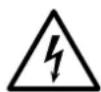
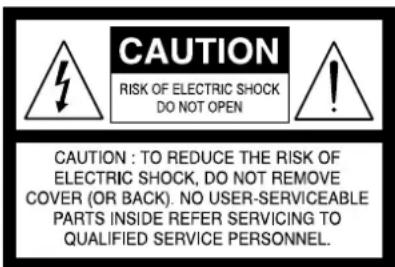
THE LIGHTNING FLASH WITH ARROWHEAD SYMBOL, WITHIN AN EQUILATERAL TRIANGLE, IS INTENDED TO ALERT THE USER TO THE PRESENCE OF UNINSULATED "DANGEROUS VOLTAGE" WITHIN THE PRODUCT'S ENCLOSURE THAT MAY BE OF SUFFICIENT MAGNITUDE TO CONSTITUTE A RISK OF ELECTRIC SHOCK TO PERSONS

THE EXCLAMATION POINT WITHIN AN EQUILATERAL TRIANGLE IS INTENDED TO ALERT THE USER TO THE PRESENCE OF IMPORTANT OPERATING AND MAINTENANCE (SERVICING) INSTRUCTIONS IN THE LITERATURE ACCOMPANYING THE APPLIANCE.
CAUTION REGARDING PLACEMENT
To maintain proper ventilation, be sure to leave a space around the unit (from the largest outer dimensions including projections) than is equal to, or greater than shown below.
Left and Right Panels: 10 cm
Rear Panel: 10 cm
Top Panel: 10 cm
Do not install near any heat sources such as radiators, heat registers, sloves, or other apparatus (including amplifiers) that produce heat.
Do not defeat the safety purpose of the polarized or grounding - type plug. A polarized plug has two blades with one wider than the other. A grounding type plug has two blades and a third grounding prong. The wide blade or the third prong is provided for your safety. When the provided plug does not fit into your outlet, consult an electrician for replacement of the obsolete outlet.
The apparatus should only be used in moderate climates.
FCC STATEMENT
This equipment has been tested and found to comply with the limits for Class B digital device, pursuant to Part 15 of the FCC Rules. These limits are designed to provide reasonable protection against harmful interference in a residential installation. This equipment generates, uses, and can radiate radio frequency energy and, if not installed and used in accordance with the instructions, may cause harmful interference to radio communications. However, there is no guarantee that interference will not occur in a particular installation. If this equipment does cause harmful interference to radio or television reception, which can be determined by turning the equipment off and on, the user is encouraged to try to correct the interference by one or more of the following measures:
- Reorient or relocate the receiving antenna.
- Increase the separation between the equipment and receiver.
- Connect the equipment into an outlet on a circuit different from that to which the receiver is connected.
- Consult the dealer or an experienced radio TV technician for help.
CAUTION
- Changes or modifications to this equipment not expressly approved by Bluescund Professional for compliance could void the user's authority to operate this equipment.
- This device complies with Part 15 of the FCC Rules. Operation is subject to the following two conditions:
1 this device may not cause harmful interference, and
2 this device must accept any interference received, including interference that may cause undesired operation.
- This device contains licence-exempt transmitter(s)/receiver(s) that comply with Innovation, Science and Economic Development Canada's licence-exempt RSS(s). Operation is subject to the following two conditions:
1 This device may not cause interference.
2 This device must accept any interference, including interference that may cause undesired operation of the device.
- To prevent electric shock, match wide blade of plug to wide slot, fully insert.
- Marking and rating plate can be found at the bottom enclosure of the apparatus.
- To reduce the risk of fire or electric shock, do not expose this apparatus to rain or moisture. The apparatus shall not be exposed to dripping or splashing and that no objects filled with liquids, such as vases, shall be placed on apparatus.
- Mains plug is used as disconnected device and it should remain readily operable during intended use. In order to disconnect the apparatus from the mains completely, the mains plug should be disconnected from the mains socket outlet completely.
- Operating temperature: 0–35 degrees Celsius
RESPONSIBLE PARTY
Lenbrook International
633 Granite Court
Pickering, ON L1W 3K1
Canada
Tel: 1905 8316555
MPE REMINDER
To satisfy FCC/IC RF exposure requirements, a separation distance of 20 cm or more should be maintained between the antenna of this device and persons during device operation. To ensure compliance, operations at closer than this distance is not recommended.
IF IN DOUBT CONSULT A COMPETENT ELECTRICIAN.

This product is manufactured to comply with the radio interference requirements of EEC DIRECTIVE 2004/108/EC.
NOTES ON ENVIRONMENTAL PROTECTION

At the end of its useful life, this product must not be disposed of with regular household waste but must be returned to a collection point for the recycling of electrical and electronic equipment. The symbol on the product, user's manual and packaging point this cut.
The materials can be reused in accordance with their markings. Through re-use, recycling of raw materials, or other forms of recycling of old products, you are making an important contribution to the protection of our environment.
Your local administrative office can advise you of the responsible waste disposal point.
INFORMATION ABOUT COLLECTION AND DISPOSAL OF WASTE BATTERIES (DIRECTIVE 2006/66/EC OF THE EUROPEAN PARLIAMENT AND THE COUNCIL OF EUROPEAN UNION) (FOR EUROPEAN CUSTOMERS ONLY)
Pb
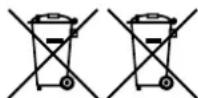
Batteries bearing any of these symbols indicate that they should be treated as "separate collection" and not as municipal waste. It is encouraged that necessary measures are implemented to maximize the separate collection of waste batteries and to minimize the disposal of batteries as mixed municipal waste.
Hg
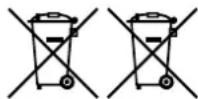
End-users are exhorted not to dispose waste batteries as unsorted municipal waste. In order to achieve a high level of recycling waste batteries, discard waste batteries separately and properly through an accessible collection point in your vicinity. For more information
about: collection and recycling of waste batteries, please contact your local municipality, your waste disposal service or the point of sale where you purchased the items.
By ensuring compliance and conformance to proper disposal of waste batteries, potential hazardous effects on human health is prevented and the negative impact of batteries and waste batteries on the environment is minimized, thus contributing to the protection, preservation and quality improvement of the environment.
WHAT'S IN THE BOX
Packed with your BSP500 you will find
- Grille puller
- Bracket screws
- Port plug
- Quick Setup Guide
SAVE THE PACKAGING
Please save the box and all the packaging in which your BSP500 arrived. Should you move or otherwise need to transport your BSP500, this is by far the safest container to do so. We have seen too many otherwise perfect components damaged in transit for lack of a proper shipping carton, so please: Save that box
QUICK START
This simple guide will help you get started with your BSP500. Your BSP500 can be connected to your network via Wired PoE connection.
IMPORTANT SETUP NOTES
- Connect standard straight-through Ethernet cable (not supplied) to BSP500's LAN/USB (RJ45) port in the back panel and the other end to corresponding port of PoE+ or PoE++ Data/Power supply.
- Tablets, smartphones and other applicable devices that support iOS (Apple) or Android operating system can be used as mobile device controller. These devices are not supplied with your BSP500.
- Download and install the corresponding "BluOS Controller" App for your device.
- The BluOS App is available as a Mobile App for Android, iOS, Kindle and Desktop App for Windows and macOS Computers.
- Mobile Apps are handled by the respective Application Store of the Mobile devices.
- Desktop Apps are available to download directly from the Bluesound homepage - www.bluesound.com
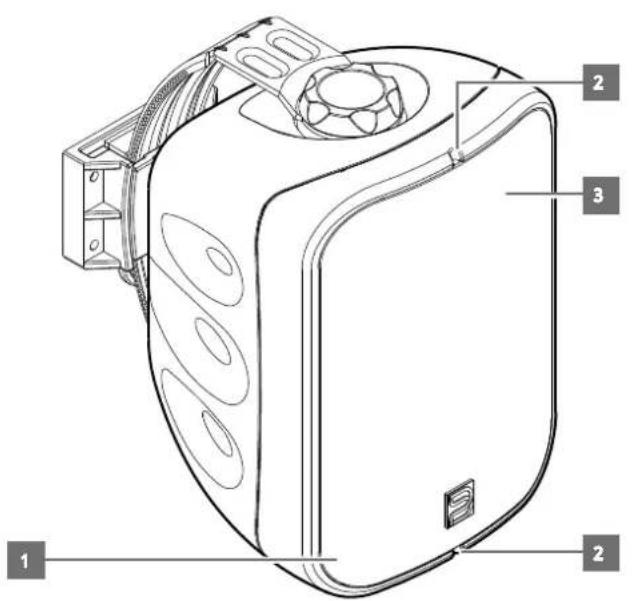
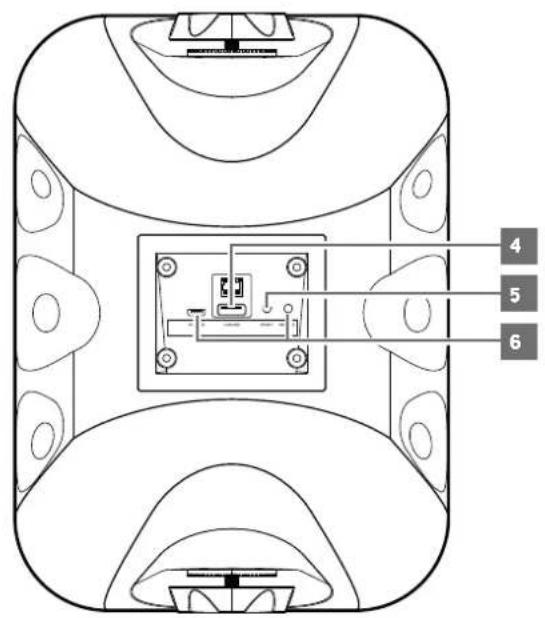
1 STATUS INDICATOR
Below is a table of the LED blink codes and their corresponding descriptions.
| LED BLINK CODE DESCRIPTION | |
| Short blue flash, then red Powering up, rebooting the unit | |
| Alternate flashing, red and green Upgrading... | |
| Flashing green Connecting to network shares | |
| Solid red Cannot boot, drive error | |
| Upgrade mode | |
| Red pulse No Internet gateway | |
| Flashing red Factory reset in progress | |
| Solid white Indoxing | |
| White pulse Software update evaliable | |
| Solid blue Connected to Network ready to use with Bluesound App | |
| Flashing blue | Mute mode |
2 GRILLE SPOTS
- Insert supplied grille puller to remove grille.
3 PORT
- With grille removed, insert the supplied rubber port plug when used in outdoor applications.
4 LAN/USB
LAN
- LAN connection must be setup for wired connection to be established. Set up a Wired Ethernet broadband router with broadband internet connection. Your router or home network should have a built-in DHCP server to consummate the connection.
- Connect standard straight-through Ethernet cable (not supplied) to BSP500's LAN/USB (RJ45) port and the other end to corresponding port of PoE+ or PoE++ Data/Power supply. Connect another standard straight-through Ethernet to corresponding port in your PoE+ or PoE++ Data/Power supply and the other end to your Ethernet broadband router.
NOTES
- Bluesound Professional is not responsible for any malfunction of the BSP500 and/or the internet connection due to communication errors or malfunctions associated with your broadband internet connection or other connected equipment. Contact your Internet Service Provider (ISP) for assistance or the service bureau of your other equipment.
- Contact your ISP for policies, charges, content restrictions, service limitations, bandwidth, repair and other related issues pertinent to internet connectivity.
USB
- Connect to this USB port USB mass storage devices formatted as FAT32, NTFS or Linux ext4. The connected USB device appears as a Local Source (USB) in the BluOS App.
- Access and playback music stored in the connected USB device by selecting "USB" from the BluOS App
5 SERVICE/USB
- These USB port and tact switch are for servicing purposes only. Not for consumer use.
6 RESET
- Use the RESET button to switch BSP500 from operating mode to standby mode.
Switch from operating mode to standby mode: While at operating mode, press and hold RESET button until the illuminated blue LED status indicator turns off. BSP500 is not accessible via BluOS app while at standby mode.
Switch from standby mode to operating mode: While at standby mode, short press RESET button – LED status indicator will turn red to flashing green if there is no wired internet connection or turn to red, flashing green and then solid blue with wired internet connection.
- Use the RESET button to restore BSP500 to its factory default settings.
- Factory Reset is recommended if your BSP500 is not functioning or internet firmware upgrade has failed. All customization, configuration, file shares and saved playlists will be lost. They have to be re-created once factory reset is completed.
FACTORY RESET PROCEDURE
a Disconnect Ethernet cable from the speaker's LAN port.
b Press and hold rear RESET button and while doing so reconnect the Ethernet cable to the speaker's LAN port.
c The front LED indicator turns red, immediately turns green and then back to red - do not release hold of the RESET button.
d After about 30 seconds of holding down the RESET button, the front LED indicator blinks red.
e Release the RESET button as soon as the front LED indicator blinks red.
f Factory reset is completed once the front LED indicator turns solid blue.
IMPORTANT NOTES
Releasing the RESET button at any time before the front LED indicator starts flashing red will cancel the factory reset and leave the BSP500 at Upgrade Mode. Just start again the procedure for Factory Reset.
MAKING THE MOST OF YOUR BSP500
Download the BuOS Controller App from the respective App stores of Apple iOS devices (iPad, iPhone and iPod), Android devices, Kindle Fire and Windows or macOS desktops.
Launch the BluOS Controller App and explore everything from your streaming music services, internet radio stations, networked music collections and favorites with quick and easy single-search discovery.
Visit support.bluesound.com for more information about setup and operation guidelines of your BSP500.
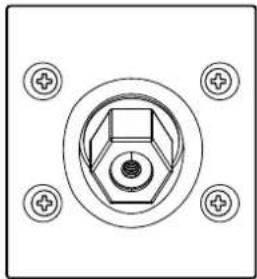
TO ACCESS REAR I/O PORT
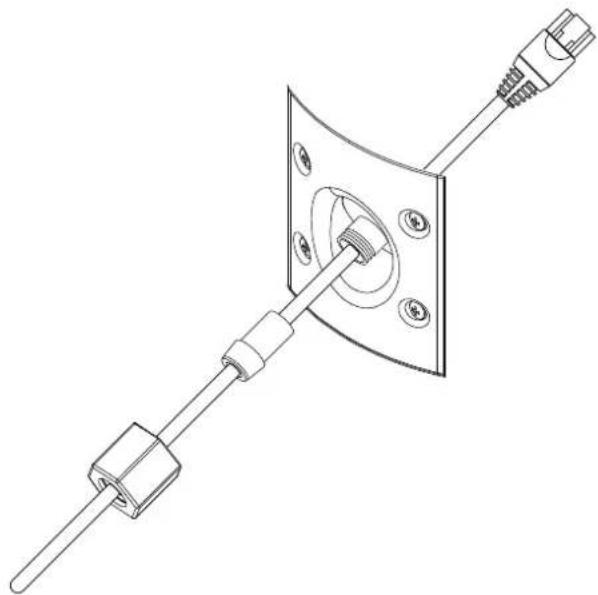
Remove 4 screws holding I/O plate. Use screwdriver edge or sharp knife to lift plate. Pass Ethernet cable through grommet and hole to connect cable, before re-attaching I/O plate for proper operation.
natural_image
Pure electrical connector diagram without any text, numbers, or symbolsFEEDING ORDER OF ETHERNET CABLE INTO I/O PORT CAVITY
natural_image
Technical line drawing of a mechanical assembly with a connector and mounting bracket (no text or symbols)PLAYER SETTINGS (SETTINGS/PLAYER/AUDIO)

POE SUPPLY
- Default setting is for 30-Watt PoE supply. This will correctly set the volume limits versus available power.
- If a 60-Watt PoE supply is available, change the setting to 60W to take advantage of increased available power.
WARNING
- If 60-Watt PoE setting is chosen and 30-Watt PoE supply is used when volume is set to upper limit, the Switch or injector power supply will go into self protect and cause a reboot.
AUDIO
| Total Harmonic Distortion (THD+N) 0.095% (ref. 20 Hz - 20 kHz at rated power) |
| Frequency response 63 Hz - 23 kHz |
| Sample rate 32-192 kHz |
| Bil depth 16-24 bil |
| Supported audio file format 1 |
| MP3, AAC, WMA, OGG, FLAC, ALAC, |
| OPUS, WMA-L, NOA, WAV, AIFF |
SUPPORTED SERVICES
| Free internet radio1 | TUNEIN Radio, iHeartRadio, CALM-RADIO, radio paradise, LiveXLive |
| Supported cloud services 1 | Spotify, amazon music, TIDAL, DEEZER, qocuz, HIGH RESAUDIO, nepstar, kkbox, Bugsi, CustomChennels, SOUNDMACHINE, Osic |
| Integration partners Control4, RTI, Crestron, URC, push, iPort, EIAN, Lutron | |
CONNECTIVITY
| USB 1 x Type-A port for connection to |
| USB memory stick (FAT32 or NT5 |
| formatted) and supported peripherals |
| 1 x Type-B (mini) for product servicing |
| Network connectivity Sigabit, Ethernet RJ45 |
| Album art JPC |
| Supported operating systems Music playback from network shares |
| on the following desktop operating |
| systems: Microsoft Windows XP, |
| 2000, Vista, 7, 8 to current Windows |
| Operating Systems and macOS |
| versions2 |
| User interface Free BLOS Controller App available |
| for download from the respective App |
| stores of Apple iOS devices (iPad, |
| Phone and iPod), Android devices, |
| Kindle Fire and Windows or macOS |
| desktops |
GENERAL
| Processor: ARM® CORTEXTM A91GHz |
| Power PoE+ IEEE 802.3at Type 2 (30 W) |
| PoF-+ IEEE 802.3BI Type 3 (60 W) |
| Power consumption (icle) | 3.3 W |
| Power output | 20 W at 30 W PoE40 W at 60 W PoE |
| Speakers | 1 x 133mm (5.25 inches) Woofer1 X 25mm (1 inch) Tweeter |
| Storage environment | -10°C to 50°C20% - 90% relative humidity |
| Operating environmentIndoor/outdoor | 0°C to 40°C |
| Gross dimensions | 196 x 268 x 251 mm7 7/8 x 10 5/8 x 9 7/8 inches |
| Unit weight | 3.2 kg (7.1 lbs) |
| Finish | Available in white or black matte |
1 Supported audio file format: cloud services and free internet: radio are subject to change without notice.
2 Compatibility to latest versions is subject to future software update
3 Win Port Plug installed
Specifications are subject to change without notice. Check out www.bluesoundprofessional.com for updated documentation or latest information about BSPS00.

BLUESOUND PROFESSIONAL
www.bluesoundprofessional.com
©2021 BLUESOUND INTERNATIONAL A DIVISION OF LENBROOK INDUSTRIES LIMITED
At rights reserved. Bluesound International, Bluesound Professional, Bluesound, the stylized wordmark and "B" logotype and e.l. other Bluesound fraud names and loglines are trademarks or registered trademarks of Bluesound International, a division of Lenbrook Industries Limited.
No part of this publication may be reproduced, stored or transmitted in any form without the written permission of Bluescound International. While every effect has been made, a ensure the contents are accurate at the time of publication, features and specifications may be subject to change without prior notice.

- WARNING
- CAUTION REGARDING PLACEMENT
- FCC STATEMENT
- CAUTION
- RESPONSIBLE PARTY
- MPE REMINDER
- NOTES ON ENVIRONMENTAL PROTECTION
- INFORMATION ABOUT COLLECTION AND DISPOSAL OF WASTE BATTERIES (DIRECTIVE 2006/66/EC OF THE EUROPEAN PARLIAMENT AND THE COUNCIL OF EUROPEAN UNION) (FOR EUROPEAN CUSTOMERS ONLY)
- WHAT'S IN THE BOX
- SAVE THE PACKAGING
- QUICK START
- IMPORTANT SETUP NOTES
- STATUS INDICATOR
- GRILLE SPOTS
- PORT
- LAN/USB
- LAN
- NOTES
- USB
- SERVICE/USB
- RESET
- FACTORY RESET PROCEDURE
- IMPORTANT NOTES
- MAKING THE MOST OF YOUR BSP500
- TO ACCESS REAR I/O PORT
- POE SUPPLY
- ©2021 BLUESOUND INTERNATIONAL A DIVISION OF LENBROOK INDUSTRIES LIMITED
Brand : Bluesound
Model : BSP500
Category : Loudspeaker