
IND3N61G28 - Cooker Infiniton - Free user manual and instructions
Find the device manual for free IND3N61G28 Infiniton in PDF.


| Product Type | Built-in Induction Hob |
| Brand | Infiniton |
| Model | IND3N61G28 |
| Product Dimensions (W x D x H) | 590 x 520 x 62 mm |
| Built-in Dimensions (W x D) | 565 x 495 mm |
| Net Weight | 9 kg |
| Gross Weight | 10 kg |
| Supply Voltage | 220-240 V ~, 50/60 Hz |
| Total Power | 5500 - 6300 W |
| Number of Cooking Zones | 3 |
| Zone 1 (Rear Right) - Diameter / Power / Boost | 280 mm / 2000 W / 2600 W |
| Zone 2 (Rear Left) - Diameter / Power | 180 mm / 1500 W |
| Zone 3 (Front Left) - Diameter / Power / Boost | 180 mm / 1800 W / 2000 W |
| Control Type | Touch Control |
| Power Levels | 9 |
| Timer | Yes, up to 99 minutes |
| Child Lock | Yes |
| Residual Heat Indicator | Yes |
| Boost Function | Yes (on zones 1 and 3) |
| Pan Detection | Yes |
| Auto Switch-Off | Yes |
| Spillage Protection | Yes |
| Hob Surface Material | Vitro Ceramic Glass |
| Power Cord | 5-core, 1 m, without plug |
| Certifications | CE, SAA, RoHS, CB |
| EAN | 8445639003909 |
Frequently Asked Questions - IND3N61G28 Infiniton
User questions about IND3N61G28 Infiniton
0 question about this device. Answer the ones you know or ask your own.
Ask a new question about this device
Download the instructions for your Cooker in PDF format for free! Find your manual IND3N61G28 - Infiniton and take your electronic device back in hand. On this page are published all the documents necessary for the use of your device. IND3N61G28 by Infiniton.
USER MANUAL IND3N61G28 Infiniton
natural_image
Illustration of a stainless steel cooking pot with lid and side handles (no text or symbols)∅ 16cm
natural_image
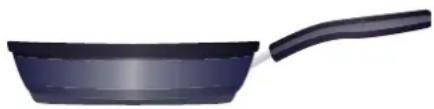
Illustration of a black frying pan with a handle (no text or symbols)∅ 21cm ∅ 32cm

natural_image
Exterior view of a stainless steel bowl with curved handles (no text or symbols)natural_image
Illustration of a cooking pot with steam rising from a red U-shaped magnet (no text or symbols)natural_image
Diagram of a mechanical setup with a square frame and a tilted base, showing internal flow arrows (no text or symbols)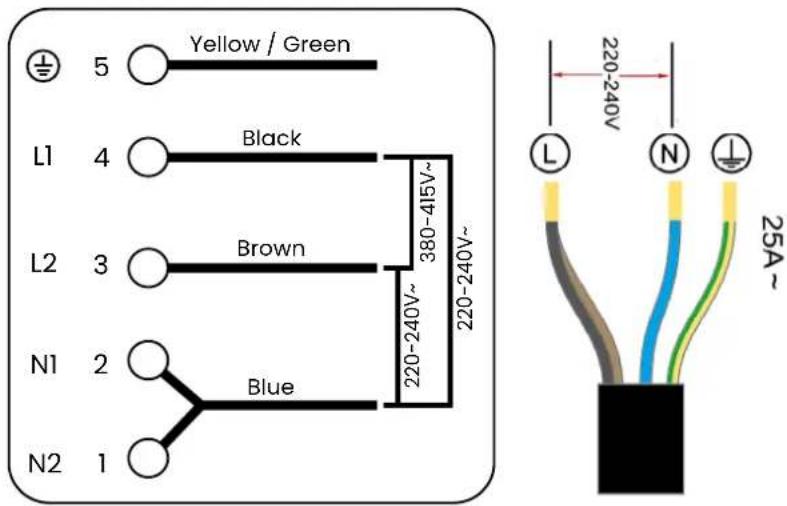
natural_image
Symbol of a trash bin crossed with a diagonal line and a horizontal bar below (no text or labels)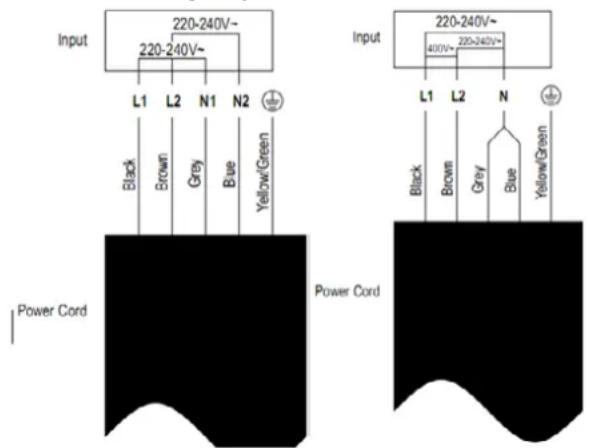
| L(mm) W | (mm) H(mm) | D(mm) A(mm) | B(mm) X | (mm) F(mm) | |||
| 590 520 | 62 58 565 49 | 5 50 mín. | 3 mín. |
natural_image
Simple line drawing of a pot with a checkmark inside and a magnetic cord around it (no text or symbols)| Content | English |
| Safety instructions | 35 |
| Installation | 39 |
| How to use | 43 |
| Cooking with Infiniton | 51 |
| Maintenance & cleaning | 53 |
| Troubleshooting | 54 |
| Error codes | 56 |
The joy of cooking
Infiniton would like to give you a brief guide to help you get the most out of your gas, vitroceramic or induction hob. Take note!
Get the most out of your Infiniton hob
The operation of an Infiniton cooktop is very simple thanks to the technology we have employed to make your everyday life easier. Just follow these simple tips and enjoy a kitchen for years to come.
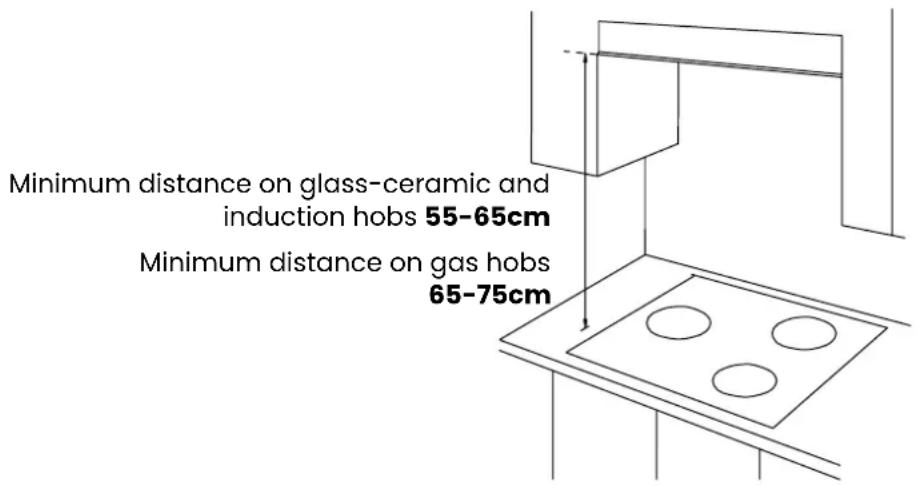
What is the recommended distance between the hob and the cooker hood?
It will always depend on each model, although the minimum distance between the cooking zone and the extraction zone will generally be between 55cm - 65cm for vitroceramic or induction hobs.
If the hob is a gas hob, the recommended distance will be somewhat greater, between 65cm - 75cm.
Protect the surface of your hob
Use only certified products that do not scratch or damage your cooktop such as liquid or foam cleaners, then apply a clean damp cloth and it will be as good as new.
What power level should I use for each recipe?
It is usual to get down to work with any recipe and use the maximum power of your cooker, but each food is cooked differently. For example, for cooking rice, we will use a low power setting, while medium power settings are ideal for boiling potatoes or a stew. It is advisable to use the maximum power setting only for frying, meat, fish and frozen foods.
Which equipment can I use on my hob?
If you have a glass-ceramic or gas hob, you can use either. They accept all types of pots and pans. If you have an induction hob, the base of pans and pots must be ferromagnetic and of a certain thickness.
Which materials do I need for my induction hob?
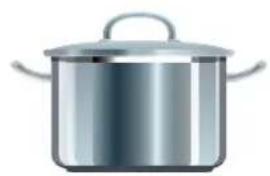
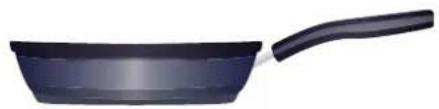
There are often cases in which our induction hob does not heat pans properly, leading us to think that it is faulty. In most of these cases it is usually due to the use of frying pans and pots that are not suitable for induction. Below, we explain the main characteristics that an induction frying pan should have:
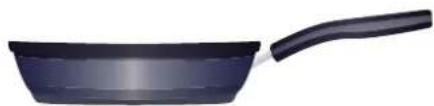
It is very important that the size of our utensils is adjusted to our cooking zone, being 14 cm or larger.
Our diameters range from 14cm to 32cm.
natural_image
Illustration of a stainless steel cooking pot with lid and side handles (no text or symbols)∅ 16cm
natural_image
Black frying pan with a handle, isolated on white background (no text or symbols)∅ 21cm ∅ 32cm

natural_image
Exterior view of a stainless steel bowl with curved handles (no text or symbols)Its base should be flat and fully ferromagnetic for best results.
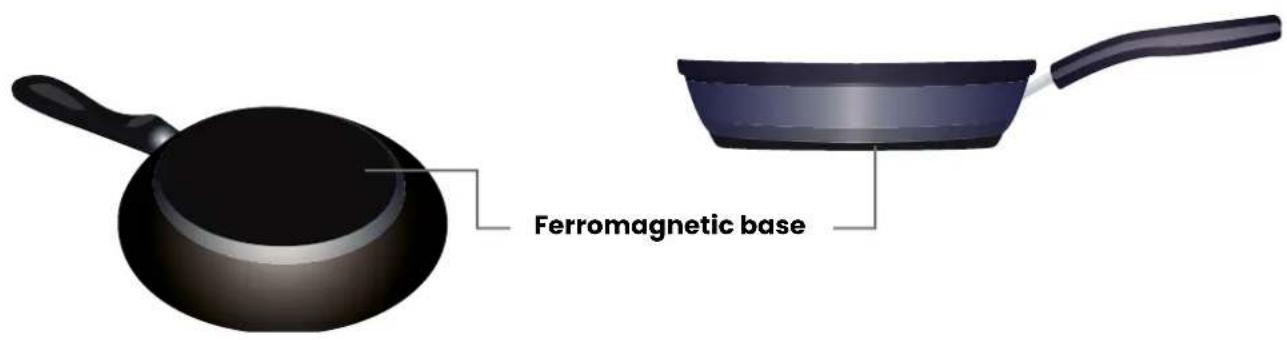
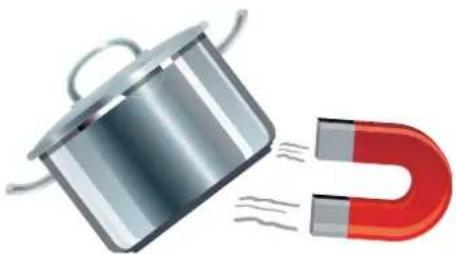
You can check if your pots and pans are suitable by doing the magnet test.
Hold a magnet close to the base of the cookware; if it attracts the magnet, it is suitable for induction.
Stainless steel, aluminium and copper utensils without a ferromagnetic base are not suitable for induction.
natural_image
Illustration of a cooking pot and a U-shaped magnet with steam lines (no text or symbols)Please read the contents of each section in the instruction manual for detailed instructions on how to operate your new Infiniton cooktop properly.
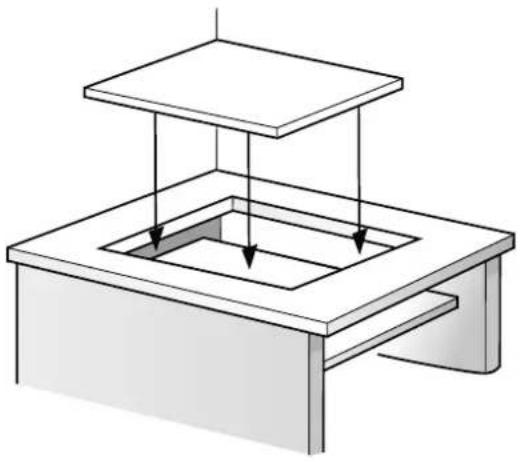
1. Choose a good location
See installation section of the user manual.
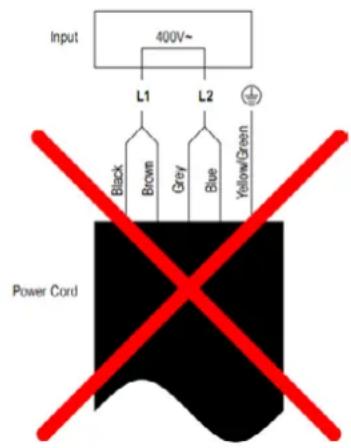
2. Make electrical connection
Refer to the electrical connections section in the user manual.
natural_image
Diagram of a square container with a top platform and internal flow arrows, no text or symbols present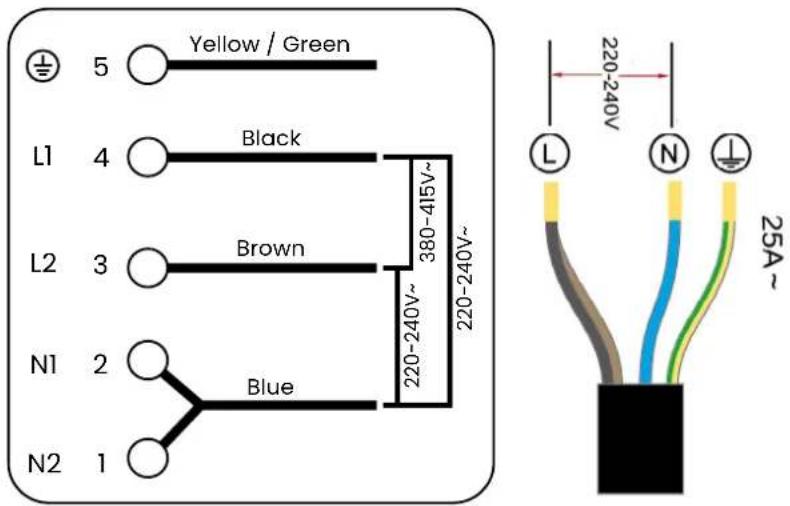
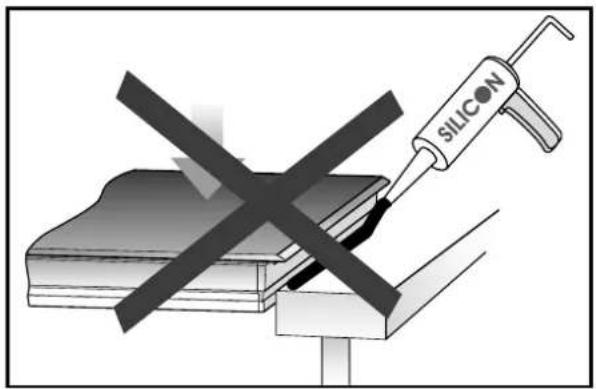
3. Never seal the plate to the recess with silicone.
Sealing the hob with silicone is not recommended, as if the hob has to be removed, it will be very difficult to remove it from the worktop and the glass may crack. Infiniton is not responsible for any damage caused by applying silicone, which would void the warranty.
4. Switch on the hob
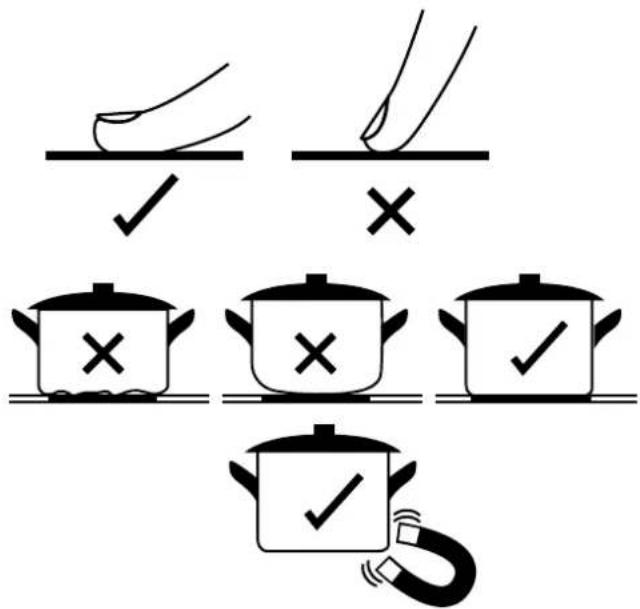
Our hobs are touch-sensitive. Be sure to place your fingertips correctly on the touch controls.
5. Select suitable utensils and kitchenware
Do not use pots and pans with an irregular or curved base. If the hob is an induction hob, be sure to use pots and pans with a ferromagnetic base.
6. Turn off the hob completely
Switch the hob off using the On/Off button.
General security
For your safety and to ensure correct use, before installing and using the device for the first time, please read this user manual carefully, including its tips and warnings. To avoid unnecessary errors and accidents, it is important to ensure that all persons using the device are thoroughly familiar with its operation and safety features. Keep these instructions and ensure that they remain with the device if it is moved or sold, so that all those who use it throughout its lifetime are adequately informed about the use and safety of the device.
For the safety of life and property, observe the precautions in these user instructions, as the manufacturer is not liable for damage caused by omission.
Safety of children and vulnerable persons
- This appliance can be used by children aged from 8 years and above and persons with reduced physical, sensory or mental capabilities or lack of experience and knowledge if they have been given supervision or instruction concerning use of the appliance in a safe way and understand the hazards involved.
• Children up to 8 years of age can charge and discharge this appliance. - Children should be supervised to ensure that they do not play with the appliance.
- Cleaning and user maintenance shall not be made by children unless they are 8 years of age or older and supervised.
- Keep all containers away from children. There is a risk of suffocation.
- If you are discarding the appliance, pull the plug out of the socket, cut the power cord (as close to the appliance as possible) and remove the door to prevent children from getting an electric shock if it falls or closes.
Electrical connections
- Make sure that the power cord is not trapped by the appliance, as this could damage it.
- Connect the appliance to a grounded socket outlet protected by a fuse that complies with the values in the "Technical specifications" table.
- The installation of the earth connection must be carried out by a qualified electrician.
- Ensure that the machine is installed in accordance with local regulations.
- Water and electrical connections must be carried out by a qualified technician in accordance with the manufacturer's instructions and local safety regulations..

WARNING!
Do not use multiple plugs or extension cords.
WARNING! The product must not have an external switching device, such as a timer or connected to a circuit that switches on and off regularly.

WARNING!
Do not disconnect the plug from the socket outlet if flammable gases are nearby.

WARNING!
Never pull out the plug with wet hands.

WARNING!
Always pull the plug, not the cable.

WARNING!
Always unplug the product when not in use.
If you have an active implanted medical device (e.g. pacemaker or defibrillator), check with your doctor that it complies with EC Council Directive 90/385/EEC of 20 June 1990 as well as EN 45502-2-1 and EN 45502-2-2 and that it has been selected, implanted and programmed in accordance with VDE-AR-E 2750-10.
If these requirements are met and both non-metallic cookware and containers with non-metallic handles are used, the use of this hotplate is harmless under normal conditions of use.
WARNING! Risk of fire
Leaving the hob unattended when cooking with oil or fat can be dangerous and can cause fires.
- Never leave oils and fats unattended.
- Never try to put out a fire with water, but only by switching off the appliance and then covering the flames with a lid or a fire blanket.
• The cooking surface gets very hot. - Never place flammable objects on or near the cooking surface.
- Never store objects on the cooking surface.
• The appliance becomes hot. - Do not store flammable objects or aerosols in the drawers directly below the hob.
• Cooktop covers can cause accidents, e.g. due to overheating, ignition or flying fragments of material. - Do not use any cooktop covers.
• Always switch the hob off at the main switch after each use. - Do not wait for the hob to switch off automatically if there is no pan.
- Food may catch fire.
- The cooking process must be monitored. Short processes must be continuously monitored.
WARNING! Risk of burns
- The appliance and the parts in contact with it (especially if the hob has a frame) become hot during use.
- Proceed with caution to avoid coming into contact with the heating elements.
- Young children (under 8 years of age) should be kept away from the appliance if they are not under the supervision of an adult.
- Protective grids for hotplates can cause accidents.
- Do not use any protective grids for hotplates.
• The appliance becomes hot during operation. - Allow the appliance to cool down before cleaning.
- Metal objects heat up quickly when they come into contact with the hotplate.
- Never place metal objects such as knives, forks, spoons or lids on the hob.
WARNING! Risk of electric shock
Disconnect the mains power supply before installing the hob. Failure to do so may result in death or electric shock. The electrical installation must be carried out by professional and qualified personnel.
- If the mains connection cable of this appliance is damaged, it must be replaced with a special connection cable which can be purchased either from the Service Centre or directly from the manufacturer.
- Do not cook on a cracked or broken cooktop. If the surface of the hob is broken or cracked, immediately switch off the appliance at the mains (wall switch) and contact a qualified technician.
- Failure to comply with this advice may result in electric shock or death.
WARNING! Risk of injury
- Pans can suddenly jump upwards due to the presence of liquid between the base of the pan and the cooking zone.
• Always keep the cooking zone and the base of the pan dry.
- Never place frozen containers on the cooking zone.
- When cooking in a bain-marie, the glass and the cooking vessel may shatter due to overheating.
- The bain-marie container must not directly touch the base of the pan containing water.
- Use only heat-resistant cooking vessels.
- An appliance with a broken or torn surface can cause injuries and cuts.
- Do not use the appliance if it has a broken or torn surface.
WARNING! Risk of suffocation
Children can put the packaging material over their heads, or roll up in it, and suffocate.
- Keep the packaging material out of the reach of children.
- Do not allow children to play with the packaging.
- If children find small parts, they may inhale or swallow them and suffocate.
- Keep small parts out of the reach of children.
- Do not allow children to play with small parts.
Important safety instructions
- Never leave the appliance unattended when in use.
- Boiling causes smoke and grease spillage which may ignite.
- Never use the appliance as a work or storage surface.
- Never leave objects or utensils on the appliance.
- Do not place or leave magnetisable objects (e.g. credit cards, memory cards), electronic devices (e.g. computers, smartphones) or flammable objects near the appliance, as they may be affected by its electromagnetic field or cause a deflagration in the room.
- Never use the appliance to heat the room.
• After use, always switch off the cooking zones and the hob as described in this manual).
- Do not allow children to play with, sit, stand or climb on the appliance.
- Do not store objects of interest to children in the cabinets above the appliance. Children climbing on the hob can cause serious injury.
- Do not leave children unattended or unattended in the area where the appliance is in use.
- Children or persons with a disability that limits their ability to use the appliance must have a responsible and competent person instruct them in its use. The adult must be convinced that they can use the appliance without danger to themselves or their environment.
- Do not repair or replace any part of the appliance unless specifically recommended in the manual.
- Any other repairs must be carried out by a qualified technician.
- Do not place or drop heavy objects on your cooktop.
- Do not stand on your hob.
- Do not use pans with jagged edges or drag pans across the surface.
- Do not use scouring pads or other abrasive cleaning agents to clean the hob as they may scratch the hob surface.
- This appliance is intended for use in domestic and similar applications such as: -staff cooking areas in shops, offices and other work environments; -cottages; -by customers in hotels, motels and other residential type environments; -bed and breakfast type environments.
Service
- Any electrical work required to service the appliance must be carried out by a qualified electrician or competent person.
- This product must be serviced by an authorised Service Centre, and only original spare parts must be used.
natural_image
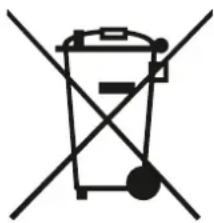
Symbol of a trash bin crossed with a diagonal line, representing no waste or elimination (no text or labels)This symbol on the product or on its packaging indicates that this product must not be treated as household waste. Instead, it must be taken to the appropriate collection point for the recycling of electrical and electronic equipment.
By ensuring this product is disposed of correctly, you will help prevent potential negative consequences for the environment and human health, which could otherwise be caused by inappropriate waste handling of this product.
For more detailed information about recycling of this product, please contact your local authorities, your household waste disposal service or the shop where you purchased the product.
Packing materials
Materials with the symbol 🙏 are recyclable. Dispose of the packaging in a suitable collection container for recycling.
Disposal of the device
- Disconnect the plug from the socket.
- Cut the power cord and discard it.

WARNING!
Electric shock hazard
Disconnect the mains power supply before installing the dishwasher. Failure to do so may result in death or electric shock. The electrical and plumbing installation must be carried out by professional and qualified personnel.
On connection to the power grid
For reasons of personal security:
- Do not use an extension cord or adapter plug with this product.
- Do not, under any circumstances, cut or remove the grounding wire from the power cord.
Electrical requirements
Refer to the specification label for voltage rating and connect the board to the appropriate power supply.

Precautions
- The hob must be installed by qualified personnel or technicians. Please never carry out the operation yourself if you are not sure.
- The hob must not be installed directly above a dishwasher, refrigerator, freezer, washing machine or tumble dryer, as moisture may damage the electronics of the hob.
- The materials surrounding the cooking zone must ensure optimum heat radiation to improve reliability.
- The wall and worktop must be able to withstand high temperatures.
- A steam cleaner must not be used.
Electrical connection
- Make sure that the voltage and frequency of the current correspond to those on the specification label.
- Only connect the plug to a properly grounded outlet.
- If the socket to which the product is to be connected is not suitable for the plug, replace the plug, rather than using an adapter or similar, as this may cause overheating and burns.
- The power cord must not touch any hot parts and must be positioned so that its temperature does not exceed 75°C at any point.
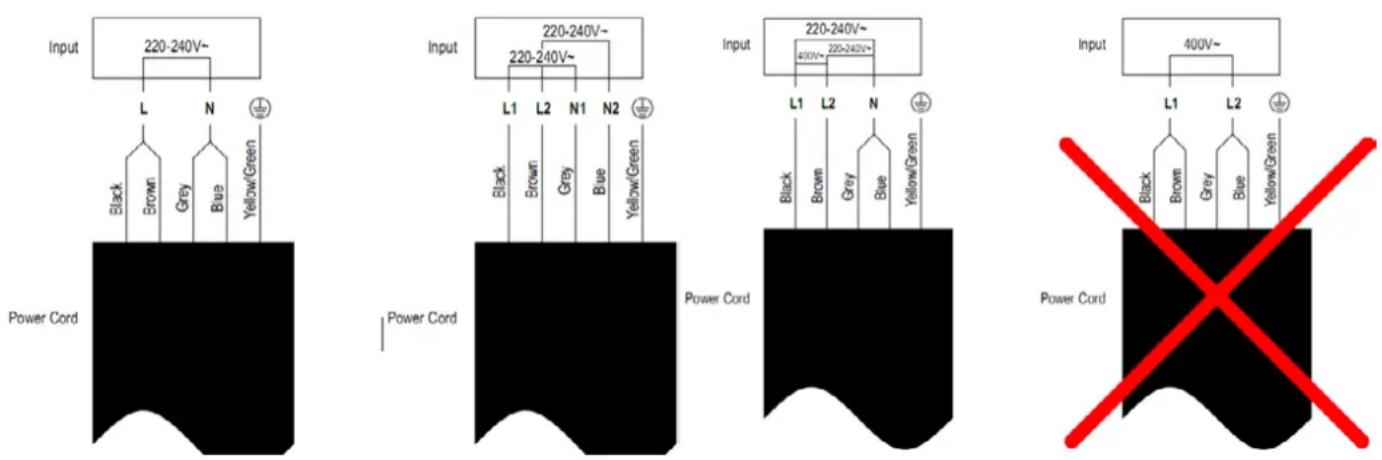
If the appliance is connected directly to the mains, a single-pole circuit breaker with an opening of at least 3 mm between the contacts must be installed. The cable must not be bent or compressed.
Before installing the hob, make sure that:
• The work surface is square and level, and no structural furniture interferes with space requirements.
- The work surface is made of a heat-resistant and insulating material.
- If the hob is installed above an oven, the oven has a built-in fan.
• The installation shall comply with all clearance requirements and current standards and regulations.
- A suitable isolating switch has been incorporated in the fixed wiring system to allow complete disconnection from the mains, and has been mounted and positioned in accordance with local electrical installation rules and regulations.
- The isolating switch must be approved and must provide 3 mm contact separation on all poles (or on all active [phase] conductors if local wiring regulations allow this variation of requirements).
- The isolating switch must be accessible to the customer after the hob has been installed.
- Consult local building authorities and ordinances if in doubt about installation.
- Use heat-resistant, easy-to-clean finishes (such as ceramic tile) for wall surfaces surrounding the cooktop.
After installing the hob, make sure that:
- The power cord is not accessible through cabinet doors or drawers.
• There is an adequate flow of fresh air from the outside of the cabinet to the base of the hob.
- If the hob is installed on top of a drawer or cabinet, a thermal protection barrier must be installed under the base of the hob.
- The isolation switch is accessible to the customer.
Before attaching the fixing brackets
The appliance must be placed on a stable, smooth surface (use the packaging). Do not apply any pressure to the controls protruding from the hob.
Adjusting the position of the brackets
Fix the hob to the work surface by screwing 2 brackets to the underside of the hob (see picture) after installation.
Adjust the position of the brackets according to the thickness of the table top.
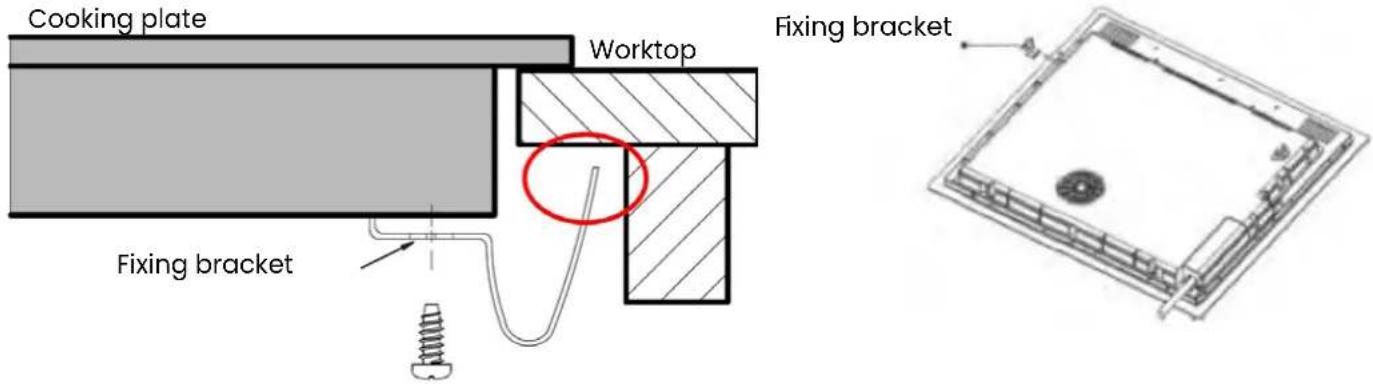
Under no circumstances may these supports come into contact with the inside surfaces of the worktop after installation (see picture).
Selecting the installation equipment
Cut out the work surface according to the dimensions shown in the illustration.
For installation and use, you must maintain a minimum clearance of 5 cm around the opening. Make sure that the thickness of the work surface is at least 30mm. Please choose heat-resistant and insulated materials for the work surface (wood and other similar fibrous or hygroscopic materials should not be used as work surface material unless they are waterproofed) to avoid electric shock and further deformation caused by heat radiation from the hob. As shown below:
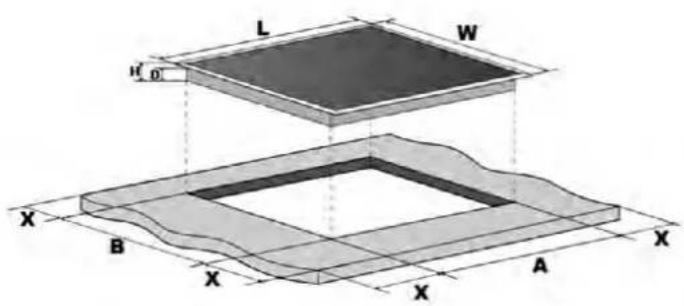
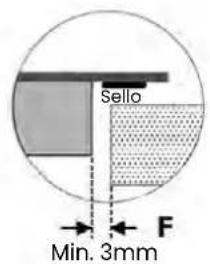
| L(mm) W(mm) H(mm) | D(mm) A(mm) B(mm) X(mm) F(mm) | ||||||
| 590 | 520 | 62 | 58 | 565 | 495 | 50 mín. | 3 mín. |
Note: Make sure that the hob is well ventilated and that the air inlet and outlet are not blocked. Make sure that the hob is in good working order. As shown below.
Note: The recommended safety distance between the hob and the cabinet above the hob should be at least 550mm - 650mm for ceramic and induction hobs, and 650mm - 750mm for gas hobs.
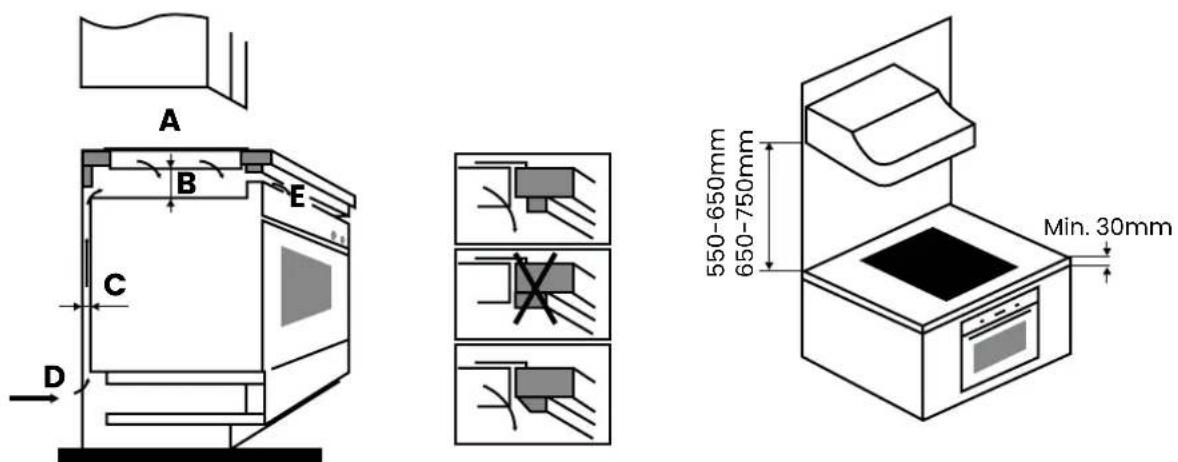
| A(mm) | B(mm) | C(mm) | D E | |
| 760 | 50 min. | 20 min. | Air inlet | Air exit 5mm |
WARNING! Adequate ventilation must be ensured
Make sure that the hob is well ventilated and that the air inlet and outlet are not blocked. To avoid accidental contact with the underside of the hotplate being overheated, or receiving an unexpected electric shock during work, it is necessary to place a wooden insulator, fixed with screws, at a minimum distance of 50 mm from the underside of the hotplate. Observe the following requirements.
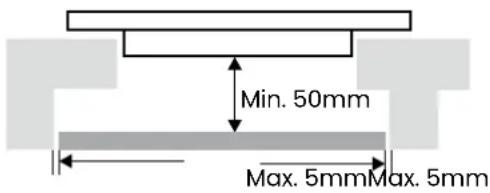
Note: There are ventilation holes around the outside of the hob. You MUST ensure that these holes are not blocked by the hob when the hob is fitted.
Never seal the plate to the recess with silicone.
Sealing the hob with silicone is not recommended, as if the hob has to be removed, it will be very difficult to remove it from the worktop and may even break the glass.
Infiniton is not responsible for any damage caused by applying silicone, which would void the warranty.
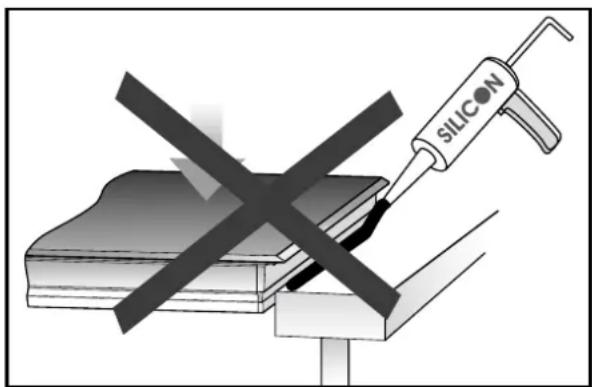
Technical specifications
Weight and dimensions are approximate. As we continually strive to improve our products, we may change specifications and designs without notice.
| Model IND3N61G28 | |
| Product dimensions (mm) 520x590x62mm (height x width x deep) | |
| Built-in dimensions (mm) 495x565mm | |
| Supply voltage 220-240V~, 50-60Hz | |
| Cooking zones 3 | |
| Power 5500W - 6300W | |
Product introduction
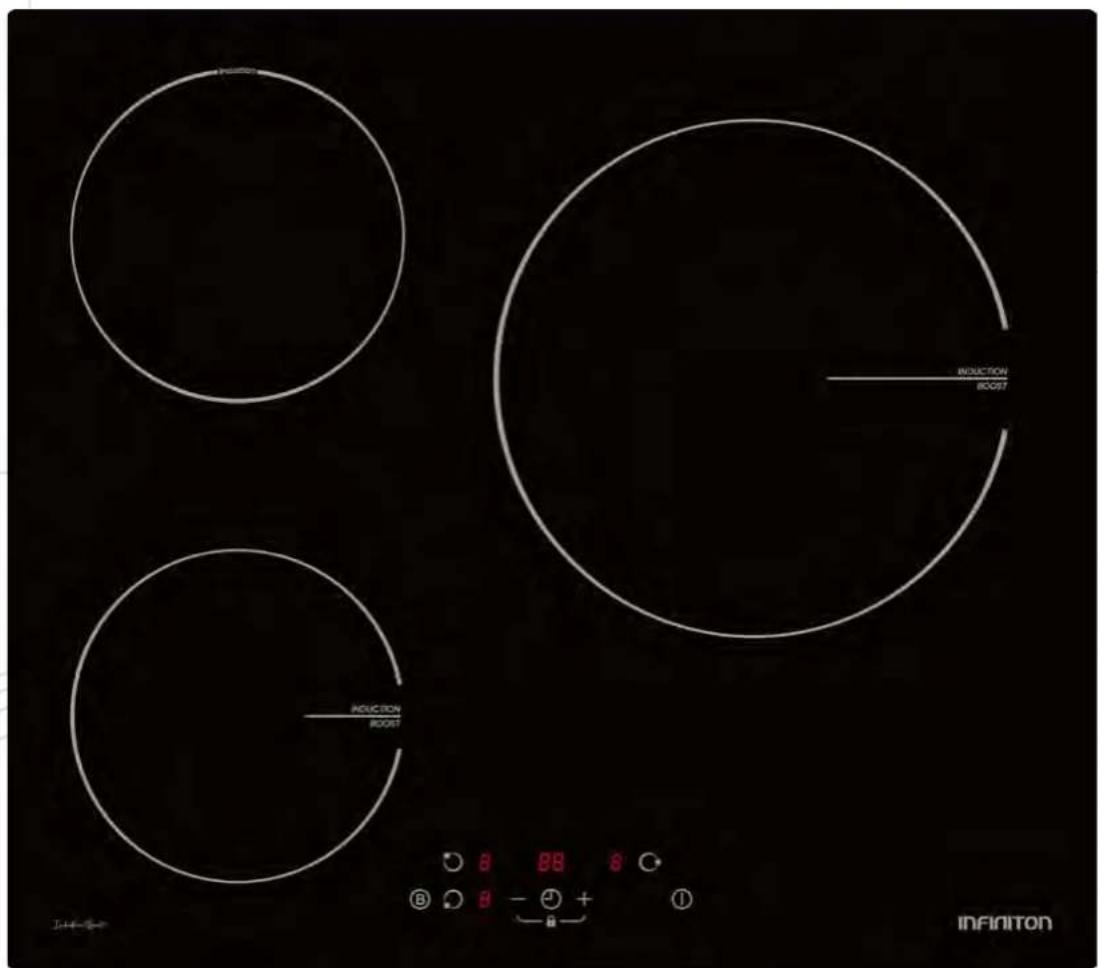
Top view
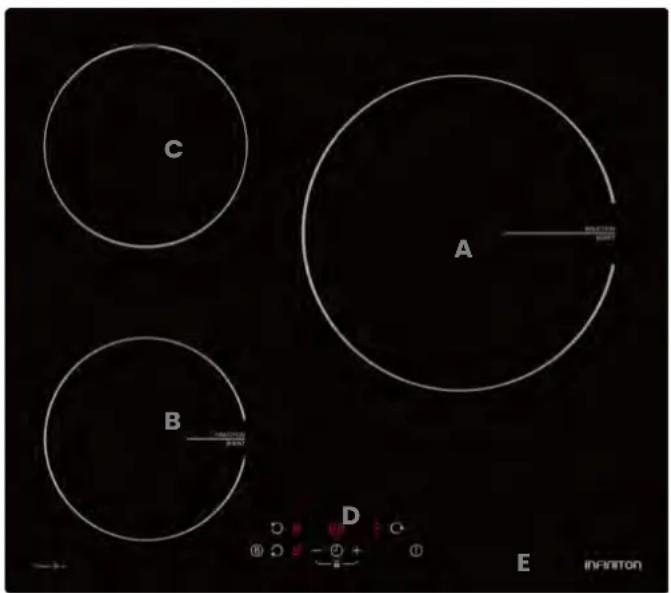
| A 280mm/2000W Boost 2600W |
| B 180mm/1800W Boost 2000W |
| C 180mm/1500W |
| D Touch control panel |
| E Glass plate |
Control panel
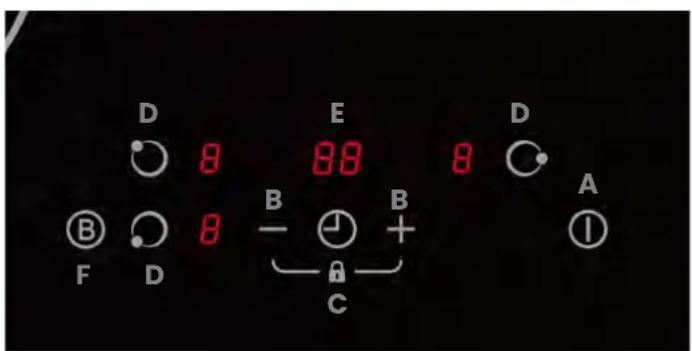
| A On / Off | |
| B Power regulator | |
| C Child Lock / Pause | |
| D Zone selection | |
| E Timer | |
| F BOSST Function |
Switch on your hob
The controls respond to touch, so there is no need to apply any pressure.
- Use your fingertip, not the tip.
- You will hear a beep each time a touch is registered.
- Make sure that the controls are always clean, dry and that no object (e.g. utensil or cloth) is covering them. Even a thin layer of water can hinder the operation of the controls..
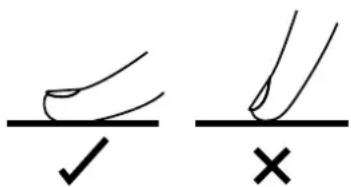
Tips to avoid property damage
!ATTENTION! Containers with rough bases may scratch the hob.
- Check that all pans are in perfect condition. Cooking under vacuum can damage the pans and even the hob. Never place empty pans on a hot cooking zone or allow them to heat up empty.
- Improperly positioned pans on the hob can cause the hob to overheat..
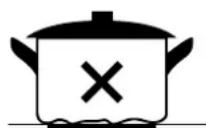
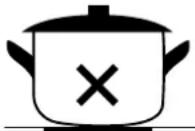
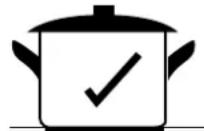
- Do not place hot pots and pans on the controls or the hob frame.
- Dropping rigid or sharp objects on the hob can cause damage.
- Non-heat-resistant materials may melt if they are placed on the hob when it is in operation or has just been used.
- Never use aluminium foil, plastic containers or baking paper.
- Use pans with a diameter as large as the graphic of the selected zone. If you use a pan that is slightly wider, the energy will be used to the maximum. If you use a pan smaller than the selected zone, the efficiency may be lower than expected. Pots smaller than 140 mm may not be detected by the hob. Always centre the pan on the cooking zone.
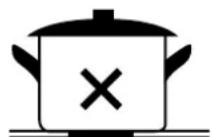
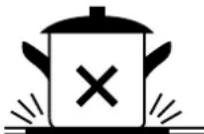
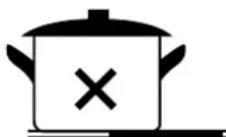
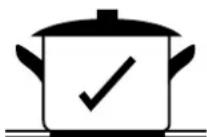
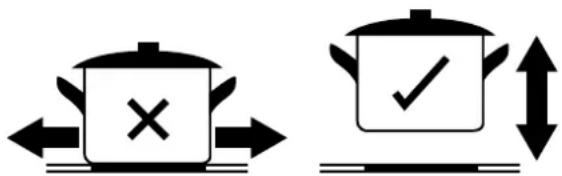
• Always lift the pans from the hob, do not slide them, as this could scratch the glass.
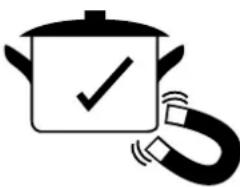
Choose utensils suitable for your induction hob (Only for induction models)
Only use cookware with a base suitable for induction cooking. Look for the induction symbol on the packaging or on the bottom of the cookware.
- You can check whether your cookware is suitable by carrying out a magnet test.
-
Move a magnet towards the base of the pan. If it is attracted, the pan is suitable for induction.
• If you do not have a magnet: -
Put some water in the pan you want to test.
-
If this symbol ≥slant 0 does not flash on the display and the water becomes hot, the cooker is suitable. Cookware made of the following materials is not suitable: pure stainless steel, aluminium or copper without magnetic base, glass, wood, porcelain, ceramic and china.
natural_image
Illustration of a cooking pot with a checkmark inside and a magnetic bar magnet nearby (no text or symbols)Start cooking
To start cooking, carefully follow the steps below to get the most out of your Infiniton cooktop.
| Touch the ON/OFF key. After switching on, a beep will sound and all indicators will show “-” or “- -”, indicating that the hob has entered standby mode. |  |
| Place a suitable container on the cooking zone you wish to use.Make sure that the bottom of the pan and the surface of the cooking zone are clean and dry. | 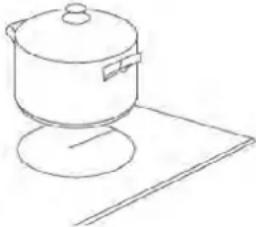 |
| When touching the heating zone selection control, an indicator next to the key will flash. | 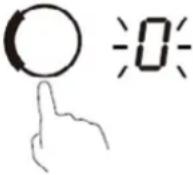 |
| Select a temperature setting by touching the “-” or “+” control. If you do not choose a heat setting within 1 minute, the hob will automatically switch off. You will have to start again at step 1.You can change the heat setting at any time during cooking. | 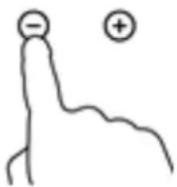 |
If the display flashes ≥ U ≤ alternately with temperature setting
This means that:
- you have not placed a pan on the correct cooking zone or,
- the pan you are using is not suitable for induction cooking or,
- the pan is too small or not properly centred on the cooking zone.
Heating does not occur if there is no suitable frying pan in the cooking zone.
The symbol ≥ U ≤ on the display will disappear automatically after 1 minute if a suitable container is not placed in the cooking zone.
Finish cooking
When you have finished cooking, follow the instructions below:
| Touch the selection control for the heating zone to be switched off. | 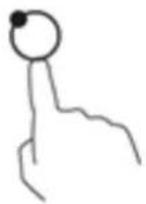 |
| Switch off the heating zone by touching the temperature selection button “-” until the number 0 appears on the display or by pressing the “-” and “+” buttons at the same time.If your hob has a slider, slide your finger across the slider to the 0 position (from right to left). | ___ 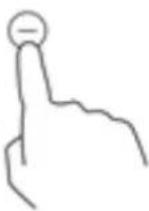 ___ ___ |
| Switch off the hob completely by touching the ON/OFF button. | 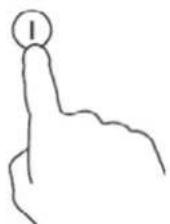 |
| Watch out for hot surfaces on the display, the letter H indicates which cooking zone is hot to the touch. It will disappear when the surface has cooled down to a safe temperature. It can also be used as an energy saving function if you want to heat more pans, use the cooking zone that is still hot. | 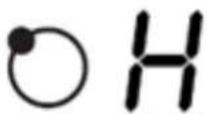 |
BOOST function
If your cooktop has a BOOST function, it will allow you to reach maximum power in record time.
Here's how to use it to get the most out of it.
On this cooktop, the BOOST function is only available on zones 1 and 3.
How to use the Boost for more power
| Touch the selection key of the cooking zone to be boosted, and an indicator next to the key will flash. | 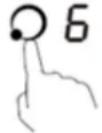 |
| Touch the Boost button, and the cooking zone will start to operate in Boost mode. The display will show "P" to indicate that the zone is in Boost mode. | 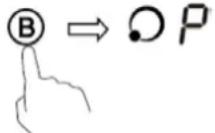 |
| The Boost power will last for 5 minutes and then the zone will return to power stage 9. If you wish to cancel Boost, first touch the cooking zone selec-tion button, and an indicator next to the button will flash. Then touch the Boost button. The cooking zone will return to power stage 9. | 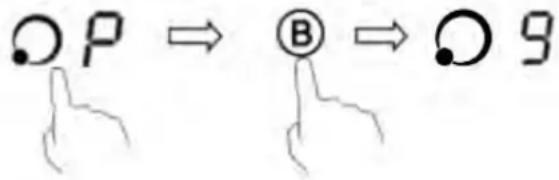 |
- The cooking zone returns to its original setting after 5 minutes.
Lock the controls (Child Lock)
You can lock the controls to prevent unintentional use (e.g. if children accidentally turn on the cooking zones).
When the controls are locked, all controls except on/off are disabled.
Activate the lock
Press and hold down the “-” and “+” controls at the same time for 3 seconds. The timer indicator will show “Lo”.
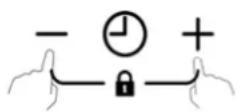

Disable the blocking
Press and hold the “-” and “+” controls at the same time for 3 seconds.
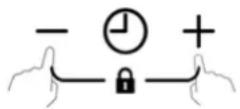
The induction cooktop is equipped with a temperature sensor that monitors the temperature inside. When excessive temperature is detected, the cooktop stops operating automatically.
Small Item Detection
When an improperly sized or non-magnetic pan (e.g. aluminum), or some other small item (e.g. knife, fork, key) has been left in contact with the cooktop, the cooktop will automatically switch to standby mode in 1 minute. The fan will continue to run on the induction cooktop for an additional 1 minute.
Default operation
The automatic switch-off is a function designed to protect your hob. It switches off automatically if you ever forget to turn off the cooktop. The preset operating times for various power levels are shown in the table below:
| Power level 12 3 4 5 6 7 8 9 | |||||||||
| Default working time (hours) 8 8 8 4 4 4 2 | 2 2 |
Note: When the pan is removed, the induction hob may stop heating immediately so the hob will automatically switch off after 2 minutes.
WARNING! Persons with a pacemaker should consult their physician before using this equipment.
Timer
If your hob has this function, you can activate it in two different ways:
- You can use it as a minute timer. In this case, the timer will not switch off any cooking zones when the set time has elapsed.
- You can program it to switch off one or more cooking zones after the set time has elapsed. The timer has a maximum duration of 99 minutes.
Using the timer as a minute reminder (For models without Slide control)
(If no cooking zone has been selected)
| Make sure that the hob is switched on. To be able to use the timer, at least one zone must be active. | 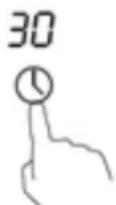 |
| Touch the "+" key on the timer. The timer indicator will start flashing and "10" will be shown on the display. | |
| Set the time by pressing the "-" or "+" buttons on the timer. Touch the "-" or "+" buttons on the timer once to decrease or increase the time in 1 minute intervals. Press repeatedly press the "-" or "+" buttons on the timer to decrease or increase the time by 10 minutes. | 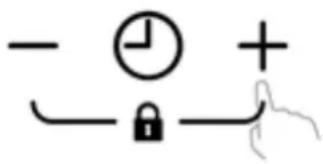 |
| By touching "-" and "+" at the same time, the timer is cancelled, and "00" will be shown on the display. | 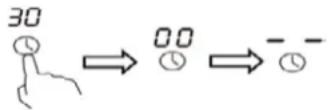 |
| When the time is set, the countdown starts. The display will show the remaining time and the timer will flash for 5 seconds. | 36 |
| At the end of the set time, the timer indicator will beep for 30 seconds. The timer indicator will display "-" when the set time has expired. | 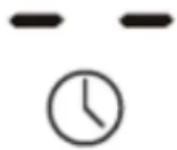 |
Setting the timer to switch off a cooking zone.
| Setting a zone | |
| Press the selection control for the cooking zone for which you wish to set the timer (e.g. zone 3#). |  |
| Touch the timer control key, the timer indicator will start flashing and “30” will be shown on the timer display. | 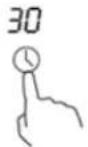 |
| Set the time by touching the timer control.Tip: If you touch the timer “-” or “+” control once, it will decrease or increase by 1 minute. If you press and hold down the “-” or “+” timer control, it will decrease or increase by 10 minutes. | 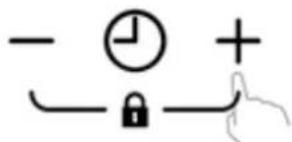 |
| By touching “-” and “+” at the same time, the timer is cancelled, and “00” will appear on the minute display. | 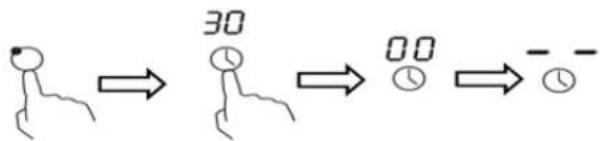 |
| Once the time has been set, the countdown will start immediately. The display will show the remaining time and the timer indicator will flash for 5 seconds.NOTE: The red dot next to the power level indicator will illuminate indicating that the zone is selected. | 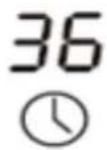 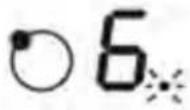 |
| When the cooking timer expires, the corresponding cooking zone is automatically turned off and H will be displayed, indicating that the zone is hot | 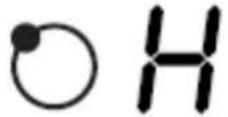 |
Note: The other cooking zones will continue to operate if they are previously switched on.
Setting the timer to switch off more than a cooking zone.
| Setting more than a zone | |
| If you use this function for more than one cooking zone, the timer indicator will show the shortest time (e.g. zone 1# set time of 3 minutes, zone 2# set time of 6 minutes, timer indicator shows "3").NOTE: The flashing red dot next to the power level indicator means that the timer indicator is showing the heating zone time.If you want to check the set time of another coo-king zone, touch the zone control once. The timer will display its set time. |   Setting to 6 minutes Setting to 6 minutes 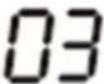   Setting to 3 minutes Setting to 3 minutes  |
| When the timer ends, the corresponding cooking zone is automatically switched off and displays "H". | 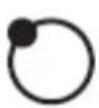 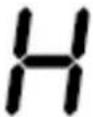 |
Note: If you want to change the time after setting the timer, you have to start from step 1.
Cooking tips and hints

WARNING! Be careful when frying, as oil and fat heat up very quickly, especially when using the
Boost function. At extremely high temperatures, oil and fat ignite spontaneously, posing a serious fire hazard.
- When food starts to boil, reduce the temperature.
- Using a lid will reduce cooking times and save energy by retaining heat.
- Reduce the amount of liquid or fat to reduce cooking time.
- Start cooking on a high setting and reduce the setting when the food has warmed up.
Simmering
Simmering occurs below boiling point, at about 85^ C, when bubbles gradually rise to the surface of the liquid being cooked. This is the key to delicious soups and tender stews, as the flavours develop without overcooking the food. You should also cook egg-based sauces and flour-thickened sauces below the boiling point.
Cooking rice
Some tasks, such as cooking rice by the absorption method, may require a setting higher than the lowest setting to ensure that the food is cooked properly in the recommended time.
Browning a fillet of meat
For cooking juicy and tasty steaks:
- Let the meat stand at room temperature for about 20 minutes before cooking.
- Heat a large frying pan.
- Brush both sides of the steak with oil. Drizzle a small amount of oil into the hot pan and then place the meat in the hot pan.
- Turn the steak only once during cooking. The exact cooking time will depend on the thickness of the steak and how cooked you want it. Time may vary from 2 to 8 minutes per side. Press the steak to measure the degree of doneness: the more firm the steak looks, the more done it is.
- Let the steak rest on a warm plate for a few minutes to relax and tenderise before serving.
Stir-fry
- Choose a flat-bottomed wok (induction compatible) or a large frying pan.
- Have all the ingredients and equipment ready. Stir-frying should be quick. If cooking large quantities, cook the food in several smaller batches.
- Preheat the pan briefly and add two tablespoons of oil.
- Cook the meat first, set aside and keep warm.
- Sauté the vegetables. When they are hot but still crisp, turn the cooking zone to a lower setting, return the meat to the pan and add your sauce.
- Stir the ingredients gently to heat through.
- Serve immediately.
WARNING! When an unsuitably sized or non-magnetic frying pan (e.g. aluminium) or any other small object (e.g. knife, fork...) is left on the hob, the hob will automatically switch to standby within 1 minute. The fan will continue to run for another 1 minute.
Power settings
The settings given below are for guidance only. The exact setting will depend on a number of factors, such as your cookware and the amount you cook. Experiment with the hob to find the settings that suit you best.
| Power setting Recommended for | ||
| 1 - 2 • Slowly heat | small quantities of food.Melt chocolate, butter and foods that burn quickly.Gentle simmering.Simmering on low heat. | |
| 3 - 4 • Reheat. | Rapid simmering.Cook the rice. | |
| 5 - 6 • Pancakes | Crepes.Waffles. | |
| 7 - 8 • Stir-fries. | Cooking pasta. | |
| 9 • Stir-fry | Lightly sautéBoil the soupBoil the water | |
| LEVEL OF SOILING SOLUTION WARNING! | ||
| Common dirt on the glass (fingerprints, marks, smudges left by food or splashes on the glass) | 1. Disconnect the hob from the main power supply.2. Apply a worktop cleaner while the glass is still hot (but not too hot!).3. Rinse and dry with a clean cloth or paper towel.4. Switch the hob back on. | When the power to the hob is switched off, there will be no "hot surface" indication, but the cooking zone may still be hot. Be very careful.Strong scouring pads, some nylon scouring pads and strong/abrasive cleaning products can scratch glass.Always read the label to check if your cleaner or scourer is suitable.Never leave cleaning residues on the hob: the glass may become stained. |
| Spills from boiling, hot melts and hot sweets on glass | Remove them immediately with a spatula or blade scraper suitable for glass hobs, but be careful of hot surfaces in the cooking area. hot surfaces in the cooking area:1. Switch off the power supply to the hob at the wall.2. Hold the blade or utensil at a 30° angle and scrape off any dirt or spillage onto a cool area of the cooktop.3. Wipe off the dirt or spillage with a tea towel or paper towel.4. Follow steps 2 to 4 in the section "Daily soiling of the glass". | Remove stains left by melted and sugary foods or spills as soon as possible. If left to cool on the glass, they may be difficult to remove from the glass surface.Cutting hazard: when the safety cover is retracted, the blade of the scraper is sharp as a razor. Use with extreme care and always store safely and out of the reach of children. |
| Splashes on the touch controls | 1. Unplug the hob.2. Absorb the spillage.3. Wipe the area with a clean, damp sponge or cloth.4. Dry the area completely with a paper towel.5. Reconnect the hob. | The hob may beep and turn off, and the touch controls may not work while there is liquid on them. Be sure to clean the touch controls area before turning the hob back on. |
| PROBLEM POSSIBLE CAUSE SOLUTION | ||
| The board does not light up. | There is no power in the electricity grid. | Make sure that the induction hob is connected to the mains and that it is switched on. Check if there is a power cut in your home or in the area. If you have checked everything and the problem persists, call a qualified technician. |
| Touch controls are not responsive. | The controls are locked. Unlock | the controls. See “Using the induction hob” section for instructions. |
| The touch controls are difficult to operate. | There may be a slight film of water on the controls or you may use your fingertip when touching them. | Make sure the touch control area is dry and use your fingertip when touching the controls. |
| The glass is scratched. Kitchen | en utensils with uneven edges.Use of unsuitable and abrasive scouring pads or cleaning products. | Use cookware with flat, smooth bases.See “Choosing the right cookware”. See “Care and cleaning”. |
| Some frying pans produce crackling or popping noises. | This may be due to a manufacturing problem of the cookware. | This is normal for cookware and does not indicate a fault in the cooktop. |
| The induction hob emits a slight buzzing sound when used at a high temperature. | This is due to the basic principles of induction operation. | This is normal, but the noise should decrease as the temperature setting is reduced. |
| Noise from the induction hob fan. | The hob has an integrated fan to prevent overheating of the electronic components. It can continue to operate after the induction hob has been switched off. | This is normal. Do not disconnect the Do not disconnect the power supply to the induction hob while the fan is running. |
| The utensils are not heated heat up | The hob does not detect the pan because it is not suitable, too small for the cooking zone or not properly centred on the cooking zone. | Use suitable cooking utensils. Centre the pan and ensure that its base matches the size of the cooking zone. |
| The panel or a zone has switched off unexpectedly, a tone is heard on the display and an error code is displayed. | Technical failure. Write down the | letters and numbers of the error, disconnect the power supply to the induction hob at the wall and contact a qualified technician. |
| FAIL PROBLEM SOLUTION A SOLUTION B | |||
| The LED does not light up when the unit is switched on. | No power.Auxiliary power board and display do not connect.The main board is damaged.The display is damaged. | Check that the plug is securely fixed in the socket and that it is working properly.Check the connection.Replace the motherboard.Replace the display. | |
| Some buttons do not work, or the LED display is not normal. | Display is damaged. Replace | the display. | |
| The cooking mode indicator lights up, but does not start the cooking process. | High board temperature.Something is wrong with the fan.The motherboard is damaged. | The ambient temperature may be too high. The air inlet or outlet may be blocked.Check if the fan is running smoothly; if not, replace the fan.Replace the motherboard. | |
| Cooking stops suddenly during operation and “u” flashes on the display. | Unsuitable utensils for induction.Pot or pan diameter too small.The hob has overheated. | Use utensils suitable for induction.The unit has overheated. Wait for the temperature to return to normal. Press the “ON/OFF” button to reset the unit. | The detection detection circuit is damaged, replace the power supply board. |
| The cooking zones on the same side (such as the first and second zone) show “u”. | Fault in the motherboard and the display.Display is damaged.The motherboard is damaged. | Check the connectionReplace the display.Replace the motherboard. | |
| The fan sounds abnormal. | The fan motor is damaged. | Replace the fan. | |
The following list will show you a series of error codes that may appear on the display of your hob. If the problem persists, please contact your nearest authorised service centre.
| ERROR CODE PROBLEM SOLUTION | ||
| F3/F4 | Failure of the board temperature sensor. | Please contact the official technical service. |
| F9/FA | High temperature of the IGBT temperature sensor. | Please contact the official technical service. |
| E1/E2 | Irregular supply voltage. Check if the power supply is normal. Turn on the power after the power supply is working properly. | |
| E3 | Induction coil temperature sensor high temperature. | Please contact the official service center. |
| E5 | Elevated temperature of the IGBT temperature sensor. | Turn the board back on when it has cooled down. |
INFINITON
PLACA DE INDUCCIÓN
IND3N61G28
8445639003909
natural_image
Illustration of a stainless steel cooking pot with lid and side handles (no text or symbols)∅ 16cm
natural_image
Black frying pan with a handle, isolated on white background (no text or symbols)∅ 21cm ∅ 32cm

natural_image
Metallic bowl with curved handles, no visible text or symbolsnatural_image
Illustration of a cooking pot with steam rising from a red U-shaped magnet (no text or symbols)natural_image
Diagram of a square container with a top platform and internal flow arrows, no text or symbols present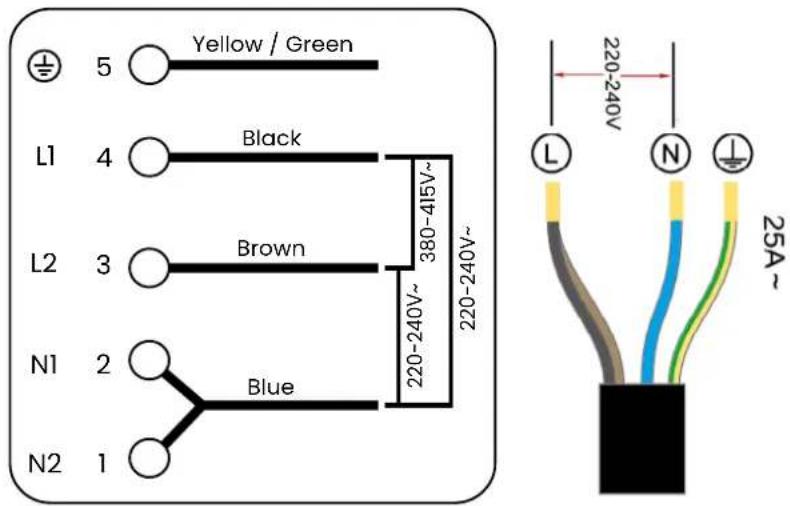
Segurança geral
natural_image
Symbol of a trash bin crossed with a diagonal line, representing no waste or elimination (no text or labels)| L(mm) W (mm) H(mm) | D(mm) A(mm) B(mm) X (mm) F(mm) | ||||||
| 590 | 520 | 62 | 58 | 565 | 495 | 50 mín. | 3 mín. |
natural_image
Illustration of a pot with a checkmark inside and a magnetic stirrer attached to its side (no text or symbols)Começar a cozinhar
| Product Name | 60CM Built -in Induction Hob |
| BRAND | Infiniton |
| INFINITON MODEL | IND3N61G28 |
| Ean | 8445639003909 |
| Specification | |
| Control mode | Touch Control |
| Voltage/frequency | 220-240V~, 50/60Hz |
| CE Certificate's power(W) | 5500W-6300W |
| Power Image | 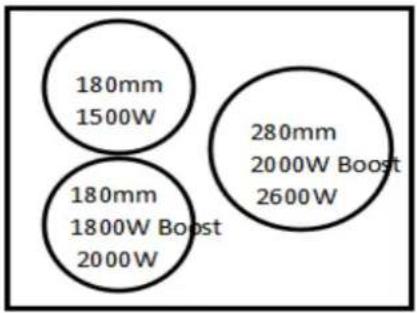 |
| Front left zone(W) 1800w Boost 2000w /180mm | |
| Rear left zone(W) 1500w /180mm | |
| Rear right zone(W) 2000w/ Boost 2600w/280mm | |
| Front right zone (W) N/A | |
| Vitro Ceramic Glass Vitro Ceramic Glass | |
| Bevelled edge N/A | |
| Heating element Solution Aluminum coil , round shape | |
| Features and functions | |
| Power stage setting | 9 |
| Timer(min) | 99 |
| Auto switch off safety | Yes |
| Child lock | Yes |
| Residual heat indicator Yes | |
| Boost funtion | Yes |
| Spillage protection | Yes |
| Pan sensor Yes | |
| Keep warm function | N/A |
| Stop and go function | N/A |
| Dimensions & Package | |
| Product Size(mm) (L*W*H) 590*520* | 62 |
| Built-in Size(mm) (L*W) 565*495 | |
| Carton Size(mm) (L*W*H) 650*560*1 | 15 |
| Product Net weight(kg) | 9 |
| Gross weight(kg) | 10 |
| Cable length(M) | 5-core power cable, neutral wires connected, live wires connected , three group ,length 1 m ,without plug |
| Loading quantity | 665/1368/1583 |
| Certificate status | CE,SAA,RoHS,CB |
| Language | English |
| Drop Test Standard | 60cm |
| Carton | Brown box |
INFINITON
Soporte y contacto

¿Necesitas ayuda?
natural_image
Silhouette icon of a person wearing a headset with a wrench inside, symbolizing a repair or maintenance (no text or symbols)
INFINITON
TÉRMINOS Y REGISTRO DE GARANTÍA
- The joy of cooking
- Get the most out of your Infiniton hob
- What is the recommended distance between the hob and the cooker hood?
- Protect the surface of your hob
- What power level should I use for each recipe?
- Which equipment can I use on my hob?
- Which materials do I need for my induction hob?
- Choose a good location
- Make electrical connection
- Never seal the plate to the recess with silicone.
- Switch on the hob
- Select suitable utensils and kitchenware
- Turn off the hob completely
- General security
- Safety of children and vulnerable persons
- Electrical connections
- WARNING! Risk of fire
- WARNING! Risk of burns
- WARNING! Risk of electric shock
- WARNING! Risk of injury
- WARNING! Risk of suffocation
- Important safety instructions
- Service
- Packing materials
- Disposal of the device
- WARNING!
- Electric shock hazard
- On connection to the power grid
- Electrical requirements
- Precautions
- Electrical connection
- Before installing the hob, make sure that:
- After installing the hob, make sure that:
- Before attaching the fixing brackets
- Adjusting the position of the brackets
- Selecting the installation equipment
- WARNING! Adequate ventilation must be ensured
- Never seal the plate to the recess with silicone.
- Technical specifications
- Product introduction
- Switch on your hob
- Tips to avoid property damage
- Choose utensils suitable for your induction hob (Only for induction models)
- Start cooking
- If the display flashes ≥ U ≤ alternately with temperature setting
- Finish cooking
- BOOST function
- Lock the controls (Child Lock)
- Activate the lock
- Disable the blocking
- Small Item Detection
- Default operation
- Timer
- Cooking tips and hints
- Simmering
- Cooking rice
- Browning a fillet of meat
- Stir-fry
- Power settings
- INFINITON
- Segurança geral
- Começar a cozinhar
- Soporte y contacto
- ¿Necesitas ayuda?
- TÉRMINOS Y REGISTRO DE GARANTÍA
Brand : Infiniton
Model : IND3N61G28
Category : Cooker