MO608B - Oven MISTRAL - Free user manual and instructions
Find the device manual for free MO608B MISTRAL in PDF.


| Product Type | Built-in Electric Oven |
| Model | MO608B |
| Brand | Mistral |
| Product Dimensions (L x W x D) | 595 x 596 x 575 mm |
| Electrical Connection | 220-240V / 50Hz |
| Maximum Power Rating | 2.7 – 3.22 kW |
| Maximum Current Rating | 13.4 A |
| Minimum Fuse Rating | 15 A |
| Oven Functions | Oven Light, Defrost, Conventional, Fan Forced, Half Grill, Full Grill, Full Grill + Fan, Bottom Element + Fan |
| Temperature Range | 50°C to Max (approx. 250°C) |
| Number of Oven Cavities | 1 |
| Door Type | 3-Layer Glass Door with Vents |
| Accessories Included | Baking Pan & Rack, 2 Racks, Tray Handle, Mounting Screws |
| Control Type | Rotary Knobs (Timer, Function, Temperature) |
| Safety Features | Child Safety Warning, Earthed Appliance, Safety Catch on Hinge |
| Cleaning & Maintenance | Do not use steam cleaners; clean with damp cloth; avoid abrasive cleaners; replace oven light bulb (230V 25W G9) |
| Warranty | 2 Year In-Home Warranty (Australia & New Zealand) |
| Installation Requirements | Minimum 70mm clearance at rear, heat-resistant cabinet (120°C) |
Frequently Asked Questions - MO608B MISTRAL
User questions about MO608B MISTRAL
0 question about this device. Answer the ones you know or ask your own.
Ask a new question about this device
Download the instructions for your Oven in PDF format for free! Find your manual MO608B - MISTRAL and take your electronic device back in hand. On this page are published all the documents necessary for the use of your device. MO608B by MISTRAL.
USER MANUAL MO608B MISTRAL
natural_image
Line drawing of a double oven with three rotary gauges and a dashed door (no text or symbols)60cm Built in Electric Oven
Model No. MO608B
Thank you
Thank you for choosing Mistral Appliances.
Mistral appliance carry a 2 year In Home warranty, be sure to retain your installation and user manual and receipt.
For all warranty and technical queries please contact
Australia 1300 373 199
New Zealand 0800 764 912
Content
Safety instructions---- 1
Product description---- 3
Installation----5
Oven Setting----7
Maintenance and cleaning ----10
Warranty---- 13
This manual explains the proper installation and use of your oven, please read it carefully before using even if you are familiar with the product. The manual should be kept in a safe place for future reference. In case of failure, only the Authorised Technical Service may repair this oven. Otherwise the guarantee will be null and void. All Mistral Appliances are for domestic use only.
General Warnings
If the supply cord is damaged, the cord must be replaced by the manufacturer, its service agent or similarly qualified persons in order to avoid a hazard.
◆ This product has not been designed for any uses other than those specified in this booklet.
◆ This appliance must not be used as a space heater.
◆ In order to avoid fire, the appliance must be kept clean and vents kept unobstructed.
◆ Do not spray aerosols within the vicinity of the appliance during operation.
◆ Do not store flammable materials in or under the appliance, e.g. aerosols.
Do not line the bottom of the oven with foil or cookware.
◆ Always use gloves when handling hot items inside the oven.
◆ Always turn the grill off immediately after use as fat left behind may catch fire.
Do not leave the appliance unattended when cooking. Oils and fats may catch fire due to overheating or boiling over.
Do not put pans weighing over 15Kgs on the opened door of the oven.
Do not use the appliance in the event of a technical fault. Any faults must be fixed by an appropriately qualified and authorised person.
◆ In the event of any incident caused by a technical fault, disconnect the power and report the fault to the service centre to be repaired.
◆ The rules and provisions contained in this instruction manual should be strictly observed.
Do not allow anybody who is not familiar with the contents of this instruction manual to operate the appliance.
Child Safety
◆ This appliance is not intended for use by persons (including children) with reduced physical, sensory or mental capabilities, or lack of
experience and knowledge, unless they've been given supervision or instruction concerning use of the appliance by a person responsible for their safety.
◆ Children should be supervised to ensure that they do not play with the appliance.
During use this appliance becomes hot. Care should be taken to avoid touching hot surfaces, e.g. oven door, heating elements.
◆ Accessible parts will also become hot when in use. To avoid burns and scalds children should be kept away.
Installation, Cleaning & Servicing
The appliance must be installed only by an authorised person in compliance with the instructions provided. Incorrect installation may cause harm to persons, animals or may damage property.
◆ Before using the appliance, ensure that all packing materials are removed from the appliance.
◆ In order to avoid any potential hazard, the enclosed installation instructions must be followed.
◆ Ensure that all specified vents, openings and air spaces are not blocked.
◆ The panels adjacent to the oven must be made of heat-resistant material.
◆ Cabinets with a veneer exterior must be assembled with glues which can withstand temperature of up to 120°C.
◆ To reduce the risk of fire, do not place or install this unit in areas where the ventilation or circulation ducts may become blocked. Make sure there are at least 70mm of space between the back of your oven and the wall. Keep some distance on each side of your oven that you can use that distance
flowing installing instructions.
The unit's power cord must be connected to a properly grounded and protected, 220-240V electrical outlet. Always use ground fault protection where required by the electrical code.
When transporting or storing the unit, keep it in a dry location, free from dust, excessive vibration or other factors, which may damage the unit.
Do not operate oven with a damaged cord, plug or if the oven has malfunctioned or has been dropped or damaged in any manner. Return oven to authorised service facility for repair.
Only authorised personnel should carry out servicing. (Certificate of Compliance to be retained)
◆ Always ensure the appliance is switched off before cleaning or replacing parts.
◆ Do not use steam cleaners, as this may cause moisture build-up.
◆ Always clean the appliance immediately after any food spills.
◆ THIS APPLIANCE MUST BE EARTHED.
◆ To maintain safe operation, it is recommended that the product be inspected every five years by an authorised service person.
Oven
During use the appliance becomes hot. Care should be taken to avoid touching the hot surfaces inside the oven.
◆ Switch the appliance off before removing the oven light glass for globe replacement.
◆ To avoid an accident, ensure that oven shelves and fittings are always inserted into the appliance in accordance with the instructions.
◆ Do not use the door as a shelf.
◆ Do not push down when the oven door is open.
Grill
Do not cover the grill insert with foil, as fat built up may catch on fire.
◆ Always keep the grill dish clean as any build up may catch on fire.
◆ Do not leave the grill on unattended.
◆ To avoid fire, ensure that grill trays and fittings are always inserted into the appliance in accordance with the instructions.
◆ Do not place thick portions of food under the grill. Foods may curl, catch and ignite.
◆ Accessible parts may become hot when grill is in use. Children should be kept away.
Environmental Hints
◆ Use the oven efficiently, by cooking many trays of food at the same time.
◆ Cook 2 trays of scones, small cakes or sausage rolls at the same time.
◆ Select the correct shelf location for food being cooked.
◆ Do not open the oven door more than necessary.
◆ After the oven is turned off it retains heat for some time.
This product must not be disposed together with domestic waste. This product has to be disposed at an authorised place for recycling of electrical and electronic
appliances.
By collecting and recycling waste, you help save natural resources, and make sure the product is
disposed in an environmental friendly and healthy way.

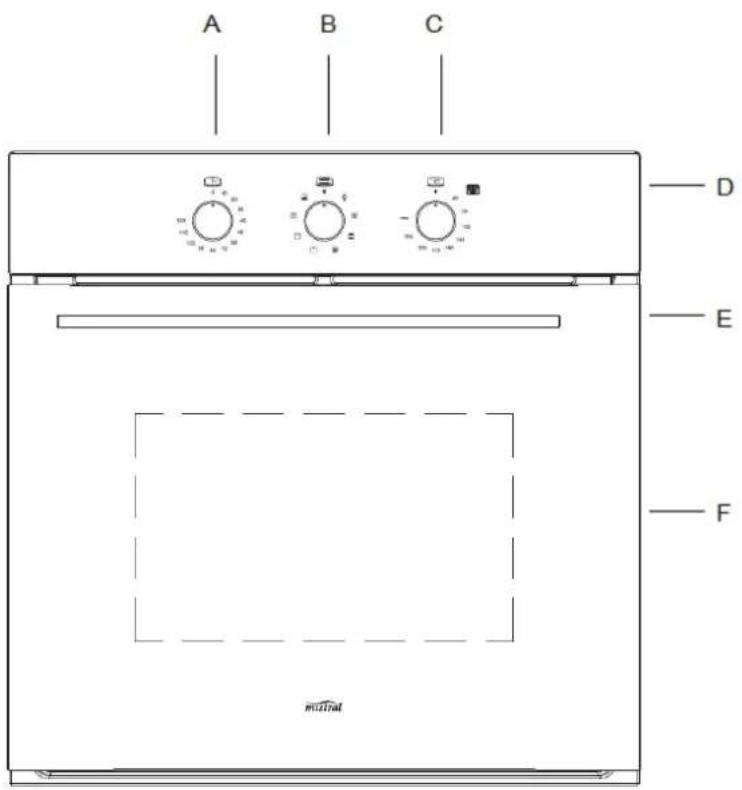
A. Minute Timer Knob
B. Function Select Knob
C. Temperature Select Knob
D. Heating Indicator Light
E. Handle
F. 3 Layer Glass Door
Accessories
| Accessory Name Picture Quantity | ||
| Mounting Screws(ST4x20) | 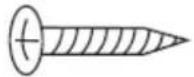 | 2 pcs |
| Baking Pan & Rack 1 Pair | 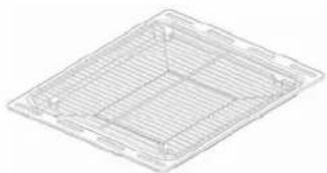 | |
| Rack 2 pcs | 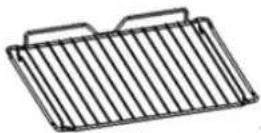 | |
| Tray handle 1 pc | 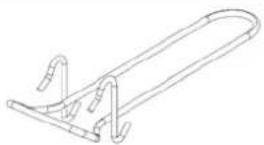 | |
Technical data
| model | product dimensions (L x W x D) mm | electrical connection | min. fuse rating | max. power rating | max. current rating |
| MO608B | 595x596x575 | 220-240V/50Hz | 15A | 2.7 – 3.22Kw | 13.4A |
| Heating elements Motor | |||||
| Oven lower heating el.: 1200Watt | Oven inside heating el. 1900 Wa tt | ||||
| Oven upper heating el.: 1000Watt | Total grill heating el. 1000+1900 Watt | Shaded motor (back) 25Watt | |||
| Oven light: 25Watt | Circle heating el. 2100 Watt | Shaded motor (top) 15Watt | |||
WARNING!
Please follow the points below when installing the appliance
Use an Authorised Person
◆ Installation should be carried out according to the instructions by a professionally qualified person.
The manufacturer declines all responsibility for any damage to persons, animals or things due to a wrong installation.
◆ Wiring connections must be in accordance with AS/NZS 3000 Wiring Rules and any particular conditions of the local authority.
◆ Refer to data plate for rating information. The data plate is positioned behind the bottom of the oven door. The circuit diagram is positioned on the top panel of the appliance.
◆ A functional switch should be provided near the appliance in an accessible position. Refer to AS/NZS 3000 clause 4.7.1
◆ Wiring should be protected against mechanical failure. Refer to AS/NZS 3000 clause 1.5
A means of disconnection with a contact separation of at least 3mm must be supplied in the fixed wiring. Always turn the grill off immediately after use as fat left behind may catch fire.
◆ Unplug the power plug of appliance from socket before installation or any adjustment or maintenance.
This Appliance Must Be Properly Earthed
◆ Do not lift the appliance by the door handles.
◆ Prepare the cupboard opening to match your appliance measurements. (See diagrams)
◆ Slide appliance into the cupboard, ensuring that the supply cable (where fitted) does not kink.
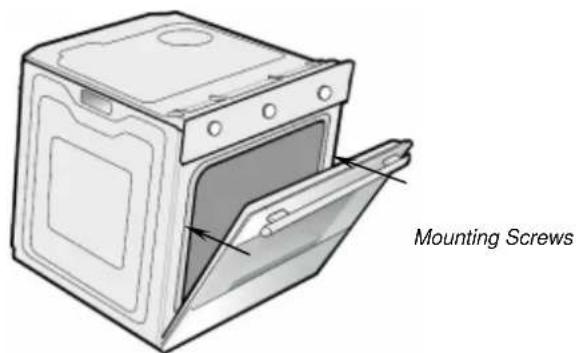
◆ To prevent tipping, secure your oven into the cupboard by fastening with 2 screws supplied.
Where the appliance is built into a cabinet, the cabinet must be capable of withstanding 120°C. Installation into low temperature tolerant cabinetry (e.g. Vinyl coated) may result in deterioration of the low temperature coating by discoloring or bubbling.
The unit panels next to the appliance must be heat resistant. In the case of veneered wood units, glue must be resistant to a temperature of 120^ C.
◆ If the appliance is to be installed adjacent to vinyl wrapped surfaces, use an installation kit available from the vinyl-wrap supplier.
◆ GSM cannot accept responsibility for damage caused by installation into low temperature tolerant cabinets.
◆ After installation, test and ensure that the appliance operates correctly before handing it over to the customer.
Once the appliance is installed, there must be no possible contact with electrical parts. Any protective parts must only be removed with the use of tools.
If a power point is fitted, it must be accessible with the appliance installed, as the plug must be accessible after installation.
To avoid any potential hazard, you must follow our instructions when you install your appliance. Failure to install the appliance correctly could invalidate any warranty or liability claims and lead to prosecution.
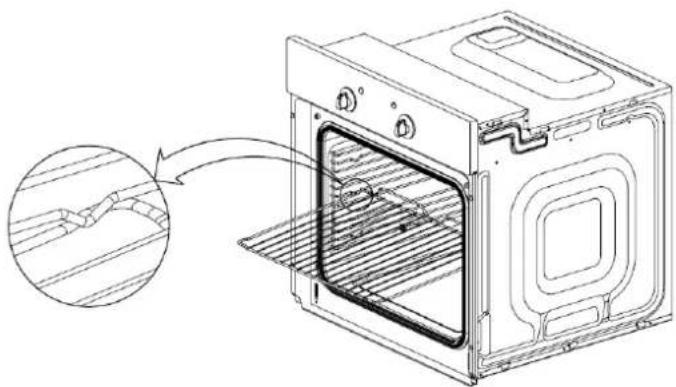
Install the shelf
natural_image
Line drawing of an oven with a close-up inset showing internal structure (no text or symbols)- Pay attention to high temperature, you may need to wear gloves if it is hot inside.
- Always slide shelves into the layer with stopper.
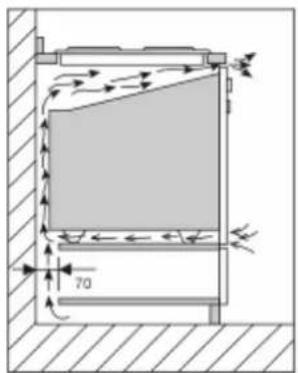
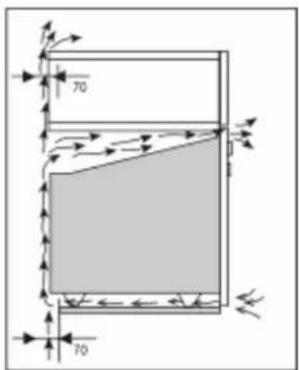
Cabinet Construction For Your Appliance The sizes of the unit for installing the appliance under a worktop or in a column unit are shown in figure.
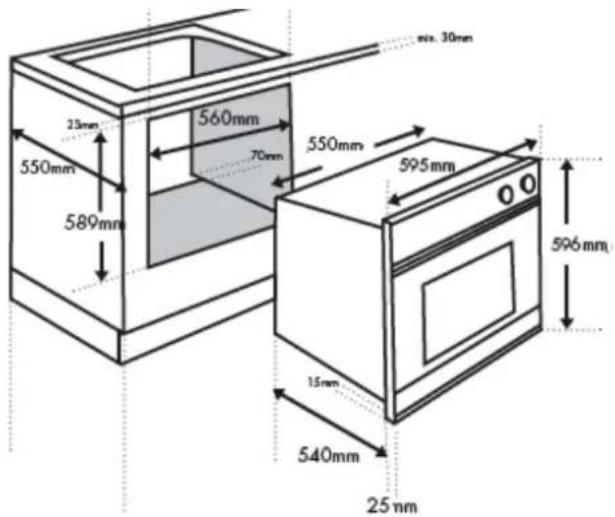
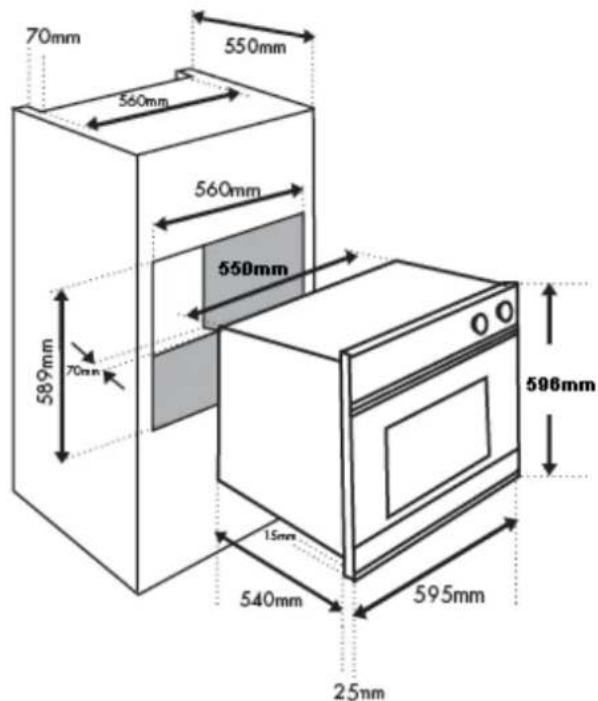
To provide adequate ventilation, there must be an appropriate ventilation opening, the panel to which the oven is fitted should have a gap of at least 70 mm at the rear.
GSM Retail Australia Pty Ltd ABN: 53 007 582 475
The unit panels next to the appliance must be heat resistant. In the case of veneered wood units, glues must be resistant to a temperature of 120^ C.
Fitting Your Appliance
Fit the appliance into its surround (beneath a work-top or above another appliance) by inserting screws into the 2 holes that can be seen in the frame of the oven when the door is open.
Note:
Your appliance must be mounted on a flat surface for the full width and depth of the product
Connect Power Supply Cord
◆ Pull open terminal board cover at rear panel of appliance.
◆ Fit wires through on terminal board and make connections to terminals.
◆ Engage wires into plastic clip. Secure plastic clip with supplied screws.
◆ Close the terminal board cover.
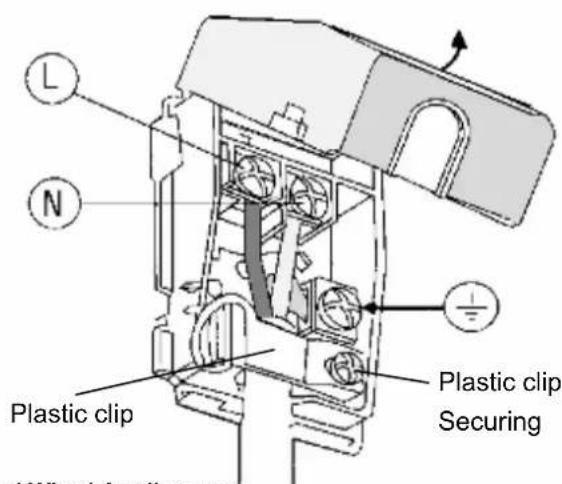
Hard Wired Appliances
When making the mains supply conductor connections to the terminal block within the terminal box, please ensure that minimum clearances are being maintained between individual conductors and conductors/connectors to the adjacent metal surfaces of the terminal box itself. Where possible add heat shrink sleeves to any bare conductor end/connectors prior to securing.
Preparing Your Oven
- Please remove all stickers, leaflets and boxes from the door and from the floor of the oven before operation.
- Please wipe out the oven interior prior to operation with warm soapy water and polish dry with a soft clean cloth.
Do not close the oven door until the oven is completely dry.
Select the Functions
Turn the function selector in any direction to the desired function. The oven cavity light will turn on.
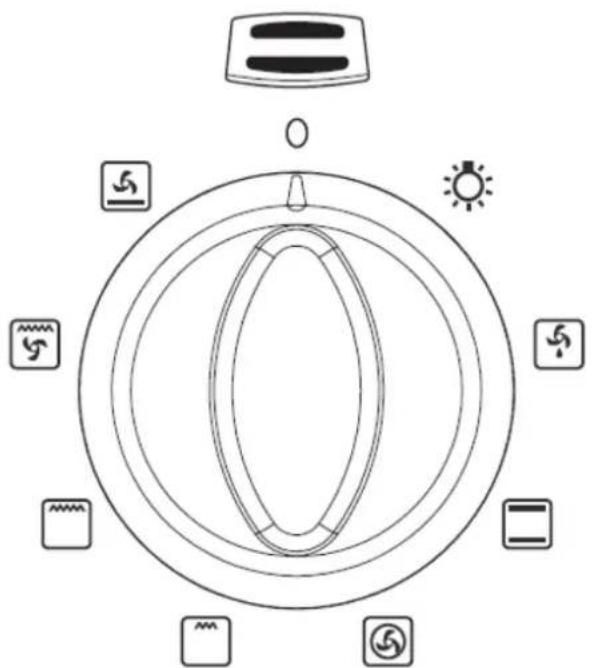
Function Selector
function description
Oven Light | When the selector knob is in any position other than the “0” position, the oven light comes on. |
Defrost | Select this function, the air at ambient temperature is distributed inside the oven for defrosting food more quickly and without proteins adulteration. |
Conventional Mode | Both the lower and upper heating elements operate together.This is for traditional cooking. Very good for roasting joints, ideal for biscuits, baked apples and crisping food. You obtain very good results when cooking on a shelf adjusting the temperature between 50°C and MAX°C. |
Fan Forced | Both the fan and the circular heating element operate together. The hot air adjustable between 50°C and MAX°C is evenly distributed inside the oven. This is ideal for cooking several types of food (meat, fish) at the same time without affecting taste and smell. It is ideal for delicate pastries. |
Half Grill | It is indicated for grilling small quantities of food. |
Full Grill | This feature activates all upper heating elements and give rapid cooking to food. |
Full Grill + Fan Force | The air which is heated by the grill heating element is circulated by the fan and so helps to distribute the heat between 50°C and 200°C. This function can be used for sterilizing glass jars. |
Bottom Element with Fan Force | The air which is heated by the lower heating element is circulated by the fan and so helps to distribute the heat between 50°C and 200°C. This function can be for sterilizing glass jars. |
Select the Temperature
◆ To set the temperature, turn the temperature selector in a clockwise direction to the desired setting. An indicator light above the temperature selector will come on.
A thermostat controls the temperature in your appliance. When the temperature is reached, the heating source switches itself off and the indicator light goes out. When the oven temperature falls below the desired setting, the heating source switches on and the indicator light comes on again.
Once the food is cooked, turn the temperature selector back in an anti-clockwise direction. Do not force it right round in a clockwise direction as this will result in damage to the thermostat.
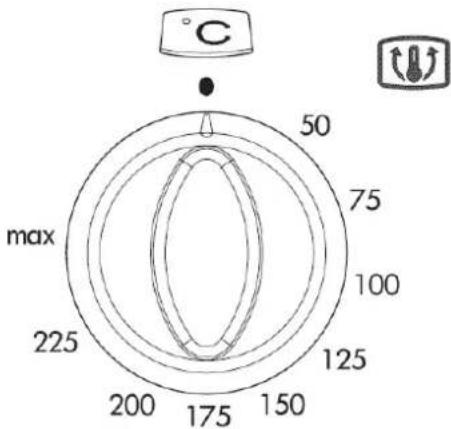
Important
The desired cooking function must be selected before the oven will operate.
Minute Timer
Turn the knob clockwise to set the desired duration. The minute minder can be adjusted from 1 to 120 minutes. An audible signal will sound at the expiry of the set time, this will NOT switch the oven OFF. Switching the oven OFF has to be manually conducted by turning Function Selection Knob to 0.
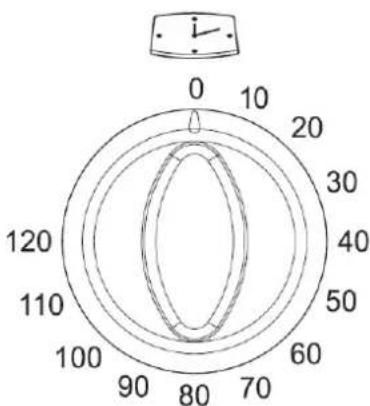
WARNING!
◆ Before cleaning your oven, or performing maintenance, disconnect it from the power supply.
◆ Do not use steam cleaners.
Do not line the oven bottom with aluminium foil, as the consequent accumulation of heat could compromise the cooking and damage the enamel.
◆ To protect against the risk of electrical shock, do not immerse the unit, cord or plug in water or other liquid or sprinkle water to clean the appliance!
Do not clean the appliance when it is still hot! The inside and external surface of the oven should preferably be cleaned by damp cloth when it is cooled down.
◆ Wash all accessories in hot soapy water or in a dishwasher and wipe dry with a paper or cloth towel.
◆ If you use your oven for an extended period of time, condensation may form. Dry it using a soft cloth.
Stainless Steel
All grades of stainless steel can stain, discolour or become greasy. You must clean these areas regularly by following the procedures below, if you want your appliance to look its best, perform well and have a long life.
◆ Care must be taken when wiping exposed stainless steel edges, they can be sharp!
◆ The front frame around the oven can be cleaned with stainless steel cleaners if it becomes soiled or discoloured.
◆ The stainless steel should only be cleaned with warm water and a mild detergent.
◆ Do not use stainless steel cleaners, abrasive cleaners or harsh solvents.
◆ Make sure you follow the polish or brushing lines in the steel.
Glass
◆ Glass surfaces on doors and control panels are best cleaned immediately after soiling.
◆ A damp cloth may help remove baked on food deposits.
◆ Oven cleaners can be used to remove stubborn marks and stains.
Do not use harsh abrasive cleaners or sharp metal scrapers to clean the oven door since they can scratch the surface, which may result in shattering of the glass
◆ Treat glass door gently.
Oven
◆ Always keep your appliance clean. Ensure fats and oils do not accumulate around elements, burners or fans
◆ Always keep the oven dish, baking trays and grill dish inserts clean, as any fat deposits may catch fire.
◆ Always wrap your meats in foil or an oven roasting bag to minimise cleaning. Any polyunsaturated fats can leave a varnish-like residue which is very difficult to remove.
◆ Always keep the grill dish and grill insert clean, as any fat deposits may catch fire.
Replacement of the Oven Light Bulb
WARNING!
Ensure that the appliance is switched off before replacing the lamp to avoid the possibility of electric shock.
◆ Cut off the supply of power to the oven by turning off the omni-polar switch connecting it to the mains, or by removing the plug if it is accessible; Avoids appearing the electric shock;
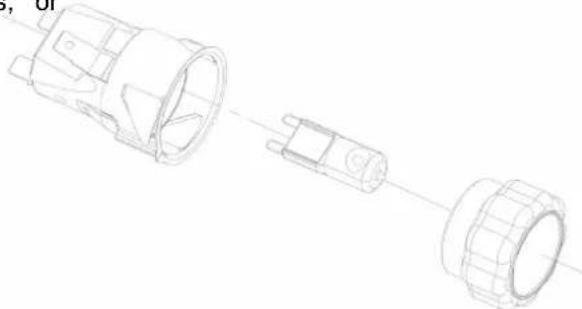
◆ Unscrew the glass cover attached to the lamp holder;
◆ Pull out the lamp and replace it with another high-temperature lamp (300°C) with the following characteristics:
- Voltage: AC230V
- Wattage: 25W
- Socket: G9
◆ Remount the glass cover and reconnect the appliance to the power supply.
natural_image
Exploded view diagram of a mechanical component showing internal parts and assembly (no text or labels)Door Removal
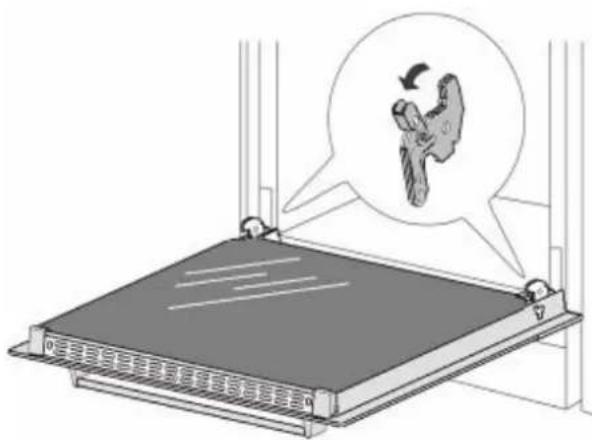
In order to obtain easier access to the oven chamber for cleaning, it is possible to remove the door. To do this, tilt the safety catch part of the hinge upwards. Close the door lightly, lift and pull it out towards you. In order to fit the door back on to the a, do the reverse. When fitting, ensure that the notch of the hinge is correctly placed on the protrusion of the hinge holder. After the door is fitted to the oven, the safety catch should be carefully lowered down again. If the safety catch is not set it may cause damage to the hinge when closing the door.
Middle Layer Glass Removal
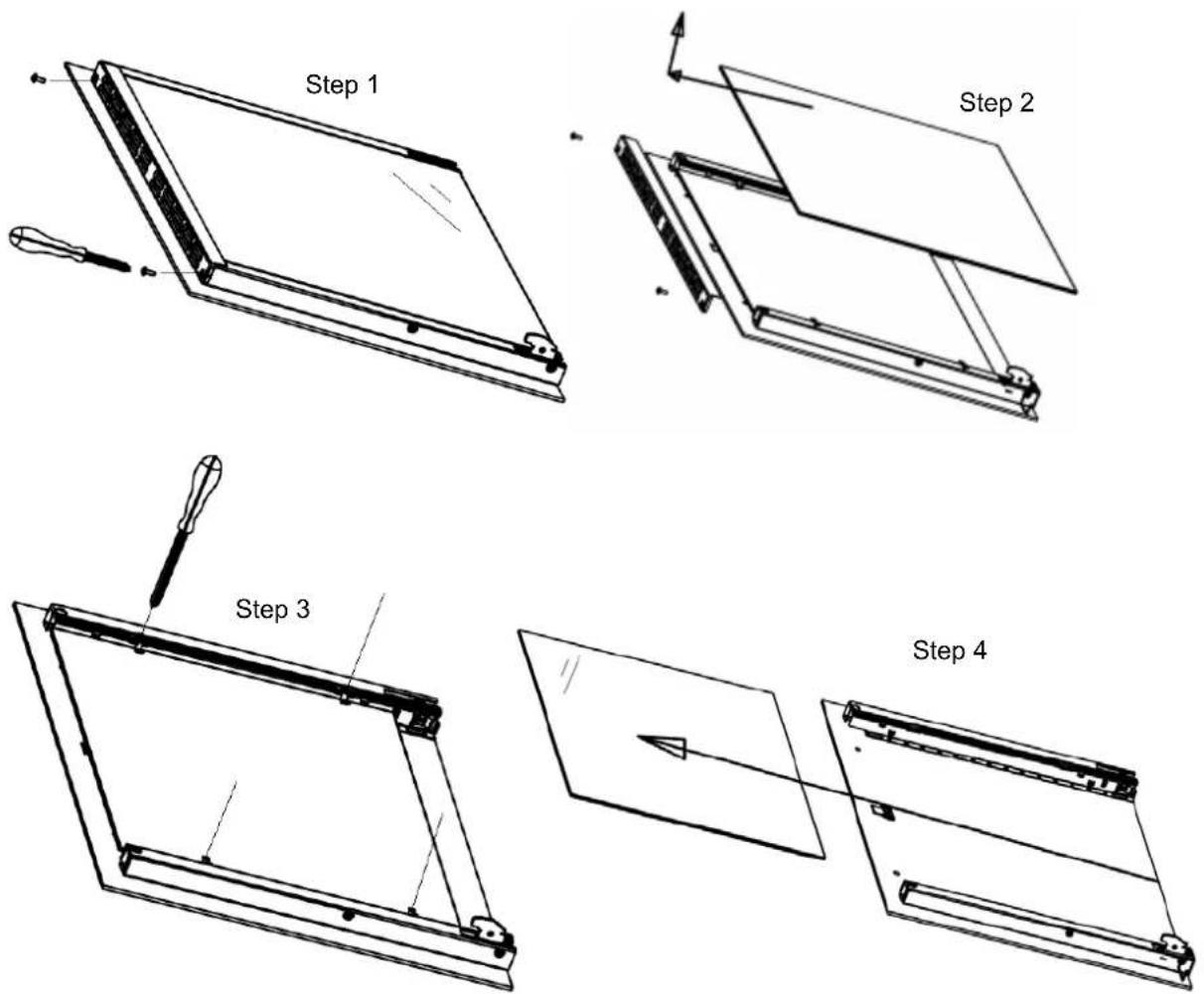
The oven door is made up of 3 panes of glass and has vents at the top and bottom. When the oven is operating, air is circulated through the door to keep the outer pane cool. If condensation has worked its way in between the glass panes, the door can be dismantled in order to clean in between the panes.
Remove the door as per above instruction and place it on a protective surface (e.g. on a table cloth) to prevent it getting scratched. The door handle should line up with the edge of the table. Make sure the glass lies flat to avoid breakage of glass during cleaning.
- Undo the 2 screws on upper bracket.
- Take out upper bracket and first pane of glass.
- Loosen the 4 clips.
- Slide out middle pane of glass carefully. Clean the glass panes and other parts with a damp microfiber cloth or a clean sponge and a solution of hot water with a little washing-up liquid. Wipe dry using a soft cloth.
Troubleshooting
| Faults Causes Remedies | ||
| The upper crust is dark and the lower part too pale | Not enough heat from the bottom | - Use the natural convection position.- Use deeper cake tins.- Lower the temperature.- Put the cake on a lower shelf. |
| The lower part is dark and the upper crust too pale | Excessive heat from the bottom | - Use the natural convection position.- Use lower side tins.- Lower the temperature.- Put the cake on a higher shelf. |
| The outside is too cooked and the inside not cooked enough | Too high temperature - Lower the temper ature and increase the cooking time. | |
| The outside is too dry even though of the right color | Too low temperature | - Increase the temperature and reduce the cooking time. |
| The appliance does not work | Break in power supply - Check the household fuse box, if there is a blown fuse replace it with a new one. | |
| The oven lighting does not work | Bulb is loose or damaged - Tighten up or replace the bl own bulb. (See chapter Cleaning & Maintenance). | |
* New appliances could have a smell during first use. It is recommended to 'run in' the oven before you cook for the first time. Operate the oven, empty, at a temperature of 180°C for approximately 2-4 hours. Please ensure the room is well ventilated during this process.
WARRANTY
1.1 In this warranty:
1.1.1 Australian Consumer Law means the law as set out in Schedule 2 of the Competition and Consumer Act 2010;
1.1.2 Company means GSM Retail Australia Pty Ltd ABN 53 007 682 475 of 142-144 Fullarton Road, Rose Park SA 5067. Telephone 1300 373 199. Email admin@gsmretailgroup.com;
1.1.3 Consumer means a "consumer" as that term is defined in Section 3 of the Australian Consumer Law as the original purchaser of a Mistral product;
1.1.4 Consumer Guarantees means the guarantees under the Australian Consumer Law;
1.1.5 You means the Consumer.
1.2 Nothing in this warranty affects any person's rights under the Australian Consumer Law. The benefits to any Consumer under this warranty are in addition to the rights and remedies available under any Consumer Guarantees.
1.3 Subject to the other clauses of this warranty, the Company warrants to the Consumer that the Mistral product will be free of manufacturing defects and will perform to the Company's specifications.
1.4 The benefit of this warranty extends only to the Consumer as original purchaser of a Mistral product which is installed in a domestic household area.
*The in Home warranty does not apply to Commercial and or industrial usage. * Please See 1.7.7 for additional information
1.5 This warranty commences on the date of purchase of the Mistral product by the Consumer and continues for the benefit only of the Consumer until the expiry of Two (2) year (Warranty Period)
1.6 If within the Warranty Period a manufacturing defect is discovered in the Mistral product or it fails to perform to the Company's specifications as a result of some defect in materials, components or workmanship (Defect) then the Company will, at its option, repair the Mistral product or supply a replacement Mistral product free of charge. A replacement Mistral product may differ from the original product purchased by the Consumer.
1.7 This warranty will not apply to any Mistral product:
1.7.1 Installed by any person other than a qualified tradesperson;or
1.7.2 Subjected to misuse, neglect, negligence or accidental damage; or
1.7.3 Operated in any way contrary to any operating or maintenance instructions; or
1.7.4 Improperly handled, installed or maintained; or
1.7.5 Altered or modified prior to or after installation; or
1.7.6 Damaged directly or indirectly by power surges, electrical storm damage or connection to incorrect power supply
1.7.7 Industrial and or Commercial usage is inclusive of staff areas in office/shop environments, hotel/motel or other similar accommodation or rental type properties including Bed and Breakfast establishments.
The Australian Consumer Law requires the inclusion of the following statement with this warranty:
Our goods come with guaranteed that cannot be excluded under the Australian Consumer Law. You are entitled to a replacement or refund for a major failure and for compensation for any other reasonably foreseeable loss or damage. You are also entitled to have the goods repaired or replaced if the goods fail to be of acceptable quality and the failure does not amount to a major failure.
1.8 You must provide proof of your purchase of the Mistral product and the date of purchase in order to obtain the benefit of this warranty.
1.9 If you live outside the service area of the Company or one of its service agents, this warranty does not cover the cost of transport of the Mistral product for service nor the service agent's traveling costs to and from your home.
1.10 If you are required to transport the Mistral product to the Company or its service agent, you must ensure it is safely disconnected by a qualified tradesman and securely packed and insured. The Company does not accept any responsibility for loss or damage of the Mistral product prior to it being received by the Company or its service agent.
1.11 You will be responsible for all costs of returning a Mistral product to the Company and for redelivery of the Mistral product by the Company (whether it is the original or a repaired and/or a replacement Mistral product) and for any other expenses you incur in claiming under this warranty.
1.12 The Company or its service agent will examine any Mistral product and if the Company determines that it is defective through no fault of the Owner and is otherwise undamaged, the Company will repair or replace the Mistral product in accordance with this warranty.
DO NOT SEND IN THIS WARRANTY
Fill out the following details and file with your purchase invoice.
RETAIN & FILE WITH YOUR RECEIPT
Your Purchase Receipt/Invoice is proof of date of purchase. If you are unable to establish the date of purchase, or if the fault is not covered by this warranty, or if the product is found to be in working order, you will be required to bear all service call charges.
GSM Retail Australia Pty Ltd reserves the right to discontinue items, modify designs and change specifications without incurring obligation.
Whilst every effort is made to ensure that descriptions, specifications and other information in this publication is correct, no warranty is given in respect thereof and the company shall not be liable for any errors therein.
Purchased from:
Co. Name:
Address:
Date of Purchase:
Serial number:
NOTE: Consistent with our continuing product development policy, improvements may have been made which render the contents of this packaging slightly different to that shown.
For Warranty and technical queries: Australia 1300 373 199
: New Zealand 0800 764 912

Gerard Sourcing & Manufacturing
GSM RETAIL AUSTRALIA PTY LTD
The GSM Retail Australia Pty Ltd Group Companies has a policy of continual improvement throughout the product range. As such the unit contained within may differ slightly from the unit illustrated on the pack.
MADE IN CHINA for the GSM Retail Australia Pty Ltd. Group Companies


- Thank you
- Content
- General Warnings
- Child Safety
- Installation, Cleaning & Servicing
- Oven
- Grill
- Environmental Hints
- WARNING!
- Use an Authorised Person
- This Appliance Must Be Properly Earthed
- Fitting Your Appliance
- Connect Power Supply Cord
- Hard Wired Appliances
- Preparing Your Oven
- Select the Functions
- Function Selector
- Select the Temperature
- Important
- Minute Timer
- Stainless Steel
- Glass
- Replacement of the Oven Light Bulb
- Ensure that the appliance is switched off before replacing the lamp to avoid the possibility of electric shock.
- Door Removal
- Middle Layer Glass Removal
- WARRANTY
- In this warranty:
- DO NOT SEND IN THIS WARRANTY
- RETAIN & FILE WITH YOUR RECEIPT
Brand : MISTRAL
Model : MO608B
Category : Oven