
MPZO120 - Oven MISTRAL - Free user manual and instructions
Find the device manual for free MPZO120 MISTRAL in PDF.


| Type of Product | Built-in Oven |
| Brand | Mistral |
| Model | MPZO120 |
| Dimensions (H x W x D) | 595 x 595 x 550 mm |
| Weight | 30 kg |
| Power Supply | 230 V ~ 50 Hz |
| Power Consumption | 2500 W |
| Energy Class | A |
| Oven Capacity | 65 L |
| Temperature Range | 50 °C to 250 °C |
| Functions | Conventional, Fan-Forced, Grill, Defrost, Turbo |
| Interior Light | Yes |
| Electronic Timer | Yes |
| Cooling Fan | Yes |
| Cleaning System | Easy-Clean Enamel |
| Child Lock | Yes |
| Automatic Shut-Off | Yes |
| Spare Parts Available | Heating elements, fan motor, thermostat, door glass |
| Repairability | Service centers and spare parts available |
Frequently Asked Questions - MPZO120 MISTRAL
User questions about MPZO120 MISTRAL
0 question about this device. Answer the ones you know or ask your own.
Ask a new question about this device
Download the instructions for your Oven in PDF format for free! Find your manual MPZO120 - MISTRAL and take your electronic device back in hand. On this page are published all the documents necessary for the use of your device. MPZO120 by MISTRAL.
USER MANUAL MPZO120 MISTRAL
natural_image
Black mistral toaster oven with baked bread and control knobs (no visible text or symbols on main body)Important Safeguards
When using electrical appliances, in order to reduce the risk of fire, electric shock and/or injury, these basic safety precautions should always be followed:
For Your Safety
Read all instructions carefully, even if you are familiar with the appliance.
- To protect against the risk of electric shock, DO NOT IMMERSE the main unit, power plug or cord in water or any other liquid.
- Please read these instructions before operating and retain these for future reference.
- Before connecting the appliance to the power supply, check that the voltage indicated on the appliance corresponds with the voltage in your home. If this is not the case, contact your local qualified technician and DO NOT use the appliance.
- If the supply cord or any part is damaged, cease use of this appliance immediately to avoid a hazard.
- Do not hang the power cord over the edge of a table and do not let the cord contact hot surfaces, including stovetop.
- Place the appliance on a flat surface. Do not place on a heated surface or near a hot gas or electric burner or oven.
- This appliance is not intended for use by persons (including children) with reduced physical, sensory or mental capabilities, or lack of experience and knowledge, unless they have been given supervision or instruction concerning use of the appliance by a person responsible for their safety.
- Children should be supervised to ensure that they do not play with appliance.
- Do not touch the inside of the appliance while it is operating.
-
Keep the appliance and its mains cord out of the reach of children.
• DO NOT PLACE The Unit on stovetop surfaces. -
The appliances are not intended to be operated by means of an external timer or separate remote-control system.
- NEVER USE this appliance with an extension cord of any kind.
- While cooking, the internal temperature of the unit is very high, TO AVOID PERSONAL INJURY, never place hands inside the Unit unless it is thoroughly cooled down.
- Do not use with an extension power cord.
- Do not operate under or near flammable materials, Such as curtains, Drapes and any other combustible materials.
- Switch off the power outlet and remove the plug before cleaning or when not in use. To unplug, grasp the plug and pull from the power outlet. Never pull the power cord. Never carry the appliance by the power cord.
- Do not place the appliance against a wall or against other appliances. Leave at least 10cm clearance around the entire appliance, including directly above it. Additional care should be taking when placing appliances on bench top surfaces or near splash backs where such materials (Acrylics, timber etc.) do not have the high heat resistant properties, so advise to place them on top of a heat resistant material between bench and appliance and further away from wall surfaces / splash backs.
- Do not place anything on top of the appliance.
- Do not use the appliance for any other purpose than described in this manual.
- Do not let the appliance operate unattended.
- Also be careful of hot steam and air when you remove the pan from the appliance.
- The temperature of the door or the outer surface may be high when the appliance is operating.
- Do not operate the appliance if there is a malfunction or if it is damaged in any manner. Immediately unplug the appliance if you see dark smoke coming out of the appliance.
- Wait for the smoke emission to stop before removing oven contents.
-
This appliance is intended for household use only and not for commercial, industrial or outdoor use.
-
This appliance must be earthed. Only connect it to a suitable earthed AC240V\~50Hz mains socket. Always make sure that the plug is inserted into the socket properly.
- Ensure the appliance is placed on a horizontal, even and stable surface.
- The baking tray becomes hot all over when it is used in the oven. Always use the tray clamp or oven gloves when handling the baking tray.
• Always unplug the appliance when not in use. - The appliance needs approximately 30 minutes to cool down.
- In the interest of safety, regular periodic close checks should be carried out on the supply cord to ensure no damage is evident. Do not attempt to dismantle or repair this unit yourself. Repairs should only be performed by qualified personnel in order to avoid a hazard.
- The use of accessory attachments not recommended by the appliance manufacturer may cause injuries.
Warning
If the supply cord is damaged, the cord must be replaced by the manufacturer, its service agent or similarly qualified persons in order to avoid a hazard.
This product has not been designed for any uses other than those specified in this booklet.
Save These Instructions
THIS APPLIANCE IS DESIGNED FOR HOUSEHOLD USE ONLY
Symbol Meanings

CAUTION: HOT SURFACES.
The surfaces are liable to get hot during use, do not touch.

The Regulatory Compliance Mark (RCM) shows that a product is safe to supply to the Australia market.
Features Of Your Pizza Oven

Getting to Know Your Pizza Oven
Congratulations on the purchase of your new Pizza Oven. Before first using your new Pizza Oven, it is most important that you read and follow the instructions in this use and care booklet, even if you feel you are familiar with this type of appliance.
Your attention is drawn particularly to the section dealing with IMPORTANT SAFEGUARDS. Find a safe and convenient place to keep this booklet handy for future reference.
This appliance has been designed to operate from a standard domestic power outlet. It is not intended for industrial or commercial use.
Before First Use
- Carefully unpack the Pizza Oven and remove all packing materials.
- Use a damp cloth to clean the exterior of the Housing, Baking Tray, and Wire Rack. Do not immerse the appliance in water or other liquids.
- Do not use abrasive cleaners to clean your Pizza Oven as these may damage your appliance.
Pizza Oven controls
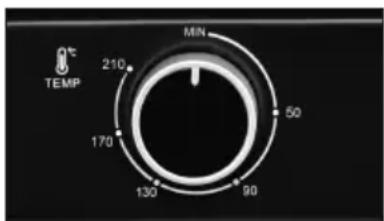
TEMPERATURE CONTROL:
Turn the Temperature Control knob clockwise to the desired temperature setting. The Temperature can be set up to 210°C.
TIMER SETTING
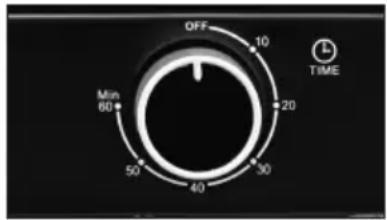
0-60 MINUTES: The Timer can be set up to 60 minutes. The oven will not turn on without the timer being set.
When the Timer knob is on the "OFF" position, the oven will not operate. To set the time, turn the knob clockwise to the desired time. Indicator Light is lit only when Timer has been set. When the Timer has reached the "OFF" position, a bell sound will be heard. Power supply will be cut off automatically.
ADJUSTING TIME
Timer can be changed during cooking cycle. Just turn the Timer knob to the desired time and continue cooking.
NOTE: To select the cooking time that is less than 10 minutes, first rotate the Timer knob more than 10 minutes, and then turn the switch back to the time you require. this is to make the cooking time more accurate.
How to Operate the Pizza Oven
- Place the Pizza Oven on a stable, heat-resistant and flat level surface. Away from other heat source.
- Insert the plug into a standard domestic power outlet and turn the power on.
- Open the glass door, place the Wire rack in position, then place the Baking Tray with food onto the Wire Rack.
- Set the Temperature Control knob to the desired position.
- Securely shut the door and set the cooking time to begin operating the oven.
- When cooking is completed, turn the timer selector knob to "OFF" position, the Pizza Oven will power OFF, disconnect from power supply when not in use.
CAUTION! THE OVEN SURFACES ARE HOT DURING AND AFTER USE, DO NOT TOUCH IT BEFORE COOL DOWN.
WARNING! To protect against the risk of electric shock, DO NOT IMMERSE the Pizza Oven, power plug or cord in water or any other liquid.
CAUTION! The Baking Tray /Wire Rack becomes hot all over when it is used in the oven. Always use the Tray Handle or oven gloves when handing it.
Care and Cleaning
- Clean the Pizza Oven after each use.
• Always unplug the appliance and wait for it to cool down completely before cleaning. - Never immerse the appliance, cord or plug in water or other liquids.
- Do not use abrasive cleaners to clean, because it is easy to scratch the surface of the appliance.
- Wipe the outside of the appliance, Wire Rack, Crumb tray, Baking Tray and the Tray Handle with a damp cloth or sponge with mild soap if necessary.
• Dry thoroughly before using again.
Technical Specifications
Model: MPZO120
Rated power input : 1350W
Voltage and frequency: 240V AC, 50Hz
NOTE: As a result of continual improvements, the design and specifications of the product within may differ slightly to the unit illustrated on the packaging.
Compliance
This product has been fully tested and meets all requirements as set out by standards AS/NZS 60335.1 and AS/NZS 60335.2.9.
Responsible disposal
At the end of its working life, do not throw this appliance out with your household rubbish. Electrical and electronic products contain substances that can have a detrimental effect on the environment and human health if disposed of inappropriately. Observe any local regulations regarding the disposal of electrical consumer goods and dispose of it appropriately for recycling. Contact your local authorities for advice on recycling facilities in your area.
Notes

Gerard Sourcing & Manufacturing
GSM Retail Group
GSM Retail Group has a policy of continual improvement throughout the product range. As such the unit contained within may differ slightly from the unit illustrated on the pack.
MADE IN CHINA for GSM Retail Group Mistral is a registered trademark of GSM Retail Group


- Important Safeguards
- For Your Safety
- Warning
- Save These Instructions
- Symbol Meanings
- Features Of Your Pizza Oven
- Getting to Know Your Pizza Oven
- Before First Use
- Pizza Oven controls
- TEMPERATURE CONTROL:
- TIMER SETTING
- ADJUSTING TIME
- How to Operate the Pizza Oven
- Care and Cleaning
- Technical Specifications
- Compliance
- Responsible disposal
- GSM Retail Group
Brand : MISTRAL
Model : MPZO120
Category : Oven