
VCC - Video Converter Grimm Audio - Free user manual and instructions
Find the device manual for free VCC Grimm Audio in PDF.


| Product Type | Professional Audio Component |
| Brand | Grimm Audio |
| Model | VCC |
| Dimensions (W x H x D) | 19 inches (483 mm) x 1.75 inches (44 mm) x 12.6 inches (320 mm) |
| Weight | 5.5 kg (12.1 lbs) |
| Power Supply | 100-240 V AC, 50/60 Hz, 30 W |
| Power Connector | IEC C14 inlet with detachable power cord |
| Analog Inputs | 2 x XLR (balanced), 2 x RCA (unbalanced) |
| Analog Outputs | 2 x XLR (balanced), 2 x RCA (unbalanced) |
| Digital Inputs | 1 x AES/EBU (XLR), 1 x S/PDIF (RCA) |
| Digital Outputs | 1 x AES/EBU (XLR), 1 x S/PDIF (RCA) |
| Sample Rate | Up to 192 kHz, 24-bit |
| Frequency Response | 20 Hz - 20 kHz (±0.1 dB) |
| Total Harmonic Distortion + Noise | < 0.001% @ 1 kHz, 0 dBFS |
| Dynamic Range | > 120 dB (A-weighted) |
| Primary Function | High-precision voltage control and signal routing |
| Chassis Material | Aluminum front panel, steel enclosure |
| Display | OLED status display with dimmable brightness |
| Remote Control | Infrared remote included (optional RS-232) |
| Operating Temperature | 0°C to 40°C (32°F to 104°F) |
| Warranty | 2 years limited warranty |
| Cleaning Instructions | Use a dry, soft cloth. Do not use liquids or abrasive cleaners. |
| Safety Precautions | Operate in a dry environment. Do not open the unit. Refer servicing to qualified personnel. |
| Spare Parts Availability | Contact Grimm Audio support or authorized distributors for replacement parts. |
Frequently Asked Questions - VCC Grimm Audio
User questions about VCC Grimm Audio
0 question about this device. Answer the ones you know or ask your own.
Ask a new question about this device
Download the instructions for your Video Converter in PDF format for free! Find your manual VCC - Grimm Audio and take your electronic device back in hand. On this page are published all the documents necessary for the use of your device. VCC by Grimm Audio.
USER MANUAL VCC Grimm Audio
Please read this manual before operating the unit!
Table of Contents
Introduction
- Installing 5
- Operation 6
- Specifications 7
- Grimm Audio Limited Warranty 8
4
Introduction
Thank you for choosing the Grimm Audio VCC Video to Word Clock converter. The VCC was designed to be directly attached to a word clock BNC input, effectively turning it into a video sync input. The VCC is therefore the ideal complementary product for use with our CC1 master clock when audio needs to slave to video and a word clock reference is not available. Of course the VCC can also be used with any other device that lacks a video sync input but can slave to word clock. Note that the VCC does not have jitter attenuation because the CC1 takes care of that. When using the VCC with a device other than the CC1, make sure that it too has good jitter suppression.
1. Installing
Signal connections
The VCC can be mounted directly on the BNC connector of the receiving or transmitting device, as shown in the picture below. Alternatively, 75Ohm BNC cables can be used on both sides of the VCC.

natural_image
Close-up of a VCC audio device with attached CD driver and external audio unit (no visible text or symbols on the device itself)Power supply
The power supply of the VCC is provided by the wall adaptor unit that is linked to the VCC. It was decided to use a fixed connection between the wall adaptor and VCC because the standard supply connections showed unreliable performance on the road. A well functioning VCC can be vital in your facilities system, so we sacrificed the convenience of a detachable supply.
2. Operation
Lock indication
The VCC locks to PAL, NTSC and SECAM video signals. Usually a black burst signal is used for reference, but the VCC will lock to any type of video content. The little white LED that shines through the dot hole of the 'i' in the VCC | Grimm logo functions as power and lock indication. It will blink in case no lock is possible and it will light continuously when the VCC is locked to the video signal.
Output sample rate
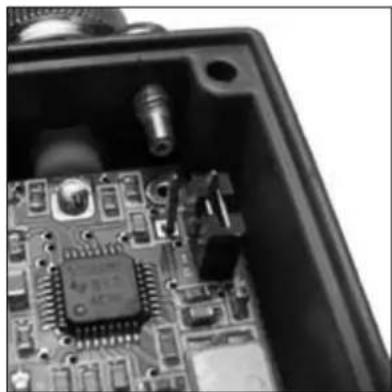
VCC's are shipped off factory with the output sample rate set to 48 kHz. If your application demands a 44.1 kHz sample rate, this needs to be changed inside the box. First make sure the power supply is removed from the power outlet. Then unfasten the four Phillips screws in the corners of the lid. Remove the lid and locate the jumper in the interior. When the jumper is open the VCC provides 48 kHz word clock, when it is closed the unit offers a 44.1 kHz word clock. In the pictures below the two settings are illustrated. After setting the jumper in its preferred position, remount the lid (noting the correct position of the dot hole) and lock it with the Phillips screws.
natural_image
Close-up of an electronic circuit board with integrated circuits and connectors (no visible text or symbols)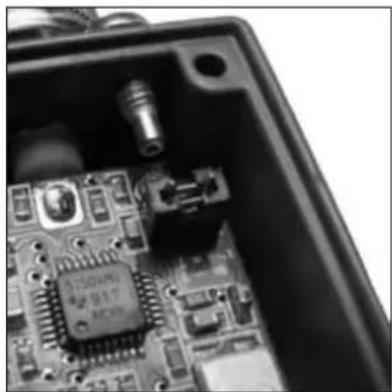
natural_image
Close-up of an open electronic circuit board with integrated circuits and connectors (no visible text or symbols)jumper set to 48 kHz jumper set to 44.1 kHz
3. Specifications
Specifications
Video input impedance 75 Ohm.
Video input maximum voltage 1.5 Vpp.
Word clock output impedance 75 Ohm.
Word clock output voltage, unterminated 3.3 Vpp. DC coupled.
Supported video formats:
· NTSC (J, M, 4.43) 29.97 fps
· PAL (B, D, G, H, I, M, N, Nc) 25 fps or M = 29.97 fps
· SECAM (B, D, G, K, K1, L) 25 fps
Weight: 50 g
Dimensions: 78 x 29 x 23 mm.
Power supply voltage range: 100-240 V 50/60Hz.
Power consumption: 1 W.
Grimm Audio contact information
Grimm Audio CV
Strijpsestraat 94
5616 GS Eindhoven
The Netherlands
+31 (0)40-213 1562
Email: info@grimmaudio.com
Website: http://www.grimmaudio.com
4. Grimm Audio Limited Warranty
Grimm Audio CV (“Grimm Audio”) warrants this product to be free of defects in material and workmanship for a period of one (1) year for parts and for a period of one (1) year for labor from the date of original purchase. This warranty is enforceable only by the original retail purchaser and cannot be transferred or assigned.
During the warranty period Grimm Audio shall, at its sole and absolute option, either repair or replace free of charge any product that proves to be defective on inspection by Grimm Audio or its authorized service representative. In all cases disputes concerning this warranty shall be resolved as prescribed by law. To obtain warranty service, the purchaser must first call or write Grimm Audio at the address and telephone number printed below to obtain instructions where to send the unit for service. All enquiries must be accompanied by a description of the problem. All authorized returns must be sent to Grimm Audio or an authorized Grimm Audio repair facility postage prepaid, insured and properly packaged. Proof of purchase must be presented in the form of a bill of sale or some other positive proof that the product is within the warranty period. Grimm Audio reserves the right to update any unit returned for repair. Grimm Audio reserves the right to change or improve design of the product at any time without prior notice.
This warranty does not cover claims for damage due to abuse, neglect, alteration or attempted repair by unauthorized personnel, and is limited to failures arising during normal use that are due to defects in material or workmanship in the product.
In no event will Grimm Audio be liable for incidental, consequential, indirect or other damages resulting from the breach of any express or implied warranty, including, among other things, damage to property, damage based on inconvenience or on loss of use of the product, and, to the extent permitted by law, damages for personal injury.
© 2013, Grimm Audio CV. All rights reserved Reproduction in whole or in part is prohibited. Specifications subject to change without notice.
Grimm Audio VCC manual v1.1, 06/12/13


Brand : Grimm Audio
Model : VCC
Category : Video Converter