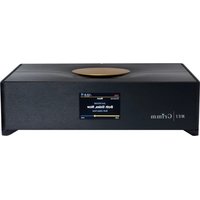
MU1 - Media player Grimm Audio - Free user manual and instructions
Find the device manual for free MU1 Grimm Audio in PDF.


Pick your language and provide your email: we'll send you a specifically translated version.
| Product Type | Media Player / Music Streamer |
| Brand | Grimm Audio |
| Model | MU1 |
| Dimensions (W x D x H) | 430 x 330 x 90 mm |
| Weight | Approx. 8 kg |
| Power Supply | 100-240 VAC, 50/60 Hz, internal linear PSU |
| Power Consumption | Typical 30 W, standby <0.5 W |
| Supported Audio Formats | DSD, PCM up to 384 kHz, MQA, FLAC, ALAC, WAV, AIFF, MP3 |
| Network Connectivity | Ethernet 1000Base-T, Wi-Fi (optional USB dongle) |
| Digital Outputs | AES/EBU (XLR), S/PDIF (coaxial & TOSLINK), USB Audio Class 2.0 |
| Digital Inputs | USB (for storage), Ethernet |
| Streaming Protocols | Roon Ready, UPnP/DLNA, Tidal, Qobuz, AirPlay 2 |
| Sample Rate Support | 44.1 kHz to 384 kHz, DSD64/128/256 |
| Bit Depth | Up to 32-bit |
| Control Interface | Front panel buttons, IR remote, Roon app, web interface |
| Display | 3.5 inch TFT color screen, 320x240 pixels |
| Internal Storage | Optional SSD (user-installable 2.5 inch SATA) |
| USB Ports | 1x USB 3.0 Type A (front), 2x USB 2.0 (rear) |
| Operating Temperature | 5°C to 35°C |
| Storage Temperature | -20°C to 60°C |
| Safety Certifications | CE, FCC, RoHS |
| Maintenance | Wipe with dry soft cloth; avoid liquids; keep ventilation clear |
| Spare Parts Availability | Power supply, display, main board (contact Grimm Audio) |
| Warranty | 2 years (extendable) |
Frequently Asked Questions - MU1 Grimm Audio
How do I connect the MU1 to my network?
Use the RJ45 Ethernet port on the rear panel. Connect to your router/switch with a CAT5e or better cable. The MU1 supports DHCP. For Wi-Fi, attach a compatible USB dongle (not included).
Can I use the MU1 with Roon?
Yes, the MU1 is Roon Ready. Ensure Roon Core is on the same network. The MU1 will appear as an audio endpoint in Roon settings.
What digital outputs does the MU1 have?
It provides AES/EBU (XLR), S/PDIF coaxial RCA, TOSLINK optical, and USB Audio Class 2.0. All outputs support high-resolution audio up to 384 kHz PCM and DSD256.
How do I update the firmware?
Firmware updates are delivered via the network. Go to the web interface (http://mu1.local) or use the Roon app. The device checks for updates automatically.
Can I play music from a USB drive?
Yes, insert a FAT32, exFAT, or NTFS formatted USB drive into the front USB 3.0 port. The MU1 can access files via UPnP/DLNA or Roon.
What should I do if the display shows 'No Signal'?
Check that the device is receiving power (LED on). Ensure the HDMI or display cable is not used (MU1 has no video output). The display shows network status. If blank, try a power cycle.
Is the MU1 compatible with Tidal and Qobuz?
Yes, via Roon integration or direct UPnP streaming. Use the Roon app to link your Tidal/Qobuz account and stream to the MU1.
How do I reset the MU1 to factory settings?
Press and hold the front panel 'Menu' button for 10 seconds until 'Factory Reset' appears. Confirm with the knob. Alternatively, use the web interface.
Can I control the MU1 without a smartphone?
Yes, the front panel has buttons and a rotary knob for basic control. An IR remote is also included. The web interface provides full control.
What is the power consumption in standby?
Typical standby power is less than 0.5 watts. The unit can be fully powered off via the rear rocker switch.
User questions about MU1 Grimm Audio
0 question about this device. Answer the ones you know or ask your own.
Ask a new question about this device
No questions yet. Be the first to ask one.
Download the instructions for your Media player in PDF format for free! Find your manual MU1 - Grimm Audio and take your electronic device back in hand. On this page are published all the documents necessary for the use of your device. MU1 by Grimm Audio.
USER MANUAL MU1 Grimm Audio


Manual assistant
Powered by Anthropic
Waiting for your message
Product information
Brand : Grimm Audio
Model : MU1
Category : Media player