
HFX85W15C - Air purifier DELONGHI - Free user manual and instructions
Find the device manual for free HFX85W15C DELONGHI in PDF.


| Product Type | Air Purifier, Heater, and Fan |
| Brand | DeLonghi |
| Model | HFX85W15C |
| Power Supply | 120 V~60 Hz |
| Power Consumption | 1500 W |
| Operating Modes | Heating, Fan, Air Purification |
| Fan Speeds (Heat Mode) | 1–6 |
| Fan Speeds (Fan Mode) | 1–10 |
| Temperature Range (Heat) | 50 °F (10 °C) to 82 °F (28 °C) |
| Filter Type | Replaceable air purification filter |
| Filter Replacement Indicator | Yes (displays “CF”) |
| Filter Lifespan | Up to 9 months (based on 8 h/day medium load) |
| Timer | 0.5 h, 1 h, 2 h, 4 h, 6 h, 8 h, 12 h (delayed on/off) |
| Oscillation | Yes (left/right) |
| Remote Control | Included (CR2032 battery) |
| ECO Function | Yes (energy-saving in heating mode) |
| Safety Features | Tip-over switch, thermal cutout, overheat alarm |
| Maintenance | Clean filter with vacuum; replace filter when CF alarm appears |
| Display Brightness | 3 levels (L1, L2, L3) |
| No Beep Function | Yes (can mute buzzer except standby/on) |
| Airflow Direction | High (H) or Low (L) |
| Temperature Scale | °C or °F (switchable) |
Frequently Asked Questions - HFX85W15C DELONGHI
User questions about HFX85W15C DELONGHI
0 question about this device. Answer the ones you know or ask your own.
Ask a new question about this device
Download the instructions for your Air purifier in PDF format for free! Find your manual HFX85W15C - DELONGHI and take your electronic device back in hand. On this page are published all the documents necessary for the use of your device. HFX85W15C by DELONGHI.
USER MANUAL HFX85W15C DELONGHI
AIR PURIFIER, HEATER AND FAN
Instructions for use. Keep these instructions
Visit www.delonghi.com for a list of service centers near you.
ELECTRIC CHARACTERISTICS
120 V\~60 Hz 1500 W
natural_image
Modern cylindrical air purifier with perforated grille and base (no text or symbols visible)
page 4

page 13
IMPORTANT INSTRUCTIONS
When using any electrical appliance, some basic safety precautions should always be observed to reduce the risk of fire, electric shock, and/or injury to persons. Read all instructions carefully before using the appliance. Specifically:

Danger!
Failure to observe the warning may result in life threatening injury by electric shock.
- Do not operate any heater with a damaged cord or plug or after the heater malfunctions, has been dropped or damaged in any manner. Return heater to authorized service facility for examination, electrical or mechanical adjustment, or repair.
- This heater is not intended for use in bathrooms, laundry areas and similar indoor locations. Never locate heater where it may fall into a bath tub or other water container.
- Do not use this heater in the immediate surroundings of a bath, a shower or a swimming pool.
- When using the appliance, make sure that the switch or other control devices are not within reach of persons in the bath or shower.
- Do not insert or allow foreign objects to enter any ventilation or exhaust opening as this may cause an electric shock, fire, or damage the heater.
- CAUTION: to prevent electric shock match wide blade of plug to wide slot, then fully insert.
- CAUTION: In order to avoid a hazard due to inadvertent resetting of thermal cutout, this appliance must not be supplied through an external switching device, such as a timer, or connected to a circuit that is regularly switched on and off by the utility.
- This heater may include an visual alarm to warn that parts of the heater are getting excessively hot. If the alarm flashes, immediately turn the heater off and inspect for any
objects on or adjacent to the heater that may cause high temperatures. DO NOT OPERATE THE HEATER WITH THE ALARM FLASHING.

Important!
Failure to observe the warning could result in injury or damage to the appliance.
- The appliance is not intended for use by persons (including children) with reduced physical, sensory ormental capabilities, or lack of experience and knowledge, unless they have been given supervision or instruction concerning use of the appliance by a person responsible for their safety. Children should be supervised to ensure that they do not play with the appliance.
- Extreme caution is necessary when any heater is used by or near children or invalids and whenever the heater is left operating and unattended.
- Always unplug heater when not in use.
- Use this heater only as described in this manual. Any other use not recommended by the manufacturer may cause fire, electric shock, or injury to persons.
- The heater must not be located immediately below a socket-outlet.
- To prevent overload and blown fuses, be sure that no other appliance is plugged into the same outlet (receptacle) or into another outlet (receptacle) wired into the same circuit.
- Be sure that the plug is fully inserted into an appropriate outlet. Please remember that outlets also deteriorate due to aging and continuous use: check periodically if signs of overheating or deformations are evi-denced by the plug. Do not use the outlet and CALL your electrician.

Danger of burns!!
Failure to observe the warning could result in burns or scalds.
- This heater is hot when in use. To avoid burns, do not let bare skin touch hot surfaces. Use handle when moving this heater. Keep
combustible materials, such as furniture, pillows, bedding, papers, clothes, and curtains at least 3 feet (0,9 m) from the front and top of the heater and keep them away from the sides and rear.
- Do not run cord under carpeting. Do not cover cord with throw rugs, runners, or the like. Arrange cord away from traffic area and where it will not be tripped over. Do not route cord under furniture or appliances.
- To prevent a possible fire, do not block air intakes or exhaust in any manner. Do not use on soft surfaces, like a bed, where openings may become blocked.
- A heater has hot or arcing or sparking parts inside. Do not use it in areas where gasoline, paint, or flammable liquids are used or stored.
- It is normal for the heater's plug and cord to feel warm to the touch. A plug or cord which becomes hot to the touch or becomes distorted in shape may be a result of a worn electrical outlet. Worn outlets or receptacles should be replaced prior to further use of the heater. Plugging heater into a worn outlet / receptacle/ may result in overheating of the power cord or fire.
- If the supply cord is damage, it must be replaced by the manufacturer, its service agent or similarly qualified person in order to avoid a hazard.
- WARNING: Do not cover the appliance while it is functioning in order to avoid overheating which may cause risk of fire.

Please note:
This symbol indicates recommendations and important information for the user.
- If your appliance is equipped with a poly-thene tape used as carry handle, remove it before connecting appliance to the outlet.
- Do not use outdoors.
- Always use the appliance stand alone on the floor and in an upright position.
-
To disconnect heater, turn controls to off, then remove plug from outlet.
-
Connect to properly polarized outlets only.
- This heater is not intended for use with an extension cord or outlet strip. Plug the cord directly into an appropriate wall receptable.
-
Check that neither the appliance nor the power cable have been damaged in any way during transportation.
-
Do not use the appliance in rooms with a floor area of less than 43 square feet (4mq).
- Make sure that no pieces of polystyrene or other packaging material have been left on the appliance. It may be necessary to pass over the appliance with a vacuum cleaner.
- When switching on the appliance for the first time, allow it to run at full power for at least two hours to get rid of the unpleasant smell. Make sure that the room in which the appliance is located is well ventilated during this operation. It is normal for the appliance to emit small cracking sounds when you turn it on.
SAVE THESE INSTRUCTIONS
THIS PRODUCT IS FOR HOUSEHOLD USE ONLY
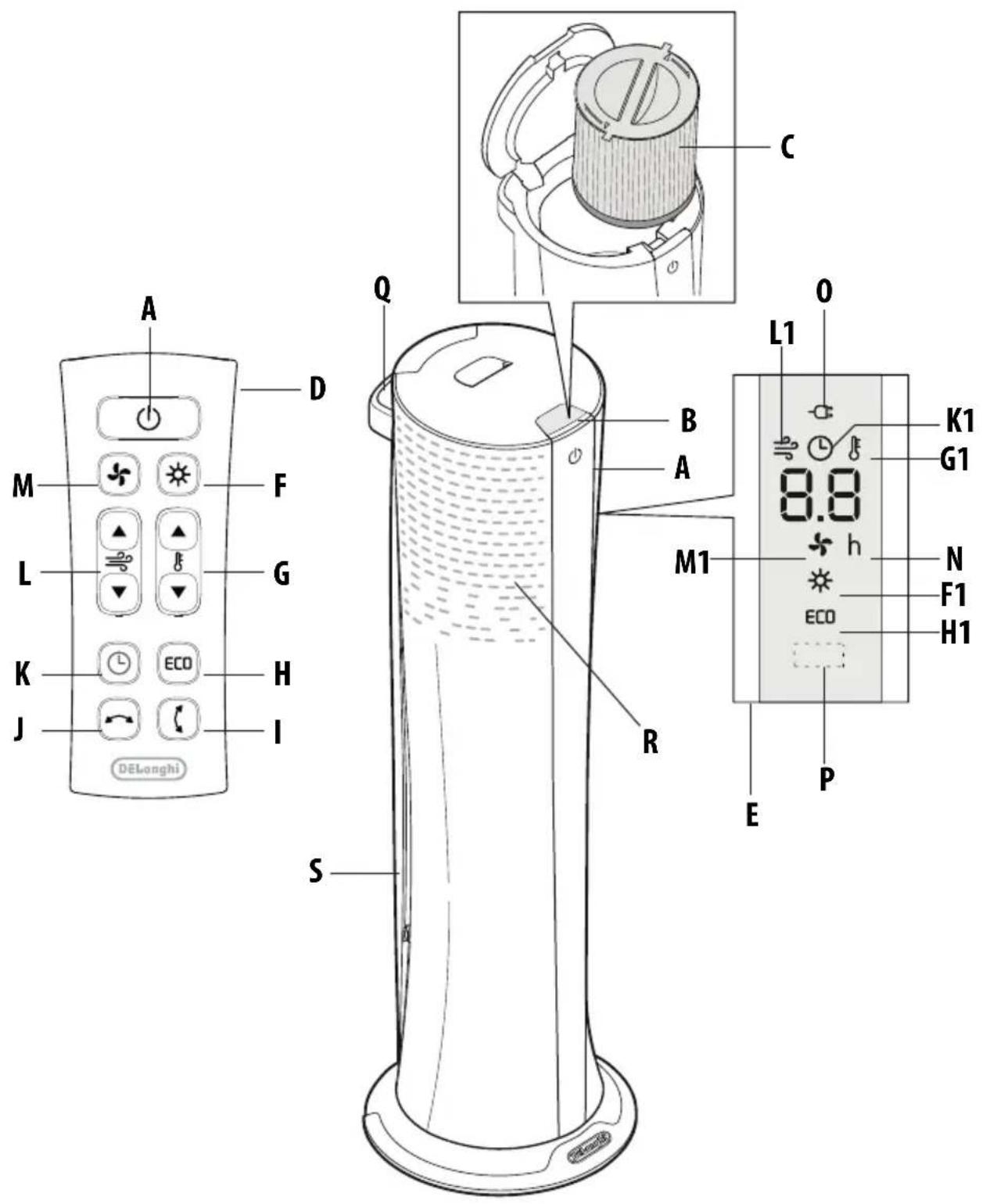
DESCRIPTION
A ON/STANDBY button
B Lid release button
C Air purification filter
D Remote control
E Control panel
F Heating button
F1 Heating mode
G Temperature buttons
G1 Temperature indicator (C° and F°)
H ECO button
H1 ECO function
I Airflow direction button
J Oscillation button
K Timer button
K1 Timer function
L Fan speed buttons
L1 Fan speed indicator
M Fan button
M1 Fan mode
N Hours
0 Power indicator light
P Receiver for remote control
▲ Increase button
▼ Decrease button
Q Handle
R Air inlet
S Air outlet
OPERATION AND USE
Electrical connection
Before plugging the appliance into the outlet, check that the power supply corresponds to the value indicated on the rating plate and that the power supply is adequate for the load.
Installation
The appliance can be used on any horizontal stable surface.
Do not overload the electrical circuit.
Avoid using the same socket for other appliances.

Please note: the appliance can be easily moved carrying it by the handle. Before moving it remember to turn it off.
Starting instructions

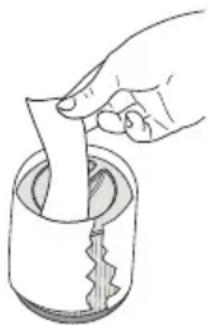
Please note: the filter is provided with a protective wrapper around it that needs to be removed before first use.
- Before turning on the appliance remove the filter from its housing as explained in the filter maintenance section.
- Remove the wrapper covering the filter (fig.1).
natural_image
Hand pouring liquid into a cylindrical container with a spiral pattern (no text or symbols)fig.1
- Replace the filter in its housing as explained in the filter maintenance section.
- Connect the appliance to the power outlet.
- The appliance emits three beeps and the power indicator light (0) also comes on and remains lit while power to the appliance is on. The appliance goes into STANDBY.
OPERATING MODES
Turn on the appliance
- Press/touch the ON/STANDBY button (A) to turn on the appliance.
There are two buttons to select the operating modes of the appliance: heating ⚙ (F) and fan ⚗M).
- To turn off the appliance press/touch button ON/STANDBY (A). If unit has been in heat mode, expect the display to count down for about 10 seconds before the unit shuts off. After that, to completely turn off the appliance, remove the plug from the socket.

Please note: never turn off the appliance by only pulling the plug. Press/touch the ON/STANDBY button (A) and wait a few minutes before pulling the plug. In this manner, the appliance can perform operating status checks.
Air purification
The product is designed to offer constant air purification from allergens and pollutants. In heating and fan modes. The purification function is NOT working when in the STANDBY mode. If air purification is desired regardless of the need for heating or ventilation, it is advisable to set the product in fan mode using ventilation levels 1 through 5.
Heating mode
- To select this operating mode, press the heating button ✿ (F) on the remote control. The display shows the
symbol ⚙1); the temperature can be set by pressing the temperature buttons (▲ or ▼) (G) on the remote control.
At first pressing, the display will show the current set-point for approximately 4-5 seconds together along with the symbol; the temperature can be increased or decreased by pressing button or respectively.
- The minimum setting is 50^ F ( 10^ C) and the maximum is 82^ F ( 28^ C).
- In this mode it is possible to increase or decrease the fan speed by pressing the speed button ▲ or (□) on remote control; the minimum fan speed available in heating mode is 1, the maximum is 6.
- At first pressing, the display will show the current fan speed for approximately 4-5 seconds along with the symbol.
i Please note: the appliance will operate for few seconds with a reduced airflow to allow the preheating in order to guarantee the best comfort.
i Please note: When the set temperature is reached, the appliance will automatically stop heating but could keep working for a preset time at reduced airflow speed. The appliance will restart heating again, at the previous settings, as long as needed to maintain the desired set temperature.
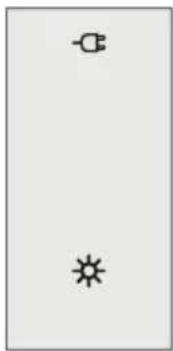
Examples: heating mode
natural_image
Simple diagram with three symbols: a circle, a star, and a minus sign, arranged vertically (no text or labels)- Press heating button (F), the display shows.
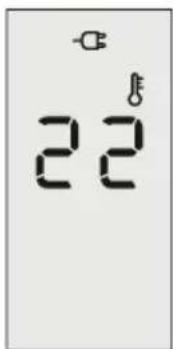
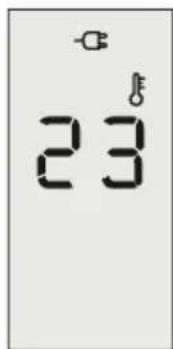
- Press the temperature button ▲ or ▼ (G) to select
desired temperature.
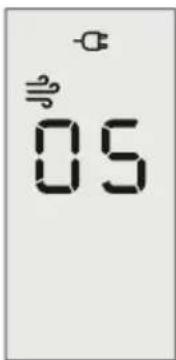
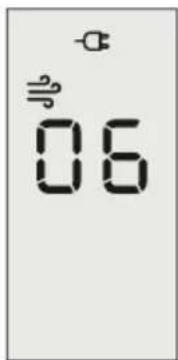
- Press the speed button ▲ or ▼ (L) to increase or decrease the fan speed.
ECO function
This function can be activated only with the heating operating mode. To activate this function, press the ECO button (H) on the remote control, the display shows ECO. The appliance will automatically set the power level to guarantee the best comfort while reducing the energy consumption.
Fan mode
In this operating mode only the fan operates so the appliance does not heat the room. This is ideal during summer days because it moves air in a room, creating a pleasant breeze instead of stale air.
- To select this operating mode, press the fan button ✗ (M) on the remote control, the display shows the symbol ✗ (M1).
- In fan mode 10 speeds are available. It's possible to increase or decrease the fan speed by pressing the speed button ▲ or ▼L) on the remote control. The value changes one fan speed at a time.
- At first pressing, the display will show the current fan speed.
Examples: fan mode
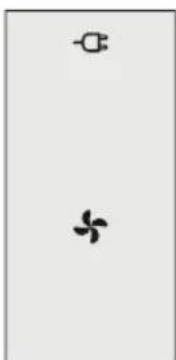
natural_image
Simple diagram with three symbols: a circle, a four-petal flower, and a minus sign, arranged vertically (no text or labels)- Press fan button ✕ (M), the display shows the symbol ✕.
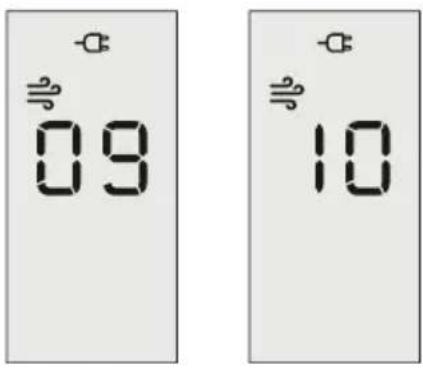
- Press the speed button ▲ or ▼ (L) to increase or decrease the fan speed. The display will show the fan speed you have selected.
TIMER operation
The timer can be used to delay appliance start up or shutdown. This avoids wasting electricity by not operating the appliance when it is not needed.
This function can be activated from any operating mode.
- DELAYED SWITCH-ON: with the appliance in the STANDBY mode position, press the timer button (K) on the remote control, the display shows the symbol (K1) together with "h" (N). The time can be set pressing the timer button repeatedly to select from the following choices: 0.5h, 1h, 2h, 4h, 6h, 8h and 12h.
Once having set the desired time, it will remain in the display for 4-5 seconds and then disappear.
When the programmed time has been reached, the appliance automatically turns on with the same settings it had during the previous operation.
Once the function has been set, if you want to go back to operation without the timer, press the timer button (K) twice rapidly. The timer symbol ⏻ disappears from the display.
- DELAYED SHUT-OFF: With the appliance ON, press the timer button (K) 📊 on the remote control. The display shows the symbol (K1) together with "h" (N). The time can be set pressing the timer button repeatedly to select from the following choices: 0.5h, 1h, 2h, 4h, 6h, 8h and 12h. Once having set the desired time, it will automatically disappear after 4–5 seconds. When the programmed time has been reached, the appliance shuts off automatically.
Once the function has been set, if you want to go back to operation without the timer, press the timer button (K) twice rapidly. The timer symbol disappears from the display.
i Please note: while the timer is active, the operating settings of the unit can still be modified.
i Please note: while this function is active, if the timer button is pressed one time, the remaining time will be shown on the display.
i Please note: if a power failure or power interruption occurs, the time function is reset and the appliance automatically goes to STANDBY.
i Please note: if the ON/STANDBY button is pressed while the timer function is active, the unit changes its status (for example it goes to ON from STANDBY or vice versa) and timer function will be deactivated.
Examples: timer function
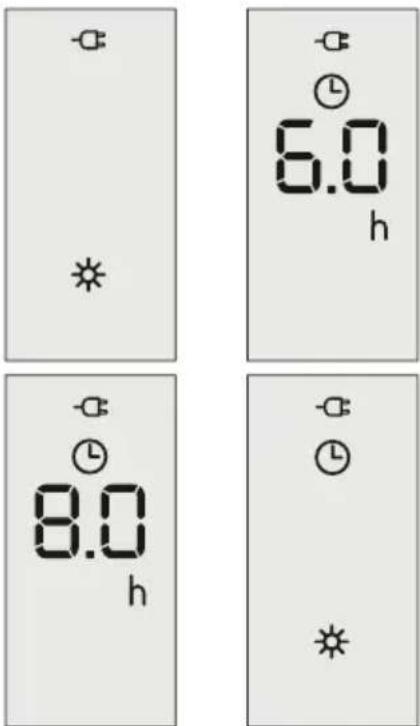
- In heating mode press timer button till 6h appears on display, press again to the desired value of 8h. The selected time will disappear after 4-5 seconds if timer button is not pushed again.
Oscillation button
If you want the appliance to distribute the airflow over a larger area, press the oscillation button (J) on remote control. The appliance will then oscillate right and left.
To stop the oscillation in the desired position, just press oscillation button (J) again.
i Please note: never try to rotate the appliance manually as you may damage the unit.
i Please note: when changing the settings, the oscillation temporarily stops for approximately 10-15 seconds before resuming.
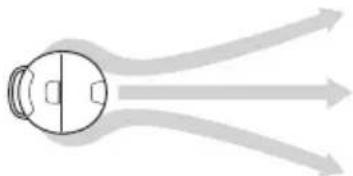
Airflow
The airflow moves around the surface of the appliance spreading uniformly throughout the room, ensuring a perfect comfort level.
natural_image
Diagram of a human head with arrows indicating airflow or movement, no text or symbols presentImportant! NEVER put your hands or any foreign objects e.g. a knife or foil, into the air outlet (S).
Airflow direction
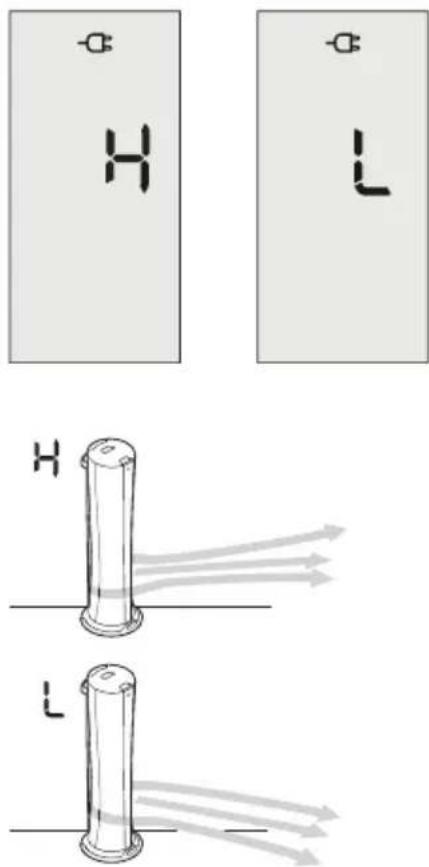
This function allows to orientate the airflow in the best way. There are two positions, "H" and "L" (high and low direction). Once the button airflow direction (I) is pressed, the buzzer emits a sound and the display shows "H" or "L" for a few seconds.
Examples of the display of airflow direction:
Changing the temperature scale
To change the temperature scale, press the temperature button (G) and speed button (L) on the remote at the same time. An acoustic signal will sound and the display will show for 3 seconds "F" (Fahrenheit) or "E" (Celsius) with the symbol ♂.
No beep function
This function allows to activate or deactivate the buzzer placed on the control panel.
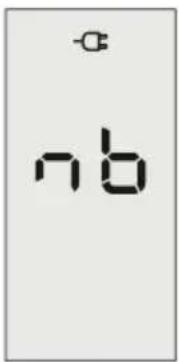
Press together airflow direction button (I) and oscillation button (J). The display shows the script "nb" for a few seconds, then the normal display reappears. This function is available in any operating mode, including standby.
Examples: no beep function
i Please note: the buzzer shall generate the sounds related to the commands "STANDBY" and "ON" regardless of No Beep function.
Brightness of the display
The appliance allows two different brightness settings for the display. The highest is active when any key button is pressed. After a few seconds of keyboard inactivity, the brightness will decrease to the operating brightness level.
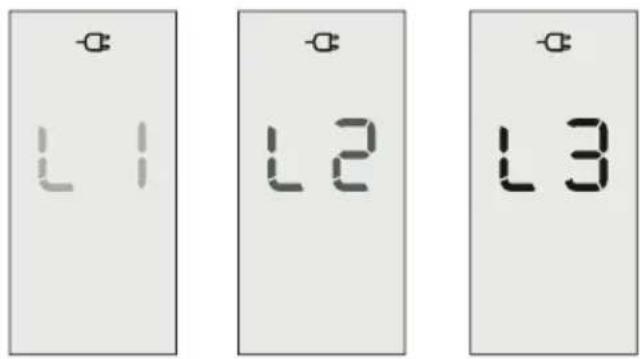
To change the operating brightness level, press the ECO button (H) and timer button (K) together. Three brightness levels are available.
The display shows: "L1", "L2", "L3" for 4-5 seconds, and within this time it is possible to increase or decrease the brightness level using the speed buttons (L), ▲ or ▼ respectively. After 4-5 seconds, the last level of brightness selected will be shown on the display and then disappear automatically.
Examples: brightness of the display:
Remote control: inserting or replacing the batteries
- The remote control
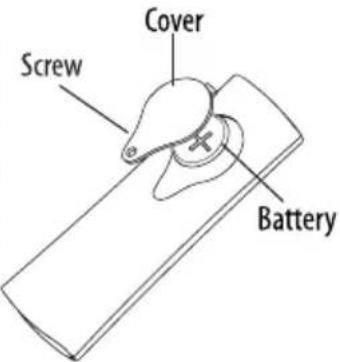
is provided with a 3v lithium flat button battery type CR2032. To activate the remote control, remove the battery cover strip by pulling to remove it.
- To replace the
batteries, remove the battery, remove the cover by rotating the screw counterclockwise with a screwdriver like those you would use to fix eyeglasses. Replace the battery paying attention to the correct polarity as shown in figure above.
- Replace the cover rotating the screw clockwise.
- Old batteries must be removed and disposed off in accordance with current legislation as they are harmful to the environment.
WARNING: DO NOT DISPOSE OF BATTERIES IN FIRE. BATTERIES MAY EXPLODE OR LEAK.
Operating from the control panel
To use the unit the remote control is needed. If the remote control is not available, it's possible to switch the operating mode between fan and heating by using the ON/STANDBY button (A) on the control panel. While the unit is in STANDBY MODE, press the ON/STANDBY button for approximately 10 seconds. The appliance comes on with the opposite function set before it was shut off with a pre-defined temperature set in case of heating and a pre-defined speed in fan mode.
MAINTENANCE
General product maintenance
Before carrying out any maintenance, always unplug from the wall socket.
i Please note: during the season when the appliance is in use, clean the air intake and outlet grilles regularly using a vacuum cleaner.
i Please note: never use abrasive powders or solvents to clean the appliance. Use only a soft damp cloth instead.
Air purification filter maintenance
It is good practice to clean the filter at regular intervals to remove accumulation of dust on the surface of the filter. To clean the filter, it is necessary to remove it from its housing as explained below:
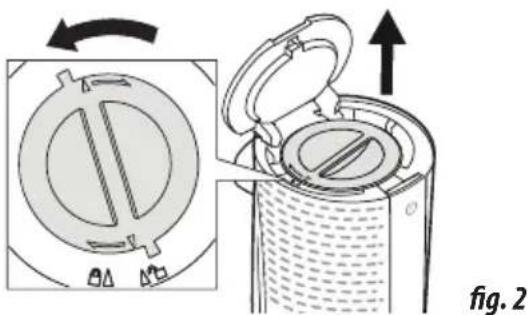
- Open the lid by pushing the lid release button (B).
- Rotate the filter cover counter clockwise until the pointer on the cover matches the symbol (Fig.2).
natural_image
Diagram showing a device with internal components and an open lid, labeled as Fig. 2 (no text or symbols on the diagram itself)- Remove the filter.
- Use a vacuum cleaner to remove the dust collected.
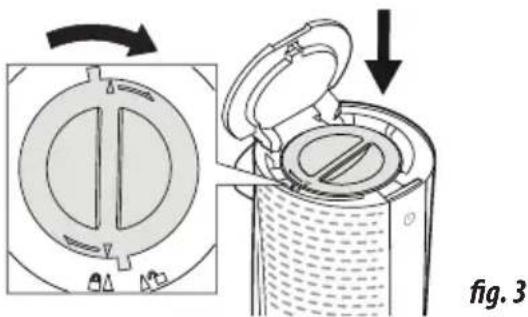
- Then put the filter back in its housing by rotating the cover clockwise until the pointer on the cover matches the symbol (fig.3).
i Please note: never close lid forcibly as you may damage the unit. Instead, check to make sure filter is set properly.
natural_image
Diagram showing a device with internal components before and after assembly, labeled 'fig. 3' (no text or symbols on diagram itself)The unit is automatically programmed to remind you to change the filter.
After a pre-defined number of working hours the unit will display CF message cyclically, indicating that the filter must be replaced. Always use original De'Longhi replacement filter. To reset the CF alarm, in rapid succession insert the plug and
touch and hold the ON/STANDBY (A) button on the unit for at least 10 seconds until you hear a long beep.
The filter is designed to last up to 9 months, based on 8 hours usage a day, at medium working load.

Please note: the indicator is a guide and you may
need to replace the filter more frequently, depending on the air quality conditions.
TROUBLESHOOTING
| PROBLEM CAUSE SOLUTION | ||
The display shows "PF" and emits a beep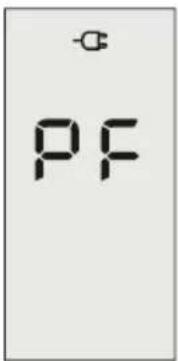 | Temperature sensors are not working properly | Please contact Customer Service |
| Product doesn't turn on Check that the plug is connected to the outletThe set temperature has been reached or the time set on the timer has elapsed | Plug inUse the "+" button to increase the set temperature | |
| The appliance goes off unexpectedly Check that the plug is connected to the outletThe set temperature has been reached or the time set on the timer has elapsed | Plug inUse the "+" button to increase the set temperature or turn off timer function. | |
A dot is flashing on display, emits a beep and unit is off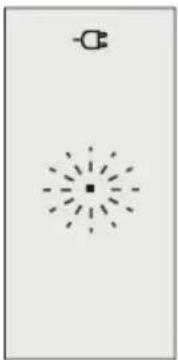 | The tip-over switch has been activated | Use the "+" button to increase the set temperature or turn off timer function.Make sure the appliance is standing up-right on a flat surface. If the appliance doesn't work please contact Customer Service |
The display shows "CF"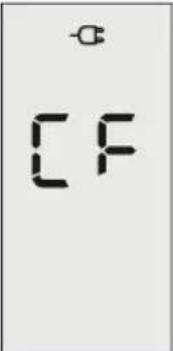 | The filter has reached the pre-defined number of hours | Replace the filter and reset the alarm.To reset the CF alarm, in rapid succession insert the plug and touch and hold the ON/STANDBY (A) button on the unit for at least 10 seconds until you hear a long beep. |
The display shows "Ht" or "It" blinking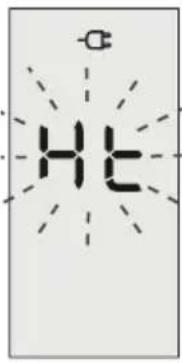 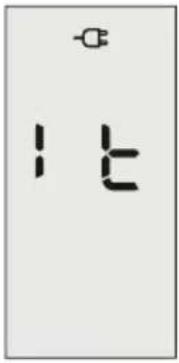 | The internal temperature is too high.The air intake or outlet grill is obstructed | Check the appliance is correctly positioned respecting the minimum distances from the wall, or objects, as indicated in the instruction manual, if not, position the appliance correctlyRemove the obstructionDisconnect the plug from the outlet and let the appliance cool down. After few minutes plug the appliance again.If the appliance doesn't work please contact Customer Service |
The display shows "FI"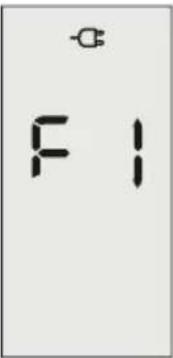 | The fan motor does not work Disconnect | the plug from the outlet.After few minutes plug the appliance again. If the problem persists please contact Customer Service |
Register Now

www.delonghi.com/register

- AIR PURIFIER, HEATER AND FAN
- IMPORTANT INSTRUCTIONS
- Danger!
- Important!
- Danger of burns!!
- Please note:
- SAVE THESE INSTRUCTIONS
- DESCRIPTION
- OPERATION AND USE
- Electrical connection
- Installation
- Starting instructions
- OPERATING MODES
- Turn on the appliance
- Air purification
- Heating mode
- ECO function
- Fan mode
- TIMER operation
- Oscillation button
- Airflow
- Airflow direction
- Changing the temperature scale
- No beep function
- Brightness of the display
- Remote control: inserting or replacing the batteries
- Operating from the control panel
- MAINTENANCE
- General product maintenance
- Air purification filter maintenance
Brand : DELONGHI
Model : HFX85W15C
Category : Air purifier