
MW-DG - Microwaves Grunkel - Free user manual and instructions
Find the device manual for free MW-DG Grunkel in PDF.


| Product Type | Microwave Oven |
| Brand | Grunkel |
| Model | MW-DG |
| Capacity | 0.7 cu ft (20 liters) |
| Dimensions (W x D x H) | 18.5 x 14.2 x 11.8 inches (47 x 36 x 30 cm) |
| Weight | 25.3 lbs (11.5 kg) |
| Power Supply | 120 V, 60 Hz, 10 A |
| Power Consumption | 1050 W |
| Microwave Power | 700 W |
| Control Type | Digital with LED display |
| Functions | Defrost, Auto Cook, Timer, Child Lock, Express Cooking |
| Turntable | Yes, glass turntable |
| Interior Light | Yes |
| Door Opening | Push button, right hinge |
| Material | Stainless steel exterior, plastic interior |
| Cleaning and Maintenance | Wipe with damp cloth; remove turntable for washing |
| Safety Features | Child lock, automatic shutoff, door interlock |
| Spare Parts | Glass turntable, rotating ring, fuse (available from manufacturer) |
| Warranty | 1 year limited |
Frequently Asked Questions - MW-DG Grunkel
User questions about MW-DG Grunkel
0 question about this device. Answer the ones you know or ask your own.
Ask a new question about this device
Download the instructions for your Microwaves in PDF format for free! Find your manual MW-DG - Grunkel and take your electronic device back in hand. On this page are published all the documents necessary for the use of your device. MW-DG by Grunkel.
USER MANUAL MW-DG Grunkel
natural_image
Three colorful kitchen microwaves (red, cyan, black) displayed against a white background, no visible text or symbols on the devices themselves.natural_image
Two people smiling while looking at a document or book, with cardboard boxes in the background (no visible text or symbols)
natural_image
Modern flat-screen TV displaying a series of purple and blue 3D lens illustrations against a white background, set against a red and white background (no text or symbols visible)
natural_image
Exterior view of a modern kitchen blender with black handle and silver casing against purple background (no text or symbols)
natural_image
White microwave oven with control knobs against an orange background (no text or symbols visible)
natural_image
White portable electric heater with mesh grille and four wheels (no visible text or symbols)
natural_image
Simple white rectangular object on orange background (no text or symbols)
natural_image
White abstract shape on a solid teal background, resembling a stylized face or organic form (no text or symbols)
natural_image
Simple white rounded rectangle shape on a solid purple background (no text or symbols)
natural_image
Close-up of a small kitchen juicer with green liquid and a green handle, set against a solid purple background (no text or symbols visible)
natural_image
Modern stainless steel coffee maker with black handle against a solid yellow background (no text or symbols visible)
natural_image
Black outdoor fan with visible blades and a black base against a blue background (no text or symbols)
natural_image
Solid pink background with a white rounded square centered on the left (no text or symbols)
natural_image
White silhouette of a stylized hat on a solid teal background (no text or symbols)
natural_image
Exterior view of a modern kitchen electric oven with handle and side panel (no text or symbols visible)DESCUBRE TODO LO QUE PODEMOS HACER POR TI EN
www.grunkel.com
grunkel
GRACIAS POR ESCOGER ESTE PRODUCTO GRUNKEL
This instruction manual is an accurate reproduction of the specifications, operation and look of the product you have just bought, except for typographical, print or translation errors. The specifications, operation and features of this product are subject to change without further notice.
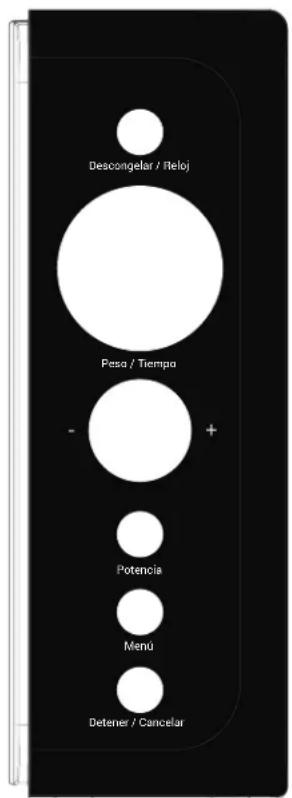
Panel de control
- Please, read carefully the entire instruction manual before using it.
• Pay special attention to the safety indications. - Keep this instruction manual. If you hand over this appliance to another person, these instructions must be also be transferred.
- Keep also the guarantee card, purchase ticket or invoice. If possible, keep the original box with all the accessories included for future inquiries.

PRECAUTIONS TO AVOID POSSIBLE EXPOSURE TO EXCESSIVE MICROWAVE ENERGY
- Do not attempt to operate this oven with the door open since open door operation can result in harmful exposure to microwave energy. It is important not to defeat or tamper with the safety interlocks.
- Do not place any object between the oven front face and the door or allow soil or cleaner residue to accumulate on sealing surfaces.
- Do not operate the oven if it is damaged. It is particularly important that the oven door close properly and that there is no damage to the:
a. Door (bent).
b. Hinges and latches (broken or loosened).
c. Door seals and sealing surfaces. - The oven should not be adjusted or repaired by anyone except properly qualified service personnel.
grunkel
Important safety instructions
When using electrical appliance basic safety precautions should be followed, including the following: WARNING!--To reduce the risk of burns, electric shock, fire, injury to persons or exposure to excessive microwave energy:
- Read all instructions before using the appliance and keep for future reference.
- Use this appliance only for its intended use as described in the manual. Do not use corrosive chemicals or vapors in this appliance. This type of oven is specifically designed to heat, cook or dry food. It is not designed for industrial or laboratory use.
- Do not operate the oven when empty.
- Do not operate this appliance if it has a damaged cord or plug, if it is not working properly, or if it has been damaged or dropped. If the supply cord is damaged, it must be replaced by the manufacturer or its service agent or a similarly qualified person in order to avoid a hazard.

- WARNING: Only allow children to use the oven without supervision when adequate instructions have been given so that the child is able to use the oven in a safe way and understands the hazards of improper use.
-
To reduce the risk of fire in the oven cavity:
-
When heating food in plastic or paper container, check the oven frequently to the possibility of ignition.
- Remove wire twist-ties from paper or plastic bags before placing bag in oven.
- If smoke is observed, switch off or unplug the appliance and keep the door closed in order to stifle any flames.
- Do not use the cavity for storage purposes. Do not leave paper products, cooking utensils, or food in the cavity when not in use.
- The microwave oven is intended for heating food and beverages. Drying of clothing and heating of warming pads, slippers, sponges, damp cloth and similar may lead to risk of injury, ignition or fire.

-
WARNING: Liquid or other food must not be heated in sealed containers since they are liable to explode.
-
Microwave heating of beverage can result in delayed eruptive boiling, therefore care has to be taken when handle the container.
- Do not fry food in the oven. Hot oil can damage oven parts and utensils and even result in skin burns.
- Eggs in their shell and whole hard-boiled eggs should not be heated in microwave ovens since they may explode even after microwave heating has ended.
@prunkel

WARNING: It is hazardous for anyone other than a trained person to carry out any service or repair operation which involves the removal of any cover which gives protection against exposure to microwave energy.
- This product is a Group 2 Class B ISM equipment. The definition of Group 2 which contains all ISM (Industrial, Scientific and Medical) equipment in which radio-frequency energy is intentionally generated and/or used in the form of electromagnetic radiation for the treatment of material, and spark erosion equipment. For Class B equipment is equipment suitable for use in domestic establishments and in establishments directly connected to a low voltage power supply network which supplies buildings used for domestic purpose.
- This appliance is not intended for use by persons (including children) with reduced physical, sensory or mental capabilities, or lack of experience and knowledge, unless they have been given supervision or instruction concerning use of the appliance by a person responsible for their safety.
- Children should be supervised to ensure that they do not play with the appliance.
- The microwave oven is only used in freestanding.

-
WARNING: Do not install oven over a range cook top or other heat-producing appliance. If installed could be damaged and the warranty would be avoid.
-
The microwave oven shall not be placed in a cabinet.
- The door or the outer surface may get hot when the appliance is operating.

-
Warning: Accessible parts may become hot during use. Young children should be kept away.
-
During use the appliances becomes hot. Care should be taken to avoid touching heating elements inside the oven, for cooking ranged and ovens.
- The temperature of accessible surfaces may be high when the appliance is operating.
- The appliance shall be placed against a wall.
- Appliance is not to be used by children or persons with reduced physical, sensory or mental capabilities, or lack of experience and knowledge, unless they have been given supervision or instruction.

-
WARNING: If the door or door seals are damaged, the oven must not be operated until it has been repaired by a competent person.
-
The instructions shall state that appliances are not intended to be operated by means of an external timer or separate remote-control system.
-
The microwave oven is for household use only and not for commercial use.
-
Never remove the distance holder in the back or on the sides, as it ensures a minimum distance from the wall for air circulation.
-
Please secure the turn table before you move the appliance to avoid damages.
-
Caution: It is dangerous to repair or maintain the appliance by no other than a specialist because under these circumstances the cover have to be removed which assures protection against microwave radiation. This applies to changing the power cord or the lighting as well. Send the appliance in these cases to our service centre.
-
The microwave oven is intended for defrosting, cooking and steaming of food only.
-
Use gloves if you remove any heated food.
-
Caution! Steam will escape, when opening lids or wrapping foil.
-
This appliance can be used by children aged from 8 years and above and persons with reduced physical, sensory or mental capabilities or lack of experience and knowledge if they have been given supervision or instruction concerning use of the appliance in a safe way and understand the hazards involved. Children shall not play with the appliance. Cleaning and user maintenance shall not be made by children unless they are aged from 8 years and above and supervised.
-
If smoke is emitted, switch off or unplug the appliance and keep the door closed in order to stifle any flames.

CAUTION!
CHILDREN UNDER 8 YEARS OLD SHOULD NOT USE NOR CLEAN THIS APPLIANCE WITHOUT THE SUPERVISION OF AN ADULT. NEITHER CAN BE USED NOR CLEAN BY PEOPLE WITH REDUCED PHYSICAL, MENTAL OR SENSORIAL CAPABILITIES, WITHOUT EXPERIENCE OR KNOWLEDGE CONCERNING THE USE OF THE APPLIANCE, OR WITHOUT HAVING RECEIVED PROPER TRAINING UNDER DIRECT SUPERVISION FROM AN EXPERIENCED PERSON RESPONSIBLE FOR THEIR SAFETY.
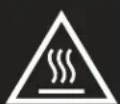
CAUTION
Hot surface
Installation
Remove all packaging. If there is a security film on the microwave, remove it before use. Carefully check that the appliance is in mint condition. Otherwise please contact your distributor or send it to the Official Technical Service.
The microwave must be placed in dry environments far from humidity and heat.
To ensure proper ventilation, a distance of at least 10cm must be kept between the back side of the microwave and the wall; at least 5cm between each side and the nearest wall; and and at least 20cm above. It must be installed at least 85cm above the floor.
Do not put the microwave near other electrical appliances, such as TV or radios, since it could affect the normal operation of the microwave.
You should take care of keeping the power cord and the electrical outlet accessible when installing the microwave, so it is easier to plug or unplug it.
The microwave must always be used with the door closed.
The microwave should not be installed inside a wardrobe or embedded in any way.
The back side of the microwave must be placed against the wall.
During its first use, there is a chance the microwave releases some odour or even smoke, since manufacturing residues or oily particles could have accumulated inside. This is normal. It is recommended to heat a cup of water at high power until it disappears. Once each cycle is finished, keep the door open for a few minutes to enable proper ventilation inside. Never use the microwave if it is empty.
Grounding instructions
This appliance must be grounded. This oven is equipped with a cord having a grounding wire with a grounding plug. It must be plugged into a wall receptacle that is properly installed and grounded. In the event of an electrical short circuit, grounding reduces risk of electric shock by providing an escape wire for the electric current. It is recommended that a separate circuit serving only the oven be provided. Using a high voltage is dangerous and may result in a fire or other accident causing oven damage.

WARNING! Improper use of the grounding plug can result in a risk of electric shock.
If you have any questions about the grounding or electrical instructions, consult a qualified electrician or service person.
Neither the manufacturer nor the dealer can accept any liability for damage to the oven or personal injury resulting from failure to observe the electrical connection procedures.
The wires in this cable main are colored in accordance with the following code:
Green and Yellow = EARTH
Blue = NEUTRAL
Brown = LIVE
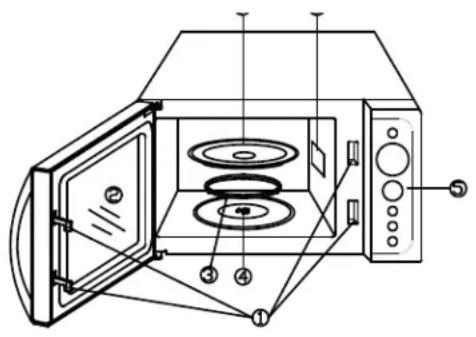
Part identification
- Door Safety Lock System
- Oven Window
- Roller Ring
- Shaft
- Control Panel
- Wave Guide (Please do not remove the mica plate covering the wave guide)
- Glass Tray
Control panel
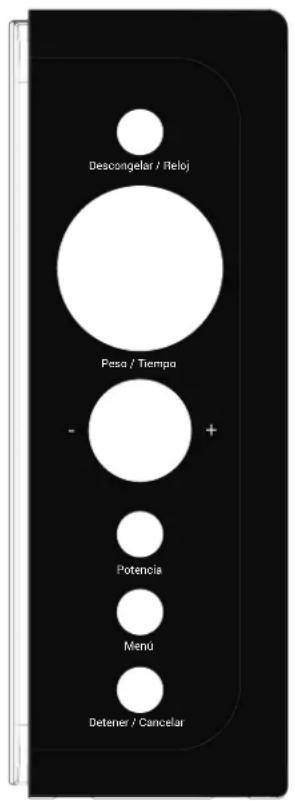
Cooking time, power, indicators and food weight are displayed.
Power
Use to set power level. To check power level during time cooking, press POWER pad.
Defrost / Clock
Press once to set speed defrost program.
Press twice to set weight defrost program.
Press to set the clock time.
Menu
Press to select a predefined program.
Stop / Cancel
Press to clear the selected power level, cook or defrost times that previously programmed.
Press to stop cooking.
It is also used to set child lock.
Weight / Time
Turn the knob to enter food weight, cook time or clock time.
Start / Quick Start
It is activated by pressing the Weight / Time knob (instead of turning it).
Press to start the cooking or defrosting programs.
Press to set express cooking program.
Operation
When the oven is first plugged in, beep will sound and the display will show "1:00" ⊕".
In the process of setting, broke about 20 seconds the oven will return to standby mode.
During cooking program, press STOP/CANCEL once to pause the program, and then press START/QUICK START to resume. Press STOP/CANCEL twice to cancel the program.
After ending cooking, the screen will display End with sound every two minutes until user press any pad or open the door.
Setting clock time
This is a 12 or 24 hour clock. You can choose to set the clock time in 12 or 24 hour cycle by pressing the DEFROST/CLOCK pad.
- In standby mode, press and hold DEFROST/CLOCK for 3 seconds to select 12 hour display, press it again to select 24 hour cycle.
- Turn WEIGHT/TIME knob to set hour digit.
- Press DEFROST/CLOCK pad once.
- Turn WEIGHT/TIME knob to set minute digit.
- Press DEFROST/CLOCK pad to confirm.
NOTE: During cooking, you can check the current time of the clock by pressing DE-FROST/CLOCK pad.
Express cooking
The oven will operate at HIGH power (100% power output) for express cooking program. In standby mode, just press the START/QUICK START a number of times to set cooking time, the oven starts working automatically at full power. The longest cooking time is 10 minutes.

Microwave cooking
- Press POWER pad repeatedly to select power level.
- Turn WEIGHT/TIME knob clockwise to enter cooking time. The longest cooking time is 60 minutes.
- Press START/QUICK START pad to confirm.
Select power level by pressing the POWER pad:
| Level Power Description | ||
| Once 100% | High | |
| Twice 80% | Medium - High | |
| 3 times 60% | Medium | |
| 4 times 40% | Medium - Slow | |
| 5 times 20% | Defrost | |
| 6 times | 0% | Low |
NOTE: During cooking, you can check the power level by pressing POWER pad.
Weight defrost
The oven allows the defrosting of meat, poultry, and seafood. The time and the defrosting power are adjusted automatically once the weight of food is programmed. The frozen food weight ranges from 100g to 1800g.
- In standby mode, press DEFROST/CLOCK pad twice.
- Turn WEIGHT/TIME knob to select weight of food.
- Press START/QUICK START pad to confirm.
NOTE: During defrosting program, the system will pause to remind you to turn over the food, and then press START/QUICK START to resume defrosting.
Speed defrost
- In standby mode, press DEFROST/CLOCK pad once.
- Turn WEIGHT/TIME knob to enter cooking time. The longest time is 60 minutes.
- Press START/QUICK START to confirm.
NOTE: During defrosting program, the system will pause and sound beeps to remind user to turn food over, and then press START/QUICK START to resume the defrosting.
Multi-stage cooking
Your oven can be programmed for up to 3 automatic microwave cooking sequences. Suppose you want to set the following cooking program:
Microwave-cooking → Microwave-cooking (with lower power level)
- Input the first stage of microwave cooking program. Do not press START/QUICK START pad.
- Input the second stage of microwave cooking program.
- Press START/QUICK START pad to confirm.
NOTE: Express cooking, speed defrost, weight defrost and auto cook menus can't be set in multi-stage cooking.
Child lock
The lock prevents unsupervised operation by children.
To set the child lock: In standby mode, press and hold STOP/CANCEL pad for 3 seconds, then a beep will sound, the oven will auto enter child lock mode and the lock indicator light will turn on. In the lock state, all pads are disabled.
To cancel the child lock: Press and hold STOP/CANCEL pad for 3 seconds, then a beep will sound, and the lock indicator light will turn off.
Autocook
For the following foods or cooking operation, you do not need to input cooking power and time. It is sufficient to indicate the type of food that you want to cook as well as the weight or servings of this food.
- In standby mode, press MENU pad repeatedly to select menu code.
- Turn WEIGHT/TIME knob to select food of weight or servings.
- Press START/QUICK START pad to confirm.
| Program Type of food Description | |
| A-1 Milk / Coffee (200ml/ taza) | For milk, coffee and potatoes, the number of servings will be shown instead of the weight.The autocooking results depend on several factors such as the shape and size of the food, your own taste or even how the food is placed in the microwave. If you are not satisfied with the results, please adjust cooking time. |
| A-2 Rice (g) | |
| A-3 Pasta (g) | |
| A-4 Potatoes (230g/ración) | |
| A-5 Reheat (g) | |
| A-6 Fish (g) | |
| A-7 Pizza (g) | |
| A-8 Popcorn (100g) |
Utensils guide
- Microwave cannot penetrate metal. Only use utensils that are suitable for use in microwave ovens. Metallic containers for food and beverages are not allowed during microwave cooking. This requirement is not applicable if the manufacturer specifies size and shape of metallic containers suitable for microwave cooking.
-
Microwave cannot penetrate metal, so metal utensils or dishes with metallic trim should not be used.
-
Do not use recycled paper products when microwave cooking, as they may contain small metal fragments which may cause sparks and/or fires. 4. Round /oval dishes rather than square/oblong ones are recommend, as food in corners tends to overcook.
- Narrow strips of aluminum foil may be used to prevent overcooking of exposed areas. But be careful don't use too much and keep a distance of 1 inch (2.54cm) between foil and cavity.
The list below is a general guide to help you select the correct utensils.
| Cookware Microwave | |
| Heat-Resistant Glass Yes | |
| Non Heat-Resistant Glass No | |
| Heat-Resistant Ceramics Yes | |
| Microwave-Safe Plastic Dish Yes | |
| Kitchen Paper Yes | |
| Metal Tray No | |
| Metal Rack No | |
| Aluminum Foil & Foil Containers No |
Microwave cooking principles
- Arrange food carefully. Place thickest areas towards outside of dish.
- Watch cooking time. Cook for the shortest amount of time indicated and add more as needed. Food severely overcooked can smoke or ignite.
- Cover foods while cooking. Covers prevent spattering and help foods to cook evenly.
- Turn foods over once during microwave cooking to speed cooking of such foods as chicken and hamburgers. Large items like roasts must be turned over at least once.
- Rearrange foods such as meatballs halfway through cooking both from top to bottom and from the center of the dish to the outside.
Cleaning and care
- Turn off the oven and remove the power plug from the wall socket before cleaning.
- Keep the inside of the oven clean. When food splatters or spilled liquids adhere to oven walls, wipe with a damp cloth. Mild detergent may be used if the oven gets very dirty. Avoid the use of spray and other harsh cleaners as they may stain, streak or dull the door surface.
@prunkel
- The outside surfaces should be cleaned with a damp cloth. To prevent damage to the operating parts inside the oven, water should not be allowed to seep into the ventilation openings.
- Wipe the door and window on both sides, the door seals and adjacent parts frequently with a damp cloth to remove any spills or spatters. Do not use abrasive cleaner.
- A steam cleaner is not be used.
- Do not allow the control panel to become wet. Clean with a soft, damp cloth. When cleaning the control panel, leave oven door open to prevent oven from accidentally turning on.
- If steam accumulates inside or around the outside of the oven door, wipe with a soft cloth. This may occur when the microwave oven is operated under high humidity condition. And it is normal.
- It is occasionally necessary to remove the glass tray for cleaning. Wash the tray in warm sudsy water or in a dishwasher.
- The roller ring and oven floor should be cleaned regularly to avoid excessive noise. Simply wipe the bottom surface of the oven with mild detergent. The roller ring may be washed in mild sudsy water or dishwasher. When removing the roller ring from cavity floor for cleaning, be sure to replace in the proper position.
- Remove odors from your oven by combining a cup of water with the juice and skin of one lemon in a deep microwaveable bowl, microwave for 5 minutes. Wipe thoroughly and dry with a soft cloth.
- When it becomes necessary to replace the oven light, please consult a dealer to have it replaced.
- The oven should be cleaned regularly and any food deposits removed. Failure to maintain the oven in a clean condition could lead to deterioration of the surface that could adversely affect the life of the appliance and possibly result in a hazardous.
- Please do not dispose this appliance into the domestic rubbish bin; it should be disposed to the particular disposal center provided by the municipalities.
Before calling for service
If the oven fails to operate:
-
Check to ensure that the oven is plugged in securely. If it is not, remove the plug from the outlet, wait 10 seconds, and plug it in again securely.
-
Check for a blown circuit fuse or a tripped main circuit breaker. If these seem to be operating properly, test the outlet with another appliance.
- Check to ensure that the control panel is programmed correctly and the timer is set.
- Check to ensure that the door is securely closed engaging the door safety lock system. Otherwise, the microwave energy will not flow into the oven.
IF NONE OF THE ABOVE RECTIFIES THE SITUATION, THEN CONTACT A QUALIFIED TECHNICIAN. DO NOT TRY TO ADJUST OR REPAIR THE OVEN YOURSELF.

WARNING
This appliance is intended for domestic use. Do not use it for commercial purposes. If so, guarantee would be cancelled.
230V \~50Hz / 700W
Product disposal
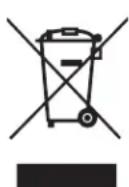
Regulation regarding waste from electronic appliances according to RAEE 2002/96/EC. This symbol means the appliance can not be treated as regular domestic waste; it must be returned to the distributor, handed over the corresponding electronic product collection point or delivered to the collection point empowered for such purpose, so its components are recycled and not
mixed within domestic waste.
You can also contact your local waste collection service, so it can be collected and treated accordingly following the environment protection instructions, or to receive proper information about the steps to follow for the correct disposal of the appliance.
The correct disposal of an appliance implies avoiding negative consequences for both environment and health. A proper disposal allows to save a significant amount of energy and resources. As a reminder of the necessity of disposing the appliances separately, the product displays the symbol of a crossed out garbage bin.
Painel de controlo
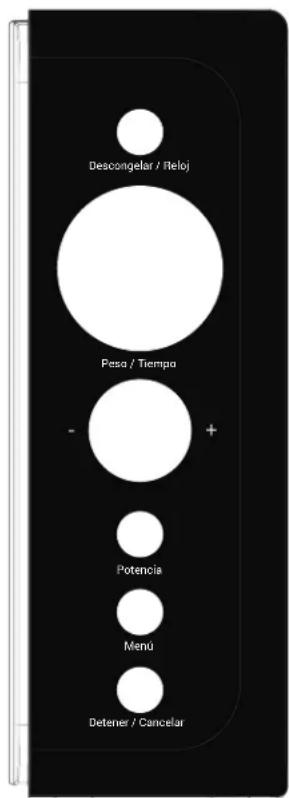
- grunkel
- GRACIAS POR ESCOGER ESTE PRODUCTO GRUNKEL
- Panel de control
- PRECAUTIONS TO AVOID POSSIBLE EXPOSURE TO EXCESSIVE MICROWAVE ENERGY
- Important safety instructions
- @prunkel
- CAUTION!
- CAUTION
- Hot surface
- Installation
- Grounding instructions
- Part identification
- Control panel
- Power
- Defrost / Clock
- Menu
- Stop / Cancel
- Weight / Time
- Start / Quick Start
- Operation
- Setting clock time
- Express cooking
- Microwave cooking
- NOTE: During cooking, you can check the power level by pressing POWER pad.
- Weight defrost
- Speed defrost
- Multi-stage cooking
- NOTE: Express cooking, speed defrost, weight defrost and auto cook menus can't be set in multi-stage cooking.
- Child lock
- Autocook
- Utensils guide
- Microwave cooking principles
- Cleaning and care
- Before calling for service
- WARNING
- Product disposal
- Painel de controlo
Brand : Grunkel
Model : MW-DG
Category : Microwaves