AT-HDR-EX-70C-RX - Audio/video converter Atlona - Free user manual and instructions
Find the device manual for free AT-HDR-EX-70C-RX Atlona in PDF.


| Product Type | Audio/Video Converter (Receiver) |
| Model | AT-HDR-EX-70C-RX |
| Brand | Atlona |
| Dimensions (W x D x H) | 165 x 110 x 30 mm |
| Weight | 0.4 kg |
| Power Supply | 5V DC, 2A (external power adapter) |
| Power Consumption | 6 W (max) |
| Video Input | 1x HDMI (Type A female) |
| Video Output | 1x RJ-45 (HDBaseT) |
| Audio Input | HDMI embedded audio |
| Audio Output | HDBaseT (audio de-embedded via HDMI or analog optional) |
| Supported Resolutions | Up to 4K@60Hz 4:4:4 (18Gbps) |
| HDR Support | HDR10, Dolby Vision, HLG |
| HDBaseT Distance | Up to 70m at 4K@60Hz 4:2:0, up to 40m at 4K@60Hz 4:4:4 |
| Control | IR, RS-232, Ethernet pass-through |
| HDCP Support | HDCP 2.2 and 1.4 |
| EDID Management | Internal EDID emulation and external pass-through |
| Main Functions | HDMI extension over single CAT6a/7 cable, signal scaling, de-embedding |
| Maintenance & Cleaning | Wipe with dry cloth; avoid liquids; clean vents regularly |
| Safety | Use only included power adapter; keep away from moisture; no user-serviceable parts inside |
| Spare Parts & Repairability | Contact Atlona support; power adapter available separately; device not field-repairable |
| General Information | Compatible with AT-HDR-EX-70C-TX transmitter; designed for professional AV installations |
Frequently Asked Questions - AT-HDR-EX-70C-RX Atlona
User questions about AT-HDR-EX-70C-RX Atlona
0 question about this device. Answer the ones you know or ask your own.
Ask a new question about this device
Download the instructions for your Audio/video converter in PDF format for free! Find your manual AT-HDR-EX-70C-RX - Atlona and take your electronic device back in hand. On this page are published all the documents necessary for the use of your device. AT-HDR-EX-70C-RX by Atlona.
USER MANUAL AT-HDR-EX-70C-RX Atlona
The Atlona AT-HDR-EX-70C-RX is a HDBaseT™ to HDMI® receiver for 4K and high dynamic range (HDR) content. It supports extension of 4K/UHD video @ 60 Hz with 4:4:4 chroma sampling plus HDR data, multi-channel audio, control signals, and power up to 130 ft. (40 m) or 1080p up to 230 ft. (70 m) over Category 6/6A cable. The AT-HDR-EX-70C-RX is ideal for use with the AT-HDR-CAT-2 and AT-HDR-CAT-8 distribution amplifiers for passing 4K HDR signals to a display. A compact enclosure and remote power supplied by the transmitter means the receiver can be conveniently mounted in furniture, behind a display, or above a projector.
Package Contents
1 x AT-HDR-EX-70C-RX
2 x Mounting brackets
4 x Mounting screws
1 x 3-pin captive screw connector
1 x 5-pin captive screw connector
1 x Installation Guide

IMPORTANT: Visit https://atlona.com/product/at-hdr-ex-70c-rx/ for the latest firmware updates and Installation Guide.
Panel Descriptions
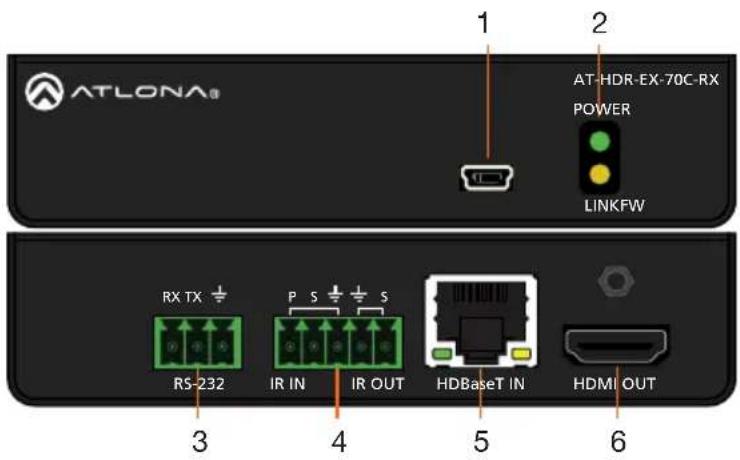
1 FW
Connect a mini-USB to USB-A type cable from this port to a computer, to update the firmware.
2 POWER and LINK LEDs
The power LED will illuminate green when receiving power. The link LED will glow yellow when signal is being sent/received between the transmitter and the receiver.
3 RS-232
Bidirectional control port, used for pass through of commands to or from the transmitter.
4 IR
Connect an IR receiver to the IR IN port or an IR emitter to the IR OUT port.
5 HDBaseT IN
Connect an HDBaseT cable from this port to the HDBaseT OUT port on the AT-HDR-CAT (available in -2, 4, 4ED, or -8).
6 HDMI OUT
Connect an HDMI cable from this port to an HDMI display.
RS-232
A 3-pin captive screw connector for RS-232 has been included.

natural_image
Green 3D model of a mechanical connector or terminal block with three circular holes (no text or symbols)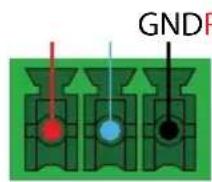
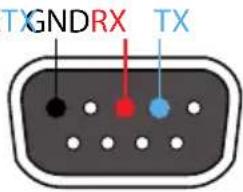
Pin out will be determined by the RS-232 cable and connect as RX (receive), TX (transmit) and ± (Ground).
IR
Two captive screw connectors for IR have been included. A 3-pin connector is included for the receiver.
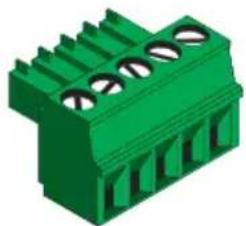
natural_image
Green 3D connector pinout diagram (no text or symbols)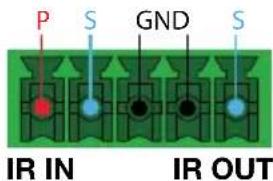
IR IN is connected by a power, ground, and signal wire. Use a 12V IR receiver with it (e.g. AT-IR-CS-RX purchasable through atlona.com).
IR OUT is connected by a ground and signal wire. Connect an IR emitter (not included) here.
Mounting Instructions
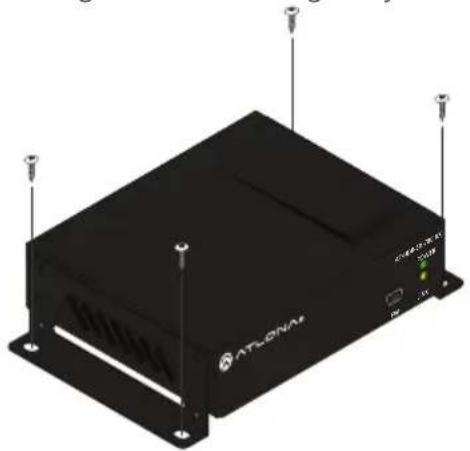
The AT-HDR-EX-70C-RX includes two mounting brackets and four mounting screws, which can be used to attach the units to any flat surface.
-
Position one of the mounting brackets, as shown below, aligning the holes on the side of the enclosure with one set of holes on the mounting bracket.
-
Use the enclosure screws to secure the mounting bracket to the enclosure.
-
Repeat the above steps to attach the second mounting bracket to the opposite side of the unit.
-
Mount the unit using the oval-shaped holes, on each mounting bracket. If using a drywall surface, a #6 drywall screw is recommended.
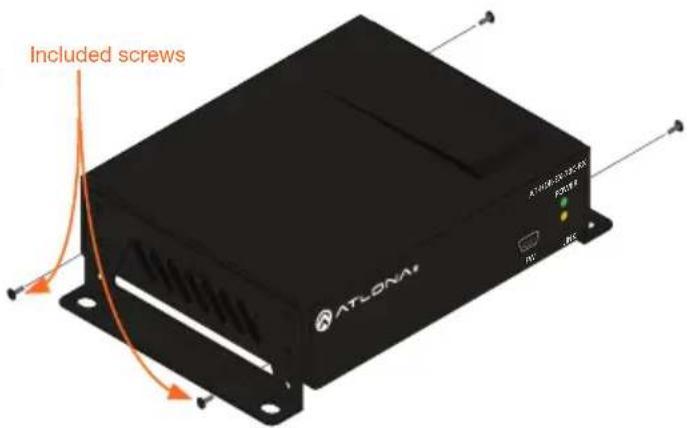

NOTE: Mounting brackets can also be inverted to mount the unit under a table or other flat surface.
natural_image
Exterior view of a black ATLONAV device with ventilation slots and ports (no readable text or symbols)Installation
- Connect an HDR display to the HDMI OUT port on the receiver.
- Connect an HDBaseT cable, from the HDBaseT OUT port on the AT-HDR-CAT, to the HDBaseT IN port on the receiver (the unit will receive power from the HDR-CAT over HDBaseT).
- *Optional* Connect an RS-232 cable from the RS-232 port to a control system or display.
- *Optional* Connect an IR receiver to the IR IN port of the receiver.
- *Optional* Connect an IR emitter to the IR OUT port of the receiver.
Cable Recommendation Guidelines
Refer to the tables below for recommended cabling when using Altona products with HDBaseT. The green bars indicate the signal quality when using each type of cable. Higher-quality signals are represented by more bars.
| Core Shielding CAT5e CAT6 CAT6a CAT7 | |||||
| Solid UTP (unshielded) N/A | |||||
| STP (shielded) | |||||
| Performance Rating (MHz) 350 500 600 | 800 | ||||

IMPORTANT: Stranded or patch cables are not recommended due to performance issues.
| Cable* Max. Distance @ 4K Max. Distance @ 1080p | |
| CAT5e / CAT6 115 feet (35 meters) 200 feet (60 meters) | |
| CAT6a / CAT7 130 feet (40 meters) 230 feet (70 meters) |
*Atlona recommends TIA/EIA 568-B termination for optimal performance.
Updating Firmware (manually)
- Download the firmware .zip file from the firmware tab located at https://atlona.com/product/at-hdr-ex-70c-rx/.
- Unzip the .bin file to an easy to locate area of the local PC.
- Connect the unit's Utility mini USB port to a PC using a mini USB to USB A cable.
- The PC should automatically detect the 70C and display the autorun options.
- Select the view files in folder option. A new window will open.
- If there are any files inside the folder, delete them, otherwise drag and drop the .bin file into the folder. While the firmware loads to the unit, the green power LED on the front panel will flash.
- Once the green LED goes solid, disconnect the unit from the PC. The firmware update is finished.
Notes
Warranty
To view the product warranty, use the following link or QR code: https://atlona.com/warranty/.

Version 1
English Declaration of Conformity
The English version can be found under the resources tab at: https://atlona.com/product/at-hdr-ex-70c-rx/.

Chinese Declaration of Conformity 中国RoHS合格声明
由SKU列出於:
https://atlona.com/about-us/china-rohs/.


INH-DEFINITION MULTIMEDIA INTERFACE
The terms HDMI, HDMI High-Definition Multimedia Interface, and the HDMI Logo are trademarks or registered trademarks of HDMI licensing Administrator, Inc.

ATLONA.
a Punduit company
US International
atlona.com • 408.962.0515 • 41.43.508.4321
© 2023 Atlona Inc. All rights reserved. "Atlona" and the Atlona logo are registered trademarks of Atlona Inc. All other brand names and trademarks or registered trademarks are the property of their respective owners. Pricing, specifications and availability subject to change without notice. Actual products, product images, and online product images may vary from images shown here.
26321-R1
Brand : Atlona
Model : AT-HDR-EX-70C-RX
Category : Audio/video converter