
0070-24124-F - Monitor Ernitec - Free user manual and instructions
Find the device manual for free 0070-24124-F Ernitec in PDF.


| Product Type | 24-inch Surveillance Monitor |
| Brand | Ernitec |
| Model | 0070-24124-F |
| Screen Size | 24 inches (diagonal) |
| Power Input | DC 12V |
| Video Inputs | HDMI, DisplayPort (DP) |
| Control Panel | 5 buttons: Power, Menu, Auto, +, - |
| OSD Menus | Color, Advance, Input, Audio, Other, Information |
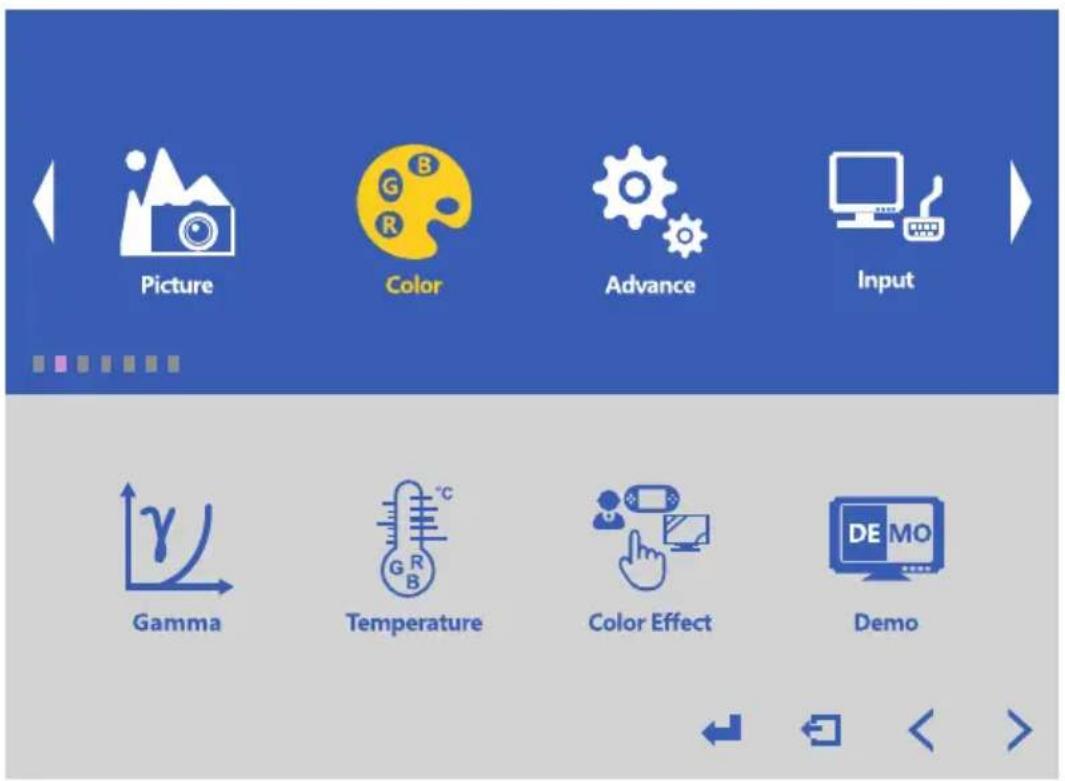
| Color Settings | Gamma, Temperature, Color Effect, Demo |
| Advance Settings | Auto Adjust, H Position, DDCCI, DCR |
| Input Selection | Auto, DP, HDMI |
| Audio Settings | Volume, Mute |
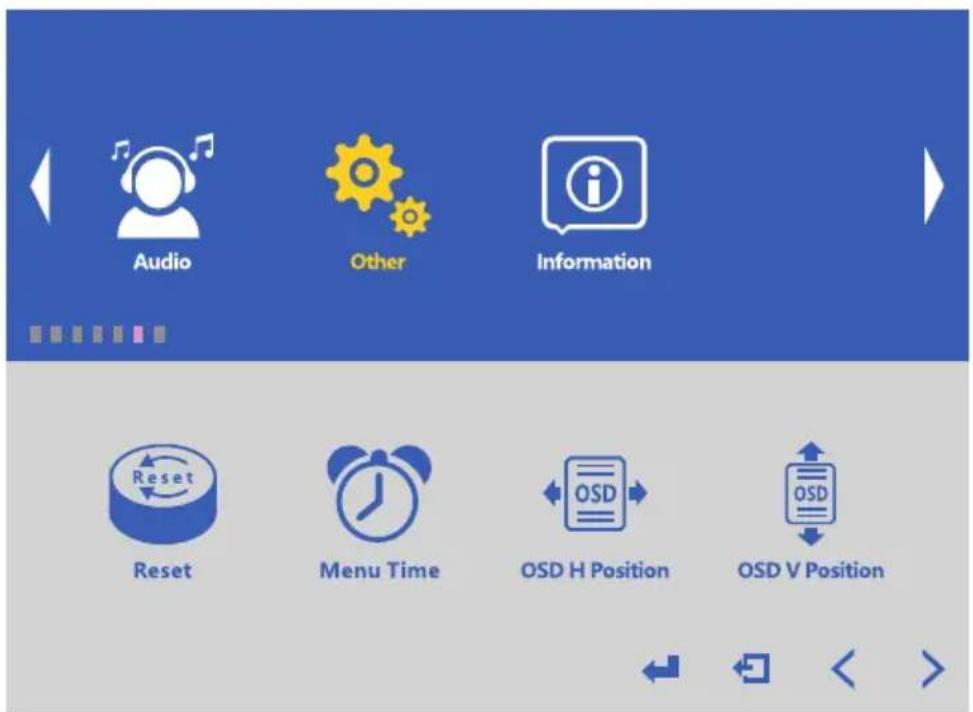
| Other Settings | Reset, Menu Time, OSD H/V Position |
| Accessories Included | Power supply, User manual |
| Usage | Designed for 24/7 surveillance applications |
| Safety Compliance | CE, WEEE (contains mercury) |
| Cleaning Instructions | Screen: soft damp lint-free cloth; Cabinet: soft dry cloth |
| Disposal | Do not dispose with household waste; follow local regulations |
Frequently Asked Questions - 0070-24124-F Ernitec
User questions about 0070-24124-F Ernitec
0 question about this device. Answer the ones you know or ask your own.
Ask a new question about this device
Download the instructions for your Monitor in PDF format for free! Find your manual 0070-24124-F - Ernitec and take your electronic device back in hand. On this page are published all the documents necessary for the use of your device. 0070-24124-F by Ernitec.
USER MANUAL 0070-24124-F Ernitec
24" Surveillance Monitor 24/7
User Manual

- Please read this manual carefully before operating your set.
- Retain it for future reference.
- Record model number and serial number of the set.
• See the label attached on the back cover and quote this information to your dealer when you require service.
Table of contents ...... 1
Warning 2
Safety instructions .... 3
1. Introduction ...... 5
1.1 Controls 5
1.2 Accessories 5
1.3 Connection Options....6
2. Basic OSD setup ...... 7
2.1 Color Settings Menu....7
2.2 Advance Menu....8
2.3 Input Menu....8
2.4 Audio Menu....9
2.5 Other Menu....9
2.6 Information Menu.... 10
3. Trouble shooting....11
- Maintenance....12
WEEE/DEEE/RAEE info.... 13
Notes (Record your important notes here)....14
WARNING

RISK OF ELECTRIC SHOCK
DONOT OPEN
CAUTION

WARNING:
TO REDUCE THE RISK OF ELECTRIC SHOCK DO NOT REMOVE COVER(OR BACK). NO UESR SERVICEABLE PARTS INSIDE. REFER TO QUALIFIED SERVICE PERSONNEL.

The lightning flash with arrowhead symbol, within an equilateral triangle, is intended to alert the user to the presence of uninsulated “dangerous voltage” within the products enclosure that may be of sufficient magnitude to constitute a risk of electric shock to persons.

The exclamation point within an equilateral triangle is intended to alert the user to the presence of important operating and maintenance (servicing) instructions accompanying the appliance.
REGULATORY INFORMATION
This equipment generates, and can radiate electromagnetic emissions (energy). If not installed and used in accordance with the instructions, it may cause harmful interference to radio communications however, there is no guarantee that interference will not occur in a particular installation. If this equipment does cause harmful interference to radio or television reception, which can be determined by turning the equipment off and on, the user is encouraged to try to correct the interference by one or more of the following measures:
-Increase the separation between the equipment and receiver.
-Connect the equipment into an outlet on a circuit different from that to which the receiver is connected.
-Consult the dealer or experienced radio/monitor technician for help.

CAUTION:
Do not attempt to modify this product in any way without written authorization from Ernitec Technical Support. Unauthorized modification could void the user's Warranty and in worst case be dangerous to persons, animals and property.
Safety instructions

WARNING:
To reduce the risk of fire or electric shock, do not expose this apparatus to rain or moisture.
Apparatus shall not be exposed to dripping or splashing area. Objects filled with liquids such as vases shall not be placed on the apparatus.
IMPORTANT SAFETY INSTRUCTIONS
- Read these instructions.
- Keep these instructions.
3.Heed all warnings.
4.Follow all instructions.

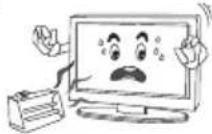
8.Do not install near any heat source
such as radiators,hea registers,stoves,or other apparatus (including amplifiers) that produce heat.
- Do not use this apparatus near water.

- Unplug this apparatus during lightning storms or when unused for
long period of time.

- Clean only with a dry cloth.

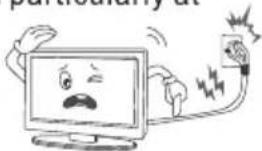
- Protect the power cord from being walked on or pinched particularly at
plugs, convenience receptacles, and the point where they exit from the apparatus.
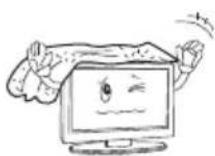
- Do not block any of the ventilation openings. Install in accordance with the manufacturer's instructions.
-
Only use the attachments/accessories specified by the manufacturer.
-
Refer all servicing to qualified service personnel. Servicing is required when the apparatus has been damaged in any way, such as power supply cord or plug is damaged, liquid has been spilled or objects have fallen into the apparatus, the apparatus has been exposed to rain or moisture, does not operate normally, or has been dropped.

- Use only with a cart, stand, tripod, bracket, or table specified by the manufacturer, or sold with the apparatus. When a cart is used, be cautious when moving the cart\apparatus combination to avoid injury from tip-over.

- Do not defeat the safety purpose of the polarized or grounding type plug. A polarized plug has two blades with one wider than the other. A grounding type plug has two blades and a third grounding type plug has two blades and a third grounding prong. The wide blade or the third prong is provided for your safety. When the provided plug does not fit for your outlet, consult an electrician for replacement of the obsolete outlet.
Note
-If the CCTV monitor feel cold to the touch, there may be a small "flicker" when it is turned on. This is normal, there is nothing wrong with CCTV monitor.
- Some minute dot defects may be visible on the screen, appearing as tiny red, green, or blue spots. However there have no adverse effect on the monitor's performance.
-Avoid touching the LED screen or holding your finger(s) against it for long periods of time. In that case, it may produce some temporary distortion effect on the screen.
CAUTION connecting the Power Cord
Most appliances are suggested to be placed upon a dedicated circuit; that is a single outlet circuit which powers only that appliance and has no additional outlets or branch circuits.
Do not overload wall outlets! Overloaded wall outlets, loose or damaged wall outlets, extension cords, frayed power cords, damaged or cracked wire insulation are dangerous. Any of these conditions could result in electric shock or fire. Periodically examine the cord of your appliance, and its if appearance indicates damage or deterioration, unplug it, discontinue use of the appliance, and have the cord replaced with an exact replacement part by an authorized servicer. Protect the power cord from physical or mechanical abuse, such as being wisted, kinked, pinched, closed in a door, or walded upon. Pay particular attention to plugs, wall outlets, and the point where the cord exits the appliance.
On Disposal
-The fluorescent lamp used in this product contain a small amount of mercury.
-Do not dispose of this product with general household waste.
Disposal of this product must be carried out in accordance to the regulations of your local authority.
1. Introduction
1.1 Controls
-Simplified control panel
-Here show may be some what different from your monitor.
![graph LR A["Rectangular Block"] --> B["Arrow"] B --> C["● 1 ● 2 ● 3 ● 4 ● 5"] C --> D["↓"] C --> E["↓"] C --> F["↓"]](/content/2026/05/902626/images/9648fc60c6eaccfabb734e0ecac48643e5355cd3cc8cb9578464a9b7e19d00ec.jpg)
| ITEM | BUTTON NAME | FUNCTION DESCRIPTION |
| 1 | AUTO | Press to select the input source and make menu selections. |
| 2 | - | Lower audio volume. |
| 3 | + | Increase audio volume. |
| 4 | MENU | Press to enter and exit the monitor's configuration menu. |
| 5 | POWER | Press to turn the monitor on and off. |
1.2 Accessories
The following accessories are included with the monitor:

User's Manual

Power Supply
1.3 Connection Options
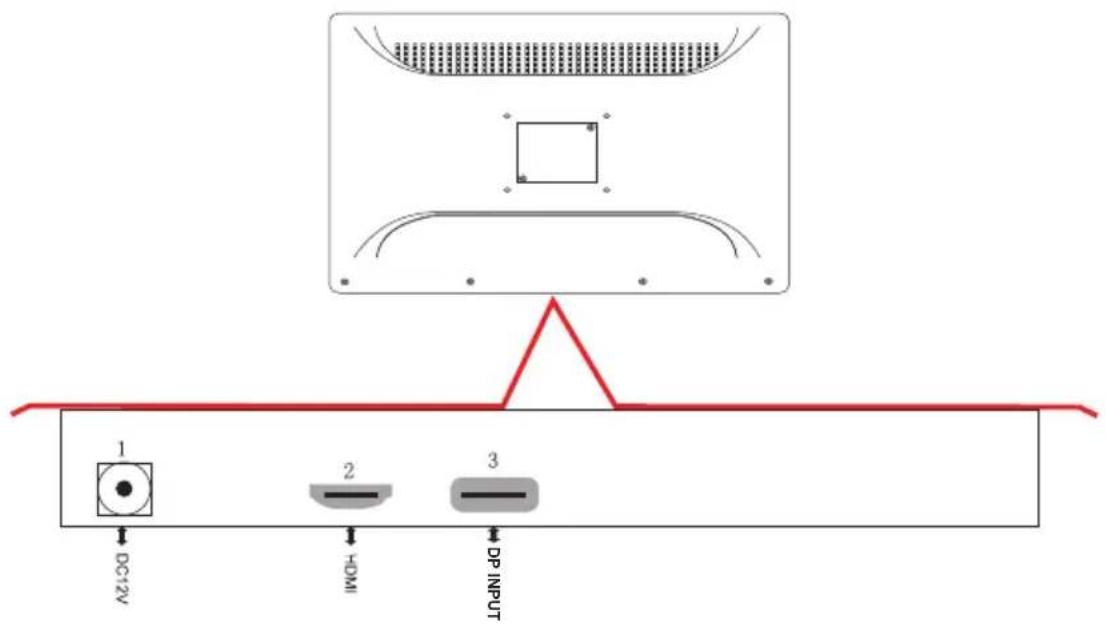
| ITEM | NAME | DESCRIPTION |
| 1 | DC 12V | POWER SUPPLY INPUT |
| 2 | HDMI | HDMI VIDEO INPUT |
| 3 | DP | DP VIDEO INPUT |
2. Basic OSD setup
Button OSD Function:
● "Power": Turn on/off Device
● “Menu” : (1) Open Menu OSD
(2) Come back last Menu
● "AUTO": select the input source
● “+”: (1) Confirm Menu Selection
(2) Adjust Option “1-100” Selection
● “-”: (1) Adjust Menu Selection
(2) Adjust Selection
2.1 OSD "Color" Menu
2.2 OSD "Advance" Menu

2.3 OSD "Input" Menu

2.4 OSD "Audio" Menu

2.5 OSD "Other" Menu
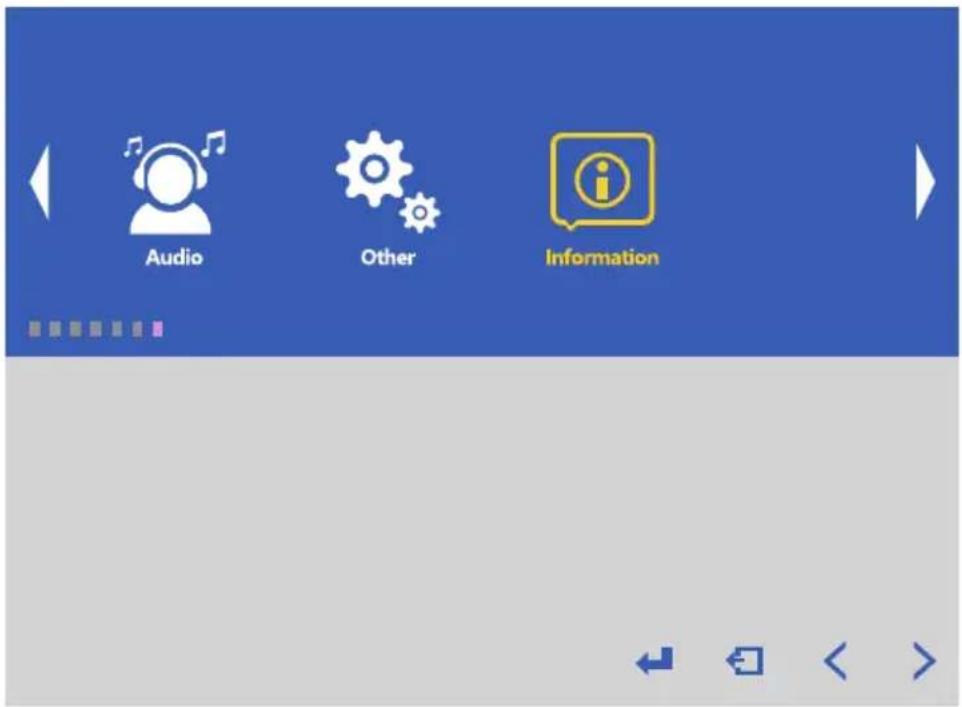
2.6 OSD "Information" Menu
3. Trouble shooting
If any problems or issues with the monitor please consult below possible solutions before contacting the Ernitec Technical Support.
| PROBLEM | POSSIBLE SOLUTION |
| No sound; picture | -Check all cables are connected correctly.-Check that you have pressed the POWER button on the front of monitor set.-Check the picture contrast and broughtness settings. |
| Normal picture but no sound | -Check the volume.-Try another channel the problem may be with the broadcast.-Are the audio cables installed properly. |
| The remote control does not work | -Check go see if there any object between the product and remote control-Are batteries installed with correct poalrity(+to+,-to-).-Install new batteries. |
| Power is suddenly turned off | -Is the sleep timer set.-Check the power control settings.Power interrupted.-No broadcast on station tuned with auto activated. |
| Picture appears slowly after switching on | -This is normal,the image is muted during the product startup process.Please contact Ernitec Support, if the picture has not appeared after five minutes. |
| No or poor color or poor picture | -Adjust the color in menu option.-Keep a sufficient distance between the product and the VCR.-Try another channel,the problem may be with the broadcast.-Are the VIDEO cables installed properly? |
| Horizontal/vertical bars or picture shaking | -Check for local interference such as an electrical appliance or power tool. |
| No output from one of the speakers | -Adjust balance in menu option. |
4. Maintenance
Early malfunctions can be prevented by maintaining the monitor.
Careful and regular cleaning can extend the lifetime. Be sure to turn of the power and unplug the power cord before maintaining or cleaning the monitor
Cleaning the screen
Wipe the screen with a soft, damp, lint-free cloth. Allow the screen to dry before connecting the power cable and turning on the monitor.
Do not use abrasive cleaners.
Cleaning the cabinet
To remove dirt or dust, wipe the cabinet with a soft, dry, lint-free cloth. Please be sure not to use a wet cloth. Do not use abrasive cleaners.
Extended Storage

If you expect not to use your monitor for extended periods of time be sure to disconnect the monitor's power cable.

Important WEEE information
This symbol on the product and /or accompanying documents indicates that, under Directive 2012/19/EU on waste electrical and electronic equipment (WEEE), product(s) used electrical and electronic equipment (WEEE) should not be mixed with general household waste.
For proper treatment, recovery, and recycling, please take this product to designated collection points where it will be accepted free of charge.
Disposing of this product correctly will help save valuable resources and prevent any potential negative effects on human health and the environment, which could otherwise arise from inappropriate waste handling.
Please contact your local authority or for further details of your nearest designated collection point.
Penalties may be applicable for incorrect disposal of this waste, in accordance with your national legislation.
For professional users in the European Union If you wish to discard electrical and electronic equipment (WEEE), please contact your dealer or supplier for further information.


- 24" SURVEILLANCE MONITOR 24/7
- TABLE OF CONTENTS ...... 1
- WARNING 2
- SAFETY INSTRUCTIONS .... 3
- INTRODUCTION ...... 5
- BASIC OSD SETUP ...... 7
- TROUBLE SHOOTING....11
- WEEE/DEEE/RAEE INFO.... 13
- NOTES (RECORD YOUR IMPORTANT NOTES HERE)....14
- WARNING
- REGULATORY INFORMATION
- CAUTION
- SAFETY INSTRUCTIONS
- IMPORTANT SAFETY INSTRUCTIONS
- NOTE
- CAUTION CONNECTING THE POWER CORD
- ON DISPOSAL
- INTRODUCTION
- 1.1 CONTROLS
- 1.2 ACCESSORIES
- 1.3 CONNECTION OPTIONS
- BASIC OSD SETUP
- BUTTON OSD FUNCTION
- 2.1 OSD "COLOR" MENU
- 2.2 OSD "ADVANCE" MENU
- 2.3 OSD "INPUT" MENU
- 2.4 OSD "AUDIO" MENU
- 2.5 OSD "OTHER" MENU
- 2.6 OSD "INFORMATION" MENU
- TROUBLE SHOOTING
- MAINTENANCE
- CLEANING THE SCREEN
- CLEANING THE CABINET
- EXTENDED STORAGE
- IMPORTANT WEEE INFORMATION
Brand : Ernitec
Model : 0070-24124-F
Category : Monitor