BC23KR587BT - Radio Be Cool - Free user manual and instructions
Find the device manual for free BC23KR587BT Be Cool in PDF.


| Product Type | Outdoor Emergency Radio |
| Brand | Be Cool |
| Model | BC23KR587BT |
| Battery Capacity | 5000 mAh (built-in) |
| Playtime | Up to 20 hours |
| Charging Methods | USB-C (5V 2A), hand crank, solar panel |
| Bluetooth Version | 5.0 |
| Bluetooth Range | Up to 10 meters |
| FM Frequency Range | 76 – 108 MHz |
| AM Frequency Range | 522 – 1710 kHz |
| Station Memory | 60 stations (FM/AM) |
| Speaker Output | 7W RMS |
| USB Output (Powerbank) | 5V, 1.5A |
| IP Rating | IPX5 (splash water protected) |
| SOS Alarm | Yes, with red/blue strobe light |
| Torch / Strobe | Yes, white torch and red/blue strobe |
| Reading Lamp | Yes, adjustable brightness and color |
| Thermometer | Yes (built-in) |
| Hand Crank | Yes, for emergency charging |
| Solar Panel | Yes, for trickle charging |
| Antenna | Extendable, for FM/AM reception |
| 1/4" Tripod Socket | Yes, on bottom |
| Reset Button | Yes, for troubleshooting |
| Included Accessories | USB-C cable, carabiner, reset needle, operating instructions |
| Warranty | 2 years (Austria) |
Frequently Asked Questions - BC23KR587BT Be Cool
User questions about BC23KR587BT Be Cool
0 question about this device. Answer the ones you know or ask your own.
Ask a new question about this device
Download the instructions for your Radio in PDF format for free! Find your manual BC23KR587BT - Be Cool and take your electronic device back in hand. On this page are published all the documents necessary for the use of your device. BC23KR587BT by Be Cool.
USER MANUAL BC23KR587BT Be Cool
Outdoor Notfallradio Outdoor emergeny radio
BC23KR587BT
1. Ein/Aus-Schalter
natural_image
Technical line drawing of a mechanical housing or enclosure with internal components and mounting holes (no text or symbols)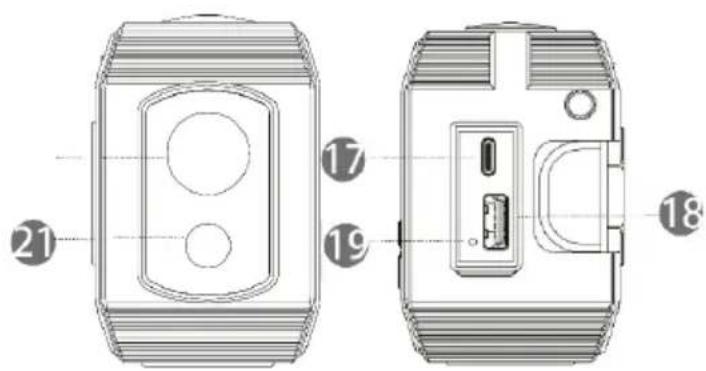
natural_image
Simple line drawing of a USB cable with two connectors (no text or symbols)USB(Type-C)-Kabel
natural_image
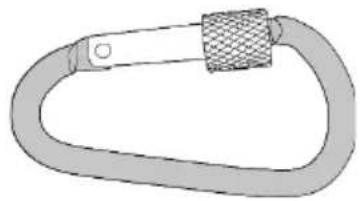
Illustration of a carabiner with mesh strap (no text or symbols)Karabiner
natural_image
Pure electrical circuit lines without any symbols
WARNUNG!
natural_image
Technical line drawing of a mechanical component with a lever and rotating arrow (no text or symbols)HINWEIS!
natural_image
Technical line drawing of a mechanical device with mounting brackets and a central panel (no text or symbols)SOS Alarm Funktion
natural_image
Diagram showing a device being connected to a device via tubing, with no visible text or symbols.natural_image
Pure technical diagram showing a mechanical component with a downward arrow indicating force or direction (no text or symbols)BE COOL
flowchart
graph LR
    A["8888"] --> B["8888"]
    B --> C["8888"]
    C --> D["8888"]
natural_image
Line drawing of a portable electronic device with antenna and control panel (no text or symbols)Technische Daten
DECLARATION OF CONFORMITY
Schuss Home Electronic GmbH
Scheringgasse 3
1140 Wien
AUSTRIA
Declares, that the product
Hersteller
Producer
Be Cool
Bezeichnung
Description
Notfallradio
Modell Nr.
Model No.
BC23KR587BT
is conformity with following directives, norms and/or regulations:
RED Richtlinie / RED directive 2014/53/EU
Health and safety
EN IEC 62368-1:2020+A11:2020
EN 62479:2010
EN 50663:2017
EMC
ETSI EN 301 489-1 V2.2.3 (2019-11)
ETSI EN 301 489-17 V3.2.4(2020-09)
EN 55032 :2015
EN 55035 :2017
Radio aspects
Place and date of issue:
Vienna, 2023-02-05
Declaration reference:
SCHUSS HOME ELECTRONIC GMBH
Scheringgasse 3, 1140 Wien, AUSTRIA
Subject to alterations and printing errors, the current version is available for download:
Outdoor emergency radio
Outdoor emergeny radio
BC23KR587BT
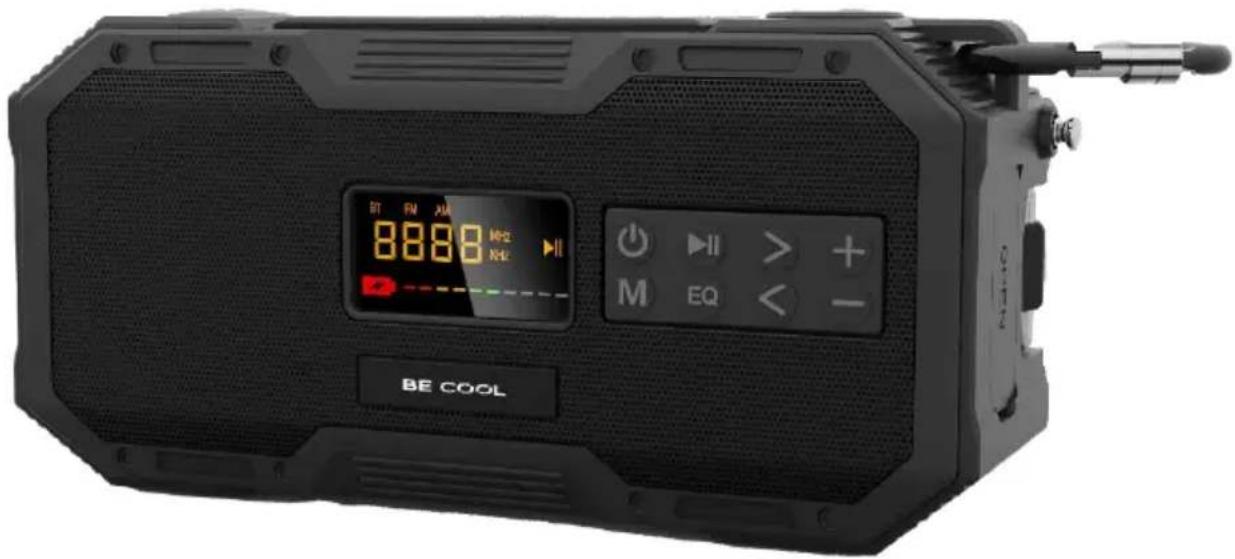
CONGRATULATIONS!
THANK YOU FOR CHOOSING A PRODUCT FROM
BE COOL HAVE DECIDED.
BE COOL
PLEASE READ THE OPERATING INSTRUCTIONS CAREFULLY BEFORE STARTING ASSEMBLY, INSTALLATION, OPERATION OR MAINTENANCE. PROTECT YOURSELF AND OTHERS BY FOLLOWING THE SAFETY INSTRUCTIONS. FAILURE TO FOLLOW INSTRUCTIONS COULD RESULT IN PERSONAL INJURY AND/OR PROPERTY DAMAGE AND/OR LOSS OF WARRANTY COVERAGE!
Explanation of symbols

DANGER!

WARNING!
Intended use
This is a consumer electronics device.
The emergency radio is used to play back audio material that can be played back via Bluetooth®. Furthermore, radio broadcasts can be played back.
The reception range mentioned represents the technical possibilities of the unit. Information received outside this range may not be used or further disseminated. The respective national laws must be observed.
Please note that in case of improper use, the liability expires:
- Do not modify the unit without our approval and do not use any additional equipment not approved or supplied by us.
- Only use spare parts and accessories supplied or approved by us.
- Observe all information in these operating instructions, especially the safety instructions. Any other operation is
BE COOL
considered improper and may result in personal injury or damage to property.
- Do not use the unit in potentially explosive areas. This includes, for example, tank farms, fuel storage areas or areas where solvents are processed. Also, do not use this unit in areas with particle-laden air (e.g. flour or wood dust).
- Do not expose the unit to extreme conditions. To be avoided are:
– High humidity or wetness over a longer period of time - Extremely high or low temperatures
- open fire.
Safety instructions

WARNING!
Risk of injury!
Risk of injury to children and persons with reduced physical, sensory or mental abilities (for example, partially disabled persons, elderly persons with reduced physical and mental abilities) or lack of experience and knowledge.
- Store the appliance and accessories in a place out of reach of children.
- This appliance can be used by children aged from 8 years and above and persons with reduced physical, sensory or mental capabilities or lack of experience and/or knowledge if they have been given supervision or instruction concerning use of the appliance in a safe way and understand the hazards involved. Children must not play with the appliance.
- Cleaning and user maintenance must not be carried out by children.
• Children do not realise the dangers that can arise when
BE COOL
handling electrical appliances. When using the appliance, please be especially attentive when children are around.
- Children younger than 8 years should be kept away from the unit and the connecting cable.
- Keep all packaging materials used (bags, polystyrene pieces, etc.) out of the reach of children.
Set up the unit safely
- Wait before connecting the appliance if the appliance is moved from a cold room to a warm room. The resulting condensation can destroy the unit under certain circumstances. When the unit has reached room temperature, it can be put into operation without risk.
- Make sure that :
- a distance of at least 10 cm is maintained to the sides and above the unit if you place the unit on a shelf or similar;
- no direct heat sources (e.g. heaters) are acting on the unit;
- use the unit only in moderate climates;
- Do not place the unit in the immediate vicinity of magnetic fields.
(e.g. television or other speakers);
- there are no open fire sources (e.g. burning candles) near or on the appliance.
- no vessels filled with liquid, such as vases, are placed on or near the appliance. The vessel may tip over and the liquid may affect electrical safety.
Power supply
- Use a USB charger with a charging current of 5V, max. 2.0 A (not included in the scope of delivery - please observe the safety instructions of the respective manufacturer).
BE COOL
- The charger must be close to the device and always easily accessible. Lay the USB-C cable so that no one can step on it or trip over it.
- To disconnect the power supply to your device, remove the USB-C cable from the device.
- Do not use the device if the USB-C input or the cable is damaged.
- As long as the unit is connected to the USB charger and plugged into a power-supplying socket, the emergency radio is also powered in standby mode to charge the battery.

WARNING!
Risk of injury!
- Never open the housing of the unit. Touching live parts or altering the electrical and mechanical construction may endanger you and possibly lead to malfunctions of the unit.
NOTE!
In the event of a thunderstorm or if you do not intend to use the unit for a longer period of time, disconnect it from the mains.
- Do not charge the emergency radio during a thunderstorm.
- The USB-C cable of the emergency radio serves as a disconnect device. As long as the emergency radio is connected to the mains, the parts inside carry power even when it is switched off.
- The USB-C cable and the charging sockets must not be touched with wet hands.
BE COOL
- Do not insert any objects into the openings. There is a risk of electric shock and short circuit!
- Do not use the emergency radio and accessories if they are damaged, smoke is emitted or if they make unusual operating noises. In this case, disconnect the charger immediately.
- The light source of this luminaire is not replaceable; when the light source has reached its end of life, replace the entire unit.
Handling batteries
The emergency radio is operated with a permanently installed battery and cannot be easily replaced by the user. Under no circumstances should you attempt to replace the battery yourself.
Please note the following information:

WARNING!
Danger of explosion!
There is a risk of explosion if the battery is not replaced properly.
Do not throw the appliance into a fire, short circuit it or take it apart.
- The emergency radio must not be charged unattended.
Splash water protection
The radio is protected to IPX5 against damage from dust and water jets.
BE COOL
NOTE!
Water resistance is only guaranteed if the mains adapter connection is sealed with the protective rubber flap.
Scope of delivery
- Remove the product from the packaging and remove all packaging material.
- Check that the delivery is complete and intact and please notify us within 14 days of purchase if the delivery is not complete or damaged. In case of damage, do not use the unit until you have consulted the customer service.
With the package you have purchased you have received:
- Emergency radio
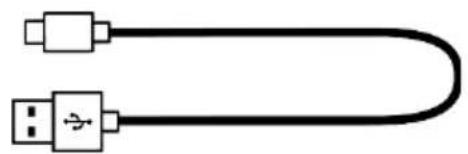
• USB (Type-C) charging cable - Carabiner
- Reset needle
- Operating instructions

RECYCLING
The packaging materials can be recycled. Therefore, it is recommended to dispose of them in sorted waste.
DISPOSAL
The symbol "crossed-out dustbin" requires the separate disposal of waste electrical and electronic equipment (WEEE). Electrical and electronic equipment may contain hazardous and environmentally dangerous substances. Therefore, do not dispose of this in unsorted residual waste, but at a designated collection point for waste electrical and electronic equipment. By doing so, you are helping to protect resources and the environment. For more information, please contact your dealer or local authorities.
DECLARATION OF CONFORMITY
We hereby certify that this article complies with the essential requirements, regulations and directives of the EU.

You can view the detailed declaration of conformity at any time under the following link: www.schuss-home.at/de/downloads/
Errors and technical modifications excepted.
BE COOL
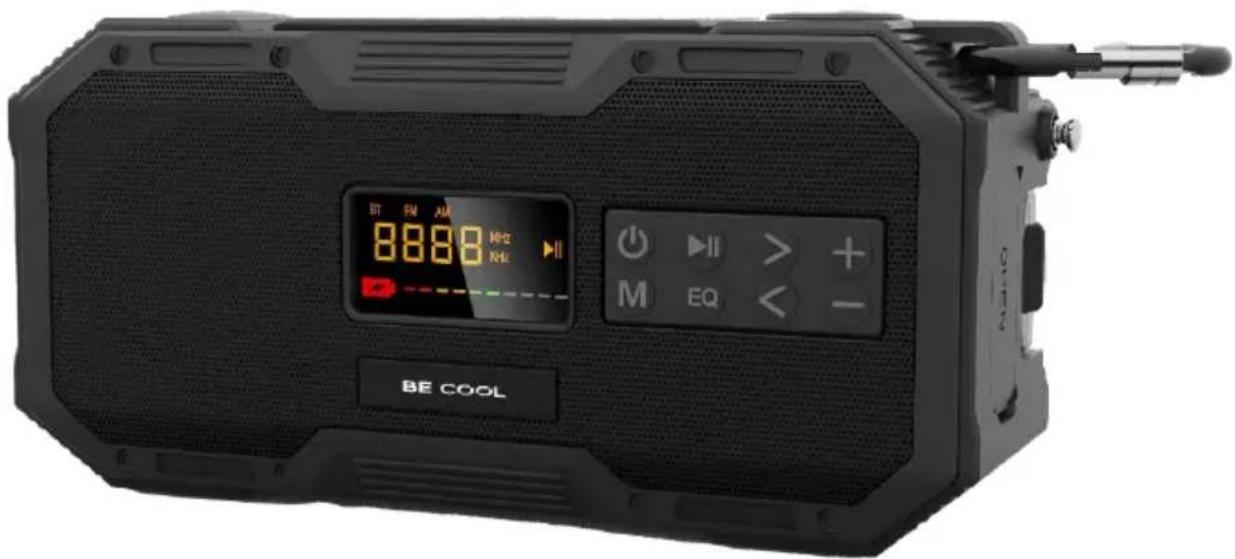
Operating elements
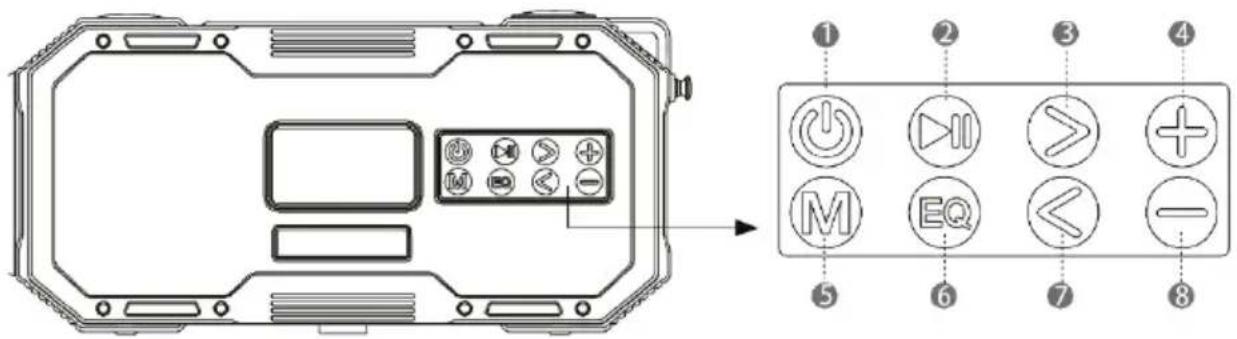
9. On/Off switch
Press and hold : To switch the unit on or off.
a. FM/AM mode
Press briefly : To mute the unit
10. Pause/Playback
a. Bluetooth® mode
i. Press briefly : Pause/Playback
ii. Long press : Disconnect the Bluetooth® connection
b. FM/AM mode
i. Press briefly : Switch between station presets
ii. Press and hold : Automatic station search
11. Forward button
a. Bluetooth® mode
i. Press briefly : next title
b. FM/AM mode
i. Press briefly : next frequency
ii. Press and hold : Search for the next station
12. Increase volume
13. Mode button
Switching between sources : BT/FM/AM
- EQ button (only available in Bluetooth® mode)
Equalizer switching between : Standard, Rock, Pop, Jazz, Country
15. Back button
a. Bluetooth® mode
i. Press briefly : Previous title
b. FM/AM mode
i. Press briefly : last frequency
ii. Press and hold : Search for previous channel
16. Decrease volume
BE COOL
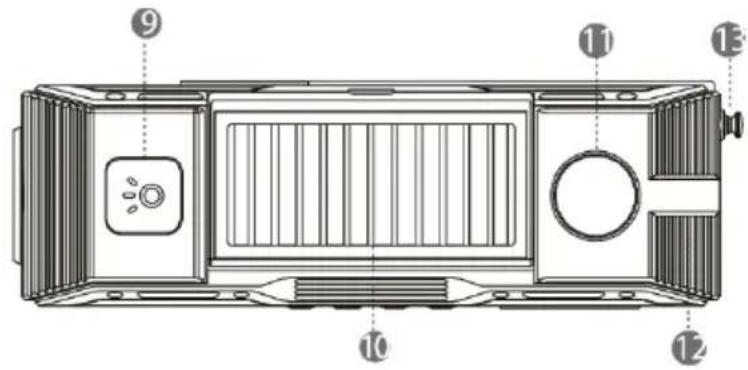
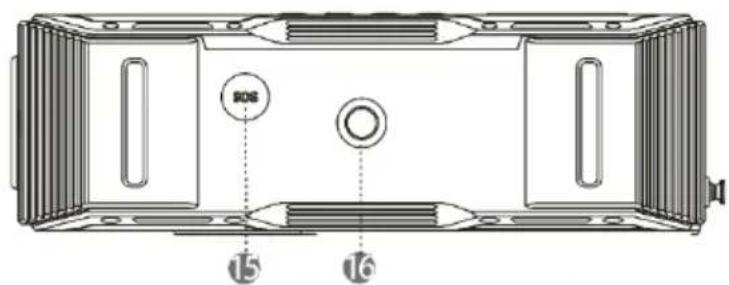
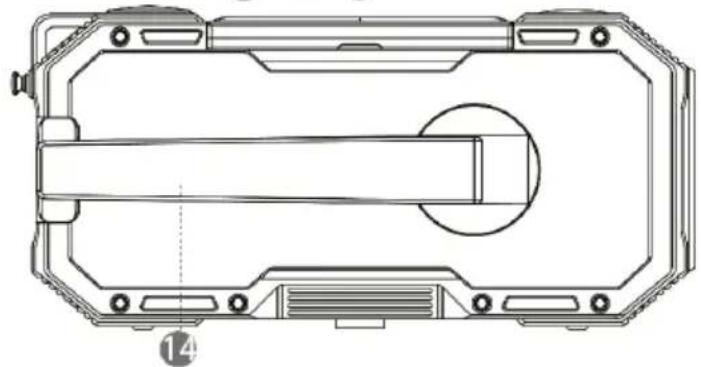
natural_image
Technical line drawing of a mechanical housing or enclosure with internal components and mounting holes (no text or symbols)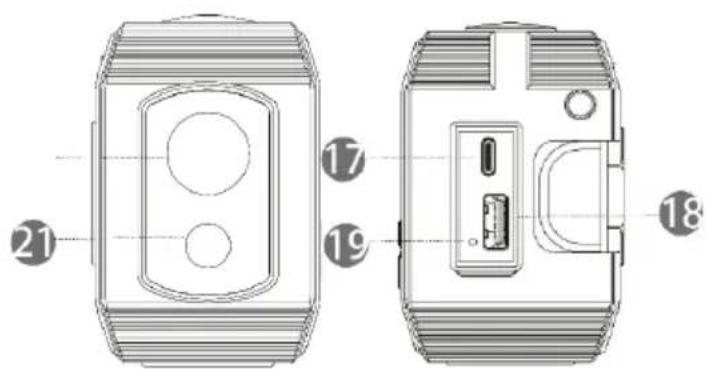
- Torch button
Switch the torch on/off
- Solar panel
for charging the emergency radio on the back there is a reading lamp
-
Thermometer
-
Eyelet for carabiner, lanyard or the like
-
Antenna
-
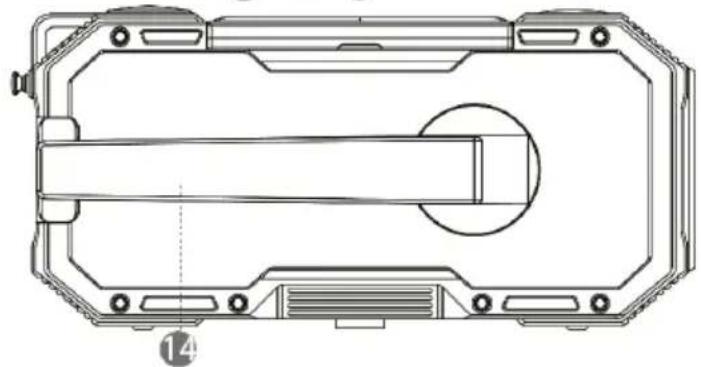
Hand crank
for charging the emergency radio
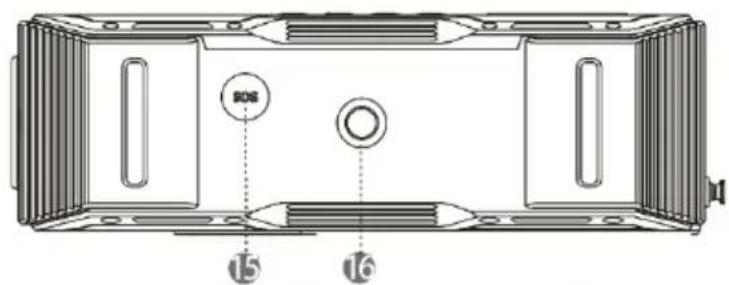
- SOS Button
Triggering the emergency signal
Long press : Triggers alarm sound
-
1/4" screw socket for tripod or similar
-
USB-C input
For charging via the supplied cable
- USB output
For charging other devices such as smartphones, tablets, etc.
- Reset button
To reset the emergency radio
-
Torch
-
Alarm light in red/blue
Strobe luminaire in red/blue
BE COOL
natural_image
Simple line drawing of two USB connectors (no text or symbols)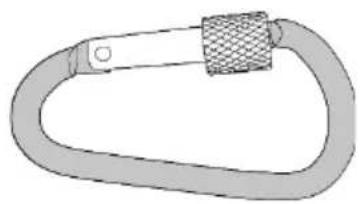
natural_image
Illustration of a carabiner with mesh strap (no text or symbols)USB (Type-C) cable carabiner
Using the powerbank function, charging other devices
- Press and hold the power button to switch off the unit.
- Open the connection cover
- Plug the appropriate USB cable into the USB output and connect your external device to the cable.
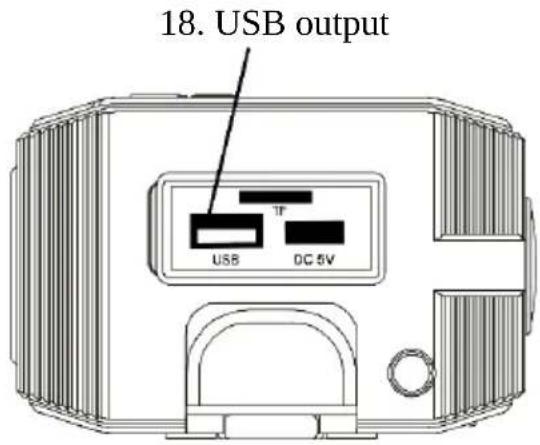
*USB cable not included, please use the original accessories of the external device.

WARNING!
- The output power of the USB output is 1.5 A. Please do not use the output if the device to be charged is not allowed to be charged with 1.5 A.
- Damage or accidents caused by charging external, unsupported devices are not guaranteed.
- Check with the manufacturer of the external device to see if the device supports 1.5 A charging.
The life of the battery, of the charged unit, may be shortened due to incorrect charging. - The emergency radio cannot charge any device that can be charged via USB.
Charging speed may be very slow or almost impossible due to the specification of the external device and the cable.
BE COOL
- Due to the specification of the external device and cable, the device may only charge up to 90% - 99%.
- Do not charge several external devices at once.
Charging the emergency radio
2. Charging via the USB(Type-C) charging cable
- Press and hold the power button to switch off the unit
- Open the connection cover
- Connect the supplied USB charging cable (Type-C) to the charging socket
- Connect the USB charging cable to a suitable adapter or to the PC.
- The charging indicator lights up red during charging, as soon as the unit is charged, the colour of the charging indicator changes to green
- After the charging process has been completed successfully, unplug the charging cable.
USB-C input on the
Connect the supplied charging cable to the USB port
Plug the charging cable into a suitable mains adapter

natural_image
Pure electrical circuit lines without any symbols
WARNING!
- Only use the USB (Type-C) charging cable supplied.
- When using the radio for the first time, please charge it fully.
- If you charge the radio via a USB hub, the unit may not charge properly.
- Make sure that the mains adapter with which you charge the radio supplies sufficient charging current.
BE COOL
NOTE!
- Charging can take up to 5 hours
- When the charging indicator lights up green, please remove the supplied USB (Type-C) charging cable.
- Please DO NOT use the radio while charging, this may reduce the life expectancy of the built-in battery and may also damage the radio if necessary.
- Before using the radio again, please check that the connection cover is closed. Otherwise, damage may occur due to dust and water ingress.
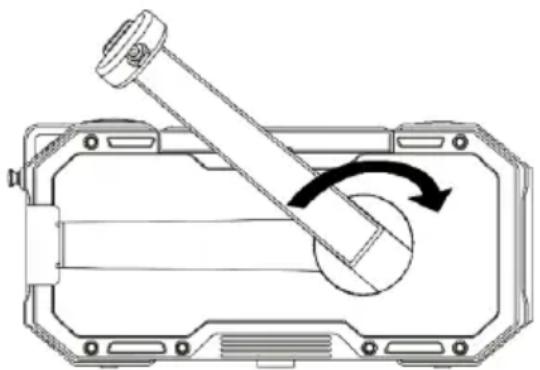
3. Charging via the hand crank
- Press and hold the power button to switch off the radio
- Fold out the crank
- Turn the crank slightly clockwise.
- Turn the crank slowly at first and increase the speed continuously.
- The charging indicator lights up red during the cranking process
- Turn the crank continuously to charge the emergency radio.
• After successful charging, fold the crank back in.
natural_image
Technical diagram of a mechanical component with a lever and rotating shaft (no text or symbols)NOTE!
Charging and power generation via the crank is an additional function and is recommended for use in emergency situations, as the efficiency of charging is low.
BE COOL
4. Charging via the built-in solar panel
- Press and hold the power button to switch off the radio
- Place the unit in the sun with the solar panel facing upwards
- The charging indicator lights up red during the charging process
NOTE!
Charging and power generation via the built-in solar panel is an additional function and is recommended for use in emergency situations, as the efficiency of charging is low.
Torches function
Press button 9 (torch button)
- Press briefly: The torch lights up
- Press and hold: Switches on the stroboscope function
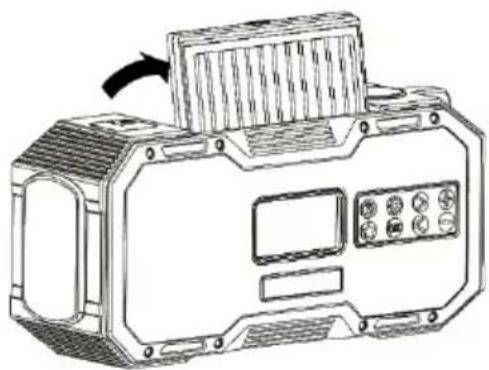
Use reading lamp
- Unfold the solar panel
- Press the "9" key to change the brightness and light colour
natural_image
Technical line drawing of a mechanical device with mounting brackets and a central panel (no text or symbols)SOS alarm function
- Press the SOS button 15 on the underside of the radio
• The alarm and the SOS lighting starts - Press the button again to stop the signal
BE COOL
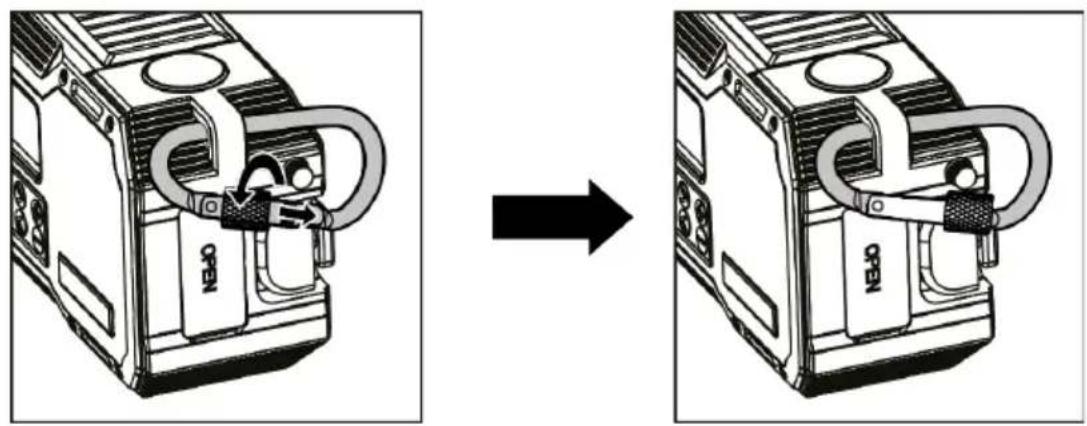
Use carabiner
- Attach the carabiner to the suspension buckle
- Screw the clasp of the carabiner tight
Adjusting the volume
- Press the + button to increase the volume.
- Press the button to decrease the volume.
• FM/AM mode: Press power button 1 to mute, press again to unmute
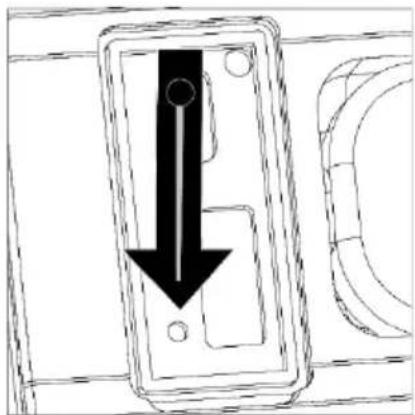
Resetting the radio
Reset the unit should:
- The unit no longer allows itself to be operated
• The unit will not charge
• The unit does not work as usual - The device cannot be connected via Bluetooth
Reset the unit as follows:
Insert a tool pin into the "Reset" socket, similar to the smartphone, as shown in the drawing.
natural_image
Pure technical diagram showing a mechanical component with a downward arrow indicating force or direction (no text or symbols)BE COOL
Using the Bluetooth® Speaker
- Use the "M" button 5 to set the source to Bluetooth®.
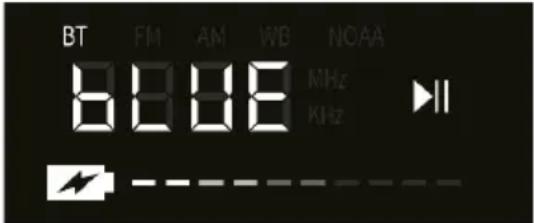
- When the "BT" light on your radio flashes, the radio is ready to be connected
- Make sure that Bluetooth® is activated on your smartphone or similar player.
- Go to the search setting of your player and search for "BC23KR587BT".
- Connect to the unit "BC23KR587BT".
- If the connection is successful, the "BT" light goes out
NOTE!
Press the "2" button for a long time to disconnect all connections to the radio
Play/Pause
Press the "2" button to pause or play the current track.
Next song
Press the > button "3" to play the next song
Previous song
Press the < button "7" to play the previous song
Equalizer
Press the "EQ" key "6" to switch between the presets:
- Standard
- Rock
- Pop
- Classic
- Jazz
- Country
to choose.
BE COOL
Using FM/AM Radio
FM/AM mode
Press the "M" key "5" to select between FM or AM.
Automatic station search
Press and hold the > key "2" to start the automatic channel search. As soon as the first channel is found, the frequency is stopped once and the station found is automatically stored under "P01". When the second radio station has been found, it is automatically stored under "P02". The process is continued in this way until all frequencies have been found and saved.

flowchart
graph LR
    A["8888"] --> B["8888"]
    B --> C["8888"]
    C --> D["8888"]
* The number of channels that can be received varies depending on the of the radio wave conditions at the site of operation.
* The station search by manual operation cannot be saved.
Switch between stored stations
- Press the "Play" button "2
- The frequency shown on the display changes to "P00
- Dial the number of the desired station
Change frequency
- Press the > button "3" and the frequency changes continuously

- Press the < button "7" and the frequency decreases

- If you remain on the > button "3" longer, the next station is automatically searched for.
However, this cannot be saved!
- If you stay on the < button "7" longer, the previous station is automatically searched for.
BE COOL
However, this cannot be saved!
Improve radio reception
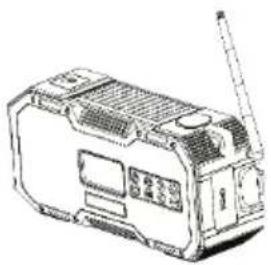
If you want to listen to the radio, make sure that the antenna is extended and well adjusted. The antenna should protrude upwards and not be covered.
natural_image
Line drawing of a portable electronic device with antenna and control panel (no text or symbols)Technical data
| Battery | 5000 mAh |
| Playtime | 20 hours |
| Charging current | 5V, Max. 2.0 A |
| Loudspeaker | 1 |
| RMS power | 7 Watt |
| Bluetooth® | 5.0 |
| Bluetooth® range | 10 metres |
| FM frequency range | 76 - 108 Mhz |
| AM frequency range | 522 - 1710 Khz |
| Station memory | 60 stations |
| USB output | 5V, 1.5 A |
| USB input | 5V, Max. 2.0 A |
| IP standard | IPX5 |
BE COOL
GUARANTEE
With this quality product from Be Cool, you have made a decision for innovation, durability and reliability.
For this Be Cool appliance we grant a warranty period of 2 years from the date of purchase, valid in Austria! If, contrary to expectations, service work should nevertheless be necessary on your appliance during this period, we hereby guarantee to repair it free of charge (spare parts and labour) or (at the discretion of Schuss) to exchange the product. If neither repair nor replacement is possible for economic reasons, we reserve the right to issue a credit note for the current value. In the event of warranty claims, please contact your specialist dealer or us directly. We would like to point out that repair work that has not been carried out by the authorised contract workshop in Austria will immediately terminate the validity of this warranty.
This warranty does not cover:
• Repair or replacement of parts due to normal wear and tear
• Damage due to non-observance of the operating instructions
• Devices that are used - even only partially - for commercial purposes
• equipment mechanically damaged by external influence (fall, impact, breakage, improper use, etc.) as well as wear and tear of an aesthetic nature.
• Equipment that has been improperly handled
• Units that have not been opened by our authorised service workshop.
• Consumer expectations not met.
• Damage caused by force majeure, water, lightning, overvoltage.
- Units where the type designation and/or serial number on the unit has been changed, deleted, made illegible or removed.
• services outside our authorised workshops, the transport costs to an authorised workshop or to us and back, and the associated risks.
We expressly point out that within the warranty period, a lump sum of € 60,- (indexed basis CPI 2010, June 2015) will be charged in case of operating errors or if no error was detected.
The absolute warranty period of 2 years from the date of purchase is not extended by the provision of warranty service (repair or replacement of the unit). The 2-year guarantee is only valid on presentation of the purchase receipt (must contain the name and address of the dealer as well as the complete designation of the unit) and the corresponding guarantee certificate, on which the type of unit as well as the serial number (visible on the box and on the back or bottom of the unit) must be noted! Without presentation of the guarantee certificate, only the legal guarantee applies! We expressly point out that the statutory warranty rights are not affected by this warranty and continue undiminished. Schuss Home Electronic GmbH and its vicarious agents shall only be liable for damages in the event of gross negligence or intent. In any case, liability for loss of profit, expected but not realised savings, consequential damages and damages from third party claims is excluded. Damages to or for recorded data are always excluded from the liability for damages.
Congratulations on your choice. We hope you enjoy your Be Cool appliance!
ADDRES S
Schuss Home Electronic GmbH
1140 Vienna, Scheringgasse 3
Tel.: +43 (0)1/ 970
Type designation: ....
Serial number: ....
In the event of a warranty claim, this warranty certificate must be handed over together with the unit to the authorised service workshop or the dealer from whom you purchased the unit!
BE COOL
DECLARATION OF CONFORMITY
DECLARATION OF CONFORMITY
Schuss Home Electronic GmbH
Scheringgasse 3
1140 Vienna
AUSTRIA
Declares that the product
Manufacturer
Producer
Be Cool
Designation
Description
Emergency radio
Model no.
Model No.
BC23KR587BT
complies with the following directives, standards and/or regulations: is conformity with following directives, norms and/or regulations:
RED directive 2014/53/EU
Health and safety
EN IEC 62368-1:2020+A11:2020
EN 62479:2010
EN 50663:2017
EMC
ETSI EN 301 489-1 V2.2.3 (2019-11)
ETSI EN 301 489-17 V3.2.4(2020-09)
EN 55032 :2015
EN 55035 :2017
Radio aspects
CE marking on the product:

Place and date of the exhibition:
Vienna, 2023-02-05
Declaration reference:
SCHUSS HOME ELECTRONIC GMBH
Scheringgasse 3, 1140 Vienna, AUSTRIA
Subject to changes and misprints, the current version can be downloaded:
Subject to alterations and printing errors, the current version is available for download:
- BC23KR587BT
- Ein/Aus-Schalter
- WARNUNG!
- HINWEIS!
- SOS Alarm Funktion
- BE COOL
- Schuss Home Electronic GmbH
- RED Richtlinie / RED directive 2014/53/EU
- Health and safety
- EMC
- Radio aspects
- Declaration reference:
- Explanation of symbols
- Intended use
- Safety instructions
- WARNING!
- Risk of injury!
- Set up the unit safely
- Power supply
- NOTE!
- Handling batteries
- Danger of explosion!
- Splash water protection
- Scope of delivery
- RECYCLING
- DISPOSAL
- DECLARATION OF CONFORMITY
- Operating elements
- On/Off switch
- Pause/Playback
- Forward button
- Increase volume
- Mode button
- Back button
- Decrease volume
- Charging the emergency radio
- Charging via the USB(Type-C) charging cable
- Charging via the hand crank
- Charging via the built-in solar panel
- Torches function
- Use reading lamp
- SOS alarm function
- Use carabiner
- Adjusting the volume
- Resetting the radio
- Using the Bluetooth® Speaker
- Play/Pause
- Next song
- Previous song
- Equalizer
- Using FM/AM Radio
- FM/AM mode
- Automatic station search
- Switch between stored stations
- Change frequency
- Improve radio reception
- GUARANTEE
- This warranty does not cover:
- RED directive 2014/53/EU
Brand : Be Cool
Model : BC23KR587BT
Category : Radio