
SHX55HP201W - Heating SHX - Free user manual and instructions
Find the device manual for free SHX55HP201W SHX in PDF.


| Product Type | Electric Space Heater |
| Model | SHX55HP201W |
| Brand | SHX |
| Heating Method | Ceramic Fan Heater |
| Power Settings | Low (1000W), High (2000W) |
| Voltage | 220-240V ~ 50/60Hz |
| Dimensions (W x H x D) | 20 x 30 x 15 cm |
| Weight | 2.5 kg |
| Cord Length | 1.8 m |
| Safety Features | Overheat protection, tip-over switch, cool-touch housing |
| Thermostat | Adjustable thermostat |
| Fan Speed | 2 speeds (high/low) |
| Oscillation | Yes, 60° |
| Remote Control | Not included |
| Noise Level | ~45 dB |
| Energy Efficiency Class | A |
| Cleaning | Wipe with damp cloth; do not immerse |
| Maintenance | Check and clean filter monthly |
| Spare Parts Availability | Replaceable filter available |
| Repairability Index | 7/10 |
Frequently Asked Questions - SHX55HP201W SHX
User questions about SHX55HP201W SHX
0 question about this device. Answer the ones you know or ask your own.
Ask a new question about this device
Download the instructions for your Heating in PDF format for free! Find your manual SHX55HP201W - SHX and take your electronic device back in hand. On this page are published all the documents necessary for the use of your device. SHX55HP201W by SHX.
USER MANUAL SHX55HP201W SHX
natural_image
Front panel of a white rectangular electronic device with a digital display showing temperature reading (no text or symbols on the device itself)HERZLICHEN GLÜCKWUNSCH!
natural_image
Simple line drawing of a pencil inside a corner, no text or symbols presentnatural_image
Line drawing of a hand holding a drill bit with a pointed tip (no text or symbols)natural_image
Simple line drawing of a hexagonal bolt with a circular head (no text or symbols)natural_image
Simple line drawing of a door corner with a handle and angle marker (no text or symbols)natural_image
Technical line drawing of a mechanical assembly with a bracket and connecting rod (no text or symbols)natural_image
Line drawing of a hand holding a small object near a vertical panel (no text or symbols)| Important information on safety, location and electrical connection | 16 – 18 |
| Recycling, Disposal and Declaration of Conformity 18 | |
| Delivery Content 18 | |
| Description of the device 19 | |
| Start Up 19 – 23 | |
| Saving Mode 23 | |
| Safety Measurements 23 | |
| Cleaning Instructions 24 | |
| Activities at the beginning and end of the season 24 | |
| Trouble Shooting 25 | |
| Technical informations 25 | |
| Required information on electrical individual room heaters 26 | |
| Warranty 27 | |
Please note that the SHX panel is not suitable for continuous operation and may only be used in well-insulated rooms.
PLEASE READ THE INSTRUCTIONS CAREFULLY, BEFORE USING THE PRODUCT. PROTECT YOURSELF AND OTHERS BY FOLLOWING THE SAFETY INSTRUCTIONS. IF YOU ARE NOT FOLLOWING THE INSTRUCTIONS, IT MAY CAUSE PERSONAL AND/OR PROPERTY DAMAGE AND/OR LOSS OF WARRANTY!
IMPORTANT INFORMATION ON SAFETY, LOCATION AND ELECTRICAL CONNECTION.



- Use this device only in accordance with the guidelines in the operating instructions. Any other use that is not recommended by the manufacturer could result in fire, electric shock, or personal injury.
- This device is only intended for heating living spaces in households and must not be used for any other purpose.
- Remove the packaging and make sure that the heating panel is not damaged. If in doubt, do not use the device and contact the service center or your dealer.
-
Before connecting to the mains, you must check whether the type of current and the mains voltage match the specifications on the device rating plate.
-
The electrical socket in which you connect the device must not be defective or loose and must be suitable for the required current load and, above all, must be reliably grounded.
- Avoid using an extension cord as this could overheat and cause a fire.
- If the power supply cable is damaged, it must be replaced by the manufacturer or an authorized service center in order to avoid all possible risks. Do not twist or bend the power cord.
- If in doubt, have your electrical installation checked by a qualified electrician.
- It is forbidden to adapt or modify the properties of this device in any way and only use spare parts and accessories recommended by the manufacturer (failure to do so will invalidate the guarantee).
- If the device has a defect, switch it off and contact the customer hotline.
-
Always contact the manufacturer's authorized service center for any repairs to the device, power plug or cable. You can access the customer service centers online at www.shx.at.
-
This device may only be used by adults.
- Children under 8 years of age and persons with limited physical, psychological, sensory or mental abilities as well as lack of experience and knowledge may only use this device if it is done under appropriate supervision and it provides detailed instructions on how to use the device in a safe manner and how it came, and the existing dangers have been described.
- Do not operate the device unsupervised. If you leave the room, always switch off the device.
- Do not use the heating panel in small rooms where there are people who are unable to leave the room on their own, unless they are constantly monitored.
- Children must not play with the device.
-
Keep children away from packaging material. If swallowed there is a risk of suffocation!
-
This device is not equipped with a device for controlling the room temperature.
- The device is not suitable for continuous and precision operation.
- This device is only intended for heating living spaces in households and must not be used for any other purpose.
- This panel is only for wall mounting in dry indoor areas.
- Do not use the heating panel near water or excessive moisture, e.g. in the wet basement, next to the swimming pool, bathtub or shower. Make sure that no water can enter the device.
- Do not use the heating panel in close proximity to gasoline, gas, oil, alcohol or other explosive and easily flammable liquids / gases.
- Keep a distance of at least 1m from other highly flammable substances such as:
a. vessels under pressure (e.g. spray containers)
b. Furniture
c. Textiles of all kinds
- Do not place any objects on the panel.
- Never cover the device during operation and cooling down.
-
Make sure that no objects get between the heating panel and the mounting wall that touch the heating surface.
-
Always switch off the device before pulling the plug.
- Do not pull the power cord to unplug the device. Always pull on the plug to pull out the power cord.
- Always allow the device to cool down before you want to clean or disassemble it.
- Unplug the device when it is not in use before cleaning it, it requires maintenance.
- Do not touch the plug with wet hands to avoid electric shock.
ATTENTION

ATTENTION

RISK OF INJURY
The fan heater and the exiting are rare very hot! Therefore, never touch the fan heater during operation this could otherwise lead to serious burns.
RISK OF FIRE
The fan heater must not be covered during operation!
SAFETY DISTANCE:
Hold min. 1m safety distance to easily inflammable objects such as
ATTENTION

furniture, curtains, paper, etc.!
LOCATION:
Always set up the device so that the air can flow in and out freely.
RISK OF BURNING:
The fan heater gets very hot during use and can cause burns.
Particular caution is required when children and vulnerable people are present.
RISK OF OVERHEATING:
Do not heat rooms with a volume of less than 4m^3 .

RECYCLING
The packaging materials can be recycled. It is therefore recommended to dispose of them in the sorted waste.
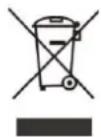
DISPOSAL
The symbol "crossed-out garbage can" requires the separate disposal of waste electrical and electronic equipment (WEEE). Electrical and electronic devices can contain dangerous and environmentally hazardous substances. Therefore, do not dispose of it in unsorted residual waste, but at a designated collection point for used electrical and electronic equipment. In this way you contribute to the protection of resources and the environment.
For more information, please contact your dealer or local authorities.

DECLARATION OF CONFIRMITY
We hereby confirm that this article complies with the essential requirements, regulations and guidelines of the EU.
You can view the detailed declaration of conformity at any time under the following link:
www.shx.at/downloads
Subject to errors and technical changes.
www.shx.at
DELIVERY CONTENT
The scope of delivery of the SHX tower heater includes:
- 1x heating panel
- 4x plastic dowel
- 4x screws
- 4x caps for screws
• 1x instruction manual
• 150 cm cord (preinstalled) with contour plug
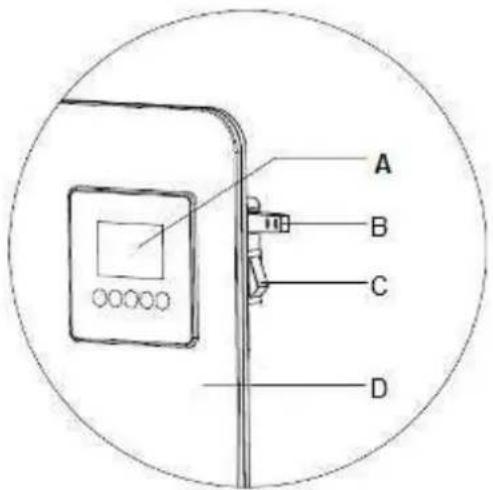
DESCRIPTION OF THE DEVICE
A → control panel + display
B → NTC-Sensor
C → ON/OFF switch
D → heating panel
START UP
SAFETY INSTRUCTIONS FOR ASSEMBLY
The SHX-heating panel can be mounted on walls or other vertical surfaces.
Please note:
-
The SHX heating panel may only be installed with the wall mounting brackets supplied.
-
Make sure that the wall you mount the panel on can carry the weight of the panel.
-
To avoid overloading the circuit, do not connect the panel to a circuit to which other devices are already connected.
-
The heater must not be located immediately below a socket outlet.
-
Mount the panel 20-100cm above the floor.
-
Leave a space of at least 50cm to all sides of the device. Leave at least 1-2 meters to all sides if there are solid or flammable objects.
-
Make sure that there is no material in the immediate surrounding of the heating panel that can deform or discolour at a temperature above 100^ C.
-
In order not to impair the heating efficiency, do not position any furniture or other objects in front of the heating panel.
-
Never install the cord behind the panel.
HINWEIS
It is recommended that the assembly is carried out in pairs, in order to avoid damaging the device.
INSTALLATION
- Open the box take out the device.
- Remove the packaging completely from the device.
- Then check the device for damages.
-
Carefully unwind the power cord and also check for damages.
-
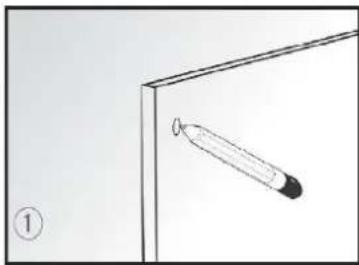
Hold the panel against the wall and markt he four positions trough the holes.
-
Drill the holes with a drilling machine.
-
Insert the four rails fitting into the holes in the wall.
-
Now hold the panel against the four rail fittings matching the four holes on the device.
-
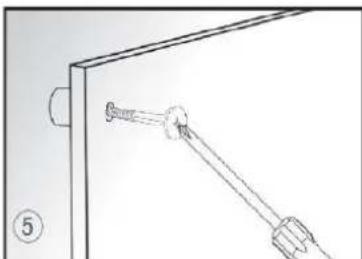
Now mount the panel against the wall, by screwing the screws trough the panel into the rails.
natural_image
Simple line drawing of a pencil inside a corner, no text or symbols present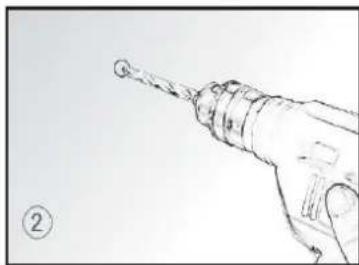
natural_image
Hand holding a drill bit with a pointed tip, no text or symbols visible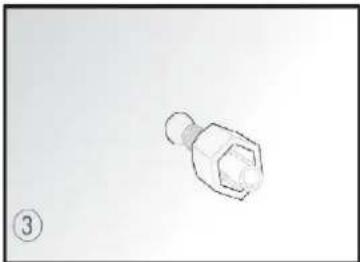
natural_image
Simple line drawing of a hexagonal bolt with a circular head (no text or symbols)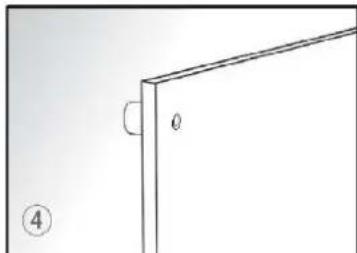
natural_image
Technical line drawing of a mechanical bracket with two bolts and a connecting rod (no text or symbols)- Put the caps onto the fasten bolts. It is recommended to use some glue to stick the caps onto the bolts steadily.
natural_image
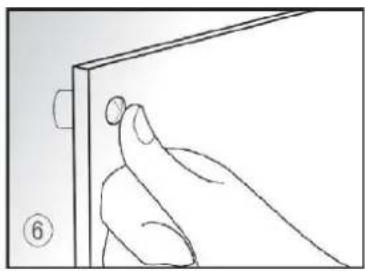
Line drawing of a hand holding a small object near a vertical panel (no text or symbols)Note: If you want to disassemble the device, simply remove the covers, unscrew the screws with a screwdriver and remove the device from the wall.
Make sure that you mount the device at least 20 cm above the floor.
DESCRIPTION OF THE DISPLAY AND CONTROL PANEL
- →Weekday
- →Symbol „ROOM TEMPERATURE“
- → Symbol
- →Symbol „TIMER“
- →Time
- →Symbol „OPENED WINDOW“
- →ON/OFF button
- →Function button
- →SET button
- → INCREASE button
- DECREASE button
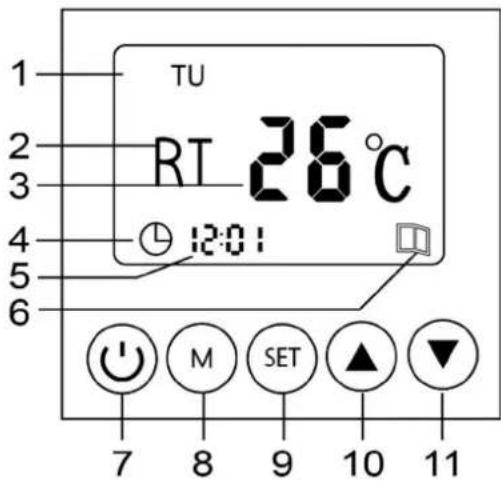
OPERATION
1. TURN ON
To turn on the device, press the 📋 button on the control panel. The standard temperature is 25^ C. If the ambient temperature is below it at the time of switching on, the device begins to heat up directly.
NOTE
Never switch off the heating panel by pulling the plug directly from the mains. Always press the button first and then the ON/OFF switch before disconnecting the device from the mains.
2. TIME & DATE:
When you use the device for the first time, please set the correct time and the correct date.
- Press the SET-button for 3 seconds. The time indicator should blink and the symbol shows up.
-
Set HOUR (0-24): Use the -buttons and confirm by pressing the SET-button → the minute indicator starts blinking.
-
Set MINUTE (0-60): Use the ▲▼-buttons again to set the correct minute and confirm it by pressing the SET-button → the weekday indicator starts blinking.
-
Set WEEKDAY (MO-SO): Use the ▲▼-buttons another time to set the correct day and confirm it by pressing the SET-button.
-
Afterwards it will show you the standard display:
-
Weekday
- Symbol "room temperature"
● Current room temperature - Time
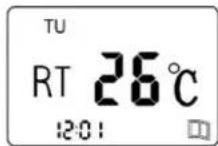
3. HEATING-FUNCTION
-
Turn the device on with the ⏻-button.
-
The display shows the standard-display.
-
Press the Ⓗ-button to start heating → the display shows the heating mode screen and the temperature indicator starts blinking.
-
Press the ▲▼-buttons to set the desired temperature. (max. 37°C)
-
Press the -button to confirm the set temperature.
-
Press the -button and the display shows you the heating mode screen with the set temperature. After 3 seconds, the display changes back to the standard-display.
4. TIMER
You can use the timer to make the device turn itself on and off automatically for every day of the week.
-
Turn the device on with the -button.
-
The display shows the standard-display.
-
Press the -button two times.
-
The timer indicator and "MON"(first day of the week) show up on the display.
-
Press until the desired day shows up on the display (for example FR → Friday)
-
Afterwards press the Ⓗ-button and set the temperature by pressing the ▲▼-buttons and press the SET-button again to confirm it.
-
Then "ON" flashes on the display this is the start time which you can set with the ▲ ▼ - buttons. First set the hour and confirm with SET, then set the minutes and confirm again with SET
-
Now "OF" flashes on the display this is the end time which you can set again using the -buttons. First set the hour and confirm with, then set the minutes and
confirm repeatedly with SET
- As soon as you have set the timer, the timer symbol also appears on the display on the standard display→
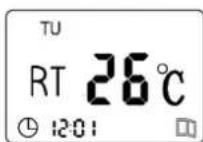
- To switch off the timer, click the Ⓜ - button until the heating FUNCTION appears on the display.
NOTE
Please note, that the temperature can't be set, whilst the TIMER is on. Turn off the timer to set the desired temperature.
SAVING MODE
The SHX panel is equipped with a saving mode, to save electricity.
As soon as you open the window in the room where the heating panel is located or the ambient temperature drops by more than 3^ C, the device switches off automatically to save electricity.
As soon as the device detects the temperature difference, the "OPEN WINDOW" symbol →
appears on the display.
Close the open window or door, switch the device on again and set the desired target temperature.
NOTE
It may happen that the "OPEN WINDOW" symbol appears on the display even though no window is open - this means that the device detects a breeze - but it does not affect operation.
To remove the symbol from the display, press and hold the button until the symbol goes out.
DISABLING THE ADAPTIVE SHUT-OFF FUNCTION /
The adaptive switch-off function is a standard factory setting for the panel. However, you have the option of deactivating this function - please proceed as follows:
- While the device is switched on, press the button for approx. 5 seconds until a signal tone sounds. Release the button to save the setting.
If you want to reactivate the function, press the button for about 5 seconds while the device is switched on until you hear a signal tone. Release the button to save the activation.
SAFETY MEASURMENTS
The SHX fan heater is equipped with protective devices that protect the device and are designed to prevent a fire.
Please note that neither mechanism is an auto stop or other comfort function. Always switch the device off, pull out the mains plug and wait until the heater cools down before you move, clean or store the device.
OVERHEATING PROTECTION
If there is any risk of overheating (e.g. cover of the device, mains overload ... ), the built-in overheating protection switches the device off.
As soon as the device cools down, the device automatically switches on and continues as before.
CLEANING INSTRUCTIONS
Before cleaning the device, switch off the heater, pull out the mains plug and then wait until the device has completely cooled down.
Clean the panel with a soft, moderately damp cloth and then wipe it with a dry cloth.

Allow the device to cool down completely, before cleaning it

- Do not dip the device in water or splash it with any other liquid.
- Do not use gasoline, alcohol or solvents for cleaning the device.
- Do not spray insecticides or similar means on the device.
- Do not use the device in rooms with high humidity.
- DO NOT COVER THE DEVICE – RISK OF FIRE!
ACTIVITIES AT THE BEGINNING / END OF THE SEASON
At the end of the season
- Check whether the panel, the power supply cable and the socket are in good condition and undamaged.
- Follow the installation and safety instructions carefully.
At the beginning of the season
- If you want to leave the device mounted on the wall, pull out the plug and store the cable carefully.
- While the panel is not connected to the electrical mains, you can cover the panel.
- If you want to remove the device from the wall, first carefully remove the covers of the screws and then the screws.
NOTE
We recommend to do the disassembly of the panel heater in pair, so it doesn't get damaged.
- Pack the device and store it in a safe, cool and dry place.
TROUBLESHOOTING
Before you contact our customer hotline / service center, please check whether the error can be remedied using the information below.
| PROBLEM POSSIBLE CAUSE SOLUTION | ||
| The heating panel does not turn on. | Power failure. | Wait for the power supply to restore. |
| The device is not connected to the power supply. | Connect / plug in the device correctly. | |
| The side ON / OFF switch is not on. | Press the ON / OFF switch to ON. | |
| The panel only works for a short time. | The desired temperature has already been reached. | Set a higher temperature. |
| The power plug is not inserted correctly. | Insert the mains plug firmly into the socket. | |
| There is an unpleasant smell in the room during operation | The panel is covered. Remove | all objects -ATTENTION RISK OF FIRE IN COMBUSTIBLE FLAMMABLE SUBSTANCES !!! |
| There is not enough distance to other objects. | The minimum distance to other objects is 1 meter. | |
| There is something between the heating panel and the mounting wall. | Remove any objects behind the heating panel. | |
TECHNICAL INFORMATIONS
| Technical information | |
| Item no. | SHX55HP201W |
| Current | 550W |
| Heating area | 0-37°C |
| Input voltage | 220V |
| Frequency | 50-60Hz |
| Weight | 7,4 kg |
| Measurements | 805 x 605 x 11 mm |
| Contact addresses for further information | Schuss Home Electronic GmbHScheringgasse 3, A-1140 WienTel: +43 (1) 97 0 21 – 0Serviceline: +43 (1) 97 0 21 – 502www.shx.atFB-Nr: 236974 t / FB-Gericht: Wien |
REQUIRED INFORMATION ON ELECTRICAL INDIVIDUAL
ROOM HEATERS
| Model identifier(s): SHX55HP201W | |||||
| Item Symbol | Value Unit Item | Unit | |||
| Heat output | Type of heat input, for electric storage local space heaters only (select one): | ||||
| Nominalheat output | P_nom 0,55 | kW | manual heat charge control, with integrated thermostat | No | |
| Minimum heat output (indicative) | P_min 0,00 | kW | manual heat charge control with room and/or outdoor temperature feedback | No | |
| Maximum continuous heat output | P_max,c | 0,55 | kW | electronic heat charge control with room and/or outdoor temperature feedback | No |
| Fan assisted heat output | No | ||||
| Auxiliary electricity consumption | Type of heat output/room temperature control (select one) | ||||
| At nominal heat output | el_max | N/A | kW | single stage heat output and no room temperature control | No |
| At minimum heat output | el_min | N/A | kW | Two or more manual stages, no room temperature control | No |
| In standby mode | el_sb | 0,000960 | kW | ||
| with mechanic thermostat room temperature control | No | ||||
| with electronic room temperature control | No | ||||
| electronic room temperature control plus day timer | No | ||||
| electronic room temperature control plus week timer | Yes | ||||
| Other control options (multiple selections possible) | |||||
| room temperature control, with presence detection | No | ||||
| room temperature control, with open window detection | Yes | ||||
| with distance control option | No | ||||
| with adaptive start control | No | ||||
| with working time limitation | Yes | ||||
| with black bulb sensor | No | ||||
| Contact details | Schuss Home Electronic GmbH Scheringgasse 3 1140 Vienna Austria | ||||
WARRANTY
By purchasing a SHX quality product you have acquired an innovative, long lasting and reliable item.
For this SHE device we grant a warranty of 2 years from the date of purchase, valid in Austria only.
In the unlikely event that service work is required on your device in this period we warrant free repair (spare parts and labour) or (subject to Schuss's decision) to replace the product. In the event that neither repair nor exchange make sense from an economical perspective we reserve the right to issue a credit based on current value. When dealing with air conditioning devices you should always contact the customer hotline first (see label on the device or the title page of the instruction manual), in case of fans contact your dealer or us directly. Please note that repair not performed by the authorised workshop in Austria immediately renders this warranty void.
This warranty does not include:
• Repair of replacement of parts due to normal wear
- Damage due to non-compliance with the instruction manual
• Devices that are used commercially – even in part
• Devices damaged by external forces (falling, impact, cracking, improper use etc.) as well as aesthetic wear
• Devices that have been used improperly
• Devices that were not opened by our authorised workshop.
• Unfulfilled customer expectations.
- Damage caused by force majeure, water, lightning and overvoltage.
- Devices on which type denomination and/or serial number on the device have been erased, rendered illegible or removed.
- Service work not performed by our authorised workshops, transport costs to an authorised workshop or us and back as well as associated risks.
Please note that within the warranty period we charge a flat rate of 60 € (indexed as per consumer price index 2010, June 2015) in case of operating errors or if no fault can be found.
The total warranty period of 2 years is not extended if warranty service is performed (repair or device replacement).
The 2 year warranty is only valid if the original invoice (must contain name and address of the dealer as well as full device name) and the respective warranty certificate are produced, on which the device type and serial number (can be found on the box and the device's rear or bottom) are to be noted! Only the statutory warranty coverage applies if the warranty certificate cannot be produced!
Please note that the statutory warranty coverage is not altered by this warranty and that it applies in full regardless.
Schuss Home Electronic GmbH and its vicarious agents are only liable for damages in case of gross negligence or intent. Liability for loss of profit, expected but not incurred savings, consequential damages and damages from third party claims is excluded in any case. Damages to or for recorded data are always excluded from the liability for damages.
Congratulations on your choice. We hope you will enjoy using your SHE device!
ADDRESS
SHX Sales
Schuss Home Electronic GmbH
A-1140 Vienna, Scheringgasse 3
Tel.: +43 (0)1/ 970 21
Type designation:
Serial number:
Together with the device, this warranty certificate must be handed to the authorised workshop or dealer you bought the device from in the event of a warranty claim!
- HERZLICHEN GLÜCKWUNSCH!
- Please note that the SHX panel is not suitable for continuous operation and may only be used in well-insulated rooms.
- IMPORTANT INFORMATION ON SAFETY, LOCATION AND ELECTRICAL CONNECTION.
- ATTENTION
- LOCATION:
- RISK OF BURNING:
- RISK OF OVERHEATING:
- RECYCLING
- DISPOSAL
- DECLARATION OF CONFIRMITY
- DELIVERY CONTENT
- DESCRIPTION OF THE DEVICE
- START UP
- SAFETY INSTRUCTIONS FOR ASSEMBLY
- Please note:
- HINWEIS
- INSTALLATION
- DESCRIPTION OF THE DISPLAY AND CONTROL PANEL
- OPERATION
- TURN ON
- NOTE
- TIME & DATE:
- HEATING-FUNCTION
- TIMER
- SAVING MODE
- DISABLING THE ADAPTIVE SHUT-OFF FUNCTION /
- SAFETY MEASURMENTS
- OVERHEATING PROTECTION
- CLEANING INSTRUCTIONS
- ACTIVITIES AT THE BEGINNING / END OF THE SEASON
- At the end of the season
- At the beginning of the season
- TROUBLESHOOTING
- TECHNICAL INFORMATIONS
- REQUIRED INFORMATION ON ELECTRICAL INDIVIDUAL
- ROOM HEATERS
- WARRANTY
- This warranty does not include:
- ADDRESS
Brand : SHX
Model : SHX55HP201W
Category : Heating