BC23PS55BTK - Loudspeaker Be Cool - Free user manual and instructions
Find the device manual for free BC23PS55BTK Be Cool in PDF.


| Product Type | Party Speaker |
| Model Number | BC23PS55BTK |
| Brand | Be Cool |
| Dimensions (W x D x H) | 310 x 338 x 636 mm |
| Power Output (RMS) | 2 x 27.5W (THD 10%) |
| Frequency Range | 20Hz - 20kHz (±3dB) |
| Drivers | 2 x 6.5" woofer, 2 x 1" tweeter |
| FM Frequency Range | 87.5MHz - 108MHz |
| Input Sources | Bluetooth, USB, TF card, FM radio, AUX (Line-in), Microphone, Guitar |
| Microphone Input | Yes (6.5mm jack) |
| Guitar Input | Yes (6.5mm jack) |
| USB Charging Output | 5V 1A (for external devices) |
| Battery | Built-in rechargeable |
| Charging Voltage | AC 100-240V, 50/60Hz |
| Remote Control | Yes (AAA battery required) |
| Wireless Connectivity | Bluetooth, TWS (pair two identical speakers) |
| Equalizer Modes | Jazz, Classical, Flat, Pop, Rock |
| Light Effects | Multiple LED colors and modes |
| Warranty | 2 years (valid in Austria) |
| Included Accessories | Power adapter, remote control, user manual |
| Safety Certifications | CE, EMC, ErP compliant |
Frequently Asked Questions - BC23PS55BTK Be Cool
User questions about BC23PS55BTK Be Cool
0 question about this device. Answer the ones you know or ask your own.
Ask a new question about this device
Download the instructions for your Loudspeaker in PDF format for free! Find your manual BC23PS55BTK - Be Cool and take your electronic device back in hand. On this page are published all the documents necessary for the use of your device. BC23PS55BTK by Be Cool.
USER MANUAL BC23PS55BTK Be Cool
natural_image
Black cylindrical device with a glowing 8-ring pattern in the center, no visible text or symbolsHERZLICHEN GLÜCKWUNSCH!
DECLARATION OF CONFORMITY
Schuss Home Electronic GmbH
Scheringgasse 3
1140 Wien, AUSTRIA
Declares, that the product
| Hersteller No | Producer No. | BeCool |
| Bezeichnung | Description | Party Lautsprecher / Party Speaker |
| Modell No | Model No. | BC23PS55BTK |
is conformity with following directives, norms and/or regulations:
EMV Richtlinie / EMC directive 2014/30/EU
ETSI EN 301 489-1 V2.2.3 (2019-11)
ETSI EN 301 489-17 V3.2.4 (2020-09)
EN55032 :2015 + A1:2020 + A11 :2020
EN55035:2017+A11:2020
EN IEC 61000-3-2 :2019 + A1 :2021
EN 61000-3-3 2013 + A1 :2019
EN IEC 62368-1:2020 + A11:2020
ErP Richtline / ErP directive 2009/125/EC
Place and date of issue:
Vienna, 2023-05-30
Declaration reference:
SCHUSS HOME ELECTRONIC GMBH
Scheringgasse 3, 1140 Wien, AUSTRIA
FB-No / Company Register No.: 236974 t

SCHUSS
HOME ELECTRONIC GMBH
Authorized representative of manufacture
BE COOL
PLEASE READ THIS INSTRUCTION MANUAL CAREFULLY BEFORE STARTING INSTALLATION, OPERATION OR MAINTENANCE. PROTECT YOURSELF AND OTHERS BY FOLLOWING THE SAFETY INSTRUCTIONS. FAILURE TO FOLLOW THE INSTRUCTIONS MAY LEAD TO INJURY OR DAMAGE TO PERSONS AND/OR PROPERTY AND/OR INVALIDATE THE WARRANTY!
IMPORTANT INFORMATION ON SAFETY, LOCATION AND ELETRICAL CONNECTION.

- Use this device exclusively in accordance with the guidelines in the instruction manual. Any use other than that recommended by the manufacturer, may result in fire, electrical shock or injury to persons.
- Remove the packaging and ensure the device is not damaged. In case of any doubt do not use the device and contact the service point or your dealer.
- Keep children away from packaging materials. There is a risk of choking if swallowed!
- If the cable is damaged it must be replaced by the manufacturer or an authorized service point, in order to avoid all potential risks.
- Before connecting to a charging adapter, you must check whether the type of current and the mains voltage comply with the information given on the device nameplate.
BE COOL
-
It is strictly forbidden to modify the properties of this device in any form or manner and you must only use replacement parts or accessories recommended by the manufacturer (failure to do so will invalidate the warranty and guarantee).
-
If the device has a defect, switch it off and contact your dealer or the customer hotline.
-
For any possible repairs to the device and the mains plug or power cable you must always refer exclusively to the customer service points recommended by the manufacturer. You can view our customer service points online at www.becool.at.
-
Do not twist or bend the cable.
-
Do not touch the charging adapter with wet hands to avoid electric shock.
-
The PartySpeaker is not waterproof and must therefore not be used near water.
-
Please do not put open flames, such as candles on the device
-
The function of the device may be affected by strong electromagnetic interference. If you notice that this happens, place the device in a different location and reset it by reviewing the entire manual.
Recycling, disposal, declaration of conformity

RECYCLING
The packaging materials can be recycled. Therefore, it is recommended to dispose of them in sorted waste.
BE COOL
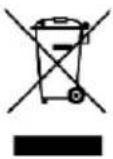 | DISPOSALThe "crossed-out wheeled bin" symbol requires the separate disposal of waste electrical and electronic equipment (WEEE). Electrical and electronic equipment may contain hazardous and environmentally dangerous substances. Therefore, do not dispose of this in unsorted residual waste, but at a designated collection point for waste electrical and electronic equipment. By doing so, you will help to protect resources and the environment. For more information, please contact your dealer or the local authorities. Directive 2012/19/EU |
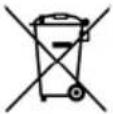 | BATTERY DISPOSALIn accordance with Legislative Decree 188 of 20 November 2008 transposing Directive 2006/66/EC on batteries, accumulators and related waste, the crossed-out wheeled bin symbol on the battery indicates that it is prohibited to dispose of waste batteries in household waste.Batteries and accumulators contain substances that are highly polluting. The user is obliged to dispose of used batteries at the collection points in the municipality or in the appropriate containers. The service is free of charge. In this way, the legal requirements are met and the environment is protected.You will find these signs on batteries:Li = Battery contains lithiumAl = Battery contains alkaliMn = battery contains manganeseCR 2025 (Li); AA (Al, Mn); AAA (Al, Mn) |
 | DECLARATION OF CONFORMITYWe hereby certify that this article complies with the essential requirements, regulations and directives of the EU. The detailed declaration of conformity can be viewed at any time at the following link:https://www.schuss-home.at/downloads |
Errors and technical modifications excepted..
BE COOL
Scope of delivery
- Be COOL Party Speaker
- Manuals
- Remote Controll
- Power adapter
Description of the unit
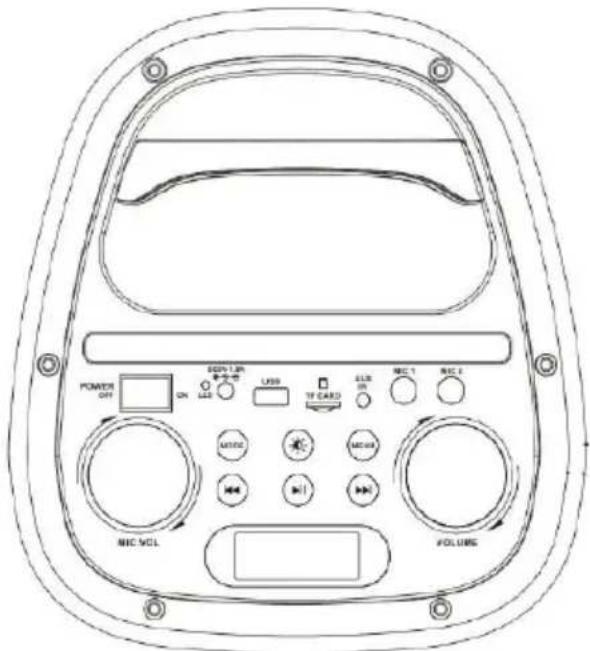
- USB - USB input
- MIC VOL - MIC volume/echo adjustment
• MODE - press to skip to the USB/Bluetooth/FM/AUX mode -
NEXT/ PREVOIUS
-
In USB mode -press to skip to next or previous track
- In FM mode- press to skip to the last channel
- PLAY - Press and hold to start automatic station search to next channel
- MENU - menu button (Treble/Bass//Echo adjustment), Long press to turns the light effects on/off
• PAUSE/PLACKBACK
○ In USB/BT mode, short press this button to play/pause.
- In FM mode: short press this button to start/stop the automatic station search. Long press to turn on TWS mode
• LIGHT - Short press to different light colors, and long press to led effects.
• LINE IN - Line-in (can connect CD/MP3/PC and other audio devices)
- MIC INPUT - Microphone input (wired microphone jack)
BE COOL
Remote Control
Insert the batteries into the remote control. Point the remote control at the remote sensor on the front of the unit. The remote control works up to a distance of about 8 metres from the sensor and within an angle of about 30 degrees from the left and right sides.
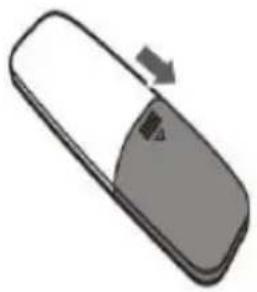
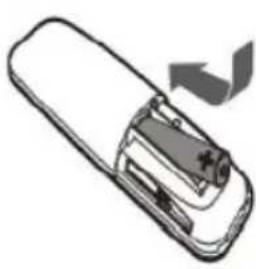
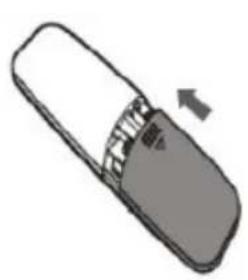
Inserting / replacing the battery
| Remove the battery compartment cover on the back of the remote control. | Insert a AAA/1.5V battery into the battery compartment, ensuring correct polarity +,- as indicated. | Replace the cover |
 |  |  |
Notice:
- Remove the battery if you are not going to use the remote control for a long time.
- A weak battery can leak and seriously damage the remote control.
- Do not expose the battery to excessive heat sources such as sunshine, fire or the like.
- Be environmentally friendly and dispose of the batteries according to legal requirements.
BE COOL
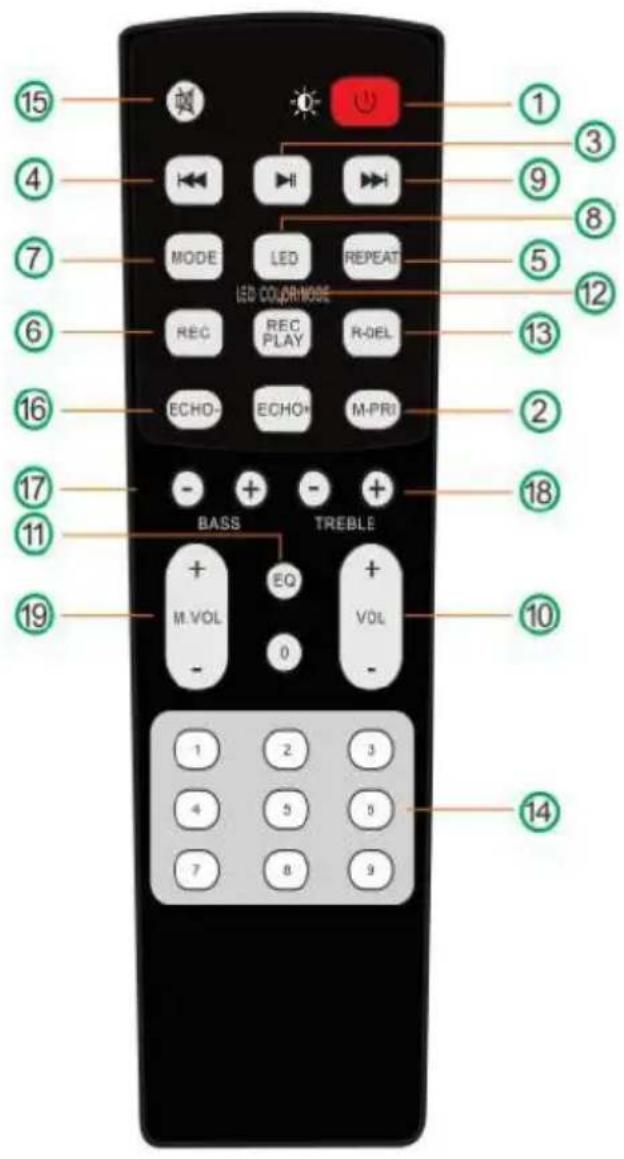
1 - Standby/LED on/off (short press for LED on/off, long press for standby).
2 - Microphone priority
3 - Pause/Playback. (Press and hold for more than 3 seconds to activate the TWS function).
4 - Previous sound (press and hold for more than 3 seconds for fast rewind).
5 - Repeat (single cycle / full cycle)
6 - Record
7 - Mode (Short press for FM/Blue/AUX IN/USB/TF/BT mode. Long press for voice prompt.
8 - LED (Short press to change the colour of the light, long press and hold for over 3 seconds to change led modes).
9 - Next tone (press and hold for 3 seconds to fast forward).
10 - Vol-/+
11 - EQ (Jazz, Classical, Flat, Pop, Rock)
12 - Play recording (play files already stored on USB)
13 - Delete recording (delete files already stored on USB)
14 - Number keys
15 - Mute
16 - Echo -/+
17 - Bass -/+
18 - Treble -/+
19 - Microphone volume -/+
| POWER ON/OFF | Press to switch the unit on or off. |
| MODE | Press repeatedly to select a signal source: Bluetooth, LINE IN or USB mode |
| LED | Press repeatedly to change the illumination mode of the LED indicator light on the speaker and OFF |
BE COOL
| EQ | Press repeatedly to switch between the different equaliser modes. |
| PAUSE | Press to temporarily pause playback; press again to resume playback |
| NEXT | Press to skip to the next track |
| PREVIOUS | Press to return to the previous track |
| MASTER VOL | Use the main volume control to change the volume of the speaker |
| MIC VOL | Use the M.Vol button to change the volume of the microphone input |
Power supply
Connect the supplied cable to the power cord and charge the built-in battery. Make sure the battery is fully charged and turn it on and off with the power button.
USB-Playback
Insert a USB drive into the USB slot on the top, press the source button to select USB mode. The Bluetooth speaker plays the MP3 track on the connected USB drive.
USB slot for charging the external device
Use a USB charging cable (not included) to charge an external USB device (except Apple devices) with the USB slot (DC 5V 1A).
Bluetooth
Briefly press the "Mode" button to enter BLUETOOTH mode. Activate Bluetooth on your smartphone and select the speaker model on your smartphone. The device is connected and playback can be started.
After switching off the party speaker and switching it on again, the devices connect automatically and do not need to be reconnected.
Battery charging
Switch on the unit to see the current charging status of the battery. The current charging indicator on the display flashes during charging until four battery
BE COOL
capacity lines appear on the display. If these light up continuously, the battery is fully charged.
Charging status:
4 battery capacity lines light up=App. 100% full
3 battery capacity lines light up=App. 75% full
2 battery capacity lines light up = App. 50% full
1 battery capacity line lit = App. 25% full (indicates that charging is required)
Microphone playback
Plug a microphone into the microphone jack on the top. Press the Menu button three times to adjust the volume of the microphone input using the Volume control. GUITAR IN connector - Connect a guitar directly to this party speaker via the guitar input on the top panel. Use the 6.5 mm guitar plug to connect to the GUITAR IN jack on the top panel.
AUX (LINE IN)
Use the audio cable to connect an audio device to the AUX - LINE IN jack. Press the [MODE] button to switch to AUX - IN(LINE IN) mode.
TWS CONNECTION
This TWS (TRUE WIRELESS STEREO) Bluetooth connection is only used between the same two speaker models. Turn on both speakers and press the mode button to select Bluetooth mode.
Choose one speaker and press the play/pause button for 3 seconds to set it as the SLAVE speaker. The display will show "SLAV," indicating a successful setting. The other speaker will be automatically configured as the MASTER speaker. Now switch to BT/Aux-in/USB/FM to play songs and enjoy music in TWS mode.
- Activate your Bluetooth device and ensure that it is in search mode.
- Select this model name from the list of discovered devices and connect to it.
BE COOL
- During TWS, the master speaker acts as the left channel and receives the Bluetooth signal, while the other speaker acts as the right channel for music playback.
Troubleshooting
| Trouble | May caused by | Solution |
| No sound comes when power on | 1: No input sound source2: Volume knob in the lowest position3: Voice switch off4:USB/SD no plug | 1:Input line has signal2: Adjust volume3: Turn on voice switch4: Plug USB/SD Card |
| Distortion of sound | 1:Volume too loud 2: Audio file error | 1:Turn volume lower 2:Check and change the audio file |
| Microphone has no sound | 1:Microphone socket not full plug 2: Microphone switch is not on3: Microphone volume in lowest | 1:Completely plug microphone socket 2:Power on microphone 3:Adjust microphone volume |
| USB/SD card no sound comes | 1:songs format error 2: Illegal operation causes function mess 3:USB/SD Card doesn’t plug properly | 1:songs format should be MP3/WMA 2: Power off, then power on 3:Plug USB/SD card properly |
| FM Radio problems | 1:Cant search radio channels 2:FM radios has no sound 3:Not enough FM channels4:FM sound not clear | 1: The FM antenna does not expand 2: Switch to next Channel and try 3: Try the antenna at a different angle 4: Try “Auto scan”. |
BE COOL
| Speaker has big noise problems | 1:The Microphone is too close to the speaker 2: The microphone switch is on but doesn’t work 3: Microphone volume too loud 4:Too close to the equipment which interfere the speaker. | 1:Do not let Microphones head point at the speaker 2:Turn off microphone if not in use. 3:Adjust microphone volume lower 4:Keep the speaker away from other interfere source. |
| Wireless BT Failure | 1:Wireless BT Disconnected 2:Wireless BT Connected but no voice3:Wireless BT effective distance too short | 1: Find the right device NameOr Long press "MENU" Button to Restore Factory Settings.2: Confirm if you connected the right device name or check 3: Try to keep away from barriers such as walls, glasses...etc |
BE COOL
| Technical Data | |
| Output power | RMS 27,5W x 2 THD 10% |
| Operating Temperature | -10~+35 °C |
| Voltage | AC100V~240V 50HZ-60HZ |
| Power adapter | |
| Speaker | Woofer 6.5' x 2 |
| FM-Frequency | Tweeter 1' x 2 |
| Frequency Range | 87.5MHz~108MHz |
| Product Dimensions | ±3dB (20Hz~20kHz) |
| Net-Weight | 310× 338× 636 (MM) |
BE COOL
WARRANTY
By purchasing a BECOOL quality product you have acquired an innovative, long lasting and reliable item.
For this BECOOL device we grant a warranty of 2 years from the date of purchase, valid in Austria only.
If, contrary to expectations, service work on your device is nevertheless necessary, we hereby guarantee you a free repair (spare parts and working hours) or (at the discretion of the company Schuss) replace the product. If repair or exchange is not possible for economic reasons, we reserve the right to issue a current value credit.
In the case of Bluetooth speakers, please contact your specialist dealer or us directly as a first step. We would like to point out that repair work that has not been carried out by the authorized workshop in Austria will immediately terminate the validity of this guarantee.
This warranty does not include:
• Repair of replacement of parts due to normal wear
• Damage due to non-compliance with the instruction manual
• Devices that are used commercially – even in part
- Devices damaged by external forces (falling, impact, cracking, improper use etc.) as well as aesthetic wear
• Devices that have been used improperly
• Devices that were not opened by our authorised workshop.
• Unfulfilled customer expectations.
• Damage caused by force majeure, water, lightning and overvoltage.
- Devices on which type denomination and/or serial number on the device have been erased, rendered illegible or removed.
- Service work not performed by our authorised workshops, transport costs to an authorised workshop or us and back as well as associated risks.
Please note that within the warranty period we charge a flat rate of 30 € (indexed as per consumer price index 2010, June 2015) in case of operating errors or if no fault can be found.
The total warranty period of 2 years is not extended if warranty service is performed (repair or device replacement).
The 2 year warranty is only valid if the original invoice (must contain name and address of the dealer as well as full device name) and the respective warranty certificate are produced, on which the device type and serial number (can be found on the box and the device's rear or bottom) are to be noted! Only the statutory warranty coverage applies if the warranty certificate cannot be produced!
Please note that the statutory warranty coverage is not altered by this warranty and that it applies in full regardless.
Schuss Home Electronic GmbH and its vicarious agents are only liable for damages in case of gross negligence or intent. Liability for loss of profit, expected but not incurred savings, consequential damages and damages from third party claims is excluded in any case. Damages to or for recorded data are always excluded from the liability for damages.
Congratulations on your choice. We hope you will enjoy using your BECOOL device!
BE COOL Vertrieb
Schuss Home Electronic GmbH
A-1140 Wien, Scheringgasse 3
Tel.: +43 (0)1/ 970 21
Together with the device, this warranty certificate must be handed to the authorised workshop or dealer you bought the device from in the event of a warranty claim!
DECLARATION OF CONFORMITY
Schuss Home Electronic GmbH
Scheringgasse 3
1140 Wien, AUSTRIA
Declares, that the product
| Hersteller No | Producer No. | BeCool |
| Bezeichnung | Description | Party Lautsprecher / Party Speaker |
| Modell No | Model No. | BC23PS55BTK |
is conformity with following directives, norms and/or regulations:
EMV Richtlinie / EMC directive 2014/30/EU
ETSI EN 301 489-1 V2.2.3 (2019-11)
ETSI EN 301 489-17 V3.2.4 (2020-09)
EN55032 :2015 + A1:2020 + A11 :2020
EN55035:2017+A11:2020
EN IEC 61000-3-2 :2019 + A1 :2021
EN 61000-3-3 2013 + A1 :2019
EN IEC 62368-1:2020 + A11:2020
ErP Richtline / ErP directive 2009/125/EC
Place and date of issue:
Vienna, 2023-05-30
Declaration reference:
SCHUSS HOME ELECTRONIC GMBH
Scheringgasse 3, 1140 Wien, AUSTRIA
FB-No / Company Register No.: 236974 t

SCHUSS
HOME ELECTRONIC GMBH
Authorized representative of manufacture
- HERZLICHEN GLÜCKWUNSCH!
- DECLARATION OF CONFORMITY
- BE COOL
- IMPORTANT INFORMATION ON SAFETY, LOCATION AND ELETRICAL CONNECTION.
- Recycling, disposal, declaration of conformity
- RECYCLING
- Scope of delivery
- Description of the unit
- Remote Control
- Notice:
- Power supply
- USB-Playback
- USB slot for charging the external device
- Bluetooth
- Battery charging
- Microphone playback
- AUX (LINE IN)
- TWS CONNECTION
- WARRANTY
- This warranty does not include:
Brand : Be Cool
Model : BC23PS55BTK
Category : Loudspeaker