
9230-010 - Tour Hazet - Free user manual and instructions
Find the device manual for free 9230-010 Hazet in PDF.


| Product Type | Cordless Electric Drill |
| Model | 9230-010 |
| Brand | Hazet |
| Chuck Type | Keyless, 1-13 mm |
| Battery Voltage | 18 V |
| Battery Capacity | 2 Ah (included) |
| Idle Speed (Low/High) | 0-560 / 0-1900 rpm |
| Maximum Torque | 60 Nm |
| Torque Settings | 15+1 (including drill mode) |
| Sound Pressure Level | 68 dB(A) |
| Sound Power Level | 79 dB(A) |
| Vibration (Screwing) | 0.8 m/s² |
| Vibration (Drilling) | 2.3 m/s² |
| Weight | 1.27 kg |
| Dimensions (L x W x H) | 192.7 x 67 x 237.1 mm |
| Charger Input Voltage | 100-240 V~, 50/60 Hz |
| Charging Time | Approx. 40 min (2 Ah battery) |
| Battery Type | Li-Ion |
| Operating Temperature (Charging) | 0 °C to +40 °C |
| Operating Temperature (Discharging) | -10 °C to +40 °C |
| Storage Temperature | -10 °C to +40 °C |
| Relative Humidity (Storage) | Max. 60% |
| Protection Features | Overheating protection, automatic shutdown at 70°C |
| Included Accessories | 1 battery (2 Ah), quick charger, belt clip, plastic case |
| Maintenance | Clean with soft cloth; no solvents; use original spare parts |
| Disposal | Do not dispose in household waste; recycle at designated collection points |
Frequently Asked Questions - 9230-010 Hazet
User questions about 9230-010 Hazet
0 question about this device. Answer the ones you know or ask your own.
Ask a new question about this device
Download the instructions for your Tour in PDF format for free! Find your manual 9230-010 - Hazet and take your electronic device back in hand. On this page are published all the documents necessary for the use of your device. 9230-010 by Hazet.
USER MANUAL 9230-010 Hazet
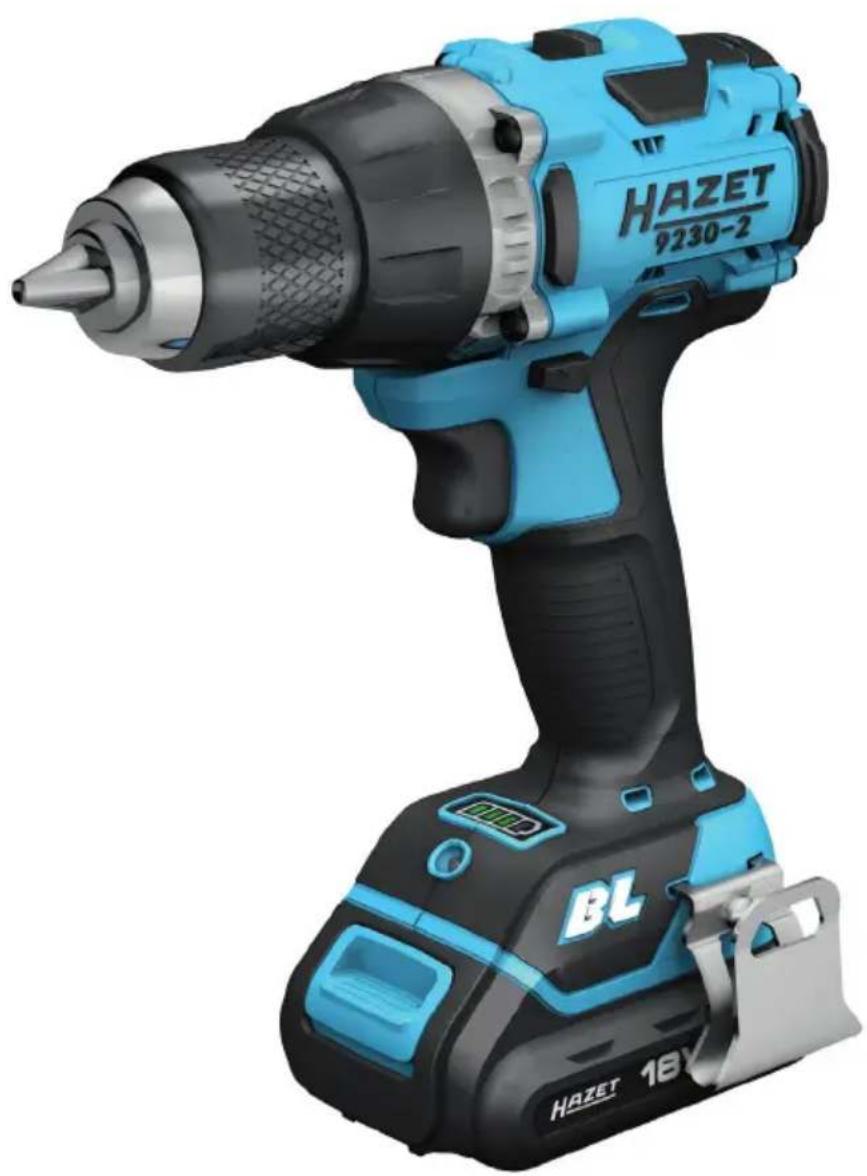
Operating Instructions Cordless Electric Drill
natural_image
Blue and black HAZET 180 power tool with drill bit, no visible text or symbols on bodyCE
Inhaltsverzeichnis
1 For your information ..... 18
2 For your safety 19
3 Design and Function...... 24
4 Maintenance and care ..... 30
Ursprungsprache deutsch – original language: German – Langue d'origine allemand
natural_image
Illustration of hands operating a mechanical device with arrows indicating motion (no text or symbols)Vor Inbetriebnahme:
natural_image
Technical line drawing of a mechanical device with no visible text or symbolsnatural_image
Technical line drawing of a mechanical device with meshed internal components (no text or symbols)Hinweis
natural_image
Line drawing of a hand using a drill bit to adjust the drill bit (no text or symbols present)Bohrmodus
natural_image
Illustration of hands using a drill bit to adjust a mechanical component (no text or symbols visible)Schnellspannfutter
natural_image
Illustration of hands using a tool to adjust or install a device into a box (no text or symbols visible)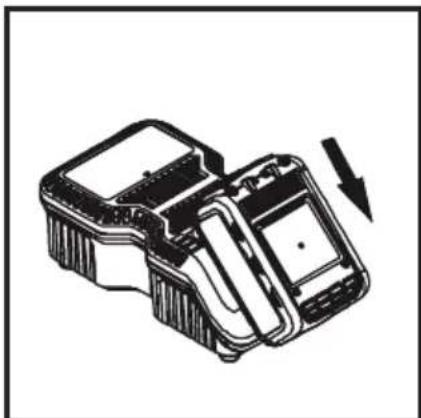
natural_image
Technical line drawing of a mechanical device with an arrow indicating motion (no text or symbols)
- Please make sure that the user of this tool carefully reads these operating instructions and fully understands all information given before it is used.
- These operating instructions contain important advice that is necessary for the safe and trouble-free operation of your HAZET tool.
- For intended use of the tool, it is essential that all safety instructions and other information in these operating instructions is adhered to.
- For this reason, always keep these operating instructions together with your HAZET tool.
- This tool has been designed exclusively for specific applications. HAZET emphasises that any modification to the tool and/or use in a way that does not correspond to its intended application is strictly forbidden.
- HAZET will not be liable for any injuries to persons or damage to property originating from improper or inappropriate application, misuse of the tool or a disregard of the safety instructions.
- Furthermore, the general safety regulations and regulations for the prevention of accidents in the application range of this tool must be observed and respected.
2. Explanation of symbols
ATTENTION: Pay strict attention to these symbols!
Read the operating instructions!
The owner is obliged to observe the operating instructions and instruct all users of this tool according to the operating instructions.
NOTE!
This symbol indicates advice that is helpful when using the tool.

WARNING!
This symbol indicates important specifications, dangerous conditions, safety risks and safety advice.

CAUTION!
This symbol marks advice which if disregarded results in damage, malfunction and/or functional failure of the tool.
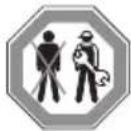
QUALIFIED PERSONNEL!
The tool may be used by qualified personnel only. Handling by non-qualified people may lead to injuries to persons or damage to the tool or the workpiece.

Electric energy may cause serious injuries!
Always wear personal protective equipment!

1. Owner's liability
- The tool was developed and manufactured according to the technical norms and standards valid and recognised at the time and is considered to be operationally reliable. Nevertheless, the tool may present a danger when it is not used as intended or in an inappropriate way by non-qualified personnel. Please make sure that any person using this tool or carrying out maintenance work carefully reads and fully understands these operating instructions before using the tool.
- Any modification of the tool is strictly for -bidden.
- All safety, warning and operating instructions on the tool must be kept legible at all times. All damaged labels or stickers must be replaced immediately.
- All specified set values or ranges must be observed.
- Always keep the operating instructions close to the tool.
- The tool must only be used if it is in good working condition.
- All safety equipment must always be within easy reach and should be checked regularly.

2. Intended use
Operational reliability is only guaranteed if the tool is used as intended in accordance with the information in the operating instructions. In addition to the safety advice in these operating instructions, the general safety regulations, regulations for the prevention of accidents and regulations for environmental protection valid for this tool's application range must be observed and respected. Use and maintenance of the tool must always comply with relevant local and national regulations.
- The HAZET cordless electric drill is used for handiwork and DIY jobs when drilling, countersinking, milling and screwing. The quick-clamping drill chuck enables easy replacement of the tools that have been used.
- The HAZET cordless electric drill has over 15+1 torque positions to choose from, which can be adjusted on the front housing.
- The device must only be used if it is in good working condition.
- All safety equipment must always be within reach and should be checked regularly.
- Any incorrect use of the cordless electric drill or use that fails to comply with the safety instructions can result in serious injury or even death.
- Any other kind of use and/or use that goes beyond the intended use of the tool is prohibited and is deemed to be improper.
- Any claims against the manufacturer and/or its authorised agents because of damage caused by improper use of the tool are void.
- Any personal injury or material losses caused by improper use of the tool are the sole responsibility of the owner.

Electric energy may cause serious injuries! Always wear personal protective equipment!
3. Dangers that may arise from using the tool
Before each use, check the HAZET cordless electric drill for full functionality. Do not use the drilling machine if its functionality cannot be ensured or if damage is detected. If the drilling machine is used its full functionality not being guaranteed, there is a risk of serious injury, health problems and material damage.
Electric energy may cause serious injuries to persons. The following safety instructions must be observed and adhered to in order to avoid electric shock, injuries or fire:
- Ensure cable and housing are not dama - ged. Tools/chargers that have been dropped or damaged must be checked by qualified personnel before restarting operation.
- Do not use tools with a defective On/Off switch. Any tools that cannot be switched on or off with the On/Off switch are dangerous and must be repaired immediately.
- When laying the power supply lead, ensure it does not come into contact with hot or sharp parts and that it cannot be damaged in another way. The lead is to be laid in such a way that it does not constitute a trip hazard.
- The charger and drilling machine must not be exposed to water or other liquids. Dangerous voltage discharge may occur.
- Keep unused rechargeable battery away from metallic objects such as paper clips, coins, keys, nails, screws, etc. These objects can establish a connection between the poles and cause a short-circuit, which can cause sparks, flames or fires.
- The charger and/or the drilling machine must not be disassembled. Inappropriate assembly can lead to a reduction of the functionality, to fire, to electric shocks and/or to injury.
- All service or repair work must be carried out by qualified personnel only. Only use original spare parts so as to guarantee its long-term operational safety.
- Do not remove safety devices and/or housing parts.
- Never operate the tool when a protective
cover is missing or when not all of the safety devices are fitted and in perfect condition.
- If an extension cord is necessary, it must be sufficiently dimensioned for the charger. Cables which are not appropriate for the necessary amperage may overheat.
- The battery may only be recharged with the explicitly intended charger. A charger that is designed for a different type of rechargeable battery can cause a fire in this type of rechargeable battery.
- Only use the tool with the specified battery. Use of any other battery may cause a fire.
- The rechargeable battery and the charger heat up slightly during charging. This does not reduce their functionality. When working with the work light, appropriate caution is required.
- Only use the cordless electric drill at places that are governed and regulated by applicable provisions for work areas and electrical systems.
- For safety reasons, any modification to HAZET cordless electric drills is strictly forbidden. Any modification of the tool will result in immediate exclusion from warranty and liability.

Electric energy may cause serious injuries! Always wear personal protective equipment!

- Wear working gloves and safety glasses. Electric tools can raise chips, dust and other abraded particles at high speed, which may result in severe eye injuries.

- Wear hearing protection. Long exposure to the working noise of a drilling machine wrench may result in permanent hearing loss.

- Wear a face mask or breathing protection.
Material abrasive tools generate dust and other debris that can cause damage to your lungs and airways. Breathing in the steam of some materials like adhesives and tar that contain dangerous chemicals can, over a longer period of time, cause serious harm to the lungs and respiratory tracts.

- Wear tight-fitting protective clothing. Tools with rotating parts or tools that drive other tools, such as drills, etc., can get caught in your hair, clothes, jewellery, or

other loose objects, which can lead to serious injury. Never wear loose clothing and/or clothing with bands or loops, etc. which may get caught in the moving parts of the tool. During the work, take off jewellery, watches, identification tags, bracelets, necklaces, etc. that could get caught in the tool. Never touch the moving parts of a tool. Tie or cover long hair.
- Keep electric tools out of the hands of children. Unattended tools could be used by unauthorised persons and could cause injury to them or to other persons.
- Only use drills, bits etc. in good working condition. Substandard, inappropriate or damaged tools, such as drills, etc., can become loose when actuated and hurled across the work area, which can lead to serious injuries. Only use tools that are
approved for the speed of the tool. Do not use tools that have fallen down or been hit, damaged or altered during use.
- Please observe the reaction torque. Pay attention to the reaction moment and to a possible breakage of the tool to be actuated. In confined spaces, reaction torques may lead to severe injuries. Countermeasures must be taken against unexpected reaction torques.
-
Do not use the tool in rooms with an explosive atmosphere. Electric tools such as drilling machines can cause sparks or ignite combustible materials. Never operate tools in proximity to combustible substances like petrol, naphtha, detergents, etc. Work in well-cleaned and well-ventilated areas only. Keep combustible materials out of the work area.
-
Do not point the tool at another person. Keep children and other persons out of the work area when operating the tool.
- Do not let the tool with the attached drill idle. Drills may come loose, break off and be hurled around and may cause severe injury to the user or to third persons in the work area.
- Stop using any tool immediately if you feel unwell or jittery or if you start feeling pain.
- Vibrations, repetitive movements or uncomfortable posture may be harmful to the hands and arms.
• Electric tools may vibrate when in use. - Before changing the accessories, adjusting and storage, remove the rechargeable battery from the tool or set the switch to OFF or in the locked position. These kinds of preventive safety measures may prevent accidental actuation.
- Only use parts, attachments and accessories recommended by the manufacturer

Electric energy may cause serious injuries! Always wear personal protective equipment!
- Never wear the tool with your finger on the quick-release press-button.
- Avoid unintentional activation.
- Keep the grip dry, clean and free of oil and grease.
- Ensure that the working area is clean, well ventilated and always well lit.
- Never use the tool whilst under the influence of alcohol or drugs.
• Repairs may be performed by authorised personnel only. - Do not clean plastic parts with solvents.
- Solvents such as petrol, benzene, carbon tetrachloride and alcohol can deform or crack the plastic parts. Do not come in contact with the above-mentioned solvents.
- When working on elevated places always make sure that no one is located below the work area before you commence work.

Important safety precautions for the quick charger:
This section contains important safety and operating instructions for the quick charger:
Before commissioning the charger, please read all instructions and markings on the:
-
charger
-
battery
- Operating temperature for Li-Ion batteries:
10 to +40 °C for discharging, 0 to +40 °C for charging
- Operating temperature for charger: 0 to +40 °C
- To avoid electric shock, disconnect the charger from the socket before cleaning or beginning maintenance work. Removing the battery does not reduce the hazard.
- Any non-approved use of the charger may result in serious injury.

Electric energy may cause serious injuries! Always wear personal protective equipment!
To avoid these hazards:
- Never disassemble the battery.
- Never throw the battery into a fire even if it is damaged or completely depleted. Explosion hazard!
- Never short-circuit the battery.
- Never push objects into the ventilation holes of the charger, otherwise you risk electric shock or damage to the charger.
- Never recharge the battery outdoors.
- Never expose the battery to direct sun - light.
- Recharge only in well-ventilated areas with low humidity.
- Never recharge the battery when the temperature is below 0^ (32°F) or above 40^ (104°F).
- Never combine two chargers.
- Never plug objects into the battery holder.
- Never use an amplifier transformer when charging.
- Never use a motor generator or DC power to recharge.
- Never store the battery and charger where the temperature can reach 40^ C ( 104^ F).
- Always use the charger with 230 V standard electrical connections. Using the charger at higher voltages can overheat and damage the charger.
- Always take at least 15 minutes of wait time between multiple recharges to avoid overheating the charger.
• Always disconnect the charger from the power source when not in use.

Electric energy may cause serious injuries! Always wear personal protective equipment!
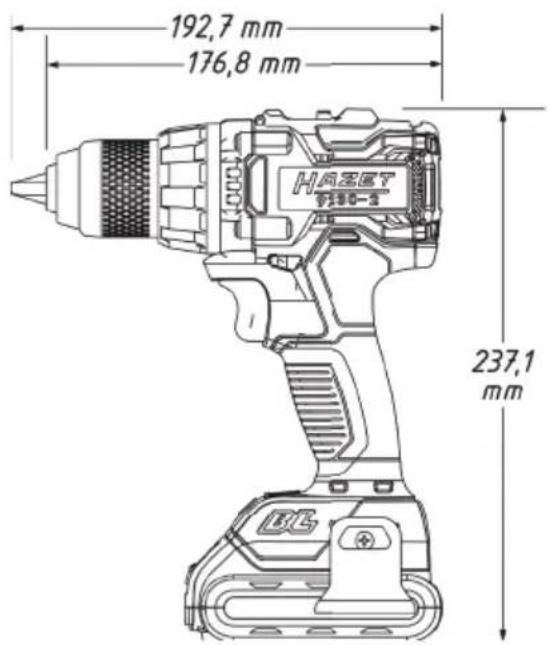
1. Technical data / tool components: Cordless electric drill HAZET 9230-2
| Drill chuck | 1-13 mm |
| Battery power | 18V - 2Ah |
| Idle Speedleftright | 0-560 / 0-1900 rpm |
| Weight | 1.27 kg |
| Dimension | 192.7 x 67 x 237.1 mm |
| Torque | 60 Nm |
| Levels | 15+1 |
| Sound pressure level LpA /Sound Pressure | 68 dB(A) |
| Sound power level LpW /Sound Power | 79 dB(A) |
| Vibration accelerationScrewing | 0.8 m/s ^2 |
| Vibration accelerationDrilling | 2.3 m/s ^2 |
| Forward / Reverse | yes |
| Battery charger HAZET 9212-03 | |
| Input voltage 100 - 240 V~ 50/60 Hz 110 W | |
| Output voltage 12 - 18 V - 4.0 A | |
| Safety approval CB, ETL, GS, ICES, PSE | |
| Battery type Li-Ion | |
| Charging time 40 min | |
| Accessories (optional) Included in delivery | ||
| HAZET No. Designation The HAZET cordless electric drill is delivered in a plastic case with a belt clip | ||
| 9212-02 Replacement battery 2 Ah | The package includes: | |
| 9212-05 Replacement battery 5 Ah | HAZET 9230-2 | |
| HAZET 9212-02 18 V / 2.0 A Ah Li-Ion battery | ||
| HAZET 9212-03 quick charger | ||

Electric energy may cause serious injuries! Always wear personal protective equipment!
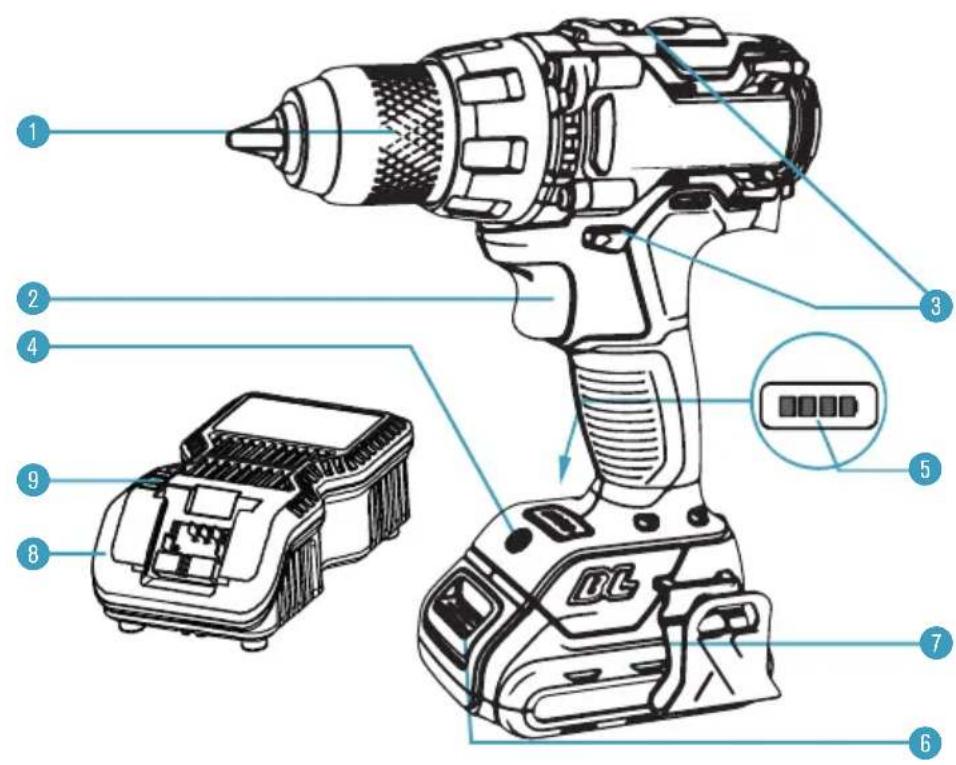
| Pos. Designation Pos. Designation | ||
| 1 Drill chuck 1-13 6 Battery safety lock | ||
| 2 Control button 7 Battery | ||
| 3 Reversing switch (forward/reverse) / Gear selector switch | 8 Battery charger | |
| 4 LED work light 9 Charge indicator | ||
| 5 Battery capacity display -- | ||

Electric energy may cause serious injuries! Always wear personal protective equipment!
Attaching the rechargeable battery:
- Insert the battery until it locks with a click.
- If it is not engaged, the battery can fall off the tool, become destroyed and/or cause injury to you or bystanders.
- The rechargeable battery is equipped with a charge indicator. The 4-stage LEDs (green) display the remaining capacity.
- Pressing the control button displays the battery's state of charge for 5 seconds.
- The battery has built-in overheating protection and protects the HAZET cordless electric drill and the battery from overheating. When the max. temperature of 70 °C is reached, the battery automatically shuts down and the HAZET cordless electric drill can no longer be operated.
| Charge capacity indicator Status | |||
| 1 LED | 1 0 - 25 % | ||
| 2 LED | 1, 2 | 26 - 50 % | |
| 3 LED | 1, 2, 3 | 51 - 75 % | |
| 4 LED | 1, 2, 3, 4 | 76 - 100 % | |
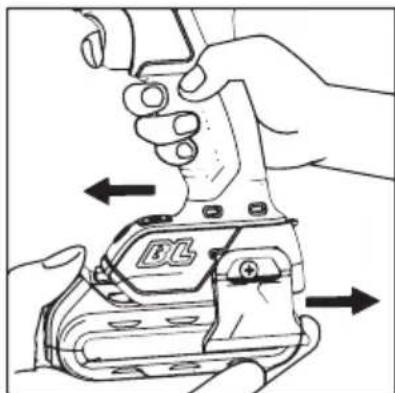
Disconnecting the battery:
- Press the safety lock and pull the battery from the tool handle.
natural_image
Illustration of hands operating a mechanical device with directional arrows indicating movement (no text or symbols)Before starting operation:
- Clean up the work area.
- Keep unauthorised persons out of the work area.
- Ensure adequate lighting and ventilation in the workplace.
• Make sure that the battery is properly installed and locked into place.
Adjusting the direction of rotation:
- The direction of rotation is set by the reversing switch.
- Forward and reverse are indicated by arrows, which are milled on to the body.
• In forward, the tools rotates clockwise.
• In reverse, the direction of rotation is set to counterclockwise.
The direction of rotation cannot be altered when the drilling machine is running. To change the direction of rotation, you must stop the drilling machine and then press the changeover switch to change the direction of rotation.

Electric energy may cause serious injuries! Always wear personal protective equipment!
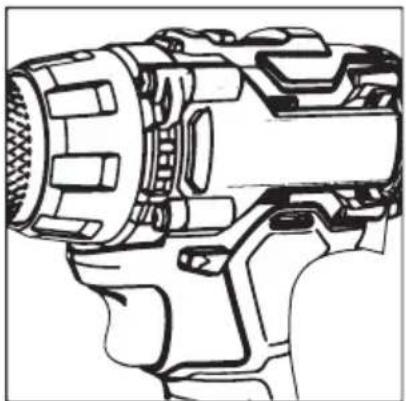
Forward and Reverse:
The direction of bit rotation is reversible and is controlled by a selector located above the trigger switch. Drilling uses the forward mode. The reverse mode is intended for the removal of screws and assisting with the removal of jammed drill bits. With the drill held in normal operating positions:
- Positioning the forward/reverse selector to the left of the tool for forward.
- Positioning the forward/reverse selector to the right of the tool for reverse.
- Positioning the forward/reverse selector in the centre will lock the switch trigger to help reduce the possibility of accidental starting when not in use.
natural_image
Technical line drawing of a mechanical device with no visible text or symbolsTwo speed gear control
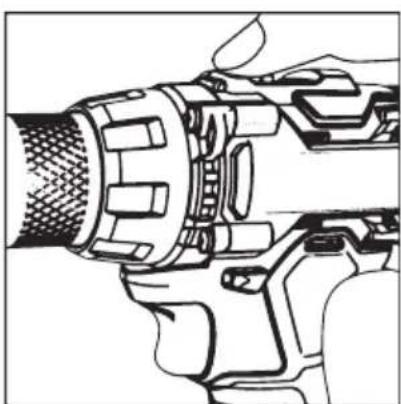
The high/low speed range selector allows you to select the gear with the optimum speed and torque to suit the application. To select the low speed, high torque setting, turn the tool off and allow it to stop. Slide the gear selector forward (towards the chuck). The number 1 will be displayed. To select the high speed, low torque setting, turn the tool off and allow it to stop. Slide the gear shifter back (away from chuck). The number 2 will be displayed.
natural_image
Technical line drawing of a mechanical component with no visible text or symbolsNote
The drill will not run unless the direction of forward/reverse selector is engaged fully to the left or right.
Adjustable torque control:
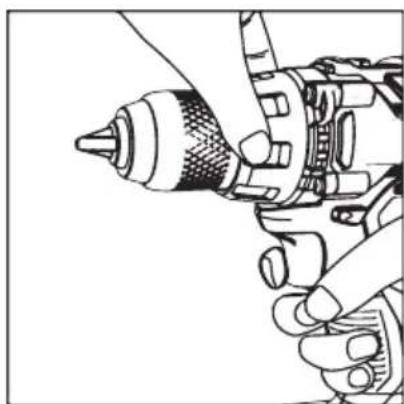
This drill is equipped with 15 torque clutch positions, including one drill mode, which are controlled by the torque clutch. All of the torque settings are clearly identified on the torque collar. To adjust the torque settings, rotate the torque collar. The higher the number, the higher the torque setting.
Controlling the torque allows for better control when using the drill on specific screwing tasks and prevents over-fastening and over-tightening.
For drilling, always use the drill mode by aligning the drill icon with the triangular indicator on the front face of the drill near the torque collar.
The proper setting will depend on the type of material and the size of the screw that is being used. Select the option that best matches the type of bit, the fastener, and the type of material.
natural_image
Illustration of hands using a drill bit to adjust a tool (no text or symbols visible)Drill mode
Select the drill mode for drilling and other heavy-duty applications, especially for hardwood and metal. To select the drill mode, rotate the torque clutch until the drill icon is aligned with the triangular indicator on the front face of the drill near the torque clutch.
natural_image
Illustration of hands using a drill bit to adjust a mechanical component (no text or symbols visible)Keyless chuck
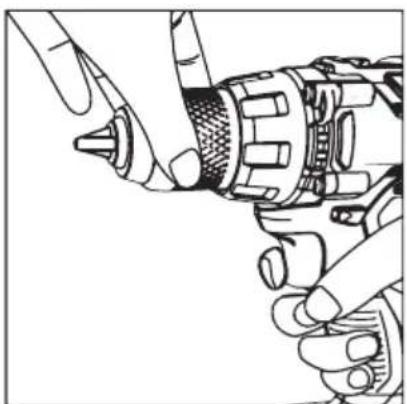
The arrows on the chuck indicate the direction of rotation of the body of the chuck to grip or release the drill bit.
Electric energy may cause serious injuries! Always wear personal protective equipment!
Operation:
- Press and hold down the control button. The tool is running. In this case the light is automatically switched on.
- Release the control button. The tool stops.
- The (rotation) speed can be set using the 15 levels and the drill level.
LED work light:
The HAZET cordless electric drill is equipped with an LED work light. This work light switches on automatically whenever the tool is activated and ensures optimum illumination of the work area, even in dark working conditions. The work light switches off automatically 15 seconds after the tool is deactivated.
Note:

High operating noise level! Always wear hearing protection!
Tightening and loosening screws:
- To tighten and loosen a screw, attach a bit that matches the screw size.
Caution!
- The screw can be tightened too much and break when the screw is tightened too long.
• Always tighten the screw with the drilling machine at a right angle to the screw. - Select the drill that corresponds for drilling!
Before charging:
- Check the power source voltage against the permissible voltage on the charger's name badge.
- Loading voltages higher than allowed represents a fire hazard to the charger.
- Check the cables for damage. Replace any damaged cables prior to use.
- Connect the charger to the power source. All 3 charging LEDs light up for 1 - 2 seconds.
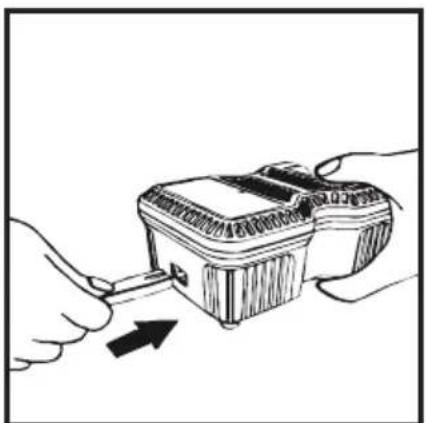
- Slide the battery headfirst with the terminal side into the charger. Make sure that the battery fits in the charger slide and that the contacts snap into position.
- If the charger detects an overheated battery, all 3 charging LEDs flash at the same time. Remove the battery and let the charger cool for about 40 minutes before you continue charging.
natural_image
Illustration of a hand using a tool to lift a small object into a device (no text or symbols visible)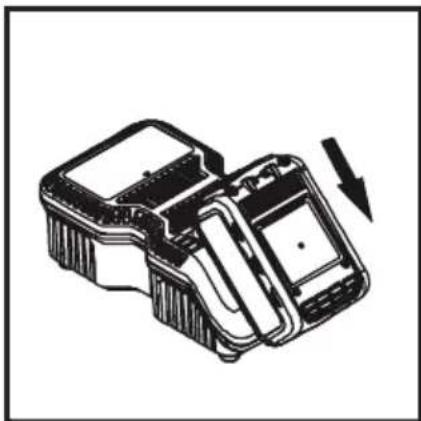
natural_image
Technical line drawing of a mechanical device with a downward arrow indicating motion (no text or symbols)
Electric energy may cause serious injuries! Always wear personal protective equipment!

If the rechargeable battery is improperly inserted into the charger, then the terminals of the charger can become bent or damaged.
• The state of charge is displayed while charging:
- Less than 30 % charged: all 3 charging LEDs are flashing.
- Less than 60 % charged: one charging LED lights up, the other two are flashing.
- Over 60 % charged: 2 LEDs light up and one is flashing.
- 100 % charged: all 3 charging LEDs light up.
- Charging may take about 65 minutes. Charging is completed when all 3 charging LEDs light up.

Always disconnect the charger from the power source in the event of malfunctions! Reinsert the battery if necessary.
Troubleshooting / Avoidance:
- Never pull the plug from the socket using the cable.
• Always pull the plug to avoid damaging the cable. - Firmly hold the charger with your hand and remove the battery from the charger.
- The rechargeable battery and the charger heat up slightly during charging. This does not impair its functionality. Appropriate caution is required for operation.
• After charging, take the required 15 minutes of wait time before charging again. - If the charger detects an overheated battery, all 3 charging LEDs flash at the same time. Remove the battery and let the charger cool for about 15 - 30 minutes before you continue charging.
- If the charger detects a malfunctioning battery, 2 charging LEDs flash at the same time. Please remove the battery and allow it cool for about 15 - 30 minutes. Should both charging LEDs continue to flash afterwards, the battery may be defective. Please send us the battery immediately for analysis.
- If the charger has a defect, all 3 charging LEDs flash at the same time. Please remove the battery and disconnect the charger from the mains. After 2 minutes, insert the plug into the socket outlet again and insert the battery. Should all 3 charging LEDs still be flashing, send the charger immediately to us for analysis.

Electric energy may cause serious injuries! Always wear personal protective equipment!
Maintenance and care:
- Disconnect the battery from the tool before any maintenance or repair work.
- Check sockets regularly. Worn or damaged sockets can slip off the tool or reduce its performance and thus damage the motor.
Motor maintenance:
- The motor unit winding/coil is the most important part of the electric tool. Handle the tool with care to ensure that the winding/coil is not damaged or gets wet from water or oil.
Care:
- The HAZET cordless impact wrench should be regularly treated with a commercial solvent-free cleaning agent without grinding additives.
Checking for dust:
- Dust can be removed with a soft cloth or a cloth moistened with soapy water.
- Do not use bleach, chlorine-based cleaning agents, benzene or thinner since these can damage the plastic.
- Wash and dry plastic parts with a soft cloth dampened with soapy water.
Spare parts:
- Only use the manufacturer's original spare parts.
- Unsuitable or defective spare parts may cause damage, malfunction or total failure of the device.
- The use of non-approved spare parts will void all warranty, service and liability claims as well as all claims for compensation against the manufacturer or its agents, distributors and sales representatives.
Storage:

The device must be stored under the following conditions:
- Keep the device in a dry and dust-free place.
- Do not expose the device to liquids and/or aggressive substances.
• Do not store the device outdoors. - Keep the device out of reach of children.
• Storage temperature: -10 °C to +40 °C.
• Relative air humidity: max. 60 %.

Electric energy may cause serious injuries! Always wear personal protective equipment!
Disposal:

- Worn-out rechargeable batteries (Li-Ion) and electric devices must not be disposed of in domestic waste, but at suitable collecting points.
- Electronic waste, electronic components, lubricants and other auxiliary materials must be treated as hazardous waste and may only be disposed of by authorised specialists!
- Reducing environmental pollution and preserving the environment are at the heart of our activities!
Notizen / Notes

Electric energy may cause serious injuries! Always wear personal protective equipment!
Notizen / Notes

Always wear personal protective equipment!
- Inhaltsverzeichnis
- Vor Inbetriebnahme:
- Hinweis
- Bohrmodus
- Schnellspannfutter
- Explanation of symbols
- Read the operating instructions!
- NOTE!
- WARNING!
- CAUTION!
- QUALIFIED PERSONNEL!
- Owner's liability
- Intended use
- Dangers that may arise from using the tool
- Important safety precautions for the quick charger:
- To avoid these hazards:
- Technical data / tool components: Cordless electric drill HAZET 9230-2
- Attaching the rechargeable battery:
- Disconnecting the battery:
- Before starting operation:
- Adjusting the direction of rotation:
- Forward and Reverse:
- Two speed gear control
- Note
- Adjustable torque control:
- Drill mode
- Keyless chuck
- Operation:
- LED work light:
- Note:
- Tightening and loosening screws:
- Before charging:
- Troubleshooting / Avoidance:
- Maintenance and care:
- Motor maintenance:
- Care:
- Checking for dust:
- Spare parts:
- Storage:
- Disposal:
- Notizen / Notes
Brand : Hazet
Model : 9230-010
Category : Tour