
BO6737E03AWG - Oven GORENJE - Free user manual and instructions
Find the device manual for free BO6737E03AWG GORENJE in PDF.


| Product Type | Built-in Electric Oven |
| Brand | Gorenje |
| Model | BO6737E03AWG |
| Dimensions (H x W x D) | 595 x 595 x 530 mm |
| Weight | 33.5 kg |
| Voltage | 220-240 V ~ 50/60 Hz |
| Power Rating | 2.9 kW |
| Oven Capacity | 73 litres |
| Oven Functions | Natural convection, fan-assisted, bottom heat, grill, combined grill, defrost, intensive hot air |
| Control Type | Knobs and electronic timer with LED display |
| Timer Functions | Minute minder, duration, end cook, start & end time |
| Interior Light | 25 W, G9, 300°C halogen bulb |
| Cleaning | Steam cleaning, warm soapy water; avoid abrasives |
| Safety Features | Automatic shut-off, cool-touch door, child safety lock (if applicable) |
| Accessories Included | Deep tray, baking tray, oven shelf |
| Energy Source | Electric |
| Installation | Built-in, requires proper ventilation and heat-resistant surroundings |
| Guarantee | Standard manufacturer warranty (details in manual) |
Frequently Asked Questions - BO6737E03AWG GORENJE
User questions about BO6737E03AWG GORENJE
0 question about this device. Answer the ones you know or ask your own.
Ask a new question about this device
Download the instructions for your Oven in PDF format for free! Find your manual BO6737E03AWG - GORENJE and take your electronic device back in hand. On this page are published all the documents necessary for the use of your device. BO6737E03AWG by GORENJE.
USER MANUAL BO6737E03AWG GORENJE
natural_image
Line drawing of a kitchen oven with control knobs and door (no text or symbols)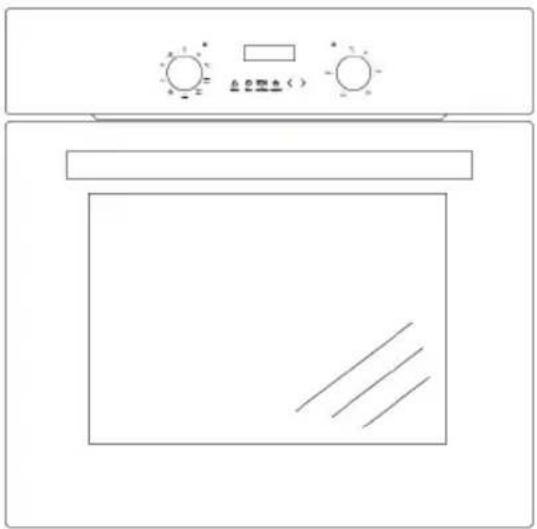
natural_image
Line drawing of a microwave oven with control knobs and a blank door (no text or symbols)МОДЕЛІ:
BO6737E02AXK BO6737E02ABG BO6737E03AWG
ECKEPTY!
natural_image
Simple line drawing of a tree with cloud and horizontal lines below (no text or symbols)natural_image
Simple line drawing of a recycling symbol (three chasing arrows), no text or labels present.natural_image
Pure geometric diagram of a 3D rectangular frame with internal triangular cutouts and mounting holes (no text or symbols)ЭМБЕБАП ТЕРЕН ТАБА
BO6737E03AWG
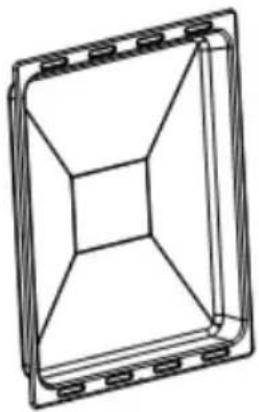
natural_image
Technical line drawing of a 3D rectangular frame with internal geometric cutouts (no text or symbols)ЭМБЕБАП ТЕРЕН ТАБА
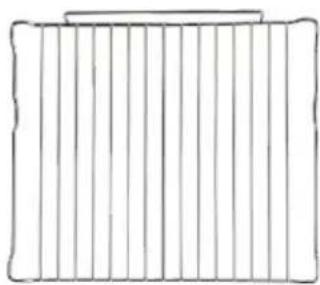
natural_image
Simple line drawing of a rectangular frame with vertical lines and a top edge (no text or symbols)TOP
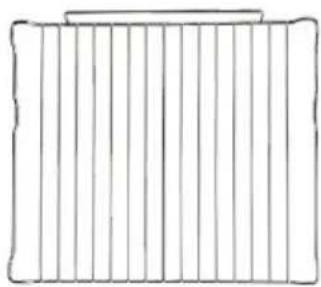
natural_image
Simple line drawing of a rectangular frame with vertical lines and a top edge (no text or symbols)TOP
natural_image
Pure geometric diagram of a square frame with internal triangular cutout (no text or symbols)ШАFЫН ТАБА
natural_image
Architectural cross-section diagram of a window frame with structural framing (no text or symbols)ЖАЛГАУ СХЕМАСЫ
natural_image
Cross-sectional diagram of a mechanical or electrical component with internal components and no visible text or symbolsnatural_image
Diagram showing three mechanical components with upward and downward arrows indicating motion (no text or symbols)Духовканың
жарыктандыру шамы
natural_image
Line drawing of a kitchen appliance with a shelf and ladder (no text or symbols)natural_image
Illustration of a book with a magnified inset showing a person's head (no text or symbols present)natural_image
Technical line drawing of a mechanical assembly with no visible text or symbols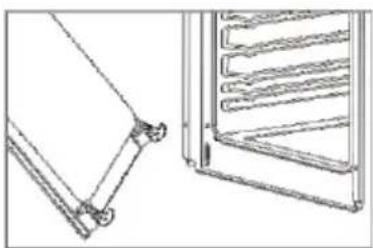
natural_image
Technical line drawing of two mechanical components: a frame-like structure and a multi-tiered rack (no text or symbols)natural_image
Line drawing of a rectangular electronic device with mounting holes and internal components (no text or symbols)natural_image
Diagram of a mechanical assembly with layered components and a black arrow indicating direction (no text or symbols)59,5/59,5/53,0 cm 73
литр шамамен
33.5 кг
natural_image
Line drawing of a kitchen oven with control knobs and a door (no text or symbols)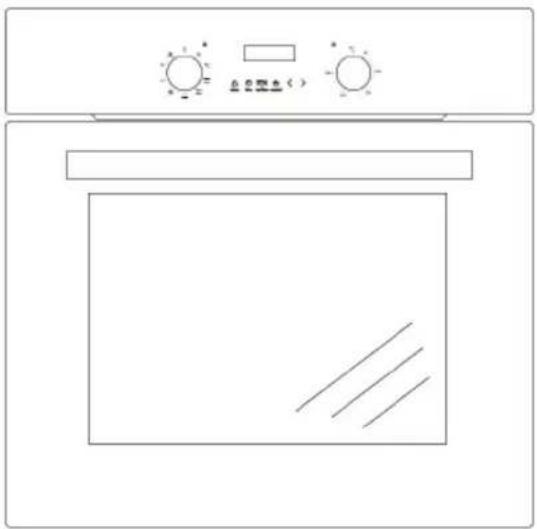
natural_image
Line drawing of a microwave oven with control knobs and a door (no text or symbols)МОДЕЛЬ:
BO6737E02AXK
BO6737E02ABG
BO6737E03AWG
ПРЕДУПРЕЖДЕНИЕ!
natural_image
Simple line drawing of a tree with cloud-like canopy and horizontal lines below (no text or symbols)natural_image
Simple line drawing of a recycling symbol (three chasing arrows), no text or labels present.natural_image
Technical line drawing of a 3D rectangular frame with internal geometric cutouts (no text or symbols)natural_image
Technical line drawing of a 3D rectangular frame with internal geometric cutouts (no text or symbols)natural_image
Simple line drawing of a rectangular frame with vertical lines and a top edge (no text or symbols)РЕШЕТКА
natural_image
Simple line drawing of a rectangular frame with vertical lines and a top edge (no text or symbols)РЕШЕТКА
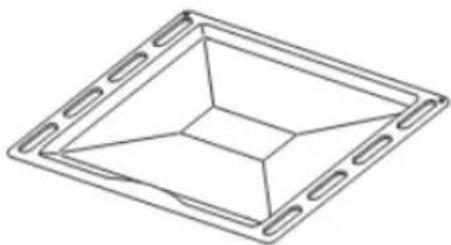
natural_image
Pure geometric diagram of a square frame with internal triangular cutout (no text or symbols)МЕЛКИЙ ПРОТИВЕНЬ
natural_image
Architectural cross-section diagram of a window frame with structural supports (no text or labels)СХЕМА ПОДКЛЮЧЕНИЯ
natural_image
Cross-sectional diagram of a mechanical device showing internal components and housing (no text or labels visible)natural_image
Diagram showing three mechanical components with upward and downward arrows indicating motion (no text or symbols)natural_image
Line drawing of a kitchen appliance with a shelf and rack (no text or symbols)natural_image
Illustration of a mechanical device with a magnified inset showing a gear-like component (no text or symbols)natural_image
Technical line drawing of a mechanical assembly with no visible text or symbols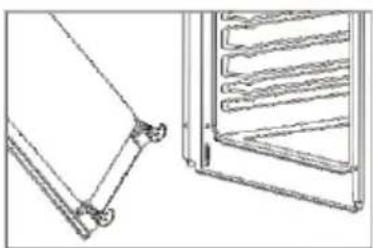
natural_image
Technical line drawing of two mechanical components: a frame and a rack (no text or symbols)natural_image
Line drawing of a rectangular electronic device with internal components and mounting holes (no text or symbols)natural_image
Pure technical diagram of a mechanical assembly with no text, numbers, or symbolsnatural_image
Line drawing of a microwave oven with control knobs and a door (no text or symbols)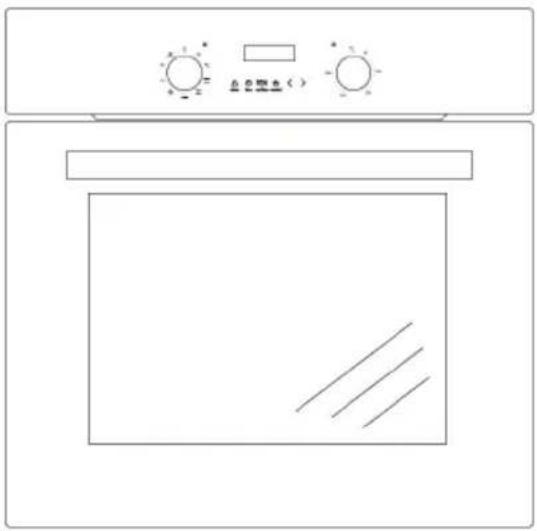
natural_image
Line drawing of a microwave oven with control knobs and a door (no text or symbols)MODEL:
BO6737E02AXK
BO6737E02ABG
BO6737E03AWG
WARNING
● The appliance is not to be used by persons (including children) with reduced physical, sensory or mental capabilities, or lack of experience and knowledge, unless they have been given supervision or instruction. children being supervised not to play with the appliance.
● During use the appliances becomes hot. Care should be taken to avoid touching heating elements inside the oven, for cooking ranges and ovens.
● WARNING: Accessible parts may become hot during use. Young children should be kept away.
- Do not use harsh abrasive cleaners or sharp metal scrapers to clean the oven door glass since they can scratch the surface, which may result in shattering of the glass.
- If during the test of Clause 11, the temperature rise at the centre of the internal bottom surface of a storage drawer exceeds that specified for handles held for short periods in normal use, the instruction shall state that these surfaces can get hot.
● A steam cleaner is not be used.
- Ensure that the appliance is switched off before replacing the lamp to avoid possibility of electric shock.
● The appliance must not be installed behind a decorative door in order to overheating.
- Disconnection of the appliance after installation, by accessible plug or a switch in the fixed wiring.
- If the supply cord is damaged, it must be replaced by the manufacturer, its service agent similarly qualified persons in order to avoid a hazard.
- This appliance should be connected to a circuit which incorporates an isolating switch which can accessible by the user after installation providing full disconnection from the power supply. The disconnection may be achieved by incorporating a switch in the fixed wiring in accordance with the wiring rules.
● This appliance can be used by children aged from 8 years and above and persons with reduced physical, sensory or mental capabilities or lack of experience and knowledge if they have been given supervision or instruction concerning use of the appliance in a safe way and understand the hazards involved. children shall not play with the appliance. cleaning and user maintenance shall not be made by children without supervision.
● WARNING: The appliance and its accessible parts become hot during use.
● Care should be taken to avoid touching heating elements.
WARNING
- If using alcohol in your recipes, please be aware that high temperatures can cause the alcohol to vaporize and even to ignite on the hot heating elements.
- When residual heat is used to keep food warm, the high level of humidity and condensation can cause corrosion in the oven. The control panel, worktop or furniture unit may also be damaged. Do not switch the oven off completely while food is inside it, but select the lowest possible temperature for the oven function you are using. This will ensure the fan will automatically continue to run.
- Cover any food which is left in the oven to be kept hot, as moisture in the food could le to corrosion damage in the oven. This also prevents the food from drying out.
● Never cover the floor of the oven with aluminium foil, or place oven dishes, pans, saucepans or trays directly onto the floor of the oven.
● This would cause concentrations of heat which could cause damage to the floor of the oven.
The oven is exceptionally easy to use and extremely efficient. After reading the instruction manual, operating the oven will be easy.
Before being packaged and leaving the manufacturer, the oven was thoroughly checked with regard to safety and functionality.
Before using the appliance, please read the instruction manual carefully.
By following these instructions carefully you will be able to avoid any problems in using the appliance.
It is important to keep the instruction manual and store it in a safe place so that it can be at any time.
It is necessary to follow the instructions in the manual carefully in order to avoid possible accidents.
Caution!
Do not use the oven until you have read this instruction manual. The
oven is intended for household use only.
The manufacturer reserves the right to introduce changes which do not affect the oper of the appliance.
TABLE OF CONTENTS
Safety instructions....3
How to save energy....5
Description of the appliance ....7
Specifications of the appliance....8
Installation....9
Operation 11
Cleaning and maintenance....17
Operation in case of emergency....20
Technical data 21
NOTE:
Ensure there is a grounded socket nearby (behind the unit)
A dedicated power circuit is recommended for the unit but not required. Additional electrical appliances on the same circuit may exceed the current (amperage) rating for that circuit. If after the installation of your unit, the circuit breaker trips or the fuse fails on a repeated basis, then a dedicated circuit will likely be required.
! The appliance must be installed only by a qualified person in compliance with the instructions provided. Incorrect installation may cause harm to persons, animals or may damage property.
The manufacturer declines all responsibility for improper
installation which may harm persons and animals and damage property.
Important: The power supply to the appliance must be cut off before any adjustments or maintenance work is done on it.
WARNING:
When using this product, basic precautions should always be taken, including the following:
Your built-in oven is a classified electrical appliance. As with any electrical appliance and particularly with electric heaters, basic precautions must be followed in order to reduce the risk of fire, burns, electrical shocks and/or other serious injuries or death.
! The appliance becomes hot during operation. Take care not to touch the hot parts inside the oven.
! This appliance is not intended for use by persons (including children) with reduced physical, sensory or mental capabilities, or lack of experience and knowledge, unless they have been supervision or instruction concerning use of the appliance by a person responsible for their s Children should be supervised to ensure that they do not play with the appliance.
While in operation direct contact with the cooker may cause burns!
! Ensure that small items of household equipment, including connection leads, do not touch the hot oven or the hob as the insulation material of this equipment is usually not resistant to high temperatures.
! Do not leave the cooker unattended when frying. Oils and fats may catch fire due to overheating or boiling over.
Do not put pans weighing over 15 Kg on the opened door of the oven and pans over 25 Kb hob.
! Do not use harsh cleaning agents or sharp metal objects to clean the door as they can scratch the surface, which could then result in the glass cracking.
! Do not use the cooker in the event of a technical fault. Any faults must be fixed by an appropriately qualified and authorised person.
! In the event of any incident caused by a technical fault, disconnect the power and report the fault to the service centre to be repaired.
! The rules and provisions contained in this instruction manual should be strictly observed. Do not allow anybody who is not familiar with the contents of this instruction manual to ope cooker.
! The cooker should not be cleaned using steam cleaning equipment.
! The panels adjacent to the oven must be made of heat-resistant material.
! Cabinets with a veneer exterior must be assembled with glues which can withstand temperature of up to 100°C.
! Keep combustible materials, such as: curtains, drapes, furniture, pillows, clothing, linens, bedding, paper, etc., at least 3 feet (0.9 meters) from the front sides and rear of the heater. Do not use this unit in areas where gasoline, paint or other flammable liquids or their associated vapors may be present.
! To reduce the risk of fire, do not place or install this unit in areas where the ventilation or circulation ducts may become blocked.
! The unit's power cord must be connected to a properly grounded and protected, 220-240V electrical outlet. Always use ground fault protection where required by the electrical code. To reduce the risk of fire, avoid running the power cord under rugs, carpets, etc. Keep the power cord away from high traffic areas where it may pose as a tripping hazard.
! Avoid the use of an extension cord, which may overheat and cause a fire.
! When transporting or storing the unit, keep it in a dry location, free from dust, excessive vibration or other factors, which may damage the unit.
! Do not operate any oven with a damaged cord or plug or after the heater malfunctions, has been dropped or damaged in any manner. Return the oven to an authorised service centre to be checked.
! If the supply cord is damaged, it must be replaced by a special cord or assembly available from the manufacturer or its service agent.
! Use this oven only as described in this manual. Any other use not recommended by the manufacturer may cause fire, electric shock, or injury to persons.
! This appliance is not intended for use by persons (including children) with reduced physical, sensory or mental capabilities, or lack of experience and knowledge, unless they have been supervision or instruction concerning use of the appliance by a person responsible for their s Children should be supervised to ensure that they do not play with the appliance.
! Never add cold water to food on a hot universal tray or baking tray or directly onto food in a hot oven. The steam created could cause serious burns or scalding and the sudden change in temperature can damage the enamel.
! Do not lift the oven by the handle.

natural_image
Simple line drawing of a tree with two horizontal lines below (no text or symbols)Using energy in a responsible way not only saves money but also helps the environment. So let's save energy! And this is how you can do it:
! Do not uncover the pan too often (a watched pot never boils!)
Do not open the oven door unnecessarily often.
! Switch off the oven in good time and make use of residual heat.
For long cooking times, switch off heating zones 5 to 10 minutes before finishing cooking, This saves up to 20% on energy.
Only use the oven when cooking larger dishes.
Meat of up to 1 kg can be prepared more economically in a pan on the cooker hob.
Make use of residual heat from the oven.
If the cooking time is greater than 40 minutes switch off the oven 10 minutes before the end time.
Important! When using the timer, set appropriately shorter cooking times according to the dish being prepared.
! Make sure the oven door is properly closed. Heat can leak through spillages on the door seals. Clean up any spillages immediately.
! Do not install the cooker in the direct vicinity of refrigerators/freezers.
Oth erwise energy consumption increases unnecessarily.

natural_image
Simple line drawing of a recycling symbol (three chasing arrows), no text or labels present.During transportation, protective packaging was used to protect the appliance against any damage. After unpacking, please dispose of all elements of packaging in a way that will not cause dam-a to the environment. All materials used for packaging the appliance are environmentally friendly; they are 100% recyclable and are marked with the appropriate symbol.
Caution! During unpacking, the packaging materials (polythene bags, polystyrene pieces, etc.) should be kept out of reach of children.
Old appliances should not simply be disposed of with normal household waste, but should be delivered to a collection and recycling centre for electric and electronic equipment. A symbol shown on the product, the instruction manual or the packaging shows that it is suitable for recycling.
Materials used inside the appliance are recyclable and are labelled with information concerning this. By recycling materials or other parts from used devices you are making a significant contribution to the protection of our environment.
Information on appropriate disposal centres for used devices can be provided by your local authority.
BO6737E02AXK
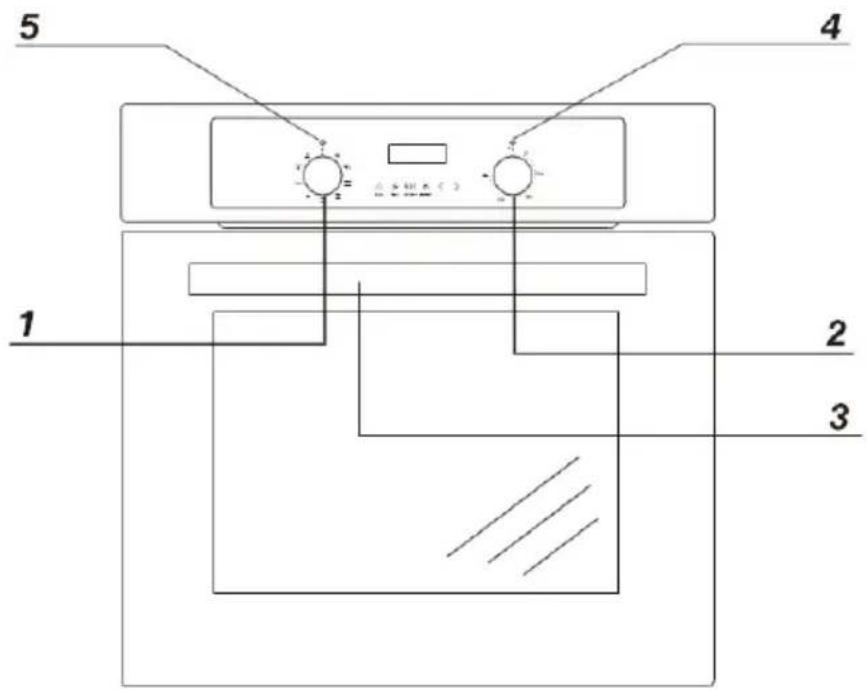
BO6737E02ABG BO6737E03AWG
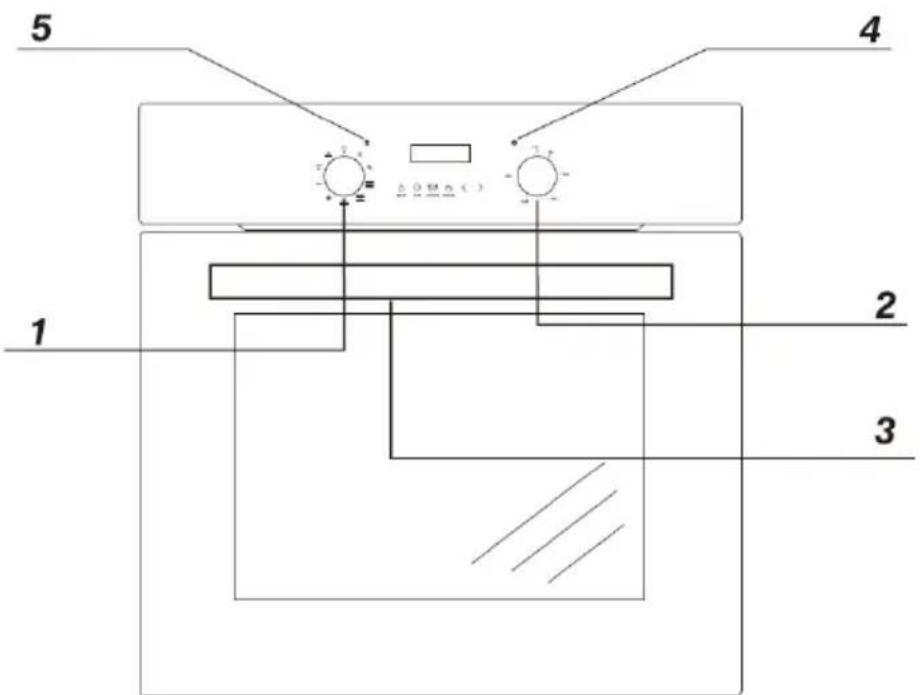
1 Oven function selection knob
2 Temperature control knob
3 Oven door handle
4 Red temperature regulator signal light
5 Yellow function operation signal light
BO6737E02AXK BO6737E02ABG
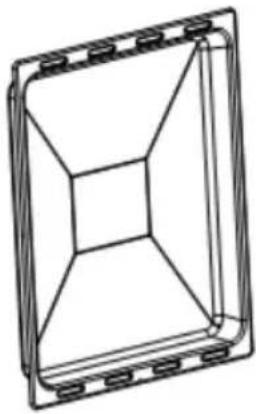
natural_image
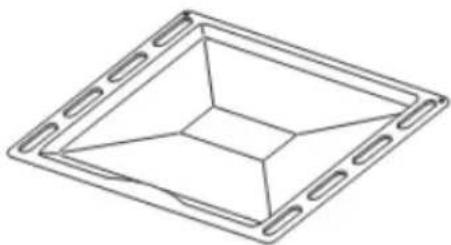
Technical line drawing of a rectangular frame with internal geometric structure (no text or symbols)Deep tray
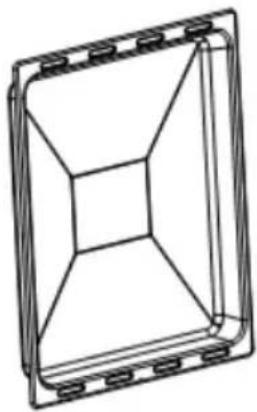
BO6737E03AWG
natural_image
Technical line drawing of a rectangular frame with internal geometric structure (no text or symbols)Deep tray
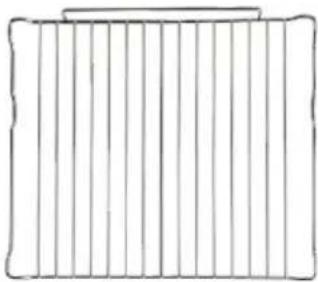
natural_image
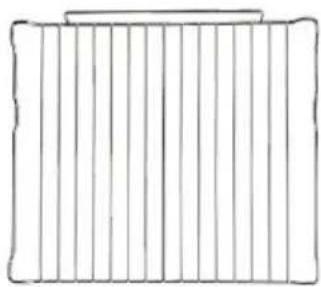
Simple line drawing of a rectangular frame with vertical lines and a top horizontal bar (no text or symbols)Oven shelf
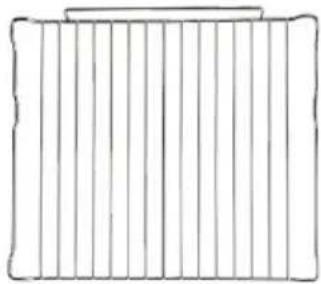
natural_image
Simple line drawing of a rectangular frame with vertical lines and a top horizontal bar (no text or symbols)Oven shelf
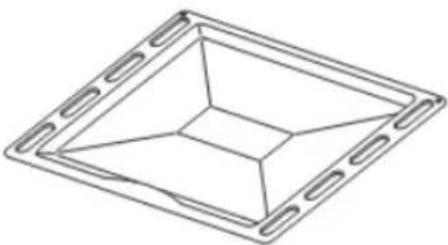
natural_image
Pure geometric diagram of a square frame with internal triangular cutout (no text or symbols)Baking tray
! The kitchen area should be dry and aired and equipped with efficient ventilation. When installing the oven, easy access to all control elements should be ensured.
! This is a built-in oven, and its back wall and one side wall can be placed next to a high piece of furniture or a wall. Coating or veneer used on fitted furniture must be applied with a heat-resistant adhesive (100°C). This prevents surface deformation or detachment of the coating.
! Make an opening with the dimensions given in the diagram for the oven to be fitted.
! Make sure the mains plug is disconnected and then connect the oven to the mains supply.
! Insert the oven completely into the opening without allowing the four screws in the places shown in the diagram to fall out.
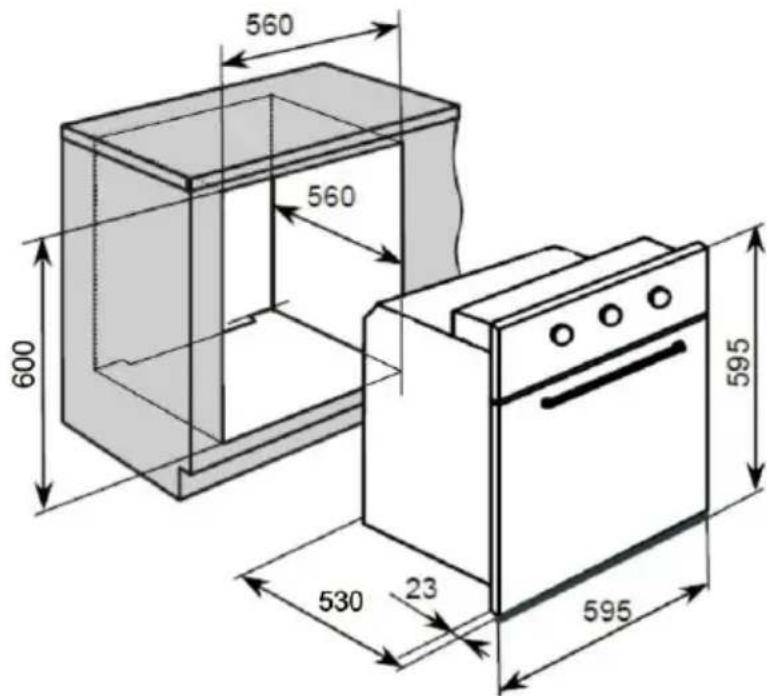
Product Dimensions Aperture Dimensions
Height: 595mm
600mm
Width: 595mm
560mm
Depth: 530mm
560mm(min)
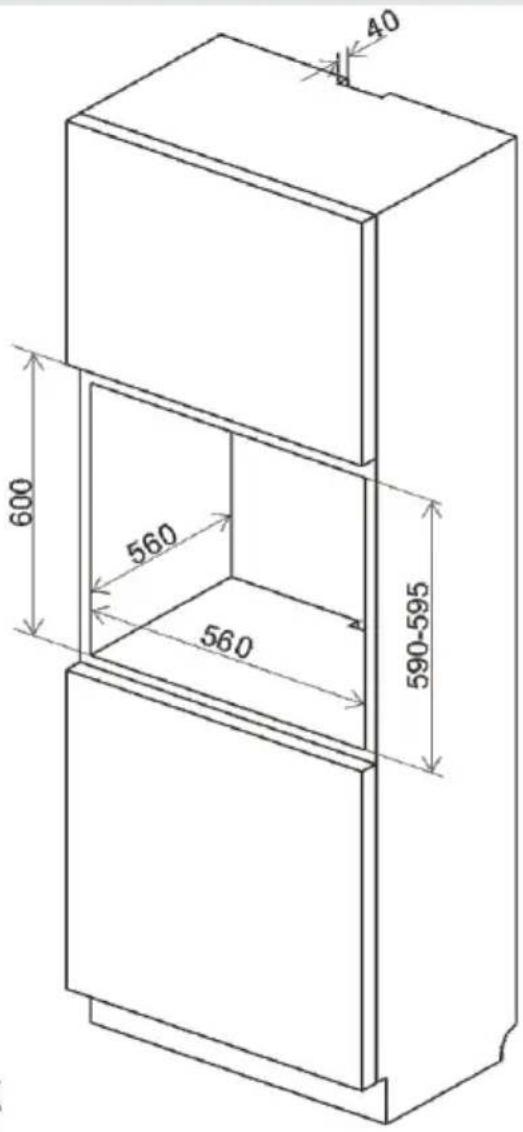
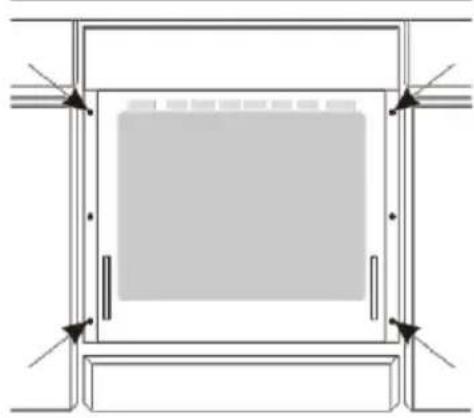
natural_image
Pure architectural or mechanical diagram showing a rectangular frame with internal components and corner arrows (no text or symbols)Electrical connection
Warning!
All electrical work should be carried out by a suitably qualified and authorised electrician. No alterations or wilful changes in the electricity supply should be carried out.
Fitting guidelines
The oven is manufactured to work with single-phase alternating current(220V-240V/50Hz). The connection diagram is also found on the cover of the connection box. Remember that the connection wire should match the connection type and the power rating of the oven.
The connection cable must be secured in a strain-relief clamp.
Warning!
Remember to connect the safety circuit to the connection box terminal marked with .The connection box terminal marked with .The electricity supply for the oven must have a safety switch which enables the power to be cut off in case of emergency. The distance between the working contacts of the safety switch must be at least 3 mm.
Before connecting the oven to the power supply it is important to read the information on the data plate and the connection diagram.
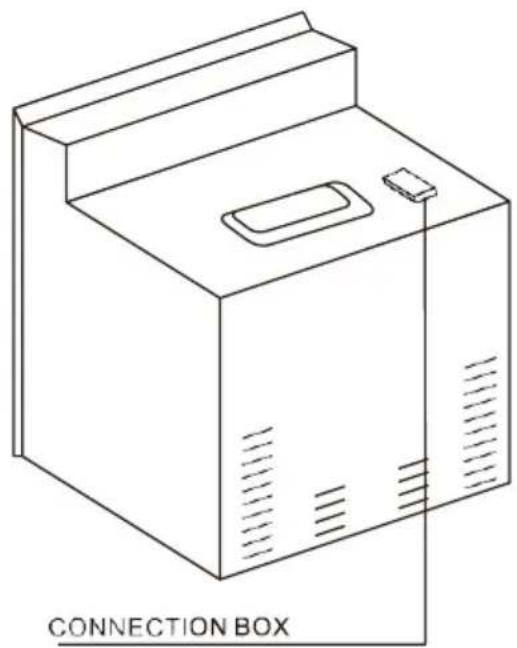
natural_image
Line drawing of a connected box device with ventilation slots and a handle (no text or symbols on the diagram itself)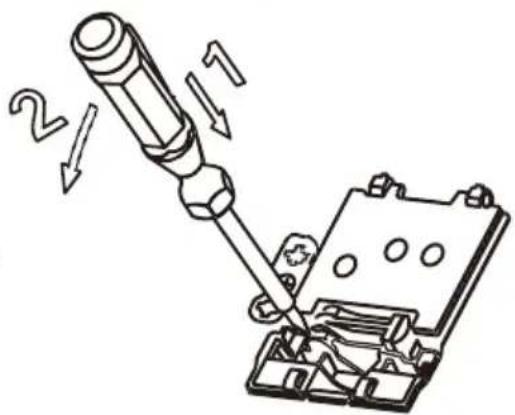
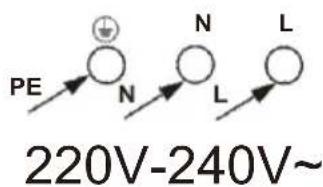
CONNECTION DIAGRAM Caution!Voltage of heating elements 220V\~240V
Caution! In the event of any connection the safety wire must be connected to PE terminal
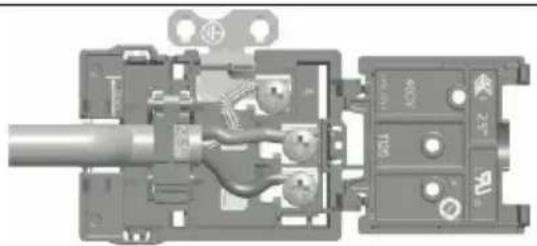
natural_image
Cross-sectional diagram of a mechanical device showing internal components and housing (no text or symbols visible)For 220V-240V earthed one phase connect on: Brown wire connect to L and blue wire connect to N, safety wire (Yellow green) connect to
Control Panel
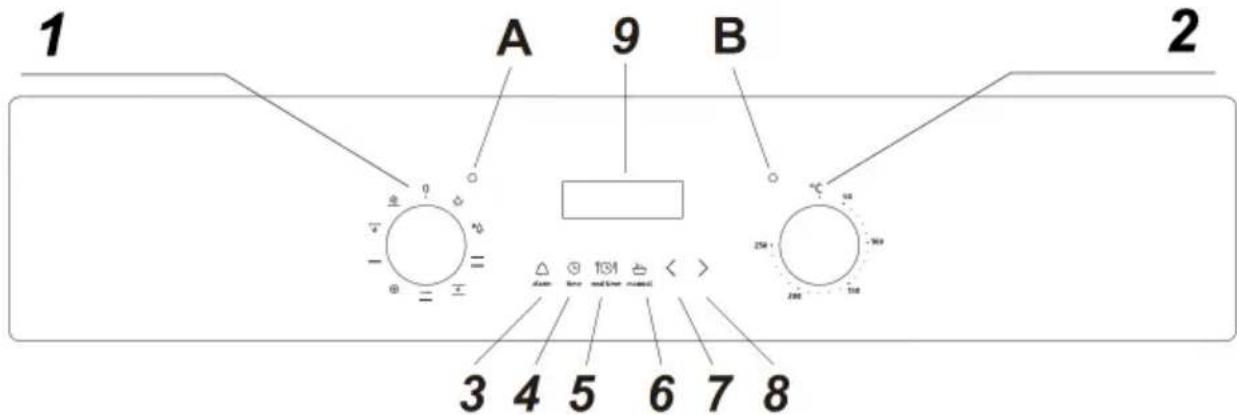
1) Oven function selector knob
2) Thermostat control knob
3) Minute minder button
4) Duration button
5) End cook button 6) Manual
operation button 7) Minus button
8) Plus button
9)LED display
A) Power indicator light
B) Oven operating light
Oven programmer/timer display
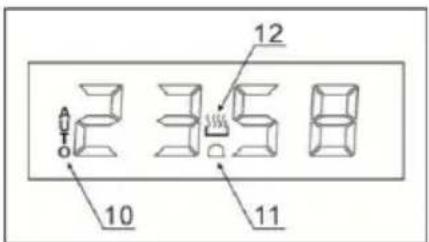
10) Auto function symbol
11) Minute minder symbol
12) Manual operation symbol
Setting and using the oven programmer/timer
Selecting manual operation mode
After your appliance is connected to your mains supply for the first time, the numbers on the timer display will flash. Before you can select a cooking function or set a temperature, you're set the appliance into manual operation mode
o To select manual operation mode, press the manual operation button (6) on the control panel.
Setting clock (the time of day)
After setting your oven for manual operation, you should also set the time of day.
o After pressing the manual operation button (6), use the minus button (7) and plus button (8) to adjust the time that appears in the display. After getting the display to the correct time, release the minus and plus buttons. After a few seconds the time will fix in the display and you will be able to use your oven.
The oven timer
o Only the minute minder can be used with the defrost oven function. None of the other timer modes will work with the defrost function.
Before first use
To remove any residue from the oven that may have been left from the manufacturing process, you should select the fan oven function and set the thermostat to its maximum temperaturesetting.
o It is perfectly normal for a smell to be produced during this process.
o You should make sure that any windows in the room are left open during this process.
o It is advisable for you not to remain in the room whilst the burning off process is taking place.
o You should leave the oven on maximum setting for 30 – 40 minutes.
o After the oven cavity has cooled, it should then be cleaned with warm soapy water, using either a sponge or soft cloth. No abrasive cleaners should be used.
o Outer parts of the oven should be cleaned with warm soapy water, using either a sponge or soft cloth. No abrasive cleaners should be used.
We would recommend that an appropriate stainless steel cleaner and polish is regularly used on the stainless steel surfaces of this appliance.
Setting the minute minder function
You are able to set the minute minder at any time, regardless of whether an oven function I been selected. You can set a period of time using the minute minder function and an alarm sound when that period of time has elapsed.
o Press the minute minder button (3), the display will show a value of 00:00. Set the period of time that you wish the minute minder to countdown for, by using the minus (7) and plus (8) buttons.
Once the display has got to your desired countdown time, let go of the minus and plus buttons. The minute minder symbol (11) will appear on the timer display.
Once a countdown time has been set, it is possible to shorten or lengthen the time by using the minus or plus buttons.
o An alarm will sound when the countdown time has elapsed. The alarm can be silenced by pressing the minute minder button.
o Important: The oven will continue to heat once the alarm has been silenced. If you have finished cooking, then you should turn the oven function selector and thermostat control knob to 0.
Setting the duration function
This function will allow you to set a countdown time similar to the minute minder function. However the oven will no longer continue to heat, once the countdown period has elapsed.
Use the thermostat control knob (2) to set the temperature that you require. The manual o op symbol (12) will appear on the display.
o Use the oven function selector knob (1) to select the mode of cooking that you require.
o It is then possible to set the duration of the cooking time that you require.
o Press the duration button (4) and the display will show a value of 00:00. Set the period the duration function to countdown for, by using the minus (7) and plus (8) buttons.
Once the display has got to your desired countdown time, let go of the minus and plus buttons. The countdown will start immediately and the word AUTO will appear on the timer display.
Once a countdown time has been set, it is possible to shorten or lengthen the time by using the minus or plus buttons.
o An alarm will sound when the countdown time has elapsed and the oven will switch off. The word AUTO will flash and the heating symbol will disappear. The alarm can be silenced by pressing the duration button.
o You will need to return the oven to manual operation mode, once the duration function has been used. To do this you should press the “manual operation” button, the word AUTO will disappear from the display and the manual operation symbol will appear instead.
o Important: If you do not turn the thermostat control knob and oven function selector knob to 0, then the appliance will continue to operate as soon as you press the manual operation button.
Setting the end cook function
This function is similar to the duration function, however instead of selecting a period of time you wish the oven to switch off after. You select the time of day that you wish the oven to at.
o Use the thermostat control knob (2) to set the temperature that you require. The manual operation symbol (12) will appear on the display.
o Use the oven function selector knob (1) to select the mode of cooking that you require.
o Press the end cook button (5) and the display will show a value of 00:00. Set the time that you wish the oven to stop cooking at by using the minus (7) and plus (8) buttons. The will calculate how long the cooking time will be, based on the time of day that you have self and show it on the display.
Once the display has got to the time of day that you want the oven to stop cooking at of the minus and plus buttons. The countdown will start immediately and the word AUTO will on the timer display.
o When the time is set, it can be modified by pressing the minus and plus buttons.
When the time of day reaches the end of cooking time that you set, the oven will switch and an alarm will sound. The word AUTO will flash and the heating symbol will disappear. That can be silenced by pressing the end cook or duration button.
o You will need to return the oven to manual operation mode, once the start and end time has been used. To do this you should press the manual operation button, the word AUTO will disappear from the display and the manual operation symbol will appear instead.
o Important: If you do not turn the thermostat control knob and oven function selector knob then the appliance will continue to operate as soon as you press the manual operation button.
Setting the start and end time function
This function will allow you to set a time in the future that the oven switches on at and a the oven will switch off at.
o Use the thermostat control knob (2) to set the temperature that you require. The manual operation symbol (12) will appear on the display.
o Use the oven function selector knob (1) to select the mode of cooking that you require
o Press the duration button (4) and the display will show a value of 00:00. Set the period of time that you wish to cook for, by using the minus (7) and plus (8) buttons. The word A will appear on the timer display.
o Immediately press the end cook button (5) and the timer display will show the value 00:00. Set the time of day that you want the oven to switch off at, using the minus and pl buttons.
The oven will calculate what time it needs to switch on at, so that your food will cook the length of time that you selected. It will automatically switch itself on, once it reaches the time of day that it has calculated.
When the time of day reaches the end of cooking time that you set, the oven will switch off and an alarm will sound. The word AUTO will flash and the heating symbol will disappea. The alarm can be silenced by pressing the end cook or duration button.
o You will need to return the oven to manual operation mode, once the start and end time function has been used. To do this you should press the manual operation button, the word will disappear from the display and the manual operation symbol will appear instead.
o Important: If you do not turn the thermostat control knob and oven function selector kn then the appliance will continue to operate as soon as you press the manual operation button
Oven on and off
In order to switch on the oven you need to:
! set required working conditions of the oven, it's temperature and a mode of heating.
! Set the knob to the required position, turning right.
Oven functions and operation.
Natural convection oven (conventional)
The oven can be warmed up using the box and top heaters. Operation of the oven is controlled by the oven function knob-to set required function you should turn the knob the selected position.
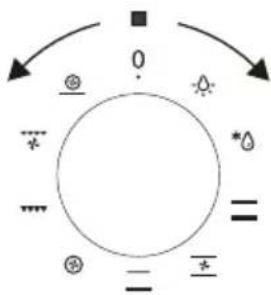
flowchart
graph TD
    A["?"] --> B["?"]
    B --> C["★"]
    C --> D["○"]
    D --> E["★"]
    E --> F["="]
    F --> G["⊕"]
    G --> H["="]
    H --> I["★"]
    I --> J["◇"]
    J --> K["?"]
    K --> L["?"]
    L --> M["?"]
    M --> N["?"]
    N --> O["?"]
    O --> P["?"]
    P --> Q["?"]
    Q --> R["?"]
    R --> S["?"]
    S --> T["?"]
    T --> U["?"]
    U --> V["?"]
    V --> W["?"]
    W --> X["?"]
    X --> Y["?"]
    Y --> Z["?"]
as well as the temperature regulator knob -to set a required function you should turn the knob to the selected position.
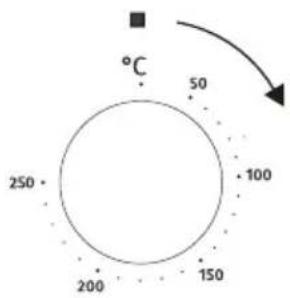
The oven can be switched off by setting both of these knobs to the position “●”/“○”.
Caution!
At this oven function knob position, when setting the temperature regulator to a position other than zero, the red light may go on, although the oven is not being warmed up.
Possible knob positions

Separate oven lighting
By setting the knob to this position, the lighting inside the oven is switched on. Use, for example, when washing the oven chamber.

Defrosting
This function allows all frozen foods to be rapidly and delicately thawed thanks to the internal fan.

Bottom and top heaters on
setting the konb to this position allows the oven to be heated conventionally.

Fan, bottom and top heaters on At this knob position the oven executes the cake function. Conventional oven with a fan.

Bottom heater on
When the knob is set to this position the oven is heated using only the bottom heater. Use for e.g. fina baking from the bottom.

Central element with fan on
This cooking mode allows homogenous distribution of the heat inside the oven, making it possible to cook several items of food at the same time.

Combined grill
(Grill and the top heater)
When the “combined grill” is active it enables grilling with the grill and with the top heater switched on at the same time. This function allows a higher temperature at the top of the cooking area, which causes more intense browning of the dish and permits larger portions to be grilled.

Fan and combined grill on.
When the knob is turned to this position, the oven activates the combined grill and fan function. in practice, this function allows the grilling process to be speeded up and an improvement in the taste of the dish. You should only use the grill with the oven door shut.

A crisp underside to pizza bases, quiches and pastry cases can be achieved by activating the intensive hot air setting. No need to preheat the oven when using this setting when cooking from frozen.
Caution!
When selecting any heating function(switching a beater on etc.) the over will only be switched on after the temperature has been set by the temperature regulator knob.
Switching on the oven is indicated by two signal lights, yellow and red, turning on. The yellow light, turned on means the oven is working. If the red light goes out, it means the oven has reached the set temperature, if a recipe recommends placing dishes in a warmed-up oven, this should be not done before the red light goes out for the first time. When baking, the red light will temporarily come on and go out (to maintain the temperature inside the oven). The yellow signal light may also turn on at the knob position of “oven chamber lighting”.
By ensuring proper cleaning and maintenance of your cooker you can have a significant influence on the continuing fault-free operation of your appliance.
Before you start cleaning, the cooker must be switched off and you should ensure that all knobs are set to the "7"0"position. Do not start cleaning until the cooker has completely cooled.
Caution! The sharp blade should always be protected by adjusting the cover (just push it with your thumb). Injuries are possible so be careful when using this instrument-keep out of reach of reach of children.
! Appropriate light cleaning or washing products are recommended, such as e.g. any kind of liquids or emulsions for fat removal. In particular, special cleaning products such as COLLO Luneta, Sidol Stahlglanz, Stahl-Fix for washing and cleaning and Cera Fix for maintainancare recommended. If the recommended products are not available, it is advisable to use a solution of warm water with a little washing-up liquid or cleaning products for stainless steel sinks.
Oven
! The oven should be cleaned after every t. When cleaning the oven the lighting should be switched on to enable you to see the surfaces better.
! The oven chamber should only be washed. With warm water and small amount of washing-up liquid.
! After cleaning the oven chamber wipe it c
Caution!
Do not use cleaning products containing abrasive materials for the cleaning and maintenance of the glass front panel.
! steam cleaning:
-pour 250ml of water(1 glass)into a bowl placed in the oven on the first level from bottom,
-close the oven door,
-set the temperature knob to 50°C, and the function knob to the bottom heater position,
-heat the oven chamber for approximately 3 minutes,
-open the oven door, wipe the chamber ins with a cloth or sponge and wash using water with washing-up liquid.
Caution! Possible moisture or water residues under the cooker can result from steam cleaning.
! After cleaning the oven chamber wipe it dry.
Replacement of the oven light bulb
In order to avoid the possibility of an electric shock ensure that the appliance is switched off before replacing the bulb.
! Set all control knobs to the position"●"/"0" and disconnect the mains plug,
! unscrew and wash the lamp cover and then wipe it dry.
! unscrew the light bulb from the socket, replace the bulb with a new one-a high temperature bulb (300°C) with the following parameters:
-voltage230 V
-power 25 W
-G9
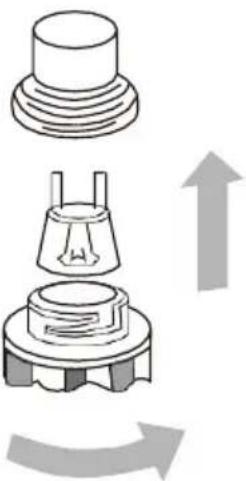
natural_image
Diagram showing a mechanical component with an upward arrow indicating rotation or movement (no text or symbols present)Oven light bulb
! Screw the bulb in, making sure it is properly inserted into the ceramic socket.
! Screw in the lamp cover.
CLEANING AND MAINTENANCE
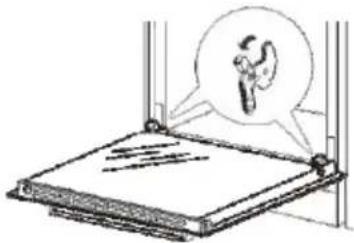
Removing the doors
a. The oven door is fully open。
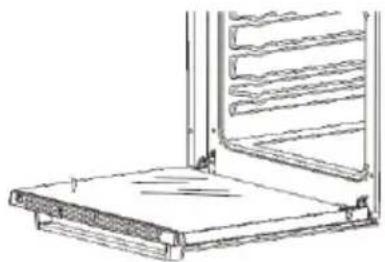
natural_image
Technical line drawing of a ladder assembly with a flat base and vertical frame (no text or symbols)b. The latch hinges completely lifted.
natural_image
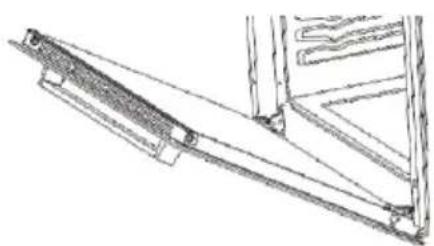
Diagram of a mechanical device with a magnified inset showing a gear component (no text or symbols present)c. Gently close the oven door until you have the sound of engagement, once they reach clamping position, with both hands holding the door and continue to push, pull up a same time so that the hinge bolt removed from the oven.
natural_image
Technical line drawing of a mechanical assembly or bracket (no text or symbols)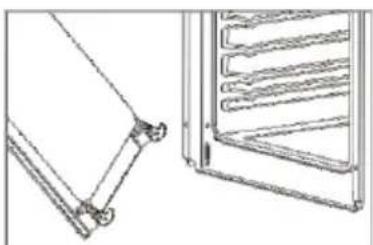
natural_image
Technical line drawing of two mechanical components: a bracket and a rack (no text or symbols)d. After cleaning, the hinge is aligned with 1 oven door .Latch and push it until it catches care to ensure that the hinge and door are properly.
aligned to avoid door damage. If in doubt, contact the service centre - information is listed on the back of this user manual.
e. With the oven door fully opened, push the latch down to it's initial position to complete the oven door installation.
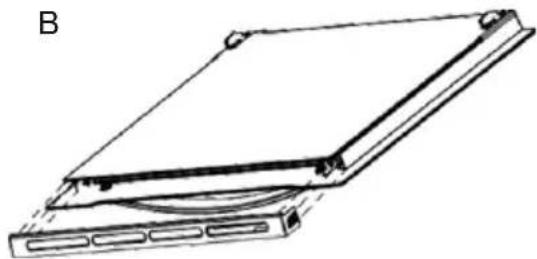
Remove the inner glass panel
a. Press and hold the two sides of the grid with both hands to pull it out.
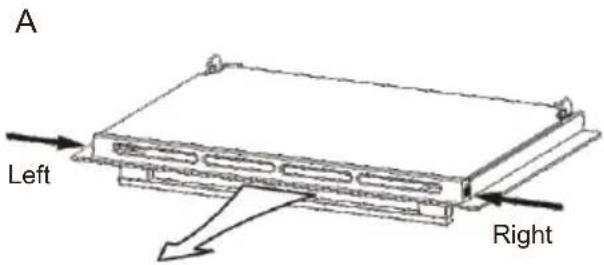
Pull out the grid
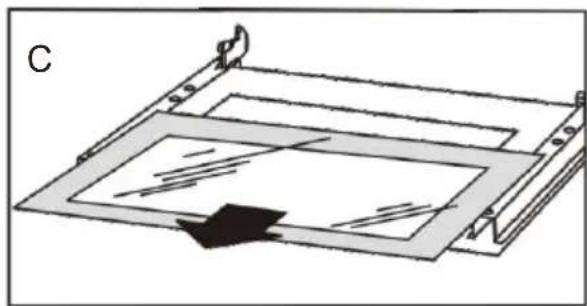
b. Remove the inner glass.
natural_image
Line drawing of a rectangular electronic device with mounting holes and a curved base (no text or symbols)c. Locate the glass stopper and remove it. Remove the glass for cleaning. To reinstall the inner glass, simply gently place it back onto the door and reinsert the glass stopper to secure the glass in place.
natural_image
Diagram of a mechanical assembly with layered components and a directional arrow (no text or symbols)In the event of an emergency, you should:
! Switch of all working units of the cooker
! Disconnect the mains plug
! Call the service centre
! Some minor faults can be fixed by referring to the instructions given in the table
| PROBLEM REASON ACTION | ||
| The appliance does not work | Break in power supply | Check the household fuse box, if there is a blown fuse replace it with a new one |
| The oven lighting does not work | The bulb is loose or damaged | Tighten up or replace the blown bulb(see chapter Cleaning and Maintenance) |
BO6737E02AXK
| Voltage rating | 220-240V~ 50/60Hz |
| Power rating | max. 2.9kw |
| Cooker dimensions H/W/D | 59. 5/59. 5/53.0 cm |
| Usable capacity of the oven * | 73 litres |
| Weight | Approx. 32.5kg |
BO6737E02ABG
| Voltage rating | 220-240V~50/60Hz |
| Power rating | max. 2.9kw |
| Cooker dimensions H/W/D | 59.5/59.5/53.0 cm |
| Usable capacity of the oven * | 73 litres |
| Weight | Approx. 32kg |
BO6737E03AWG
| Voltage rating | 220-240V~50/60Hz |
| Power rating | max. 2.9kw |
| Cooker dimensions H/W/D | 59. 5/59. 5/53.0 cm |
| Usable capacity of the oven * | 73 litres |
| Weight | Approx. 33.5kg |