99150I - Receiver InLine - Free user manual and instructions
Find the device manual for free 99150I InLine in PDF.


| Product Type | Bluetooth Audio Transceiver (Receiver & Transmitter) |
| Model | 99150I |
| Bluetooth Version | 4.1 with aptX low latency |
| Supported Audio Codecs | aptX low latency, aptX, AAC, SBC |
| Bluetooth Range | Up to 10 meters (33 feet) |
| Latency | ~40 ms with aptX low latency |
| Audio Inputs | Toslink Optical, 3.5mm AUX |
| Audio Outputs | Toslink Optical, 3.5mm AUX |
| Power Supply | 5V DC, 500mA via Micro USB |
| LED Indicators | Blue (optical), Green (AUX), flashing for pairing, solid for connected |
| Included Accessories | TOSLINK optical cable (1.5m), 3.5mm AUX cable (1.5m), 3.5mm to RCA adapter (0.2m), Micro USB cable (0.8m), adhesive strips, Velcro strips |
| Mounting | Adhesive mounting strips or Velcro, mount on side or top of TV/audio system |
| Cleaning | Dry, soft cloth; do not use detergents |
| Safety Warnings | Keep away from children (choking hazard), caution for pacemaker users, avoid excessive volume to prevent hearing damage |
| Intended Use | Stream audio wirelessly from TV/computer to Bluetooth headphones/speakers (TX mode) or from smartphone/tablet to home audio system (RX mode) |
Frequently Asked Questions - 99150I InLine
User questions about 99150I InLine
0 question about this device. Answer the ones you know or ask your own.
Ask a new question about this device
Download the instructions for your Receiver in PDF format for free! Find your manual 99150I - InLine and take your electronic device back in hand. On this page are published all the documents necessary for the use of your device. 99150I by InLine.
USER MANUAL 99150I InLine
natural_image
Black rectangular electronic device with 'EVI.NET' branding and a button, no visible text or symbols on the body itself.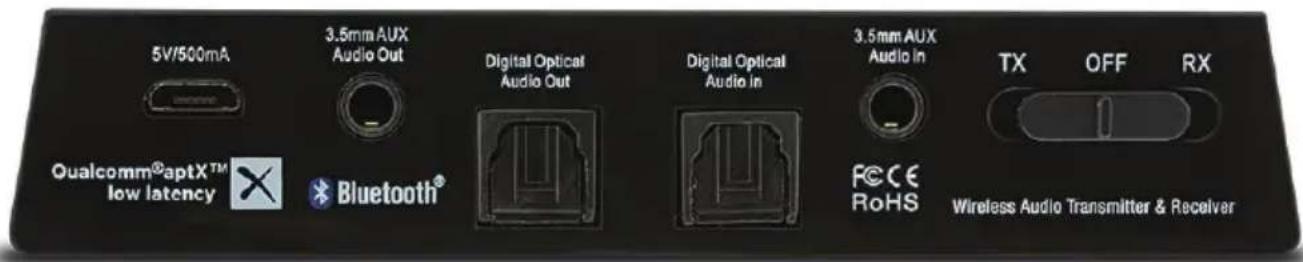
INHALTSVERZEICHNIS
flowchart
graph LR
    A["TV"] --> B["Digital Optical Audio In"]
    A --> C["3.5mm AUX Audio In"]
    A --> D["Digital Optical Audio Out"]
    A --> E["Headphone Jack"]
    A --> F["RCA Audio Out"]
7.2 Vorbereitung
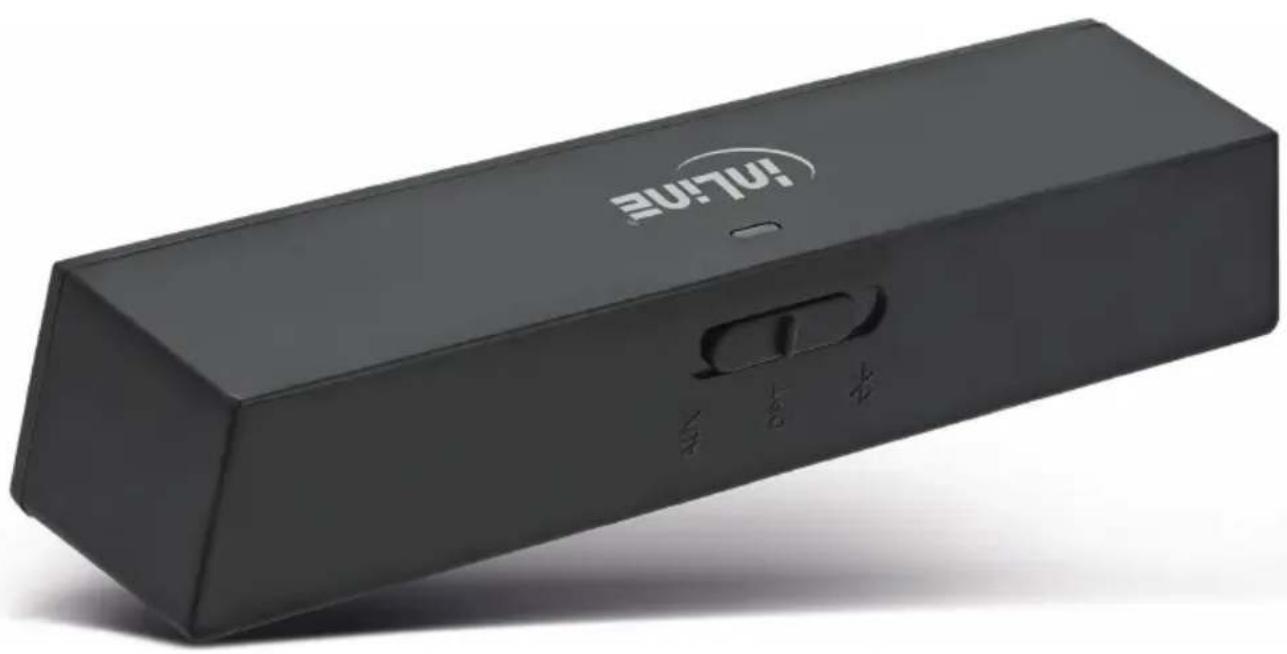
InLine® Bluetooth Audio Transceiver, Receiver/Transmitter, BT 4.1, aptX, 3.5mm + Toslink
natural_image
Black rectangular electronic device with 'EVI.NET' branding and control buttons, no visible text or symbols on body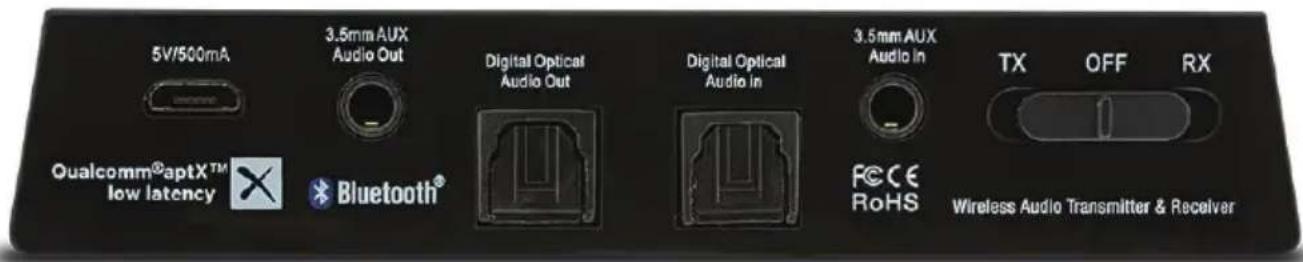
TABLE OF CONTENTS
- General
- Scope of delivery
- Explanation of warning symbols and notes
- General warnings
- Intended use
-
Improper use
-
Use
7.1 Product views
7.2 Preparation
7.3 Configuration: Pairing in TX mode
7.4 Multipoint streaming - pairing with two Bluetooth headphones
7.5 Configuration: Pairing in RX mode
- Other functions
8.1 Reconnection
8.2 Adjust the volume
8.3 Restore factory settings
- Troubleshooting tips
9.1 The audio transceiver is connected but does not turn on (LED does not light)
9.2 Connection between audio transceiver and Bluetooth device fails
9.3 The Bluetooth headphone is connected but does not output an audio signal
9.4 Smartphone is connected but there is no sound from my audio system
9.5 The volume is too low
9.6 The sound quality is bad and / or the audio output has small dropouts
9.7 Delay (latency) during audio playback
-
LED indications
-
Technical specifications
- Maintenance and cleaning
- Radio frequency reference
- Optional accessories
- Disposal
1. GENERAL
Validity This operating instructions is valid for the following product:
99150I InLine® Bluetooth Audio Transceiver, Receiver/Transmitter, BT 4.1, aptX, 3.5mm + Toslink
Manufacturer INTOS ELECTRONIC AG
Siemensstraße 11
D-35394 Gießen
Date June 2017
2. SCOPE OF DELIVERY
- 1x InLine® Bluetooth Audio Transceiver
• 1x TOSLINK digital optical audio cable (1.5 m)
- 1x 3.5 mm AUX audio cable (1.5 m)
- 1x 3.5 mm RCA adapter cable (0.2 m)
• 1x Micro USB cable (0.8 m)
• 1x Sticky gel mounting strips
- 1x Velcro strips
• 1x Operating instructions
3. EXPLANATION OF WARNING SYMBOLS AND NOTES
NOTE!
This symbol indicates information which contributes to a better understanding.
Note

DANGER!
This symbol indicates major danger for human health.
Danger
4. GENERAL WARNINGS

DANGER!
Components of the product could be dangerous for children. Risk of suffocation by absorbing of small parts!

DANGER!
Users with heart pacemakers or implanted defibrillators are cautioned because of the Bluetooth technology used. The generated magnetic fields can lead to disturbances in cardiac pacemakers and implanted defibrillators.

DANGER!
Avoid excessive over-loud playback, which can lead to permanent hearing damage.
5. INTENDED USE
The InLine® Bluetooth Audio Transceiver is a sleek and compact Bluetooth audio transmitter that seamlessly streams Hi-Fi digital audio wirelessly from your TV or wired music system to your favorite pair of Bluetooth headphones or speakers.
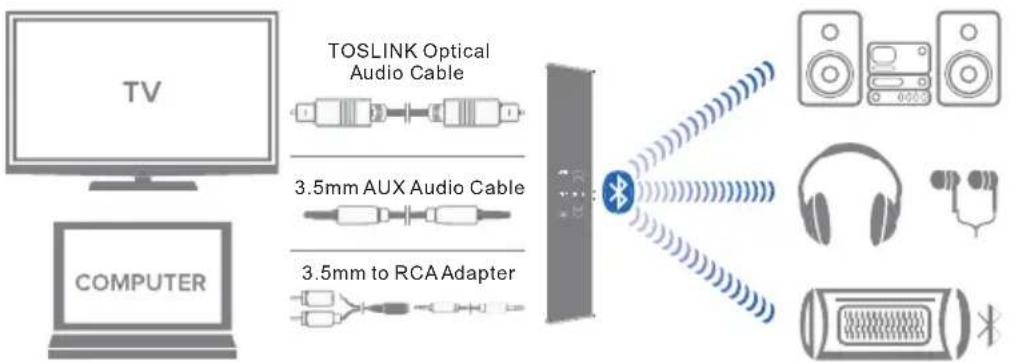
Also the InLine® Bluetooth Audio Transceiver is a Hi-Fi Bluetooth music receiver that streams high quality audio wirelessly from any Bluetooth enabled smartphone, computer or tablet to any music system or powered speakers.
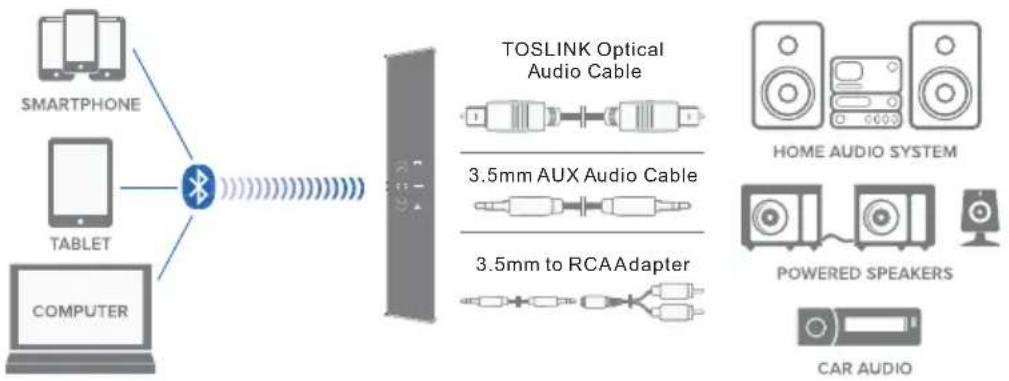
flowchart
graph LR
    A["SMARTPHONE"] --> B["Bluetooth"]
    C["TABLET"] --> B
    D["COMPUTER"] --> B
    B --> E["TOSLINK Optical Audio Cable"]
    B --> F["3.5mm AUX Audio Cable"]
    B --> G["3.5mm to RCAAdapter"]
    H["HOME AUDIO SYSTEM"] --> I["POWERED SPEAKERS"]
    I --> J["CAR AUDIO"]
With aptX low latency, the audio signals are transmitted with the least delay in order to achieve the best possible synchronicity between audio and video contents.
6. IMPROPER USE
Improper use in the sense of a foreseeable misuse applies as follows:
- Do not disassemble the InLine® Bluetooth Audio Transceiver.
- Use the InLine® Bluetooth Audio Transceiver only in dry, closed rooms and do not expose it to direct sunlight, extreme temperatures or moisture.
- Do not expose the InLine® Bluetooth Audio Transceiver to mechanical stress.
7. USE
7.1 Product views
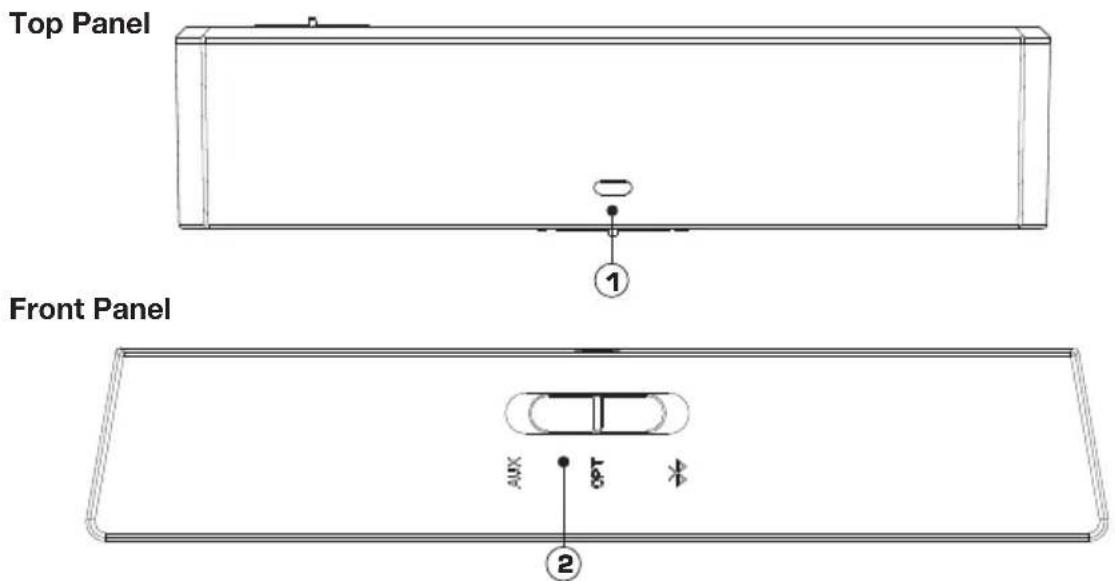
Rear Panel
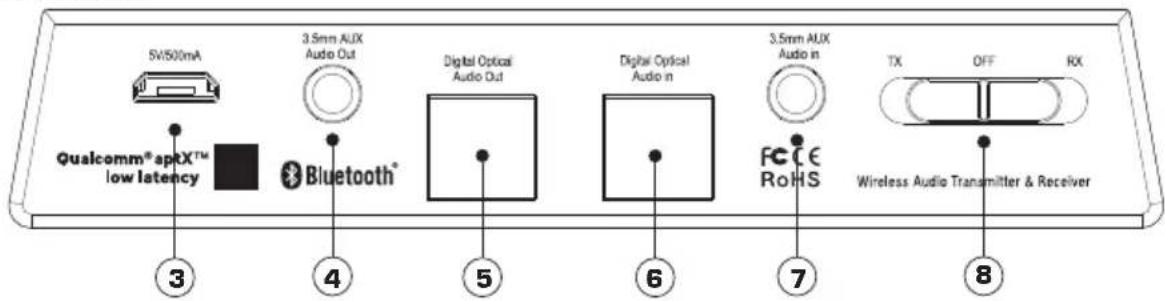
- LED indicator 5. Toslink optical audio out
- Multifunction switch - Audio source select / pairing 6. Toslink optical audio in
- Micro USB power input 7.3.5 mm AUX audio in
- 3.5 mm AUX audio out 8. TX/RX toggle and power off switch
Note:
(1) The audio inputs are only used in TX mode. When in TX mode, transceiver needs an audio source to transmit. It must be fed with an audio signal from a connected device such as a television, video game system, computer, MP3 player, etc.
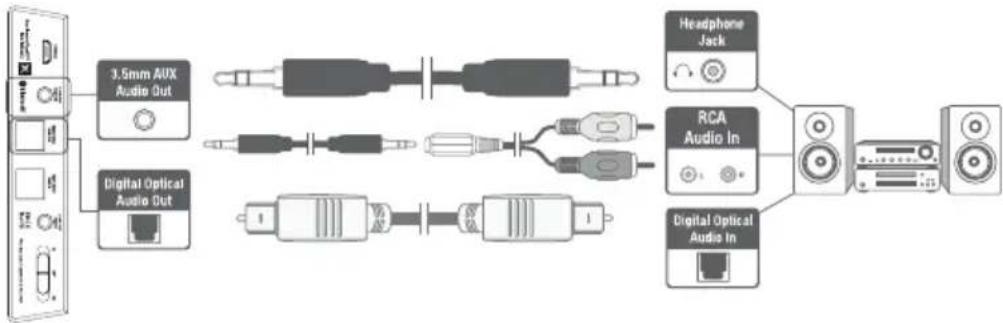
flowchart
graph LR
    A["3.5mm AUX Audio Out"] --> B["AC"]
    C["Digital Optical Audio Out"] --> D["AC"]
    B --> E["AC"]
    D --> F["AC"]
    E --> G["RCA Audio In"]
    F --> H["RCA Audio In"]
    G --> I["Speaker"]
    H --> J["Speaker"]

(2) The audio outputs are used with RX mode only. When in RX mode, transceiver is an audio signal and passing that signal from its output to the input of some amplification device like a home stereo, speaker, car audio, etc.
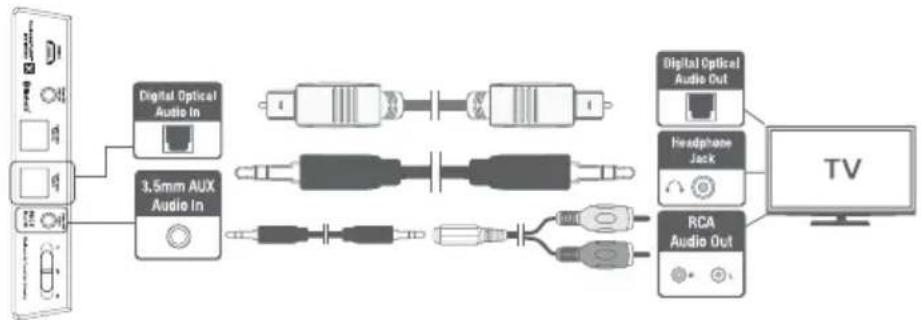
flowchart
graph LR
    A["TV"] --> B["Digital Optical Audio In"]
    A --> C["3.5mm AUX Audio In"]
    A --> D["Headphone Jack"]
    A --> E["RCA Audio Out"]
    B --> F["Analog cable"]
    C --> G["Analog cable"]
    D --> H["Analog cable"]
    E --> I["Analog cable"]
7.2 Preparation
Step 1: Stick one side of the included double side sticky gel mounting strips to the bottom of the transceiver. Mount the transceiver onto the side or top of your TV or audio system. Avoid placing transceiver behind the TV or any audio device.
Step 2: Plug the included Micro USB charging cable into an USB power adapter or any powered USB port and the charging port on the rear of the unit.
Step 3: Select the desired mode (TX/RX) by sliding the toggle switch situated on the rear of the transceiver. The LED will start flashing slowly indicating the unit is switched „ON“. To switch off transceiver, slide the TX/RX toggle switch to the „OFF“ position.
7.3 Configuration: Pairing in TX mode
Pairing with a Bluetooth headphone / speaker
Step 1: Connect the InLine® Bluetooth Audio Transceiver to your TV or computer using the appropriate connector cable. Place your Bluetooth headphone or speaker within 1 meter (3 feet) range of the InLine® Bluetooth Audio Transceiver and set it into pairing mode.
Step 2: With transceiver powered on and TX/RX toggle switch set to „TX“, slide and hold the multifunction switch all the way to the right in the direction of the Bluetooth symbol. The LED indicator light will flash red and blue / green to indicate that transceiver is ready to pair. Now release the multifunction switch.
Step 3: Transceiver and your Bluetooth headphone or speaker have to be in pairing mode simultaneously in order to pair. Transceiver will remain in pairing mode for 30 seconds or until successfully paired. Once paired, the LED indicator will turn solid blue / green (depending on the audio input selection).
Step 4: Make sure the proper audio input source is selected on the transceiver. Select the corresponding audio input (optical or AUX) on the back of the transceiver using the multifunction switch.
Step 5: The sound from your TV will now play through your Bluetooth headphone or speaker.
7.4 Multipoint streaming - pairing with two Bluetooth headphones
Step 1: Connect your first headphone to the audio transceiver by following the steps described in section 7.3 for pairing.
Step 2: Get the transceiver in pairing mode by sliding and holding the multifunction switch till the LED indicator flashes red and blue / green.
Step 3: Set your second headphone to pairing mode and wait until they connect.
Step 4: The sound from your TV will now play through both Bluetooth headphones simultaneously.

Note: Transceiver will provide the best possible audio quality and minimizes audio latency only when used with headphones or receivers that support Qualcomm aptX low latency technology.
When streaming to two headphones, if one of the headphones supports aptX and the other does not, then standard Bluetooth audio streaming will be used with both headphones.
7.5 Configuration: Pairing in RX mode
Pairing with a smartphone / tablet / PC
Step 1: Connect the InLine® Bluetooth Audio Transceiver to your music system using the appropriate connector cable.
Step 2: With the transceiver powered on and TX/RX toggle switch set to „RX“, slide and hold the multifunction switch all the way to the right in the direction of the Bluetooth symbol. The LED indicator will flash red and blue / green to indicate that transceiver is ready to pair. Now release the multifunction switch.
Step 3: Turn on Bluetooth on your device and go to Bluetooth preferences. If necessary, refer to the operating instructions of your device.
Step 4: Scan listed Bluetooth devices and select „InLine BT Transceiver“ to pair and connect. Once paired, the LED indicator will turn to solid blue / green (depending on the audio input selection).
Step 5: Make sure the proper audio output source is selected on transceiver. Match the corresponding audio output (optical or AUX) on the back of the transceiver using the multifunction switch.
Step 6: The music on your smartphone / tablets / PC will now play through your home stereo system.
8. OTHER FUNCTIONS
8.1 Reconnection
Previously paired Bluetooth devices will reconnect to transceiver automatically, as long as the transceiver and the paired Bluetooth devices are turned on.
8.2 Adjust the volume
The audio transceiver, by design, is a passive transmitter or receiver and has no volume control. User volume level must be adjusted via the input and output sources connected to transceiver.
8.3 Restore factory settings
With audio transceiver powered on, slide and hold the multifunction switch all the way to the right for approximately 6 seconds until the LED indicator shows solid static light. Release the multifunction switch when the light flashes red and blue. The unit has entered pairing mode and any previously paired devices will be cleared from its memory.
9. TROUBLESHOOTING TIPS
9.1 The audio transceiver is connected but does not turn on (LED does not light)
Confirm that the power adapter is connected to transceiver with the included USB cable and plugged into a functioning AC outlet. The blue LED indicator on the front of the unit will light up - pulsing slowly when the unit is turned „ON“ by setting the TX/RX toggle switch on the rear of the unit to „TX“ or „RX“.
9.2 Connection between audio transceiver and Bluetooth device fails
Make sure you are operating transceiver in the appropriate Bluetooth mode.
In TX mode: The audio transceiver can only pair with a Bluetooth receiving device such as a Bluetooth headphone, speaker or receiver. In this mode, ensure that audio transceiver and the Bluetooth headphone, speaker or receiver are in pairing mode at the same time and are within 1 meter (3 feet) of each other.
In RX mode: The audio transceiver can only pair with a Bluetooth transmitting device such as smartphone, tablet or PC. In this mode, ensure that Bluetooth is turned „ON“ on your smartphone, tablet or PC. Make sure that the LED indicator is blinking and your device and transceiver are 1 meter (3 feet) of each other.
9.3 The Bluetooth headphone is connected but does not output an audio signal
-
Ensure that your audio source (TV / computer) output is properly connected to transceiver audio input. Audio inputs are used with TX mode only.
-
Check whether the audio input source is correctly selected on transceiver (AUX <-> OPT). If AUX is selected, make sure that your audio source is connected to the AUX input. If OPT is selected, make sure your audio source is connected to the optical input.
-
Confirm that audio is playing on the TV / PC and the volume is not set to mute or very silent. Also check the volume settings of your Bluetooth headset / speaker.
-
If you are using an optical connection, make sure nothing is connected to the AUX input of transceiver.
9.4 Smartphone is connected but there is no sound from my audio system
-
Ensure that your audio source (home audio system, stereo speakers, etc.) INPUT is properly connected to transceiver audio OUTPUT. Audio outputs are used in RX mode only.
-
Check whether the audio output source is correctly selected on transceiver (AUX <-> OPT). If AUX is selected, make sure that your audio source is connected to the AUX output. If OPT is selected, make sure your audio source is connected to the optical output.
-
Check the volume settings of the operating system of your PC and the software player you are using.
-
If you are using an optical connection, make sure that nothing is connected to the AUX output of transceiver.
9.5 The volume is too low
In TX mode: Adjust the volume on your Bluetooth headset / speaker, TV, or any other connected device as they can control the volume.
In RX mode: Check the volume settings of the operating system of your PC and the software player you are using. Also, check the volume settings of your speakers or music system.
9.6 The sound quality is bad and / or the audio output has small dropouts
-
Maximize the volume of your audio source (TV, music system, active speakers, etc.), and then control the volume using the Bluetooth headphones, speakers, or smartphone.
-
Make sure that you are within the range of your Bluetooth-enabled device.
-
Bluetooth devices are susceptible to interference from other Bluetooth devices, cordless phones, routers, microwave ovens and other wireless devices operating on the 2.4 GHz band. Eliminate as many potential sources of interference as possible while using your Bluetooth headphone / speakers.
9.7 Delay (latency) during audio playback
-
Bluetooth is a digital wireless signal and there is some latency expected due to coding / decoding and compression / decompression steps must occur.
-
The aptX and aptX low latency audio codecs supported by transceiver are notable for having lower and much lower latency (smaller delay), respectively, compared to regular Bluetooth audio.
-
Using the audio transceiver with a headphone that supports aptX or aptX low latency will minimize audio lag.
10. LED INDICATIONS
LED indicator Connection status
LED off Transceiver is off
Blue indicator light pulsing slowly Transceiver is on with OPT selected
Green indicator light pulsing slowly Transceiver is on with AUX selected
Blue and red light flashing Pairing in TX/RX mode - OPT
Green and red light flashing Pairing in TX/RX mode - AUX
Solid blue light Successfully paired - OPT
Solid green light Successfully paired - AUX
11. TECHNICAL SPECIFICATIONS
- Bluetooth version: 4.1 with aptX low latency
• Supported codecs: aptX low latency, aptX, AAC, SBC - Bluetooth profiles: A2DP
- Bluetooth range: Up to 10 meters
- Inputs / outputs: Toslink digital optical input & output, 3.5mm AUX input & output
- Input power: 5V DC, 500 mA
• Latency: \~ 40 milliseconds (ms)
12. MAINTENANCE AND CLEANING
- Clean the InLine® Bluetooth audio transceiver with a dry, velvety cloth
- Do not use detergents
13. RADIO FREQUENCY REFERENCE
General allocation of frequencies for use in local area networks, wireless local area networks (WLAN applications)
Pursuant to § 55 of the Telecommunications Law (TKG) hereby frequencies are allocated in the range from 2400.0 to 2483.5 MHz for the use by the general public in local networks and wireless local networks.
This general assignment comes with the mandatory implementation of the European commission to harmonize used frequency spectrum by short-range devices from November 9th 2006 (2006/771/EG), as last amended by the implementing decision of commission on December 8th 2011 (2011/829/EU), published in the official journal of the European Union L 329, page 10 et seq. on December 13th 2011 in Germany.
If you plan to use the product outside Germany please inform yourself previously about the legal regulations of each country.
14. OPTIONAL ACCESSORIES
- Item no. 31507S InLine® USB power adaptor, charger, 100-240VAC to 5V/2,5A, black
15. DISPOSAL
Electric and electronic devices as well as batteries must not be disposed of with household waste. Consumers are obliged by law to return electrical and electronic devices as well as batteries at the end of their service lives to the public collecting points set up for this purpose or point of sale.
- INHALTSVERZEICHNIS
- Vorbereitung
- TABLE OF CONTENTS
- GENERAL
- SCOPE OF DELIVERY
- EXPLANATION OF WARNING SYMBOLS AND NOTES
- GENERAL WARNINGS
- DANGER!
- INTENDED USE
- IMPROPER USE
- USE
- Note:
- Preparation
- Configuration: Pairing in TX mode
- Pairing with a Bluetooth headphone / speaker
- Multipoint streaming - pairing with two Bluetooth headphones
- Configuration: Pairing in RX mode
- Pairing with a smartphone / tablet / PC
- OTHER FUNCTIONS
- Reconnection
- Adjust the volume
- Restore factory settings
- TROUBLESHOOTING TIPS
- The audio transceiver is connected but does not turn on (LED does not light)
- Connection between audio transceiver and Bluetooth device fails
- The Bluetooth headphone is connected but does not output an audio signal
- Smartphone is connected but there is no sound from my audio system
- The volume is too low
- The sound quality is bad and / or the audio output has small dropouts
- Delay (latency) during audio playback
- LED INDICATIONS
- LED indicator Connection status
- TECHNICAL SPECIFICATIONS
- MAINTENANCE AND CLEANING
- RADIO FREQUENCY REFERENCE
- OPTIONAL ACCESSORIES
- DISPOSAL
Brand : InLine
Model : 99150I
Category : Receiver