
TT 20-CXA - Monitor RCF - Free user manual and instructions
Find the device manual for free TT 20-CXA RCF in PDF.


| Product Type | Full-range active high-output stage monitor |
| Woofer | 2 x 8" high-power neodymium woofers in symmetrical configuration |
| Tweeter | 2.5" compression driver with 60° x 90° constant directivity horn |
| Amplifier Power | 300W (typical mains power consumption) |
| Power Supply | 100-240V~ 50-60Hz, with PowerCon locking connector |
| AC Output Link | PowerCon locking, 100V~ 16A max 1600W / 240V~ 16A max 3500W |
| Fuse | T6.3A H250V, replaceable by authorized service centre |
| Input Connector | Female XLR (balanced/unbalanced), AES standard: pin1 ground, pin2 hot, pin3 cold |
| Output Connector | Male XLR signal link (loop-through for daisy chaining) |
| RDNet Control | EtherCON IN/OUT for RCF RDNet protocol, allows full control via RDNet software |
| Controls | Volume knob, Flat/High Pass button, Bypass/Local Setup button |
| Indicators | Power (green LED), Signal/Limiter (green/red LED), Link (green LED), Active (blinking green LED) |
| Enclosure | Symmetrical design for monitor use, sturdy construction |
| Application | Medium to large-scale live sound, theatre, corporate events, broadcast |
| Technology | RCF TT+ series, Direct Drive technology, high definition sound |
| Cooling | Convection (ensure adequate air circulation, avoid heat sources) |
| Maintenance | Clean exterior with dry cloth only; do not use solvents. Use screened cables only. |
| Safety | Class I construction, must be earthed. No user-serviceable parts. Do not expose to rain or moisture. |
| Repair | Contact authorized RCF service centre for any repairs or fuse replacement |
| Reset | Hold Bypass/Local Setup button while power LED blinks to restore factory settings |
Frequently Asked Questions - TT 20-CXA RCF
User questions about TT 20-CXA RCF
0 question about this device. Answer the ones you know or ask your own.
Ask a new question about this device
Download the instructions for your Monitor in PDF format for free! Find your manual TT 20-CXA - RCF and take your electronic device back in hand. On this page are published all the documents necessary for the use of your device. TT 20-CXA by RCF.
USER MANUAL TT 20-CXA RCF
- All the precautions, in particular the safety ones, must be read with special attention, as they provide important information.
- Power supply from mains
a. The mains voltage is sufficiently high to involve a risk of electrocution; install and connect this product before plugging it in.
b. Before powering up, make sure that all the connections have been made correctly and the voltage of your mains corresponds to the voltage shown on the rating plate on the unit, if not, please contact your RCF dealer.
c. The metallic parts of the unit are earthed through the power cable. An apparatus with CLASS I construction shall be connected to a mains socket outlet with a protective earthing connection.
d. Protect the power cable from damage; make sure it is positioned in a way that it cannot be stepped on or crushed by objects.
e. To prevent the risk of electric shock, never open this product: there are no parts inside that the user needs to access.
- Make sure that no objects or liquids can get into this product, as this may cause a short circuit.
This apparatus shall not be exposed to dripping or splashing. No objects filled with liquid, such as vases, shall be placed on this apparatus. No naked sources (such as lighted candles) should be placed on this apparatus.
4. Never attempt to carry out any operations, modifications or repairs that are not expressly described in this manual.
Contact your authorized service centre or qualified personnel should any of the following occur:
- the product does not function (or functions in an anomalous way).
- The power cable has been damaged.
- Objects or liquids have got in the unit.
-
The product has been subject to a heavy impact.
-
If this product is not used for a long period, disconnect the power cable.
-
If this product begins emitting any strange odours or smoke, switch it off immediately and disconnect the power cable.
- Do not connect this product to any equipment or accessories not foreseen.
For suspended installation, only use the dedicated anchoring points and do not try to hang this product by using elements that are unsuitable or not specific for this purpose. Also check the suitability of the support surface to which the product is anchored (wall, ceiling, structure, etc.), and the components used for attachment (screw anchors, screws, brackets not supplied by RCF etc.), which must guarantee the security of the system / installation over time, also considering, for example, the mechanical vibrations normally generated by transducers.
To prevent the risk of falling equipment, do not stack multiple units of this product unless this possibility is specified in the user manual.
- RCF S.p.A. strongly recommends this product is only installed by professional qualified installers (or specialised firms) who can ensure correct installation and certify it according to the regulations in force.
The entire audio system must comply with the current standards and regulations regarding electrical systems.
- Supports and trolleys.
The equipment should be only used on trolleys or supports, where necessary, that are recommended by the manufacturer. The equipment / support / trolley assembly must be
IMPORTANT

moved with extreme caution. Sudden stops, excessive pushing force and uneven floors may cause the assembly to overturn.
-
There are numerous mechanical and electrical factors to be considered when installing a professional audio system (in addition to those which are strictly acoustic, such as sound pressure, angles of coverage, frequency response, etc.).
-
Hearing loss.
Exposure to high sound levels can cause permanent hearing loss. The acoustic pressure level that leads to hearing loss is different from person to person and depends on the duration of exposure. To prevent potentially dangerous exposure to high levels of acoustic pressure, anyone who is exposed to these levels should use adequate protection devices. When a transducer capable of producing high sound levels is being used, it is therefore necessary to wear ear plugs or protective earphones. See the manual technical specifications to know the maximum sound pressure level.
IMPORTANT NOTES
To prevent the occurrence of noise on line signal cables, use screened cables only and avoid putting them close to:
- Equipment that produces high-intensity electromagnetic fields.
- Power cables.
- Loudspeaker lines.
IMPORTANT NOTES

OPERATING PRECAUTIONS

OPERATING PRECAUTIONS
- Place this product far from any heat sources and always ensure an adequate air circulation around it.
- Do not overload this product for a long time.
- Never force the control elements (keys, knobs,etc.).
- Do not use solvents, alcohol, benzene or other volatile substances for cleaning the external parts of this product.
IMPORTANT NOTES
Before connecting and using this product, please read this instruction manual carefully and keep it on hand for future reference. The manual is to be considered an integral part of this product and must accompany it when it changes ownership as a reference for correct installation and use as well as for the safety precautions. RCF S.p.A. will not assume any responsibility for the incorrect installation and / or use of this product.
WARNING: to prevent the risk of fire or electric shock, never expose this product to rain or humidity.
CAUTION: to prevent electric shock hazard, do not connect to mains power supply while grille is removed
IMPORTANT NOTES

WARNING

CAUTION

PRODUCT INFORMATIONS

RCF TT+ represents another prominent chapter in the long history of RCF Sound Systems.
Whether a speaker system is designed for live sound or large concert situations as well as permanent installed theatre sound applications, the paying customer now expects a level of audio fidelity and intelligibility of such a standard unsurpassed by previous generations.
This requirement has fostered the need for Audio Professionals to be able to offer a range of speaker systems combined with dedicated transducer and crossover technologies that are superior in acoustic performance and control.
RCF TT+ offers ready to use solutions and tools in true high definition speaker systems.
Our research and engineering faculty can today offer innovative projects with finite control of each detail, from the loudspeaker voice coil wire to the highly efficient extended dynamic amplifier topology. There are many different ingredients that go into creating quality products and systems. These include computer aided simulation software to assist the understanding of transducer behaviour and amplifier operation and the relationship of dynamics and transient response.
RCF utilises over thirty state of the art software packages to identify magnetic circuits, voice coil dynamics, suspension linearity, horn dispersion simulation, crossover filters, amplifier thermal behaviour etc.
RCF is one of only a few loudspeaker manufacturers worldwide who have the ability to completely design and manufactures transducers, speaker systems and amplification and control electronics. Our 60 plus years heritage in Audio combined with our state of the art research and development and manufacturing processes allows us to seamlessly integrate all the ingredients to design and build TT+.
The design philosophy for the new TT+ series is based upon offering the sound engineer solutions and tools that are ready to use. Key factors are the ability to sustain very high power with highly efficient sound pressure levels. Intense sound levels are created with extremely high definition and extended dynamic range. Modern construction materials result in mechanical weight ratios that are light for practical flying and portability.
The RCF TT08-A II is by far the smallest member of the TT+ family, whilst being the most flexible and powerful tool in its class. From live sound to playback and monitoring, corporate events and broadcast studios. Though remarkably compact and lightweight, the TT08-A offers an incredible maximum sound pressure level of 128dB. Its performance efficiency is almost 3dB higher than many larger 10" speaker systems and indeed comparable to many 12" systems.
The RCF TT10-A, with 130 dB SPL and a small footprint, can be the right solution if you need high power and unobtrusive size in live sound, playback or monitoring, corporate events and broadcast studios. Though remarkably compact and lightweight, the TT10-A offers an incredible maximum sound pressure level of 130dB.
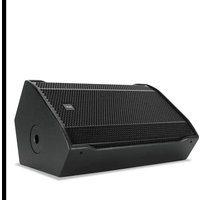
The TT20-CXA is a full range active high output stage monitor, featuring an high performance symmetrical enclosure. The high frequencies section features a 60° x 90° horn-loaded 2,5" compression driver with constant directivity coverage angle. The Direct Drive technology provides exceptional sound pressure levels, making the TT20-CXA the right choice for medium to large-scale applications. The loudspeaker's low frequency section comprises two 8" high-power neodymium woofers in symmetrical configuration.
TT+ HIGH DEFINITION
TOURING AND THEATRE
INNOVATION
INTEGRATION
INTENSITY
TT08-A II
ACTIVE PRECISION MONITOR
TT10-A
ACTIVE PRECISION MONITOR
TT20-CXA
ACTIVE HIGH DEFINITION
MONITOR

1 FEMALE XLR INPUTS (BAL/UNBAL). The system accepts XLR input connectors.
2 MALE XLR SIGNAL OUTPUT. The output XLR connector provides a loop through for speakers daisy chaining. The balanced connector is connected in parallel and can be used to send the audio signal to other amplified speakers, recorders or supplementary amplifiers.
3 SYSTEM VOLUME KNOB
4 SIGNAL / LIMITER LED. The LED light is green when a signal is applied to the speaker. It turns RED when the speaker compressor activates.
5 POWER LED. This green led is ON when the speaker is connected to the main power supply.
6 LINK LED. This LED turns on when the speaker is connected to RDNet.
7 ACTIVE LED. This LED blinks when the speaker is transmitting data over RDNet.
8 RDNET DATA INPUT AND DATA LINK. The RDNET IN/OUT PLUG SECTION features etherCON connectors for the RCF RDNet protocol. This allows the user to completely control the speaker using the RDNet software.
9 FLAT / HIGH PASS. Use the Flat / High Pass button if you want to apply a Flat or a High Pass Equalization.
10 BYPASS / LOCAL SETUP. When pressed, the setup is loaded from the internal memory that only RDNet can write. Every time the speaker is turned on, the last stored configuration is applied. When the button is released, the speaker uses its local setup and will not remember its last RDNet setup when turned on again.

11 AC POWER INPUT. Powercon locking 3-pole AC mains.
12 AC OUTPUT LINK. Powercon locking 3-pole AC mains output.
WARNING: the Powercon connector is used to disconnect the system from the power supply network. It shall be easily accessible after the instillation and during the use of the system.
To reset the speaker to the original settings :
- turn on the speaker (the Power LED will blink slowly)
- while the Power Led is blinking, press and release several times the Bypass / Local Setup button
- the Power LED wil now start blinking faster, this means the system accepted the reset command
The XLR connectors use the following AES standard:
PIN 1 = GROUND (SHIELD)
PIN 2 = HOT (+)
PIN 3 = COLD (-)
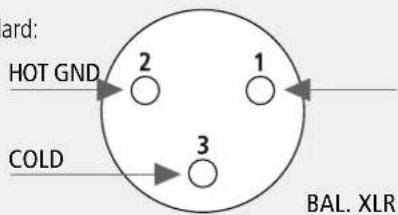
At this point you can connect the power supply cable and the signal cable, but before turning on the speaker make sure that the volume control is at the minimum level (even on the mixer output). It is important that the mixer is already ON before turning on the speaker. This will avoid damage to the speakers and noisy "bumps" due to turning on parts on the audio chain. It is a good practice to always turn on speakers at last and turn them off immediately after the show. Now you can turn ON the speaker and adjust the volume control to a proper level.
WARNING

SPEAKER RESET
CONNECTIONS
WARNING: daisy chaining speakers always make sure that the maximum current requirement does not exceed the maximum admitted POWERCON current. In case of doubt call the closest RCF SERVICE CENTRE.
WARNING: The powercon connector is used to disconnect the system from the power supply network. It shall be easily accessible after the installation and during the use of the system.
The fuse settings/replacement shall be as follow:
FUSE VALUE T 6.30 A H 250 V
VOLTAGE SETUP
(RESERVED TO THE RCF SERVICE CENTRE)



Brand : RCF
Model : TT 20-CXA
Category : Monitor