
Iron 3 - Smartphone Krüger&Matz - Free user manual and instructions
Find the device manual for free Iron 3 Krüger&Matz in PDF.


| Product Type | Smartphone |
| Brand | Krüger&Matz |
| Model | Iron 3 |
| Dimensions | 130 x 56 x 15 mm |
| Weight | 164 g |
| Display | 2.4" QVGA, 320 x 240 pixels |
| Processor | MTK6261 |
| RAM | 32 MB |
| Internal Storage | 32 MB |
| External Storage | Up to 32 GB (microSD) |
| Rear Camera | 0.3 MP |
| Connectivity | Bluetooth 3.0, WAP |
| Battery Capacity | 2500 mAh |
| Charging | 5 V / 1000 mA via USB-C |
| SIM | Dual nanoSIM (SIM2 shared with microSD) |
| Protection | IP68 (water and dust resistant) |
| Audio | Ear speaker, speaker, microphone |
| Additional Features | Torch, FM radio, voice recorder, alarm, calculator, profiles |
| Ports | USB-C, 3.5 mm headphone jack (not specified but likely) |
| Included Accessories | Charger, USB cable, user manual |
| Repair | Only by qualified service points |
| Safety | Do not use while driving or on aircraft; avoid medical devices |
Frequently Asked Questions - Iron 3 Krüger&Matz
User questions about Iron 3 Krüger&Matz
0 question about this device. Answer the ones you know or ask your own.
Ask a new question about this device
Download the instructions for your Smartphone in PDF format for free! Find your manual Iron 3 - Krüger&Matz and take your electronic device back in hand. On this page are published all the documents necessary for the use of your device. Iron 3 by Krüger&Matz.
USER MANUAL Iron 3 Krüger&Matz
natural_image
Abstract wavy line pattern with no text or symbolsBEDIENUNGSANLEITUNG
DE
OWNER'S MANUAL
EN
ΕΓΧΕΙΡΙΔΙΟ ΧΡΗΣΗΣ
GR
INSTRUKCJA OBSŁUGI
PL
MANUAL DE UTILIZARE
RO
- In case of losing or theft of the phone, contact your network carrier about locking the SIM card. Taking action immediately will increase chances of avoiding unauthorized use. To secure the phone from unauthorized use, set the SIM card PIN number and set up the phone password.
- It is forbidden to use the phone while driving, if it requires holding the phone near your ear. If it is necessary to use the phone, use headset or earphones.
- Do not use the phone while on board a plane. During flight it must be shut down.
- Turn off the phone in places where using it is forbidden or may cause danger. Do not expose the phone to high or low temperatures.
- Make sure that all rubber caps are sealed tight.
- Despite the IP68 rating, the phone is not resistant to every water damage in every situation. Do not expose the device to salt water or ionized water.
- After submerging the phone in water, make sure to dry speaker, microphone and leave the phone to dry completely. Do not dry the phone with a hair dryer.
- Water and dust protection rating is not permanent, and can decrease over time, as a result of everyday usage of the device.
- Usage of this device near medical apparatuses may cause interference in their operation. Pay attention while using your phone near medical apparatuses such as pacemakers, hearing aids and some other electronic medical devices.
- Any repair of this device can be carried out in qualified and authorized service point exclusively. Any attempts to repair this device on your own, may hold the risk of permanent device damage and lose of warranty.
- Do not use accessories which are not specifically designed and recommended by the phone manufacturer.
- Producer does not claim responsibility of damages or injuries caused by inappropriate device use and handling.
- The phone may not include all of the features that are listed in this owner's manual due to network settings or network carrier setting. Do not rely solely on this phone in emergency situations. If there are

Krüger&Matz
Owner's manual
any doubts, please consult your network carrier.
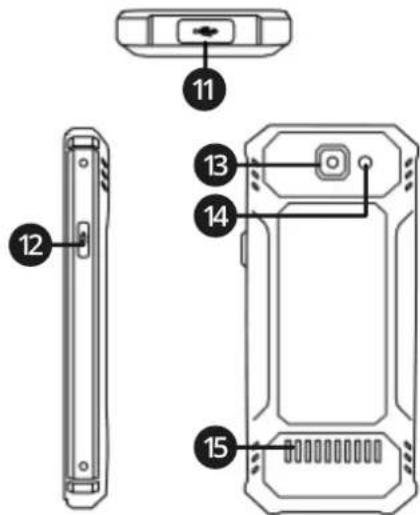
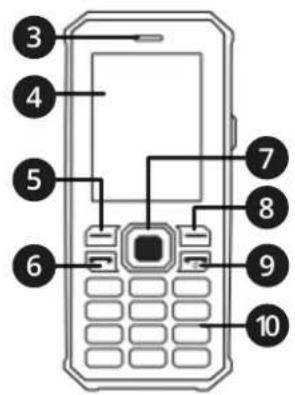
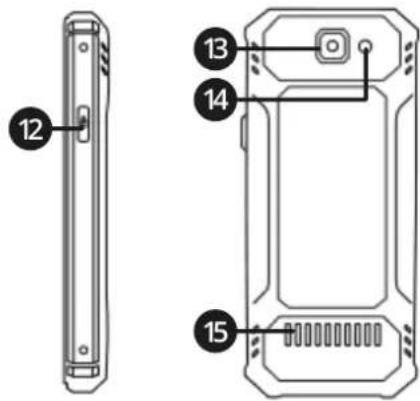
PRODUCT DESCRIPTION
- Torch
- SIM card / memory card slot
- Ear speaker
- Display
- Left function button
- Dial call button
- Directional buttons
- Right function button
- End call button
10.Numeric keypad
11.USB-C socket
12.Torch button - Camera
- Flash LED
15.Speaker



INSTALLING SIM CARDS AND MEMORY CARD
- Open the SIM card / memory card slot cover.
- Slide out the SIM tray.
- Place a SIM card in SIM1 slot.
- Optional: place a SIM card or a memory card in SIM2 slot.
- Slide in the SIM tray in a way that pins of a SIM card are directed to the display.
CHARGING
- Connect the USB-C cable to the power adapter.
- Open the USB-C socket cover.
- Plug the USB-C cable to the socket.
- Disconnect the charger after finished charging.
OPERATION
- To turn on the phone, press and hold the end call button.
- To lock the keypad, press the Menu button, then the * button, or in the main screen, press the end call button.
MAIN SCREEN NOTIFICATION ICONS
| Network signal level | |
| Battery level | |
| Unread text message | |
| Missed call | |
| Bluetooth enabled | |
| Memory card active | |
| Alarm enabled | |
| Keypad locked | |
| Silent profile active | |
| Profil Cichy aktywny | |
| Meeting profile active | |
| Outdoor profile active |
Making phone calls
- To dial a number, while in main screen, use the numeric keypad.
• To call the contact from contact list, go to the Contacts menu, select the contact and press the dial call button.
Sending text message
- Go to the Messages menu, then select the Write message menu and write a message. Then press the Options button and select Send to. Select Enter number or Add from Phonebook option. Press the Options button and select Send.
Shortcuts on the main screen
- Press and hold the # button to switch between profiles General, Silent and Meeting.
- Press and hold the 1 button to dial the voicemail number.
- Press one of the directional buttons to activate a shortcut. Shortcuts can be changed in the Settings menu.
Call log
• History of dialed, received and missed calls can be viewed in the Call history menu.
Multimedia
• To take pictures, select the Camera menu.
- To view taken pictures, select the Gallery menu. Use the directional buttons to switch between pictures. To rotate the picture, press the 1 button.
- To shoot videos, select the Video recorder menu.
- To watch the videos, select the Video player menu.
- To listen to music and recorded voice, select the Audio player menu.
• To record voice, select the Sound recorder menu. To start the recording, go to Options menu and select New record.
EN
Tools
• To set the alarm, go to the Alarms menu.
- Calculator menu allows to make simple calculations.
- The Bluetooth menu allows to connect the phone with external devices, such as another phone or wireless headphones. To connect the phone with external device, enable the Bluetooth, then go to the Paired devices menu and select Search new device. After finding an external device, select it and press the Pair button. If password is required, input 0000.
- SIM toolkit menu allows to enable services provided by network carrier.
Profiles
Profiles menu allows to change sound setting of a profile. To change sound settings, select the profile, press the Options button and select Customize. Attention: Silent profile can't be customized.
TROUBLESHOOTING
| Problem | Possible solution |
| SIM card error | Clean the pins of the SIM card. If this problem keeps occurring, contact your network carrier. |
| Can't make a phone call | Check the network signal. If it is too low, go to a place with stronger signal. If this problem keeps occurring, contact your network carrier. |
| Can't access SIM toolkit menu | SIM card does not support this function |
E Z
Krüger&Matz
Owner's manual
SPECIFICATION
Main parameters
CPU: MTK6261
RAM: 32 MB
Internal memory: 32 MB
External memory: max. 32 GB
Display
Size: 2,4" QVGA
Dimension: 320 x 240 px
Multimedia
Camera: 0,3 Mpx
FM Radio
Microphone
Speaker
Connectivity
Network: WAP
Bluetooth: 3.0
I/O
1 x nanoSIM, 1 x nanoSIM / microSD slot
Type C USB
Power supply
Power supply: 5 V / 1000 mA
Battery capacity: 2500 mAh
Body
IP68 protection
Weight: 164 g
Dimensions: 130 x 56 x 15 mm
Set includes
Charger, USB cable, user manual
Z
Lechpol Electronics Sp. z o.o. Sp.k. hereby declares that Mobile phone KM0468 is consistent with directive 2014/53/UE.
Full text of the EU Declaration of Conformity is available at following Internet address: www.lechpol.eu.


English Correct Disposal of This Product (Waste Electrical & Electronic Equipment)
(Applicable in the European Union and other European countries with separate collection systems) This marking shown on the product or its literature, indicates that it should not be disposed with other household wastes at the end of its working life. To prevent possible harm to the environment or human health from uncontrolled waste disposal, please separate this from other types of wastes and recycle it responsibly to promote the sustainable reuse of material resources. Household users should contact either the retailer where they purchased this product, or their local government office, for details of where and how they can take this item for environmentally safe recycling. Business users should contact their supplier and check the terms and conditions of the purchase contract. This product should not be mixed with other commercial wastes for disposal.
Made in China for LECHPOL ELECTRONICS Sp. z o.o. Sp.k., ul. Garwolińska 1, 08-400 Miętne.

ΟΔΗΓΙΕΣ ΑΣΦΑΛΕΙΑΣ
GR

Lechpol Electronics Sp. z o.o. Sp.k. hereby declares that Mobile phone KM0468 is consistent with directive 2014/53/UE.
Full text of the EU Declaration of Conformity is available at following Internet address: www.lechpol.eu.

INSTALACJA KARTY SIM I KARTY PAMIĘCI
RO
INSTALAREA CARTELEI SIM ŞI A CARDULUI DE MEMORIE
natural_image
Completely black image with no visible content, text, or symbols.
natural_image
Abstract wavy line pattern with no text or symbols
www.krugermatz.com
Krüger&Matz is a registered trademark


- Krüger&Matz
- Owner's manual
- PRODUCT DESCRIPTION
- INSTALLING SIM CARDS AND MEMORY CARD
- CHARGING
- OPERATION
- MAIN SCREEN NOTIFICATION ICONS
- Making phone calls
- Sending text message
- Shortcuts on the main screen
- Call log
- Multimedia
- EN
- Tools
- Profiles
- SPECIFICATION
- Main parameters
- Display
- Connectivity
- I/O
- Power supply
- Body
- Set includes
- English Correct Disposal of This Product (Waste Electrical & Electronic Equipment)
- ΟΔΗΓΙΕΣ ΑΣΦΑΛΕΙΑΣ
- INSTALACJA KARTY SIM I KARTY PAMIĘCI
- INSTALAREA CARTELEI SIM ŞI A CARDULUI DE MEMORIE
Brand : Krüger&Matz
Model : Iron 3
Category : Smartphone