
GZPA 4SQ - Receiver Ground Zero - Free user manual and instructions
Find the device manual for free GZPA 4SQ Ground Zero in PDF.


| Product Type | 4-Channel Car Audio Amplifier (Receiver) |
| Dimensions (W x H x D) | 210 x 150 x 50 mm |
| Weight | 2.5 kg |
| Power Supply | 12V DC (negative ground) |
| Number of Channels | 4 |
| Power Output (RMS per channel) | 100W at 4 ohms |
| Total RMS Power | 400W |
| Frequency Response | 20 Hz - 20 kHz |
| Signal-to-Noise Ratio | 100 dB |
| Crossover | Variable high-pass/low-pass (50-250 Hz) |
| Input Sensitivity | 0.2V - 6V |
| Speaker Impedance | 2 - 8 ohms |
| Remote Turn-On | Yes (12V trigger) |
| Protection Circuits | Thermal, short circuit, overvoltage |
| Cleaning and Maintenance | Wipe with a dry, lint-free cloth; do not use solvents |
| Safety Precautions | Disconnect battery before installation; ensure proper ventilation |
| Spare Parts Availability | Contact Ground Zero support for replacement parts |
| General Information | Designed for car audio systems; manual available for download |
Frequently Asked Questions - GZPA 4SQ Ground Zero
User questions about GZPA 4SQ Ground Zero
0 question about this device. Answer the ones you know or ask your own.
Ask a new question about this device
Download the instructions for your Receiver in PDF format for free! Find your manual GZPA 4SQ - Ground Zero and take your electronic device back in hand. On this page are published all the documents necessary for the use of your device. GZPA 4SQ by Ground Zero.
USER MANUAL GZPA 4SQ Ground Zero
(Improved SQ version)
Erlenweg 25, 85658 Egmating, Germany
Tel. +49 (0)8095/873 830 Fax -8310
www.ground-zero-audio.com

GROUND ZERO®
GERMAN ENGINEERING
PLUTONIUM SERIES
High-End Class A/B Amplifier
GZPA 2SQ
GZPA 4SQ
Owner's Manual & Installation Guide
(AWV2.0)
English
GROUND ZERO PLUTONIUM Series SQ Amplifiers
Introduction
Thank you for choosing a GROUND ZERO product and welcome to your new PLUTONIUM series amplifier!
This is the owner's manual providing instructions on the operation and installation of this high-end car amplifier. Please, read it carefully. If you have any further questions, please contact your local Ground Zero dealer or our regional distribution partner.
The amplifier is one of the most important parts of your car audio system. However, it will only be able to deliver its full performance when each part of the whole system is tuned carefully matching each other. Therefore, we recommend consulting a car audio specialist to compile the desired sound system, as well as for installation and tuning.
We hope you will enjoy the sound quality of an enthusiastic development by the Ground Zero engineering team!
PLUTONIUM Series – The High-End Experience
Products belonging to the GROUND ZERO PLUTONIUM series stand for high-end sound quality or extreme power handling capability.
To achieve one of these targets, exceptional materials and technologies are applied during the development.
The technical, electrical and mechanical skills of the resulting products convince not only during worldwide sound quality competitions but also satisfy the demands of high-end enthusiasts with outstanding audio reproduction ability.
Starting from the market release, the subwoofers have set benchmarks in SPL competitions around the world and have been awarded for best performance by numerous test magazines.
The GZPA SQ amplifiers have been developed by experienced sound quality engineers and tuned by music loving enthusiasts. They are being built with highest care using some of the best quality parts available and run through numerous tests prior to handing over to GROUND ZERO partners and retail shops.
Terms of Warranty
The limited warranty for this product is covered by GROUND ZERO's regional distribution partners and their terms and conditions. For further information contact your local retailer or regional distributor.
Safety instruction / Manufacturer's declaration
Safety Instructions: Do not expose the device to extreme temperatures, fire, high humidity or direct contact with liquids. Do not use the device if it has been damaged or exposed to liquids. Keep the device, packaging and accessories away from children and pets to prevent accidents and suffocation.
Manufacturer's declaration: Herewith Ground Zero GmbH declares that this product complies with the directive 2014/30/EU (EMC) and further declares that this product is in conformity with the rules of the EU directives (including all applicable amendments) 2011/65/EU RoHS2 and 2001/95/EC General Product Safety directive. The full text of the Declaration of Conformity (EU) is available at the following internet address: www.ground-zero-audio.com. Electronic products contain valuable raw materials and must not be disposed of with normal household waste. At the end of its service life, please bring the device to your local recycling facility.
PLUTONIUM SERIES
High-End Class A/B Amplifier
GZPA 2 SQ
GZPA 4 SQ
(Improved SQ version)
Common Features
• High-End SQ amplifier
• Shielded dual power supply
• Discretely constructed MOS-FET amplifier section
• 1-ohm stable stereo / 2-ohms stable in bridged mode
• Smoothly variable BIAS adjustment
• Variable input sensitivity
• Capsulated potentiometers
• Wide range high pass and low pass filter
• Filter range multiplication switch (x10)
- Wide frequency range for high resolution music (10 Hz – 50 kHz)
- Soft-start delay
• Operation and protection indicator
• Start-Stop capability (9 -16 Volt)
• Overheat and short circuit protection
• High-End JFET operation amplifiers
• Ground Zero exclusive Mundorf Mcap® capacitors
• Solid and high-efficient black anodized heatsink
• White illuminated lasered glass logo plate
• Phase control (GZPA 2SQ)
• Pure Direct mode (GZPA 2SQ)
General installation note
- As a precaution, it is recommended to disconnect the vehicles battery before mounting the amplifier.
(Note: For new vehicles, disconnecting the battery might cause various errors in your vehicle's electric system that can be cleared only by authorized service partners of your vehicle's manufacturer! Please ask your service partner first before disconnecting the battery!) - The power supply wire (+12 V) has to be protected within max. 20 cm / 8" by a main fuse holder with a fuse value matching the recommendation for your amplifier
(Note: If there is more than one amplifier connected using this power wire, the main fuse value must be equal to the sum of the recommended fuses of all connected devices. However, make sure the diameter of your power wire will be sufficient for the required current!) - If necessary, replace a defective fuse by a fuse with identical quality and value
- Never drill holes to the vehicle's gas tank or brake lines, to wirings or any other important vehicle parts!
- Never pass wires over sharp edges or vehicle parts due to avoid any kind of damage
- Keep the wiring away from the antenna and electronic devices contributing to radio reception
- Lay the power supply wiring always separated from speaker wiring to avoid disturbance
- The amplifier contains a temperature protection circuit that turns the device off in case of overheating. After a certain cooling time, it will turn on automatically. To avoid heat build-up, sufficient air supply for cooling must be provided. Never cover the surface of the amplifier's heatsink entirely
- The amplifier should NEVER be mounted onto a vibrating part or surface such as a subwoofer enclosure. This might lead to malfunction due to loosened electrical parts inside the amplifier.
- Some amplifiers offer a high-level input option, however if a pre-amplified output (RCA) is available (at the head unit), it is strongly recommended to make use of them.
Controls and functions GZPA 2SQ


| 1 | Power terminal | GROUND Vehicle ground connectionREMOTE Remote connection (turn-on voltage)BATT+ 12 Volt (Battery) |
| 2 | Speaker terminal | Speaker wire connection |
| 3 | Signal input | RCA wire connection |
| 4 | Input sensitivity | Control for correct input sensitivity adjustment |
| 5 | High pass switch | Switch to activate the high pass filter |
| 6 | High pass multiplier | Switch to multiply (x10) the high pass filter frequency range |
| 7 | High pass frequency | Control to adjust the correct high pass filter frequency |
| 8 | Low pass switch | Switch to activate the low pass filter |
| 9 | Low pass multiplier | Switch to multiply (x10) the low pass filter frequency range |
| 10 | Low pass frequency | Control to adjust the correct low pass filter frequency |
| 11 | Bypass function | Switch to deactivate both crossover filters (Direct signal path) |
| 12 | Phase switch | Switch to activate the phase adjustment control |
| 13 | Phase adjustment | Control to adjust the correct phase |
| 14 | BIAS adjustment | Control to adjust the BIAS setting (check the BIAS adjustment info below) |
| 15 | Status indication | POWER (white) indicates the correct operation modePROTECT (red) indicates a defect / activated protection mode |
BIAS adjustment
Adjusting the BIAS setting influences the operation mode and sound of the amplifier. Increasing the BIAS setting clockwise leads to a warm sound experience with wide stereoscopic sound comparable to the performance of a Class A amplifier with increased current consumption und heat generation. Reducing the BIAS setting counterclockwise results in direct and clear music reproduction. Depending on the speaker's characteristics and the mounting positions, the adjustment is up to the listener's taste of music reproduction. The BIAS setting however, does not influence the general output power of the amplifier
LED illumination
Optionally, the LED illumination of the Ground Zero logo can be switched off. For this purpose, the jumper positioned on the back side of the top aluminum cover needs to be removed from the illumination pc board.
Connections GZPA 2SQ – stereo mode
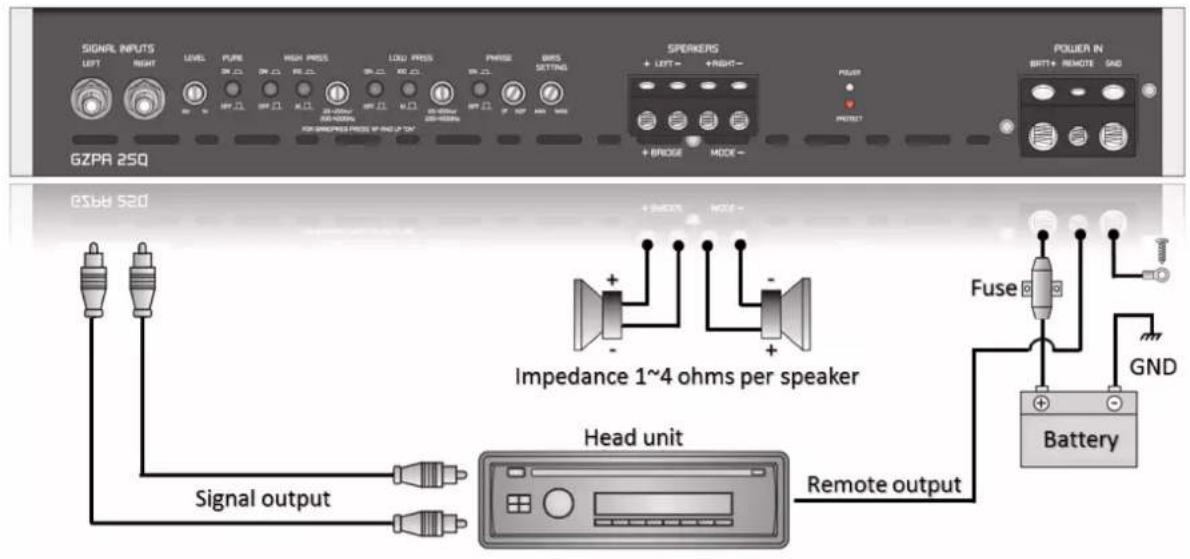
Connections GZPA 2SQ – bridged mode

Controls and functions GZPA 4SQ

| 1 | Power terminal | GROUND Vehicle ground connectionREMOTE Remote connection (turn-on voltage)BATT+ 12 Volt (Battery) |
| 2 | Speaker terminals | Speaker wire connections |
| 3 | Signal input | RCA wire connection |
| 4 | Input sensitivity | Control for correct input sensitivity adjustment |
| 5 | High pass switches | Switches to activate the high pass filter (separately for front and rear) |
| 6 | High pass multipliers | Switches to multiply (x10) the high pass filter frequency range |
| 7 | High pass frequency | Controls to adjust the correct high pass filter frequency |
| 8 | Low pass switch | Switches to activate the low pass filter (separately for front and rear) |
| 9 | Low pass multiplier | Switches to multiply (x10) the low pass filter frequency range |
| 10 | Low pass frequency | Controls to adjust the correct low pass filter frequency |
| 14 | BIAS adjustment | Controls to adjust the BIAS setting (check the BIAS adjustment info below) for each pair of channels separately |
| 15 | Status indication | POWER (white) indicates the correct operation modePROTECT (red) indicates a defect / activated protection mode |
BIAS adjustment
Adjusting the BIAS setting influences the operation mode and sound of the amplifier. Increasing the BIAS setting clockwise leads to a warm sound experience with wide stereoscopic sound comparable to the performance of a Class A amplifier with increased current consumption und heat generation. Reducing the BIAS setting counterclockwise results in direct and clear music reproduction. Depending on the speaker's characteristics and the mounting positions, the adjustment is up to the listener's taste of music reproduction. The BIAS setting however, does not influence the general output power of the amplifier
LED illumination
Optionally, the LED illumination of the Ground Zero logo can be switched off. For this purpose, the jumper positioned on the back side of the top aluminum cover needs to be removed from the illumination pc board.
Connections GZPA 4SQ – stereo mode
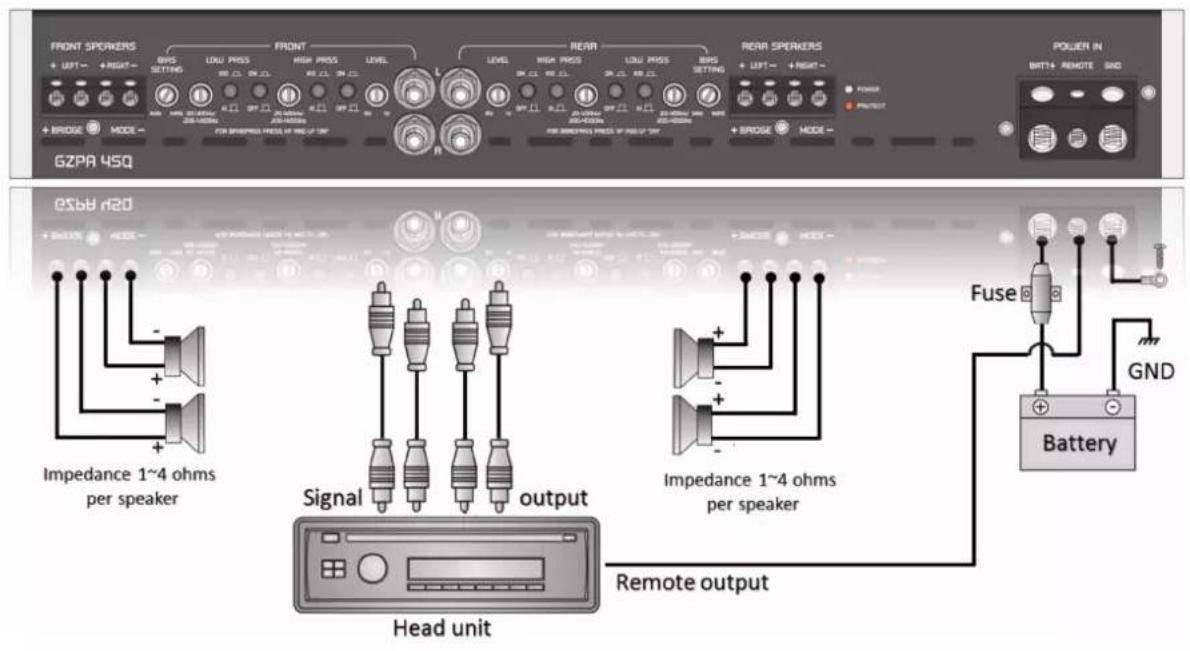
Connections GZPA 4SQ – bridged mode

Trouble shooting
The amplifier includes protection features to prevent any kind of damage caused by misuse or faulty conditions. Sensor-detected short circuit at the speaker terminals or an impedance below the permitted value lights up the protection indicators and turns off the amplifier.
To determine the problem, the volume should be reduced to minimum, the power supply disconnected, and the installation checked carefully for wiring mistakes or defects.
If the amplifier shuts down due to excessive heat, the protection indicators will not light up. In this case the amplifier just needs a certain time to cool down.
Check the following table to solve a problem. It's recommended to check the speakers and speaker wires first, whenever the protection mode has been activated (PROTECT).
| Problem | Check point | Reason / action |
| No audible signal | POWER indication status | Check the fuse(s)Check the power connectionCheck the ground connectionCheck the remote wire connection |
| PROTECT indication status | Speaker short circuit→ Check the speakers and speaker wiresAmplifier overheated→ Wait for cooling downProbably damaged amplifier→ Contact a Ground Zero service partner | |
| Amplifier is not switching to operation mode | Power supply | Check the fuse(s)Check the power connectionCheck the ground connection |
| Remote (turn-on) voltage | Check the remote (out) voltage at the head unit | |
| Amplifier switches off or into protection mode at high levels | Speaker impedanceSpeaker wiring | Check if the impedance at the speaker wire dropped below the permitted value |
| No audible signal at one of the amplifiers channels | RCA cable / speaker wires | Check the terminals and RCA connectors(check the audio signal on each RCA cable) |
Specifications
| Model | GZPA 2SQ | GZPA 4SQ |
| RMS Power @ 4 Ω (14.6 V) | 2 x 175 W (1% THD+N) | 4 x 125 W (1% THD+N) |
| RMS Power @ 2 Ω (14.6 V) | 2 x 315 W (1% THD+N) | 4 x 225 W (1% THD+N) |
| RMS Power @ 1 Ω (14.6 V) | 2 x 500 W (1% THD+N) | 4 x 350 W (1% THD+N) |
| RMS Power @ 4 Ω bridged (14.6 V) | 1 x 630 W (1% THD+N) | 2 x 450 W (1% THD+N) |
| RMS Power @ 2 Ω bridged (14.6 V) | 1 x 1000 W (1% THD+N) | 2 x 700 W (1% THD+N) |
| Damping factor (20 Hz) | >220 | |
| High pass filter (pair of channels) | 20 - 400 Hz / 200 - 4000 Hz (switchable) | |
| Low pass filter (pair of channels) | 20 - 400 Hz / 200 - 4000 Hz (switchable) | |
| Phase control | Yes No | |
| Pure direct mode | Yes No | |
| BIAS control | Yes Yes | |
| Distortion | <0.006% (4 ohms load) | |
| Signal to noise ratio (SNR) | >91 dB | |
| Frequency response | 10 Hz - 50 kHz(±1 dB) | |
| Input sensitivity range | 1 V - 6 V | |
| Fuse(s) | 3 x 40 A (internal/under the bottom plate) | |
| Recommended main fuse | 1x 120 A | |
| Operating voltage range | 9 - 16 Volt | |
| DimensionsW x H x L mm | 222 x 60.5 x 420 | |
| DimensionsW x H x L inch | 8.74" x 2.38" x 16.54" | |
| Weight | 6.0 kg 6.2 kg | |

GROUND ZERO products are engineered in Germany
GROUND ZERO – international sponsor

Ground Zero GmbH
Erlenweg 25, 85658 Egmating, Germany
Tel. +49 (0)8095/873 830 Fax -8310
www.ground-zero-audio.com



- GROUND ZERO®
- GERMAN ENGINEERING
- PLUTONIUM SERIES
- High-End Class A/B Amplifier
- Introduction
- PLUTONIUM Series – The High-End Experience
- Terms of Warranty
- Safety instruction / Manufacturer's declaration
- GZPA 2 SQ
- GZPA 4 SQ
- Common Features
- General installation note
- Controls and functions GZPA 2SQ
- BIAS adjustment
- LED illumination
- Controls and functions GZPA 4SQ
- Connections GZPA 4SQ – stereo mode
- Connections GZPA 4SQ – bridged mode
- Trouble shooting
Brand : Ground Zero
Model : GZPA 4SQ
Category : Receiver