Leapster L-Max - Tablet Leap Frog - Free user manual and instructions
Find the device manual for free Leapster L-Max Leap Frog in PDF.


| Product Type | Educational Handheld Gaming Device |
| Dimensions | Approx. 7 x 4 x 1 inches (17.8 x 10.2 x 2.5 cm) |
| Weight | Approx. 0.5 lbs (227 g) |
| Power Source | 4 AA batteries (not included) or AC adapter (sold separately) |
| Display | 2.8 inch color touch screen |
| Input Methods | Touch screen, stylus, 4 directional pad, and action buttons |
| Main Functions | Educational games, math, reading, writing, problem solving, and creative play |
| Built-in Software | Includes pre-loaded learning apps and game cartridges sold separately |
| Audio | Built-in speaker with volume control |
| Connectivity | Not applicable (standalone device, no Wi-Fi/Bluetooth) |
| Storage | Internal memory for game saves and progress |
| Recommended Age | 4 to 8 years |
| Care and Cleaning | Wipe with a soft, dry cloth. Do not use water or cleaning solvents. |
| Safety | Choking hazard warning for small parts; not for children under 3 years. Use only under adult supervision. |
| Spare Parts and Repairability | No official spare parts available; device is not user-serviceable. Contact LeapFrog support for repair options. |
| General Information | Brand: LeapFrog, Model: Leapster L-Max, Category: Tablet/Gaming Device |
Frequently Asked Questions - Leapster L-Max Leap Frog
User questions about Leapster L-Max Leap Frog
0 question about this device. Answer the ones you know or ask your own.
Ask a new question about this device
Download the instructions for your Tablet in PDF format for free! Find your manual Leapster L-Max - Leap Frog and take your electronic device back in hand. On this page are published all the documents necessary for the use of your device. Leapster L-Max by Leap Frog.
USER MANUAL Leapster L-Max Leap Frog
Leapster™ games for learning on the go!
Leapster Games also work with the Leapster L-Max "Handheld for learning on the go.

Kindergarten Welcome to Carnival Marvel! Step right up to play 6 learning games that teach over 45 essential reading and math skills for kindergarten.


Finding Nemo Enter tropical waters to experience love, laughter, fear and friendship in Disney'Pixar's Finding Nemo. This electronic book teaches pre-K and kindergarten skills including science, phonics, reading and math.


1st Grade Join Leap, Lily and Tad at the Beach Boardwalk, and play 6 learning games that teach over 70 essential reading and math skills for 1st grade.

The Incredibles Meet the Incredibles and engage in an extraordinary battle of wits and superpowers. This educational game teaches 2nd and 3rd grade skills including spelling, grammar, math and problem solving.

Accessories for your Leapster L-Max™ Handheld

Recharging System
The Leapster L-Max Recharging System is the last, kid-friendly way to recharge the Leapster L-Max learning game system! It's easy! Just insert the included rechargeable battery packs, and then dock Leapster L-Max handheld to recharge the batteries. In about 4 hours, you're ready for more action-packed learning fun! An AC adapter is also included, so you can power the Leapster L-Max handheld directly from an AC outlet!
Includes: - Recharging dock - AC adapter - Rechargeable battery pack
Leapster Backpacks
These protective backpacks hold all of your Leapster L-Max gaming gear, including the Leapster L-Max handheld, AC adapter, TV cables and 10 cartridges!


Parent Guide
This guide contains important information. Please keep it for future reference. www.leapfrog.com
Actual package set may vary. All titles may not be available in all markets. Images are representative of gameplay and do not will act actual schematic production.
Welcome to the Leapster L-Max" Handheld! The Leapster L-Max learning game system combines learning skills for preschool through 4th grade with the best of video game play. Children become engaged in the games and want to play them again and again! Best of all, with the Leapster L-Max handheld, children can learn anytime, anywhere—on the go and with the TV.
Attaching Protective LCD Screen Cover
- Snap the cover fastening tabs into the slots on the top edge of the LEAPSTER L-MAX handheld as shown (Figure 1). Make sure the tabs are fully inserted.
- Flip back the screen cover.
- Secure the cover to the back of the LEAPSTER L-MAX handheld as shown (Figure 2).


Alphabet Adventures: Letters on the Loose The letters are loose all over the Letter Factory and Professor Quigley needs help to find them Learn letter names and sounds during your adventure! When you connect to the TV, you can practice your writing skills and see the letters you write star in the animated story.

Dora the Explorer: Wildlife Rescue Hola! Play 5 fun-fi Iled games with Dora and Boots and learn 45 pre-K and kindergarten skills! Connect to the TV and go on an adventure to help Dora rescue lost animals and unlock more than 20 animal facts.



SpongeBob SquarePants: Saves the Day Help SpongeBob save the Krusty Krab and play 5 action-packed learning games that teach 40+ kindergarten and 1st grade skills. Connect to the TV and unlock the Musical Garden where you can compose your own Bikini Bottom musical masterpieces!

Spider-Man: The Case of the Sinister Speller Swing into action with Spider-Man and experience classic intrigue and suspense. This electronic book tells the comic adventure frame by frame, while teaching 1st and 2nd grade reading skills. Connect to the TV and unlock the Green Goblin Super Challenge.



The following table is provided in the image.
Madagascar Join Alex the Lion, Marty the Zebra, Melman the Giraffe and Gloria the Hippo on the island of Madagascar and experience the true meaning of the saying: "It's a jungle out there." Play 5 games that teach 1st and 2nd grade skills, plus unlock bonus game rounds and expand the learning even more with the TV.

Reading Adventures: Rock the World It's the Battle of the Bands and the Algorithms star player is monkey-napped! Play arcade-style spelling games to collect words. Connect to the TV to go on an adventure where you use those words and your critical thinking to save Turbo Monkey and win the game.

Actual package are may vary. All titles may not be available in all markets. Images are representative of gameplay and do not fail out actual screenset production.

GETTING STARTED:
Battery Installation:
- Locate the battery compartment on the back of the handheld.
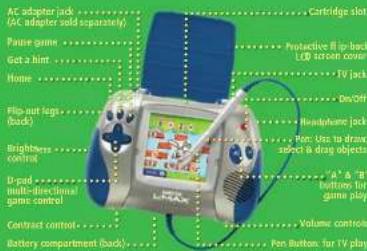
- Loosen the screw on the battery compartment with either a screwdriver or a coin.
- Slide out the battery tray.
- Insert 4 AA (called LR6 in some countries) alkaline batteries.
- Slide the tray back in with the batteries facing down.
- Tighten the screw.


Ready for On-the-Go Learning
I. Press the on/off button to begin.
2. When prompted, select your country (required the first time only).
Game Selection Screen
The LEAPSTER L-MAX™ handheld includes an educational game and a built-in digital art studio. To start, touch an activity icon with the pen, or use the arrow pad to scroll through and highlight games, then press the “A” button.
To turn off the background music, touch the music note tab. Select “music on” or “music off,” and then “OK” to confirm. The setting will return to “music on” each time the unit is turned on.

All images in this Parent Guide are representative only of gameplay and do not reflect actual screenshot pixelation.
GETTING STARTED:
Connecting the LEAPSTER L-MAX™ handheld to a TV:
I. Make sure both the LEAPSTER L-MAX handheld and the TV are turned OFF before attaching the cable.
2. Locate the TV cable included in the package.
3. Plug the single yellow plug into the TV output jack on the LEAPSTER L-MAX handheld.
4. Connect the other end of the cable to the TV.
◆ Connect the yellow plug to the yellow video input jack on the TV.
◆ Connect the white and red plugs to the white and red audio input jacks on the TV.
5. For best performance, plug the LEAPSTER L-MAX directly into the TV input jack.
6. Older TVs without video/audio inputs require an additional adapter.

For TVs with a single audio input:
◆ Connect the yellow plug to the yellow video input jack on the TV.
◆ Connect either the white or red plug to the audio input jack on the TV.
Ready for TV Learning:
I. Turn on the TV and the LEAPSTER L-MAX handheld.
2. If you don't see the L-Max game appear on your TV, make sure to select the correct video input on your TV, by using your TV's menu feature.
3. When prompted, select your country (required the first time only).
4. See page 1 for information about the game selection screen.
⚠ WARNING: It is rare but possible for seizures to be triggered by light flashes or patterns such as those on TV or computers. To reduce exposure to such potential, play/watch TV in a well lit room, sit an appropriate distance from the screen and take 10 to 15 minute breaks every hour.
Any frame left on the television for an extended period may cause images to be burned into the screen. To avoid this occurrence, it is recommended to turn the unit off, instead of using pause, during extended breaks.
Using the Pen Button:
Some LEAPSTER L-MAX games have an arrow that appears on the TV screen when the pen is moved on the LEAPSTER L-MAX handheld screen. This is similar to a cursor on a computer screen that moves when the computer mouse is moved. To select an object, move the arrow on top if it, and press the button on the pen. Note: The pen button is not used when the LEAPSTER L-MAX handheld is not connected to the TV.
Table of Contents
Getting Started with the LEAPSTER L-MAX™ handheld....I
The LEAPSTER L-MAX Advantage 4
Included Activities
Rabbit River Math Game 6
Rabbit River Reading Game 7
The Color/Colour Corral Art Studio....8
Touch Screen Calibration 9
Country Selection 9
Safety, Troubleshooting and Warranty Information .... 10

THE LEAPSTER L-MAX™ HANDHELD ADVANTAGE
Introduction
The LEAPSTER L-MAX learning game system combines preschool through 4th grade learning with the best of video game play. Children become so engaged in the games that they want to play them again and again—and the more they play, the more they learn!
Best of all, with the LEAPSTER L-MAX handheld, children can learn anytime, anywhere—on the go or with the TV. The LEAPSTER L-MAX handheld literally puts the power of learning in the palm of your child's hand.
A Multisensory Approach to Learning
The LEAPSTER L-MAX learning game system pioneers a new way for children to learn—through an animated, multisensory learning environment.
◆ Animated sequences visually model the skills and concepts being taught. Correct answers are greeted by rewards, while incorrect answers are supported by animations that guide players toward the right answer. When needed, game play will slow down and allow more time for a child to comprehend the skill or concept being introduced.
◆ The audio component provides additional support as players listen to the sounds associated with on-screen visuals. Spoken directions help guide the game play and numerous audio hints help players better understand each concept or skill.
◆ Manipulating the game input controls, the pen (used to select and drag items) and the directional arrow buttons (used to move characters around the screen) facilitate game play and help develop fine motor skills.
Learning at All Levels
The Rabbit River Math and Reading Games advance through four levels of difficulty, adjusting the challenge from preschool through 4th grade. Each level increases the complexity of both the skills being taught and the dexterity needed to play the games. Players can select or change the level of difficulty at the start of each game or after each round.
Secret Codes and www.leapsterworld.com
The Web site www.leapsterworld.com is the place to go to learn fun game tips or to unlock special surprises with secret codes earned while playing the games. Secret codes are built into many LEAPSTER L-MAX™ games that appear as a player uses the LEAPSTER L-MAX. These codes earn players a special downloadable surprise when they log on to www.leapsterworld.com.
To view a code in the included game, players simply touch the 🔒 located on the game selection screen at any time. The child can then log on to www.leapsterworld.com and get started.
How Tutorials Work
The goal of a tutorial is to provide a strategy for breaking down complex skills into smaller parts.
A tutorial is activated when the player either presses the Hint button or selects a number of incorrect answers. For example, at the third level of the Rabbit River game, if a player has answered the math equation incorrectly several times in a row, Edison will visually show the equation, then prompt the child to count both groups of carrots to determine the total. Edison prompts the player to try again. If the player succeeds, then game play continues. If not, then another tutorial is provided.

RABBIT RIVER-MATH
HOW TO PLAY
The hungry rabbits want to cross the river to eat Leap's harvest of vegetables. Players use arrow buttons to help the rabbits hop onto logs with shapes, numbers and mathematical equations! The object of the game is to get all the rabbits across the river by responding to the questions. Scoring: Players collect bonus carrots.

Numeration: Recognizing numerals, making the connection between numerals and values, comparing and ordering numbers, counting, recognizing basic math operators and functions, and solving math equations.
Level I: Players identify numbers and distinguish numerals from letters and shapes; count in sequence from 1 to 10.
Level 2: Players count in sequence from 1 to 99; skip count by 2s, 5s, and 10s; and count backward from 10.
Level 3: Players identify addition and subtraction symbols and use them to create and solve addition and subtraction problems.
Level 4: Players identify the symbol for multiplication and use it to create and solve multiplication problems.
WHY IS THAT IMPORTANT?
It may take some time for children to understand that numbers are symbols for amounts. Once they do, they can begin to compare and order numbers. Sequential counting further reinforces the progression of numbers from fewer to many, while skip counting helps children recognize number patterns, a prerequisite to all future work in mathematics.
Try This at Home:
◆ Look for numbers everywhere you go: on buildings and street signs, or at the grocery store. Ask your child to identify the numbers in his or her age, address and telephone number.
Use snacks, such as nuts or raisins, to practice counting, adding and subtracting from 1 to 10, and skip counting by 2s, 5s, or 10s to 50.

RABBIT RIVER-READING
HOW TO PLAY
The hungry rabbits want to cross the river to eat Leap's harvest of vegetables. Players use arrow buttons to help the rabbits hop onto logs with letters. The object of the game is to get all the rabbits across the river by responding to the questions. Scoring: Players collect bonus carrots.

Letters, Sounds, Spelling: Learning the letters of the alphabet and what sounds they represent, as well as spelling 3- to 5-letter words.
Level I: Players must identify letters by name and match letters with sounds.
Level 2: Players must build 3- and 4-letter words with the silent e rule. Visual clues are provided.
Level 3: Players must spell 3- and 4-letter words with the silent e rule. Visual clues are not provided.
Level 4: Players must spell 4- and 5-letter words with consonant blend and complex vowel rules. Visual clues are not provided.
WHY IS THAT IMPORTANT?
Once children associate printed letters to sounds, they can begin to sound out words for reading and spelling. Reading blends letters and sounds together. Spelling breaks these sounds down to letters. Phonetic spelling begins with regular patterns, such as c-a-p, in which each letter stands for its own sound. Rules are then applied. For example, silent e signals that a preceding vowel has its long-vowel sound. A child learns how cap becomes cape, pin becomes pine, and so on.
Try This at Home:
◆ Build word families by changing the first letter or sound in words with magnetic letters or letter cards, for example, Ben, den, hen, men, pen and ten.
Write the consonant blends bl, cl, fl, pl; br, cr, dr, gr, pr, tr; sm, sp, sn, sw, and st on individual paper plates. Spread them across the floor and play a game of “Penny Toss.” Take turns with your child, tossing a penny into one of the plates. Once the penny lands in a plate, the player who tossed it must think of a word that begins with that blend, or say it, spell it, and use it in a sentence.

THE COLOR/COLOUR CORRAL ART STUDIO
HOW TO PLAY
Players create their own pictures—paint, draw, add animated stamps and even weather effects.

Touch to select a background, including a blank canvas.

Touch to add weather options—day and night, snow and rain.

Add stamps to a child's pictures. Many animate!

Touch to use a paintbrush, a paint bucket, a crayon, a magic wand or an eraser.

Touch to select a color/colour or pattern.

Touch to undo the last action.

Creativity: Children use their imaginations and explore new ways of seeing things. They can create a farm scene with a polka-dot barn and plaid grass. With so many options (and none of them wrong!) your child is free to explore.
Science and Nature: Players can put animals in their natural habitats: on the farm and on the pond. By adding weather and time of day to scenes, players can also consider the effects of atmosphere on the environment.
WHY IS THAT IMPORTANT?
Imagination and creativity are important qualities that can be encouraged and enhanced during early childhood. By allowing your child to put “a round peg in a square hole,” he or she is given “permission” to investigate all sorts of possibilities and develop creative problem-solving strategies.
Try This at Home:
Make a mural of another habitat: the ocean, the rainforest, the North or South Pole. Explore the real-life plants and animals that live there, as well as the climate in that place.

Your LEAPSTER L-MAX ™ handheld touch screen has already been calibrated for use, but if you should see either example below, you may adjust this calibration yourself.
- Lines drawn with the pen appear to be offset from the location of the pen tip.
- Objects you are trying to select are not being chosen.
Should this happen, follow these steps to calibrate the touch screen on your LEAPSTER L-MAX handheld:
I) Ensure that a cartridge is NOT inserted.
2) Press the power button to turn on your system.
3) When the "game selection screen" appears, press these buttons all at the same time:
- the "B" button
- the "Hint" button
- the "Home" button
4) You'll see a message that says "Press the "A" button to begin."
5) Follow the on-screen instructions.
COUNTRY SELECTION
Selecting your country of residence adjusts the phonetic pronunciation of some letters to better match the country's language.
If you need to change your country selection, follow these steps:
I) Ensure that a cartridge is not inserted.
2) Press the power button to turn on your system.
3) When the "game selection screen" appears, press these buttons all at the same time:
- the "Home" button
- the "D-pad right arrow" button
- the "B" button
4) Follow the on-screen instructions.
Care and Maintenance:
- Keep unit away from foods and beverages.
- Clean with a slightly damp cloth (cold water).
- Do not use soap or detergent.
- Never submerge the unit in water.
- Remove batteries during prolonged storage.
- Avoid prolonged exposure to extreme temperatures and direct sunlight.
Battery Information:
Requires 4 AA (called LR6 in some countries) alkaline batteries, not included.
Battery Safety:
Batteries are small objects. Replacement of batteries must be done by adults.
Follow the polarity (+/-) diagram in the battery compartment.
Promptly remove dead batteries from the unit.
Dispose of used batteries properly.
Remove batteries for prolonged storage.
Only recommended batteries of the same type are to be used.
DO NOT incinerate used batteries.
DO NOT dispose of batteries in fire, as batteries may explode or leak.
DO NOT mix old and new batteries or types of batteries (i.e. alkaline/standard).
DO NOT recharge non-rechargeable batteries.
DO NOT short-circuit the supply terminals.
I. Use only a 9V D.C. 700mA AC adapter.
2. Note: The transformer is not a toy. Disconnect the toy from the transformer before cleaning, or performing any kind of maintenance procedures.
| TROUBLESHOOTING | |
| Symptom: | Try this: |
| Toy does not turn on or does not respond | Make sure batteries are correctly installedMake sure battery cover is securely attachedRemove batteries and put them back inClean battery contacts with pencil eraserInstall new batteries |
| Toy makes strange sounds or behaves erratically | Clean battery contacts with pencil eraserInstall new batteries |
| Toy makes improper responses | Clean battery contacts with pencil eraserInstall new batteries |
| Display stops working | Adjust brightness/contrast controlsInstall new batteries |
| No image on TV, colors are distorted on TV, or TV image is flickering | Make sure the yellow video connector is fully inserted in the correct input jack on the TVMake sure you have selected the correct video input on your TV to display the L-MAX image |
| Images on the TV appear stretched or cut off at the top and bottom | Make sure the TV is set to display at the standard 4:3 aspect ratio; Leapster L-Max games are not designed to be displayed in wide screen mode |
| Colors do not appear accurate | Adjust the color settings on the TV |
| If Pen button is not functioning | Call consumer support at (800)701-LEAP (5327) for instructions on how to detach the stylus from the L-MAX unit |
U.S. Consumer Service Contact:
Please visit our U.S. Consumer Support Web site at: http://www.leapfrog.com/support, or our Canada Consumer Support Web site at: http://lfcanada.custhelp.com, 24 hours a day. You can search for frequently asked questions, review previous questions, or submit a question to our support staff via e-mail.
U.S./Canada Office:
Telephone: (800) 701-LEAP (5327)
Hours: Monday through Saturday, 5:00 AM to 7:00 PM, Pacific time.
U.K. Consumer Service Contact:
Please visit our U.K. Consumer Support Web site at http://leapfroguk.custhelp.com, 24 hours a day. You can search for frequently asked questions, or submit a question to our support staff via e-mail.
U.K. Office:
Tel: 0800 169 5435
Eire: 00 44 1702 200244
Hours: Monday through Friday, 9:00 AM to 5:00 PM.
IMPORTANT: If you have a problem with this product, return it to the retailer where the product was purchased for exchange. If the retailer is unable to assist you for any reason, contact LeapFrog Consumer Services. If our service representative is unable to help you resolve the problem, you will be given instructions on how to replace the product and an authorization number. Returns must have a return authorization number (RMA) to be accepted at our warehouse. If you need replacement parts for this product, please contact LeapFrog Consumer Services.
WARNING: Changes or modifications to this unit not expressly approved by the party responsible for compliance could void the user's authority to operate the equipment.
This device complies with Part 15 of the FCC rules. Operation is subject to the following two conditions:
I) This device may not cause harmful interference, and
2) This device must accept any interference received, including interference that may cause undesired operation.
This equipment has been tested and found to comply with the limits for a Class B digital device pursuant to Part 15 of the FCC rules. These limits are designed to provide reasonable protection against harmful interference to radio communications. Because this toy generates, uses, and can radiate radio frequency energy, there can be no guarantee that interference will not occur. If this toy does cause interference to radio or television reception (you can check this by turning the toy off and on while listening for the interference), one or more of the following measures may be useful:
• Reorient or relocate the receiving antenna
- Increase the separation between the toy and the radio or the TV
- Consult the dealer or an experienced TV-radio technician for help
Warranty Information
This LeapFrog product is warranted only to the original purchaser for a period of 3 months from the original purchase date, under normal use and service, against defective workmanship and material. This warranty is void if the product has been damaged by accident or unreasonable use, immersion in water, neglect, abuse, battery leakage or improper installation, improper service, or other causes not arising out of defects in workmanship or materials. Repair or replacement as provided under this warranty is the exclusive remedy of the purchaser. LeapFrog shall not be liable for any incidental or consequential damages for breach of any express warranty on this product.
Any implied warranty of merchantability or fitness for a particular purpose on this product is limited to the duration of this warranty. Some states do not allow the exclusion or limitation of incidental or consequential damages, or limitation on how long an implied warranty lasts, so the above limitations or exclusions may not apply to you. This warranty gives you specific legal rights and you may also have other rights, which vary from state to state.
During the warranty period, your product will either be repaired or replaced at LeapFrog's option, when returned, shipping prepaid and with proof of purchase date as instructed by a LeapFrog service representative. In the event that your product is replaced, the replacement will be covered under the original warranty or for 30 days, whichever is longer.
Canada: In addition to the above-referenced warranty, the hardware component shall be free from defects in material and workmanship for 12 months. The above express warranty and any applicable implied warranties are limited in duration to the warranty periods described above. Some provinces do not allow limitations on how long an implied warranty lasts, or the exclusion of incidental or consequential damages, so the above limitations do not apply to you. You may also have other rights, which vary from province to province.
U.K.: In addition to the above-referenced warranty, this LeapFrog product shall be free from defects in material and workmanship for 12 months where the 3-month warranty period is not valid. The above express warranty and any applicable implied warranties are limited in duration to the warranty periods described above. Some provinces do not allow limitations on how long an implied warranty lasts, or the exclusion of incidental or consequential damages, so the above limitations do not apply to you. You may also have other rights under U.K. law, which this warranty does not limit.
LEAPFROG, the LeapFrog Logo, LEAPSTER, Leapster L-MAX, TALKING WORDS FACTORY and LETTER FACTORY are registered trademarks or trademarks of LeapFrog Enterprises, Inc. Copyright © 2004 LeapFrog Enterprises, Inc. All rights reserved.
U.S. Patents Pending
Visit our fun-filled Web site at: www.leapfrog.com
For ages 4-10 years.
- LEAPSTER™ GAMES FOR LEARNING ON THE GO
- RECHARGING SYSTEM
- LEAPSTER BACKPACKS
- GETTING STARTED
- BATTERY INSTALLATION
- READY FOR ON-THE-GO LEARNING
- GAME SELECTION SCREEN
- CONNECTING THE LEAPSTER L-MAX™ HANDHELD TO A TV
- FOR TVS WITH A SINGLE AUDIO INPUT
- READY FOR TV LEARNING
- USING THE PEN BUTTON
- TABLE OF CONTENTS
- THE LEAPSTER L-MAX™ HANDHELD ADVANTAGE
- INTRODUCTION
- A MULTISENSORY APPROACH TO LEARNING
- LEARNING AT ALL LEVELS
- SECRET CODES AND WWW.LEAPSTERWORLD.COM
- HOW TUTORIALS WORK
- RABBIT RIVER-MATH
- HOW TO PLAY
- WHY IS THAT IMPORTANT
- TRY THIS AT HOME
- RABBIT RIVER-READING
- THE COLOR/COLOUR CORRAL ART STUDIO
- COUNTRY SELECTION
- CARE AND MAINTENANCE
- BATTERY INFORMATION
- BATTERY SAFETY
- U.S. CONSUMER SERVICE CONTACT
- U.S./CANADA OFFICE
- U.K. CONSUMER SERVICE CONTACT
- U.K. OFFICE
- WARRANTY INFORMATION
Brand : Leap Frog
Model : Leapster L-Max
Category : Tablet