
RF-96 - Radio ELBE - Free user manual and instructions
Find the device manual for free RF-96 ELBE in PDF.


| Product Type | Mini Portable FM Radio |
| Brand | ELBE |
| Model | RF-96 |
| Dimensions | 80 x 28 x 20 mm |
| Power Supply | 2 x AAA 1.5V batteries |
| Frequency Range | FM 87.5 - 108 MHz |
| Reception Sensitivity | 5 dB |
| Maximum Power Output | 2.4 mW |
| Maximum Current | 26 mA |
| Stereo Separation | ≥ 32 dB |
| Distortion | ≤ 1% |
| Headphone Jack | 3.5 mm stereo |
| Headphone Impedance | 32 Ω |
| Preset Stations | 20 (max) |
| Volume Levels | 16 (00 to 15) |
| Display | 1.1 inch LCD (frequency, volume, memory) |
| Auto Scan & Store | Yes |
| Manual Tuning | Yes (0.1 MHz steps or auto search) |
| Last Station Memory | Yes |
| Warranty | 3 years |
| Box Contents | Radio, transport bag, manual, hanging strap, in-ear stereo headset |
Frequently Asked Questions - RF-96 ELBE
User questions about RF-96 ELBE
0 question about this device. Answer the ones you know or ask your own.
Ask a new question about this device
Download the instructions for your Radio in PDF format for free! Find your manual RF-96 - ELBE and take your electronic device back in hand. On this page are published all the documents necessary for the use of your device. RF-96 by ELBE.
USER MANUAL RF-96 ELBE
Thank you for purchasing the ELBE Mini Portable FM Radio. This is a small retro style FM tuner radio that can be easily carried around. This product has a digital DSP processor chip and can receive FM signals stably without interference. The 1.1-inch LCD screen and easy adjustment buttons enhance a great user experience. Please read this manual before using it for the first time and save it for future reference.
Content in the box:
Radio model RF-96, transport bag, instruction manual, hanging strap, in-ear stereo headset.
Specifications:
The RF-96 ELBE radio has the following functions:
- Two modes of station storage, including automatic scanning and storage and search (manual or automatic) with subsequent manual storage.
• Space to memorize 20 stations. - Last tuned station memory. When you turn on the radio, it will play the last station tuned to before it turned off.
- LCD screen: It can display the frequency, volume and memory number of the stations.
Characteristics:
| Technical characteristics | |
| Frequency Range | Reception Sensitivity |
| FM: 87.5-108MHz | 5dB |
| Dimensions: 80x28x20mm | |
| Batteries: 2xAAA 1.5V | |
| Minimum operating voltage: 2.2V | |
| Maximum power output: 2.4MW | |
| Maximum current: 26MA | |
| stereo: ≥32DB | |
| Degree of distortion: ≤1% | |
| Headphones included: Φ3.5MM/32ΩX2 | |
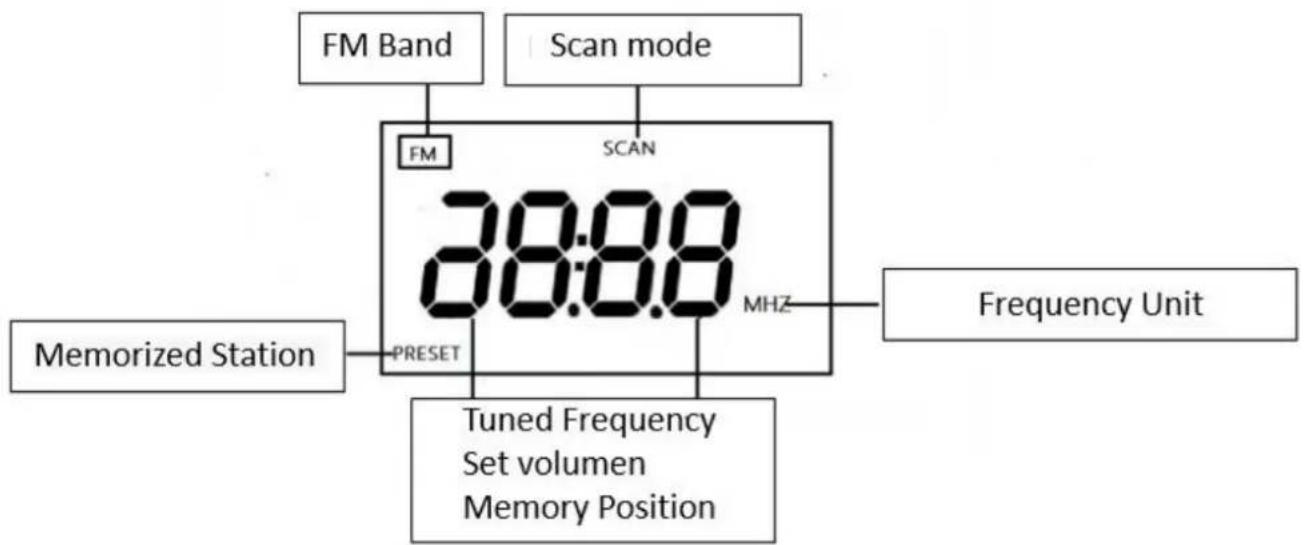
flowchart
graph TD
    A["FM Band"] --> B["FM"]
    C["Scan mode"] --> D["SCAN"]
    E["Memorized Station"] --> F["PRESET"]
    G["Tuned Frequency Set volumen Memory Position"] --> H["MHZ"]
    I["Frequency Unit"] --> J["08:08"]
Exterior view and function keys:
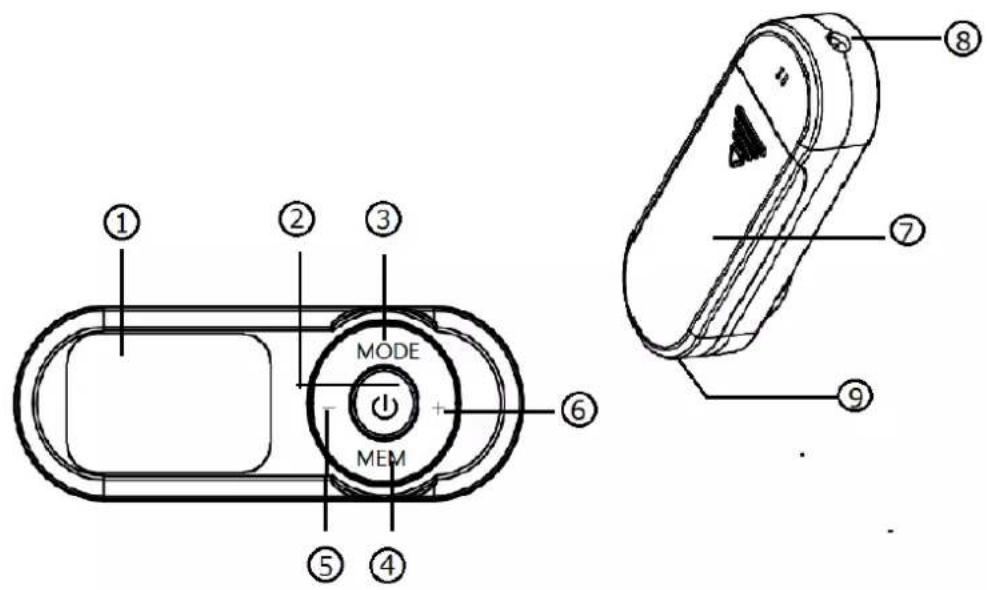
① LCD Screen.
② On/ Off Button.
③ MODE: Auto scan with station store / Manual station selection and manual store.
④ MEM: Store and manually access stations.
⑤ —: volume-, Select station -, Memory access -
⑥ + : volume+, Select stati +, Memory access +
⑦ Battery cover.
⑧ :3.5mm headphone jack.
⑨ Strap hole.
Operation:
- Press the indicator on the battery cover and slide it to the right to install the two 1.5V AAA type batteries. on the radio correctly. Then close the lid again. Before turning on the radio, plug the earphones (included) into the 3.5mm jack at the end of the radio indicated with the “” symbol (the earphone acts as a receiving antenna for the radio radio).
- On/Off button: Press the “” button, the radio will turn on. The LCD will show “On”. When the radio is on, pressing the button again will turn off the radio.
- MODE: Automatic station search and store / manual station selection / switch between search mode and play mode.
Operations for automatic search and storage:
Press the MODE button for more than one second, the radio will start auto scan with automatic station storage. During this process, the symbol "FM" will be displayed on the upper left corner of the LCD screen and the word "PRESET" (store) will be displayed on the bottom of the screen. The SCAN symbol will flash and the frequency will be automatically scanned from the lowest 87.5 Mhz to the highest 108 Mhz. During this process, if you press any other button, it will interrupt the scan. Up to a maximum of 20 stations can be stored.
After finishing the auto scan and memorize process, the radio will display and play the first memorized station with signal.
Switching between manual interval or tone tuning mode:
After connecting the radio, short press the MODE button once to enter manual tuning mode. In this mode the "FM" symbol will flash on the screen.
When the “FM” symbol is flashing, the + and - buttons will increase or decrease the frequency. If the + and - buttons are pressed with a short press, the radio will go up or down in frequency in 0.1 Mhz intervals. On the contrary, if the + and - buttons are pressed for one second, the radio will search up or down the dial for the next station with a receivable signal, after which it will stop searching and start playing the recently found station by displaying the frequency on the LCD screen.
4. Play mode
After finishing the manual tuning mode, short press the MODE button, the "FM" symbol will stop flashing on the LCD display and show steady. From then on, if you press the + or - buttons you will be able to increase or decrease the volume of the radio.
This RF-96 model has 16 volume levels: from 00 to 15. The user can choose the level of his preference.
By short pressing the + or - button, you can increase or decrease the volume by 1 by 1. By pressing the + and - button for more than one second, you can quickly adjust the volume.
+ and - buttons: Raise or lower the selected frequency, volume or selected preset station.
In tuning mode: increase or decrease the selected frequency.
In playback mode: increase or decrease the selected volume.
In station memory mode: up or down the selected station memory.
- MEM: Manually store a station / access a station.
Manually store stations: Press the MEM button for one second, the LCD will display P01...P20 (indicates the memory position), and the "PRESET" indicator will start flashing. press the buttons + and – to select the memory location where the station is going to be stored. After selecting that position, press the MEM button again to
confirm the operation and leave the station stored in that memory position.
Manual access to stations: After the stations are stored in memory, short press the MEM button and the LCD will display PRESET P01...P20. Press the + and - buttons to select the memory position you want and the radio will start playing the station recorded in that memory position.
Security recommendations
- When you are listening to the radio, if the volume becomes unstable and the LCD shows the low battery symbol (below the word Mhz) or starts to see very weak image, it means it is time to replace the batteries.
- Do not mix used batteries with new ones.
- When you are not going to use the radio for a long time, please remove the battery to avoid leaking the connectors and damaging your radio.
- If any of the batteries have leaked, use a soft cloth to clean the electrolyte from the connectors and remove the damaged battery from your radio, replacing it with a good battery.
Warranty conditions:
- This radio is guaranteed for 3 years from the date of the invoice equipment purchase.
- Those devices whose failure has been caused by a fault will be exempt from guarantee misuse of it.
- Also those equipments that have been manipulated by the user or by an after-sales service outside the list of official Technical Services of ELBE.
- The validity of the guarantee will be linked to the purchase invoice or ticket.
Device Manufactured in R.P.C Imported by River International S.A.
Contact details After Sales Service ELBE Spain:
Contact email: sat@riverint.com
Web: www.elbeproducts.es
This radio has been designed and manufactured with high quality, recyclable and reusable materials. The symbol drawn below indicates that, at the end of its useful life, electrical and electronic equipment must be disposed of separately and must not be mixed with household waste. Dispose of this radio at a recycling / waste collection point. In the European Union there are specific collection systems for used electrical and electronic waste.


Brand : ELBE
Model : RF-96
Category : Radio