
CoffeeMaster ES300 - Coffee maker TESLA - Free user manual and instructions
Find the device manual for free CoffeeMaster ES300 TESLA in PDF.


| Product Type | Coffee Maker (drip) |
| Brand | TESLA |
| Model | CoffeeMaster ES300 |
| Capacity | Up to 12 cups |
| Water Tank Capacity | Approx. 1.2 L (12 cups) |
| Filter Type | Permanent filter (also compatible with paper filters 1x4) |
| Carafe Material | Glass with handle and pouring spout |
| Heating Plate | Yes, keeps coffee warm |
| Control Panel | Digital buttons: HOUR, MIN, PROG, ON/OFF |
| Timer Function | Programmable delayed start |
| Auto Shut-off | Yes, after 40 minutes |
| Anti-drip System | Yes, anti-drip valve prevents spills |
| Safety Features | Thermal safety fuse, hot surface warning |
| Cleaning Instructions | Wash removable parts with warm water; wipe exterior with damp cloth |
| Descaling | Regularly remove calcium deposits for optimal performance |
| Intended Use | Domestic only |
| Warranty | Contact dealer; void for improper use |
| Certification | CE compliant |
Frequently Asked Questions - CoffeeMaster ES300 TESLA
User questions about CoffeeMaster ES300 TESLA
0 question about this device. Answer the ones you know or ask your own.
Ask a new question about this device
Download the instructions for your Coffee maker in PDF format for free! Find your manual CoffeeMaster ES300 - TESLA and take your electronic device back in hand. On this page are published all the documents necessary for the use of your device. CoffeeMaster ES300 by TESLA.
USER MANUAL CoffeeMaster ES300 TESLA
ON/OFF Zapnuto/Vypnuto
PRVNÍ POUŽITÍ
Thank you for choosing the TESLA CofeeMaster ES300 coffee machine.
Please read the safe use rules carefully before use and follow all normal safety rules.
IMPORTANT SAFETY NOTICE
THIS PRODUCT IS FOR DOMESTIC USE ONLY.
This device is a complex electromechanical device, please pay attention to the following instructions:
- Use only clean, cold drinking water for cooking. Do not use heated water or other liquids or insert any objects into it.
• Do not cover the top lid or place anything on it while the coffee maker is in operation
- Do not use the coffee maker if the Glass kettle shows signs of cracks, has a loose or weakened handle.
• Use the glass pot only with this coffee maker, be careful as it is very fragile.
- Never cover the heating plate of the hot plate and do not place flammable objects on it, it is intended only for heating coffee in a glass pot.
• Do not leave the Glass kettle empty on the heating plate when the coffee machine is switched on.
• Do not use the coffee machine without a permanent filter or paper coffee filter.
• Do not use the coffee maker outdoors or in excessively hot, dusty or humid environments.
- Do not leave the coffee machine unattended.
- Connect the coffee maker only to a grounded outlet. Always make sure the plug is properly inserted into the socket.
- The coffee maker is equipped with a thermal safety fuse, which interrupts the power supply in the event of boiling water or starting an empty coffee maker. If this happens, unplug the coffee maker and let it cool down.
- Use only original TESLA accessories intended for this model.
- If the coffee machine is used incorrectly or for professional or semi-professional purposes, or if it is not used according to the instructions in the User Manual, the warranty becomes void.
- The manufacturer and importer to the European Union is not responsible for damages caused by the operation of the coffee machine, such as injuries, burns, scalds, broken glass teapots, fires, deterioration of other items, etc.

CAUTION HOT SURFACE
• Do not cover the top lid, steam is generated during operation of the appliance.
• Do not place the coffee maker near surfaces that could be damaged by steam.
- Do not touch the heated surface, otherwise burns may occur.
- Use the handle to remove and carry the heated Glass kettle.
- Place the heated Glass kettle only on heat-resistant surfaces.
• Do not place the hot Glass kettle on a cold or wet surface to avoid damage.
DESCRIPTION
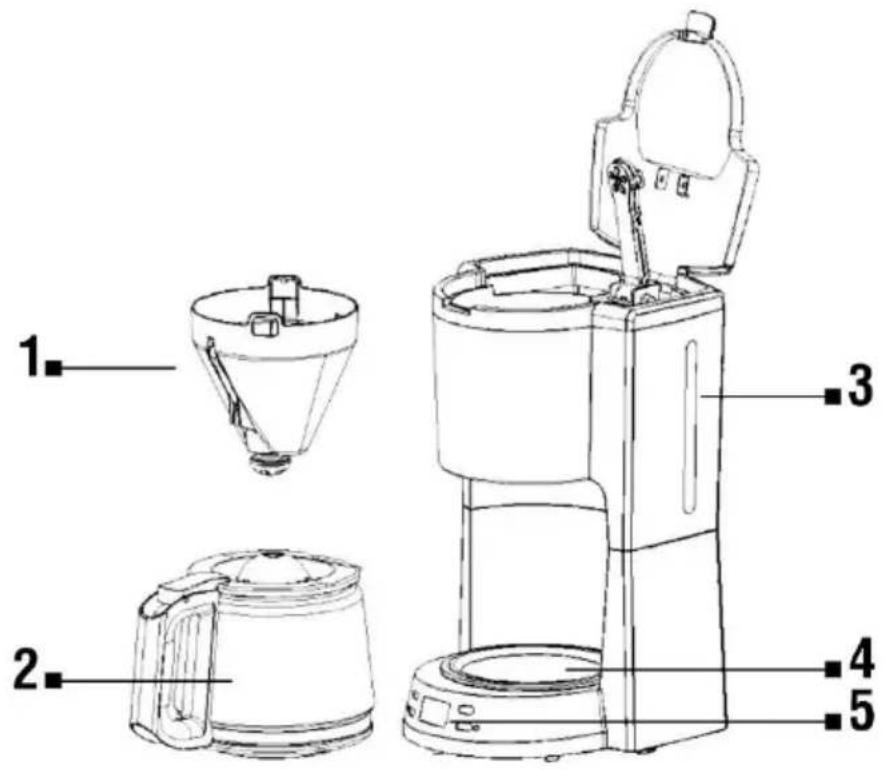
1 Brewing basket with permanent filter
2 Glass teapot
3 Water tank
4 Heating plate
5 Display
CONTROL PANEL
HOUR Hour
PROG Timer
MIN Minute
ON/OFF On/Off
FIRST USE
We recommend using the coffee machine several times without coffee powder. Pour one liter of water into the Water tank and press the "ON/OFF" button. Then pour the water out of the glass kettle. Thoroughly wash all removable parts such as the brewing basket with the permanent filter in warm water.
USE OF THE COFFEE MACHINE
- Place the coffee machine on a stable and level surface and connect it to a grounded outlet.
- Open the Water tank cover and pour an appropriate amount of water into the coffee maker (not less than 2 and not more than 12 cups, according to the water level indicator) and close the cover.
• Use a permanent filter or insert a paper filter (1 x 4) into the filter holder.
• Pour an appropriate amount of ground coffee into the filter, usually 1 scoop per 1 cup. - Turn on the coffee machine by pressing the "ON/OFF" button on the control panel, the indicator will light up and the coffee will start brewing.
- When the coffee is ready, the coffee maker automatically switches off. If you want to stop the coffee brewing process earlier, press the "ON/OFF" button.
- Unplug the power cord from the outlet.
TIMER
If you want to delay the start of coffee preparation, set the current time using the "HOUR" and "MIN" buttons. Then press the "PROG" button and use the "HOUR" and "MIN" buttons to set the coffee machine start time (delayed start). Press the "PROG" button again and the start time will be set.
The amount of coffee you brew will be less than the amount of water you put in the Water tank because some of the water is absorbed by the ground coffee or evaporates. When pouring coffee, the angle of inclination of the Glass kettle must not be greater than 45^ , so that the coffee does not spill out of the pouring hole. The coffee maker switches off automatically after 40 minutes from the start of coffee preparation. For optimal coffee taste, serve it immediately after preparation.
CLEANING INSTRUCTIONS
• Unplug it from the power supply and let it cool completely before cleaning.
- After each use, clean all removable parts, such as the brewing basket and the permanent filter, with warm water.
- Push the anti-drip valve up 3-4 times to empty the residual water.
- Wipe the exterior of the coffee maker with a soft, damp cloth to remove stains.
- Wipe the heating plate with a damp cloth, do not clean it with an abrasive cleaning agent.
- Clean the coffee maker if there is excessive grease leaching. The small oil droplets on the surface of brewed black coffee are caused by the extraction of oil from the coffee powder. Higher oiliness may occur more often if heavily roasted coffee is used.
CLEANING THE GLASS KETTLE AND LID
Pour the unused coffee out of the Glass kettle and let it cool completely. It is important to clean the Glass kettle and the lid after each use, this will prevent the formation of deposits that can negatively affect the taste of the prepared coffee and shorten the life of the Glass kettle. Rinse it in warm water and wash in warm water with a small amount of neutral dishwashing detergent. Then rinse it under clean running water and dry it thoroughly.
REMOVING CALCIUM DEPOSITS
During use, calcium deposits can form in the appliance, which can negatively affect the taste of the prepared coffee and shorten the life of the coffee machine. It is important to remove calcium deposits regularly.
TECHNICAL SUPPORT
Do you need advice on setting up and operating the TESLA CofeeMaster ES300?
Contact us at www.tesla-electronics.eu.
CONSUMABLES AND ACCESSORIES
Consumables can be purchased in the official TESLA store eshop.tesla-electronics.eu.
WARRANTY REPAIR
For warranty repair, contact the dealer where you purchased the TESLA product.
Warranty does NOT apply to:
• using the device for other purposes
- normal tear and wear
- failure to observe the "Important Safety Instructions" listed in the user manual
• electromechanical or mechanical damage caused by improper use
• damage caused by natural elements such as water, fire, static electricity, overvoltage, etc.
• damage caused by unauthorized repair
- unreadable device serial number
DECLARATION OF CONFORMITY
We, TESLA Electronics LTD, declare that this equipment is in compliance with the essential requirements and other relevant provisions of the standards and regulations relevant to the type of equipment.

This product meets the requirements of the European Union.
Please inquire about your local separate collection system for electrical and electronic products. Please follow local regulations and do not dispose of old products in normal household waste.
As the product is being developed and improved, we reserve the right to modify the user manual. The latest version of this user manual can always be found at www.tesla-electronics.eu.
Design and specifications are subject to change without notice, printing errors reserved.
GE
1 Coş de preparare cu filtru permanent
2 ceainic de sticla
3 Rezervor de apă
4 Placa de incalzire
5 Afişa
PANOU DE CONTROL
HOUR Ora

- PRVNÍ POUŽITÍ
- Please read the safe use rules carefully before use and follow all normal safety rules.
- IMPORTANT SAFETY NOTICE
- CAUTION HOT SURFACE
- DESCRIPTION
- CONTROL PANEL
- FIRST USE
- USE OF THE COFFEE MACHINE
- TIMER
- CLEANING INSTRUCTIONS
- CLEANING THE GLASS KETTLE AND LID
- REMOVING CALCIUM DEPOSITS
- TECHNICAL SUPPORT
- CONSUMABLES AND ACCESSORIES
- WARRANTY REPAIR
- Warranty does NOT apply to:
- DECLARATION OF CONFORMITY
- GE
- PANOU DE CONTROL
Brand : TESLA
Model : CoffeeMaster ES300
Category : Coffee maker