
KLC7000 - Air conditioner Columbia Vac - Free user manual and instructions
Find the device manual for free KLC7000 Columbia Vac in PDF.


| Product Type | Portable Air Conditioner |
| Model | KLC7000 |
| Brand | Columbia Vac |
| Cooling Capacity | 7000 Btu (2.06 kW) |
| Power Consumption | 792 W |
| Power Supply | 220-240 V ~ 50 Hz |
| Refrigerant | R290 (130 g) |
| Airflow Rate | 300 m³/h |
| Operating Modes | Cooling, Dehumidification, Fan, Sleep |
| Temperature Range | 16 °C – 31 °C (cooling) |
| Timer | 1 – 24 hours (start delay and timer) |
| Remote Control | Included (with night mode function) |
| Wheels | Yes, for easy mobility |
| Water Drainage | Manual and continuous drainage options |
| Filter | Washable; clean every 2 weeks |
| Maximum Hose Length | 1500 mm (straightened) |
| Safety Features | Overheat protection, automatic shut-off if water full, R290 caution |
| Required Room Size | Minimum 7 m² (due to R290) |
| Clearance Around Unit | At least 50 cm from walls and flammable materials |
| Fuse Rating | 3.15 A / 250 V (type 5ET or SMT) |
Frequently Asked Questions - KLC7000 Columbia Vac
User questions about KLC7000 Columbia Vac
0 question about this device. Answer the ones you know or ask your own.
Ask a new question about this device
Download the instructions for your Air conditioner in PDF format for free! Find your manual KLC7000 - Columbia Vac and take your electronic device back in hand. On this page are published all the documents necessary for the use of your device. KLC7000 by Columbia Vac.
USER MANUAL KLC7000 Columbia Vac
KLC7000
KLIMATYZATOR PRZENOŚNY
PORTABLE AIR CONDITIONER
MOBILNÍ KLIMATIZAČNÍ JEDNOTKA
TRAGBARE KLIMAANLAGE
natural_image
Line drawing of a portable air conditioner unit with cooling fins and wheels (no text or symbols)
natural_image
Two black upward arrows inside a rounded square border (no text or symbols)

natural_image
Technical line drawing of a mechanical device with a conical component and directional arrow (no text or symbols)
natural_image
Line drawing of two air conditioning units connected by a hose, showing exterior and interior views (no text or symbols)
natural_image
Diagram of a vehicle with a large cylindrical component and a coiled airfoil labeled 'X' (no text or symbols on the diagram itself)
natural_image
Line drawing of an air conditioner unit with a bucket and hose, no text or symbols present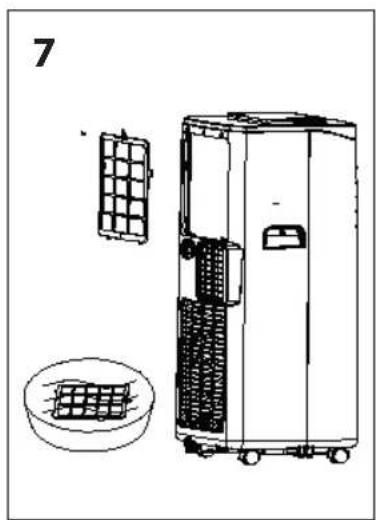
natural_image
Line drawing of a portable air conditioner unit with a grid panel and a circular base (no text or symbols)WSKAZÓWKI BEZPIECZEŃSTWA
UWAGA: RYZYKO POŻARU
- Before installation and operation, please read the operating instructions and warnings on the unit carefully. This manual contains the correct principles for the installation and operation of the air conditioner, failure to observe which can void the warranty.
- This device is intended for home use only, as described in this manual. Do not use the device for purposes other than those specified in these operating instructions. If the air conditioner is not used for its intended purpose, the warranty can be void.
- The device should not be operated by persons who are not familiar with it, and who haven't made themselves familiar with the operating instructions. In particular, this applies to children.
- This appliance may be used by children of at least 8 years of age, and by persons with reduced physical and mental abilities, and persons with no experience or knowledge of the equipment, if supervised or instructed on its safe use so that the risks associated with it are understandable. Children should not play with the appliance. Unattended children should not be allowed to carry out cleaning and maintenance on the appliance.
- The installation of the air conditioner does not require special knowledge, and can be carried out by the user alone, in accordance with the guidelines and diagrams in these operating instructions. Improper installation can result in water leakage, electric shock, and irreparable damage to the unit. Eldom Sp. z o.o. shall not be
liable for any potential losses due to improper use of the appliance.
-
The unit must be installed in accordance with the national regulations for electrical installations. Before connecting to the mains, make sure that the mains current (voltage) parameters correspond to those specified on the device. The mains plug of the device should be fully plugged into the mains socket. Do not use extension cords or splitters to connect the mains cable of the device. Please remove the plug from the mains socket if the device is not used for an extended period of time. If the unit has not been used for a long time, check that the air inlets and outlets are not blocked before restarting the unit.
-
Keep the device at least 50 cm away from flammable materials (e.g. alcohol, etc.), and pressurised containers (e.g. aerosols).
-
The mains cable and the mains plug of the appliance are used for the eventual disconnection of the appliance from the mains power supply, and must therefore be easily accessible at all times.
-
Switch off the air conditioner and disconnect it from the mains power supply during a storm. If the operation of the air conditioner is affected by lightning or electromagnetic radiation, turn off the unit and disconnect it from the mains power supply. The device may be switched on after a few minutes.
-
Do not put hands or any objects into the air outlets while the unit is in operation.
-
Before cleaning, repair, maintenance, or inspection, turn off the air conditioner and disconnect it from the mains power supply.
-
Clean the device with a soft, dry cloth. If the housing of the unit is badly soiled, you can use a cloth soaked in a household cleaner. Do not wipe or clean the air conditioner with chemical solvents such as gasoline and alcohol
- Place and use the unit away from any splashes of water or oil.
- If, during the operation of the device, the user notices any irregularities, such as a strange smell or sound, smoke, steam, fire, heating of the casing or mains plug, fuse failure, or malfunction of other devices, turn off the device immediately, disconnect it from the mains power supply, and contact an authorised service centre immediately.
- Do not use if the power cord is damaged, or if the unit has been dropped or otherwise damaged. The repair of the device should be entrusted to an authorised service centre; information on which can be found on the warranty card and on the website www.eldom.eu.
- All modernisations or use of spare parts or appliance elements other than the original ones are prohibited, and they can cause hazard to the safety of use.
- Under the risk of voiding the warranty, the user may not carry out on their own any repairs, modifications, or disassembly of the device's casing.
- There are no user-serviceable parts inside the unit.
- All modernizations or use of spare parts or appliance elements other than the original ones are prohibited and they cause hazard to the safety of use.
- Clean the device with a dry and soft cloth. If the appliance casing is heavily soiled, use a cloth soaked in a household cleaner.
NOTE



Appliance is filled with flammable gas R290.
Before using the appliance, read the mannal.
Before installing the appliance, read the installation manual.
Any repairs you need, contact the nearest authorized Service Centre and strictly follow manufacturer's instruction only.
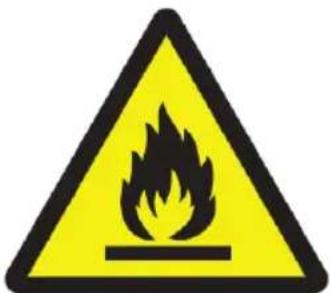
Caution, risk of fire
Information on equipment with R290 gas coolant
- Please read all warnings carefully. - Do not use tools other than those recommended by the manufacturer during defrosting and cleaning.
- The device shall be kept clear of fixed sources of ignition (e.g. open flames, operating gas, or electrical appliances).
• Do not allow puncturing to the housing, do not burn the device.
• Gases used as a coolant can be odourless.
• The unit must be installed, used, and stored in a room larger than 7 m2.
• R290 is a gaseous coolant which meets EU environmental directives.
• Do not allow puncturing to any part of the cooling circuit.
- If the appliance is installed, used, or stored, in a room without ventilation, measures shall be taken to prevent the accumulation of leaked coolant and the risk of fire or explosion due to the ignition of the coolant caused by an electric heater, stove, or other source of ignition.
• Store the device in a way which prevents mechanical damage.
- The persons operating or modifying the cooling circuit must have the appropriate authority from an accredited organisation to ensure the professional handling of the coolant, which must be confirmed by reputable industry organisations.
- All repairs must be carried out in accordance with the manufacturer's instructions. Maintenance and repairs requiring the employment of experts in other fields should be carried out under the supervision of a person authorised to use flammable coolants
EN
INSTRUCTION MANUAL PORTABLE AIR CONDITIONER KLC7000

GENERAL DESCRIPTION (drawing 1)
| Front1. Control panel2. Top cover3. Louvres4. Handles5. Front cover6. Rear cover7. Base8. Wheels | Rear9. Filter I10. Water drain - continuous11.Warm-air outlet12.Filter II13. Water drain - manualAdditional accessories14.Remote control15. Outlet pipe16.Connection adaptor17. Mounting panel (2 parts) |
INTENDED USE
The KLC7000 air conditioner is designed to improve thermal comfort in living spaces. The air can be cooled or dehumidified with it. It will also work as a standard fan.
INSTALLATION
Choosing the place for installation – drawing 2.
The device must be placed vertically on a flat surface, in a dry and spacious place. Leave at least 50 cm of free space round the unit.
The unit must be installed in accordance with the national regulations for electrical installations.
Before connecting to the mains, make sure that the mains-current (voltage) parameters correspond to those specified on the device.
The mains plug of the device should be fully plugged into the mains socket.
Do not use extension cords or splitters to connect the mains cable of the device.
If the device will not be used for an extended period of time, unplug the power cord from the wall outlet.
If the unit has not been used for a long time, check that the air inlets and outlets are not blocked before restarting the unit.
Installation
Attach the connector (16) to one end of the outlet pipe and attach the other end of the pipe to the outlet (11) – drawing 3.
The connector (16) can be mounted on the mounting panel (17) and then placed in the window - drawing 4.
The length of the panel (17) is adjustable.
Incorrect installation
The outlet pipe (15) should not be excessively bent - drawing 5.
Improper installation can result in the improper operation of the device.
There must be no sharp bends in the outlet pipe (15).
The air leaving the unit must flow freely.
NOTE
The length of the outlet pipe (15) is designed in accordance with the air conditioner's specifications. Do not replace the outlet pipe with other hoses, or extend it, as this can cause malfunction of the unit. The maximum length of the straightened outlet pipe is 1500 mm. Use the shortest pipe length possible. It is most recommended to install the outlet pipe horizontally.
TIPS
In order to reach the target temperature as soon as possible during the cooling process, the doors and windows in the air-conditioned room should be closed, and the use of heat-emitting devices should be kept to a minimum.
Do not expose yourself to cold air for long periods of time, as this is harmful to your health.
THE CONTROL PANEL, REMOTE CONTROL – drawing 1.
A TIMER - used to start and stop the automatic operation of the device.
B,C buttons - for setting the temperature (cooling) and time (TIMER). Pressing both buttons on the control panel simultaneously changes the temperature units between Fahrenheit and Celsius degrees.
D fan-speed selection (F2 = fast, F1 = slow).
E selecting the operating mode ( ✉ - cooling, △ dehumidification, - fan).
F switching the device on/off.
G display.
H REMOTE CONTROL - switching the night mode on/off.
All changes in the settings are confirmed with a sound signal.
The air flow from the air conditioner should not be directed directly at people.
The cold air flow can be controlled by means of the louvres (3).
COOLING
Switch on the device with the „F“ button.
Press the „E“ button - cooling is indicated by the ✗ indicator light.
The display „G“ shows the temperature pre-set within the range 16°C to 31°C.
Use the „B“ and „C“ buttons to set the temperature.
The fan speed can be set by pressing the „D“ button.
When using the dehumidification mode, the pipe discharging the air to the outside must be connected to the unit to.
DEHUMIDIFICATION
Switch on the device with the „F“ button.
Press the „E“ button once - dehumidification is indicated by the ⚙ indicator light.
The display „G“ shows the „dh“ symbol.
The humidity level is constant - it cannot be changed.
The fan operates only at „F1“ speed.
To switch off, press the „E“ button (change of operating mode) or the „F“ button (switching off the device).
When using the dehumidification mode, the pipe discharging the air to the outside must be connected to the unit to allow moisture to be removed.
FAN
In this mode, only the fan of the device works.
Switch on the device with the „F“ button.
Press the „E“ button – activation of the function is indicated by the ✝ indicator light.
The „FA“ symbol appears on the „G“ display.
The fan speed (
To switch off, press the „E“ button (change of operating mode) or the „F“ button (switching off the device).
SLEEP
The night mode is activated by pressing the „H“ button (REMOTE CONTROL).
Activation of the function is indicated by the ⏻ indicator light.
The display „G“ shows the pre-set temperature.
The fan operates only at
To switch off, press the „H“ button.
START DELAY
The device must be switched off, but connected to the power supply.
Press the „A“ button - the digits on the „G“ display will start blinking.
Select the desired operating mode (see above).
Using the „B“ and „C“ buttons, select the time within the range 1 to 24 hours.
After selecting the time, wait until the digits on the display stop blinking.
Activation of the function is indicated by the HR indicator light.
To deactivate the function, press the „A“ button twice.
TIMER
Switch on the device with the „F“ button.
Select the desired operating mode (see above).
Press the „A“ button - the digits on the „G“ display will start blinking.
Using the „B“ and „C“ buttons, select the time within the range 1 to 24 hours.
After selecting the time, wait until the digits on the display stop blinking.
Activation of the function is indicated by the HR indicator light.
To deactivate the function, press the „A“ button twice.
It is possible to change the operating mode when the „TIMER“ function is active.
WATER DISCHARGE
The unit is equipped with an evaporation system. Liquefied water is used to cool the condenser, which increases the cooling efficiency and reduces energy consumption.
If the amount of water in the system reaches the maximum level, the „WATER FULL" indicator on the control panel lights up, and the compressor stops working.
Manual removal of water
Switch off the device and move it to a place where water can be drained from it.
Remove the plug from the hole „13“ and carefully drain the water.
Insert the plug into the hole „13“.
Turn the device on again.
Constant water drainage drawing 6.
Turn the appliance off.
Remove the plug from the hole „10“.
Mount the rubber tube (not included) and place its other end in a container, e.g. a bucket.
MAINTENANCE
Note: Turn off the unit and unplug it before any maintenance or repair begins to avoid electric shock.
CLEANING
Unplug the unit before any cleaning.
Clean the housing with a soft moisture cloth. Do not use chemical solvent (such as benzene, alcohol, gasoline). The surface may be damaged or even the whole case may be deformed.
Do not sprinkle water on the unit.
● AIR FILTER - drawing 7.
Clean the air filter every 2 weeks. If the air filter is blocked with dust, the efficiency will reduce.
Open the air filter cover upwards, and then take out the air filter.
Wash the air filter by immersing it gently into warm (about 40irc C) water with a neutral detergent, rinse it and dry it thoroughly in a shaded place.
END OF SEASON
- Please drain the water.
- Keep the unit running in "Fan" mode for two hours until the inside of the unit is dry.
- Turn off the unit and unplug it.
- Clean the air filter and after dry it thoroughly, reinstall it.
- Remove the exhaust pipes and keep them carefully.
- Wrap the unit with the plastic bag and keep it in a dry place.

| Problem Cause Solution | ||
| The air conditioner does not function. | No power supply. Connect to power | supply outlet and switch on |
| flashes on the display screen Drain water | ||
| The air conditioner restart frequently | In direct sunlight Close curtains. | |
| Windows or doors open, many people or a heat source in the room. | Close doors and windows, remove the heat source | |
| Dirty filter Clean or replace the filter(s). | ||
| Air inlet or air outlet blocked Remove the blockage | ||
| The unit is too noisy Unit stands uneven. Place on an even, solid surface (less vibration). | ||
| No work of compressor. Self protect of compressor Wait for 3 minute and restart again after the descend of temperature | ||
Cautions: Switch off the unit and unplug it immediately if anything abnormal happens. Then contact a qualified electrician.
Above data without advance notice for product improvement
TECHNICAL DATA
| Power supply 220-240V~ 50Hz | ||
| Cooling medium | R290/130g | |
| Cooling efficiency | 7000Btu(2.06KW) | |
| Power consumption | 792W | |
| Maximum allowed overpressure | suction | 0.6MPa |
| pumping | 1.8MPa | |
| Maksymalne dopuszczalne ciśnienie | 3.0MPa | |
| Air flow | 300m3/h | |
Fuse parameters of the machine
Type: 5ET or SMT Voltage: 250V Current: 3.15 A
Addendum
Schematic diagram of the air-conditioning system (Refer to the nameplate on the product for the detailed technical parameters)
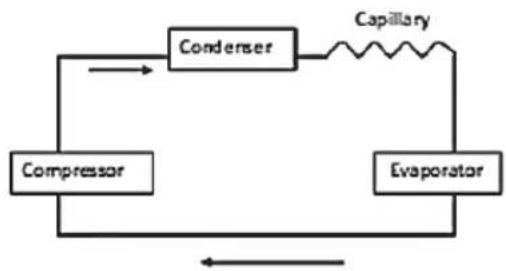
flowchart
graph TD
    A["Compressor"] --> B["Condenser"]
    B --> C["Evaporator"]
    C --> A
    B --> D["Capillary"]
    D --> B


- WSKAZÓWKI BEZPIECZEŃSTWA
- NOTE
- Information on equipment with R290 gas coolant
- EN
- INSTRUCTION MANUAL PORTABLE AIR CONDITIONER KLC7000
- GENERAL DESCRIPTION (drawing 1)
- INTENDED USE
- INSTALLATION
- Incorrect installation
- TIPS
- DEHUMIDIFICATION
- FAN
- SLEEP
- START DELAY
- TIMER
- WATER DISCHARGE
- Manual removal of water
- Constant water drainage drawing 6.
- MAINTENANCE
- CLEANING
- ● AIR FILTER - drawing 7.
- END OF SEASON
- Addendum
Brand : Columbia Vac
Model : KLC7000
Category : Air conditioner