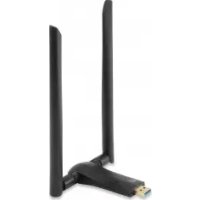
WUA-0600 - Network card / adapter LEVELONE - Free user manual and instructions
Find the device manual for free WUA-0600 LEVELONE in PDF.


Pick your language and provide your email: we'll send you a specifically translated version.
| Product Type | Wireless Network Adapter |
| Brand | LevelOne |
| Model | WUA-0600 |
| Interface | USB 2.0 |
| Wireless Standard | IEEE 802.11n (draft 2.0), backward compatible with 802.11g/b |
| Frequency Band | 2.4 GHz |
| Data Transfer Rate | Up to 150 Mbps |
| Security | WEP 64/128-bit, WPA, WPA2, WPS |
| Dimensions | Approximately 75 x 25 x 10 mm |
| Weight | Approximately 20 g |
| Power Source | USB bus powered (5V DC) |
| Operating Temperature | 0°C to 40°C |
| Storage Temperature | -20°C to 70°C |
| Supported Operating Systems | Windows 2000/XP/Vista/7, Mac OS X, Linux |
| Antenna Type | Internal PCB antenna |
| LED Indicators | Link/Activity |
| Packet Encryption | TKIP, AES |
| Wireless Modes | Infrastructure, Ad-Hoc |
| Maintenance | Keep dry; clean with soft cloth; avoid solvents |
| Safety | Use only with specified voltage; avoid overheating |
| Spare Parts / Repairability | Not user-serviceable; replace unit if defective |
Frequently Asked Questions - WUA-0600 LEVELONE
How do I install the WUA-0600 driver on Windows 10?
Download the latest driver from the LevelOne support page. Run the installer, and follow on-screen instructions. If the device is not recognized, try inserting the adapter into a different USB port and restart your computer.
Is the WUA-0600 compatible with Mac OS X?
Yes, the WUA-0600 supports Mac OS X. Drivers are included on the installation CD or can be downloaded from the LevelOne website. Check the compatibility list for your specific OS version.
What is the maximum range of this adapter?
Under open conditions, the WUA-0600 can achieve up to 100 meters indoors and 300 meters outdoors. Actual range depends on obstacles and interference.
Can I use the WUA-0600 with a Linux system?
Yes, Linux kernel drivers are available. Many distributions automatically detect the adapter. If not, install the rtl8192cu driver or the official vendor driver.
Does the adapter support WPS?
Yes, the WUA-0600 supports WPS (Wi-Fi Protected Setup) for easy and secure connection to your router. Press the WPS button on both devices to pair.
Why is my connection speed slower than expected?
Check for interference from other devices, walls, or metal objects. Ensure you have the latest drivers and that your router supports 802.11n. Try changing the wireless channel on your router.
Can I connect to a 5 GHz network?
No, the WUA-0600 operates only on the 2.4 GHz band. It does not support dual-band or 5 GHz networks.
How do I reset the adapter to factory settings?
The WUA-0600 does not have a reset button. To restore default settings, uninstall the driver and software, then reinstall it. For network settings, reset your router.
Is the adapter compatible with gaming consoles?
The WUA-0600 is designed for computers. Some consoles like PlayStation 3 may support USB adapters, but compatibility is not guaranteed. Check your console's specifications.
What should I do if the LED is not lighting up?
Ensure the adapter is firmly inserted into a USB port. Try a different USB port. If still off, the adapter may be faulty. Contact LevelOne support for replacement.
User questions about WUA-0600 LEVELONE
0 question about this device. Answer the ones you know or ask your own.
Ask a new question about this device
No questions yet. Be the first to ask one.
Download the instructions for your Network card / adapter in PDF format for free! Find your manual WUA-0600 - LEVELONE and take your electronic device back in hand. On this page are published all the documents necessary for the use of your device. WUA-0600 by LEVELONE.