
KB-UMW-01 - Keyboard Gembird - Free user manual and instructions
Find the device manual for free KB-UMW-01 Gembird in PDF.


| Product Type | Mechanical Gaming Keyboard |
| Brand | Gembird |
| Model | KB-UMW-01 |
| Interface | USB with 1.75m braided cable |
| Polling Rate | 1000 Hz (fixed) |
| Key Switch Type | Optical switch |
| Key Response Time | 0.2 ms |
| Key Lifespan | 100,000,000 strokes |
| Key Lift | 3.8 ± 0.3 mm |
| Pressing Force | 55 ± 15 g |
| Backlight Modes | 9 default modes, 3 gaming modes, 3 user-defined modes |
| Side RGB Strips | 5 light modes with color/speed settings |
| Anti-Ghosting | 100% with full key rollover |
| Lock Function | Windows key and FN key lock |
| Material | Aluminum + ABS plastic |
| Waterproof Rating | IP58 with nano-coating |
| Dimensions | 460 x 140 x 38 mm |
| Net Weight | 1.06 kg |
| Power Consumption | 5V DC, up to 0.35A |
| Operating Temperature | 32°F to 104°F (0°C to 40°C) |
| Multimedia Hotkeys | Yes (Internet and music controls) |
| Cleaning | Use a soft, dry cloth. Avoid liquids. |
| Safety | Avoid exposure to liquids and humid environments; operate within temperature range. |
| Disposal | Do not dispose with household waste; follow local regulations for electronic waste. |
Frequently Asked Questions - KB-UMW-01 Gembird
User questions about KB-UMW-01 Gembird
0 question about this device. Answer the ones you know or ask your own.
Ask a new question about this device
Download the instructions for your Keyboard in PDF format for free! Find your manual KB-UMW-01 - Gembird and take your electronic device back in hand. On this page are published all the documents necessary for the use of your device. KB-UMW-01 by Gembird.
USER MANUAL KB-UMW-01 Gembird
natural_image
Abstract geometric logo design with a stylized letter 'G' inside a hexagonal frame (no text or symbols)GMB GAMING
KB-UMW-01
USER MANUAL
HANDBUCH
HANDLEIDING
INSTRUKCJA OBSŁUGI
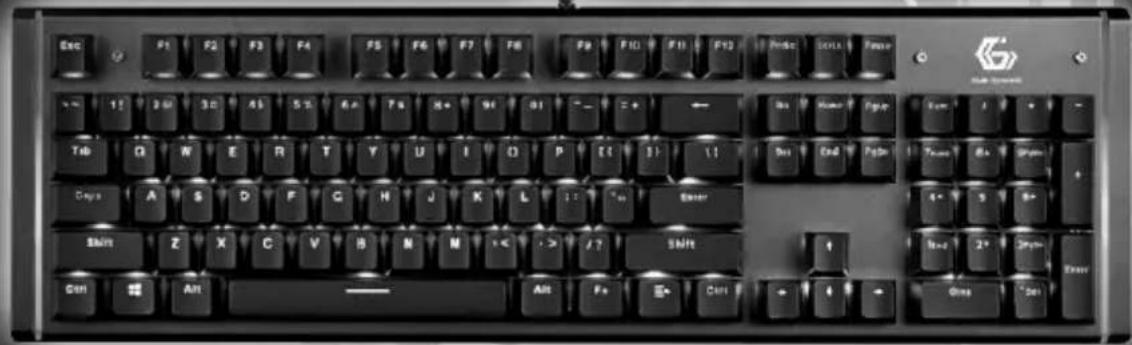
MECHANICAL BACKLIGHT GAMING KEYBOARD
MECHANISCHE RGB MULTIMEDIA-TASTATUR
MECHANISCH BACKLIGHT GAMING TOETSENBORD
PODŚWIETLANA GAMINGOWA KLAWIATURA MECHANICZNA, USB
Features
• Full-size USB mechanical gaming keyboard with backlight
- Optical switch keys with with extreme 0.2 ms key response time and durable 100 million key strokes life span
- Backlight function on all keys with 9 preset default modes, 3 special gaming modes and 3 brightness/speed settings
- 3 customizable user-defined backlight modes: decide which keys light up for use in specific games or applications
- RGB LED side strips with 5 light modes and multiple color/speed settings
- Heavy-duty IP58 waterproof aluminum body with nano-coating technology
- 100% anti-ghosting on all keys to ensure all key strokes are registered, no matter how fast your play
- Lock function to disable the Windows and/or Fn button during gameplay
• Practical multimedia hotkeys for Internet and music
Specifications
• Materials: aluminum + ABS plastic
• Interface: USB, 1.75 m braided cable
- Polling rate: 1000 Hz (fixed)
- Illumination: 9 modes
• 100% anti-ghosting with full key rollover
• Key lift: 3.8 ± 0.3 mm
- Pressing force: 55 ± 15 ~g
• Key life time: 100 000 000 strokes
• Power consumption: 5 V DC up to 0.35 A
• Size: 460 x 140 x 38 mm
• Net weight: 1.06 kg





1 FN+ Key Combinations
English
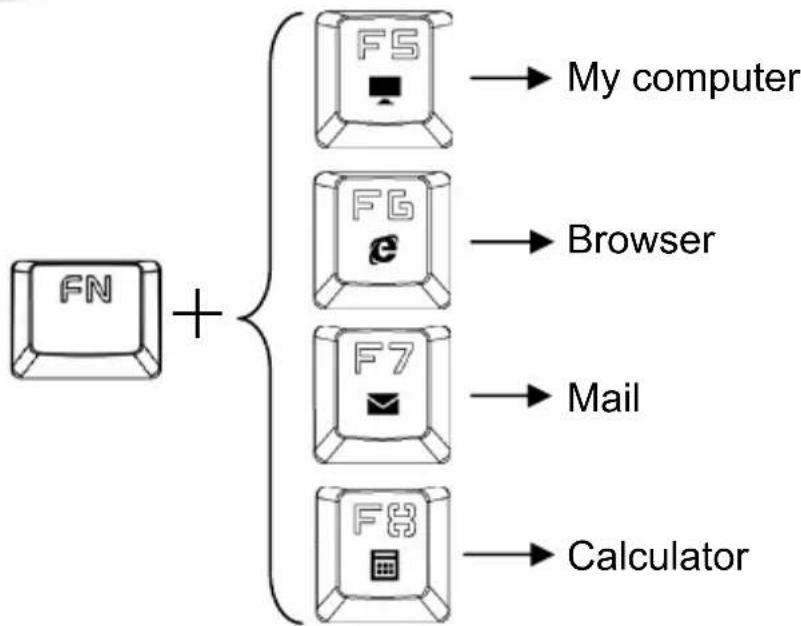
flowchart
graph TD
    A["FN"] --> B["File"]
    A --> C["FSG"]
    A --> D["F7"]
    A --> E["Calculator"]
    B --> F["My computer"]
    C --> G["Browser"]
    D --> H["Mail"]
    E --> I["Calculator"]
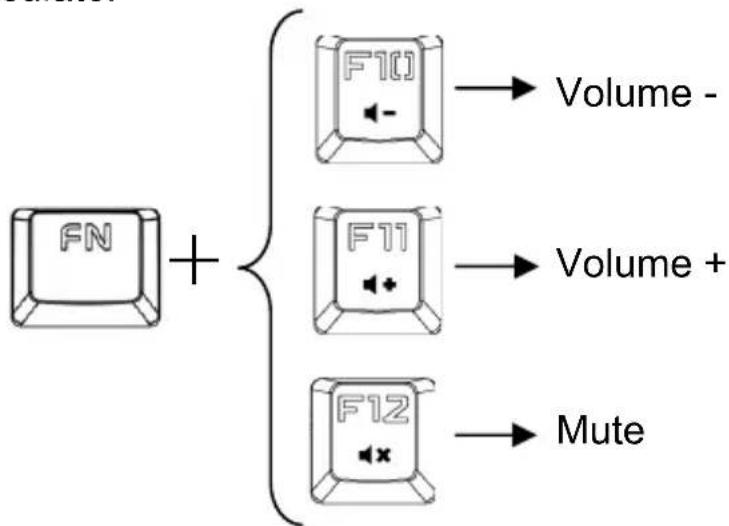
flowchart
graph TD
    A["FN"] + B["F10"] --> C["Volume -"]
    B --> D["F11"] --> E["Volume +"]
    D --> F["F12"] --> G["Mute"]
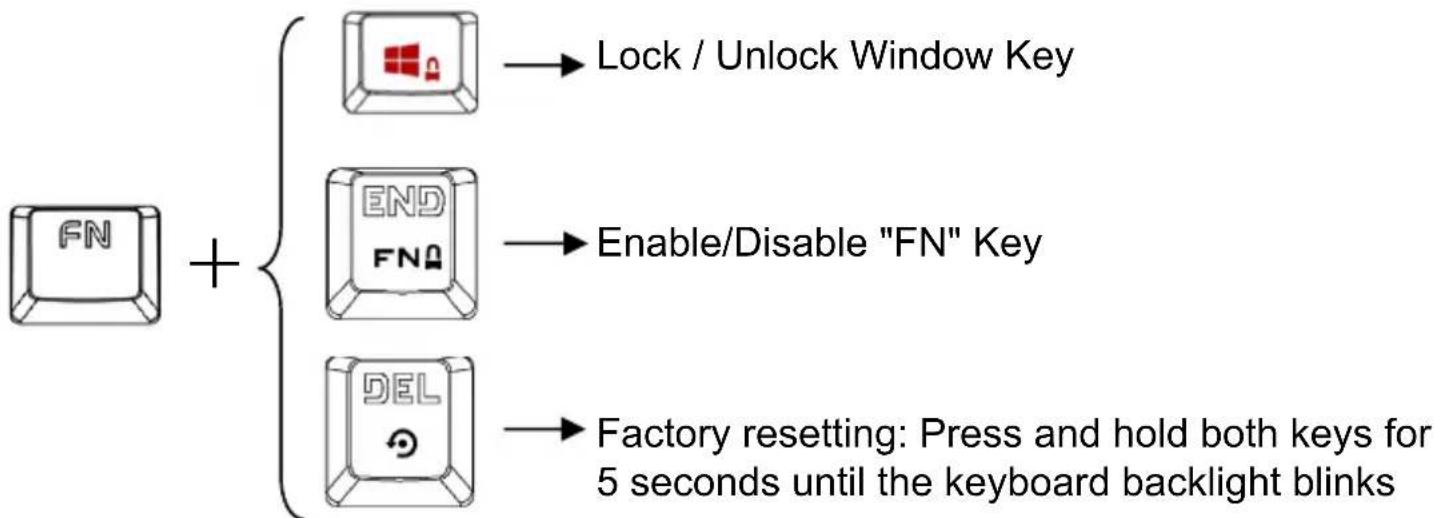
flowchart
graph TD
    A["FN"] --> B["Lock / Unlock Window Key"]
    A --> C["END FNQ"]
    A --> D["DEL"]
    B --> E["Enable/Disable "FN" Key"]
    C --> E
    D --> F["Factory resetting: Press and hold both keys for 5 seconds until the keyboard backlight blinks"]
2 Default Backlight Mode
10 Kinds of Backlight Mode to Cycle: Backlight On Breath Trace Wave Ripple Meteor Light flow Row-by-row Bump Backlight Off.
Levels of brightness of backlight: 30%, 60%, 100% (Default setting is 100%).
3 levels of the speed of backlight breathing (Default setting is Level 2)
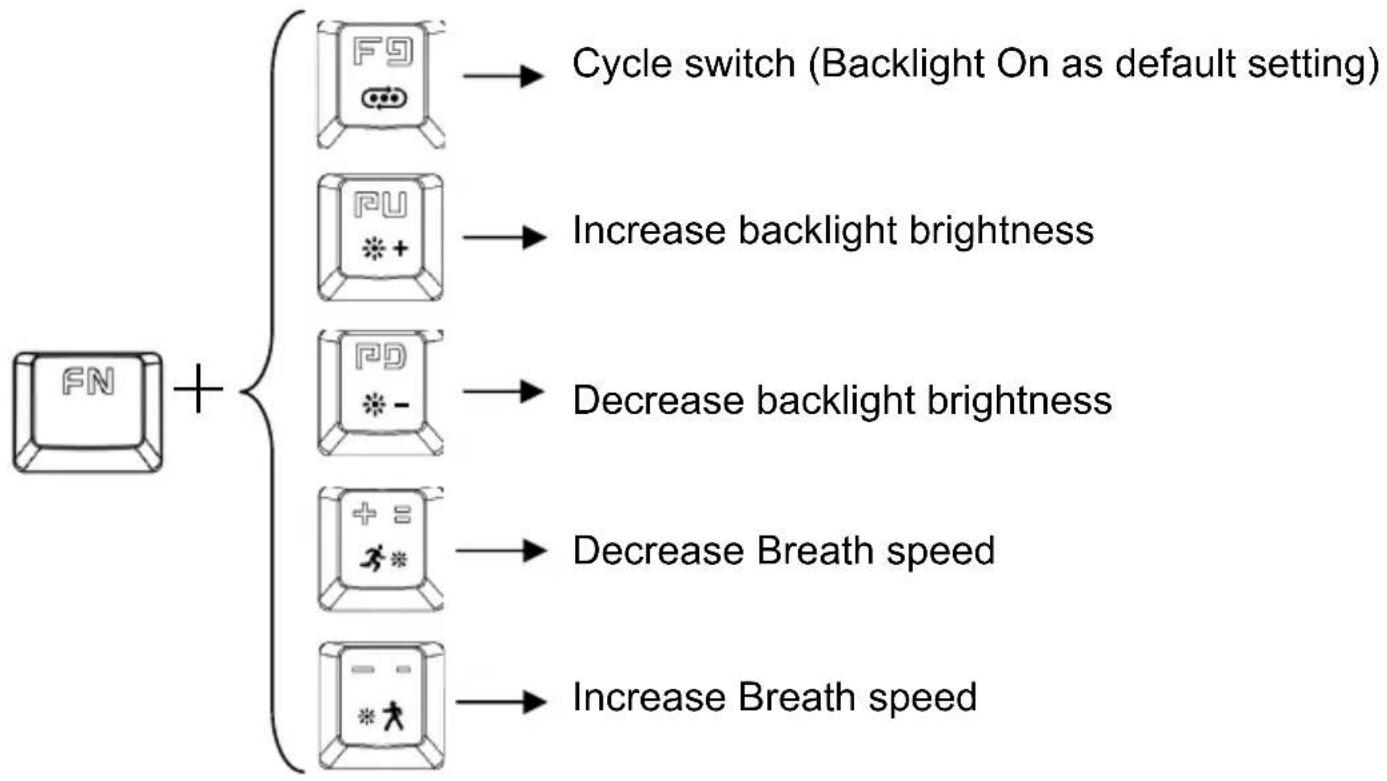
flowchart
graph TD
    A["FN"] --> B["Cycle switch (Backlight On as default setting)"]
    A --> C["Increase backlight brightness"]
    A --> D["Decrease backlight brightness"]
    A --> E["Decrease Breath speed"]
    A --> F["Increase Breath speed"]
3 Customize Backlight Mode
Please choose which key you want to light up. Follow the following steps to customize:
-
Press FN+1 to select and activate CM1 profile.
-
Hold FN+ ESC to enter recording mode. (All Other functions of keyboard are disabled).
- Press the key or keys which you want to set backlight on. (With the exception of Caps Lock, Num Lock, Scroll Lock and Windows four keys)
- When finished, press "FN+ESC" to save the user-defined backlight to CM1 profile.
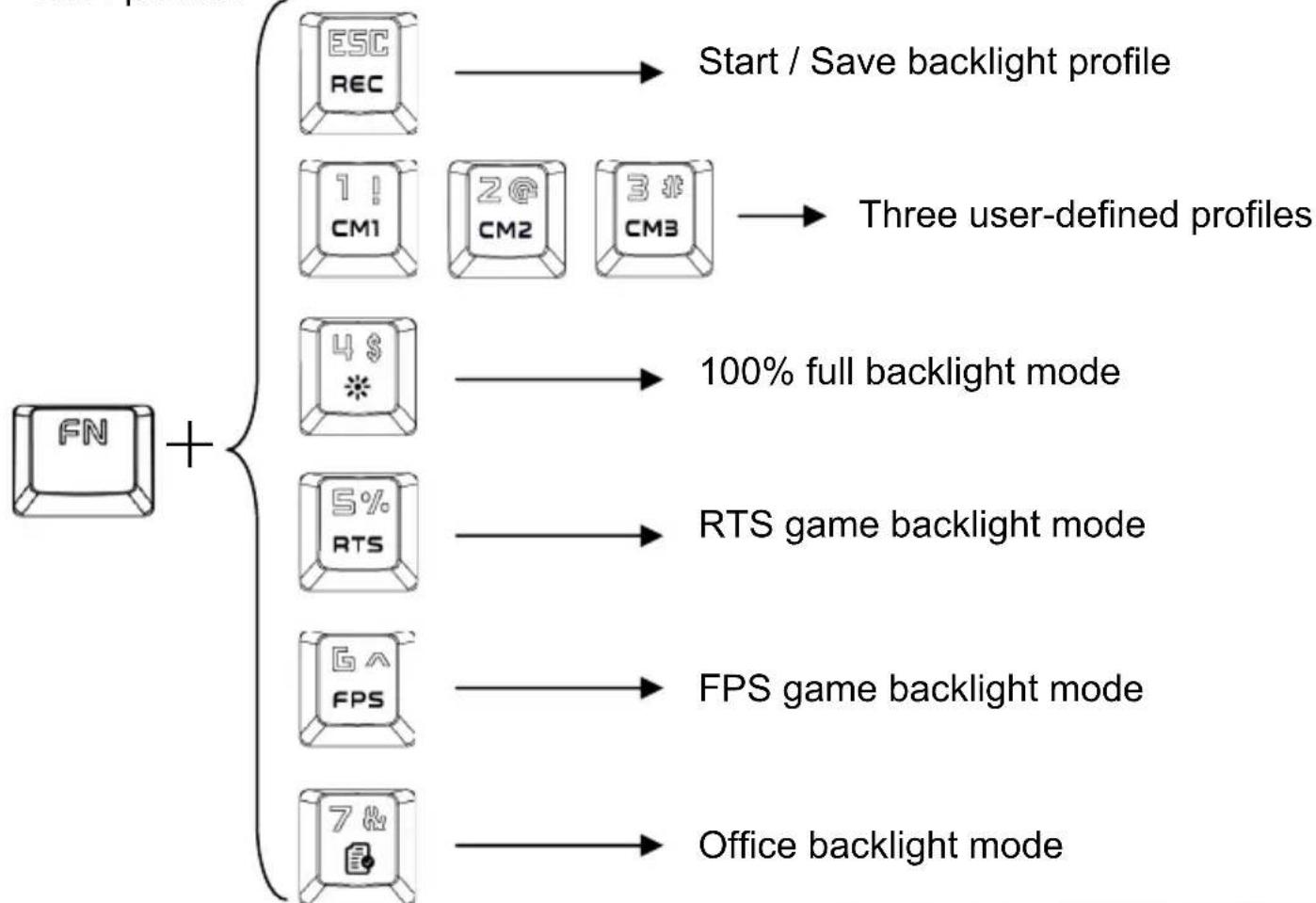
flowchart
graph TD
    A["FCN"] --> B["ESC REC"]
    A --> C["1 ! CM1"]
    A --> D["2 @ CM2"]
    A --> E["3 # CM3"]
    B --> F["Start / Save backlight profile"]
    C --> G["Three user-defined profiles"]
    D --> H["100% full backlight mode"]
    E --> I["RTS game backlight mode"]
    F --> J["4 $ *"]
    G --> K["5% RTS"]
    H --> L["6^A FPS"]
    I --> M["FPS game backlight mode"]
    J --> N["7 & Office backlight mode"]
    K --> O["Office backlight mode"]
7 Right & Left Side Light Mode
5 light modes cycle: Light On Neon Flowing Wave Breath Light Off.
Backlight color sequence: White Skyblue (Default) Pink Yellow Blue Green Red.
Apply to "Light on Wave Breath" 3 modes to switch colors.
4 level of speed adjustment, apply to “RGB color Meteor Wave Breathing” modes.
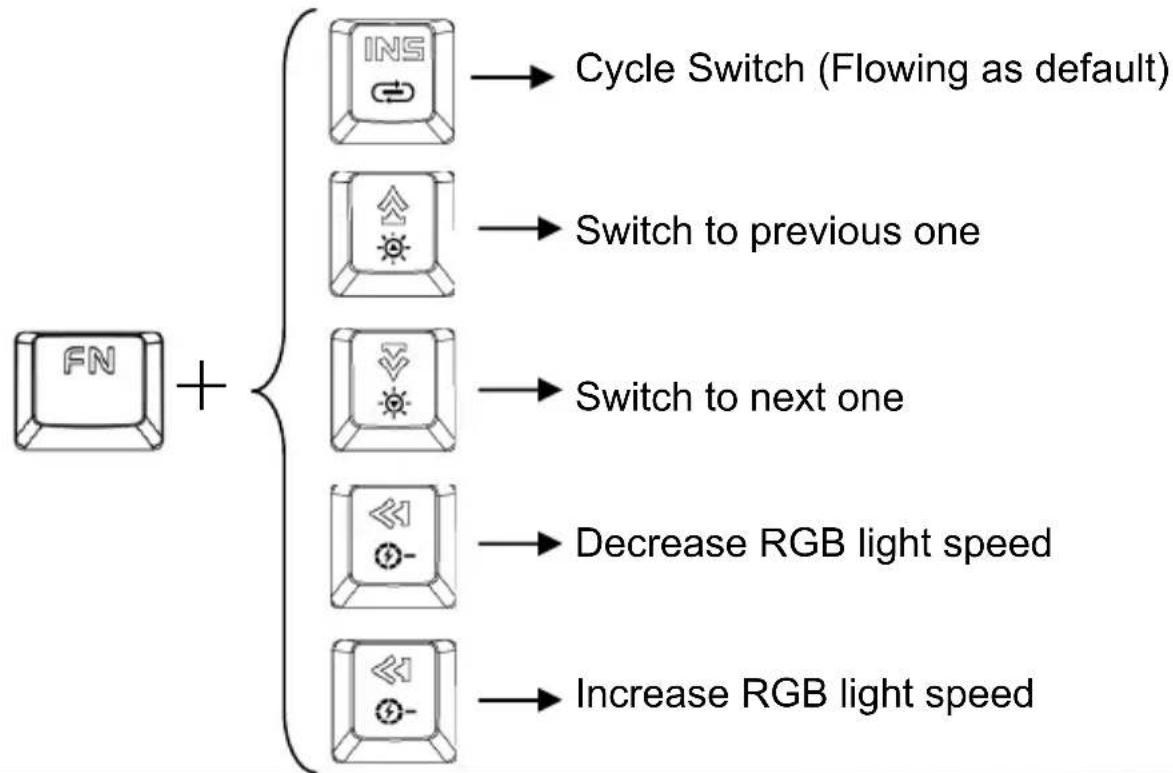
flowchart
graph TD
    A["FN"] + B["INS"] --> C["Cycle Switch (Flowing as default)"]
    A --> D["Switch to previous one"]
    A --> E["Switch to next one"]
    A --> F["Decrease RGB light speed"]
    A --> G["Increase RGB light speed"]
8 Remarks
- The keyboard corresponds to the button with four status lights, user-friendly real-time understanding of the keyboard status.
- Clean the keyboard regularly to avoid dust accumulation.
- Avoid exposing the device to liquids and humid environments. Only use the device within the specified temperature range of 32^ F to 104^ F ( 0^ C to 40^ C). Once the temperature falls below or rises above this range, unplug and switch off the device until the temperature returns to the appropriate range.
Waste disposal:

Do not deposit this equipment with the household waste. Improper disposal can harm both the environment and human health. For Information about waste collection facilities for used electrical and electronic devices, please contact your city council or an authorized company for the disposal of electrical and electronic equipment.
Brand : Gembird
Model : KB-UMW-01
Category : Keyboard