HSVC-V22.2RD - Vacuum Cleaner Heinner - Free user manual and instructions
Find the device manual for free HSVC-V22.2RD Heinner in PDF.


| Product Type | Cordless Stick Vacuum Cleaner |
| Brand | Heinner |
| Model | HSVC-V22.2RD |
| Power Consumption | 195 W |
| Suction Power | 18 kPa |
| Battery Voltage | 22.2 V (Li-ion) |
| Input Voltage | 100-240 V ~ 50 Hz |
| Noise Level | 77 dB |
| Dust Bin Capacity | 0.5 L |
| Battery Type | Removable Lithium-ion pack |
| Charging Time | Approximately 5 hours (first charge) |
| Speed Settings | Normal and High (two speeds) |
| Filter Type | Washable (reusable) |
| Included Accessories | Crevice tool, Bending brush, 2-in-1 brush, Flat brush, Charging adapter |
| Maintenance | Washable filter, Clean rotating brush |
| Safety Features | Use only supplied adapter; Do not vacuum liquids or hot ashes |
| Disposal | Remove battery before disposal; recycle battery separately |
| Warranty | Included (see warranty card) |
Frequently Asked Questions - HSVC-V22.2RD Heinner
User questions about HSVC-V22.2RD Heinner
0 question about this device. Answer the ones you know or ask your own.
Ask a new question about this device
Download the instructions for your Vacuum Cleaner in PDF format for free! Find your manual HSVC-V22.2RD - Heinner and take your electronic device back in hand. On this page are published all the documents necessary for the use of your device. HSVC-V22.2RD by Heinner.
USER MANUAL HSVC-V22.2RD Heinner
natural_image
Red and silver vacuum cleaner with black handle and white base (no visible text or symbols)- Aspirator vertical
- Putere: 195 W
- Putere de aspirare: 18 kPa
natural_image
Line drawing of a mechanical device with a gear-like component and a circular arrow indicating rotation (no text or symbols)natural_image
Technical line drawing of a mechanical assembly showing a shaft and housing with an arrow indicating motion (no text or symbols)natural_image
Technical line drawing of a mechanical device with an arrow indicating assembly or transformation (no text or symbols present)natural_image
Technical line drawing of a mechanical tool with two views: top shows internal structure, bottom shows side profile (no text or symbols)natural_image
Line drawing of an electric vehicle battery pack with a cable plugged into a plug (no text or symbols)natural_image
Technical line drawing of a mechanical device with three views: top, side, and bottom (no text or symbols)natural_image
Technical line drawing of a mechanical assembly with gears and housing (no text or symbols)natural_image
Red and silver vacuum cleaner with black handle and white base (no visible text or symbols)• Vertical vacuum cleaner
- Power: 195W
• Suction power: 18kPa
Thank you for choosing this product!
I. INTRODUCTION
Before using the appliance, please read carefully this instruction manual and keep it for future reference.
This instruction manual is designed to provide you with all required instructions related to the installation, use and maintenance of the appliance.
In order to operate the unit correctly and safety, please read this instruction manual carefully before installation and usage.
II. PACKAGE CONTENT
Vacuum cleaner
Crevice
Bending brush
▶ Charging adaptor
User manual
Warranty card
i
III. SAFETY WARNING
- Read this instruction booklet carefully.
- This appliance is for domestic use only. Use as described in this instruction booklet.
-
Before using this appliance, check that the mains power voltage corresponds to the voltage shown on the rating plate.
-
Do not use the appliance to vacuum all the latter things:
-
water and other liquids
- lighted stub, hot ashes and other combustible things
- sharp matter
-
wood pieces, gesso, cement, calcimine and other tiny granules
-
Keep the vacuum cleaner away from stoves and heat-emitting appliance. Heat can deform and discolor the plastic parts of unit.
-
Always remove the plug from the power socket when the appliance is not in charging.
-
Never use spirits or other solvents to clean the appliance.
-
Never leave the appliance unattended when it is switched on. Keep the appliance out of the reach of children or the infirm.
-
Do not switch the appliance on if it appears to be faulty in any way.
-
The battery must be removed from the appliance before it is scrapped.
-
The battery is to be disposed of safely.
-
The appliance must be disconnected from the supply when removing the battery.
-
Only the adapter provided by the manufacturer can be used.
-
For battery protection and durable years, please turn off the vacuum cleaner at once after using, and charge in time when the suction is become weaker.
-
Please charge once a week at least if you don't use the vacuum cleaner for a long time.
-
This appliance can be used by children aged from 8 years and above the persons with reduced physical, sensory or mental capabilities or lack of experience and knowledge if they have been given supervision or instruction concerning use of the appliance in a safe way and understand the hazards involved. Children shall not play with the appliance. Cleaning and user maintenance shall not be made by children without supervision.
IV. DESCRIPTION OF THE VACUUM CLEANER
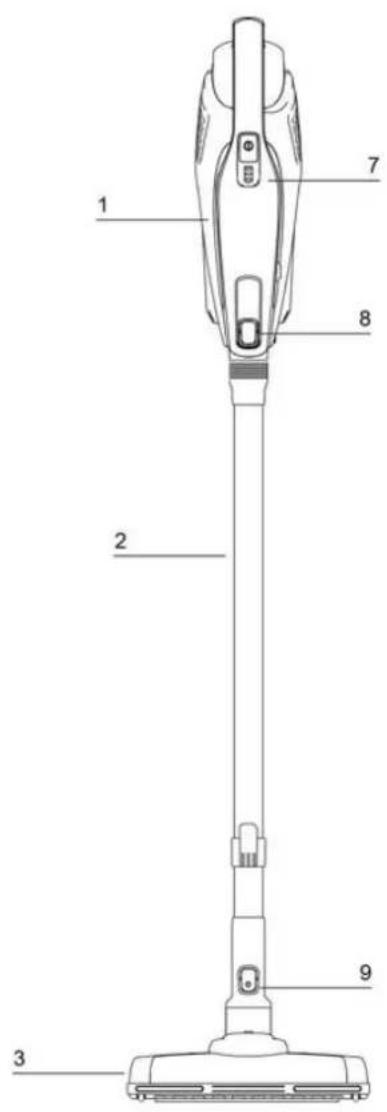
- Cordless vacuum cleaner main unit
- Aluminum tube
- Electrical floor brush
- ON/OFF Button
- Dust bin release knob
- Removable dust bin
- Battery indicator display
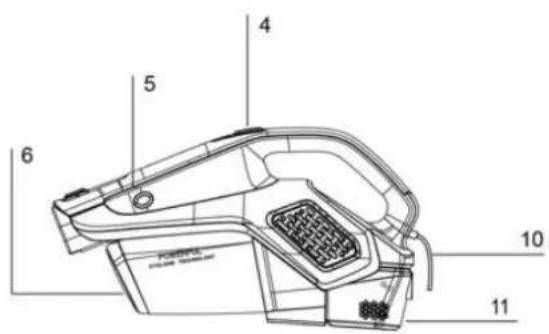
natural_image
Technical line drawing of a mechanical tool or device with no visible text or symbols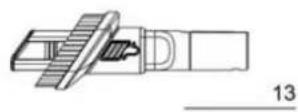
natural_image
Simple line drawing of a rectangular electronic component with a coiled cable and a labeled number 14 (no text or symbols on the component itself)- Aluminum tube release knob
- Floor brush release knob
- Charge port
- Battery pack
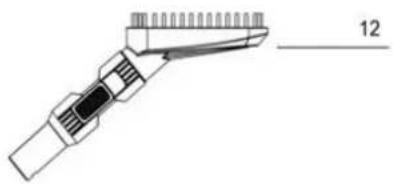
- Flat brush
- 2 in 1 brush
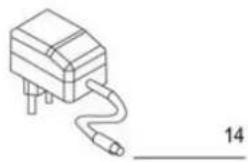
- Adapter
V. ASSEMBLY
Note:
Before using the cordless vacuum cleaner for the first time, clean it with a soft, damp cloth and dry thoroughly.
Do not immerse the cordless vacuum cleaner in water or any other liquid.
Assembling the cordless vacuum cleaner
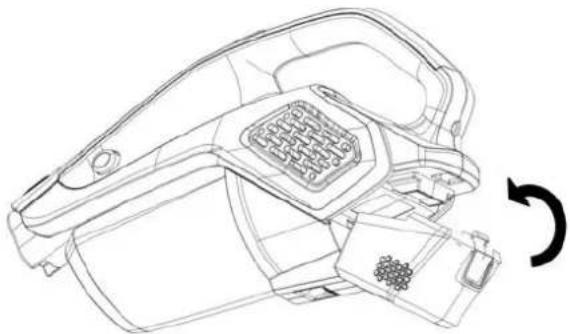
- Assembling the battery pack
natural_image
Line drawing of a mechanical device with a circular arrow indicating rotation (no text or symbols)Fit the battery pack onto the main body base until it clicks into the position.
If need to remove the battery pack, hold the main body, press the release knob and remove the battery pack.
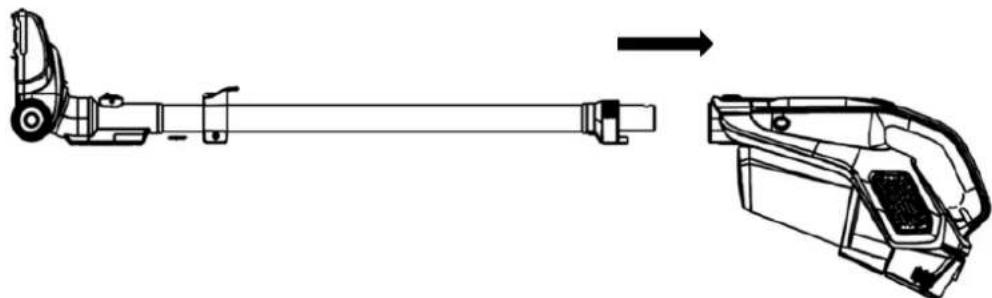
- Assembling the aluminum tube
natural_image
Technical line drawing of a mechanical assembly showing a shaft and housing with an arrow indicating transformation (no text or symbols present)Fit the tube onto the main body's air inlet until it clicks into the position.
If need to remove the tube, hold the main body, press the release knob and remove the tube.
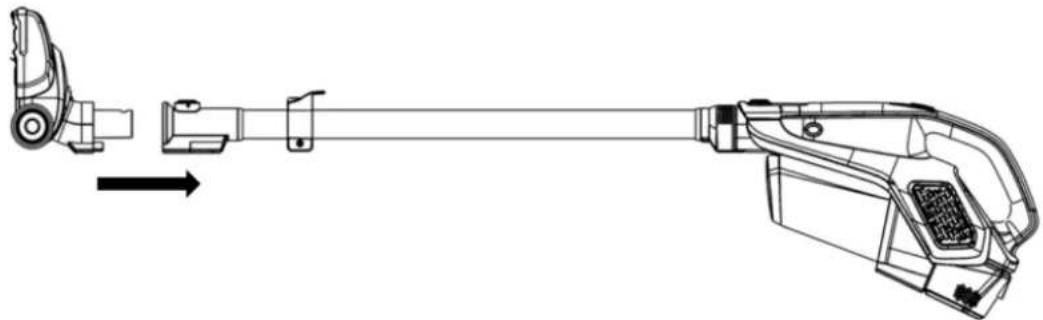
- Assembling the electrical floor brush
natural_image
Technical line drawing of a mechanical device with an arrow indicating assembly or transformation (no text or symbols present)Fit the electrical floor brush on the tube until it click into the position.
If need to remove the electrical floor brush, hold the aluminum tube, press the floor brush release knob and remove the brush from the tube.
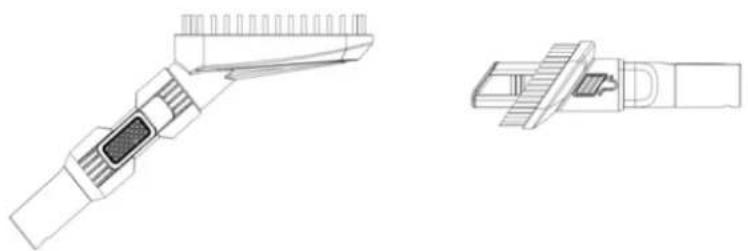
- Assembling the 2 in 1 brush & flat brush
natural_image
Technical line drawing of a mechanical tool with two views: top shows internal structure, bottom shows side profile (no text or symbols)Fit the accessory on the main body's air inlet and/or on the tube until it clicks into the position. The 2 in 1 brush and flat brush are good for cleaning stairs, in corners and awkward crevices.
VI. USING THE APPLIANCE
Before first time use, ensure the vacuum cleaner has been charged 5 hours.
Turn on the Cordless vacuum cleaner by pressing the ON/OFF button.
1 time pressing the on/off button, operating in normal speed.
2 times pressing the on/off button, operating in high speed.
3 times pressing the on/off button, turn off the vacuum cleaner.
Note: Battery indicator light represents battery capacity and will illuminate during use. The indicator light will extinguish one at a time as the battery runs out.
Warning: Do not use the Cordless Vacuum cleaner without the removable filter or dust bin not in position.
Charging the battery
natural_image
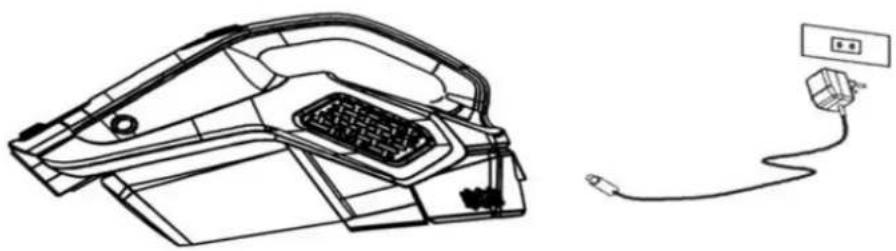
Line drawing of an electric vehicle charging case with cable and plug, no text or symbols presentTurn off the Cordless vacuum cleaner. Connect the adapter to the charging port on the main unit. Plug the adapter into the main power supply. The battery indicator display will flash and illuminate one by one. Once the battery fully charged, the battery indicator display will extinguish.
Warning: Do not use any mains power adaptor other than that supplied, as using an alternative will increase the risk of injury and/or damage to main product.
VII. MAINTENANCE
Filter replacement and cleaning
- Turn off the cordless vacuum cleaner.
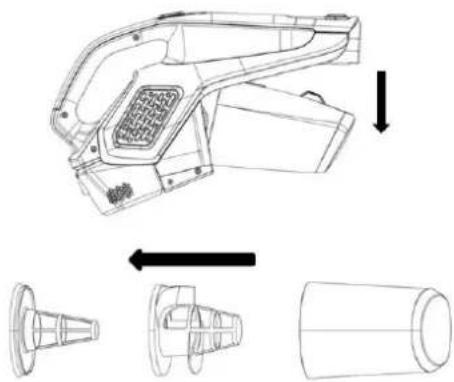
- Press the dust bin release knob, remove the dust bin
- Come up with the filter, empty the dirt inside
- Cleaning the filter in water, wait for it to dry completely.
- Put the filter back into the dust bin carefully.
- Put the dust bin back into the main body.
natural_image
Technical line drawing of a handheld device with three views: top, side, and bottom (no text or symbols)Rotating brush cleaning
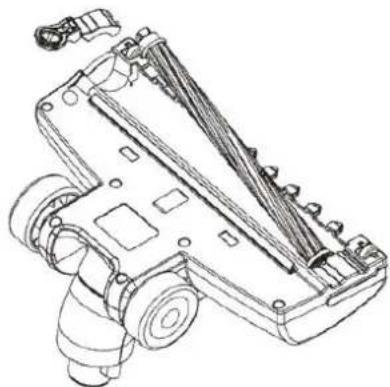
- Turn the brush bottom screw to unlock position (pictured).
- Open the brush bottom fixed device.
- Show brush, clean the rotating brush on the twisting thing.
- Put the rotating brush back.
- Turn the brush bottom screw to lock position.
natural_image
Technical line drawing of a mechanical device with gears and housing (no text or symbols)Environment
BATTERIES - Discarded batteries are environmentally friendly and disposed of it in accordance with applicable regulations.
- Discharge the battery by running the appliance to stop the engine at idle.
- Remove the battery from the appliance.
- Dispose of the battery to a collection of chemical waste from.
VIII. TECHNICAL DETAILS
| Power | 195W |
| Suction power | 18 Kpa |
| Battery Li | 22.2V |
| Voltage | 100-240V~50Hz |
| Noise level | 77dB |
| Dust bin capacity | 0.5 L |
Environment friendly disposal
You can help protect the environment!
Please remember to respect the local regulations: hand in the non-working electrical equipment's to an appropriate waste disposal center.

HEINNER is a registered trademark of Network One Distribution SRL. Other brands and product names are trademarks or registered trademarks of their respective holders.
No part of the specifications may be reproduced in any form or by any means or used to make any derivative such as translation, transformation, or adaptation without permission from NETWORK ONE DISTRIBUTION.
Copyright © 2013 Network One Distribution. All rights reserved.
www.heinner.com, http://www.nod.ro
http://www.heinner.com, http://www.nod.ro
CE
This product is in conformity with norms and standards of European Community.
Importer: Network One Distribution
Marcel Iancu Street, 3-5, Bucharest, Romania
Tel: +40 21 211 18 56, www.heinner.ro, www.heinner.com
HEINNER
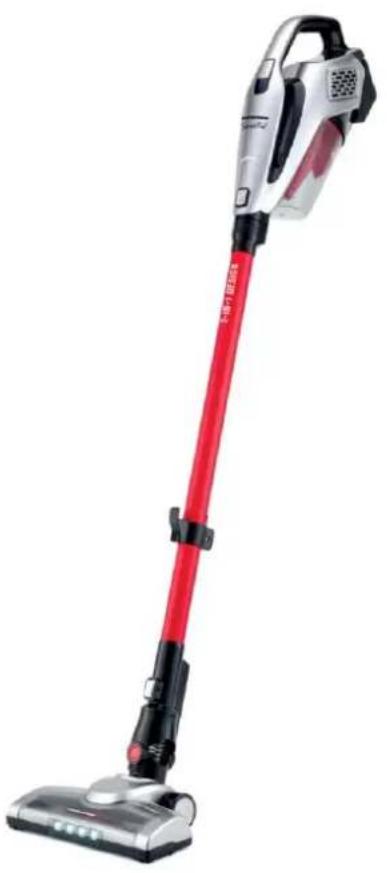
ВЕРТИКАЛНА ПРАХОСМУКАЧКА
Модел: HSVC-V22.2RD
natural_image
Red and silver vacuum cleaner with black handle and white base (no visible text or symbols)• Вертикална прахосмукачка
- Мощност: 195 W
• Сила за всмукване: 18 kPa
natural_image
Line drawing of a mechanical device with a circular arrow indicating rotation (no text or symbols)natural_image
Technical line drawing of a mechanical assembly showing a shaft and housing with an arrow indicating motion (no text or symbols)natural_image
Technical line drawing of a mechanical device with an arrow indicating assembly or transformation (no text or symbols present)natural_image
Technical line drawing of a hairbrush tool and its connector (no text or symbols)natural_image
Line drawing of an electric vehicle charging plug and cable (no text or symbols)natural_image
Technical line drawing of a handheld device with three views: top view, side view, and bottom view (no text or symbols)natural_image
Technical line drawing of a mechanical device with gears and housing (no text or symbols)natural_image
Red and silver vacuum cleaner with black handle and white base (no visible text or symbols)natural_image
Line drawing of a mechanical device with a circular arrow indicating rotation (no text or symbols)natural_image
Technical line drawing of a mechanical assembly showing a shaft and housing with an arrow indicating transformation (no text or symbols present)natural_image
Technical line drawing of a mechanical device with an arrow indicating assembly or transformation (no text or symbols present)natural_image
Line drawing of a handheld electronic device with a textured grip and metallic contacts (no text or symbols)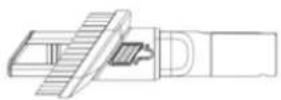
natural_image
Line drawing of an electric vehicle charging plug and cable (no text or symbols)natural_image
Technical line drawing of a handheld device with three views: top, side, and bottom (no text or symbols)natural_image
Technical line drawing of a mechanical device with gears and housing (no text or symbols)Környezetvédelem
- Thank you for choosing this product!
- INTRODUCTION
- PACKAGE CONTENT
- SAFETY WARNING
- DESCRIPTION OF THE VACUUM CLEANER
- ASSEMBLY
- Note:
- Assembling the cordless vacuum cleaner
- USING THE APPLIANCE
- Before first time use, ensure the vacuum cleaner has been charged 5 hours.
- Charging the battery
- MAINTENANCE
- Filter replacement and cleaning
- Rotating brush cleaning
- Environment
- TECHNICAL DETAILS
- Environment friendly disposal
- HEINNER
- ВЕРТИКАЛНА ПРАХОСМУКАЧКА
- Модел: HSVC-V22.2RD
- Környezetvédelem
Brand : Heinner
Model : HSVC-V22.2RD
Category : Vacuum Cleaner