
Streambar Pro - Soundbar ROKU - Free user manual and instructions
Find the device manual for free Streambar Pro ROKU in PDF.


| Product Type | Soundbar with built-in 4K streaming player |
| Dimensions (W x H x D) | 32.2 x 2.8 x 3.9 inches (81.8 x 7.1 x 9.9 cm) |
| Weight | 6.1 lbs (2.77 kg) |
| Power Supply | AC adapter (input 100-240V, 50/60Hz) |
| Audio Output | 2.0 channels, Dolby Audio, DTS Digital Surround |
| Streaming Resolution | Up to 4K HDR (HDR10, HLG, Dolby Vision) |
| Connectivity | HDMI ARC/eARC, optical digital audio, USB-A (media playback) |
| Wireless | 802.11ac dual-band Wi-Fi, Bluetooth 5.2 |
| Remote Control | Roku Voice Remote (with TV controls, headphone jack) |
| Voice Assistants | Works with Alexa, Google Assistant, Apple AirPlay 2 |
| Mounting | Wall-mountable (brackets not included) |
| Frequency Response | 70Hz – 20kHz |
| Maximum SPL | 86 dB |
| Operating Temperature | 32° to 95° F (0° to 35° C) |
| Storage Humidity | 5% to 90% (non-condensing) |
| Included Accessories | Remote, power adapter, HDMI cable, optical cable, 2 AA batteries, mounting template |
| Cleaning | Wipe with dry soft cloth; avoid liquids and abrasives |
| Safety Certifications | UL, FCC, CE, RoHS |
| Repairability Score | 6/10 (user-replaceable remote batteries only) |
| Warranty | 1 year limited |
Frequently Asked Questions - Streambar Pro ROKU
User questions about Streambar Pro ROKU
0 question about this device. Answer the ones you know or ask your own.
Ask a new question about this device
Download the instructions for your Soundbar in PDF format for free! Find your manual Streambar Pro - ROKU and take your electronic device back in hand. On this page are published all the documents necessary for the use of your device. Streambar Pro by ROKU.
USER MANUAL Streambar Pro ROKU
Just wait until you hear this
Roku® Streambar™ Pro
Quick Start Guide
What's included Details
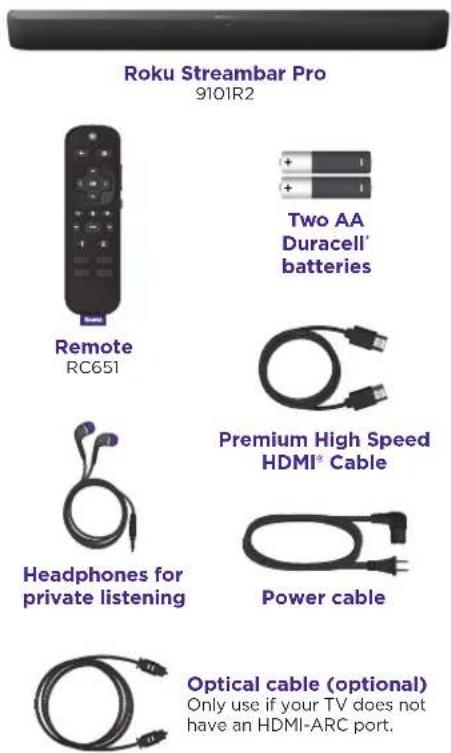
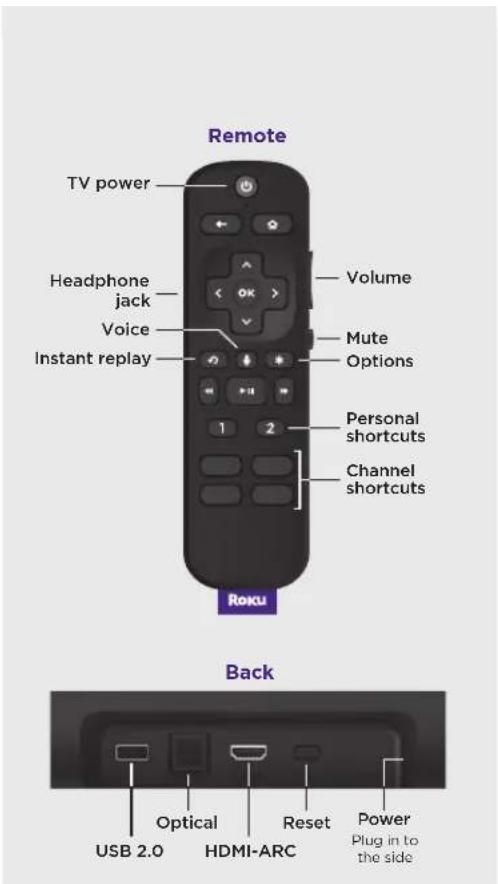
Let's get started
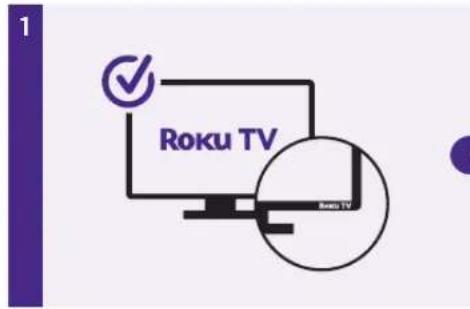
STEP 1: Adjust TV settings
Have a Roku TV?
Simply use the remote that came with your Roku TV ^™ and follow steps 2 and 3. The rest is automatic, even linking your Roku account.
natural_image
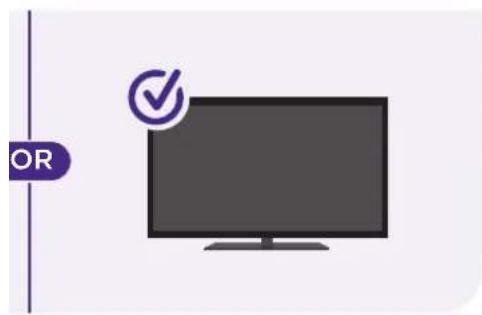
Illustration of a flat-screen monitor with a checkmark on top (no text or symbols)All other TVs
You may need to enable your TV's HDMI-CEC and ARC settings.
TV manufacturers use different names for these settings. For help, visit go.roku.com/streambarpro
natural_image
Diagram showing a cable with two power outlets connected to a device via an external cable (no text or symbols present)STEP 2: Connect to power
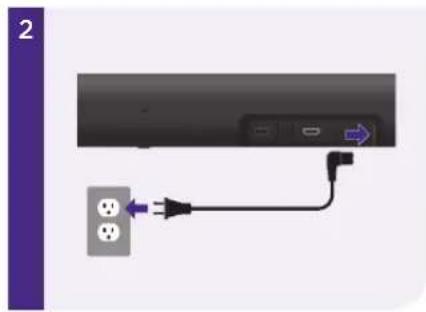
Use the included power cable to connect your Roku Streambar Pro to a wall outlet.
TIP:
Place your Roku Streambar Pro at the front edge of your TV stand for the best sound experience.
STEP 3: Connect to TV
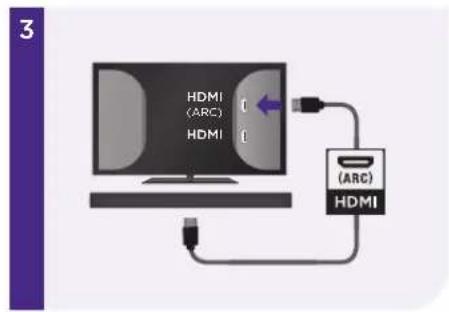
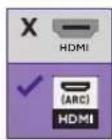
Connect your Roku Streambar Pro to the HDMI port on your TV labeled "ARC" with the included cable.
Don't see an HDMI-ARC port?
Use the included optical cable along with the HDMI Cable to connect. Remember to remove the plastic caps before use!
4
STEP 4: Select input
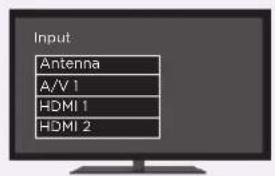
Use the remote that came with your TV to select the HDMI input (source) you used to connect your Roku Streambar Pro.
5
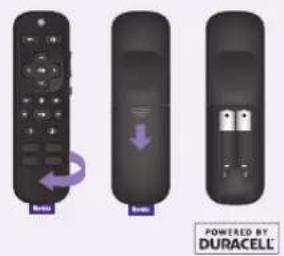
STEP 5: Insert batteries
Slide open the cover on the back of your remote and insert the included Duracell® batteries. Your remote will pair automatically.
6
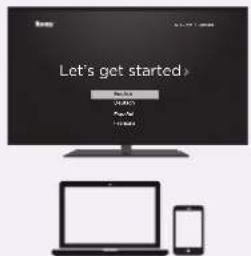
STEP 6: Follow on-screen setup
Follow the instructions on your TV screen. Activate your Roku Streambar Pro by using your computer or smartphone to link to a Roku account.
IMPORTANT:
Roku does not charge for activation support - beware of scams.
Remote features
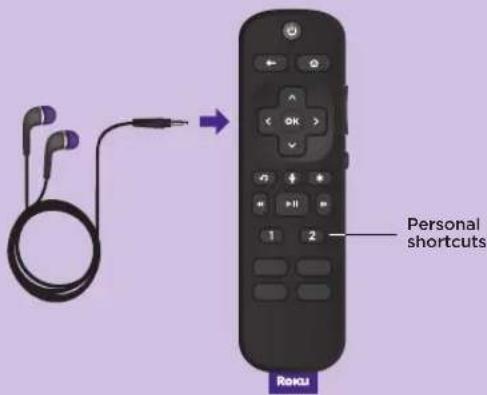

Private listening
To use private listening, simply plug headphones into your remote. Your Roku Streambar Pro will mute automatically.

Personal shortcuts
To set: Give a command using the voice button. Then, press and hold a personal shortcut button until you hear a tone.
To use: Press the personal shortcut button once.

Lost remote finder
Use the free Roku mobile app to easily locate your misplaced remote. Your remote will play a tone to help you find it.
Common questions
Why do I need to enable HDMI-CEC and ARC on my TV?
HDMI-CEC lets you control your TV's power with the Roku remote while ARC makes sure all of your TV inputs send sound through your Roku Streambar Pro. TV manufacturers may use different names for these settings and some, including Roku TVs, automatically enable them. Refer to your TV manual or visit the link below for help.
Can I use the included voice remote to control my Roku TV?
Yes, to learn how to pair the voice remote included with your Roku Streambar Pro to your Roku TV, visit the link below.
Why do I need to create a Roku account?
You'll need a Roku account to stream, add channels, easily manage subscriptions, rent movies, and more.
Why should I enter a credit card?
Saving a payment method makes it easy to rent or buy movies, subscribe to popular channels, and start free trials in just a click. No charges will be made without your authorization.
Visit go.roku.com/streambarpro for more information
Tips and tricks
Using sound settings
While streaming, press to view sound settings, like:
• Volume leveling
Helps keep your volume consistent and quiets loud commercials.
- Speech clarity
Improves clarity of voices so your favorite TV is easier to hear.
- Night mode
Lowers loud scenes while boosting quiet ones so you don't wake the house.
- Virtual surround
Creates an immersive audio experience similar to surround sound.
Pairing a Bluetooth device
• From the home screen, go to Settings and select Remotes & devices.
- Then choose Pair Bluetooth device and follow the instructions.
Using voice commands
Press and hold the voice button and say things like:
"Play classic rock on Pandora"
"Set volume to 30"
"Launch The Roku Channel"
Easily expandable
Roku
Wireless Subwoofer
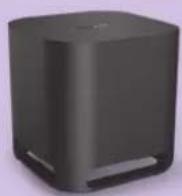
Add even deeper, richer bass
Roku
Wireless Speakers
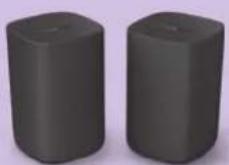
Add immersive surround sound
Sold separately.
Need more help?
support.roku.com

Video tutorials

Wireless help
Cut cable. Save money. Stream big.
streamandsave.com

Free TV

Live TV
See what's streaming for free, tips, and more
Visit blog.roku.com
Follow us

Roku
© 2021 Roku, Inc. All rights reserved. Roku, Roku TV, the Roku logo, and Streambar are the trademarks of Roku, Inc. Manufactured under license from Dolby Laboratories, Dolby, Dolby Audio, Pro Logic, and the double-D symbol are trademarks of Dolby Laboratories. The Bluetooth word mark and logos are registered trademarks owned by Bluetooth SIG, Inc. The terms HDMI and HDMI: High-Definition Multimedia Interface, and the HDMI Logo are trademarks or registered trademarks of HDMI Licensing Administrator, Inc. in the United States and other countries. All other logos and trademarks herein not owned by Roku, Inc. are the property of their respective owners.


- Just wait until you hear this
- Roku® Streambar™ Pro
- Quick Start Guide
- Have a Roku TV?
- All other TVs
- STEP 2: Connect to power
- TIP:
- STEP 3: Connect to TV
- Don't see an HDMI-ARC port?
- STEP 4: Select input
- STEP 5: Insert batteries
- STEP 6: Follow on-screen setup
- IMPORTANT:
- Private listening
- Personal shortcuts
- Lost remote finder
- Common questions
- Why do I need to enable HDMI-CEC and ARC on my TV?
- Can I use the included voice remote to control my Roku TV?
- Why do I need to create a Roku account?
- Why should I enter a credit card?
- Tips and tricks
- Using sound settings
- Pairing a Bluetooth device
- Using voice commands
- Easily expandable
- Roku
Brand : ROKU
Model : Streambar Pro
Category : Soundbar