941 - Measurement FLUKE - Free user manual and instructions
Find the device manual for free 941 FLUKE in PDF.


| Product Type | Light Meter (Illuminance Meter) |
| Brand | Fluke |
| Model | 941 |
| Measuring Range (Lux) | 20, 200, 2000, 20000, 200000 Lux |
| Measuring Range (Foot-candles) | 20, 200, 2000, 20000 Fc |
| Accuracy | ±3% (incandescent lamp at 2854°K), ±6% other visible light sources |
| Display | 3½ digit, 1999 count LCD |
| Sensor | Silicon photodiode with filter |
| Sampling Rate | 2.5 times per second |
| Dimensions (Base) | 130 x 63 x 38 mm (5.1 x 2.5 x 1.5 in) |
| Dimensions (Sensor) | 80 x 55 x 29 mm (3.2 x 2.2 x 1.1 in) |
| Weight | 220 g (0.48 lb) including battery |
| Power Supply | 9V, IEC 6LR61 alkaline battery |
| Battery Life | 200 hours |
| Auto Power Off | Approximately 6 minutes of inactivity |
| Functions | Lux/Fc select, Data Hold, AUTO/MAN ranging, MIN/MAX, Zero adjustment |
| Cosine Correction | Per JIS C 1609:1993 and CNS 5119 general A class |
| Operating Temperature & Humidity | -10°C to 50°C, 0 to 80% RH |
| Storage Temperature & Humidity | -10°C to 50°C, 0 to 70% RH |
| Altitude | Up to 2000 m |
| EMC Compliance | IEC 61326-1: Portable, CISPR 11: Group 1, Class A |
| Warranty | 1 year |
| Maintenance | Clean with mild detergent and water; replace battery when symbol appears |
Frequently Asked Questions - 941 FLUKE
User questions about 941 FLUKE
0 question about this device. Answer the ones you know or ask your own.
Ask a new question about this device
Download the instructions for your Measurement in PDF format for free! Find your manual 941 - FLUKE and take your electronic device back in hand. On this page are published all the documents necessary for the use of your device. 941 by FLUKE.
USER MANUAL 941 FLUKE
January 2009, Rev. 1, 5/18
© 2009-2018 Fluke Corporation. All rights reserved. Specifications are subject to change without notice. All product names are trademarks of their respective companies.
LIMITED WARRANTY AND LIMITATION OF LIABILITY
Each Fluke product is warranted to be free from defects in material and workmanship under normal use and service. The warranty period is one year and begins on the date of shipment. Parts, product repairs, and services are warranted for 90 days. This warranty extends only to the original buyer or end-user customer of a Fluke authorized reseller, and does not apply to fuses, disposable batteries, or to any product which, in Fluke's opinion, has been misused, altered, neglected, contaminated, or damaged by accident or abnormal conditions of operation or handling. Fluke warrants that software will operate substantially in accordance with its functional specifications for 90 days and that it has been properly recorded on non-defective media. Fluke does not warrant that software will be error free or operate without interruption.
Fluke authorized resellers shall extend this warranty on new and unused products to end-user customers only but have no authority to extend a greater or different warranty on behalf of Fluke. Warranty support is available only if product is purchased through a Fluke authorized sales outlet or Buyer has paid the applicable international price. Fluke reserves the right to invoice Buyer for importation costs of repair/replacement parts when product purchased in one country is submitted for repair in another country.
Fluke's warranty obligation is limited, at Fluke's option, to refund of the purchase price, free of charge repair, or replacement of a defective product which is returned to a Fluke authorized service center within the warranty period.
To obtain warranty service, contact your nearest Fluke authorized service center to obtain return authorization information, then send the product to that service center, with a description of the difficulty, postage and insurance prepaid (FOB Destination). Fluke assumes no risk for damage in transit. Following warranty repair, the product will be returned to Buyer, transportation prepaid (FOB Destination). If Fluke determines that failure was caused by neglect, misuse, contamination, alteration, accident, or abnormal condition of operation or handling, including overvoltage failures caused by use outside the product's specified rating, or normal wear and tear of mechanical components, Fluke will provide an estimate of repair costs and obtain authorization before commencing the work. Following repair, the product will be returned to the Buyer transportation prepaid and the Buyer will be billed for the repair and return transportation charges (FOB Shipping Point).
THIS WARRANTY IS BUYER'S SOLE AND EXCLUSIVE REMEDY AND IS IN LIEU OF ALL OTHER WARRANTIES, EXPRESS OR IMPLIED, INCLUDING BUT NOT LIMITED TO ANY IMPLIED WARRANTY OF MERCHANTABILITY OR FITNESS FOR A PARTICULAR PURPOSE. FLUKE SHALL NOT BE LIABLE FOR ANY SPECIAL, INDIRECT, INCIDENTAL, OR CONSEQUENTIAL DAMAGES OR LOSSES, INCLUDING LOSS OF DATA, ARISING FROM ANY CAUSE OR THEORY.
Since some countries or states do not allow limitation of the term of an implied warranty, or exclusion or limitation of incidental or consequential damages, the limitations and exclusions of this warranty may not apply to every buyer. If any provision of this Warranty is held invalid or unenforceable by a court or other decision-maker of competent jurisdiction, such holding will not affect the validity or enforceability of any other provision.
Fluke Corporation
P.O. Box 9090
Everett, WA
98206-9090
U.S.A.
Fluke Europe B.V.
P.O. Box 1186
5602 BD Eindhoven
The Netherlands
11/99
To register your product online, visit http://register.fluke.com
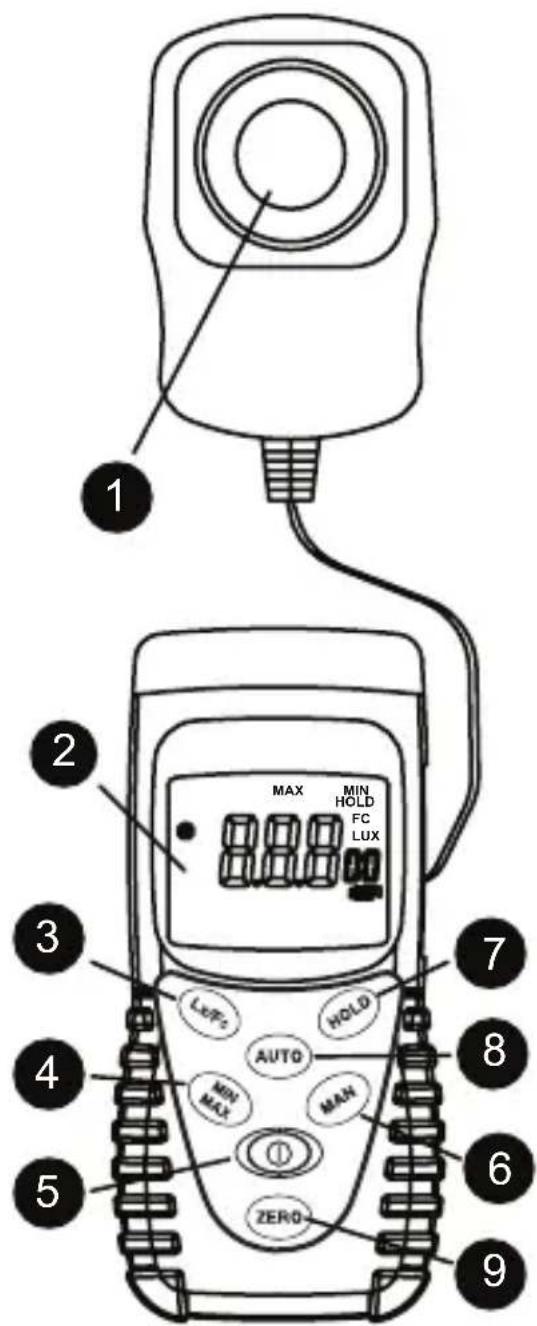
1 Light sensor
2 Display (LCD)
3 Lux / foot candles
4 MAX Lock up MIN and MAX value
5 Power Button: ON/OFF
6 Manual range selection
7 DATA HOLD button
8 AUTO ranging
9 Light sensor Zero Adjustment
CONTENTS
Symbols....5
Unpacking and Inspection 5
Introduction......6
Operation 6
Lx / Fc 6
Data Hold 6
AUTO / MAN Ranging....6
MIN/MAX 6
Auto-Power Off....6
Zero....6
Specifications 7
Maintenance and Repair 8
Battery Replacement 8
SYMBOLS
The following symbols are used on the Product and in this manual.
| Symbol Description | |
 | WARNING.RISK OF DANGER. |
 | Battery or battery compartment. |
 | Consult user documentation. |
 | Conforms to relevant South Korean EMC Standards. |
| [STKK] | Conforms to relevant Australian Safety and EMC standards. |
 | Conforms to European Union directives. |
 | This product complies with the WEEE Directive marking requirements. The affixed label indicates that you must not discard this electrical/electronic product in domestic household waste. Product Category: With reference to the equipment types in the WEEE Directive Annex I, this product is classed as category 9 “Monitoring and Control Instrumentation” product. Do not dispose of this product as unsorted municipal waste. |

Warning and Precautions
- Do not operate the meter in explosive gas (material), combustible gas (material) steam or filled with dust.
- The light sensor is calibrated to CIE standard incandescent lamp at 2854 °K and may give different readings for spectrums from other lamp types.
UNPACKING AND INSPECTION
Your shipping carton should include:
1 941 light meter
1 9 volt battery
1 Users Manual
If any of the items are damaged or missing, return the complete package to the place of purchase for an exchange.
INTRODUCTION
The 941 measures the visible light from fluorescent, metal halide, high-pressure sodium or incandescent sources.
One LUX (Lumen) is the illumination from a one candela lamp perpendicular to a surface one meter squared at a distance of one meter. One foot-candle (Fc) is the illumination from a one candela lamp perpendicular to a surface one foot squared at a distance of one foot.
OPERATION
- Press the Ⓐ button to turn power on or off
- Remove sensor cap and place the sensor perpendicular to the light.
- Select Illuminance scale and range for reading.
- When done testing, replace the sensor cover to protect the filter and sensor.
Lx / Fc
Illuminance scales. 1 foot-candle = 10.764 Lux and 1 lux = 0.09290 foot-candles.
Data Hold
Freezes the reading present on the LCD at the moment the button is pressed. Press HOLD again to disable Data Hold.
AUTO / MAN Ranging
Press the AUTO or MANual ranging button for useable reading. AUTO ranging is the default operation.
MIN/MAX
Pressing the MIN/MAX button for less than 1 second will put the meter into a mode of displaying the maximum, minimum, or actual readings. Each time the MIN/MAX button is pressed, the meter will cycle from MAX ▶ MIN ▶ off.
Select the proper measurement range before enabling the MIN/MAX feature.
Auto-Power Off
In order to save battery life, your light meter powers down automatically after approximately 6 minutes of inactivity. You can turn it back on by pressing the ① button. You can disable Auto Power Off by pressing and holding the HOLD button while turning the meter ON.
Zero
The light sensor will change the null point over time. To reset the null point, cover the sensor, press the ZERO button. The display will show "ADJ". When the null reset is done, the display will read '00.0'.
SPECIFICATIONS
General
Sampling Rate 2.5 times per second for digital display.
Display 3½ digit, 1999 count LCD
Sensor Silicon photodiode and filter.
Environment Indoor operation
Altitude Up to 2000m.
Temperature / Humidity
Operating -10 °C to 50 °C, 0 to 80 % RH.
Storage -10 °C to 50 °C, 0 to 70 % RH.
Power Supply 9V, IEC 6LR61
Battery life 200 hours
Auto Power Off approx 6 min
Dimension (Base) 130 x 63 x 38 mm (5.1 x 2.5 x 1.5")
Dimension (Sensor) 80 x 55 x 29 mm (3.2 x 2.2 x 1.1")
Weight 220 g (.48 lb.) include battery
Illumination
Measuring Range 20, 200, 2000, 20000, 200000 Lux
20, 200, 2000, 20000 Foot candles
Accuracy ± 3% (Calibrated to standard incandescent lamp at 2854°K)
± 6% other visible light sources
Angle deviation from cosine Characteristics
30^ ± 2%
60^ ± 6%
80^ ± 25%
Cosine Angular corrected per JIS C 1609:1993 and CNS 5119 general A class specifications.
Electromagnetic compatibility (EMC)
International IEC 61326-1:Portable; CISPR 11:Group 1, Class A.
Group1: Equipment has intentionally generated and/or uses conductively-coupled radio frequency energy that is necessary for the internal function of the equipment itself.
Class A: Equipment is suitable for use in all establishments other than domestic and those directly.
Korea (KCC) Class A Equipment (Industrial Broadcasting & Communication Equipment)
Class A: Equipment meets requirements for industrial electromagnetic wave equipment and the seller or user should take notice of it. This equipment is intended for use in business environments and not to be used in homes.
MAINTENANCE AND REPAIR
If there appears to be a malfunction during the operation of the meter, the following steps should be performed in order to isolate the cause of the problem.
- Check the battery. Replace the battery immediately when the symbol “-+” appears on the LCD.
- Review the operating instructions for possible mistakes in operating procedure.
Except for the replacement of the battery, repair of the meter should be performed only by a Factory Authorized Service Center or by other qualified instrument service personnel. The front panel and case can be cleaned with a mild solution of detergent and water. Apply sparingly with a soft cloth and allow to dry completely before using. Do not use aromatic hydrocarbons or chlorinated solvents for cleaning.
BATTERY REPLACEMENT
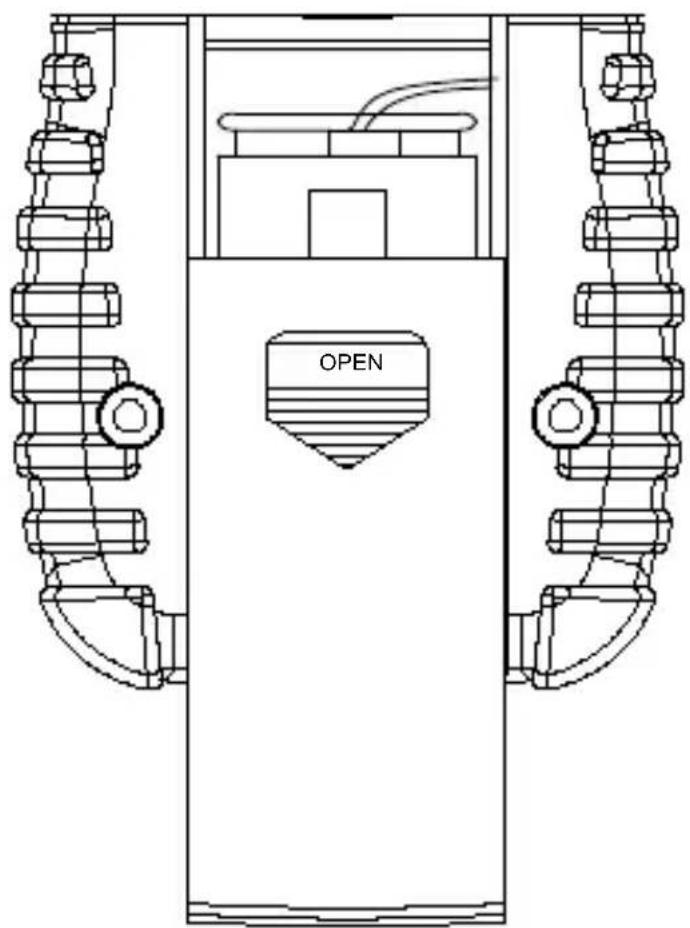
- Turn off the meter and slide out the battery cover. Replace the battery with a IEC 6LR61 9V alkaline battery. Replace the cover.
- Remove battery when the Fluke-941 is not used for extended period.
natural_image
Technical line drawing of a mechanical device with two vertical supports and a central labeled 'OPEN' (no other text or symbols)Battery Replacement
- LIMITED WARRANTY AND LIMITATION OF LIABILITY
- CONTENTS
- SYMBOLS
- Warning and Precautions
- UNPACKING AND INSPECTION
- INTRODUCTION
- OPERATION
- Lx / Fc
- Data Hold
- AUTO / MAN Ranging
- MIN/MAX
- Auto-Power Off
- Zero
- SPECIFICATIONS
- General
- Illumination
- Electromagnetic compatibility (EMC)
- MAINTENANCE AND REPAIR
- BATTERY REPLACEMENT
Brand : FLUKE
Model : 941
Category : Measurement