
SC6243 - Vacuum Cleaner SAMSUNG - Free user manual and instructions
Find the device manual for free SC6243 SAMSUNG in PDF.


| Product Type | Canister Vacuum Cleaner |
| Model | SC6243 |
| Brand | Samsung |
| Power Consumption | 1600 W |
| Dust Capacity | 4.5 L |
| Type of Dust Collection | Bagged |
| Filtration System | HEPA Washable Filter |
| Cord Length | 8 m |
| Cleaning Radius | 10 m |
| Noise Level | 80 dB(A) |
| Weight (Canister) | 4.2 kg |
| Weight (Total with accessories) | 5.8 kg |
| Dimensions (Canister) | 400 x 280 x 250 mm |
| Attachments Included | Floor nozzle, crevice tool, upholstery brush, dusting brush |
| Wand Material | Metal |
| Variable Power Control | Yes |
| Automatic Cord Rewind | Yes |
| Wheels | 4 swivel wheels |
| Handle Grip | Ergonomic |
| Bag Type | Samsung VCA-SAE95 or equivalent |
| CE Marking | Yes |
| Energy Class | A |
| Operating Voltage | 220-240 V, 50/60 Hz |
| Color | Red / Dark Gray |
Frequently Asked Questions - SC6243 SAMSUNG
User questions about SC6243 SAMSUNG
0 question about this device. Answer the ones you know or ask your own.
Ask a new question about this device
Download the instructions for your Vacuum Cleaner in PDF format for free! Find your manual SC6243 - SAMSUNG and take your electronic device back in hand. On this page are published all the documents necessary for the use of your device. SC6243 by SAMSUNG.
USER MANUAL SC6243 SAMSUNG
Vacuum Cleaner user manual
* Before operating this unit, please read the instructions carefully.
* For indoor use only.
English
imagine the possibilities
Thank you for purchasing a Samsung product.
To receive a more complete service,
please register your product at
www.samsung.com/register
safety information
SAFETY INFORMATION

- Before operating the appliance, please read this manual thoroughly and retain it for your reference.

- Because these following operating instructions cover various models, the characteristics of your vacuum cleaner may differ slightly from those described in this manual.
CAUTION/WARNING SYMBOLS USED
| WARNING | Indicates that a danger of death or serious injury exists. |
| CAUTION | Indicates that a risk of personal injury or material damage exists. |
OTHER SYMBOLS USED
| Represents something you must NOT do. | |
| Represents something you must NOT disassemble. | |
| Represents something you must NOT touch. | |
| Represents something you must follow. | |
| Indicates that you must disconnect the power plug from the socket. | |
| Represents a ground is needed to prevent electric shock. | |
| It is recommended that this symbol be handled by service man. |
IMPORTANT SAFEGUARDS
- Read all instructions carefully. Before switching on, make sure that the voltage of your electricity supply is the same as that indicated on the rating plate on the bottom of the cleaner.
- WARNING: Do not use the vacuum cleaner when rug or floor is wet. Do not use to suck up water.
- Close supervision is necessary when any appliance is used by or near children. Do not allow the vacuum cleaner to be used as a toy. Do not allow the vacuum cleaner to run unattended at any time. Use the vacuum cleaner only for its intended use as described in these instructions.
- Do not use the vacuum cleaner without a dust bag. Change the dust bag before it is full in order to maintain the best efficiency.
- Do not use the vacuum cleaner to pick up matches, live ashes or cigarette butts. Keep the vacuum cleaner away from stoves and other heat sources. Heat can deform and discolour the plastic parts of the unit.
- Avoid picking up hard, sharp objects with the vacuum cleaner as they may damage the cleaner parts. Do not stand on the hose assembly. Do not put weight on the hose. Do not block the suction or the exhaust port.
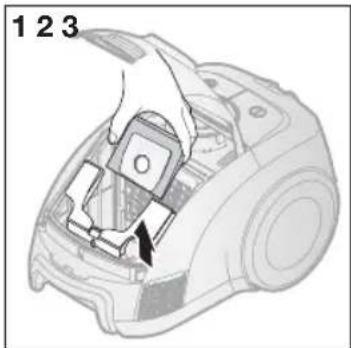
- Switch the vacuum cleaner off on the body of the machine before unplugging from the electrical outlet. Disconnect the plug from the electrical outlet before changing the dust bag or dust container. To avoid damage, please remove the plug by grasping the plug itself, not by pulling on the cord.
- This appliance is not intended for use by persons (including children) with reduced physical, sensory or mental capabilities, or lack of experience and knowledge, unless they have been given supervision or instruction concerning use of the appliance by a person responsible for their safety. Children should be supervised to ensure that they do not play with the appliance.
- The plug must be removed from the socket outlet before cleaning or maintaining the appliance.
- The use of an extension cord is not recommended.
- If your vacuum cleaner is not operating correctly, switch off the power supply and consult an authorized service agent.
- If the supply cord is damaged, it must be replaced by the manufacturer or its service agent or a similarly qualified person in order to avoid a hazard.
- Don't carry the vacuum cleaner by holding the hose. Use the handle on the vacuum cleaner set.
- Unplug the cleaner when not in use. Turn off the power switch before unplugging.
Assembling The CleANeR

05 Assembling the Cleaner
OpeRATING The CleANeR

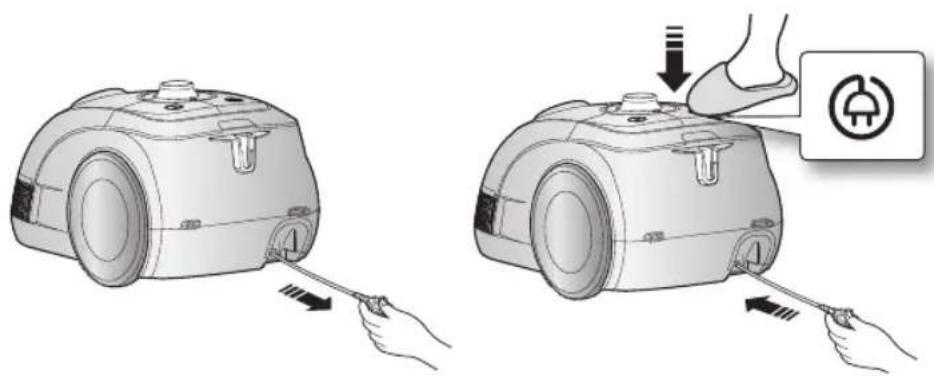
06 Power cord
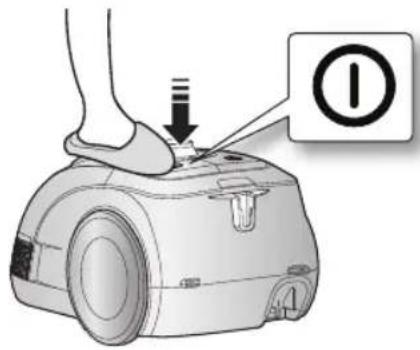
06 On/Off Switch
06 Power control
mAINTAIN TOOIs AND fllTeR

07 Using accessory
08 Maintain floor tools
09 Check filter indicator
10 Changing the dust bag
10 Cleaning inlet filter
10 Cleaning outlet filter
TROUbleshOOTING
11
assembling the cleaner
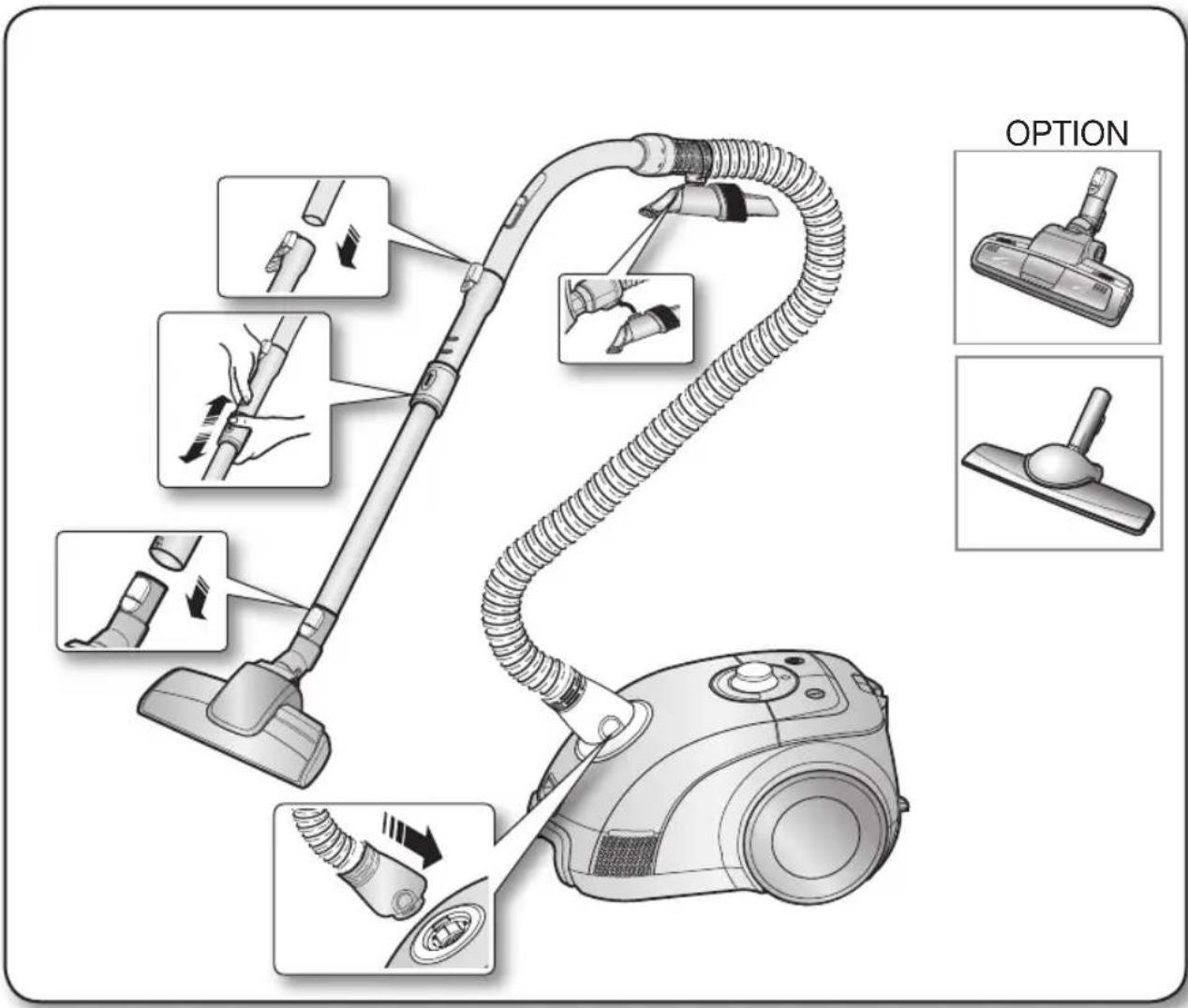

- Features may vary according to model. Refer to 5,6 page.
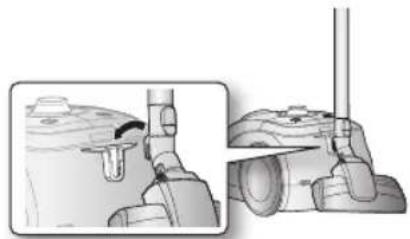
natural_image
Mechanical assembly diagram showing two views of a device with no visible text or symbols
- For storage, park the floor nozzle.
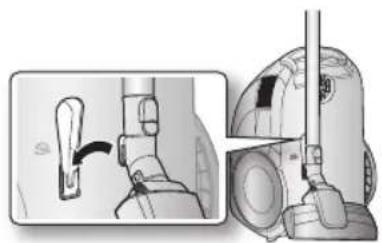
natural_image
Diagram showing a hand operating a valve mechanism, with no visible text or symbolsoperating the cleaner
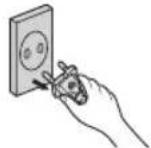
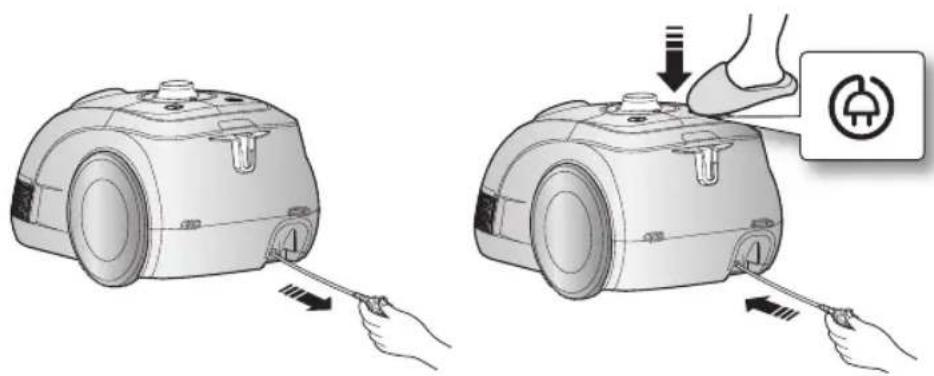
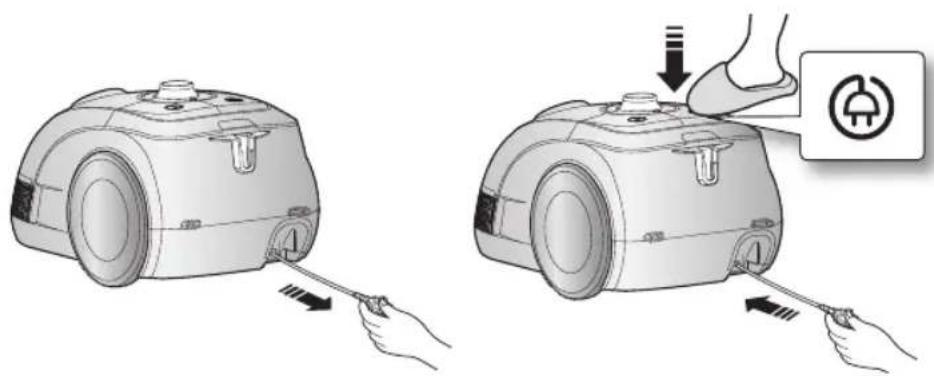
POwER cORD
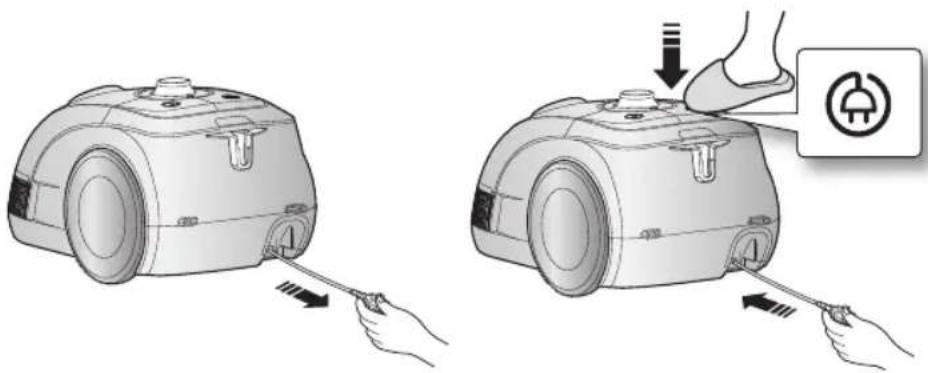

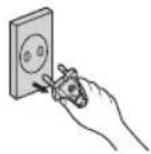
- When removing the plug from the electrical outlet, grasp the plug, not the cord.
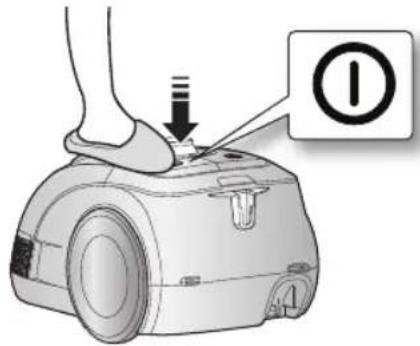
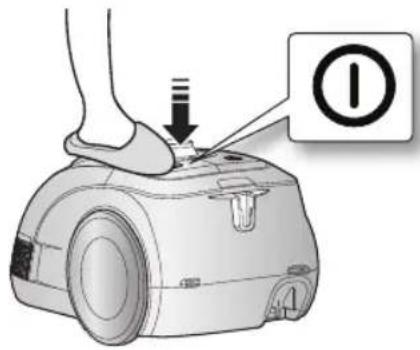
ON/OFF SwITch
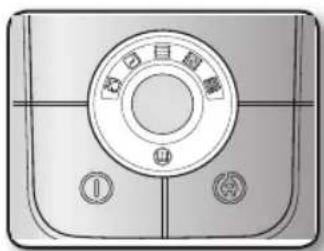
POwER cONTROI
Body-control type
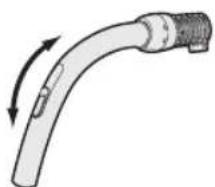
- hOse
To reduce suction for leaning draperies, small rugs, and other light fabrics, pull the tap air until the hole is open
natural_image
Diagram of a curved mechanical component with directional arrows indicating motion (no text or symbols)- bOdY
To control power level, just slide the power control bottom right and left.
Off = For stopping the vacuum cleaner.
max = For hard floors and heavily soiled carpets.
6\_ operating the cleaner
maintain tools and filter
USING AccESSORY
Accessory
- Push the accessory on to the end of the hose handle
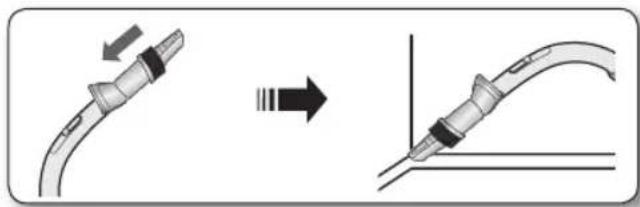
natural_image
Diagram showing a cable being inserted into a connector, with an arrow indicating the process (no text or symbols present)- Pull out and turn the dusting brush for cleaning delicate areas.
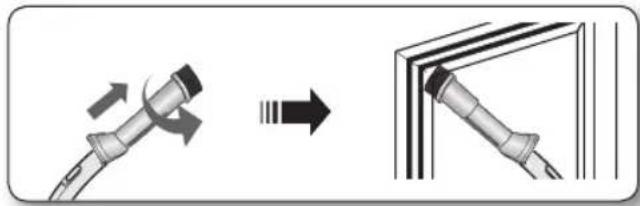
natural_image
Diagram showing a cable being folded into a panel, with arrows indicating direction (no text or symbols present)- To use the upholstery tool, push the accessory on to the end of the hose handle in the opposite direction.
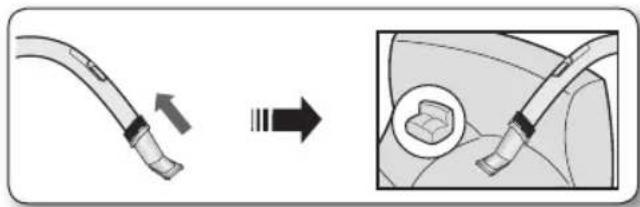
natural_image
Diagram showing a cable being inserted into a car body, with an arrow indicating the process (no text or symbols present)Pipe
- Adjust the length of the telescopic pipe by sliding the length control button located in the center of the telescopic pipe back and forth.
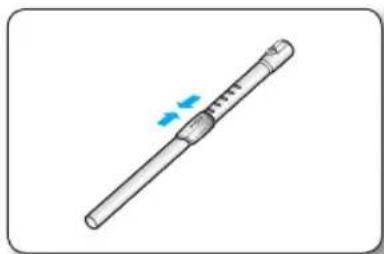
natural_image
Illustration of a cylindrical tool with a blue arrow indicating motion or force (no text or symbols)- To check for blockages, separate the telescopic pipe and adjust to shorten. This allows for easier removal of waste clogging the tube.
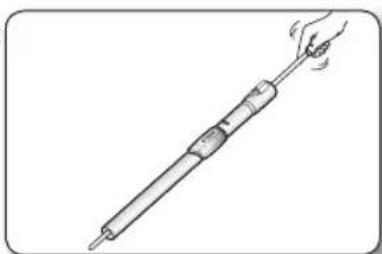
natural_image
Line drawing of a hand holding a pen-like tool with a handle, no text or symbols presentmaintain tools and filter
MAINTAIN FLOOR TOOLS
3Way Brush
- Adjust the inlet lever according to the floor surface.
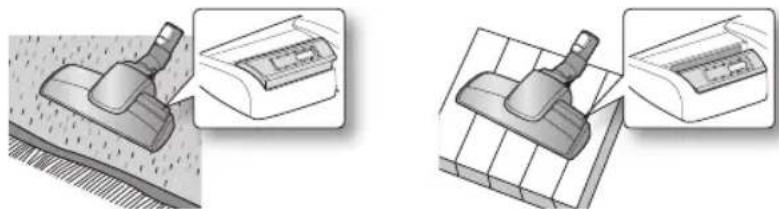
Carpet Cleaning Floor Cleaning
- Remove waste matter completely if the inlet is blocked.
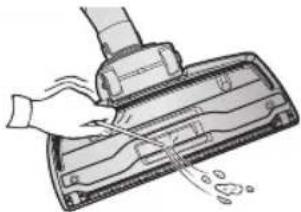
natural_image
Illustration of a hand using a vacuum cleaner to clean or store items (no text or symbols visible)Power Turbo Plus (Option)
For improved pick-up of pet hair and fibre on carpets.
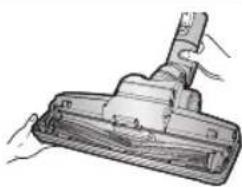
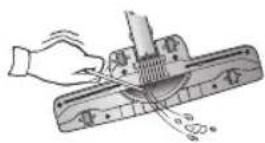
Frequent vacuuming of hair or pet fur may cause a falling-off of the rotation due to matters tangled around the drum. In this case, clean the drum with care.
- Push the Open button on the transparent screen cover to separate the cover.
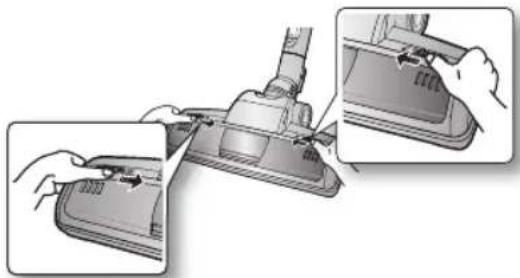
natural_image
Illustration of a robotic vacuum cleaner with hand positioning and close-up views (no text or symbols)- Remove the brushbar from the transparent screen.
natural_image
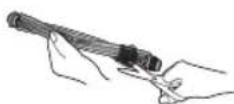
Illustration of a hand holding a vacuum cleaner in a container (no text or symbols visible)- Remove waste matter such as dust and hair tangled around the brushbar using scissors.
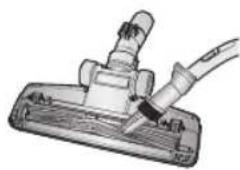
- Remove dust inside the brush housing using a dry duster or crevice tool.
natural_image
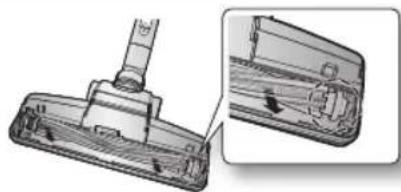
Illustration of a mechanical clamp or clamp assembly with a wire and connector (no text or symbols visible)- Insert brushbar into rotating belt and assemble.
natural_image
Technical illustration of a mechanical component with a close-up view showing internal structure (no text or symbols)- Click the transparent screen cover back into place to reassemble.
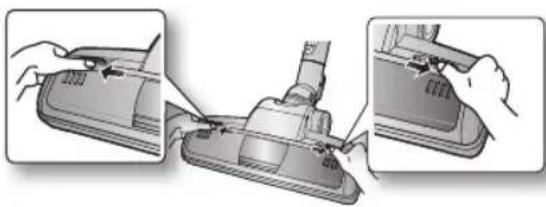
natural_image
Illustration of a vacuum cleaner being adjusted for installation, showing three steps (no text or symbols present)Parquet brush (Option)
Vacuum dust in wide area at once
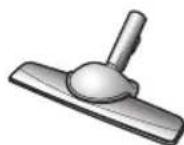
- Remove waste matter completely if the inlet is blocked.
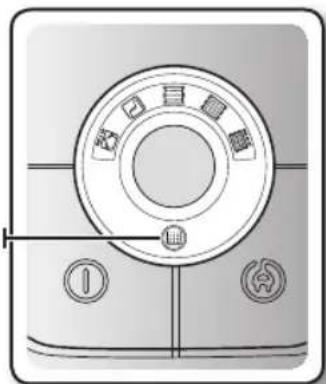
DUST FUI INDICATOR
Body-Control Type
When the "DUST FULL LAMP" light comes on, please change the DUST BAG as shown in the following illustrations.
DUST FUII IAMP
natural_image
Front view of a circular mechanical device with control buttons and a dial (no text or symbols visible)maintain tools and filter
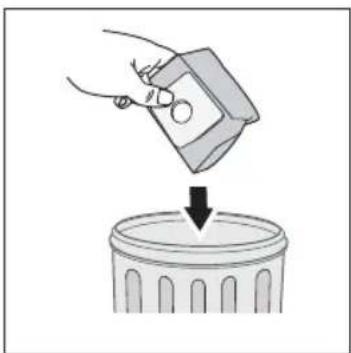
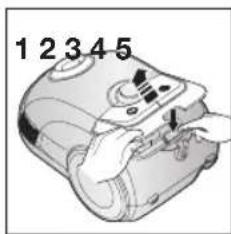
chANGING The DUST BAG
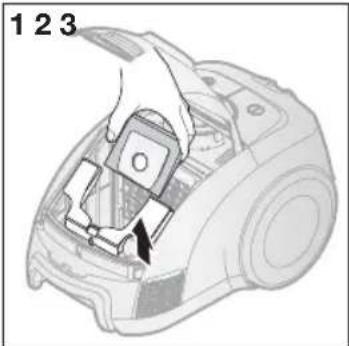
natural_image
Illustration of a hand inserting a device into a device casing, labeled with numbers 1 and 3 (no text or symbols on the device itself)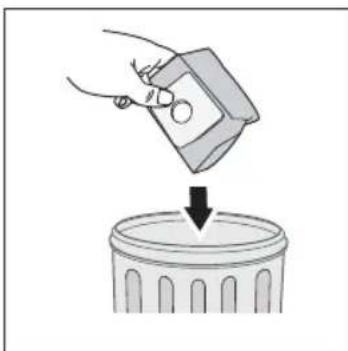
natural_image
Illustration of a hand pouring liquid into a trash bin (no text or symbols)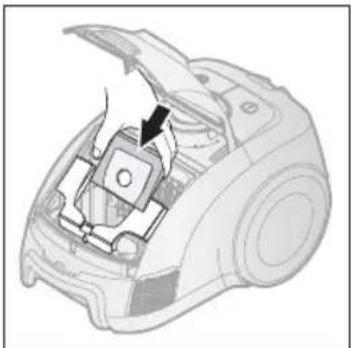
natural_image
Diagram of a device interior showing a switch mechanism (no text or symbols present)
A used dust bag can be sealed by removing the paper from the adhesive strip and sealing the strip over the hole.
OpTIONAI
- For Cloth Bag
After using, if the cloth bag is full of dust, clean the cloth bag and use it again.
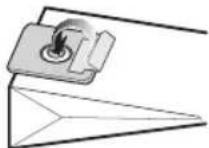

You can purchase dust bags in the shops where you bought this vacuum cleaner. Micro bag or paper bag both can be used as you prefer(Micro-bag:VP-78M, Paper-bag:VP-90)
cLEANING INIET FIITER
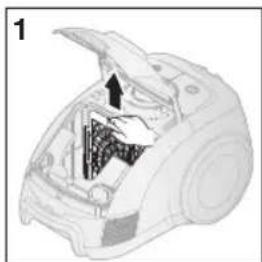
natural_image
Diagram of a car interior showing internal components and an open lid (no text or symbols)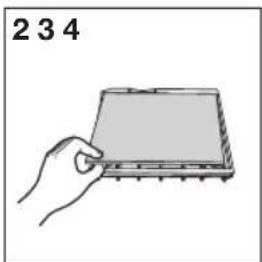
natural_image
Hand holding a rectangular electronic component, labeled '234' (no other text or symbols)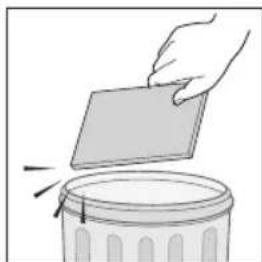
natural_image
Illustration of a hand placing a blank sheet into a trash can (no text or symbols)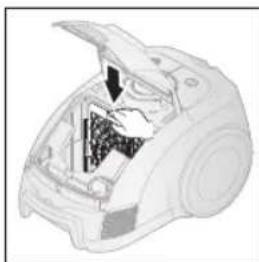
natural_image
Cutaway illustration of a device showing internal components (no text or symbols)
Don't throw away the filter.
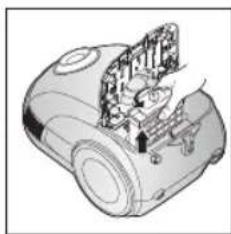
cLEANING OUTIET FILTER
SILVER NANO HEPAH18 (Option)
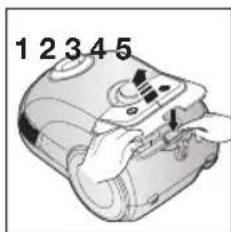
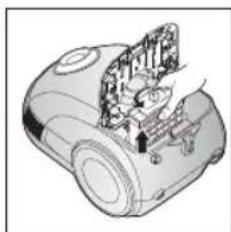
natural_image
Technical illustration of a mechanical device with internal components (no text or symbols)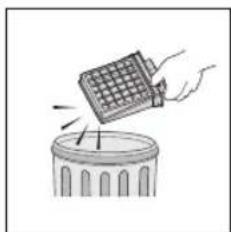
natural_image
Illustration of a hand holding a grid-patterned object above a trash can (no text or symbols)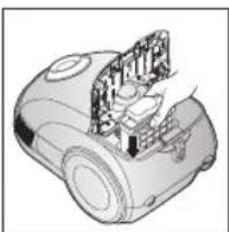
natural_image
Technical illustration of a mechanical device with internal components (no text or symbols)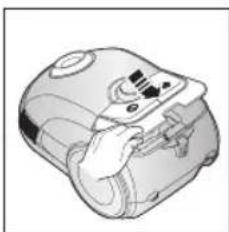
natural_image
Illustration of a hand holding a device with a screen and buttons (no text or symbols visible)
- When the Assy Panel Control is pulled up very strongly, it is possible the Assy Panel Control is separated for the safety of the product. In this case, just reassemble the Assy Panel Control. This is not a malfunction.
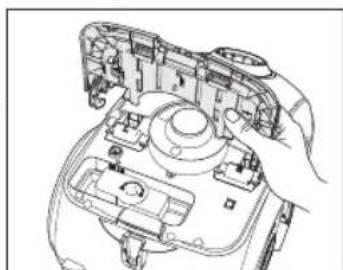
natural_image
Line drawing of a hand holding a device with internal components (no text or symbols)troubleshooting
| PROBLEM SOLUTION | |
| Motor dows not start. | Check cable, pulg and socket.Leave to cool. |
| Suction force is gradually decreasing. | Check for blockage and remove. |
| Cord does not rewind fully. | Pull the cord out 2-3m and push down the cord rewind button. |
| Vacuum cleaner dows not pick up dirt. | Check hose and replace if required. |
| Low or decreasing suction | Please check filter and, if required, clean as illustrated in the instructions. |
This Vacuum cleaner is approved the following.
Electromagnetic Compatibility Directive : 2004/108/EEC
Low Voltage Directive : 2006/95/EC
SAMSUNG

natural_image
Technical illustration of a mechanical component with two views (top and side), no visible text or symbols
natural_image
Diagram showing a hand operating a vacuum cleaner with a close-up view of the device (no text or symbols present)använda dammsugaren
NäTkABEI

EFFEkTkONTROII
Kontrolltyp
- dAmmsUGARsLANG
natural_image
Diagram of a curved mechanical component with directional arrows indicating motion (no text or symbols)-hUVUdeNheT
natural_image
Diagram showing a cable being inserted into a connector, with an arrow indicating the process (no text or symbols present)natural_image
Diagram showing a cable being folded into a panel, with arrows indicating direction (no text or symbols)natural_image
Diagram showing a cable being inserted into a car body, with an arrow indicating the process (no text or symbols present)Rör
natural_image
Illustration of a cylindrical tool with a handle and a blue arrow indicating direction (no text or symbols)natural_image
Line drawing of a hand holding a soldering iron with a handle (no text or symbols)natural_image
Illustration of a cleaning tool on a textured surface with an inset showing a close-up of the tool (no text or symbols present)Mattrengöring Golvrengöring
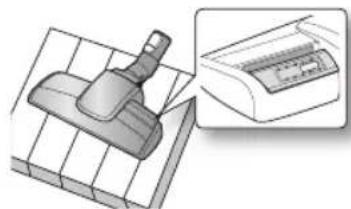
natural_image
Illustration of a mechanical clamp device on a grid base, with an inset showing a close-up of its internal component (no text or symbols present)natural_image
Illustration of a hand using a vacuum cleaner to clean or store items (no text or symbols visible)Power Turbo Plus (tillval)
natural_image
Illustration of a robotic vacuum cleaner with hand positioning and close-up views (no text or symbols)natural_image
Illustration of a hand holding a vacuum cleaner in a container (no text or symbols visible)natural_image
Illustration of a mechanical clamp or tool with a cable inserted, no visible text or symbolsnatural_image
Technical illustration of a mechanical component with a side view showing internal structure (no text or symbols)natural_image
Illustration of a hand holding a vacuum cleaner with a close-up view of the component being inserted (no text or symbols present)Parquet brush(tillval)
natural_image
Front view of a circular mechanical device with control buttons and a dial (no text or symbols visible)natural_image
Illustration of a hand inserting a component into a device casing (no text or symbols visible)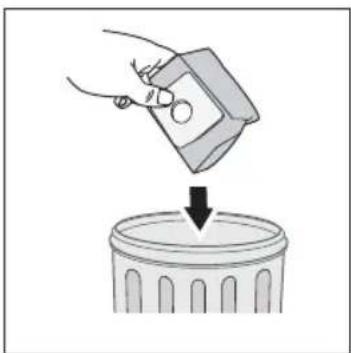
natural_image
Illustration of a hand pouring liquid into a trash bin (no text or symbols)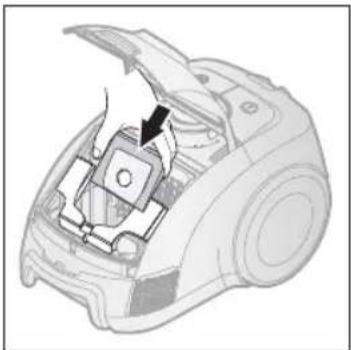
natural_image
Diagram of a device interior showing a switch and belt mechanism (no text or symbols)
natural_image
Diagram of a car engine compartment showing internal components and airflow path (no text or labels)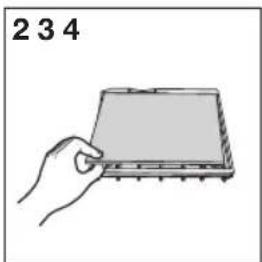
natural_image
Hand holding a rectangular electronic component with pins, labeled '234' (no other text or symbols)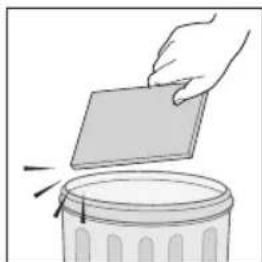
natural_image
Illustration of a hand placing a blank sheet into a trash can (no text or symbols)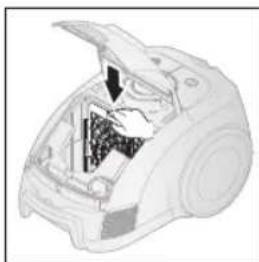
natural_image
Cross-sectional diagram of a vacuum cleaner internal structure (no text or labels)
natural_image
Technical illustration of a mechanical device with internal components (no text or symbols)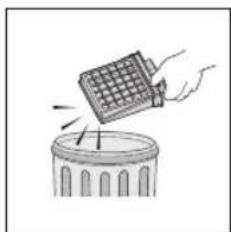
natural_image
Illustration of a hand holding a grid-patterned object above a trash can (no text or symbols)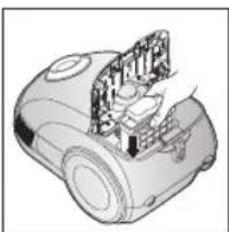
natural_image
Technical illustration of a mechanical device with internal components (no text or symbols)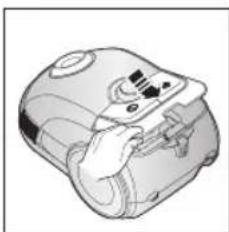
natural_image
Illustration of a hand holding a device with a screen and buttons (no text or symbols visible)
natural_image
Line drawing of a hand holding a device with internal components (no text or symbols)Felsökning
06 TÆND/SLUK knap (on/off)
06 Strømstyring
VedllGehOldelse Af Tllbeh∅R OG fllTeR

natural_image
Mechanical assembly diagram showing two views of a device with no visible text or symbols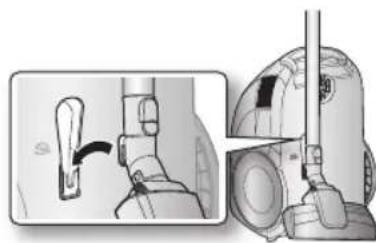
natural_image
Illustration of a hand holding a device with a close-up view showing the mechanism (no text or symbols present)
TÆND/SIUk kNAP (ON/OFF)
STRøMSTYRING
Enhedskontroltype
- SLANGE
natural_image
Diagram of a curved mechanical or electrical component with directional arrows indicating motion (no text or symbols)- ENHEDEN
natural_image
Diagram showing a cable being inserted into a connector, with an arrow indicating the process (no text or symbols present)natural_image
Diagram showing a cable being folded into a panel, with arrows indicating direction (no text or symbols)natural_image
Diagram showing a cable being inserted into a car's seat, with an arrow indicating the process (no text or symbols present)Rør
natural_image
Illustration of a cylindrical tool with a blue arrow indicating motion or force (no text or symbols)natural_image
Line drawing of a hand holding a cylindrical tool with a handle, emitting motion lines (no text or symbols)natural_image
Illustration of a hairdryer tool applying material to a surface, showing three stages: application, cleaning, and packaging (no text or symbols present)natural_image
Illustration of a hand using a vacuum cleaner to clean or store items (no text or symbols visible)Power Turbo Plus (valgfri)
natural_image
Illustration of a robotic vacuum cleaner with hand positioning and close-up views (no text or symbols)natural_image
Illustration of a hand holding a vacuum cleaner in a container (no text or symbols visible)natural_image
Mechanical component diagram showing a tool interacting with a base plate (no text or symbols visible)natural_image
Technical illustration of a mechanical component with a pin inserted, shown from two views (no text or symbols present)natural_image
Illustration of a vacuum cleaner's lid and base being adjusted for installation (no text or symbols)Parquet brush (valgfri)
natural_image
Front view of a circular mechanical device with control buttons and a dial (no text or symbols visible)SÅDAN UDSkIFTER DU STøVSUGERPOSE
natural_image
Illustration of a hand pouring liquid into a trash bin (no text or symbols)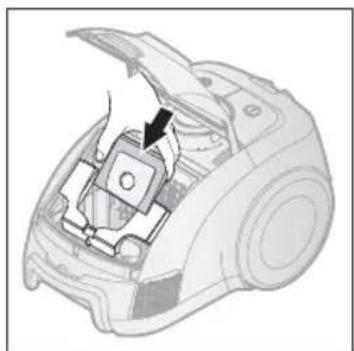
natural_image
Diagram of a device interior showing a component being inserted into a housing (no text or symbols visible)
natural_image
Diagram of a car engine compartment showing internal components and airflow path (no text or labels)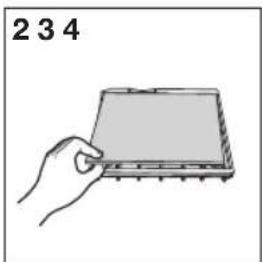
natural_image
Hand holding a rectangular electronic component with pins, labeled '234' (no other text or symbols)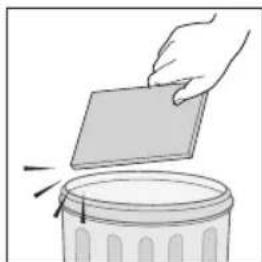
natural_image
Illustration of a hand placing a blank sheet into a trash can (no text or symbols)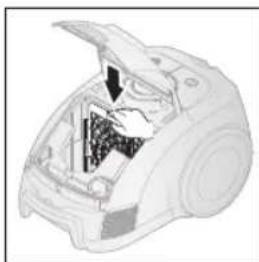
natural_image
Cross-sectional diagram of a vacuum cleaner internal structure (no text or labels)
natural_image
Technical illustration of a mechanical device with internal components (no text or symbols)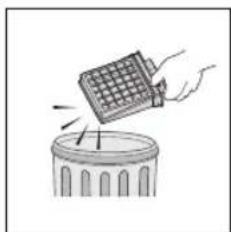
natural_image
Illustration of a hand holding a grid-patterned object above a trash can (no text or symbols)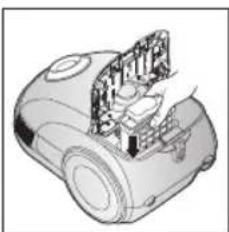
natural_image
Technical illustration of a mechanical device with internal components (no text or symbols)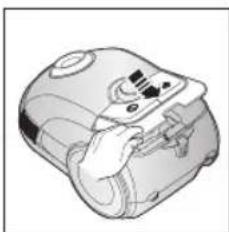
natural_image
Illustration of a hand holding a device with a screen and buttons (no text or symbols visible)
natural_image
Line drawing of a hand holding a device with internal components (no text or symbols)Fejlfinding
natural_image
Mechanical assembly diagram showing two views of a device with no visible text or symbols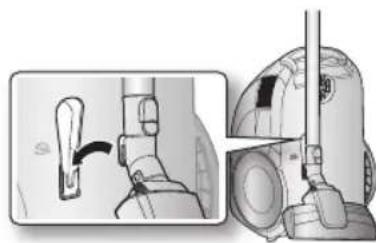
natural_image
Illustration of a hand holding a device with a close-up view showing the mechanism (no text or symbols present)bruke støvsugeren
STR∅MIEDNING

- Når du trekker strømstøpselet ut av veggkontakten skal du gripe i støpselet, ikke i ledningen.
PÅ/AV-BRYTER
EFFEkTkONTROII
Kabinettkontroll-type
- sIANGE
natural_image
Diagram of a curved mechanical component with directional arrows indicating motion (no text or symbols)- KAbINeTT
natural_image
Diagram showing a cable being inserted into a connector, with an arrow indicating the process (no text or symbols present)natural_image
Diagram showing a cable being folded into a panel, with arrows indicating direction (no text or symbols present)natural_image
Diagram showing a cable being inserted into a car body, with an arrow indicating the process (no text or symbols present)Rør
natural_image
Illustration of a cylindrical tool with a blue arrow indicating motion or force (no text or symbols)natural_image
Line drawing of a hand holding a cylindrical tool with a handle, emitting vapor or smoke (no text or symbols)VEDLIKEHOLDE TILBEH∅R FOR GULV
3Way Brush
natural_image
Illustration of a hand using a vacuum cleaner to clean or store items (no text or symbols visible)Power Turbo Plus (tilleggsutstyr)
natural_image
Illustration of a robotic vacuum cleaner with hand positioning and close-up views (no text or symbols)natural_image
Illustration of a hand holding a vacuum cleaner in a container (no text or symbols visible)natural_image
Illustration of a mechanical clamp or clip assembly with a cable (no text or symbols visible)natural_image
Technical illustration of a mechanical component with an inset view showing internal structure (no text or symbols)natural_image
Illustration of a hand operating a vacuum cleaner with two close-up views showing the process (no text or symbols present)Parquet brush (tilleggsutstyr)
natural_image
Front view of a circular device with control buttons and a dial (no text or symbols visible)natural_image
Illustration of a hand pouring liquid into a trash bin (no text or symbols)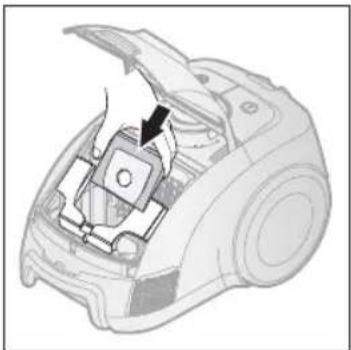
natural_image
Diagram of a device interior showing a switch and belt mechanism (no text or symbols)
En brukt støvpose kan forsegles ved å fjerne papiret fra den klebrige stripen og forsegle hullet med stripen.
TllleGGsUTsTYR
- Tekstilstøvpose
natural_image
Diagram of a car engine compartment showing internal components and airflow path (no text or labels)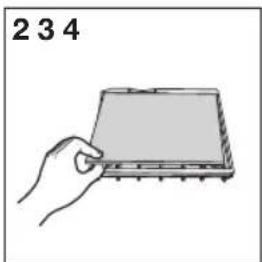
natural_image
Hand holding a rectangular electronic component with pins, labeled '234' (no other text or symbols)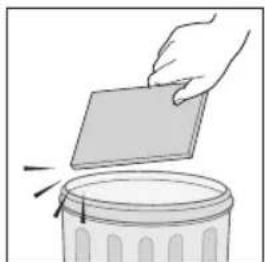
natural_image
Illustration of a hand placing a blank sheet into a trash bin (no text or symbols)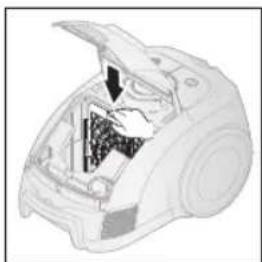
natural_image
Cross-sectional diagram of a vacuum cleaner showing internal components (no text or labels)
Ikke kast filteret.
RENGjøRE UTFIITERET
SILVER NANO HEPAH18 (tilleggsutstyr)
natural_image
Illustration of a robotic vacuum cleaner with internal components (no text or symbols)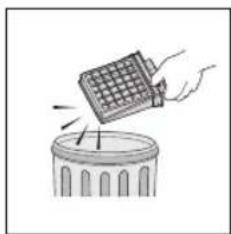
natural_image
Illustration of a hand using a grid-based tool to lift a trash can (no text or symbols present)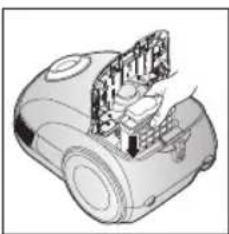
natural_image
Technical illustration of a mechanical device with internal components (no text or symbols)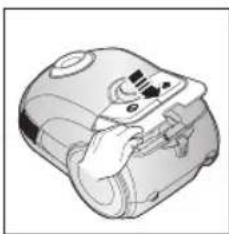
natural_image
Illustration of a hand holding a device with a screen and buttons (no text or symbols visible)
natural_image
Line drawing of a hand holding a camera module with visible wiring and components (no text or symbols)
natural_image
Mechanical assembly diagram showing two views of a device with no visible text or symbols
natural_image
Illustration of a hand holding a device with a close-up view showing the mechanism (no text or symbols present)imurin käyttö
VIRTAjOhTO

TEhON SääTÖ
Runko-ohjaintyyppi
- leTKU
natural_image
Diagram of a curved pipe with directional arrows indicating motion (no text or symbols)- RUNKO
natural_image
Diagram showing a cable being inserted into a connector, with an arrow indicating the process (no text or symbols present)natural_image
Diagram showing a cable being folded into a panel, with arrows indicating direction (no text or symbols present)natural_image
Diagram showing a cable being inserted into a car body, with an arrow indicating the process (no text or symbols present)Putki
natural_image
Illustration of a cylindrical tool with a blue arrow indicating motion or force (no text or symbols)natural_image
Line drawing of a hand holding a cylindrical tool with a handle, emitting motion lines (no text or symbols)natural_image
Illustration of a spray gun on a textured surface with an inset showing a device (no text or symbols present)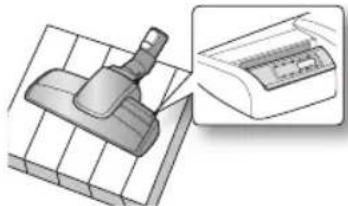
natural_image
Illustration of a mechanical component with a tool and a close-up view of its internal structure (no text or symbols)Mattojen imurointi lattian imurointi
natural_image
Illustration of a hand using a vacuum cleaner to clean or store items (no text or symbols visible)Power Turbo Plus (valinnainen)
natural_image
Illustration of a robotic vacuum cleaner with hand positioning and close-up views (no text or symbols)natural_image
Illustration of a hand holding a vacuum cleaner in a container (no text or symbols visible)natural_image
Illustration of a mechanical clamp or bracket with a cable inserted (no text or symbols)natural_image
Technical illustration of a mechanical component with a close-up view showing internal structure (no text or symbols)natural_image
Illustration of a hand operating a vacuum cleaner with a tool, shown in two different states (no text or symbols present)Parquet brush (valinnainen)
natural_image
Top-down view of a camera control panel with no visible text or symbolsnatural_image
Illustration of a hand pouring liquid into a trash bin (no text or symbols)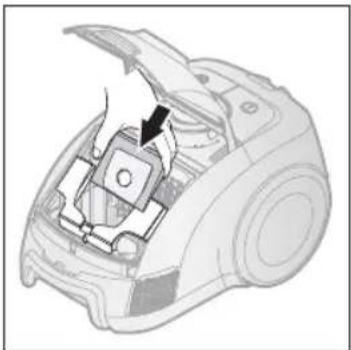
natural_image
Diagram of a device interior showing a switch and belt mechanism (no text or symbols)
natural_image
Diagram of a car engine compartment showing internal components and airflow path (no text or labels)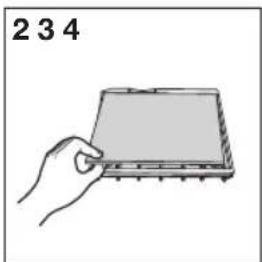
natural_image
Hand holding a rectangular electronic component with pins, labeled '234' (no other text or symbols)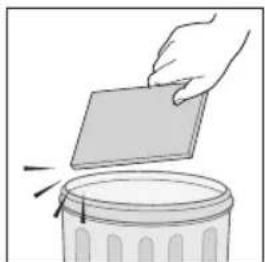
natural_image
Illustration of a hand placing a blank sheet into a trash bin (no text or symbols)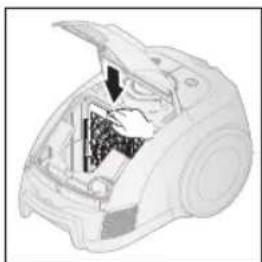
natural_image
Cross-sectional diagram of a vacuum cleaner showing internal components (no text or labels)
natural_image
Technical illustration of a mechanical device with internal components (no text or symbols)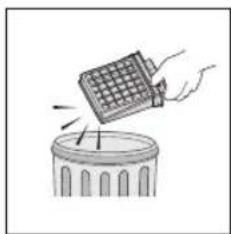
natural_image
Illustration of a hand using a grid-based tool to lift a trash can (no text or symbols present)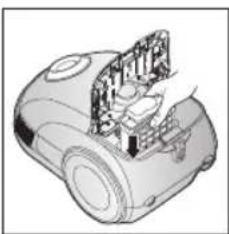
natural_image
Technical illustration of a mechanical device with internal components (no text or symbols)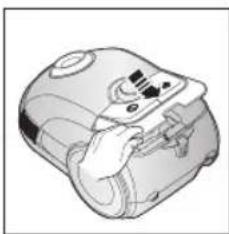
natural_image
Illustration of a hand holding a device with a screen and buttons (no text or symbols visible)
natural_image
Line drawing of a hand holding a camera module with visible internal components (no text or symbols)- Vacuum Cleaner user manual
- imagine the possibilities
- safety information
- IMPORTANT SAFEGUARDS
- Assembling The CleANeR
- OpeRATING The CleANeR
- mAINTAIN TOOIs AND fllTeR
- TROUbleshOOTING
- POwER cORD
- ON/OFF SwITch
- POwER cONTROI
- Body-control type
- 6\_ operating the cleaner
- maintain tools and filter
- USING AccESSORY
- Accessory
- Pipe
- MAINTAIN FLOOR TOOLS
- 3Way Brush
- Power Turbo Plus (Option)
- Parquet brush (Option)
- DUST FUI INDICATOR
- chANGING The DUST BAG
- OpTIONAI
- cLEANING INIET FIITER
- cLEANING OUTIET FILTER
- SILVER NANO HEPAH18 (Option)
- använda dammsugaren
- NäTkABEI
- EFFEkTkONTROII
- Kontrolltyp
- - dAmmsUGARsLANG
- -hUVUdeNheT
- Rör
- Power Turbo Plus (tillval)
- Parquet brush(tillval)
- Felsökning
- VedllGehOldelse Af Tllbeh∅R OG fllTeR
- TÆND/SIUk kNAP (ON/OFF)
- STRøMSTYRING
- Enhedskontroltype
- - SLANGE
- - ENHEDEN
- Rør
- Power Turbo Plus (valgfri)
- Parquet brush (valgfri)
- SÅDAN UDSkIFTER DU STøVSUGERPOSE
- Fejlfinding
- bruke støvsugeren
- STR∅MIEDNING
- PÅ/AV-BRYTER
- VEDLIKEHOLDE TILBEH∅R FOR GULV
- Power Turbo Plus (tilleggsutstyr)
- Parquet brush (tilleggsutstyr)
- TllleGGsUTsTYR
- RENGjøRE UTFIITERET
- imurin käyttö
- VIRTAjOhTO
- TEhON SääTÖ
- Putki
- Power Turbo Plus (valinnainen)
- Parquet brush (valinnainen)
Brand : SAMSUNG
Model : SC6243
Category : Vacuum Cleaner