
GXM 51 - GPS accessory GARMIN - Free user manual and instructions
Find the device manual for free GXM 51 GARMIN in PDF.


| Product Type | XM Satellite Weather and Radio Antenna for NMEA 2000 |
| Dimensions | 3.6 in. (91.6 mm) diameter x 1.9 in. (49.5 mm) high |
| Weight | 7.1 oz. (201 g) |
| Power Input | 9-16 Vdc unregulated; 137 mA at 12 Vdc |
| NMEA 2000 Load Equivalency Number (LEN) | 5 (250 mA) |
| Cable Length | 19 ft. 8 in. (6 m) NMEA 2000/audio cable |
| Temperature Range | -22°F to 176°F (-30°C to 80°C) |
| Case Material | Fully gasketed, high-impact plastic alloy |
| Waterproof Rating | IEC 529 IPX7 |
| Mounting Options | Surface-mount, pole-mount (1 in. OD pipe thread), under-deck (fiberglass only) |
| Main Functions | Receives XM WX Satellite Weather and XM Satellite Radio, integrates with NMEA 2000 network |
| Compatible Chartplotters | Garmin NMEA 2000-compatible chartplotters (e.g., GPSMAP 4/5000 series with software v5.0 or later) |
| Subscription Required | Yes, XM Satellite Radio and XM WX Weather subscription |
| Certification | NMEA 2000 certified, FCC Part 15 Class B |
| Included Accessories | Surface-mount bracket, pole-mount bracket, under-deck mount bracket, mounting hardware, NMEA 2000 T-connector, audio adapter cable |
| Safety | Wear safety goggles when installing; weather data not for safety-critical decisions |
| Maintenance | Keep antenna clean; ensure unobstructed sky view; avoid EMI sources |
| Spare Parts Availability | Contact Garmin dealer or visit www.garmin.com for accessories |
Frequently Asked Questions - GXM 51 GARMIN
User questions about GXM 51 GARMIN
0 question about this device. Answer the ones you know or ask your own.
Ask a new question about this device
Download the instructions for your GPS accessory in PDF format for free! Find your manual GXM 51 - GARMIN and take your electronic device back in hand. On this page are published all the documents necessary for the use of your device. GXM 51 by GARMIN.
USER MANUAL GXM 51 GARMIN
GXM™ 51 Installation Instructions
The Garmin GXM 51 XM® antenna provides XM WX Satellite Weather® information and XM Satellite Radio® for your existing NMEA 2000® network. If you do not have an existing NMEA 2000 network on your boat, you will need to install one. For more information about NMEA 2000, visit www.garmin.com.
The GXM 51 antenna must be properly installed according to the following instructions. You need the appropriate fasteners, tools, and mounts listed in each section. These items are available at most marine dealers. Always wear safety goggles, ear protection, and a dust mask when drilling, cutting, or sanding. When drilling or cutting, always check what is on the opposite side of the surface.
Contact Garmin Product Support if you have any questions while installing or using your GXM 51. In the USA, go to www.garmin.com/support, or contact Garmin USA by phone at (913) 397-8200 or (800) 800-1020.

See the Important Safety and Product Information guide in the product box for product warnings and other important information.
Product Registration
Help us better support you by completing our online registration at www.garmin.com/registration/.
For future reference, write the serial number assigned to your GXM 51 in the space provided. It is located on a sticker on the back of the device.
Serial number
In addition to the device serial number, unique ID numbers are associated with your GXM 51. XM Satellite Radio uses these ID numbers to activate and deactivate your XM weather and XM audio. To locate the ID numbers on a Garmin NMEA 2000-compliant chartplotter, select Configure > System > System Information.
For future reference, write the XM WX Weather ID and XM Radio ID assigned to your GXM 51 in the spaces provided.
XM WX Weather ID
XM Radio ID
Packing List, Accessories, and Tools Needed
Before installing your unit, confirm that your package includes the following items. If any parts are missing, contact your Garmin dealer immediately.
Standard Package
- GXM 51 Antenna
• Surface-mount bracket - Pole-mount bracket
• Under-deck mount bracket - Mounting hardware (screws and adhesive pads)
• NMEA 2000 T-connector
• NMEA 2000/audio cable 19 ft., 8 in. (6 m)
• Audio adapter cable 1 ft. (30.5 cm)
• Installation instructions
Tools Needed
- Drill
- Drill bits— ^1/8 in. (3 mm) and ^3/4 in. (19 mm)
- Hole saw, 1 in. (25 mm)—surface-mount cable hole
- Screwdriver—surface-mount screws
- Pencil (to mark surface-mount pilot holes)
- Countersink bit (when mounting on fiberglass)
• Marine sealant (for some mounting options)
Optional Accessories
• Additional NMEA 2000 network components
• Audio adapter cable extensions
Step 1: Mount the GXM 51 Antenna
You can surface mount the GXM 51 antenna, attach it to a standard 1 in. OD pipe-threaded-pole marine mount (14 threads-per-inch—not included), or even install the antenna under fiberglass.
Select a suitable location for the GXM 51 antenna on your boat. To ensure the best reception, mount the GXM 51 antenna in a location that has a clear, unobstructed view of the sky in all directions.
- Avoid mounting the GXM 51 antenna where it is shaded by the superstructure of the boat, a radome antenna, or a mast.
- On a sailboat, avoid mounting the GXM 51 antenna high on the mast.
- The GXM 51 antenna provides more-stable reception when located nearer to water level.
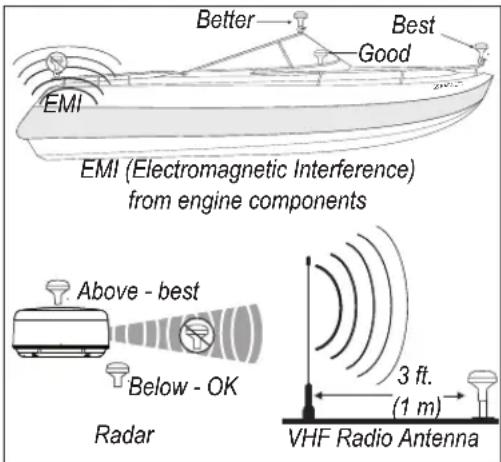
GXM 51 Placement Considerations
- Mount the GXM 51 antenna at least 3.3 ft. (1 m) away from (preferably above) the path of any radar beam or a VHF radio antenna.
Temporarily secure the antenna in the preferred mounting location and test it for correct operation. If you experience interference with other electronics, try a different location. After verifying correct operation, permanently mount the antenna.
Surface-mounting the GXM 51 Antenna
- Use the surface-mount bracket as your mounting template.
- Use a pencil to mark the three screw locations on the surface and to trace the cable hole in the center of the bracket. - Set the surface-mount bracket aside. Do not drill through the surface-mount bracket.
- Drill three 18 in. (3 mm) pilot holes.

NOTE: If you are mounting the GXM 51 on fiberglass, it is recommended to use a countersink bit to drill a clearance counterbore through the top gelcoat layer (but no deeper). This will help to avoid cracking in the gelcoat layer when the screws are tightened.
-
Use a 1 in. (25 mm) hole saw to cut the cable hole in the center.
-
Use the included M4 screws to attach the surface-mount bracket to the mounting surface.
-
Route the NMEA 2000/audio cable through the 1 in. (25 mm) cable hole and connect it to the GXM 51.
-
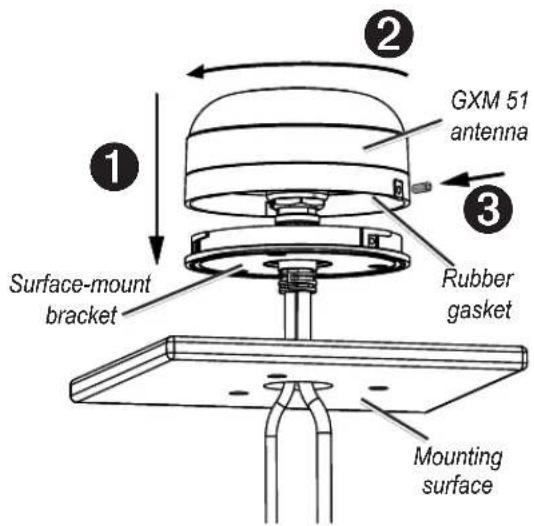
Make sure the large gasket is in place on the bottom of the GXM 51 antenna, place the antenna on the surface-mount bracket ①, and twist it clockwise to lock it in place ②.
-
Secure the antenna to the mounting bracket with the included M3 set screw ③.
-
Route the NMEA 2000/audio cable away from sources of electronic interference, and connect it to your NMEA 2000 network and to the audio input of your stereo receiver (see page 5).
Pole Mounting the GXM 51 Antenna
With the pole-mount adapter attached to the GXM 51, you can install the GXM 51 on a standard 1 in. OD pipe-threaded-pole marine mount (14 threads per inch—not included). You can route the NMEA 2000/audio cable either through the pole or outside the pole.
To mount the GXM 51 with the cable routed outside the pole:
-
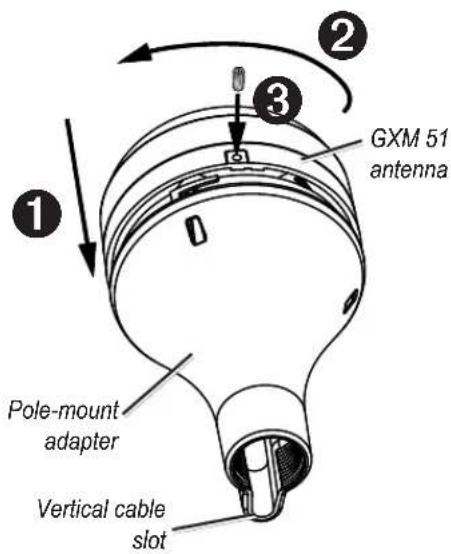
Route the NMEA 2000/audio cable through the pole-mount adapter, and place the cable in the vertical slot along the base of the pole-mount adapter.
-
Thread the pole-mount adapter onto a standard 1 in. OD pipe-threaded-pole marine mount (14 threads per inch—not included). Do not overtighten the adapter.
-
Connect the NMEA 2000/audio cable to the GXM 51 antenna.
-
Place the GXM 51 antenna on the pole-mount adapter ① and twist it clockwise to lock it in place ②.
-
Secure the antenna to the adapter with the included M3 set screw ③.
-
(Optional) With the GXM 51 installed on the pole mount, fill the remaining gap in the vertical cable slot with a marine sealant (not included).
-
Attach the marine mount to the boat if it is not already attached.
-
Route the NMEA 2000/audio cable away from sources of electronic interference, and connect it to your NMEA 2000 network and to the audio input of your stereo receiver (see page 5).
To mount the GXM 51 with the cable routed through the pole:
- Position a standard 1 in. OD pipe-threaded-pole marine mount (14 threads per inch—not included) in the preferred location, and mark the approximate center of the pole.
- Drill a hole using a ^3/_4 in. (19 mm) drill bit for the cable to pass through.
- Fasten the pipe-threaded pole marine mount to the boat.
- Thread the pole-mount adapter onto the pole. Do not overtighten the adapter.
- Route the NMEA 2000/audio cable through the pole and connect it to the GXM 51 antenna.
- Place the GXM 51 antenna on the pole-mount adapter ① and twist it clockwise to lock it in place ②.
- Secure the antenna to the adapter with the included M3 set screw ③.
- (Optional) With the GXM 51 installed on the pole mount, fill the vertical cable slot with a marine sealant (not included).
- Route the NMEA 2000/audio cable away from sources of electronic interference, and connect it to your NMEA 2000 network and to the audio input of your stereo receiver (see page 5).
Under-deck-mounting the GXM 51 Antenna
The GXM 51 can be mounted under a fiberglass surface with the adhesive pads attached to the under-deck mounting bracket. The GXM 51 will not acquire satellite signals through metal—you can only use the under-deck mount under a fiberglass surface.
- Determine the location on the fiberglass surface where you want to mount the GXM 51.
- Place the adhesive pads on the under-deck mounting bracket.
- Place the GXM 51 in the under-deck mounting bracket.
- Adhere the under-deck mounting bracket to the mounting surface.
- Secure the under-deck mount to the mounting surface with
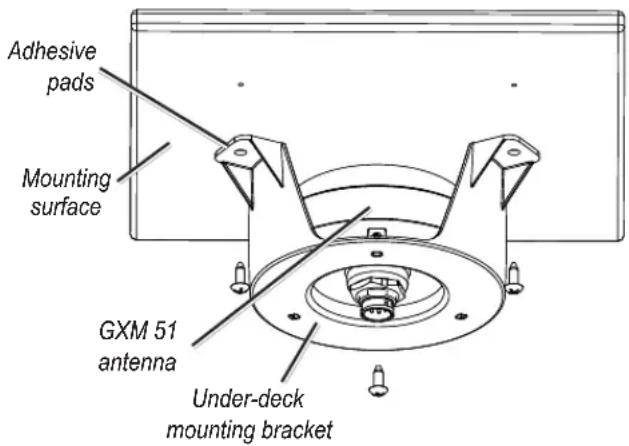
screws. Use extreme care to ensure that the screws do not penetrate the upper surface of the deck.
- Connect the NMEA 2000/audio cable to the GXM 51.
- Route the NMEA 2000/audio cable away from sources of electronic interference, and connect it to your NMEA 2000 network and to the audio input of your stereo receiver (see step 3 below).
Step 2: Connect the GXM 51 Antenna to Your NMEA 2000 Network
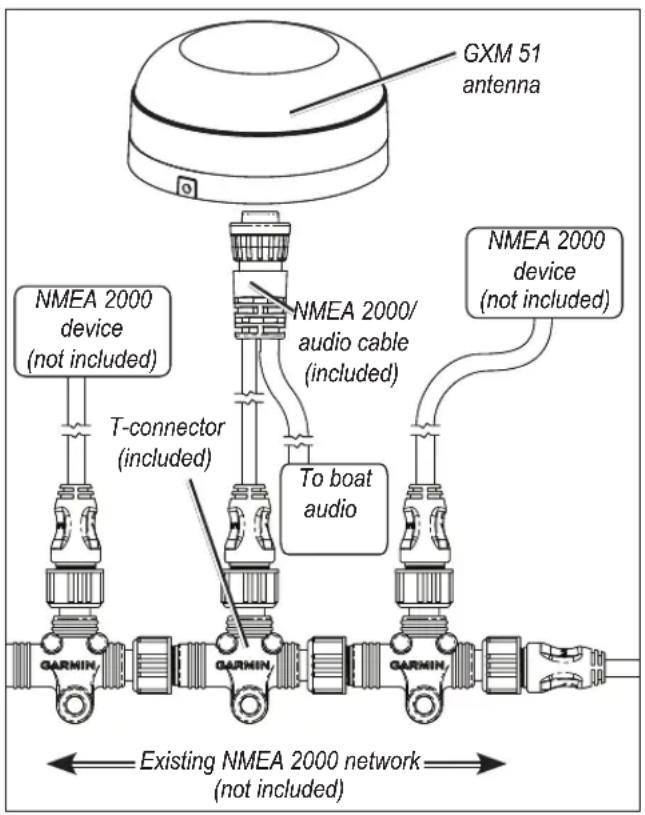
The GXM 51 is packaged with a NMEA 2000 T-connector and a NMEA 2000/audio cable. You will use these two components to connect the GXM 51 to your existing NMEA 2000 network. If you do not have an existing NMEA 2000 network, you will need to install a NMEA 2000 network on your boat. For more information on NMEA 2000, visit www.garmin.com.
To connect the GXM 51 to your existing NMEA 2000 network:
- Determine an appropriate location to connect the GXM 51 to your existing NMEA 2000 backbone.
- Disconnect one side of a NMEA 2000 T-connector from the backbone nearest to the location where you want to connect the GXM 51 antenna.
If you need to extend the NMEA 2000 backbone, connect an appropriate NMEA 2000 backbone extension cable (not included) to the side of the T-connector you disconnected. - Connect the included T-connector in the NMEA 2000 backbone.
- Route the NMEA 2000 portion of the NMEA 2000/audio cable from the GXM 51 antenna to the top of the T-connector you added to your NMEA 2000 network.
flowchart
graph TD
    A["GXM 51 antenna"] --> B["NMEA 2000 device (included)"]
    A --> C["NMEA 2000/ audio cable (included)"]
    A --> D["NMEA 2000 device (not included)"]
    B --> E["T-connector (included)"]
    C --> F["To boat audio"]
    D --> G["Existing NMEA 2000 network (not included)"]
The 19 ft., 6 in. (6 m) NMEA 2000 portion of the NMEA 2000/audio cable is the maximum length for a drop cable as defined by the NMEA 2000 standards. If more cable is needed, add an extension to your NMEA 2000 backbone, based on the NMEA 2000 guidelines.
Step 3: Connect the GXM 51 Audio Cable
To hear XM Radio through the stereo on your boat, connect the audio adapter cable to the audio portion of the NMEA 2000/audio cable and to an audio input on the stereo. Refer to the manual provided with your stereo for audio input installation and operation.
Step 4: Update Your Chartplotter
To ensure compatibility with the GXM 51, upgrade your Garmin chartplotter with the latest software. A GPSMAP 4/5000 series chartplotter must be at software v5.0 or later to use the GXM 51. For more information, visit http://www8.garmin.com/support/download.jsp.
Step 5: Activate Your XM Subscription
- Ensure that your XM Weather ID and your XM Radio ID are readily available. Write them on the front page of these instructions for convenience. Contact XM Satellite Radio by phone at (800) 985-9200. After receiving the required information from you, the XM representative activates the account and sends out an XM signal to activate the GXM 51.
To answer other XM questions, call the above number or visit www.xmwxweather.com.
-
Confirm all components of your service package:
-
XM WX Weather: Ensure that the chartplotter and the NMEA 2000 network are powered on so that you receive the XM signal. When the components of the selected service package appear in the Weather Products list, the XM signal is working correctly. To see the Weather Products list, from the Home screen, select Configure > System > System Information > Weather Subscription.
- XM Radio: From the home screen, select Configure > XM Audio, and verify that channels 7, 9, 47, and 122 appear. This indicates that all channels on the XM basic radio service are working correctly.
If the XM WX Weather and the XM Radio service have not activated within an hour, call XM customer care at (800) 985-9200 and ask an XM representative to refresh the signal.
Using the GXM 51
Instructions for using the XM WX Weather and the XM Radio service on your chartplotter are contained in the Owner's Manual provided with your Garmin NMEA 2000-compatible chartplotter.
Specifications Physical
Dimensions: 3 ^19/32 in. (91.6 mm) Diameter × 1 ^15/16 in. (49.5 mm) High
Weight: 7.1 oz. (201 g)
NMEA 2000/audio cable: 19 ft., 8 in. (6 m)
Temperature range: From -22°F (-30°C) to 176°F (80°C)
Case Material: Fully gasketed, high-impact plastic alloy, waterproof to IEC 529 IPX7 standards
Power
Power input source: 9–16 Vdc unregulated
Input current: 137 mA at 12 Vdc
NMEA 2000 Load Equivalency Number (LEN): 5 (250 mA)

The GXM 51 is NMEA 2000 certified
NMEA 2000 PGN Information
| Transmit Receive | |||
| 059392 ISO | Acknowledgment | 059392 ISO Acknowledgment | |
| 060928 ISO | Address Claim | 059904 ISO Request | |
| 126208 NMEA | - Command/Request/Acknowledge Group Function | 060928 ISO Address Claim | |
| 126464 Transmit | Receive PGN List Group Function | 126208 NMEA | - Command/Request/Acknowledge Group Function |
| 126996 Product Information | |||
Weather and Sea Surface Information
The GXM 51 receives XM Weather Radio data and shows it on your chartplotter. The weather data for each feature comes from reputable weather data centers such as the National Weather Service and the Hydrometerological Prediction Center. (See the XM WX Satellite Weather Web site at http://weather.xmradio.com/weather for more information.) Any weather feature can change in appearance or interpretation if the source that provides the information changes. XM Weather Radio data is broadcast at set rates. For example, NEXRAD Radar data is broadcast at five minute intervals. When the marine network is turned on or when a new feature is selected, the GXM 51 has to receive new data before it can be displayed. For this reason you may experience a delay before weather data or a new feature appears on the map.
WARNING: The XM Weather Radio data is merely supplemental and advisory in nature and is not intended to be relied up on as safety-critical information. You should always exercise caution and common sense when confronted with severe weather conditions.
WARNING: XM WX Weather should not be used for hazardous weather penetration. Weather information is approved only for weather avoidance, not penetration.
Weather-Related Broadcast Rates
| Feature | Broadcast Rate (minutes) |
| NEXRAD 5 | |
| Cloud Tops 15 | |
| Storm Cells 1.25 | |
| Lightning 5 | |
| Wind 12 | |
| Pressure 12 | |
| Hurricanes 12 | |
| Visibility 12 | |
| Fronts 12 | |
| Sea-Surface Temperature 12 | |
| Wave Height 12 | |
| Wave Period 12 | |
| Wave Direction 12 | |
| Current Conditions | 12 |
| Forecasts | 12 |
| Sea-Surface Conditions | 12 |
NEXRAD Overview
NEXRAD Description
NEXRAD Radar is a Doppler radar system that has greatly improved the detection of meteorological events such as thunderstorms, tornadoes, and hurricanes. An extensive network of NEXRAD stations provides almost complete radar coverage of the continental United States, Alaska, and Hawaii, and the majority of Canada. The range of each NEXRAD is 124 nautical miles.
NEXRAD Abnormalities
There are possible abnormalities regarding displayed NEXRAD images. Some, but not all, of those include the following circumstances:
Ground clutter
Strobes and spurious radar data
Sun strobes, when the radar antenna points directly at the sun
Military aircraft deployment of metallic dust (chaff), which can cause alterations in radar scans
Interference from buildings or mountains, which may cause shadows
NEXRAD Limitations
Certain limitations exist regarding the NEXRAD radar displays. Some, but not all, are listed here for your awareness:
NEXRAD base reflectivity does not provide sufficient information to determine cloud layers or precipitation characteristics (for example, determining between hail and rain).
NEXRAD base reflectivity is sampled at the minimum antenna elevation angle. An individual NEXRAD site cannot depict high altitude storms at close ranges, and has no information about storms directly over the site.
Software License Agreement
BY USING THE GXM 51, YOU AGREE TO BE BOUND BY THE TERMS AND CONDITIONS OF THE FOLLOWING SOFTWARE LICENSE AGREEMENT. PLEASE READ THIS AGREEMENT CAREFULLY.
Garmin grants you a limited license to use the software embedded in this device (the "Software") in binary executable form in the normal operation of the product. Title, ownership rights, and intellectual property rights in and to the Software remain in Garmin.
You acknowledge that the Software is the property of Garmin and is protected under the United States of America copyright laws and international copyright treaties. You further acknowledge that the structure, organization, and code of the Software are valuable trade secrets of Garmin and that the Software in source code form remains a valuable trade secret of Garmin. You agree not to decompile, disassemble, modify, reverse assemble, reverse engineer, or reduce to human readable form the Software or any part thereof or create any derivative works based on the Software. You agree not to export or re-export the Software to any country in violation of the export control laws of the United States of America.
Declaration of Conformity (DoC)
Hereby, Garmin, declares that this GXM 51 is in compliance with the essential requirements and other relevant provisions of Directive 1999/5/EC.
To view the full Declaration of Conformity, see the Garmin Web site for your Garmin product: www.garmin.com/products/gxm51/. Click Manuals, and then select the Declaration of Conformity link.

FCC Compliance
This device complies with part 15 of the FCC Rules. Operation is subject to the following two conditions: (1) this device may not cause harmful interference, and (2) this device must accept any interference received, including interference that may cause undesired operation.
This equipment has been tested and found to comply with the limits for a Class B digital device, pursuant to part 15 of the FCC rules. These limits are designed to provide reasonable protection against harmful interference in a residential installation. This equipment generates, uses, and can radiate radio frequency energy and may cause harmful interference to radio communications if not installed and used in accordance with the instructions. However, there is no guarantee that interference will not occur in a particular installation. If this equipment does cause harmful interference to radio or television reception, which can be determined by turning the equipment off and on, the user is encouraged to try to correct the interference by one of the following measures:
XM Satellite Radio Service Agreement
XM Satellite Radio Inc.
Hardware and required monthly subscription sold separately. Subscription fee is consumer only. Other fees and taxes, including a one-time activation fee may apply. All programming fees and weather data subject to change. XM WX weather data displays and individual product availability vary by hardware equipment. Reception of the XM signal may vary depending on location. Subscriptions subject to Customer Agreement included with the XM Welcome Kit and available at www.xmradio.com. Available only in the 48 contiguous United States. XM WX is a registered trademark of XM Satellite Radio Inc.
Weather Data Warranty
THE SOFTWARE PRODUCT IS PROVIDED "AS IS." ALL OTHER WARRANTIES, EXPRESSED OR IMPLIED, INCLUDING ANY WARRANTY OF MERCHANTABILITY OR FITNESS FOR A PARTICULAR PURPOSE OR OF NON-INFRINGEMENT ARE HEREBY EXCLUDED.
User Safety
If you use XM Services it is your responsibility to exercise prudent discretion and observe all safety measures required by law and your own common sense. You assume the entire risk related to your use of the Services. XM and Garmin assume no responsibility for accidents resulting from or associated with use of the Services. Your Radio Service includes traffic and weather information, and you acknowledge that such information is not for “safety for life”, but is merely supplemental and advisory in nature, and therefore cannot be relied upon as safety-critical in connection with any aircraft, sea craft or automobile usage. This information is provided “as is” and XM and Garmin disclaim any and all warranties, express and implied, with respect thereto or the transmission or reception thereof. XM and Garmin further do not warrant the accuracy, reliability, completeness or timeliness of the traffic and weather information disclosed on the Radio Service. In no event will XM and Garmin, their data suppliers, service providers, marketing/distribution, software or Internet partners or hardware manufacturers be liable to you or to any third party for any direct, indirect, incidental, consequential, special, exemplary or punitive damages or lost profits resulting from use of or interruptions in the transmission or reception of the Services.
Limits On Our Responsibility
a) DISCLAIMERS.
EXCEPT AS EXPRESSLY PROVIDED HEREIN, WE MAKE NO WARRANTY OR REPRESENTATION, EITHER EXPRESS OR IMPLIED, REGARDING THE RADIO SERVICE. YOUR USE OF THE SERVICE IS AT YOUR SOLE RISK. THE CONTENT AND FUNCTIONALITY OF THE SERVICE IS PROVIDED "AS IS" WITHOUT ANY WARRANTY OF ANY KIND, EXPRESS OR IMPLIED. ALL SUCH WARRANTIES OR REPRESENTATIONS (INCLUDING, WITHOUT LIMITATION, THE IMPLIED WARRANTIES OF MERCHANTABILITY, FITNESS FOR A PARTICULAR PURPOSE, TITLE AND NON-INFRINGEMENT) ARE HEREBY DISCLAIMED.
b) LIMITATIONS OF LIABILITY.
WE ARE NOT RESPONSIBLE FOR ANY SPECIAL, INCIDENTAL, OR CONSEQUENTIAL DAMAGES OR LOSSES RELATING TO THE USE OF THE RADIO SERVICE, WHETHER BASED ON NEGLIGENCE OR OTHERWISE. OUR TOTAL LIABILITY TO YOU AND ANY OTHER PERSONS RECEIVING OUR SERVICES, REGARDLESS OF THE CAUSE, WILL IN NO EVENT EXCEED THE AMOUNTS THAT YOU HAVE PAID TO US FOR THE SERVICE THAT YOU RECEIVED DURING THE SIX (6) MONTH PERIOD IMMEDIATELY PRIOR TO THE SPECIFIC EVENT THAT GAVE RISE TO THE APPLICABLE DAMAGE OR LOSS. THIS ALLOCATION OF RISK IS REFLECTED IN OUR PRICES. YOU MAY HAVE GREATER RIGHTS THAN DESCRIBED ABOVE UNDER YOUR STATE'S LAWS.
a. Under 10 U.S.C. 456, no civil action may be brought against the United States on the basis of the content of a navigational aid prepared or disseminated by either the former Defense Mapping Agency (DMA), National Imagery and Mapping Agency (NIMA), or the National Geospatial-Intelligence Agency (NGA).
b. The DAFIF ^™ product is provided “as is,” and no warranty, express or implied, including, but not limited to the implied warranties of merchantability and fitness for particular purpose or arising by statute or otherwise in law or from a course of dealing or usage in trade, is made by NGA as to the accuracy and functioning of the product.
c. Neither NGA nor its personnel will be liable for any claims, losses, or damages arising from or connected with the use of this product. The user agrees to hold harmless the United States National Geospatial-Intelligence Agency. The user's sole and exclusive remedy is to stop using the DAFIF product. This product was developed using DAFIF, a product of the National Geospatial-Intelligence Agency.
For the latest free software updates (excluding map data) throughout the life of your Garmin products, visit the Garmin Web site at www.garmin.com.

© 2009 Garmin Ltd. or its subsidiaries
Garmin International, Inc.
1200 East 151 ^st Street, Olathe, Kansas 66062, USA
Garmin (Europe) Ltd.
Liberty House, Houndown Business Park, Southampton, Hampshire, SO40 9LR UK
Garmin Corporation
No. 68, Jangshu 2nd Road, Shijr, Taipei County, Taiwan
www.garmin.com
- GXM™ 51 Installation Instructions
- Product Registration
- Serial number
- Packing List, Accessories, and Tools Needed
- Standard Package
- Tools Needed
- Optional Accessories
- Step 1: Mount the GXM 51 Antenna
- Surface-mounting the GXM 51 Antenna
- Pole Mounting the GXM 51 Antenna
- To mount the GXM 51 with the cable routed outside the pole:
- To mount the GXM 51 with the cable routed through the pole:
- Under-deck-mounting the GXM 51 Antenna
- Step 2: Connect the GXM 51 Antenna to Your NMEA 2000 Network
- To connect the GXM 51 to your existing NMEA 2000 network:
- Step 3: Connect the GXM 51 Audio Cable
- Step 4: Update Your Chartplotter
- Step 5: Activate Your XM Subscription
- Using the GXM 51
- Specifications Physical
- Power
- Weather and Sea Surface Information
- Weather-Related Broadcast Rates
- NEXRAD Overview
- NEXRAD Description
- NEXRAD Abnormalities
- Software License Agreement
- Declaration of Conformity (DoC)
- FCC Compliance
- XM Satellite Radio Service Agreement
- XM Satellite Radio Inc.
- Weather Data Warranty
- User Safety
- Limits On Our Responsibility
Brand : GARMIN
Model : GXM 51
Category : GPS accessory