
XR 84 Plus - Docking Station Trevi - Free user manual and instructions
Find the device manual for free XR 84 Plus Trevi in PDF.


| Product type | Docking station / Portable Bluetooth speaker |
| Brand | Trevi |
| Model | XR 84 Plus |
| Dimensions (L x W x H) | 160 x 70 x 70 mm |
| Weight | 380 g |
| Power supply | 5 V ⎓ 1 A (USB) |
| Rechargeable battery | Lithium 3.7 V / 1200 mAh |
| Bluetooth transmission power | 0.8 mW |
| Bluetooth frequency | 2.4 GHz |
| FM radio frequency | 87.5 - 108.0 MHz |
| Main functions | Bluetooth, micro SD, USB, FM radio, AUX IN, hands-free calling, playback controls |
| Inputs / Ports | Micro USB (charging), Micro SD, USB, AUX IN (3.5 mm jack) |
| Charging indicator | Red LED (on while charging, off when charged) |
| Recommended charging temperature | 5 °C to 35 °C |
| Maximum charging time | 4 hours |
| Cleaning | Soft, slightly damp cloth; avoid solvents and abrasives |
| Safety precautions | Do not use with voltage >5 V; avoid magnetic fields, heat, humidity, dust, vibrations; leave 5 cm space around; unplug if liquid enters |
| Hearing protection | Do not listen at too high volume to avoid hearing damage |
| Disposal | Do not dispose of with household waste; follow separate collection |
Frequently Asked Questions - XR 84 Plus Trevi
User questions about XR 84 Plus Trevi
0 question about this device. Answer the ones you know or ask your own.
Ask a new question about this device
Download the instructions for your Docking Station in PDF format for free! Find your manual XR 84 Plus - Trevi and take your electronic device back in hand. On this page are published all the documents necessary for the use of your device. XR 84 Plus by Trevi.
USER MANUAL XR 84 Plus Trevi
SPEAKER POWERED WITH BLUETOOTH CONNECTION
User Manual
BLUETOOTH CONNECTION
MP3 PLAYER
USB/MICRO SD CARD READER
AUX IN
natural_image
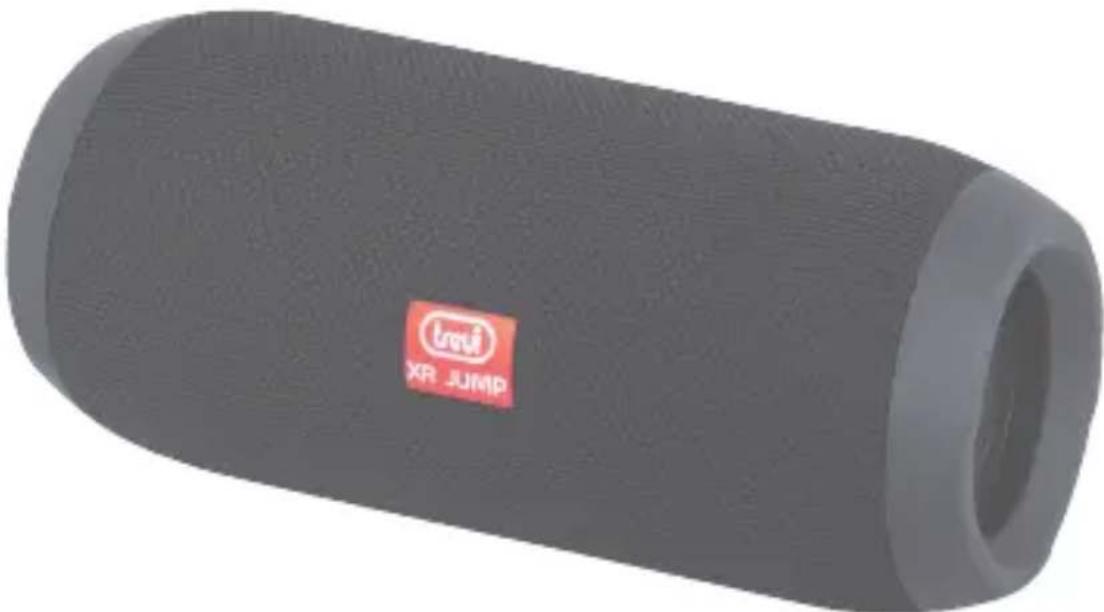
Exterior view of a gray cylindrical electronic device with a red logo and 'XR JUMP' label (no additional text or symbols)Do not use power supply with a voltage higher than 5V, cause damage to the player.
- Listen at high volume for long periods of time, may damage your hearing.
- Avoid using it in the following cases:
- Near strong heat sources, such as central heating plants or stoves.
- In very humid places such as bathrooms, swimming pools, etc.
- In very dusty places.
- In places subject to strong vibrations.
- Position the appliance in such a way that there is always enough room for free air circulation (at least 5 cm).
- Do not block the air inlets.
- If any liquid enters the appliance, unplug it immediately from the socket and take it to the nearest TREVI authorised service centre.
- Before switching on the appliance, always check that the power cable and the connection cable are properly installed.
- No naked flame sources, such as lighted candles, should be placed on this.
- The apparatus shall not be exposed to dripping or splashing water and no object filled with water, such as vases, should be placed on the unit.
- Keep this manual for future reference.
CARE AND MAINTENANCE
For cleaning it is recommended to use a soft, slightly damp cloth. Avoid solvents or abrasive substances.
IMPORTANT
The construction of this device guarantees long flawless operation. However, if come some problem, you should consult your nearest authorized service center.
TREVI pursues a policy of continuous research and development. Therefore, the products may show different characteristics from those described.
WARNING FOR A CORRECT USE OF RECHARGEABLE BATTERY
- Recharge the battery in an ambient temperature between 5°C and 35°C.
- Don't recharge more than the suitable period to prevent the risk of overheating and burst.
- Recharging the battery over the suitable period or an extended period of inactivity may reduce battery duration.
- Rechargeable battery is liable to wear and tear and its performance will reduce gradually.
- To extend the duration of the battery use it when is completely charged up to the complete discharging, then recharge it fully before use it again. Recharge a battery not completely consumed, will result a reduced duration. In this case, repeat the full charging/discharging cycle many times.
- Avoid recharge the battery for the whole night.
CONTROLS
- Micro USB socket for charging with LED indicator:
Red: on during charging, yes turn off when charging is completed. - MicroSD memory input
- USB input
- AUX IN input
- Volume- / Previous Track button
- Volume + / Next track button
- MODE button
- Power On/Off / Play / Pause button
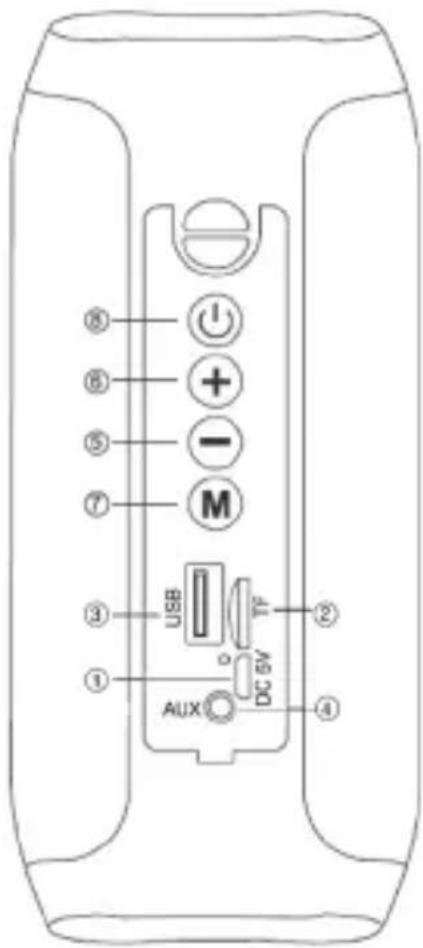
CHARGING
The speaker must be recharged when switched off.
- Using the supplied USB cable, connect the side with the Micro USB jack to the micro-USB jack (1) and the other end to the USB port of a PC or USB charger (5V, 1A not included).
- Led indicator will light up red to indicate the charging status, after charging it will off.
Note: when the battery is low the voice message will play “Battery is low, recharge” a few times before the device switches off automatically.
BASIC OPERATION
To turn on the speaker, long push on power button(8).
Press the MODE button (7) to choose from:
- Bluetooth mode.
-
Micro SD mode, if present a micro SD type memory in the slot (2) it will start playback of the music automatically.
-
USB Mode, if present a USB-type memory in the slot (3), the device will start playing songs automatically.
- Radio Mode.
VOLUME ADJUSTMENT
Press and hold the Volume - (5), Volume + (6) to adjust the volume.
OPERATION AUX IN
- Turn on the speaker.
- Connect the Micro USB/ Jack cable (supplied) to the AUX IN jack (4) and the other end to the external device.
- Start from the external device playback.
- Turn on the speaker.
- Insert a Micro SD card into the slot (2) holding the contacts facing the USB plug or insert a USB memory.
- Playback will start automatically.
- Press once the (5) button to skip to the previous track, press the button once (6) to move to the next track.
- Press the button (8) to pause, to resume playback press again.
BLUETOOTH OPERATION
COUPLING DEVICES
- Place the speaker next to the Bluetooth device to be coupled.
- Turn on the speaker, press the key MODE (7) until the voice message "Bluetooth mode".
- Follow the instructions of your device to search the speaker.
- Search for the speaker named "XR 84 PLUS" and enter the PIN "0000" if required.
- When paired will be possible to play music.
Notes:
- The Bluetooth speaker only works with a connection at a time, the connection can not be interrupted during normal operation.
- When the Bluetooth pairing with external devices fails, delete another Bluetooth device in the list of connections, restart the Bluetooth speaker and search for the signal again.
COMMANDS IN BLUETOOTH MODE
- Press once on the (5) button to skip to the previous track, press the button once (6) to move to the next track.
- Press the button (8) to pause, to resume music playback press again.
- When you receive a call click once on the (8) key to open the call and activate the speaker phone feature, press again to end the call.
RADIO OPERATION
Before using the Radio function, please, to insert the Micro USB cable into the socket (1) as a receiving antenna.
- Use the MODE button (7) to select the radio function.
- Long press the MODE button (7) to start scanning and automatic storage of radio stations.
- Once you have registered stations, press the button (5) to select the station previous or the key (6) to select the next station.
TECHNICAL FEATURES
Rechargeable Battery: ....... Internal Lithium to 3.7V, 1200mAh
Power: 5V --- 1A
Bluetooth max power transmission: .... 0,8mW
Bluetooth transmission frequency: .... 2.4GHz
Radio frequency: 87.5-108.0MHz
Dimensions: 160 x 70 x 70 mm
Weight: 380 gr.
INFORMATION ON THE REMOVAL AND DISPOSAL OF BATTERIES
Warning: the operation of removal and disposal is reserved to technical personnel!
Whatever type of battery used up, it should never be placed in household waste, fire or water. Each type of used battery must be recycled or disposed of at an appropriate dedicated collection points.
To remove the battery:
- Remove the grid speaker.
- Unscrew all the screws and remove the back of the cabinet
- Locate the battery, disassemble it and remove it.
Precautions for correct disposal of the product.
The symbol shown on the equipment indicates that waste must be disposed of in “separate collection” and so the product must not be disposed of together with urban waste.
The user must take the product to special “separate waste collection centres” provided by local government, or deliver it to the retailer against the purchase of a new product.
Separate collection of waste and subsequent treatment, recycling and disposal operations promotes the production of equipment with recycled materials and limits negative effects on the environment and on health caused by improper handling of waste.
Illegal disposal of the product leads to the enforcement of administrative penalties.
NOTES D'EMPLOI
DISPOSITIFS D'ACCOUPLEMENT
SIMPLIFIED EU DECLARATION OF CONFORMITY
Hereby TREVI Spa declares that the radio equipment type XR 84 PLUS is in compliance with directive 2014/53/EU.
The full text of the EU declaration of conformity is available at the following internet address: https://www.trevi.it/dms/zidi/TREVI/DOCXR84PLUS.pdf
Note
XR 84 PLUS


Strada Consolare Rimini-San Marino, 62 47924 Rimini (RN) Italy Tel. 0541/756420 - Fax 0541/756430 - www.trevi.it - e-mail: info@trevi.it
natural_image
Grid of nine grayscale speech bubble icons with national flags, no text or symbols presentEN If you will not find your language on the instruction manual, please go on our website www.trevi.it to find it
- SPEAKER POWERED WITH BLUETOOTH CONNECTION
- CARE AND MAINTENANCE
- IMPORTANT
- WARNING FOR A CORRECT USE OF RECHARGEABLE BATTERY
- CONTROLS
- CHARGING
- BASIC OPERATION
- VOLUME ADJUSTMENT
- OPERATION AUX IN
- BLUETOOTH OPERATION
- COUPLING DEVICES
- Notes:
- COMMANDS IN BLUETOOTH MODE
- RADIO OPERATION
- TECHNICAL FEATURES
- INFORMATION ON THE REMOVAL AND DISPOSAL OF BATTERIES
- Precautions for correct disposal of the product.
- NOTES D'EMPLOI
- DISPOSITIFS D'ACCOUPLEMENT
- SIMPLIFIED EU DECLARATION OF CONFORMITY
Brand : Trevi
Model : XR 84 Plus
Category : Docking Station