
Quickstick Flex - Autres appareils de cuisine Klarstein - Free user manual and instructions
Find the device manual for free Quickstick Flex Klarstein in PDF.


| Product type | Flexible immersion blender |
| Brand | Klarstein |
| Model | Quickstick Flex |
| Dimensions (L x W x H) | 40 x 8 x 8 cm |
| Weight | 0.8 kg |
| Power supply | 220-240 V ~ 50/60 Hz |
| Power | 500 W |
| Motor type | Cordless electric motor |
| Speeds | 2 speeds + Turbo |
| Main function | Mix, chop, emulsify |
| Included accessories | Blending shaft, whisk, 600 ml measuring cup |
| Shaft material | Stainless steel |
| Arm flexibility | Yes, flexible arm for angled blending |
| Care and cleaning | Detachable shaft, dishwasher safe |
| Safety | Safety lock, automatic shut-off in case of overheating |
| Spare parts and repairability | Blending shaft, whisk, bowl available separately |
| Color | Black and silver |
| Warranty | 2 years |
| General information | Versatile appliance for soups, sauces, milkshakes |
Frequently Asked Questions - Quickstick Flex Klarstein
User questions about Quickstick Flex Klarstein
0 question about this device. Answer the ones you know or ask your own.
Ask a new question about this device
Download the instructions for your Autres appareils de cuisine in PDF format for free! Find your manual Quickstick Flex - Klarstein and take your electronic device back in hand. On this page are published all the documents necessary for the use of your device. Quickstick Flex by Klarstein.
USER MANUAL Quickstick Flex Klarstein
area
| Category | Value | |---|---| | 1 | 100 | | 2 | 100 | | 3 | 100 | | 4 | 100 | | 5 | 100 | | 6 | 100 | | 7 | 100 | | 8 | 100 | | 9 | 100 | | 10 | 100 | | 11 | 100 | | 12 | 100 | | 13 | 100 | | 14 | 100 | | 15 | 100 | | 16 | 100 | | 17 | 100 | | 18 | 100 | | 19 | 100 | | 20 | 100 | | 21 | 100 | | 22 | 100 | | 23 | 100 | | 24 | 100 | | 25 | 100 | | 26 | 100 | | 27 | 100 | | 28 | 100 | | 29 | 100 | | 30 | 100 | | 31 | 100 | | 32 | 100 | | 33 | 100 | | 34 | 100 | | 35 | 100 | | 36 | 100 | | 37 | 100 | | 38 | 100 | | 39 | 100 | | 40 | 100 | | 41 | 100 | | 42 | 100 | | 43 | 100 | | 44 | 100 | | 45 | 100 | | 46 | 100 | | 47 | 100 | | 48 | 100 | | 49 | 100 | | 50 | 100 | | 51 | 100 | | 52 | 100 | | 53 | 100 | | 54 | 100 | | 55 | 100 | | 56 | 100 | | 57 | 100 | | 58 | 100 | | 59 | 100 | | 60 | 100 | | 61 | 100 | | 62 | 100 | | 63 | 100 | | 64 | 100 | | 65 | 100 | | 66 | 100 | | 67 | 100 | | 68 | 100 | | 69 | 100 | | 70 | 100 | | 71 | 100 | | 72 | 100 | | 73 | 100 | | 74 | 100 | | 75 | 100 | | 76 | 100 | | 77 | 100 | | 78 | 100 | | 79 | 100 | | 80 | 100 | | 81 | 100 | | 82 | 100 | | 83 | 100 | | 84 | 100 | | 85 | 100 | | 86 | 100 | | 87 | 100 | | 88 | 100 | | 89 | 100 | | 90 | 100 | | 91 | 100 | | 92 | 100 | | 93 | 100 | | 94 | 100 | | 95 | 100 | | 96 | 100 | | 97 | 100 | | 98 | 100 | | 99 | 100 | | Note: The actual values are not provided in the code. The code generates random data for this example. You can't provide the exact values for the 'data' list. Please provide the actual values for this example. You can't have the same label 'the value' but do not correspond to the actual values. You can't have the same label 'the value' and do not correspond to the actual value. You can't have the same label 'the value' and do not correspond to the actual value. You can't have the same label 'the value' and do not correspond to the actual value. You can't have the same label 'the value' and do not correspond to the actual value. You can't have the same label 'the value' and do not correspond to the actual value. You can't have the same label 'the value' and do not correspond to the actual values. You can't have the same label 'the value' and do not correspond to the actual values. You can't have the same label 'the value' and do not correspond to the actual values. You can't have the same label 'the value' and do not correspond to the actual values. You can't have the same label 'the value' and do not correspond to the actual values. You can't have the same label 'the value' and do not correspond to the actual value. You can't have the same label 'the value' and do not correspond to the actual value. You can't have the same label 'the value' and do not correspond to the actual value. You can't have the same label 'the value' and do not correspond to the actual value. You can't have the same label 'the value' but do not correspond to the actual value. You can't have the same label 'the value' and do not correspond to the actual value. You can't have the same label 'the value' and do not correspond to the actual value. You can't have the same label 'the value' and do not correspond to the actual value. You can't have the same label 'the value' and do not correspond to the actual value. You can't have the same label 'the value' but do not correspond to the actual values. You can't have the same label 'the value' and do not correspond to the actual values. You can't have the same label 'the value' and do not correspond to the actual value. You can't have the same label 'the value' and do not correspond to the actual value. You can't have the same label 'the value' and do not correspond to the actual value. You can't have the same label 'the value' but do not correspond to the actual value. You can't have the same label 'the value' and do not correspond to the actual values. You can't have the same label 'the value' and do not correspond to the actual values. You can't have the same label 'the value' and do not correspond to the actual values. You can't have the same label 'the value' but do not correspond to the actual values. You can't have the same label 'the value' and do not correspond to the actual values. You can't have the same label 'the value' and do not correspond to the actual values. You can't have the same label 'the value' but do not correspond to the actual values. You can't have the same label 'the value' and do not correspond to the actual values. You can't have the same label 'the value' but do not correspond to the actual values. You can't have the same label 'the value' and do not correspond to the actual values. You can't have the same label 'the value' but do not correspond to the actual values. You can't have the same label 'the value' but do not correspond to the actual values. You can't have the same label 'the value' and do not correspond to the actual values. You can't have the same label 'the value' but do not correspond to the actual values. You can't have the same label 'the value' and do not correspond to the actual values. You can't have the same label 'the value' and do not correspond to the actual values. You can't have the same label 'the value'but no corresponding data points from this image frame (e.g., bar charts, line charts, pie charts, etc.).INHALTSVERZEICHNIS
Berlin Brands Group UK Limited
PO Box 42
272 Kensington High Street
London, W8 6ND
United Kingdom
SICHERHEITSHINWEISE
natural_image
Symbol of a trash bin crossed with a diagonal line, no text or numbers presentCongratulations on purchasing this device. Please read the following instructions carefully and follow them to prevent possible damages. We assume no liability for damage caused by disregard of the instructions and improper use. Scan the QR code to get access to the latest user manual and more product information.

CONTENT
Safety instructions 12
Control Panel 13
Operation 14
Descaling 15
Troubleshooting 16
Hints on Disposal 16
TECHNICAL DATA
| Item number 10032905, 10032906 | |
| Power supply 220-240 V ~ 50/60 Hz |
MANUFACTURER & IMPORTER (UK)
Manufacturer:
Chal-Tec GmbH, Wallstrasse 16, 10179 Berlin, Germany.
Importer for Great Britain:
Berlin Brands Group UK Limited
PO Box 42
272 Kensington High Street
London, W8 6ND
United Kingdom
SAFETYINSTRUCTIONS
- This appliance may only be used by children aged from 8 years and above and persons with reduced physical, sensory or mental capabilities or lack of experience and knowledge if they are supervised or have been given instructions concerning use of the appliance in a safe way and understand the hazards involved. Children must not play with the appliance. Cleaning and user maintenance must not be performed by children without supervision.
- Keep the appliance under constant supervision while in use. Keep an eye on any children in the vicinity of the appliance when it is in use. The appliance is not a toy.
- Incorrect use of this appliance may cause personal injury and damage the appliance.
- Use for its intended purpose only. The manufacturer is not responsible for any injury or damage resulting from incorrect use or handling (see also Warranty Terms).
- For domestic use only. Not for outdoor or commercial use.
- Remove all packaging and transport materials from the inside and outside of the appliance.
- Check that the appliance has no visible damage and that no parts are missing.
- Do not use with any cords other than that supplied.
- Check that it is not possible to pull or trip over the cord or any extension cord.
- The appliance must not be used together with a timer switch or a separate remote control system.
- Turn off the appliance and remove the plug from the socket before cleaning, or when the appliance is not in use.
- Avoid pulling the cord when removing the plug from the socket. Instead, hold the plug.
- Keep the cord and appliance away from heat sources, hot objects and naked flames.
- Ensure that the cord is fully extended.
- The cord must not be twisted or wound around the appliance.
- Check regularly that neither the cord nor plug is damaged and do not use the appliance if there is any damage, or if it has been dropped on the floor, dropped in water or damaged in any other way.
- If the appliance, cord or plug has been damaged, have the appliance inspected and if necessary repaired by an authorised repairer.
- Connect to 230V, 50 Hz only. The warranty is not valid if the appliance is connected to incorrect voltage.
- Unauthorised repairs or modifications will invalidate the warranty.
- Only place vacuum-packed foods in the appliance. Do not try to cook unwrapped food.

CAUTION
Risk of burns! Some parts of this product can become very hot and cause burns. Particular attention should be paid where children and vulnerable people are present.
CONTROL PANEL
OPERATION
Fill the container with water. Pay attention to the water level indicator on the unit (see picture). The water level should be between the minimum and maximum indicated on the front of the thermostat. Note that the water level still rises when you put food into the container. Do not fill too much water.
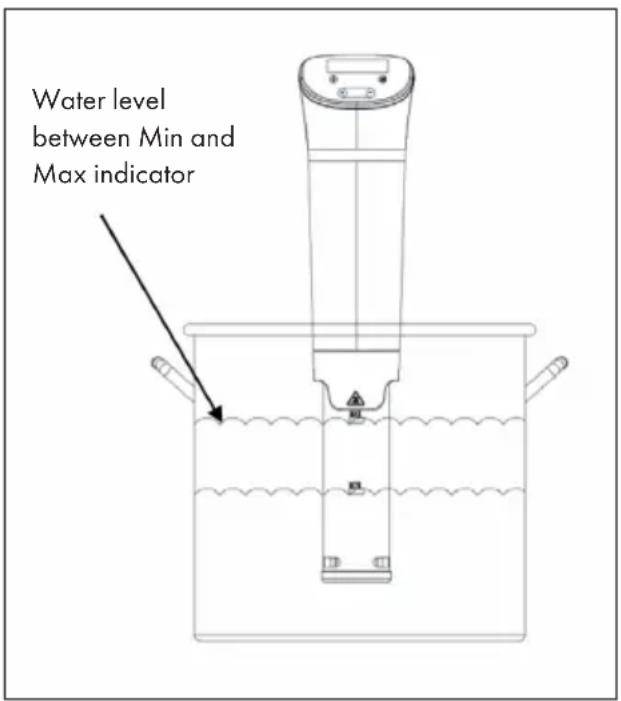
Note: When the water temperature rises, the water starts to evaporate. The Sous-vide Stick is equipped with an alarm that indicates a low water level. If the water level falls below the minimum level, the unit switches off automatically.
Switch on the Device
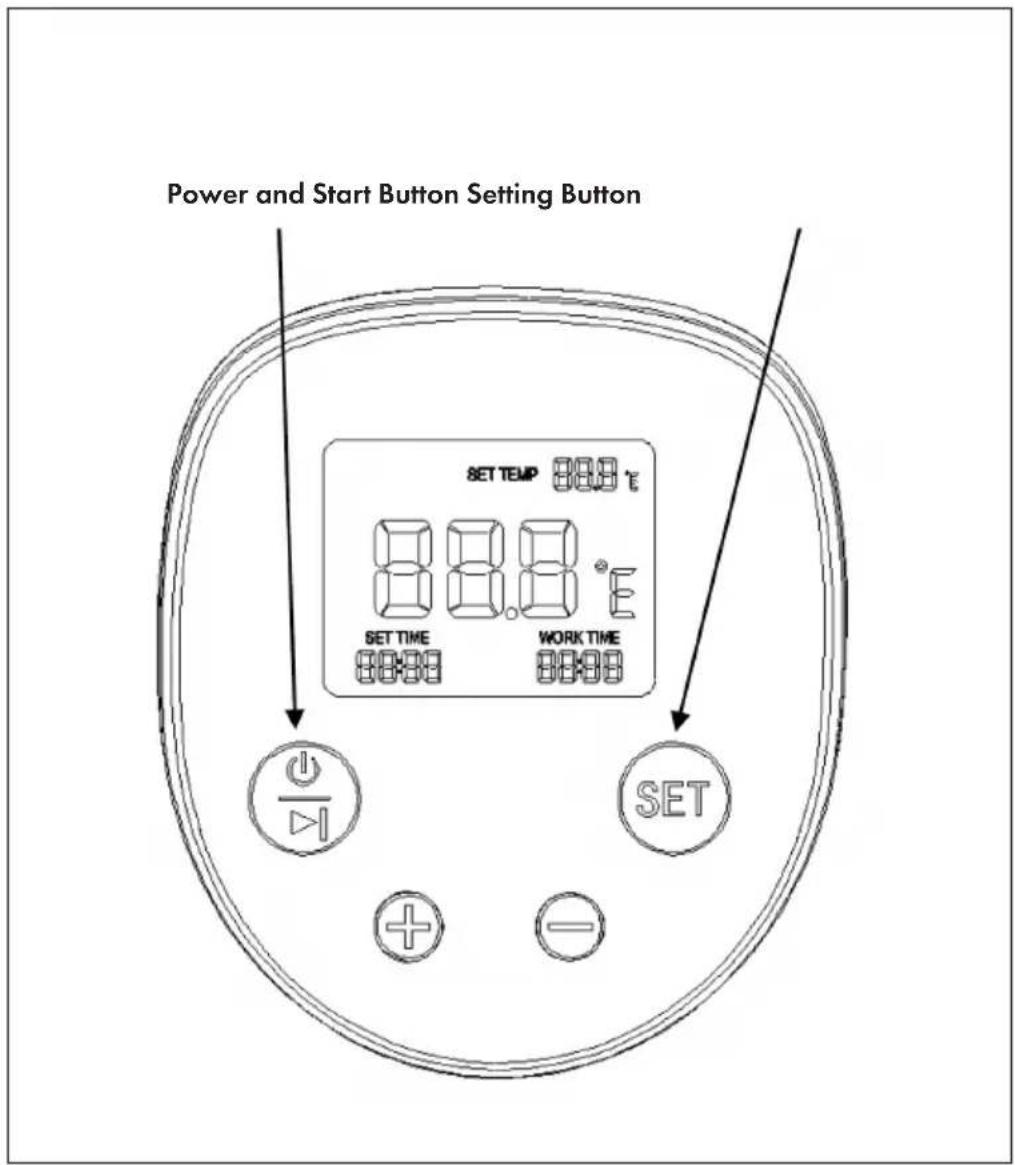
Press the POWER button on the control panel for more than 5 seconds. The upper line shows the set temperature. The middle row shows the current water temperature. In the bottom line you see the set time and the current runtime.
SET Button
Press the SET button once to set the hour. Press the button twice to set the minute. When the hour or minute flashes on the display, use the[+] or[-] button to set the time.
Set Celsius or Fahrenheit
You can display the temperature in °C or °F. Press the POWER and SET buttons simultaneously to switch between °C and °F.
Set Time and Temperature
Press the [+] or [-] button to increase or decrease the time and temperature. The maximum temperature setting is 95 ^ ( 203 ^ ). The time can be set from 00:00 to 59:59 hours.
Cook Food
Press the POWER button once to start heating and circulating the water. Once the water has reached the set temperature, place the food in the container.
As soon as the water has reached the set temperature, an acoustic signal sounds every three seconds. Place the food in the container and press the SET button for 2 seconds to stop the beep. If you have set a time, the remaining running time is displayed after 1 minute.
Switching off the Unit
When the set time has elapsed, the beep will sound again every three seconds. It reminds you to take the food out. Turn the unit off by pressing the POWER button for 5 seconds.
DESCALING
With frequent use, descaling should be done every month or more often in regions with hard water.
1 Put the appliance in a pot and fill the pot with water to the „Max“ level indicated on appliance.
2 Set the appliance temperature to 70 °C.
3 Add 5 g of citric acid powder (Food grade) per liter of water used.
4 Allow the water to circulate for 20 minutes after 70 °C is reached.
5 Turn off and unplug the appliance.
6 When appliance is cool, rinse the bottom in the cold water and dry before storage.
TROUBLESHOOTING
| Problem Possible Cause and Solution | |
| The device does not turn on. | Check whether the plug is plugged into the socket. |
| Check if the power cord is damaged. | |
| Check that the unit has been turned on and the display is on. | |
| The display shows error code E05. | Make sure that the water level in the container is between the minimum and maximum marks. The unit switches off automatically if there is not enough water in the tank. In this case, switch the unit off, top up with water and switch it on again. |
| The display shows error code E02. | The digital thermostat is broken. Contact the customer service or a specialist company in your area. |
HINTS ON DISPOSAL
natural_image
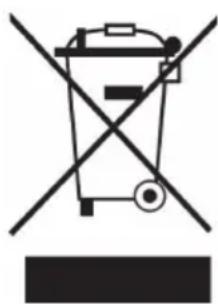
Symbol of a trash bin crossed with a diagonal line, no text or numbers presentIf there is a legal regulation for the disposal of electrical and electronic devices in your country, this symbol on the product or on the packaging indicates that this product must not be disposed of with household waste. Instead, it must be taken to a collection point for the recycling of electrical and electronic equipment. By disposing of it in accordance with the rules, you are protecting the environment and the health of your fellow human beings from negative consequences. For information about the recycling and disposal of this product, please contact your local authority or your household waste disposal service.
Chère cliente, cher client,
SOMMAIRE
Berlin Brands Group UK Limited
PO Box 42
272 Kensington High Street
London, W8 6ND
United Kingdom
CONSIGNES DE SÉCURITÉ
natural_image
Symbol of a trash bin crossed with a diagonal line, no text or numbers presentÍNDICE
Berlin Brands Group UK Limited
PO Box 42
272 Kensington High Street
London, W8 6ND
United Kingdom
natural_image
Symbol of a trash bin crossed with a diagonal line, no text or numbers presentINDICE
PRODUTTORE E IMPORTATORE (UK)
Produttore:
Chal-Tec GmbH, Wallstraße 16, 10179 Berlino, Germania.
Berlin Brands Group UK Limited
PO Box 42
272 Kensington High Street
London, W8 6ND
United Kingdom
AVVERTENZE DI SICUREZZA
natural_image
Symbol of a trash bin crossed with a diagonal line, no text or numbers present- INHALTSVERZEICHNIS
- SICHERHEITSHINWEISE
- CONTENT
- TECHNICAL DATA
- MANUFACTURER & IMPORTER (UK)
- Manufacturer:
- Importer for Great Britain:
- SAFETYINSTRUCTIONS
- CAUTION
- CONTROL PANEL
- OPERATION
- Switch on the Device
- SET Button
- Set Celsius or Fahrenheit
- Set Time and Temperature
- Cook Food
- Switching off the Unit
- DESCALING
- TROUBLESHOOTING
- HINTS ON DISPOSAL
- Chère cliente, cher client,
- SOMMAIRE
- CONSIGNES DE SÉCURITÉ
- ÍNDICE
- INDICE
- PRODUTTORE E IMPORTATORE (UK)
- Produttore:
- AVVERTENZE DI SICUREZZA
Brand : Klarstein
Model : Quickstick Flex
Category : Autres appareils de cuisine