
Mode - Headphones MARSHALL - Free user manual and instructions
Find the device manual for free Mode MARSHALL in PDF.

 BG
BG
 CS
CS
 DE
DE
 EL
EL
 EN
EN
 ES
ES
 ET
ET
 FI
FI
 HE
HE
 HU
HU
 ID
ID
 IT
IT
 JA
JA
 KO
KO
 LT
LT
 LV
LV
 NL
NL
 PL
PL
 PT
PT
 RO
RO
 RU
RU
 SK
SK
 SV
SV
 TL
TL
 TR
TR
 UK
UK
 VI
VI
 ZH
ZH
| Product Type | On-ear headphones |
| Dimensions (W x H x D) | 6.0 x 8.0 x 2.5 in (15.2 x 20.3 x 6.4 cm) |
| Weight | 0.45 lb (200 g) |
| Power Source | Passive (no battery required) |
| Driver Size | 40 mm |
| Frequency Response | 20 Hz - 20 kHz |
| Impedance | 32 Ω |
| Sensitivity | 99 dB SPL (1 mW) |
| Connector | 3.5 mm stereo jack, gold-plated |
| Cable Length | 4.9 ft (1.5 m), detachable |
| Control Type | In-line remote with microphone |
| Main Functions | Foldable design, adjustable headband, cushioned ear pads, swiveling ear cups |
| Compatibility | Smartphones, tablets, laptops, audio players with 3.5 mm output |
| Maintenance & Cleaning | Wipe with a soft, dry cloth. Do not use liquids or abrasive cleaners. |
| Safety Precautions | Avoid prolonged listening at high volume to prevent hearing damage. |
| Spare Parts & Repairability | Replacement ear pads and cables available from Marshall authorized dealers. |
| General Information | Impedance: 32 Ω, Frequency response: 20 Hz – 20 kHz, Sensitivity: 99 dB SPL |
Frequently Asked Questions - Mode MARSHALL
User questions about Mode MARSHALL
0 question about this device. Answer the ones you know or ask your own.
Ask a new question about this device
Download the instructions for your Headphones in PDF format for free! Find your manual Mode - MARSHALL and take your electronic device back in hand. On this page are published all the documents necessary for the use of your device. Mode by MARSHALL.
USER MANUAL Mode MARSHALL
Device layout....003
Changing ear tips....005
Cleaning your Mode USB-C 005
Troubleshooting....006
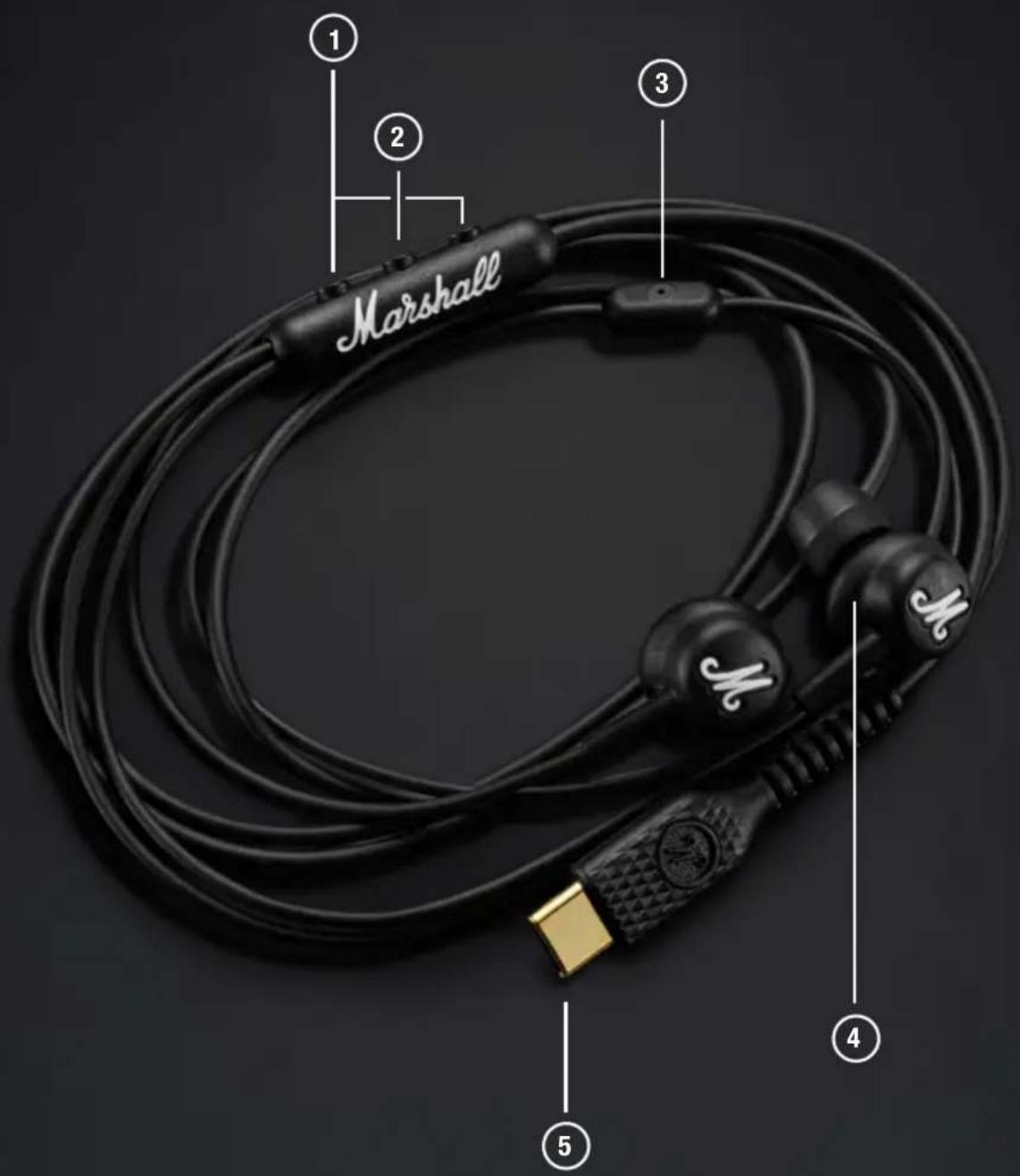
① VOLUME BUTTONS
Push the upper button to turn the volume up and the lower button to turn it down.
② CONTROL BUTTON
Use the buttons to control your music, phone calls and more.
- Play/pause – push once
- Skip forward – push twice
- Skip backward – push thrice
- Receive/end a call – push once
- Reject a call – double push
- Your phone's voice assistant – push and hold
③ MICROPHONE
Microphone for phone calls or with your phone's voice assistant.
④ EAR TIPS
Mode USB-C comes with 4 sizes of ear tips and getting the best fit is important in ensuring you enjoy the best audio experience.
⑤ USB-C AUDIO CONNECTOR
Connects your earphones to a sound device supporting audio through USB-C.
CHANGING EAR TIPS
Take the time to find the ear tips that best fit your ear. The ear tips should fit snugly in your ear but still feel comfortable. It is not uncommon to use different sizes for left and right.
I. Pull the ear tip from the earbud to remove it.
II. Gently pinch the new ear tip and press it on the earbud to attach it.
CLEANING YOUR MODE USB-C
Earphones come in close contact with your skin frequently and sometimes for long periods of time. This may over time cause build-up of dirt and grease that can affect performance and cause skin irritation. Clean your earphones regularly to keep them fresh and make them last longer.
Unplug the earphones before cleaning them. Make sure everything is completely dry before plugging in or using the earphones.
Remove the silicone ear tips from the earphones and clean them separately.
Gently clean the earphones and cables with a lint-free cloth, slightly damp with either:
- water,
- 70% isopropyl alcohol, or
- 75 % ethyl alcohol
Avoid getting moisture in any openings or in the speaker mesh. Carefully clean those areas with a dry and soft brush, or a cotton swab.
- Do not use any sharp objects.
- Do not use compressed air.
- Do not use products containing bleach or hydrogen peroxide.
- Do not submerge the earphones in any cleaning agents.
- Do not rinse the earphones under running water.
| PROBLEM ACTION | |
| There is no sound Check the volume on your sound device. | |
Marshall
MODE USB-C WIRED EARPHONES
المحتويات
الفهرس
Layout ng device 003
- tubig,
- 70% isopropyl alcohol, o
- 75 % ethyl alcohol
REEMPLACEMENT DES EMBOUTS
⑤ B'YΣMA 'HXOY USB-C
MEMBERSIHKAN MODE USB-C ANDA
Trocar as pontas dos auriculares 005
LIMPAR O SEU MODE USB-C
⑤ ĐẦU NỔI ÂM THANH USB-C
Brand : MARSHALL
Model : Mode
Category : Headphones