
GSB 180-LI Professional - Drill BOSCH - Free user manual and instructions
Find the device manual for free GSB 180-LI Professional BOSCH in PDF.


 FR
FR
 BG
BG
 CS
CS
 DA
DA
 DE
DE
 EL
EL
 EN
EN
 ES
ES
 ET
ET
 FI
FI
 HU
HU
 IT
IT
 KK
KK
 KO
KO
 LT
LT
 LV
LV
 MK
MK
 NL
NL
 NO
NO
 PL
PL
 PT
PT
 RO
RO
 RU
RU
 SK
SK
 SL
SL
 SV
SV
 TR
TR
 UK
UK
| Brand | Bosch |
| Model | GSB 180-LI Professional |
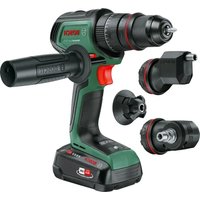
| Product type | Cordless impact drill/driver |
| Rated voltage | 18 V |
| Idle speed (1st gear) | 0 – 500 rpm |
| Idle speed (2nd gear) | 0 – 1,900 rpm |
| Impact frequency | 0 – 27,000 bpm |
| Max torque (hard / soft) | 54 / 21 Nm |
| Max drilling diameter (wood) | 35 mm |
| Max drilling diameter (steel) | 10 mm |
| Max drilling diameter (masonry) | 10 mm |
| Tool holder | Automatic chuck 1.5 – 13 mm |
| Weight (according to EPTA) | 1.7 – 2.7 kg |
| Power supply | Li-Ion battery 18 V (recommended GBA 18V... or ProCORE18V...) |
| Recommended charger | GAL 18..., GAX 18..., GAL 36... |
| Recommended charging temperature | 0 °C to +35 °C |
| Operating and storage temperature | −20 °C to +50 °C |
| Sound pressure level | 88 dB(A) |
| Sound power level | 99 dB(A) |
| Vibration (metal drilling) | < 2.5 m/s² (uncertainty K = 1.5 m/s²) |
| Vibration (hammer drilling concrete) | 11.0 m/s² (uncertainty K = 1.5 m/s²) |
| Main functions | Drilling, screwdriving, impact drilling, reversible rotation, variable speed, torque presetting (20 positions), LED light, kickback control (Kickback Control) |
| Maintenance and cleaning | Clean ventilation slots, replace carbon brushes every 2-3 months, use only original Bosch carbon brushes |
| Safety | Thermal overload protection, deep discharge protection (ECP), kickback control, battery lock |
| Spare parts and repairability | Replaceable carbon brushes, Bosch after-sales service, spare parts available at www.boschpt.com |
| General information | Proper use: drilling in wood, metal, ceramic, plastic, masonry; screwdriving and unscrewing |
Frequently Asked Questions - GSB 180-LI Professional BOSCH
User questions about GSB 180-LI Professional BOSCH
0 question about this device. Answer the ones you know or ask your own.
Ask a new question about this device
Download the instructions for your Drill in PDF format for free! Find your manual GSB 180-LI Professional - BOSCH and take your electronic device back in hand. On this page are published all the documents necessary for the use of your device. GSB 180-LI Professional by BOSCH.
USER MANUAL GSB 180-LI Professional BOSCH
GSR | GSB Professional
180-LI
Robert Bosch Power Tools GmbH
70538 Stuttgart
GERMANY
www.bosch-pt.com
1609 92A 5PY (2020.03) AS / 231

1 609 92A 5PY

GSR 180-LI


6


Deutsch
Sicherheitshinweise
General Power Tool Safety Warnings
WARNING
Read all safety warnings, instructions, illustrations and specifications
provided with this power tool. Failure to follow all instructions listed below may result in electric shock, fire and/or serious injury.
Save all warnings and instructions for future reference.
The term "power tool" in the warnings refers to your mains-operated (corded) power tool or battery-operated (cordless) power tool.
Work area safety
▶ Keep work area clean and well lit. Cluttered or dark areas invite accidents. ▶ Do not operate power tools in explosive atmospheres, such as in the presence of flammable liquids, gases or dust. Power tools create sparks which may ignite the dust or fumes. ▶ Keep children and bystanders away while operating a power tool. Distractions can cause you to lose control.
Electrical safety
▶ Power tool plugs must match the outlet. Never modify the plug in any way. Do not use any adapter plugs with earthed (grounded) power tools. Unmodified plugs and matching outlets will reduce risk of electric shock. ▶ Avoid body contact with earthed or grounded surfaces, such as pipes, radiators, ranges and refrigerators. There is an increased risk of electric shock if your body is earthed or grounded. ▶ Do not expose power tools to rain or wet conditions. Water entering a power tool will increase the risk of electric shock. ▶ Do not abuse the cord. Never use the cord for carrying, pulling or unplugging the power tool. Keep cord away from heat, oil, sharp edges or moving parts. Damaged or entangled cords increase the risk of electric shock. ▶ When operating a power tool outdoors, use an extension cord suitable for outdoor use. Use of a cord suitable for outdoor use reduces the risk of electric shock. ▶ If operating a power tool in a damp location is unavoidable, use a residual current device (RCD) protected supply. Use of an RCD reduces the risk of electric shock.
Personal safety
▶ Stay alert, watch what you are doing and use common sense when operating a power tool. Do not use a power tool while you are tired or under the influence of drugs, alcohol or medication. A moment of inattention
while operating power tools may result in serious personal injury.
▶ Use personal protective equipment. Always wear eye protection. Protective equipment such as a dust mask, non-skid safety shoes, hard hat, or hearing protection used for appropriate conditions will reduce personal injuries. ▶ Prevent unintentional starting. Ensure the switch is in the off-position before connecting to a power source and/or battery pack, picking up, or carrying the tool. Carrying power tools with your finger on the switch or energizing power tools that have the switch on invites accidents. Remove any adjusting key or wrench before turning the power tool on. A wrench or a key left attached to a rotating part of the power tool may result in personal injury. ▶ Do not overreach. Keep proper footing and balance at all times. This enables better control of the power tool in unexpected situations. ▶ Dress properly. Do not wear loose clothing or jewelry. Keep your hair and clothing away from moving parts. Loose clothes, jewelry, or long hair can be caught in moving parts. If devices are provided for the connection of dust extraction and collection facilities, ensure these are connected and properly used. Use of dust collection can reduce dust-related hazards. ▶ Do not let familiarity gained from frequent use of tools allow you to become complacent and ignore tool safety principles. A careless action can cause severe injury within a fraction of a second. ▶ Do not force the power tool. Use the correct power tool for your application. The correct power tool will do the job better and safer at the rate for which it was designed. ▶ Do not use the power tool if the switch does not turn it on and off. Any power tool that cannot be controlled with the switch is dangerous and must be repaired. ▶ Disconnect the plug from the power source and/or remove the battery pack, if detachable, from the power tool before making any adjustments, changing accessories, or storing power tools. Such preventive safety measures reduce the risk of starting the power tool accidentally. ▶ Store idle power tools out of the reach of children and do not allow persons unfamiliar with the power tool or these instructions to operate the power tool. Power tools are dangerous in the hands of untrained users. ▶ Maintain power tools and accessories. Check for misalignment or binding of moving parts, breakage of parts, and any other condition that may affect the power tool's operation. If damaged, have the power tool repaired before use. Many accidents are caused by poorly maintained power tools.
Power tool use and care
Keep cutting tools sharp and clean. Properly maintained cutting tools with sharp cutting edges are less likely to bind and are easier to control. Use the power tool, accessories, and tool bits, etc., in accordance with these instructions, taking into account the working conditions and the work to be performed. Use of the power tool for operations different from those intended could result in a hazardous situation. Keep handles and grasping surfaces dry, clean, and free from oil and grease. Slippery handles and grasping surfaces do not allow for safe handling and control of the tool in unexpected situations.
Battery tool use and care
Recharge only with the charger specified by the manufacturer. A charger that is suitable for one type of battery pack may create a risk of fire when used with another battery pack. Use power tools only with specifically designated battery packs. Use of any other battery packs may create a risk of injury and fire. When battery pack is not in use, keep it away from other metal objects, like paper clips, coins, keys, nails, screws, or other small metal objects, that can make a connection from one terminal to another. Shorting the battery terminals together may cause burns or a fire. Under abusive conditions, liquid may be ejected from the battery; avoid contact. If contact accidentally occurs, flush with water. If liquid contacts eyes, additionally seek medical help. Liquid ejected from the battery may cause irritation or burns. Do not use a battery pack or tool that is damaged or modified. Damaged or modified batteries may exhibit unpredictable behavior resulting in fire, explosion, or risk of injury. Do not expose a battery pack or tool to fire or excessive temperature. Exposure to fire or temperature above 130°C may cause explosion. Follow all charging instructions and do not charge the battery pack or tool outside the temperature range specified in the instructions. Charging improperly or at temperatures outside the specified range may damage the battery and increase the risk of fire.
Service
Have your power tool serviced by a qualified repair person using only identical replacement parts. This will ensure that the safety of the power tool is maintained. Never service damaged battery packs. Service of battery packs should only be performed by the manufacturer or authorized service providers.
Safety information for drills and screwdrivers
Safety instructions for all operations
Wear ear protectors when impact drilling. Exposure to noise can cause hearing loss.
Hold the power tool by insulated gripping surfaces, when performing an operation where the cutting accessory or fasteners may contact hidden wiring. Cutting accessory or fasteners contacting a "live" wire may make exposed metal parts of the power tool "live" and could give the operator an electric shock.
Safety instructions when using long drill bits
Never operate at higher speed than the maximum speed rating of the drill bit. At higher speeds, the bit is likely to bend if allowed to rotate freely without contacting the workpiece, resulting in personal injury. Always start drilling at low speed and with the bit tip in contact with the workpiece. At higher speeds, the bit is likely to bend if allowed to rotate freely without contacting the workpiece, resulting in personal injury. Apply pressure only in direct line with the bit and do not apply excessive pressure. Bits can bend causing breakage or loss of control, resulting in personal injury.
Additional safety warnings
Hold the power tool securely. When tightening and loosening screws be prepared for temporarily high torque reactions. Secure the workpiece. A workpiece clamped with clamping devices or in a vice is held more secure than by hand. Use suitable detectors to determine if there are hidden supply lines or contact the local utility company for assistance. Contact with electric cables can cause fire and electric shock. Damaging gas lines can lead to explosion. Breaking water pipes causes property damage. Always wait until the power tool has come to a complete stop before placing it down. The application tool can jam and cause you to lose control of the power tool. In case of damage and improper use of the battery, vapours may be emitted. The battery can set alight or explode. Ensure the area is well ventilated and seek medical attention should you experience any adverse effects. The vapours may irritate the respiratory system. Do not open the battery. There is a risk of short-circuiting. The battery can be damaged by pointed objects such as nails or screwdrivers or by force applied externally. An internal short circuit may occur, causing the battery to burn, smoke, explode or overheat. Only use the battery with products from the manufacturer. This is the only way in which you can protect the battery against dangerous overload.
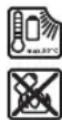
Protect the battery against heat, e.g. against continuous intense sunlight, fire, dirt, water and moisture. There is a risk of explosion and short-circuiting.
Switch the power tool off immediately if the application tool becomes blocked. Be prepared for high torque reactions which cause kickback. The application tool becomes blocked when it becomes jammed in
the workpiece or when the power tool becomes overloaded.
Product Description and Specifications

Read all the safety and general instructions. Failure to observe the safety and general instructions may result in electric shock, fire and/or serious injury.
Please observe the illustrations at the beginning of this operating manual.
Intended use
The power tool is intended for driving and loosening screws and for drilling in wood, metal, ceramic and plastic. The GSB is also designed for impact drilling in brick, concrete and stone.
Product Features
The numbering of the product features refers to the diagram of the power tool on the graphics page.
(1) Tool holder
(2) Keyless chuck
(3) Torque presetting ring
(4) Mode selector switch (GSB)
(5) Gear selector switch
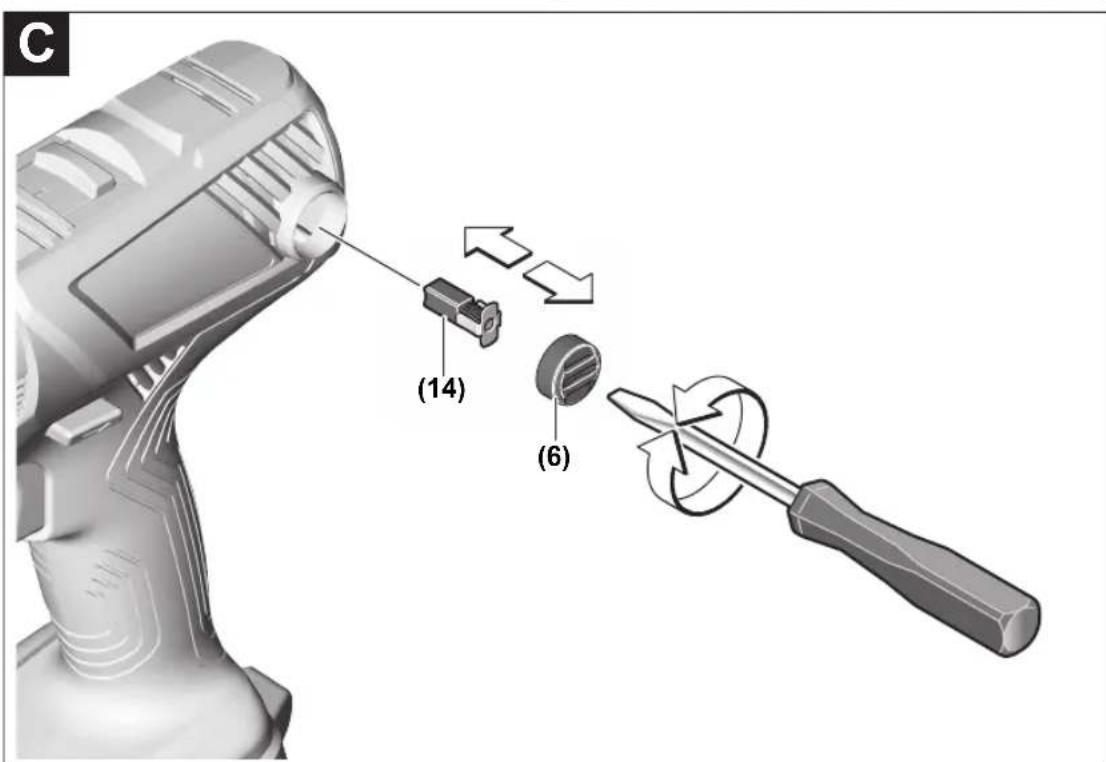
(6) Cover cap
(7) Battery
(8) Battery release button
(9) Worklight
(10) Rotational direction switch
(11) On/off switch
(12) Handle (insulated gripping surface)
(13) Universal bit holder 4
(14) Carbon brushes
(15) Battery charge indicator button
(16) Battery charge indicator
A) Accessories shown or described are not included with the product as standard. You can find the complete selection of accessories in our accessories range.
Technical Data
| Cordless drill/driver GSR 180-LI GSB 180-LI | ||
| Article number | 3 601 JF8 1.. 3 601 JF8 3.. | |
| Rated voltage V= 18 18 | ||
| No-load speed | ||
| - First gear min | -1 | 0-500 0-500 |
| - Second gear min | -1 | 0-1900 0-1900 |
| Impact rate min | -1 | -0-27000 |
| Max. torque, hard/soft screwdriving application according to ISO 5393A) | Nm 54/21 54/21 | |
| Max. drilling diameter (first and second gear) | ||
| - Wood mm 35 35 | ||
| - Steel mm 10 10 | ||
| - Masonry mm - 10 | ||
| Tool holder | 1.5-13 | 1.5-13 |
| Max. screw diameter | mm 10 10 | |
| Weight according to EPTA-Procedure 01:2014A) | kg 1.6-2.6 1.7-2.7 | |
| Recommended ambient temperature during charging | °C | 0 to +35 |
| Permitted ambient temperature during operationB) and during storage | °C | -20 to +50 |
| Recommended batteries | GBA 18V...ProCORE18V... | GBA 18V...ProCORE18V... |
Cordless drill/driver GSR 180-LI GSB 180-LI
| Recommended chargers GAL 18... | GAL 18... | |
| GAX 18... | GAX 18... | |
| GAL 36... | GAL 36... |
A) Depends on battery in use B) Limited performance at temperatures <0 °C
Noise/vibration information
Noise emission values determined according to EN 62841-2-1.
Typically, the A-weighted noise level of the power tool is: Sound pressure level 88 dB(A); sound power level 99 dB(A). Uncertainty K = 5 dB.
Wear hearing protection!
| GSR 180-LI GSB 180-LI | |||
| Vibration total values ah (triax vector sum) and uncertainty K determined according to EN 62841-2-1. | |||
| Drilling into metal: | |||
| ah | m/s2 | <2.5 | <2.5 |
| K | m/s2 | 1.5 | 1.5 |
| Impact drilling into concrete: | |||
| ah | m/s2 | - | 11.0 |
| K | m/s2 | - | 1.5 |
The vibration level and noise emission value given in these instructions have been measured in accordance with a standardised measuring procedure and may be used to compare power tools. They may also be used for a preliminary estimation of vibration and noise emissions.
The stated vibration level and noise emission value represent the main applications of the power tool. However, if the power tool is used for other applications, with different application tools or is poorly maintained, the vibration level and noise emission value may differ. This may significantly increase the vibration and noise emissions over the total working period.
To estimate vibration and noise emissions accurately, the times when the tool is switched off or when it is running but not actually being used should also be taken into account. This may significantly reduce vibration and noise emissions over the total working period.
Implement additional safety measures to protect the operator from the effects of vibration, such as servicing the power tool and application tools, keeping their hands warm, and organising workflows correctly.
Assembly
Remove the battery from the power tool before carrying out work on the power tool (e.g. maintenance, changing tool, etc.). The battery should also be removed for transport and storage. There is risk of injury from unintentionally pressing the on/off switch.
Charging the Battery
▶ Use only the chargers listed in the technical data. Only these chargers are matched to the lithium-ion battery of your power tool.
Note: The battery is supplied partially charged. To ensure full battery capacity, fully charge the battery in the charger before using your power tool for the first time.
The lithium-ion battery can be charged at any time without reducing its service life. Interrupting the charging process does not damage the battery.
The lithium-ion battery is protected against deep discharge by the "Electronic Cell Protection (ECP)". When the battery is discharged, the power tool is switched off by means of a protective circuit: The application tool no longer rotates.
▶ Do not continue to press the On/Off switch after the power tool has automatically switched off. The battery can be damaged.
Follow the instructions on correct disposal.
Removing the Battery
The battery (7) is equipped with two locking levels to prevent the battery from falling out when pushing the battery release button (8) unintentionally. As long as the battery is inserted in the power tool, it is held in position by means of a spring.
To remove the battery (7), press the release button (8) and pull the battery out of the power tool. Do not use force to do this.
Battery Charge Indicator
The green LEDs on the battery charge indicator (16) indicate the state of charge of the battery (7). For safety reasons, it is only possible to check the state of charge when the power tool has been stopped.
Press the battery charge indicator button (15) to show the state of charge. This is also possible when the battery is removed.
If no LED lights up after pressing the battery charge indicator button (15), the battery is defective and must be replaced.
Battery Model GBA 18V... (see figure D1)
LEDs Capacity
| 3× continuous green light 60-100% |
| 2× continuous green light 30-60% |
| 1× continuous green light 5-30% |
| 3× flashing green light 0-5% |
Battery Model ProCORE18V... (see figure D2)
LEDs Capacity
| 5× continuous green light 80-100% |
| 4× continuous green light 60-80% |
| 3× continuous green light 40-60% |
| 2× continuous green light 20-40% |
| 1× continuous green light 5-20% |
| 1× flashing green light 0-5% |
Changing the Tool (see figure A)
Remove the battery from the power tool before carrying out work on the power tool (e.g. maintenance, changing tool, etc.). The battery should also be removed for transport and storage. There is risk of injury from unintentionally pressing the on/off switch.
Open the keyless chuck (2) by turning it in the direction of rotation ① until the tool can be inserted. Insert the tool. Firmly tighten the keyless chuck (2) by turning it by hand in the direction of rotation ②. This will automatically lock the drill chuck.
Dust/Chip Extraction
Dust from materials such as lead-containing coatings, some wood types, minerals and metal can be harmful to one's health. Touching or breathing-in the dust can cause allergic reactions and/or lead to respiratory infections of the user or bystanders.
Certain dust, such as oak or beech dust, is considered carcinogenic, especially in connection with wood-treatment additives (chromate, wood preservative). Materials containing asbestos may only be worked by specialists.
- Provide for good ventilation of the working place.
- It is recommended to wear a P2 filter-class respirator. Observe the relevant regulations in your country for the materials to be worked.
- Avoid dust accumulation at the workplace. Dust can easily ignite.
Operation
Starting Operation
Inserting the battery
Note: The use of batteries unsuitable for your power tool can lead to malfunctions or damage to the power tool. Set the rotational direction switch (10) to the middle position to avoid unintentionally switching it on. Insert the charged battery (7) into the handle until you feel it engage and it is flush with the handle.
Setting the rotational direction (see figure B)
The rotational direction switch (10) is used to change the rotational direction of the power tool. However, this is not possible while the on/off switch (11) is being pressed.
Right rotation: To drill and to drive in screws, press the rotational direction switch (10) through to the left stop.
Left Rotation: To loosen and unscrew screws and nuts, press the rotational direction switch (10) through to the right stop.
Setting the operating mode

Drilling
GSR:
Set the torque presetting ring (3) to the required torque.
GSB:
Set the mode selector switch (4) to the "drilling" symbol.
Set the mode selector switch (4) to the "drilling" symbol.

Screwdriving
GSR:
Set the torque presetting ring (3) to the "screwdriving" symbol.
GSB:
Set the mode selector switch (4) to the "screwdriving" symbol.

Impact drilling (GSB)
Set the mode selector switch (4) to the "impact drilling" symbol.
Switching on/off
To start the power tool, press and hold the on/off switch (11).
The LED (9) lights up when the on/off switch (11) is lightly or fully pressed, meaning that the work area is illuminated in poor lighting conditions.
To switch off the power tool, release the on/off switch (11).
Adjusting the Speed
You can adjust the speed of the power tool when it is on by pressing in the on/off switch (11) to varying extents.
A light pressure on the on/off switch (11) results in a low rotational speed. Increased pressure on the switch causes an increase in speed.
Pre-selecting the torque
The torque presetting ring (3) can be used to pre-select the required torque in 20 stages. Once the set torque has been reached, the application tool will be stopped.
Mechanical Gear Selection
You can press the gear selector switch (5) with the power tool off or on. However, you should not do this at full load or maximum torque.
Gear I:
Low speed range; for working with a large drilling diameter or for screwdriving.
Gear II:
High speed range; for working with a small drilling diameter.
Temperature-dependent overload protection
In normal conditions of use, the power tool cannot be overloaded. If the power tool is overloaded or the battery temperature is not kept within the permitted range, the power tool switches off and the LED on the power tool flashes. Allow the power tool to cool down before you carry on working.
Protection against deep discharge
The lithium-ion battery is protected against deep discharge by the "Electronic Cell Protection (ECP)". When the battery is discharged, the power tool is switched off by means of a protective circuit: The application tool no longer rotates.
Emergency switch-off (KickBack Control)

The emergency switch-off function (Kick-Back Control) gives the user greater control over the power tool and offers them better protection than power tools that do not
have KickBack Control. The power tool will switch off if it suddenly and unforeseeably rotates around the drilling axis.
Rapid shut-off is indicated by the LED on the power tool flashing.
To switch the tool back on, release the on/off switch and then press it again.
If the KickBack Control function is defective, it will no longer be possible to switch the power tool on. Have the power tool serviced by a qualified repair person using only original replacement parts.
Working Advice
Always slide the gear selector switch or turn the mode selector switch as far as it will go. Otherwise, the power tool may become damaged. Only apply the power tool to the screw/nut when the tool is switched off. Rotating tool inserts can slip off.
An auxiliary tool can be used to remove the screwdriver bit or universal bit holder.
Working in especially dusty environments can lead to failure of the power tool. If the power tool suddenly fails, remove the carbon brushes and check them (see section "Replacing the carbon brushes").
Maintenance and Service
Maintenance and cleaning
Remove the battery from the power tool before carrying out work on the power tool (e.g. maintenance, changing tool, etc.). The battery should also be removed for transport and storage. There is risk of injury from unintentionally pressing the on/off switch. To ensure safe and efficient operation, always keep the power tool and the ventilation slots clean.
Replacing the carbon brushes (see figure C)
Check the length of the carbon brushes around every 2–3 months and replace both carbon brushes if required.
Never replace only a single carbon brush.
Note: Only use carbon brushes supplied by Bosch and intended specifically for your product.
- Unscrew the caps (6) using a suitable screwdriver.
- Replace the spring-loaded carbon brushes (14) and screw on the caps again. If the battery is no longer working, please contact an authorised after-sales service centre for Bosch power tools.
After-Sales Service and Application Service
Our after-sales service responds to your questions concerning maintenance and repair of your product as well as spare parts. You can find explosion drawings and information on spare parts at: www.bosch-pt.com
The Bosch product use advice team will be happy to help you with any questions about our products and their accessories.
In all correspondence and spare parts orders, please always include the 10-digit article number given on the nameplate of the product.
Australia, New Zealand and Pacific Islands
Robert Bosch Australia Pty. Ltd.
Power Tools
Locked Bag 66
Clayton South VIC 3169
Customer Contact Center
Inside Australia:
Phone: (01300) 307044
Fax: (01300) 307045
Inside New Zealand:
Phone: (0800) 543353
Fax: (0800) 428570
Outside AU and NZ:
Phone: +61 3 95415555
www.bosch-pt.com.au
www.bosch-pt.co.nz
Great Britain
Robert Bosch Ltd. (B.S.C.)
P.O. Box 98
Broadwater Park
North Orbital Road
Denham Uxbridge
UB 9 5HJ
At www.bosch-pt.co.uk you can order spare parts or arrange the collection of a product in need of servicing or repair.
Tel. Service: (0344) 7360109
E-Mail: boschservicecentre@bosch.com
Ireland
Origo Ltd.
Unit 23 Magna Drive
Magna Business Park
City West
Dublin 24
Tel. Service: (01) 4666700
Fax: (01) 4666888
Republic of South Africa
Customer service
Hotline: (011) 6519600
Gauteng - BSC Service Centre
35 Roper Street, New Centre
Johannesburg
Tel.: (011) 4939375
Fax: (011) 4930126
E-Mail: bsctools@icon.co.za
KZN - BSC Service Centre
Unit E, Almar Centre
143 Crompton Street
Pinetown
Tel.: (031) 7012120
Fax: (031) 7012446
E-Mail: bsc.dur@za.bosch.com
Western Cape - BSC Service Centre
Democracy Way, Prosperity Park
Milnerton
Tel.: (021) 5512577
Fax: (021) 5513223
E-Mail: bsc@zsd.co.za
Bosch Headquarters
Midrand, Gauteng
Tel.: (011) 6519600
Fax: (011) 6519880
E-Mail: rbsa-hq.pts@za.bosch.com
Armenia, Azerbaijan, Georgia
Robert Bosch Ltd.
David Agmashenebeli ave. 61
0102 Tbilisi, Georgia
Tel. +995322510073
www.bosch.com
Kyrgyzstan, Mongolia, Tajikistan, Turkmenistan, Uzbekistan
TOO "Robert Bosch" Power Tools, After Sales Service
Muratbaev Ave., 180
050012, Almaty, Kazakhstan
Service Email: service.pt.ka@bosch.com
Official Website: www.bosch.com, www.bosch-pt.com
Transport
The contained lithium-ion batteries are subject to the Dangerous Goods Legislation requirements. The batteries are suitable for road-transport by the user without further restrictions.
When shipping by third parties (e.g.: by air transport or forwarding agency), special requirements on packaging and labelling must be observed. For preparation of the item being shipped, consulting an expert for hazardous material is required.
Dispatch battery packs only when the housing is undamaged. Tape or mask off open contacts and pack up the battery in such a manner that it cannot move around in the packaging. Please also observe the possibility of more detailed national regulations.
Disposal

Power tools, rechargeable batteries, accessories and packaging should be sorted for environmental-friendly recycling.

Do not dispose of power tools and batteries/re-chargeable batteries into household waste!
Only for EU countries:
According to the Directive 2012/19/EU, power tools that are no longer usable, and according to the Directive 2006/66/EC, defective or used battery packs/batteries, must be collected separately and disposed of in an environmentally correct manner.
Battery packs/batteries:
Li-ion:
Please observe the notes in the section on transport (see "Transport", page 20).
Robert Bosch (France) S.A.S.
Robert Bosch Argentina Industrial S.A.
Calle Blanco Encalada 250 - San Isidro
B1642AMQ
Calle Robert Bosch No. 405
Bosch Service Center
Telegrafvej 3
2750 Ballerup
At www.bosch-pt.dk you can order spare parts online or create a repair order.
Service Center phone: 44898855
Fax: 44898755
E-mail: vaerktoej@dk.bosch.com
Transport
Bosch Service Center
Telegrafvej 3
2750 Ballerup
Denmark
Tel.: (08) 7501820 (within Sweden)
Fax: (011) 187691
Transport
Robert Bosch Sp. z o.o.
Bosch Service Center PT
K Vápence 1621/16
692 01 Mikulov
Power tool service
Strada Horia Măcelariu Nr. 30–34, sector 1
013937 Bucharest
Power tool service
Strada Horia Măcelariu Nr. 30–34, sector 1
013937 Bucharest, Romania
Transport
Sahba Technology Group
Al Muthanna Airport Street
Baghdad
Robert Bosch Morocco SARL
EC/96/2006/66/EC is collected

- GSR | GSB PROFESSIONAL
- DEUTSCH
- SICHERHEITSHINWEISE
- GENERAL POWER TOOL SAFETY WARNINGS
- WARNING
- WORK AREA SAFETY
- ELECTRICAL SAFETY
- PERSONAL SAFETY
- POWER TOOL USE AND CARE
- BATTERY TOOL USE AND CARE
- SERVICE
- SAFETY INFORMATION FOR DRILLS AND SCREWDRIVERS
- SAFETY INSTRUCTIONS FOR ALL OPERATIONS
- SAFETY INSTRUCTIONS WHEN USING LONG DRILL BITS
- ADDITIONAL SAFETY WARNINGS
- PRODUCT DESCRIPTION AND SPECIFICATIONS
- INTENDED USE
- PRODUCT FEATURES
- NOISE/VIBRATION INFORMATION
- WEAR HEARING PROTECTION
- ASSEMBLY
- CHARGING THE BATTERY
- REMOVING THE BATTERY
- BATTERY CHARGE INDICATOR
- BATTERY MODEL GBA 18V... (SEE FIGURE D1)
- BATTERY MODEL PROCORE18V... (SEE FIGURE D2)
- CHANGING THE TOOL (SEE FIGURE A)
- DUST/CHIP EXTRACTION
- OPERATION
- STARTING OPERATION
- INSERTING THE BATTERY
- SETTING THE ROTATIONAL DIRECTION (SEE FIGURE B)
- SETTING THE OPERATING MODE
- DRILLING
- GSR
- SET THE MODE SELECTOR SWITCH (4) TO THE "DRILLING" SYMBOL
- SCREWDRIVING
- GSB
- IMPACT DRILLING (GSB)
- SWITCHING ON/OFF
- ADJUSTING THE SPEED
- PRE-SELECTING THE TORQUE
- MECHANICAL GEAR SELECTION
- GEAR I
- GEAR II
- TEMPERATURE-DEPENDENT OVERLOAD PROTECTION
- PROTECTION AGAINST DEEP DISCHARGE
- EMERGENCY SWITCH-OFF (KICKBACK CONTROL)
- WORKING ADVICE
- MAINTENANCE AND SERVICE
- MAINTENANCE AND CLEANING
- REPLACING THE CARBON BRUSHES (SEE FIGURE C)
- AFTER-SALES SERVICE AND APPLICATION SERVICE
- AUSTRALIA, NEW ZEALAND AND PACIFIC ISLANDS
- GREAT BRITAIN
- TRANSPORT
- DISPOSAL
- ONLY FOR EU COUNTRIES
- BATTERY PACKS/BATTERIES
Brand : BOSCH
Model : GSB 180-LI Professional
Category : Drill