
Blade V8 - Smartphone ZTE - Free user manual and instructions
Find the device manual for free Blade V8 ZTE in PDF.


| Product type | Smartphone |
| Brand | ZTE |
| Model | Blade V8 |
| Dimensions (approx.) | 148.4 x 71.5 x 7.7 mm |
| Weight (approx.) | 141 g |
| Power | Non-removable lithium-ion battery, charging via micro-USB 2.0, recommended wall charger |
| Battery capacity | 2730 mAh |
| Screen type | Capacitive touchscreen |
| Supported networks | GSM B2/B3/B5/B8, WCDMA B1/B5/B8, FDD LTE B1/B3/B5/B7/B8/B20 |
| Wireless connectivity | Wi-Fi 802.11b/g/n, Bluetooth 4.1, GPS |
| Rear camera | Dual sensor (13 MP + 2 MP) with LED flash |
| Front camera | 13 MP |
| Storage and RAM | 32 GB internal storage, 3 GB RAM, expandable via microSDXC |
| SIM cards | Dual nano-SIM (4G+3G/2G) |
| Maintenance and cleaning | Clean with a soft dry cloth; avoid any contact with liquids |
| Operating temperature | -10°C to +60°C |
| SAR value (head) | 0.333 W/kg |
| SAR value (body) | 1.229 W/kg (at 5 mm) |
| Safety | Do not use while driving; avoid prolonged high volume; keep away from pacemakers |
| Spare parts and repairability | Non-removable battery; use only ZTE-approved accessories |
| Box contents | Phone, charger, micro-USB cable, SIM ejection tool, quick start guide |
Frequently Asked Questions - Blade V8 ZTE
User questions about Blade V8 ZTE
0 question about this device. Answer the ones you know or ask your own.
Ask a new question about this device
Download the instructions for your Smartphone in PDF format for free! Find your manual Blade V8 - ZTE and take your electronic device back in hand. On this page are published all the documents necessary for the use of your device. Blade V8 by ZTE.
USER MANUAL Blade V8 ZTE
Quick Start Guide....2
ZTE BLADE V8 LITE
Copyright © 2017 ZTE CORPORATION.
All rights reserved.
No part of this publication may be quoted, reproduced, translated or used in any form or by any means, electronic or mechanical, including photocopying and microfilm, without the prior written permission of ZTE Corporation.
Notice
ZTE Corporation reserves the right to make modifications on print errors or update specifications in this guide without prior notice. We offer self-service for our smart terminal device users. Please visit the ZTE official website (at www.ztedevice.com) for more information on self-service and supported product models. Information on the website takes precedence. Visit http://www.ztedevice.com to download the user manual. Just click Support from the home page and then select your location, product type, and name to search for related support information.
Disclaimer
ZTE Corporation expressly disclaims any liability for faults and damages caused by unauthorized modifications of the software.
Images and screenshots used in this guide may differ from the actual product. Content in this guide may differ from the actual product or software.
Trademarks
ZTE and the ZTE logos are trademarks of ZTE Corporation.
Google and Android are trademarks of Google, Inc.
The Bluetooth ^® trademark and logos are owned by the Bluetooth SIG, Inc. and any use of such trademarks by ZTE Corporation is under license.

microSDXC Logo is a trademark of SD-
3C, LLC.
Other trademarks and trade names are the property of their respective owners.
Version No.: R1.0
Edition Time : January 11, 2017
Getting to Know Your Phone
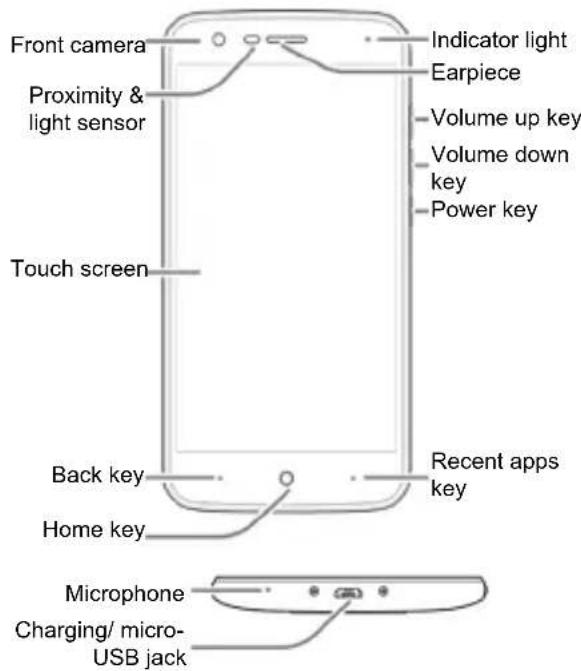
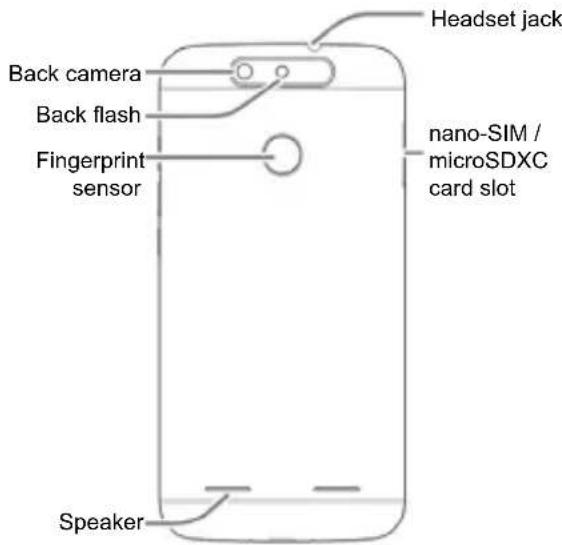
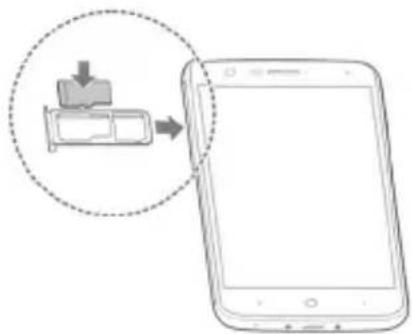
Installing the nano-SIM Card(s) and the microSDXC™ Card
Power off your phone before installing or removing the nano-SIM card.

WARNING!
To avoid damage to the phone, do not use any other kind of SIM cards, or any non-standard nano-SIM card cut from a SIM card. You can get a standard nano-SIM card from your service provider.
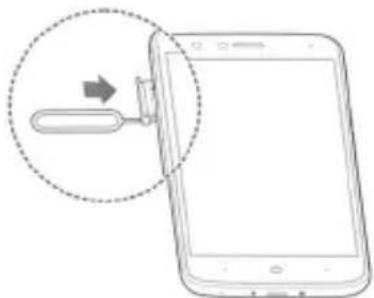
Insert the tip of the tray eject tool into the hole on the card tray
natural_image
Illustration of a smartphone with an attached USB port and a magnified view showing the port (no text or symbols)Install the nano-SIM cards
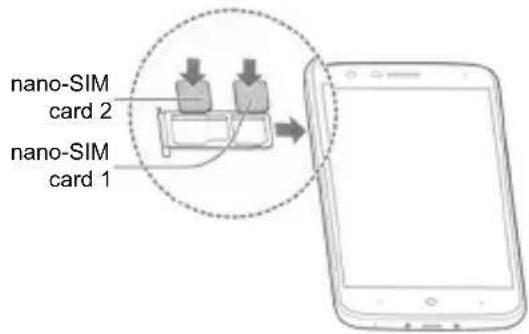
6

NOTE:
The two nano-SIM slots support 4G/3G/2G networks. When one nano-SIM card is set to connect with 4G/3G networks, the other installed nano-SIM card can only connect with 3G/2G networks.
Install the microSDXC™ Card
natural_image
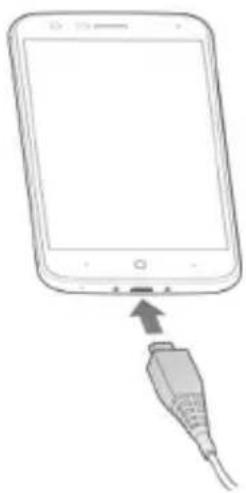
Illustration of a smartphone with a battery icon and download arrow, no text or symbols presentCharging the Phone
Your phone's battery should have enough power for the phone to turn on, find a signal, and make a few calls. You should fully charge the battery as soon as possible.

WARNING!
Use only ZTE-approved chargers and cables. The use of unapproved accessories could damage your phone or cause the battery to explode.

WARNING!
Do not remove the back cover. The battery is not removable. Removal may cause fire or explosion.
7
natural_image
Line drawing of a smartphone with an attached cable showing the cable's connector (no text or symbols present)
NOTE:
If the battery is extremely low, you may be unable to power on the phone even when it is being charged. In this case, try again after charging the phone for at least 20 minutes. Contact the customer service if you still cannot power on the phone after prolonged charging.

NOTE:
If the screen freezes or takes too long to respond, try pressing and holding the Power key for about 10 seconds to restart the phone.
Product Safety Information
| Don't make or receive phone calls while driving. Never text while driving. | |
| Keep your phone at least 5 mm away from your ear or body while making calls. |
 | Small parts may cause choking. |
 | Your phone can produce a loud sound. |
 | To prevent possible hearing damage, do not listen at high volume levels for long periods. |
 | Avoid contact with anything magnetic. |
 | Keep away from pacemakers and other electronic medical devices. |
 | Turn off when asked to in hospitals and medical facilities. |
 | Turn off when told to on aircraft and at airport. |
 | Turn off when near explosive materials or liquids. |
 | Don't use at gas stations. |
 | Your phone may produce a bright or flashing light. |
 | Don't dispose of your phone in fire. |
 | Avoid extreme temperatures. |
 | Avoid contact with liquids. Keep your phone dry. |
 | Do not attempt to disassemble your phone. |
| Only use approved accessories. | |
| Don't rely on your phone as a primary device for emergency communications. |
Specific Absorption Rate (SAR)
Your mobile device is a radio transmitter and receiver. It is designed not to exceed the limits for exposure to radio waves recommended by international guidelines. These guidelines were developed by the independent scientific organization ICNIRP and include safety margins designed to assure the protection of all persons, regardless of age and health.
The guidelines use a unit of measurement known as Specific Absorption Rate, or SAR. The SAR limit for mobile devices is 2 W/kg and the highest SAR value for this device when tested at the head was 0.333 W/kg*, and when tested at the body was 1.229 W/kg* with 5 mm distance.
As SAR is measured utilizing the device's highest transmitting power, the actual SAR of this device while operating is typically below that indicated above. This is due to automatic changes to the power level of the device to ensure it only uses the minimum power required to communicate with the network.
* The tests are carried out in accordance with EN 50360, EN 50566, EN 62479, EN 62209-1 and EN 62209-2.
Specification
| EUTsupportsRadiosapplication | GSM B2/B3/B5/B8WCDMA Band B1/B5/B8FDD LTE B1/B3/B5/B7/B8/B20802.11b/g/nBluetooth V4.1GPS |
| WCDMA Version Rel.8LTE Version Rel.10 | |
| MaximumRF OutputPower | GSM850:33dBmGSM900:33dBmGSM1800:30dBmGSM1900:30dBmWCDMA Band 1:23.2dBmWCDMA Band 5:23.2dBmWCDMA Band 8:23.1dBmFDD LTE Band1(FULL RB):22dBmFDD LTE Band3(FULL RB): 22dBmFDD LTE Band5(FULL RB): 22dBmFDD LTE Band7(FULL RB): 22dBmFDD LTE Band8(FULL RB): 22dBmFDD LTE Band20(FULL RB):22dBm802.11b/g/n: 15.3dBmBluetooth EDR:7.2dBmBluetooth LE:0.5dBmGPS(RX Only) |

NOTE:
This device do not support CA.
CE Caution
Battery Caution
Risk of explosion if battery is replaced by an incorrect type. Dispose of used batteries according to the instructions.
USB Port
This product shall only be connected to a USB interface of version USB 2.0.
Proper Use
As described in this guide, your device can be used only in right location. If possible, please do not touch the antenna area on your device. Do not expose your device to extreme temperatures lower than - 10 °C and higher than + 60 °C.
Hereby, ZTE Corporation declares that this device is in compliance with the essential requirements and other relevant provisions of Directive 2014/53/EU.
Declaration of RoHS Compliance
To minimize the environmental impacts and take more responsibilities to the earth we live on, this document shall serve as a formal declaration that ZTE BLADE V8 LITE manufactured by ZTE CORPORATION is in compliance with the Directive 2011/65/EU of the European Parliament - RoHS (Restriction of Hazardous Substances) with respect to the following substances:
- Lead (Pb)
- Mercury (Hg)
- Cadmium (Cd)
- Hexavalent Chromium (Cr (VI))
- Polybrominated biphenyls (PBBs)
- Polybrominated diphenyl ethers (PBDEs) ZTE BLADE V8 LITE manufactured by ZTE CORPORATION meets the requirements of Directive 2011/65/EU.
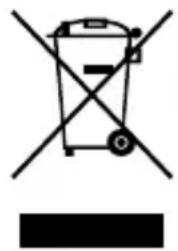
Disposal of Your Old Appliance
natural_image
Symbol of a trash bin crossed with a diagonal line and a horizontal bar below (no text or labels)- When this crossed-out wheeled bin symbol is attached to a product, it means the product is covered by the European Directive 2012/19/EU.
- All electrical and electronic products should be disposed of separately from the municipal waste stream via designated collection facilities appointed by the government or the local authorities.
- The correct disposal of your old appliance will help prevent potential negative consequences for the environment and human health.
For this product's recycling information based on WEEE directive, please send an e-mail to weee@zte.com.cn
EU DECLARATION OF CONFORMITY
Hereby, ZTE Corporation declares that the radio equipment type ZTE BLADE V8 LITE is in compliance with Directive 2014/53/EU.
The full text of the EU declaration of conformity is available at the following internet address: http://certification.ztedevice.com
ZTE
ZTE BLADE V8 LITE Guide de démarrage rapide
MENTIONS LEGALES
Copyright © 2017 ZTE CORPORATION.
natural_image
Illustration of a smartphone with an attached USB port and a magnified view showing the port (no text or symbols)natural_image
Illustration of a smartphone with a download icon and arrow pointing to its screen (no text or symbols present)Charge du téléphone
natural_image
Line drawing of a smartphone with an attached USB cable, showing no text or symbols
REMARQUE:
natural_image
Symbol of a trash bin crossed with a diagonal line, no text or numbers presentCopyright © 2017 ZTE CORPORATION.
natural_image
Diagram of a smartphone with an attached USB cable, showing the cable being inserted (no text or symbols present)natural_image
Illustration of a smartphone with a device icon and arrow pointing to it, no text or symbols present.natural_image
Line drawing of a smartphone with an attached USB cable, showing no text or symbols
HINWEIS:
natural_image
Symbol of a trash bin crossed with a diagonal line, no text or numbers presentCopyright © 2017 ZTE CORPORATION.
natural_image
Illustration of a smartphone with an attached USB port and a magnified view showing the port (no text or symbols)natural_image
Illustration of a smartphone with a device icon and magnified view showing the next screen (no text or symbols)De telefoon opladen
natural_image
Line drawing of a smartphone with an attached USB cable (no text or symbols)
OPMERKING:
- All rights reserved.
- Notice
- Disclaimer
- Trademarks
- Installing the nano-SIM Card(s) and the microSDXC™ Card
- WARNING!
- NOTE:
- Charging the Phone
- Specific Absorption Rate (SAR)
- CE Caution
- Battery Caution
- USB Port
- Proper Use
- Declaration of RoHS Compliance
- Disposal of Your Old Appliance
- EU DECLARATION OF CONFORMITY
- ZTE
- ZTE BLADE V8 LITE Guide de démarrage rapide
- MENTIONS LEGALES
- Charge du téléphone
- REMARQUE:
- Copyright © 2017 ZTE CORPORATION.
- HINWEIS:
- De telefoon opladen
- OPMERKING:
Brand : ZTE
Model : Blade V8
Category : Smartphone