HEX11WP-TX - Extension AV Blustream - Free user manual and instructions
Find the device manual for free HEX11WP-TX Blustream in PDF.


| Product Type | AV Extender (HDBaseT Transmitter) |
| Model | HEX11WP-TX |
| Brand | Blustream |
| Video Resolution Support | Up to 4K@60Hz 4:4:4 |
| HDCP Support | HDCP 2.2 / 1.4 |
| Transmission Distance | Up to 70m (1080p) / 40m (4K) via CAT6 |
| Audio Formats | LPCM 2.0/5.1/7.1, Dolby Digital, DTS, Dolby TrueHD, DTS-HD MA |
| Input Connectors | 1x HDMI (Type A), 1x IR In (3.5mm), 1x RS-232 (3-pin Phoenix) |
| Output Connector | 1x RJ45 (HDBaseT) |
| Power Supply | PoE (Power over Ethernet) or external 24V DC adapter |
| Dimensions (W x H x D) | 4.5 x 2.5 x 1.5 inches (114 x 64 x 38 mm) |
| Weight | 0.5 lbs (227 g) |
| IR Pass-Through | Yes, bi-directional (IR In and IR Out) |
| RS-232 Pass-Through | Yes, bi-directional |
| Wall Plate Design | Decora style, single gang |
| Operating Temperature | 32°F to 104°F (0°C to 40°C) |
| Storage Temperature | -4°F to 140°F (-20°C to 60°C) |
| Maintenance | Clean with a soft dry cloth. Do not use liquid cleaners. |
| Safety | For indoor use only. Avoid exposure to moisture or direct sunlight. |
| Spare Parts & Repairability | No user-serviceable parts. Contact Blustream support for repairs. |
| General Information | Designed for professional AV extension in residential or commercial environments. |
Frequently Asked Questions - HEX11WP-TX Blustream
User questions about HEX11WP-TX Blustream
0 question about this device. Answer the ones you know or ask your own.
Ask a new question about this device
Download the instructions for your Extension AV in PDF format for free! Find your manual HEX11WP-TX - Blustream and take your electronic device back in hand. On this page are published all the documents necessary for the use of your device. HEX11WP-TX by Blustream.
USER MANUAL HEX11WP-TX Blustream
Introduction
Our HEX11WP HDMI Wall Plate HDBaseT ^™ Transmitter is a 4K solution that extends HDMI up to 70m at 1080p (40m at 4K 60Hz 4:2:0). The HEX11WP-TX has been designed to work with all Blustream HDBaseT ^™ receiver and matrix solutions, be installed in both UK and European backboxes and can be powered locally or from compatible Blustream HDBaseT ^™ products.
FEATURES:
- Advanced HDBaseT™ technology offering distribution of video and audio over a single CAT cable
• Supports 4K UHD video up to 40m (3840 x 2160 @30Hz 4:4:4, 4096 x 2160 @24Hz 4:4:4, and 4K @60Hz 4:2:0) - Extends HDMI at 1080p up to a distance of 70m
- Smart EDID function automatically limits EDID to within HDBaseT™ specification to improve compatibility #
• Supports all known HDMI audio formats including Dolby TrueHD, Dolby Atmos, Dolby Digital Plus and DTS-HD Master Audio transmission - Supports 12V-48V PoC from compatible Blustream HDBaseT™ receiver / matrix products
• Bi-directional RS-232 pass-through - Supports IR pass-through to HDBaseT™ device
- Compatible with all Blustream HDBaseT™ receiver / matrix products*
- Magnetic faceplate surround allowing both UK & EU backbox compatibility
- HDCP 2.2 support
*Technical performance is subject to the features supported on the connected HDBaseT™ device.
EDID function added to products from Revision B onward.
Front Panel Description
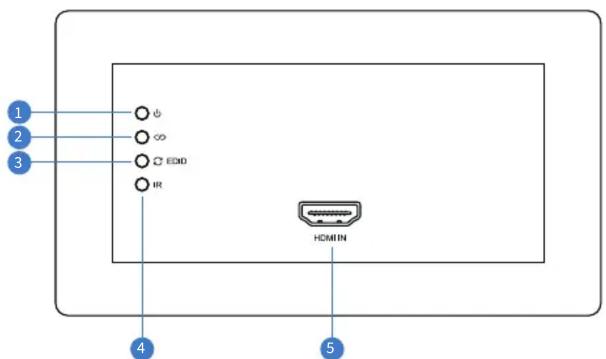
① Power Status Indicator - Illuminates when powered
② HDBaseT™ Link Status Indicator - Illuminates when the transmitter is connected to a HDBaseT™ receiver / matrix product successfully
3 EDID Selection Button – Cycle through 2 EDID modes - see EDID Management below
4 IR Receiver - Built in IR sensor for IR pass-through
5 HDMI Input - Type A HDMI port to connect HDMI source
Rear Panel Description
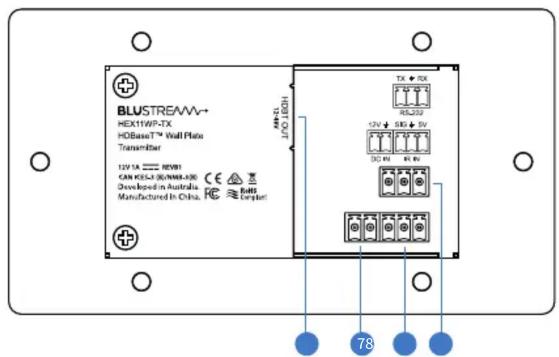
6 HDBaseT™ Output - RJ45 HDBaseT™ port to connect to the HDBaseT™ input port of the compatible Blustream HDBaseT™ receiver / matrix device
12V DC Input - 2-pin Phoenix connector to connect to Blustream 12V power supply (supplied)
Product supports PoC to Blustream HDBaseT™ Receiver products. PoC output is not live until HDMI source is connected to the wall plate. This feature can be used for 12V trigger on Blustream SW41HDBT Switcher.
8 IR Receiver Input - 3-pin Phoenix connector to connect to Blustream IR receiver (not supplied)
9 RS-232 - 3-pin Phoenix connector for RS-232 pass-through to / from compatible Blustream HDBaseT™ device
Note: When powering the HEX11WP-TX locally and using PoC to power a compatible Blustream receiver device, power is only enabled when an active HDMI source device is connected to the HEX11WP-TX. This feature is used to trigger auto switching on the Blustream SW41HDBT HDBaseT™ Switcher. Products from Revision B onward.
EDID Management
The HEX11WP-TX features automatic EDID management to ensure signals being transmitted fall within the 10.2Gbps bandwidth requirement of HDBaseT™. The HEX11WP-TX will evaluate the EDID of the display device and modify its EDID value to ensure compatibility. The default maximum resolution supported is 4K @60Hz 4:2:0. By pressing the EDID selection button you can limit the maximum EDID to 4K @30Hz 4:4:4.
Note: Products from Revision B onward.
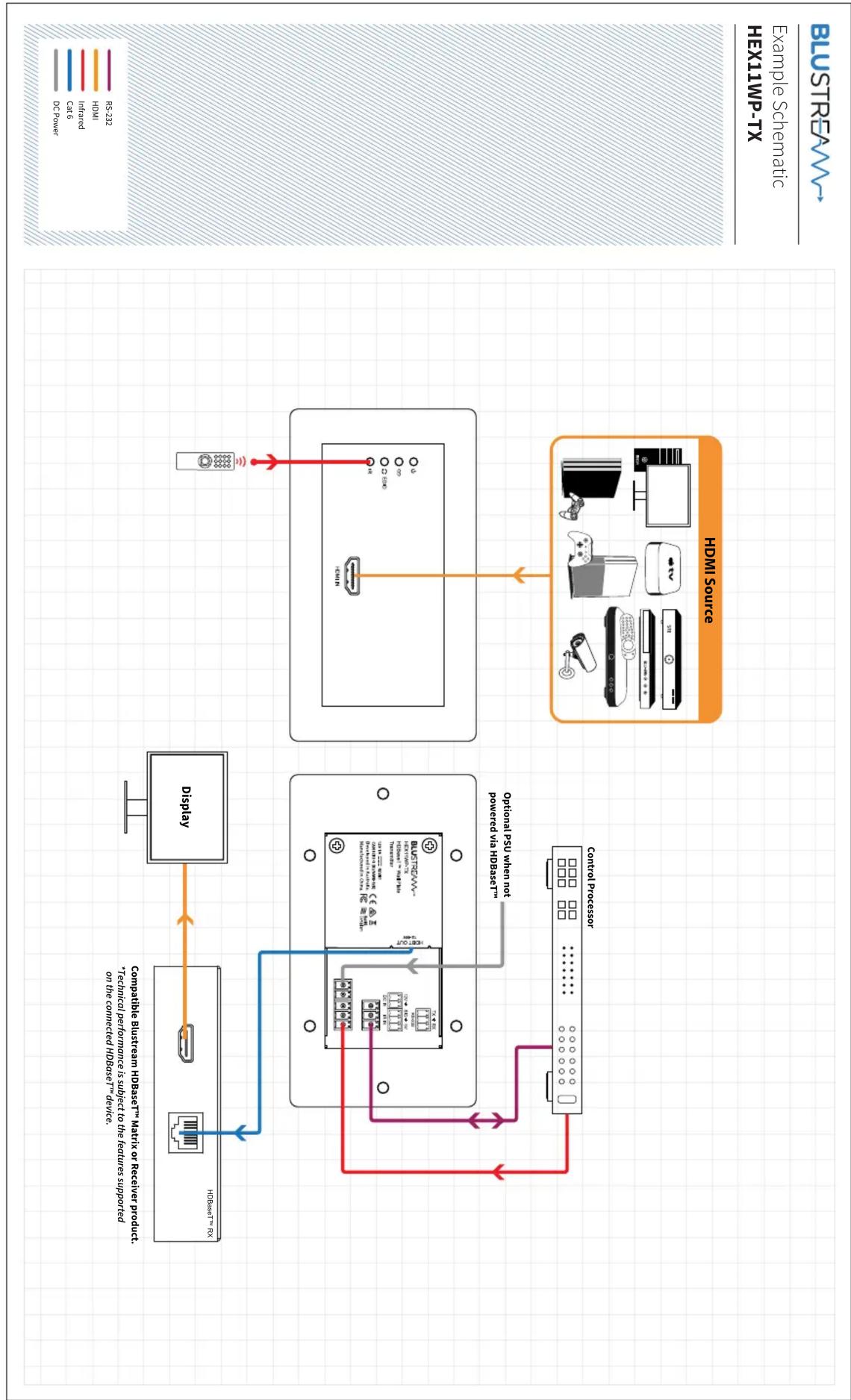
flowchart
graph TD
    A["Display"] -->|HDBSET / PSU| B["Control Processor"]
    A -->|HDBSET / PSU / BaseSet / Matrix / Receiver Product / Matrix / RAx / RS16| C["HDMS Source"]
    C -->|Optional PSU when not powered via HDBSET| B
    C -->|Optional PSU when not powered via HDBSET| D["Display"]
    D -->|DC Power| E["HDMS Source"]
    D -->|RS232| F["Display"]
    style A fill:#f9f,stroke:#333
    style C fill:#f9f,stroke:#333
Infrared Receiver
The HEX11WP-TX features 2 x options for receiving of IR signals. The HEX11PW-TX has an in-built IR receiver on the front panel that will receive IR commands from line of sight IR remote controls, and a 3-pin Phoenix connection on the rear panel. You may need to cut and terminate the Blustream IR receiver (not supplied) into the Phoenix connector.
The pin out configuration for the Blustream IR receiver is as follows:
- White - 5V
- Red - Signal
- Black - Ground

Specifications
HEX11WP-TX
Video Input Connectors: 1 x HDMI Type A, 19-pin, female
Video Output Connectors: 1 x HDBaseT™ RJ45 connector
RS-232 Serial Port: 1 x 3-pin Phoenix connector
IR Input Port: 1 x 3-pin Phoenix connector
Local Power Input: 1 x 2-pin Phoenix connector
Module Dimensions (W x H x D): 136mm x 76mm x 44mm (w/o faceplate)
Faceplate Dimensions (W x H x D): 146mm x 86mm x 6mm
Cut Out Dimensions (W x H x D): 87mm x 49mm x 39mm
Mounting Hole Spacing: UK 121mm CTC, EU 60mm CTC
Backbox Mounting Depth: 40mm (minimum), 47mm (recommended), UK or EU double gang
Shipping Weight: 1.0Kg
Operating Temperature: 32^ F to 104^ F ( -5^ C to +55^ C)
Storage Temperature: -4°F to 140°F (-25°C to +70°C)
Power Supply: 12V/1A DC
NOTE: Specifications are subject to change without notice. Weights and dimensions are approximate.
Package Contents
HEX11WP-TX
- 1xHEX11WP-TX
• 1 x 12V/1A DC Power Supply - 1 x Magnetic Faceplate
• 1 x Quick Reference Guide
Certifications
FCC NOTICE
This equipment has been tested and found to comply with the limits for a Class B digital device, pursuant to part 15 of the FCC Rules. These limits are designed to provide reasonable protection against harmful interference in a residential installation. This equipment generates, uses, and can radiate radio frequency energy and, if not installed and used in accordance with the instructions, may cause harmful interference to radio communications. However, there is no guarantee that interference will not occur in a particular installation. If this equipment does cause harmful interference to radio or television reception, which can be determined by turning the equipment off and on, the user is encouraged to try to correct the interference by one or more of the following measures:
- Reorient or relocate the receiving antenna.
- Increase the separation between the equipment and receiver.
- Connect the equipment into an outlet on a circuit different from that to which the receiver is connected.
- Consult the dealer or an experienced radio/TV technician for help.
CAUTION - changes or modifications not expressly approved by the party responsible for compliance could void the user's authority to operate the equipment.
CANADA, INDUSTRY CANADA (IC) NOTICES
This Class B digital apparatus complies with Canadian ICES-003.
Operation is subject to the following two conditions: (1) this device may not cause interference, and (2) this device must accept any interference, including interference that may cause undesired operation of the device.
CORRECT DISPOSAL OF THIS PRODUCT
This marking indicates that this product should not be disposed with other household wastes. To prevent possible harm to the environment or human health from uncontrolled waste disposal, recycle it responsibly to promote the sustainable reuse of material resources. To return your used device, please use the return and collection systems or contact the retailer where the product was purchased. They can take this product for environmentally safe recycling.
Brand : Blustream
Model : HEX11WP-TX
Category : Extension AV