EX40B-KIT - Extension AV Blustream - Free user manual and instructions
Find the device manual for free EX40B-KIT Blustream in PDF.


| Product Type | HDMI Extender Kit |
| Model | EX40B-KIT |
| Brand | Blustream |
| Category | AV Extension |
| Max Resolution | 4K@60Hz 4:4:4 |
| HDMI Version | HDMI 2.0 |
| HDR Support | HDR10, HLG, Dolby Vision |
| Transmission Distance | Up to 40 meters (CAT6/7) |
| Power Supply | DC 5V/1A (included) |
| Power over Cable | Yes (PoC) |
| IR Pass-through | 20-60 kHz |
| Audio Formats | PCM, Dolby TrueHD, DTS-HD Master Audio |
| Dimensions (Transmitter) | 95 x 65 x 25 mm |
| Dimensions (Receiver) | 95 x 65 x 25 mm |
| Weight (Transmitter) | 130 g |
| Weight (Receiver) | 130 g |
| Operating Temperature | 0°C to 40°C |
| Storage Temperature | -20°C to 60°C |
| HDCP Version | HDCP 2.2 |
| Connector Type | HDMI (Type A) on units, RJ45 for link |
| Included Accessories | 2x power adapters, IR transmitter/receiver, mounting brackets |
| Maintenance | Wipe with dry cloth; do not use liquids |
Frequently Asked Questions - EX40B-KIT Blustream
User questions about EX40B-KIT Blustream
0 question about this device. Answer the ones you know or ask your own.
Ask a new question about this device
Download the instructions for your Extension AV in PDF format for free! Find your manual EX40B-KIT - Blustream and take your electronic device back in hand. On this page are published all the documents necessary for the use of your device. EX40B-KIT by Blustream.
USER MANUAL EX40B-KIT Blustream
EX40B-KIT
User Manual
Thank you for purchasing this product.
For optimum performance and safety, please read these instructions carefully before connecting, operating or adjusting this product. Please keep this manual for future reference.

Surge protection device recommended
This product contains sensitive electrical components that may be damaged by electrical spikes, surges, electric shock, lightning strikes, etc. Use of surge protection systems is highly recommended in order to protect and extend the life of your equipment.
Safety And Performance Notice
The transmission distances of HDMI over UTP cables are measured using TE CONNECTIVITY 1427071-6
EIA/TIA-568-B termination (T568B) of cables is recommended for optimal performance.
To minimise interference of the unshielded twisted pairs in the CAT5e/6 cable do not run the HDBaseT / Cat5e/6/6a cabling with or in close parallel proximity to mains power cables.
Do not substitute or use any other power supply other than the enclosed unit, or a Bluestream approved replacement.
Do not disassemble either the Transmitter or Receiver units for any reason. Doing so will void the manufacturer's warranty.
Contents
Introduction 03
Features 03
Panel descriptions 04
Terminating the interconnecting CAT cable_05
Understanding the status lights 05
EDID Control 06
Infrared distribution 07
Application diagram 08
Specifications 09
Package contents 09
Maintenance 09
Introduction
Our EX40B-KIT HDMI™ extender set offers HDMI distribution over a single CAT cable. The product delivers HDMI & B-directional IR up to lengths of 40m @ 1080p and 50m @ 1080i.
FEATURES:
- Extends HDMI 1080p up to distances of 40m over single CAT cable
- Extends HDMI 1080i and lower resolutions up to distances of 50m over single CAT cable
• Supports industry standard video resolutions 480i-1080p and DVI formats up to 1920x1080
• Supports 3D signal extension
• Supports bitstream passthrough of multichannel surround sound including object-based audio formats in line with
HDMI specifications
• Supports bi-directional IR from input and output locations
- Smart EDID management
• Supplied with Blustream IR receiver and emitter
- Requires local power at both Transmitter and Receiver
- HDCP compliant
WARNING!
Please read these instructions carefully before connecting, operating or adjusting this product. Incorrect termination of the RJ45 connecting cable may result in damage to the Blustream hardware.
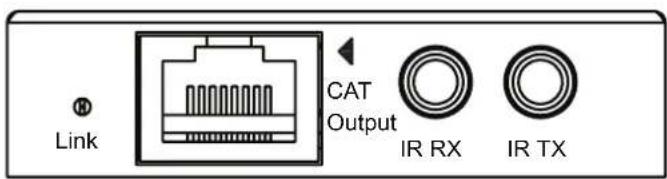
Panel Description EX40B-RX
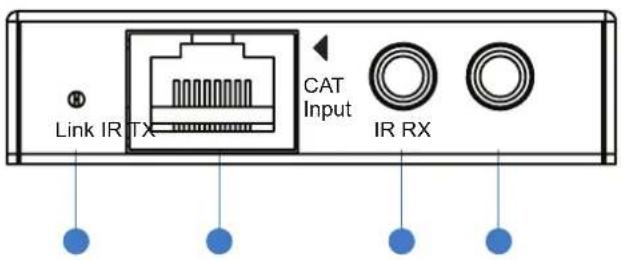
1 CAT link indicator
2 CAT cable input
3 IR Receiver jack (Sensor input)
4 IR Transmitter jack (Emitter output)
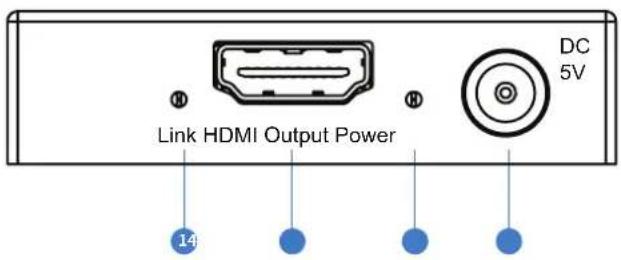
1 HDMI link indicator
2 HDMI output
3 Power indicator
4 5V/1A DC power input
Panel Description EX40B-TX
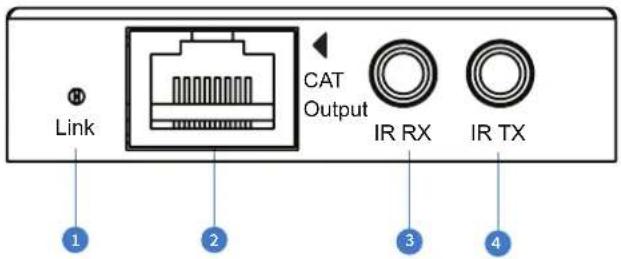
1 CAT link indicator
2 CAT cable input
3 IR Receiver jack (Sensor input)
4 IR Transmitter jack (Emitter output)
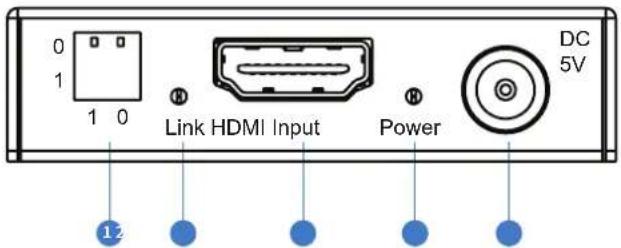
1 EDID management dip-switches
2 HDMI link indicator
3 HDMI input
4 Power indicator
5V/1A DC power input
Terminating the interconnecting CAT cable
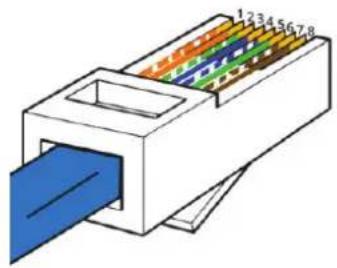
It is important that the interconnecting CAT cable between the Blustream Transmitter and Receiver is terminated using the correct RJ45 pin configuration. The link CAT cable MUST be a 'straight' (pin-to-pin) CAT cable and it is advised that this is wired to the T568B wiring standard as this format is less prone to EMI (Electro-Magnetic Interference).
When installing CAT cables it is advised that you use the best possible CAT cable quality possible. HDMI disitribution products will only work if used with CAT5e standard cable or above. Blustream recommends using a CAT6 cable for your installations.
RJ45 Pin-Out
T568B
natural_image
Diagram of a 3-pin electrical connector with color-coded internal structure (no text or symbols)12345678

natural_image
Illustration of a blue electrical plug with multiple colored wires (no text or symbols)Understanding the RX/TX status lights
The Blustream HDMI extender solution includes status LED indicators on both the Transmitter and Receiver products to show all connections are active and to help diagnose possible problems.
Understanding the status lights:-
Blustream Transmitter (TX):
- The link light will be off when there is no signal on the HDMI input (no connection with a source device)
- The link light will blink when there is a signal on the HDMI input but there is no CAT cable/Bluestream Receiver connected to the RJ45 output
- The link light will be lit when there is a signal on the HDMI input, a CAT cable is connected to the RJ45 output and an active connection is achieved with a Blustream Receiver.
Blustream Receiver (RX):
- The link light will be off when there is no signal on the HDMI output (no connection with a display)
- The link light will blink when there is a connection on the HDMI output but there is no CAT cable/Blustream Transmitter connected to the RJ45 input
- The link light will be lit when there is connection with a display, a CAT cable is connected to the RJ45 input and an active connection is achieved with a Blustream Transmitter
EDID Control
EDID (Extended Display Identification Data) is a data structure that is used between a display and a source. This data is used by the source to find out what audio and video resolutions are supported by the display then from this information the source will determine what the best resolution is to output.
While the objective of EDID is to make connecting a digital display to a source a simple plug and play procedure issues do arise.
By pre-determining the video resolution and audio format of the source and display device you can potentially work around compatibility issues associated with some display and source combinations.
The EX40B-KIT has 2x dip-switches on the Transmitter which allow you to fix the Video and Audio resolution to one of the below settings.
Note: EDID management only supports 2ch PCM audio types. Should alternate audio formats be required these must be forced from the source hardware. The EX40B-KIT supports bitstream passthrough of multichannel surround sound including object-based audio formats in line with HDMI specifications.
Adjusting the EDID settings
The EDID configuration can be altered using the 2x dip-switches located on the side panel of the EX40B Transmitter.
Please see table below for EDID settings.
Note: You must power-cycle the HDMI extender kit after changes have been made in order for the EDID settings to update.
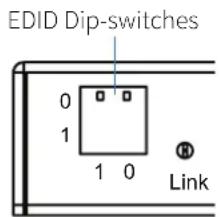
Dip-switch settings
[DIP]=00: HDMI 1080p, Audio 2ch PCM
[DIP]=01: HDMI 1080i, Audio 2ch PCM
[DIP]=10: HDMI 3D, Audio 2ch PCM
[DIP]=11: Copy EDID from display
Note: Video resolution is limited to 1080p when the EDID is copied from the display (Dip-switches both in position '1,1')
InfraRed (IR) Distribution
The Blustream range of matrix, switcher and extender products include multiple options for control and routing of IR.
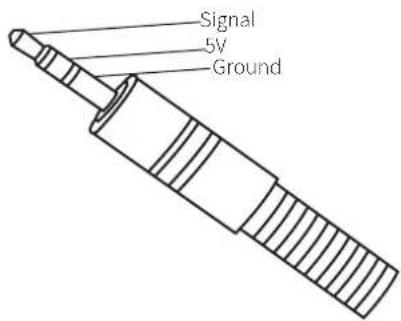
IMPORTANT: Blustream InfraRed products are all 5V and NOT compatible with alternate manufacturers InfraRed solutions. When using third party 12V IR control solutions with Blustream HDMI extender products please use the Blustream IRCAB cable for IR conversion. This is available as an optional accessory.
Each Blustream HDMI extender solution is supplied with an IR Emitter and IR Receiver.
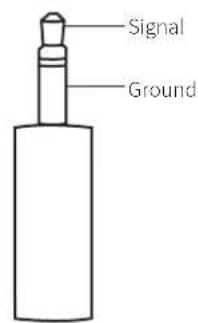
IR Emitter
Blustream IR Emitter designed for discrete IR control of hardware. IR Emitter is connected to the IR TX port on Blustream products
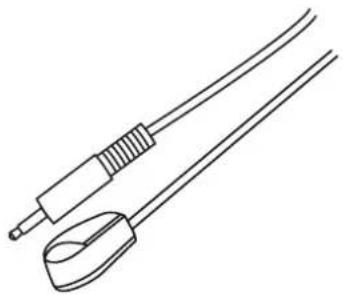
natural_image
Line drawing of two medical or electrical instruments with no text or symbolsInfrared 3.5mm Pin-Out
IR Emitter - Mono 3.5mm
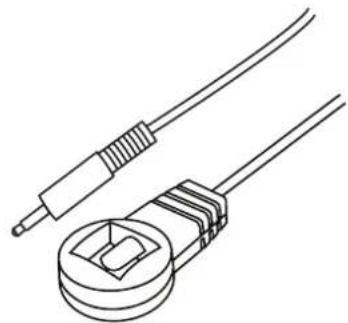
IR Receiver
Blustream IR receiver to receive IR signal and pass-through Blustream products. IR Receiver is connected to the IR RX port on Blustream products.
natural_image
Line drawing of two electrical connectors with wires, no text or symbols presentIR Receiver - Stereo 3.5mm
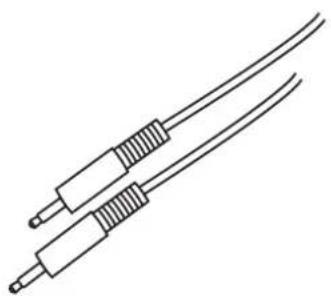
IR Control Cable
Blustream IR Control cable 3.5mm Mono to 3.5mm Stereo for linking third party control solutions to Blustream products.
Will work with 12V IR third party products.
Note: Cable is directional as indicated
natural_image
Line drawing of two coaxial cables with coiled connectors (no text or symbols)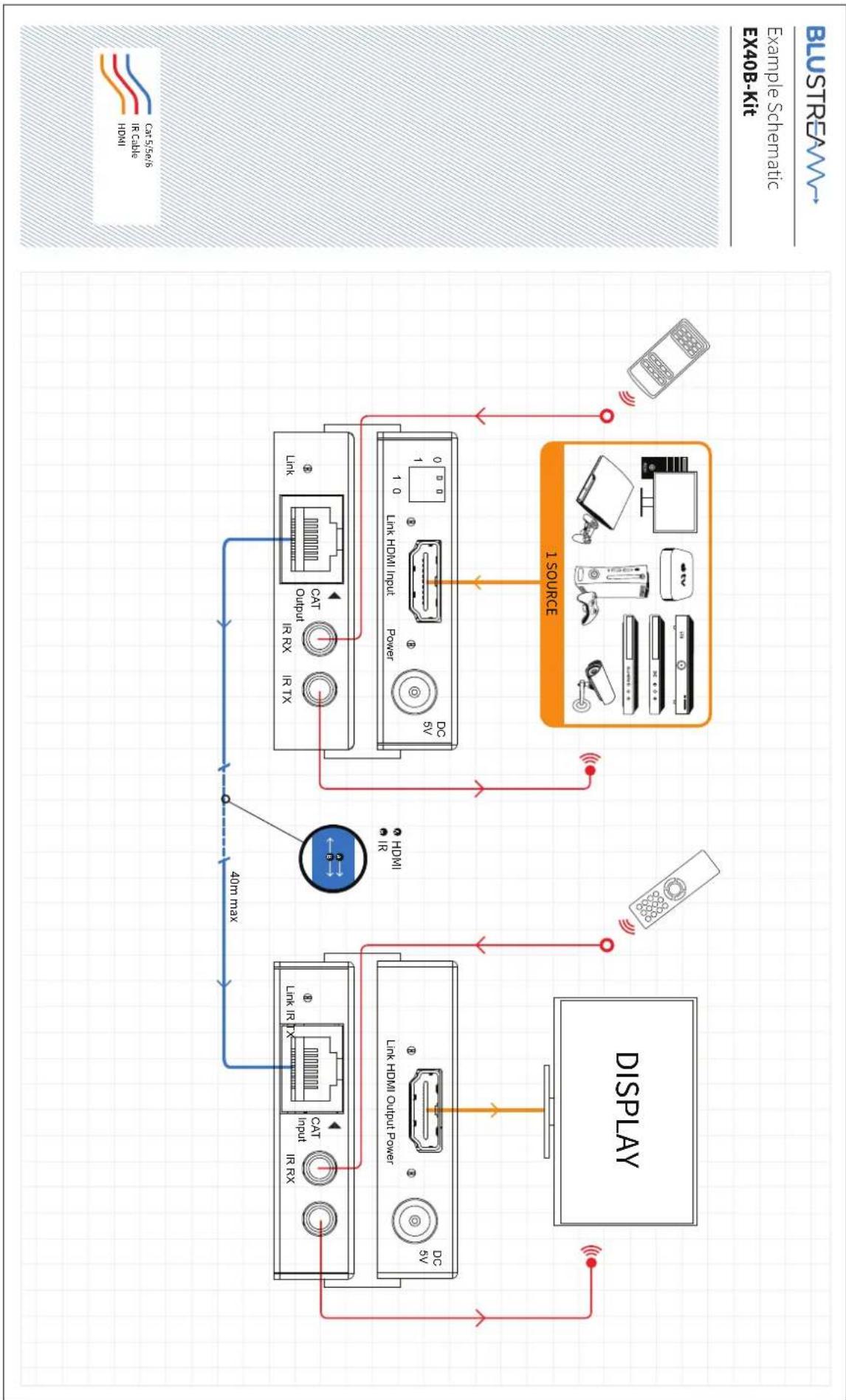
flowchart
graph TD
    A["Display"] --> B["Cat Input IR RX"]
    A --> C["Link HDMI Output Power"]
    A --> D["DC SV"]
    B --> E["40m max"]
    C --> E
    D --> E
    E --> F["CAT Output IR TX"]
    E --> G["Link HDMI Input"]
    E --> H["DC SV"]
    F --> I["Power"]
    G --> I
    H --> I
    I --> J["1 Source"]
    J --> K["Display"]
    style A fill:#f9f,stroke:#333
    style J fill:#ccf,stroke:#333
    style K fill:#cfc,stroke:#333
Specifications
| Video input EX40B-TX | 1x HDMI Type A, 19-pin, female | EX40B-RX1x RJ45 |
| Video output EX40B-TX | 1x RJ45 | EX40B-RX1x HDMI Type A, 19-pin, female |
| IR Input Ports 1x 3.5mm stereo jack (Per TX & RX) | ||
| IR Output Ports 1x 3.5mm mono jack (Per TX & RX) | ||
| Power Supply | 2x 5V/1A DC, screw type connector (Power must be connected at both TX & RX) | |
| Power Consumption 7.5W | ||
| Dimensions (WxDxH) 58 x 96 x 15mm | ||
| Shipping Weight 0.4kg | ||
| Operating Temperature 32°F to 104°F (0°C to 40°C) | ||
| Storage Temperature -4°F to 140°F (-20°C to 60°C) | ||
| Rack-Mountable Mounting kits included | ||
NOTE: Specifications are subject to change without notice. Weight and dimensions are approximate.
Package Contents:
- EX40B-TX
- EX40B-RX
- 2 x 5V/1A DC power supply
- 1 x IR Emitter
- 1 x IR Sensor
- 2 x mounting brackets
- 1xuser manual
Maintenance
Clean this unit with a soft, dry cloth. Never use alcohol, paint thinner or benzene to clean this unit.
Certifications
FCC NOTICE
This equipment has been tested and found to comply with the limits for a Class B digital device, pursuant to part 15 of the FCC Rules. These limits are designed to provide reasonable protection against harmful interference in a residential installation. This
equipment generates, uses, and can radiate radio frequency energy and, if not installed and used in accordance with the instructions, may cause harmful interference to radio communications. However, there is no guarantee that interference will not occur in a particular installation. If this equipment does cause harmful interference to radio or television reception, which can be determined by
turning the equipment off and on, the user is encouraged to try to correct the interference by one or more of the following measures:
- Reorient or relocate the receiving antenna.
- Increase the separation between the equipment and receiver.
- Connect the equipment into an outlet on a circuit different from that to which the receiver is connected.
- Consult the dealer or an experienced radio/TV technician for help.
CAUTION - changes or modifications not expressly approved by the party responsible for compliance could void the user's authority to operate the equipment.
CANADA, INDUSTRY CANADA (IC) NOTICES
This Class B digital apparatus complies with Canadian ICES-003. Operation is subject to the following two conditions: (1) this device may not cause interference, and (2) this device must accept any interference, including interference that may cause undesired operation of the device.
CORRECT DISPOSAL OF THIS PRODUCT
This marking indicates that this product should not be disposed with other household wastes. To prevent possible harm to the environment or human health from uncontrolled waste disposal, recycle it responsibly to promote the sustainable reuse of material resources. To return your used device, please use the return and collection systems or contact the retailer where the product was purchased. They can take this product for environmentally safe recycling.
- EX40B-KIT
- Thank you for purchasing this product.
- Surge protection device recommended
- Safety And Performance Notice
- Contents
- Introduction
- FEATURES:
- HDMI specifications
- WARNING!
- Panel Description EX40B-RX
- Panel Description EX40B-TX
- Terminating the interconnecting CAT cable
- Understanding the RX/TX status lights
- Understanding the status lights:-
- EDID Control
- Adjusting the EDID settings
- Dip-switch settings
- InfraRed (IR) Distribution
- IR Emitter
- Infrared 3.5mm Pin-Out
- IR Receiver
- IR Receiver - Stereo 3.5mm
- IR Control Cable
- Package Contents:
- Maintenance
- Certifications
- FCC NOTICE
- CANADA, INDUSTRY CANADA (IC) NOTICES
- CORRECT DISPOSAL OF THIS PRODUCT
Brand : Blustream
Model : EX40B-KIT
Category : Extension AV