SM11 - AV Extension Blustream - Free user manual and instructions
Find the device manual for free SM11 Blustream in PDF.


| Product Type | HDMI Signal Manager / AV Extender |
| Brand | Blustream |
| Model | SM11 |
| Category | AV Extension |
| Dimensions (W x D x H) | 105 mm x 87 mm x 23 mm (without connections) |
| Weight (Shipping) | 0.5 kg |
| Power Supply | 5V/1A DC (screw type connector) |
| Video Input | 1 x HDMI Type A (19-pin female) |
| Video Output | 1 x HDMI Type A (19-pin female) |
| Audio Input | 1 x Analogue L/R (3.5mm stereo jack) |
| Audio Outputs | 1 x Coaxial Digital (RCA) + 1 x Analogue L/R (3.5mm stereo jack) |
| Maximum Video Resolution | 4K @ 60Hz 4:4:4 (HDMI 2.0) |
| HDCP Support | HDCP 2.2 compliant, with bypass or management mode |
| HDR Support | Yes (pass-through) |
| 3D Support | Yes (pass-through) |
| EDID Management | Yes (DIP switch selectable presets) |
| Audio Embedding | Yes (replaces HDMI audio with analogue stereo input) |
| Audio De-embedding | Yes (to analogue L/R and coaxial digital simultaneously) |
| Hot Plug Detect Mode | DIP switch selectable (on/off) to emulate display connection |
| Operating Temperature | 32°F to 104°F (0°C to 40°C) |
| Storage Temperature | -4°F to 140°F (-20°C to 60°C) |
| Package Contents | 1x SM11, 1x 5V/1A DC power supply, 1x mounting kit, 1x user manual |
| Maintenance | Clean with soft dry cloth; do not use alcohol, paint thinner or benzene |
| Certifications | FCC Class B, ICES-003 (Canada) |
| Warranty | Void if disassembled or power supply substituted |
Frequently Asked Questions - SM11 Blustream
User questions about SM11 Blustream
0 question about this device. Answer the ones you know or ask your own.
Ask a new question about this device
Download the instructions for your AV Extension in PDF format for free! Find your manual SM11 - Blustream and take your electronic device back in hand. On this page are published all the documents necessary for the use of your device. SM11 by Blustream.
USER MANUAL SM11 Blustream
SM11
User Manual
(Revision for firmware v2.0 180614)
Thank you for purchasing this product.
For optimum performance and safety, please read these instructions carefully before connecting, operating or adjusting this product. Please keep this manual for future reference.

Surge Protection Device Recommended
This product contains sensitive electrical components that may be damaged by electrical spikes, surges, electric shock, lightning strikes, etc. Use of surge protection systems is highly recommended in order to protect and extend the life of your equipment.
Safety And Performance Notice
Do not substitute or use any other power supply other than the enclosed unit, or a Blustream approved replacement.
Do not disassemble Blustream hardware for any reason. Doing so will void the manufacturer's warranty.
Contents
Introduction 03
Features 03
Panel Descriptions 04
EDID Control 05
Mode DIP Switch Settings 06
Schematic Diagram - Embedding 07
Schematic Diagram - De-embedding 08
Specifications 09
Package Contents 09
Maintenance 09
Installer Notes 10-11
Introduction
Our SM11 HDMI Signal Manager has been designed to help solve HDMI compatibility, HDCP2.2, clock stretching, EDID and handshaking issues that are becoming common problems when distributing HDMI signals. The SM11 also features de-embedding and embedding audio within the HDMI signal path, allowing you to breakout up to 7.1 channel audio signals. The SM11 supports full HDMI 2.0 and HDCP 2.2 with video resolutions up to and including 4K @ 60Hz 4:4:4.
FEATURES:
- Can help to solve most HDMI, EDID, HDCP, compatibility, and handshaking issues
• Supports full HDMI 2.0 specification 4K UHD video (4K @ 60Hz 4:4:4) - HDCP 2.2 compliant
• Supports all industry standard video resolutions including VGA-WUXGA and 480i-4K
• Supports all known HDMI audio formats including Dolby TrueHD, Dolby Atmos, Dolby Digital Plus and DTS-HD Master Audio transmission (HDMI pass-through) - Embed stereo analogue (L/R) audio using 3.5mm stereo jack input in place of source audio onto the HDMI output signal path
• HDMI audio extracted to both analogue L/R audio and coaxial digital outputs concurrently - Extract audio with or without a connected display - acts as an end-sink
• Supports HDR (High Dynamic Range) pass-through
• Supports 3D signal display
• Advanced EDID management
Front Panel
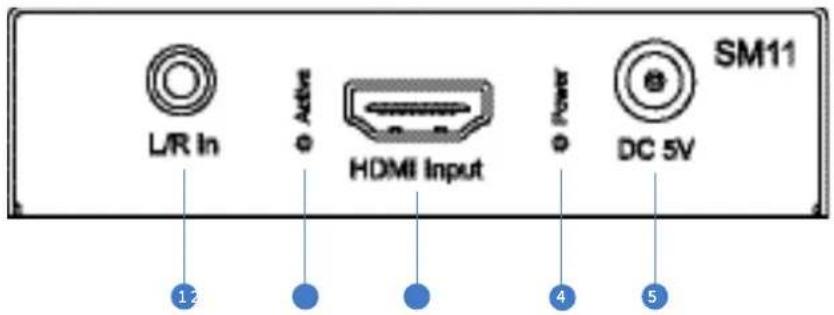
① L/R Analogue Audio Input - 3.5mm stereo jack
② HDMI Input Indicator LED - Lit when connected to a source
③ HDMI Input - Connect to a HDMI source
4 Power Indicator LED - Lit when unit is powered on
5 Power Port - Use supplied 5V 1A DC adaptor
Rear Panel
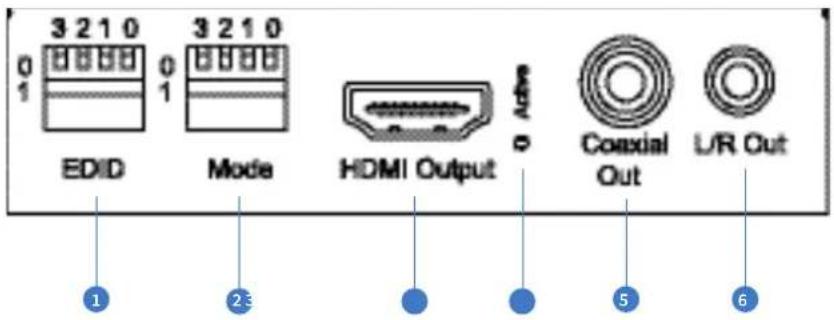
1 EDID DIP Switch (UP=0, DOWN=1) - See page 5 for further details
2 Mode DIP Switch - See page 5 for further details
3 HDMI Output - Connect to a HDMI display (unless using as an audio breakout only product)
4 HDMI Link Status LED - Lit when connected to a HDMI display
⑤ Coaxial Digital Audio Output (RCA)
6 Left / Right Analogue Audio Output - De-embedded audio from the HDMI signal input. Note: source input must be PCM 2ch audio for analogue audio outputs to work. The SM11 does not down-mix multi-channel audio signals.
EDID Control
EDID (Extended Display Identification Data) is a data structure that is used between a display and a source. This data is used by the source to find out what audio and video resolutions are supported by the display, from this information the source will discover what the best audio and video resolutions need to be outputted.
While the objective of EDID is to make connecting a digital display to a source a simple plug and play procedure, issues do arise when multiple displays or video matrix switching is introduced because of the increased number of variables. By pre-determining the video resolution and audio format of the source and display device you can reduce the time needed for EDID hand shaking thus making switching quicker and more reliable.
Configuration of extender EDID settings can be achieved using the product dip-switches on the end panel of the SM11.
Note: You must power cycle the product after making EDID changes. For some sources it may be necessary to power cycle the source after EDID changes have been made for the source to update its video & audio output settings.
Global EDID Settings
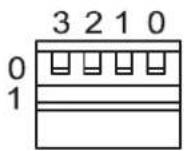
EDID
Dip-switch position '0' = Off
Dip-switch position '1' = On

DIP ON ▼/OFF▲ SWITCHING POSITIONS
Note: When EDID is set to 1080p 2ch/5.1ch/7.1ch the HDCP handshake with source will always be HDCP 1.x (Not HDCP 2.2)
Mode DIP Switch Settings
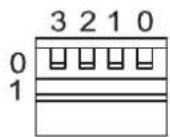
The SM11 can be configured to perform various tasks using the MODE dip-switches. For details on each setting please see below:
Note: You must power cycle the product after making MODE changes.
Mode
Dip-switch 3 - Hotplug Mode ON / OFF
When Hotplug mode is turned OFF the SM11 will use the HPD of the connected display on the HDMI output.
When Hotplug mode is turned ON the SM11 will complete the HPD back to the source connected to the HDMI input, no longer requiring a HPD from a connected display.
Turning on HPD in the SM11 can be beneficial in 2 ways:-
1) Audio de-embedding is required but no display is available. The SM11 will act as the HDMI end-point completing the necessary HDMI handshake, allowing the HDMI source to output a signal.
2) The SM11 will act as the HDMI end-point completing the necessary HDMI handshake which can help resolve any handshake issues that may be associated with the display connected to the HDMI output of the SM11.
Position = 0 (up) - HPD (hot plug detect) off
Position = 1 (down) - HPD on
Dip-switch 2 - Audio embedding
The SM11 can be used to embed audio onto the HDMI output signal.
Position=0 (up) - HDMI input audio pass-through (no audio embedding)
Position = 1 (down) - audio embedding (2CH L/R audio input added to the HDMI video out)
Note - Audio de-embedding is always active and is the breakout of the HDMI input audio only. Source input must be PCM 2ch audio for analog audio outputs to work. The SM11 does not down-mix multi-channel audio signals.
Dip-switch 1 - HDCP Bypass or Conversion
The SM11 can be used to help resolve HDCP issues.
Position = 0 (up) - HDCP management mode
Position = 1 (down) - HDCP bypass
Dip-switch 0:
Reserved / not in use - leave in '0' position
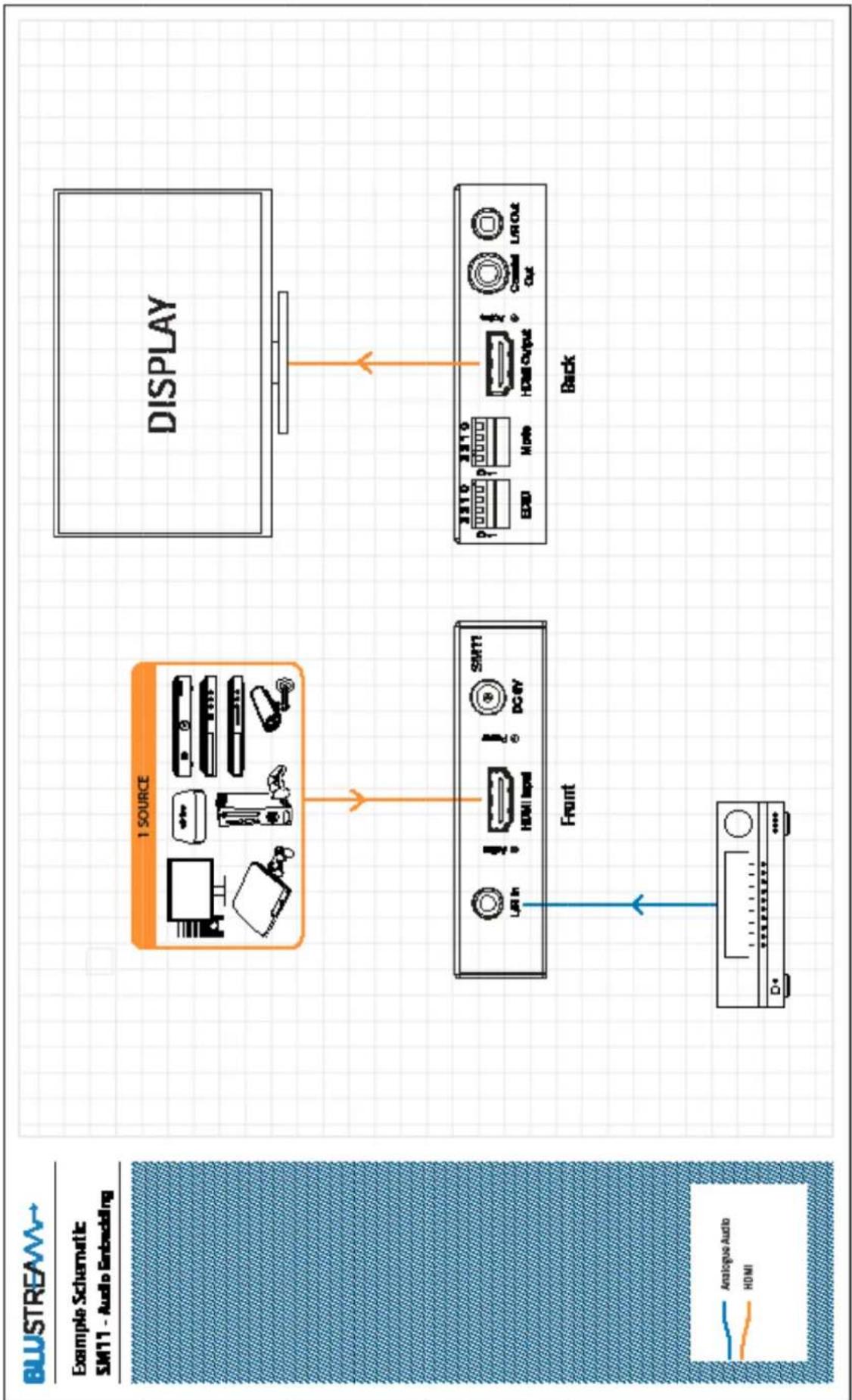
flowchart
graph TD
    A["1 SOURCE"] --> B["Front"]
    B --> C["Display"]
    C --> D["Back"]
    style A fill:#f9f,stroke:#333
    style C fill:#ccf,stroke:#333
    style D fill:#cfc,stroke:#333
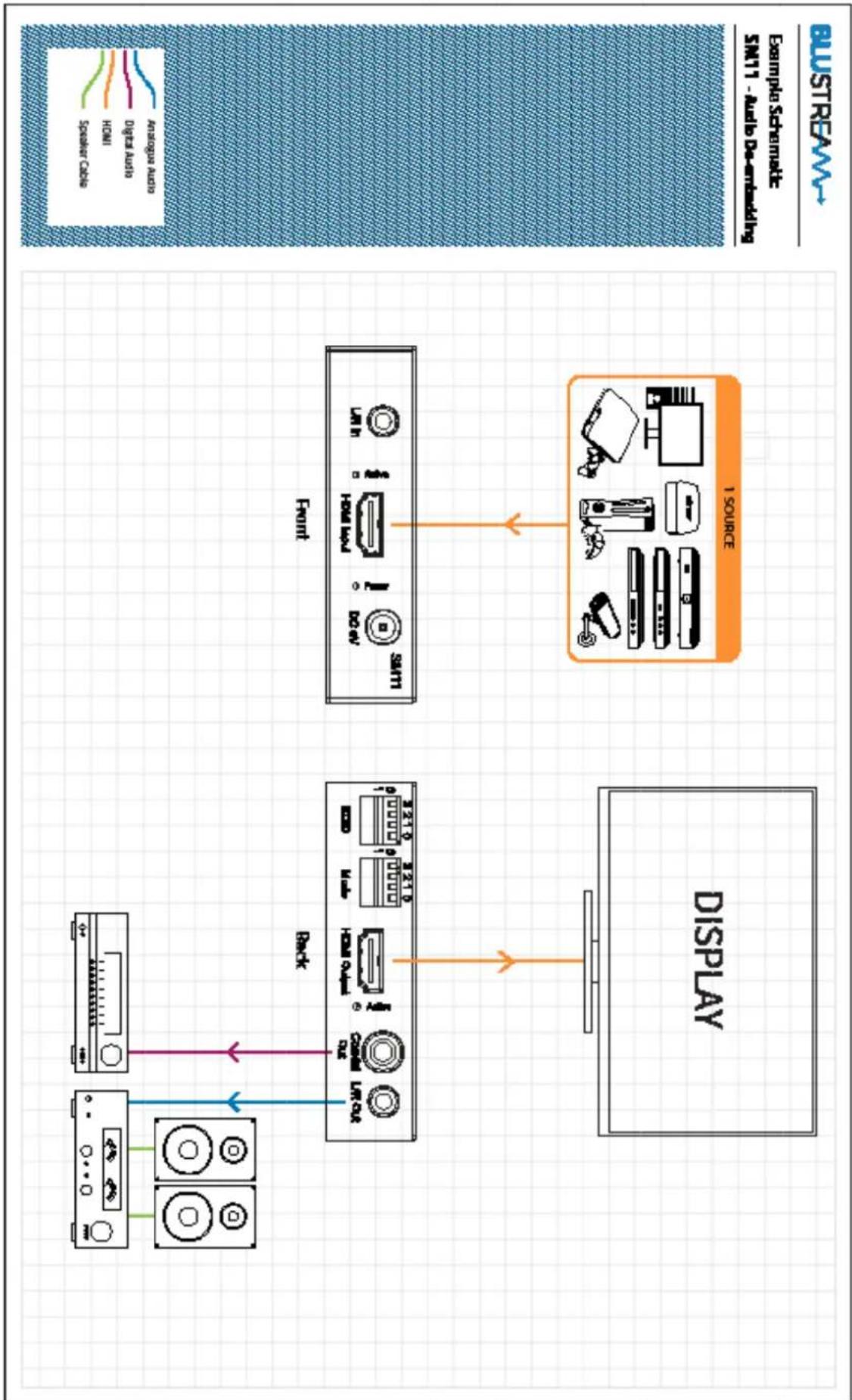
flowchart
graph TD
    A["Audio Source"] --> B["Display"]
    B --> C["Back Panel"]
    C --> D["Front Panel"]
    D --> E["1 Source"]
    style A fill:#f9f,stroke:#333
    style B fill:#ccf,stroke:#333
    style C fill:#cfc,stroke:#333
    style D fill:#fcc,stroke:#333
    style E fill:#cff,stroke:#333
Specifications
• Audio Input Connector: 1 x analogue left/right audio (3.5mm stereo jack)
• Audio Output Connectors: 1x RCA (SPDIF) & 1 x analogue left / right audio (3.5mm stereo jack)
• Video Input Connector: 1 x HDMI Type A, 19-pin, female
• Video Output Connector: 1x HDMI Type A, 19-pin, female
- Mounting Kit Included
- Dimensions (W x D x H): 105mm x 87mm x 23mm (without connections)
- Shipping Weight: 0.5 kg
• Power Supply: 5V/1A DC, screw type connector
- Operating Temperature: 32°F to 104°F (0°C to 40°C)
• Storage Temperature: -4°F to 140°F (-20°C to 60°C)
Package Contents
- 1 x SM11
- 1 x 5V/1A DC Power Supply
- 1 x Mounting Kit
- 1x User Manual
Maintenance
Clean this unit with a soft, dry cloth. Never use alcohol, paint thinner or benzene to clean this unit.
Components inside this unit are not user serviceable. Do not remove the protective cover from the unit. Removing any panel from this product will invalidate the manufacturers warranty.
Certifications
FCC NOTICE
This equipment has been tested and found to comply with the limits for a Class B digital device, pursuant to part 15 of the FCC Rules. These limits are designed to provide reasonable protection against harmful interference in a residential installation. This equipment generates, uses, and can radiate radio frequency energy and, if not installed and used in accordance with the instructions, may cause harmful interference to radio communications. However, there is no guarantee that interference will not occur in a particular installation. If this equipment does cause harmful interference to radio or television reception, which can be determined by turning the equipment off and on, the user is encouraged to try to correct the interference by one or more of the following measures:
- Reorient or relocate the receiving antenna.
- Increase the separation between the equipment and receiver.
- Connect the equipment into an outlet on a circuit different from that to which the receiver is connected.
- Consult the dealer or an experienced radio/TV technician for help.
CAUTION - changes or modifications not expressly approved by the party responsible for compliance could void the user's authority to operate the equipment.
CANADA, INDUSTRY CANADA (IC) NOTICES
This Class B digital apparatus complies with Canadian ICES-003. Operation is subject to the following two conditions: (1) this device may not cause interference, and (2) this device must accept any interference, including interference that may cause undesired operation of the device.
CORRECT DISPOSAL OF THIS PRODUCT
This marking indicates that this product should not be disposed with other household wastes. To prevent possible harm to the environment or human health from uncontrolled waste disposal, recycle it responsibly to promote the sustainable reuse of material resources. To return your used device, please use the return and collection systems or contact the retailer where the product was purchased. They can take this product for environmentally safe recycling.
Installer Notes
Installer Notes
- SM11
- Thank you for purchasing this product.
- Surge Protection Device Recommended
- Safety And Performance Notice
- Contents
- Introduction
- FEATURES:
- Front Panel
- Rear Panel
- EDID Control
- Global EDID Settings
- Mode DIP Switch Settings
- Dip-switch 3 - Hotplug Mode ON / OFF
- Dip-switch 2 - Audio embedding
- Dip-switch 1 - HDCP Bypass or Conversion
- Dip-switch 0:
- Specifications
- Package Contents
- Maintenance
- Certifications
- FCC NOTICE
- CANADA, INDUSTRY CANADA (IC) NOTICES
- CORRECT DISPOSAL OF THIS PRODUCT
- Installer Notes
Brand : Blustream
Model : SM11
Category : AV Extension