
PRW24C32AG - Refrigerator Zephyr - Free user manual and instructions
Find the device manual for free PRW24C32AG Zephyr in PDF.


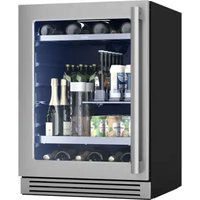
| Product Type | Two-zone built-in wine cooler |
| Brand | Zephyr |
| Model | PRW24C32AG |
| Dimensions (H x W x D) | 34-3/8 in x 23-7/8 in x 23-1/2 in (87.3 x 60.6 x 59.7 cm) |
| Weight | 144 lb (65.3 kg) |
| Power Supply | 115 VAC, 60 Hz, 1.5 A, 130 W |
| Refrigerant | R600a (1.41 oz) |
| Temperature Range | 34 °F to 65 °F (1 °C to 18 °C) |
| Storage Capacity | 42 bottles (750 ml, Bordeaux style) |
| Color | Black cabinet with stainless steel door |
| Main Features | Two independent cooling zones, interior lighting (amber, cloud white, dark blue) with showcase and automatic modes, Sabbath mode, integrated charcoal filter, internal fan, door open alarm |
| Care and Cleaning | Clean interior after defrosting with a clean cloth; clean exterior with mild detergent and baking soda; do not use abrasive products |
| Safety | Grounding required (three-prong outlet), dedicated 15 A circuit, do not use extension cord, keep keys out of reach of children, do not install near heat sources |
| Spare Parts and Repairability | Replacement charcoal filter (part #Z0F-C004), optional handle (part #PRHAN-C002), power cord replacement by qualified technician |
| General Information | Limited warranty: 5 years on compressor, 2 years on parts, 1 year on labor. Built-in or freestanding installation. 1 to 2 inches (2.5 to 5 cm) rear clearance required for ventilation. |
Frequently Asked Questions - PRW24C32AG Zephyr
User questions about PRW24C32AG Zephyr
0 question about this device. Answer the ones you know or ask your own.
Ask a new question about this device
Download the instructions for your Refrigerator in PDF format for free! Find your manual PRW24C32AG - Zephyr and take your electronic device back in hand. On this page are published all the documents necessary for the use of your device. PRW24C32AG by Zephyr.
USER MANUAL PRW24C32AG Zephyr
Presrv Dual Zone Wine Cooler

natural_image
Line drawing of a dual-chamber industrial oven with vertical slats and side grilles (no text or symbols)Important Safety Information
Improper handling can cause serious damage to the Zephyr wine cooler and/or injury to the user.
This wine cooler is designed for domestic indoor use only. Do not use the unit for industrial or commercial use. Any other use may invalidate the warranty. Please review the rating label located on the rear panel of the unit for electrical and other technical data related to this unit. The unit must be used in a properly grounded wall outlet. Please read and follow the safety information listed below to reduce the risk of fire, electric shock, or injury.

RICAL SAFETY
- Do not exceed the power outlet ratings.
- It is recommended the wine cooler be connected on its own circuit.
- The unit must be installed in accordance with state and local electrical codes.
- A standard electrical supply (115 V, 60Hz), that is properly grounded in accordance with the National Electrical Code and local codes and ordinances is required.
- Use outlets that cannot be turned off by a switch or pull chain.
• Always turn the unit off and unplug it from the outlet when cleaning. - Unplug the unit if it is not going to be used for an extended period of time.
- Do not operate the unit with a power plug missing the ground plug, a damaged cord, or a loose socket.
- Be sure the wine cooler is properly grounded.
- Never plug or unplug the unit with wet hands.
- Do not bypass, cut, or remove the grounding plug.
- Do not use extension cords or power strips with this unit. You may need to contact your electrician if it is necessary to use a longer cord or if you do not have a grounded outlet. Do not modify the power cord's length or share the outlet with other appliances.
- Do not start or stop the unit by switching the circuit's power on and off.
- If the power cord is damaged, it must be replaced by the manufacturer or a qualified technician.
- Never repair the unit while it is plugged in.
- Immediately unplug the unit if it makes strange sounds, emits smells, or smoke comes out of it, and contact customer service.
- Do not remove any part of the casing unless instructed to do so by an authorized technician.
- You should never attempt to repair the unit yourself. Contact customer service for service options if the unit needs service.

GENERAL SAFETY
- To prevent back and other types of injuries, use at least two people to move and install the wine cooler.
- This appliance is not intended for use by persons, including children, with reduced physical, sensory, or mental capabilities, unless they have been given supervision or instruction concerning the use of the appliance by the person(s) responsible for their safety.
- Install the wine cooler in a well ventilated area where the ambient temperature is above 50^ F and below 90^ F.
- The temperature range for this cooler is optimized for wine storage. Perishable food items may require a different storage environment.
- Do not place hot or warm items into the wine cooler before they cool down to room temperature.
- This unit is designed to be installed indoors, and protected from rain, sleet, snow, and / or moisture.
- Never allow children to crawl inside the wine cooler. If you are disposing of the unit, remove the door.
- Do not use this appliance near flammable gas or combustibles, such as gasoline, benzene, thinner, etc.
- Do not place the unit near heat sources such as ovens, grills, or direct sunlight.
- Only use in an upright position on a flat, level surface and provide proper ventilation.
- Do not pinch or kink the power supply line between the unit and cabinet.
- Do not place any other appliances on top of the unit.
- Do not turn the unit upside down, on its side, or at an angle off level.
- If your model of wine cooler is equipped with a lock, take care to keep the keys away from children.
- Do not move the unit without removing the contents and securing the door in a closed position.

Note: Flammable Refrigerant Used! When handling, moving, and using the cooler, make sure to avoid either damaging the refrigerant tubing, or increasing the risk of a leak.

Prop. 65 Warning for California Residents
WARNING: This product may contain chemicals known to the State of California to cause cancer, birth defects, or other reproductive harm.
Table of Contents
Important Safety Information....ii
Table of Contents....iv
First Time Operating Instructions....v
Introduction....1
Parts Identification & Dimensions.... 2 - 3
Installing Your Wine Cooler 3 - 5
Installing Your Door Handle and Shelves.... 5 - 6
Operation....7 - 8
Internal Light 8
Defrosting....9
Normal Sounds....9
Cleaning and Maintenance....9
Preparing Your Wine Cooler for Storage.... 10
Troubleshooting.... 10 - 11
Specifications....12
Zephyr Product Warranty....13
First Time Operating Instructions:
Before use, make sure all packaging labels and materials are removed from the unit. Be sure to keep track of all included parts and pieces before discarding packaging materials. It is advised that you keep the original box and packaging materials in case you need to move or ship the appliance in the future.
Allow the unit to stand for at least 24 hours before you use it; this allows the cooling components time to settle from transit. The instruction manual should be read before use.
This owner's manual is provided for reference use only. Specifications may change without prior notice. Refer to the product label on the back of your wine cooler for the latest technical information.
Introduction
Thank you for purchasing your Zephyr wine cooler. Zephyr is dedicated to developing products that will enhance your lifestyle with superior quality and distinctive features. Please visit www.zephyronline.com for more information on your product and other Zephyr products.
This manual contains important information regarding the proper installation, use, and maintenance of your wine cooler. Following this manual will ensure that your product will work at its peak performance and efficiency.
Please save the original product packaging in case you need to safely transport your wine cooler.
For Your Records:
Please write down the model number and serial number below for future reference. Both numbers are located on the rating label on the back of your unit and are needed to obtain warranty service. You may also want to staple your receipt to this manual as it is the proof of your purchase, and is also needed for service under your warranty.
Model Number:
Serial Number:
Date of Purchase:
To better serve you, please do the following before contacting customer service:
- If you received a damaged product, immediately contact the retailer or dealer that sold you the product.
- Read and follow this instruction manual carefully to help you install, use, and maintain your wine refrigerator.
- Read the troubleshooting section of this manual as it will help you diagnose and solve common issues.
- Visit us on the web at http://www.zephyronline.com to download product guides, additional troubleshooting resources, and up-to-date information.
- If you need warranty service, our friendly customer service representatives are available via email at productsupport@zephyronline.com or by telephone at 888-880-8368.
Parts Identification & Dimensions
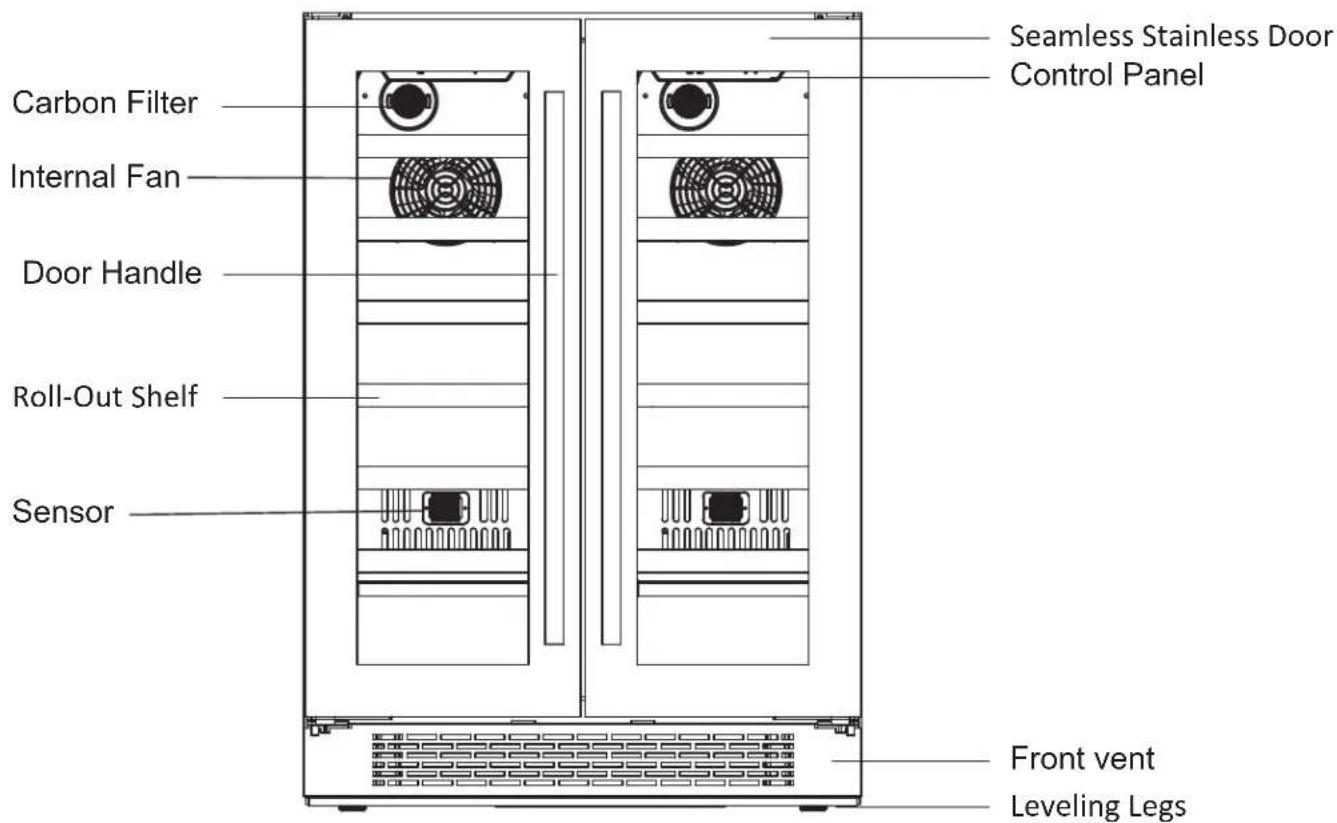
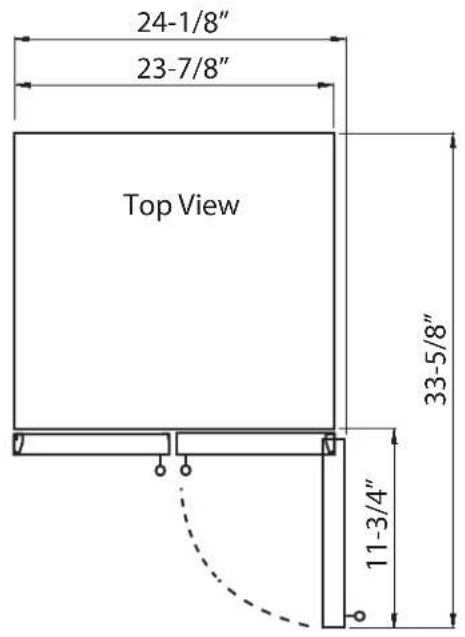
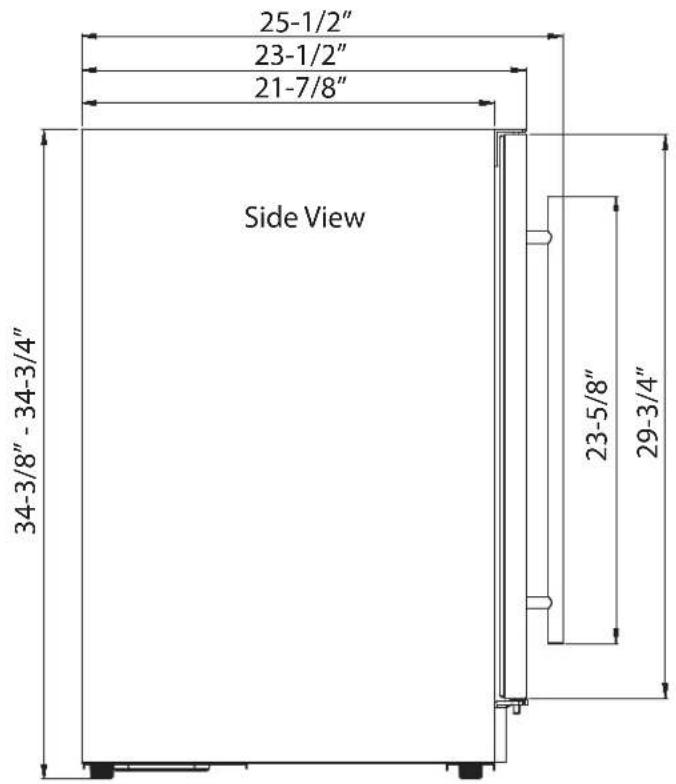
Carbon Filter
A built-in carbon filter protects your beverages by acting as a natural barrier against harmful odors.

natural_image
Simple circular diagram with a grid pattern inside, no text or symbols present.Internal Fan
This is an air-cooled unit equipped with an internal fan that maintains a consistent internal temperature.

natural_image
Circular pattern with concentric rings and intersecting lines, no text or symbols present
Note: The carbon filter should be replaced every 3-6 months depending on the unit's exposure level to odor. If the unit is placed in a kitchen, regular replacement every three (3) months is ideal.
Carbon Filter Replacement Part #: Z0F-C004

Tip: Gather the model and serial number from the product label and write them down before installing the wine cooler.
Installing Your Wine Cooler
The wine cooler should be installed in accordance with local electrical code requirements. It should also be placed in a location that is strong enough to support its total weight, keeping in mind that it will weigh substantially more when fully loaded than when empty.
Before you plug the wine cooler into a power supply, be sure to let it stand upright for at least 24 hours to allow the compressor's oils to settle.

Warning: Use two or more people to move and install the wine cooler. Failure to do so can result in back or other injury. Carefully remove the packaging materials. Remove any shipping tape and glue from your wine cooler before using. Do not use sharp instruments, rubbing alcohol, flammable fluids, or abrasive cleaners to remove tape or glue. These products can damage the surface of your wine cooler.

Important: Do not remove any safety, warning, or product information labels from your wine cooler.
TYPES OF INSTALLATION:
This wine cooler has been designed for free-standing or built-in installation. In every case, there must be adequate ventilation and access for service.
Free-standing Installation
A free-standing installation will allow you to install the wine cooler in almost any place you desire. You must follow the stated instructions for electrical requirements and leveling the wine cooler.
Built-in Installation
A recessed installation will allow you to install the wine cooler under a counter or in a kitchen cabinet provided the clearance space requirements around the wine cooler are followed. It is necessary to allow adequate ventilation space around the unit (make sure there is at least some ventilation room for the back of the unit). The following additional items must be observed:
- Place the wine cooler in front of the installation location.
- Adjust the feet and place the unit flat on the floor or on a platform depending on your installation requirements.
- If the electrical outlet for the wine cooler is behind the cabinet, plug in the wine cooler.
- Push the wine cooler into position.

Warning: DO NOT install the wine cooler behind a closed cabinet door.
Installation Clearance Requirements:
When installing the wine cooler under a counter, follow the recommended spacing dimensions shown.
- To ensure proper service access and ventilation, allow between 1 - 2 inches of clearance at the back as shown in the diagram.
- The installation should allow the unit to be pulled forward for servicing, if necessary.
- A standard electrical supply (115 VAC only, 60 Hz), properly grounded in accordance with National Electrical Code and local codes and ordinances, is required.
- An installation next to a wall will require a minimum 2-1/4" door clearance to accommodate the handle.
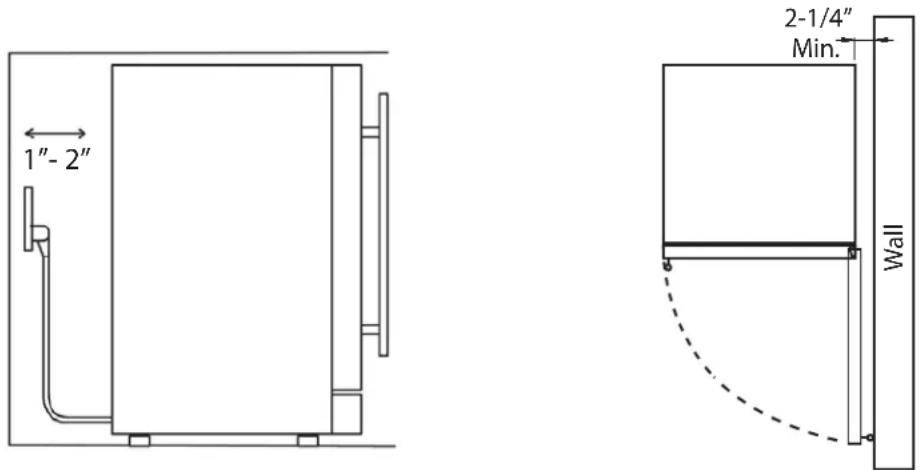

Important: Once you are ready to install the unit in a cabinet or directly on the floor, you must adjust the feet to level the wine cooler.
LEVELING:
The wine cooler should be installed on a firm and level surface that will be able to support the entire weight of a fully loaded unit. It is important for the wine cooler to be leveled in order to work properly. It can be raised or lowered by rotating the plastic sheaths around each of the feet on the bottom of the machine. If you find that the surface is not level, rotate the feet until the wine cooler becomes level. You may need to make several adjustments to level it. We recommend using a carpenter's level to check the machine. Turn the leveling feet to the right to lower that side of the cooler. Turn the leveling feet to the left to raise that side of the cooler.
RECOMMENDED GROUNDING METHOD:
For your personal safety, this appliance must be grounded. It is equipped with a power supply cord having a 3-prong grounding plug. To minimize possible shock hazard, the cord must be plugged into a mating 3-pronged wall socket, and grounded in accordance with the National Electrical Code and local codes and ordinances. If a mating wall socket is not available, it is the personal responsibility of the customer to have a properly grounded, 3-prong wall receptacle installed by a qualified electrician.

Electrical Shock Hazard!
☒ Plug into a grounded 3-prong outlet.
☒ Never remove the grounding prong from the plug.
☒ Never use an adapter to bypass the grounding prong.
☒ DO NOT use an extension cord.
☒ Failure to follow these instructions can result in fire, electrical shock, or personal injury.
Before you move your wine cooler into its final location, it is important to make sure you have the proper electrical connection. A standard electrical supply (115 V, 60Hz), properly grounded in accordance with the National Electrical Code and local codes and ordinances, is required. It is recommended that a separate circuit, serving only your wine cooler, be provided. Use receptacles that cannot be turned off by a switch or pull chain.
The fuse (or circuit breaker) size should be 15 Amps.
Installing Your Door Handle and Shelves
INSTALLING THE DOOR HANDLE:
- Open the door and carefully pull the door gasket around the area where the handle is to be installed.
- Insert each Phillips head screw through the gasket side of the door until the screw passes through the door.
- Align the handle with the screws and tighten using a Phillips head screwdriver until the handle is flush against the door frame.
Caution: Do not over-tighten the screws as this may cause damage to the handle or to the stainless steel door. - Carefully press the door gasket into its original position.
INSTALLING THE SHELVES:
- Open the door completely.
- Push the shelf tracks affixed to the walls of the inner cabinet to the rear of the unit so that the tracks are fully seated inside the cooler compartment.
- Line up the rails affixed to the shelf with the corresponding wine cooler tracks attached to the inner cabinet walls.
- Push the front of the shelf inwards evenly until the shelf rests fully inside of the unit and you are able to close the door.
- The shelf should glide smoothly back and forth. If it does not, you may need to remove it and start over.
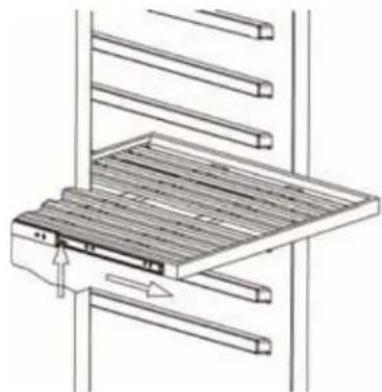
REMOVING THE SHELVES:
- Open the door completely.
- Remove all of the contents loaded on the shelf, if applicable.
- Pull the shelf towards yourself until it is fully extended outward.
- The shelf has plastic posts on both sides as indicated in the diagram below. While facing the unit, press the plastic post on the right side down while pulling up on the left plastic post. You may choose to do this by hand or by using a flathead screwdriver.
- Evenly pull out the shelf from the track until it is completely removed from the inner compartment.
natural_image
Technical line drawing of a mechanical assembly with no visible text or symbols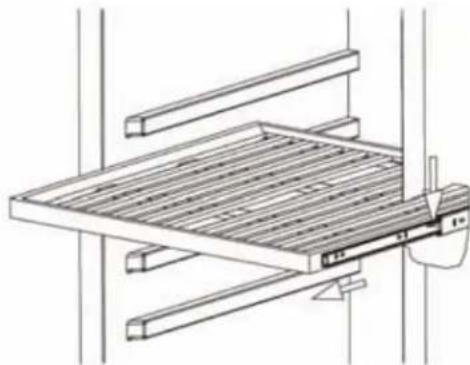
natural_image
Technical line drawing of a mechanical assembly with no visible text or symbols!
Tip: To prevent damaging the door gasket, make sure to open the door fully before pulling the shelves out of their tracks.
!
Note: The cooler may experience decreased cooling efficiency if air flow is restricted due to a fully loaded cabinet.
Operation
INSTALLATION CHECK-LIST BEFORE OPERATION:
- Have all packing materials and tape been removed from the interior and exterior of the wine refrigerator?
- Have the installation instructions been followed, including connecting the machine to electricity?
- Has proper grounding been installed for the wine refrigerator?
- Has the machine been leveled?
- Is the wine refrigerator in a site where the ambient temperature is between 50^ F and 90^ F all year round?
- Is there a clearance of at least 1" to 2" at the rear for proper air circulation?
USING YOUR CONTROL PANEL:

Each independently controlled temperature zone – right and left – has a temperature range of 34^ F to 65^ F to accommodate the storage of different wine varietals. Each zone contains its own control panel.

Power Button
Press and hold this button for three seconds to power your unit on or off. While the unit is on the R "Compressor Running" light may illuminate to indicate the internal compressor is active.

Increase Temperature
Press this button to increase the temperature by one (1) degree increments. 65^ F is the highest available temperature on this unit.

Decrease Temperature
Press this button to decrease the temperature by one (1) degree increments. 34^ F is the lowest available temperature on this unit.

Interior Light
Press this button to cycle through the different internal light settings. There are three light settings: Amber, Cloud White and Deep Blue.
Open and close the door to check the internal light color and whether the lights stay on with the door closed (Display Mode) or illuminate only when the door is open (Automatic Mode). Please refer to the "Internal Light" section on the next page for further detail.
Sabbath Mode
This unit offers a Sabbath mode. Sabbath mode disables system responses to user initiated activities and all external functions, including lighting, display and audible alarms. The unit will still maintain internal temperatures and set points.
To enable or disable Sabbath Mode:
Press the Power Button and simultaneously press the Increase Temperature Button twice to enable or disable.
The interior light and control display will go dark until user disables Sabbath Mode.
Note: Although the display will not be visible, the temperature settings will remain active and preserve the internal temperature. Sabbath Mode will remain active until it is disabled by the user.
| ⚠️Note: Pressing and holding the increase and decrease temperature buttons at the same time will switch the temperature display from °F to °C. | |
| ⚠️Tip: If you powered the unit off, please wait at least five (5) minutes before powering it back on. | |
| ⚠️Warning: Allow at least 24 hours for your wine cooler to run before storing your beverages and to allow the temperature to acclimate. Whether your wine cooler can reach the actual set temperature depends on the ambient environmental conditions. | |
| ⚠️Note: If door is left ajar for a period of (3) minutes or more the unit door ajar alarm will beep until door is closed. | |
| ⚠️Note: The Wine Cooler is equipped with a temperature memory function. If power is suddenly lost, the previously set temperature will be saved and the refrigerator will return to this setting once power is restored. | |
| ⚠️Note: If the interior temperature is higher than 73°F (23°C), “HI” is shown on the display panel and the buzzer alarm sounds continuously after one hour. This indicates that the inner temperature is too high, and you should look for the reason. If the inner temperature is lower than 32°F (0°C), “LO” is shown on the display panel; the alarm and the malfunction indicator light go on at the same time. |
Internal Light
This cooler is equipped with side internal lights that can be set to Amber, Cloud White or Deep Blue color. Because the unit comes with a glass door, the inside will be seen whether the door is open or closed. You can choose to display each color of light in two different modes: Display Mode and Automatic Mode.
Display Mode
The internal lights will stay constantly illuminated whether the door is open or closed.
Automatic Mode
The internal lights will illuminate each time the door is opened and fade off once the door is closed. This feature is triggered by a sensor located on the front vent. This sensor allows the cooler to recognize when the door is open or closed.
To change to between Display Mode and Automatic Mode, press and hold Light button for 3 seconds.
!
Note: We run test every unit that we produce in our factory. Because of this, your model may default to any of the above settings out of the box. Simply cycle through the progression of settings until you reach your desired light setting.
!
Tip: Close the door to determine if the light is currently in Display Mode or Automatic Mode. In Display Mode the lights will remain on, and in Automatic Mode the lights will fade off once the door is closed.
Defrosting
Note that under most refrigerating settings, the unit will automatically defrost under most ambient conditions. However, on colder settings, some frost may build up. Additionally, the more humid the ambient conditions, the more frost may build up. Keep the door closed as much as possible and avoid opening the door unnecessarily to minimize frost build-up.
If frost is preventing the door from closing properly, you may need to power the unit off until the frost melts. Use a soft absorbent towel to dry the unit.

Warning: Never attempt to remove frost with a sharp object.
Normal Sounds
Your new wine cooler may make sounds that are not familiar to you. Most of the new sounds are normal. Hard surfaces like the floor or walls can make the sounds seem louder than they actually are. The following describes the kinds of sounds that might be new to you and what may be making them.
- Rattling noises may come from the flow of the refrigerant or the water line.
- Items stored on top of the wine cooler can also make noises.
- The high efficiency compressor may make a pulsating or high-pitched sound.
- The internal fan will run frequently to create a consistent internal temperature environment.
• Water running from the evaporator to the water bin may make a splashing sound. - As each cycle ends, you may hear a gurgling sound due to the refrigerant flowing in your wine refrigerator.
- You may hear air being forced over the condenser by the condenser fan.
Cleaning and Maintenance
Periodic cleaning and proper maintenance will ensure efficiency, top performance, and long life.
INTERIOR CLEANING:
- Disconnect power to the unit.
- Open the door and remove the contents and shelves.
- Wait until the unit defrosts.
- With a clean cloth, wipe down the interior of the unit.
- Reinsert the shelves and beverages.
- Reconnect power to the unit.
EXTERIOR CLEANING:
The door and cabinet may be cleaned with a mild detergent and lukewarm water solution such as two (2) tablespoons of baking soda to one (1) quart of water. Do not use solvent based or abrasive cleaners. Use a soft sponge and rinse with clean water. Wipe with a soft clean towel to prevent water spotting. If the door panel is stainless steel, it can discolor when exposed to chlorine gas and moisture. Clean stainless steel with a cloth dampened with a mild detergent and warm water solution. Never use an abrasive or caustic cleaning agent.
Preparing Your Wine Cooler for Storage
If the wine cooler will not be used for a long time, or is to be moved to another place, it will be necessary to defrost the unit and dry the interior.
- Disconnect the cooler from the power supply by removing the power plug from the wall socket.
- Leave the door open to allow for air circulation and to prevent mold, mildew, and unpleasant smells.
- Once the interior is dry and clean the unit will be ready for storage.

Caution: Store the unit out of the reach of children. If you have children, you may want to take additional precautions such as removing the door to prevent a child from being trapped inside the cooler.

Important: Do NOT touch the power plug when your hands are wet. NEVER unplug the unit by pulling the plug.
Troubleshooting
| ISSUE | POSSIBLE | CAUSE |
| The wine cooler turns on and off frequently. | The room temperature is higher than the recommended ambient environment. | Run the cooler at the appropriate ambient temperature. |
| The door is being opened often. | Minimize the number of times the door is opened. | |
| The door is not completely closed. | Make sure the door is completely closed. | |
| The door gasket is not sealing properly. | Make sure the door gasket is properly sealed. | |
| The cooler does not have the suggested ventilation. | Read and follow the “Installation Clearance Requirements” section. | |
| The wine cooler does not turn on. | There is a power failure. | Ensure the cooler is plugged in and the outlet has power. |
| The cooler is not plugged in. | Plug the unit in to a power outlet that has sufficient amperage. | |
| A house fuse has blown or the circuit breaker is tripped. | Replace the broken fuse in your fuse box or reset the breaker. | |
| Sabbath mode may be enabled. | See Operation page and verify Sabbath mode is disabled. | |
| ISSUE POSSIBLE CAUSE SOLUTION | ||
| The wine cooler will not reach the desired temperature. | The cooler is placed too close to a heat source. | Keep the cooler away from direct sunlight or other heat sources. |
| The cooler does not have sufficient ventilation. | Read and follow the “Installation Clearance Requirements” section. | |
| The door is opened too frequently or for long periods of time. | Close the door tightly and do not open the door too frequently or for long periods of time. | |
| The wine cooler is making strange noises. | Certain sounds are normal | Read the “Normal Sounds” section. |
| The unit is not level or is touching another appliance. | Check to make sure the cooler is level and that it is not in contact with another appliance or furniture. | |
| The body of the wine cooler is electrified. | The unit is not properly grounded. | Contact your local electrician to test your electrical grounding system. |
| Frost is forming in the wine cooler. | The environment is humid. Through the ambient temperature is too low. | the unit uses an “auto-defrost” system, under certain conditions, manual defrosting may be required. If frost builds up, you can try running the cooler on a warmer temperature setting, minimizing the number of times you open the door, or unplugging the unit to allow the frost to melt. |
| The door is being opened too frequently. | ||
| The door will not shut properly. The cooler is not level. | Make sure the cooler is on a level surface. | |
| The door gasket is dirty. Clean the door gasket. | ||
| The door gasket is not installed correctly. | ||
| The shelves are incorrectly installed. | ||
Specifications
| DESCRIPTION OF PRODUCT Dual Zone Built-In Wine | Cooler |
| MODEL PRW24C32AG | |
| VOLTAGE / FREQUENCY AC 115 / 60 Hz | |
| AMPERAGE | 1.5 A |
| INPUT POWER | 130 W |
| COLOR | Black Cabinet with Stainless Steel Door |
| STORAGE CAPACITY 42 Bottles* | |
| REFRIGERANT | R600a, 1.41 oz. |
| TEMPERATURE RANGE 34° F to 65° F | |
| DIMENSIONS (HEIGHT X WIDTH X DEPTH) | 34^3/8 " X 23^7/8 " X 23^1/2 " |
| WEIGHT | 144 Pounds |
| OPTIONAL PRO HANDLE ACCESSORY | PRHAN-C002 |
| REPLACEMENT CARBON FILTER | ZOF-C004 |
*Storage capacity is based on standard 750 ml. Bordeaux-style wine bottles.

Note: Technical data and performance information are provided for reference only. Specifications are subject to change. Check the rating label on the wine cooler for the most accurate information.
ZEPHYR
Limited Warranty
Zephyr Ventilation, LLC (referred to herein as "we" or "us") warrants to the original consumer purchaser (referred to herein as "you" or "your") of Zephyr products (the "Products") that such Products will be free from defects in materials or workmanship as follows:
Five Year Limited Warranty for Compressor: For five years from the date of your original purchase of the Products, we will provide, free of charge, compressor parts to replace those that failed due to manufacturing defects subject to the exclusions and limitations below. We may choose, in our sole discretion, to repair or replace parts before we elect to replace the Products.
Two Year Limited Warranty for Parts: For two years from the date of your original purchase of the Products, we will provide, free of charge, Products or parts (including LED light bulbs, if applicable) to replace those that failed due to manufacturing defects subject to the exclusions and limitations below. We may choose, in our sole discretion, to repair or replace parts before we elect to replace the Products.
One Year Limited Warranty for Labor: For one year from the date of your original purchase of the Products, we will provide, free of charge, the labor cost associated with repairing the Products or parts to replace those that failed due to manufacturing defects subject to the exclusions and limitations below. After the first year from the date of your original purchase, you are responsible for all labor costs associated with this warranty.
To Obtain Service Under Limited Warranty: To qualify for warranty service, you must: (a) notify us at the address or telephone number stated below within 60 days of the discovery of the defect; (b) give the model number and serial number; and (c) describe the nature of any defect in the Product or part. At the time of the request for warranty service, you must present evidence of your proof of purchase and proof of the original purchase date. If we determine that the warranty exclusions listed above apply or if you fail to provide the necessary documentation to obtain service, you will be responsible for all shipping, travel, labor and other costs related to the services. This warranty is not extended or restarted upon warranty repair or replacements.
Warranty Exclusions: This warranty covers only repair or replacement, at our option, of defective Products or parts and does not cover any other costs related to the Products including but not limited to: (a) normal maintenance and service required for the Products and consumable parts such as filters, light bulbs, fuses; (b) any Products or parts which have been subject to freight damage, misuse, negligence, accident, faulty installation or installation contrary to recommended installation instructions, improper maintenance or repair (other than by us); (c) commercial or government use of the Products or use otherwise inconsistent with its intended purpose; (d) natural wear of the finish of the Products or wear caused by improper maintenance, use of corrosive and abrasive cleaning products, pads, and oven cleaner products; (e) chips, dents or cracks caused by abuse or misuse of the Products; (f) service trips to your home to teach you how to use the Products; (g) damage to the Products caused by accident, fire, floods, acts of God; or (h) Custom installations or alterations that impact serviceability of the Products. (I) Damage to personal property or food spoilage from use of this product. If you are outside our service area, additional charges may apply for shipping costs for warranty repair at our designated service locations and for the travel cost to have a service technician come to your home to repair, remove or reinstall the Products. After the first year from the date of your original purchase, you are also responsible for all labor costs associated with this warranty. All Products must be installed by a qualified professional installer to be eligible for warranty repairs or service.
Limitations of Warranty: OUR OBLIGATION TO REPAIR OR REPLACE, AT OUR OPTION, SHALL BE YOUR SOLE AND EXCLUSIVE REMEDY UNDER THIS WARRANTY. WE SHALL NOT BE LIABLE FOR INCIDENTAL, CONSEQUENTIAL OR SPECIAL DAMAGES ARISING OUT OF OR IN CONNECTION WITH THE USE OR PERFORMANCE OF THE PRODUCTS. THE EXPRESS WARRANTIES IN THE PRECEDING SECTION ARE EXCLUSIVE AND IN LIEU OF ALL OTHER EXPRESS WARRANTIES. WE HEREBY DISCLAIM AND EXCLUDE ALL OTHER EXPRESS WARRANTIES FOR THE PRODUCTS, AND DISCLAIM AND EXCLUDE ALL WARRANTIES IMPLIED BY LAW, INCLUDING THOSE OF MERCHANTABILITY AND FITNESS FOR A PARTICULAR PURPOSE. Some states or provinces do not allow limitations on the duration of an implied warranty or the exclusion or limitation of incidental or consequential damages, so the above limitations or exclusions may not apply to you. To the extent that applicable law prohibits the exclusion of implied warranties, the duration of any applicable implied warranty is limited to the same two-year and one-year periods described above if permitted by applicable law. Any oral or written description of the Products is for the sole purpose of identifying the Products and shall not be construed as an express warranty. Prior to using, implementing or permitting use of the Products, you shall determine the suitability of the Products for the intended use, and you shall assume all risk and liability whatsoever in connection with such determination. We reserve the right to use functionally equivalent refurbished or reconditioned parts or Products as warranty replacements or as part of warranty service. This warranty is not transferable from the original purchaser and only applies to the consumer residence where the Product was originally installed located in the United States and Canada. This warranty is not extended to resellers.
Please check our website for any additional Product information, www.zephyronline.com.
Zephyr Ventilation Service Department, 2277 Harbor Bay Parkway, Alameda, CA 94502 1-888-880-8368
natural_image
Line drawing of a dual-chamber industrial oven with vertical slats and side grilles (no text or symbols)
Filtre à charbon
natural_image
Simple circular diagram with a grid pattern inside, no text or symbols present.Ventilateur interne
natural_image
Concentric circular pattern with radial lines and four corner dots (no text or symbols)
natural_image
Diagram of a mechanical assembly with a wooden panel and directional arrows indicating motion (no text or symbols)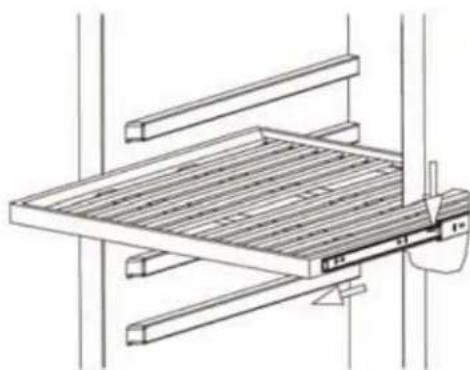
natural_image
Technical line drawing of a mechanical assembly with no visible text or symbols
Zephyr Ventilation Service Department, 2277 Harbor Bay Parkway, Alameda, CA 94502 1-888-880-8368
- Important Safety Information
- RICAL SAFETY
- GENERAL SAFETY
- Prop. 65 Warning for California Residents
- Table of Contents
- First Time Operating Instructions:
- Introduction
- For Your Records:
- Carbon Filter
- Internal Fan
- Installing Your Wine Cooler
- TYPES OF INSTALLATION:
- Free-standing Installation
- Built-in Installation
- Installation Clearance Requirements:
- LEVELING:
- RECOMMENDED GROUNDING METHOD:
- Electrical Shock Hazard!
- Installing Your Door Handle and Shelves
- INSTALLING THE DOOR HANDLE:
- INSTALLING THE SHELVES:
- REMOVING THE SHELVES:
- !
- Operation
- INSTALLATION CHECK-LIST BEFORE OPERATION:
- USING YOUR CONTROL PANEL:
- Power Button
- Increase Temperature
- Decrease Temperature
- Interior Light
- Sabbath Mode
- Internal Light
- Display Mode
- Automatic Mode
- Defrosting
- Normal Sounds
- Cleaning and Maintenance
- INTERIOR CLEANING:
- EXTERIOR CLEANING:
- Preparing Your Wine Cooler for Storage
- Specifications
- ZEPHYR
- Limited Warranty
- Filtre à charbon
- Ventilateur interne
Brand : Zephyr
Model : PRW24C32AG
Category : Refrigerator