
KA86 - Orbital sander BLACK & DECKER - Free user manual and instructions
Find the device manual for free KA86 BLACK & DECKER in PDF.


| Product Type | Orbital Sander |
| Model Number | KA86 |
| Brand | Black & Decker |
| Power Source | Corded Electric (120V / 60Hz) |
| Weight | 3.2 lbs (1.45 kg) |
| Dimensions (L x W x H) | 10.5 x 4.7 x 5.3 inches (267 x 119 x 135 mm) |
| Orbit Diameter | 1/8 inch (3.2 mm) |
| No-Load Speed | 12,000 OPM (Orbits Per Minute) |
| Pad Size | 5 inches (127 mm) square |
| Dust Collection | Dust bag with micro-filter |
| Switch Type | Slide switch with lock-on |
| Key Features | Comfort grip handle, hook and loop pad for quick paper changes |
| Intended Use | Wood, metal, plastic sanding and finishing |
| Maintenance | Clean pad and dust bag after each use; inspect power cord regularly |
| Safety Features | Lock-on switch, double insulation, dust sealed bearings |
| Spare Parts Availability | Replacement pads, dust bags, carbon brushes available |
| Included Accessories | Dust bag, sanding paper assortment (6 sheets) |
| Warranty | 2-year limited warranty |
Frequently Asked Questions - KA86 BLACK & DECKER
User questions about KA86 BLACK & DECKER
0 question about this device. Answer the ones you know or ask your own.
Ask a new question about this device
Download the instructions for your Orbital sander in PDF format for free! Find your manual KA86 - BLACK & DECKER and take your electronic device back in hand. On this page are published all the documents necessary for the use of your device. KA86 by BLACK & DECKER.
USER MANUAL KA86 BLACK & DECKER
English (Original instructions) 4
natural_image
Line drawing of hands assembling a mechanical component (no text or symbols)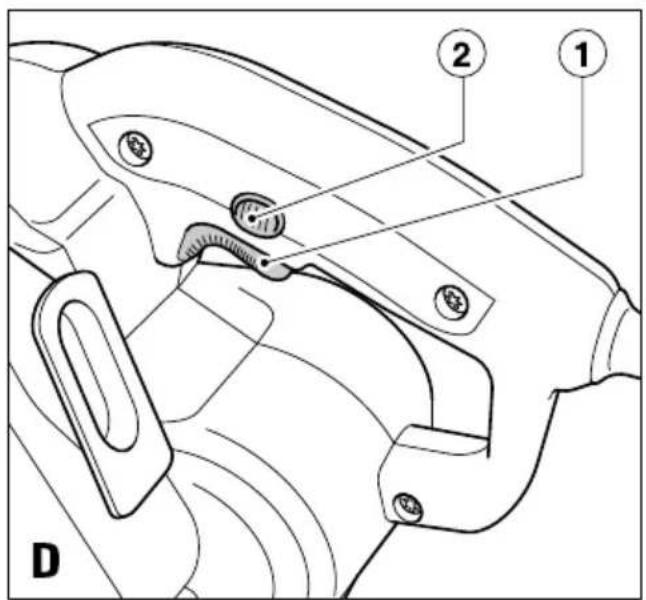
Intended use
Your Black & Decker sander has been designed for sanding wood, metal, plastics and painted surfaces. This tool is intended for consumer use only.
Safety instructions
General power tool safety warnings

Warning! Read all safety warnings and all instructions. Failure to follow all instructions may result in electric shock, fire and/or serious injury.
Save all warnings and instructions for future reference.
The term "power tool" in all of the warnings listed below refers to your mains operated (corded) power tool or battery operated (cordless) power tool.
1. Work area safety
a. Keep work area clean and well lit. Cluttered and dark areas invite accidents.
b. Do not operate power tools in explosive atmospheres, such as in the presence of flammable liquids, gases or dust. Power tools create sparks which may ignite the dust or fumes.
c. Keep children and bystanders away while operating a power tool. Distractions can cause you to lose control.
2. Electrical safety
a. Power tool plugs must match the outlet. Never modify the plug in any way. Do not use any adapter plugs with earthed (grounded) power tools. Unmodified plugs and matching outlets will reduce risk of electric shock.
b. Avoid body contact with earthed or grounded surfaces such as pipes, radiators, ranges and refrigerators. There is an increased risk of electric shock if your body is earthed or grounded.
c. Do not expose power tools to rain or wet conditions. Water entering a power tool will increase the risk of electric shock.
d. Do not abuse the cord. Never use the cord for carrying, pulling or unplugging the power tool. Keep cord away from heat, oil, sharp edges or moving parts. Damaged or entangled cords increase the risk of electric shock.
e. When operating a power tool outdoors, use an extension cord suitable for outdoor use. Use of a cord suitable for outdoor use reduces the risk of electric shock.
f. If operating a power tool in a damp location is unavoidable, use a Residual Current Device (RCD) protected supply. Use of an RCD reduces the risk of electric shock.
3. Personal safety
a. Stay alert, watch what you are doing and use common sense when operating a power tool. Do not use a power tool while you are tired or under the influence of drugs, alcohol or medication. A moment of inattention while operating power tools may result in serious personal injury.
b. Use personal protective equipment. Always wear eye protection. Protective equipment such as dust mask, non-skid safety shoes, hard hat, or hearing protection used for appropriate conditions will reduce personal injuries.
c. Prevent unintentional starting. Ensure the switch is in the off-position before connecting to power source and/or battery pack, picking up or carrying the tool. Carrying power tools with your finger on the switch or energising power tools that have the switch on invites accidents.
d. Remove any adjusting key or wrench before turning the power tool on. A wrench or a key left attached to a rotating part of the power tool may result in personal injury.
e. Do not overreach. Keep proper footing and balance at all times. This enables better control of the power tool in unexpected situations.
f. Dress properly. Do not wear loose clothing or jewellery. Keep your hair, clothing and gloves away from moving parts. Loose clothes, jewellery or long hair can be caught in moving parts.
g. If devices are provided for the connection of dust extraction and collection facilities, ensure these are connected and properly used. Use of these devices can reduce dust related hazards
4. Power tool use and care
a. Do not force the power tool. Use the correct power tool for your application. The correct power tool will do the job better and safer at the rate for which it was designed.
b. Do not use the power tool if the switch does not turn it on and off. Any power tool that cannot be controlled with the switch is dangerous and must be repaired.
c. Disconnect the plug from the power source and/or the battery pack from the power tool before making any adjustments, changing accessories, or storing power tools. Such preventive safety measures reduce the risk of starting the power tool accidentally.
d. Store idle power tools out of the reach of children and do not allow persons unfamiliar with the power tool or these instructions to operate the power tool.
Power tools are dangerous in the hands of untrained users.
e. Maintain power tools. Check for misalignment or binding of moving parts, breakage of parts and any other condition that may affect the power tools operation. If damaged, have the power tool repaired before use. Many accidents are caused by poorly maintained power tools.
f. Keep cutting tools sharp and clean. Properly maintained cutting tools with sharp cutting edges are less likely to bind and are easier to control.
g. Use the power tool, accessories and tool bits etc. in accordance with these instructions, taking into account the working conditions and the work to be performed. Use of the power tool for operations different from those intended could result in a hazardous situation.
5. Service
a. Have your power tool serviced by a qualified repair person using only identical replacement parts. This will make sure that the safety of the power tool is maintained.
Additional power tool safety warnings

Warning! Additional safety warnings for sanders.
- Hold the power tool by insulated gripping surfaces, because the sanding belt / sanding base may contact its own cord. Cutting a "live" wire may make exposed metal parts of the power tool "live" could give the operator an electric shock.
- Use clamps or another practical way to secure and support the workpiece to a stable platform. Holding the work by hand or against your body leaves it unstable and may lead to loss of control.
- Warning! Contact with or inhalation of dust arising from sanding applications may endanger the health of the operator and possible bystanders. Wear a dust mask specifically designed for protection against dust and fumes and ensure that persons within or entering the work area are also protected.
- Thoroughly remove all dust after sanding.
Take special care when sanding paint which is possibly lead based or when sanding some woods and metal which may produce toxic dust:
Do not let children or pregnant women enter the work area.
◆ Do not eat, drink or smoke in the work area.
◆ Dispose of dust particles and any other debris safely.
The intended use is described in this instruction manual. The use of any accessory or attachment or performance of any operation with this tool other than those recommended in this instruction manual may present a risk of personal injury and/or damage to property.
Safety of others
- This appliance is not intended for use by persons (including children) with reduced physical, sensory or mental capabilities, or lack of experience and knowledge, unless they have been given supervision or instruction concerning the use of the appliance by a person responsible for the their safety.
◆ Children should be supervised to ensure that they do not play with the appliance.
Vibration
The declared vibration emission values stated in the technical data and the declaration of conformity have been measured in accordance with a standard test method provided by EN 60745 and may be used for comparing one tool with another. The declared vibration emission value may also be used in a preliminary assessment of exposure.
Warning! The vibration emission value during actual use of the power tool can differ from the declared value depending on the ways in which the tool is used. The vibration level may increase above the level stated.
When assessing vibration exposure to determine safety measures required by 2002/44/EC to protect persons regularly using power tools in employment, an estimation of vibration exposure should consider, the actual conditions of use and the way the tool is used, including taking account of all parts of the operating cycle such as the times when the tool is switched off and when it is running idle in addition to the trigger time.
Labels on tools

Warning! To reduce the risk of injury, the user must read the instruction manual.
Electrical safety

This tool is double insulated; therefore no earth wire is required. Always check that the power supply corresponds to the voltage on the rating plate.
If the supply cord is damaged, it must be replaced by the manufacturer or an authorised Black & Decker Service Centre in order to avoid a hazard.
Features
- On/off switch
- Lock-on button
- Dust bag
- Dust extraction outlet
Assembly
Warning! Before assembly, make sure that the tool is switched off and unplugged.
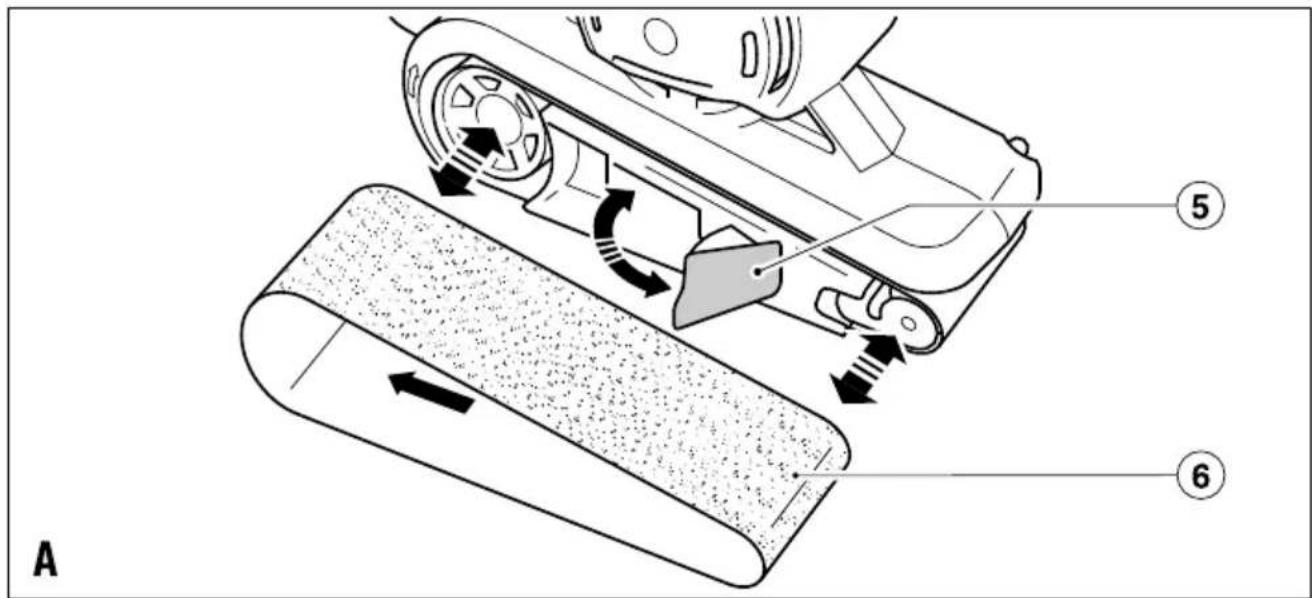
Fitting a sanding belt (fig. A)
Warning! Never use the tool without a sanding belt (6).
◆ Pull the tension lever (5) outward to release the tension on the sanding belt (6).
◆ Remove the old sanding belt (6).
◆ Place a new sanding belt (6) over the rollers. Ensure that the arrow on the sanding belt (6) points in the same direction as the arrow on the tool.
- To ensure a correct tracking, the sanding belt (6) must be centred over the rollers.
♦ Push the tension lever (5) inward to tension the sanding belt (6).
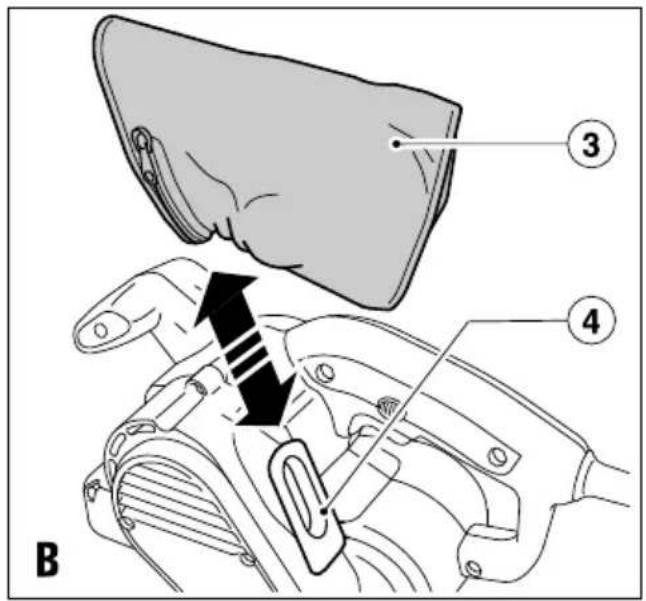
Fitting and removing the dustbag (fig. B)
◆ Slide the dustbag (3) over the dust extraction outlet (4).
◆ To remove the dustbag (3), slide it off the outlet.
Residual risks
Additional residual risks may arise when using the tool which may not be included in the enclosed safety warnings. These risks can arise from misuse, prolonged use etc.
Even with the application of the relevant safety regulations and the implementation of safety devices, certain residual risks cannot be avoided. These include:
◆ Injuries caused by touching any rotating/moving parts.
◆ Injuries caused when changing any parts, blades or accessories.
◆ Injuries caused by prolonged use of a tool. When using any tool for prolonged periods make sure you take regular breaks.
◆ Impairment of hearing.
◆ Health hazards caused by breathing dust developed when using your tool (example:- working with wood, especially oak, beech and MDF).
Use
Warning! Let the tool work at its own pace. Do not overload.
The auto tracking feature of this sander allows you to sand without adjusting the location of the sanding belt (6).
◆ Make sure that the sanding belt (6) is centred over the rollers during assembly.
During use, if the sanding belt (6) begins to track incorrectly, remove the belt sander from the work piece and allow it to run briefly. The sanding belt (6) will return to its centred position.
◆ If the sanding belt (6) does not return to the centred position, allow the unit to cool for 5 minutes and repeat.
Switching on and off (fig. D)
◆ To switch the tool on, press the on/off switch (1).
- For continuous operation, press the lock-on button (2) and release the on/off switch (1).
◆ To switch the tool off, release the on/off switch (1).
◆ To switch the tool off when in continuous operation, press the on/off switch (1) once more and release it.
Emptying the dustbag
The dustbag (3) should be emptied every 10 minutes.
◆ Unzip the dustbag (3) and empty it before continuing.
Hints for optimum use
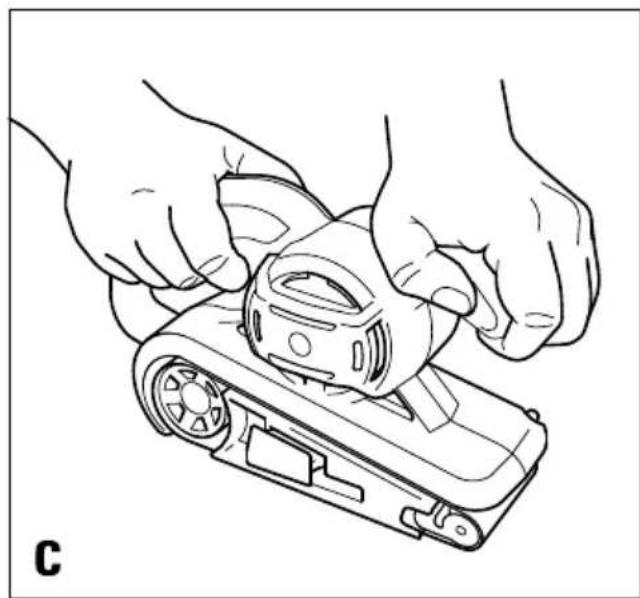
◆ Always hold the tool with both hands (fig. C).
◆ Do not exert too much pressure on the tool.
◆ Regularly check the condition of the sanding belt (6). Replace when necessary.
◆ Always sand with the grain of the wood.
- When sanding new layers of paint before applying another layer, use extra fine grit.
- On very uneven surfaces, or when removing layers of paint, start with a coarse grit. On other surfaces, start with a medium grit. In both cases, gradually change to a fine grit for a smooth finish.
- Consult your retailer for more information on available accessories.
Accessories
The performance of your tool depends on the accessory used. Black & Decker and Piranha accessories are engineered to high quality standards and designed to enhance the performance of your tool. By using these accessories you will get the very best from your tool.
Maintenance
Your Black & Decker tool has been designed to operate over a long period of time with a minimum of maintenance.
Continuous satisfactory operation depends upon proper tool care and regular cleaning.
Warning! Before performing any maintenance, switch off and unplug the tool.
◆ Regularly clean the ventilation slots in your tool using a soft dry brush or dry cloth.
- Regularly clean the motor housing using a clean damp cloth. Do not use any abrasive or solvent-based cleaner.
Mains plug replacement (U.K. & Ireland only)
If a new mains plug needs to be fitted:
◆ Safely dispose of the old plug.
- Connect the brown lead to the live terminal in the new plug.
◆ Connect the blue lead to the neutral terminal.
Warning! No connection is to be made to the earth terminal. Follow the fitting instructions supplied with good quality plugs. Recommended fuse: 5 A.
Protecting the environment
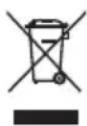
Separate collection. This product must not be disposed of with normal household waste.
Should you find one day that your Black & Decker product needs replacement, or if it is of no further use to you, do not dispose of it with household waste. Make this product available for separate collection.

Separate collection of used products and packaging allows materials to be recycled and used again. Re-use of recycled materials helps prevent environmental pollution and reduces the demand for raw materials.
Local regulations may provide for separate collection of electrical products from the household, at municipal waste sites or by the retailer when you purchase a new product.
Black & Decker provides a facility for the collection and recycling of Black & Decker products once they have reached the end of their working life. To take advantage of this service please return your product to any authorised repair agent who will collect them on our behalf.
You can check the location of your nearest authorised repair agent by contacting your local Black & Decker office at the address indicated in this manual. Alternatively, a list of authorised Black & Decker repair agents and full details of our after-sales service and contacts are available on the Internet at: www.2helpU.com.
Technical data
KA86 TYPE 1
Voltage Vac 230
Power input W 720
Belt speed m/min 206
Sanding base surface mm 75 x 457
Weight kg 2.5
Level of sound pressure according to EN 60745:
Sound pressure (LpA) 89 dB(A), uncertainty (K) 3 dB(A)
Sound power (LWA) 100 dB(A), uncertainty (K) 3 dB(A)
Vibration total values (triax vector sum)
according to EN 60745:
Vibration emission value ( a_h ) 3.6 m/s ^2 ,
uncertainty (K) 1.5 m/s²
EC declaration of conformity
MACHINERY DIRECTIVE

KA86
Black & Decker declares that these products described under "technical data" are in compliance with:
2006/42/EC, EN60745-1, EN60745-2-4
For more information, please contact Black & Decker at the following address or refer to the back of the manual.
The undersigned is responsible for compilation of the technical file and makes this declaration on behalf of Black & Decker.
Kevin Hewitt
Vice-President Global Engineering
Black & Decker Europe, 210 Bath Road, Slough,
Berkshire, SL1 3YD
United Kingdom
15-02-2010
Guarantee
Black & Decker is confident of the quality of its products and offers an outstanding guarantee. This guarantee statement is in addition to and in no way prejudices your statutory rights. The guarantee is valid within the territories of the Member States of the European Union and the European Free Trade Area.
If a Black & Decker product becomes defective due to faulty materials, workmanship or lack of conformity, within 24 months from the date of purchase, Black & Decker guarantees to replace defective parts, repair products subjected to fair wear and tear or replace such products to make sure of the minimum inconvenience to the customer unless:
- The product has been used for trade, professional or hire purposes.
◆ The product has been subjected to misuse or neglect. - The product has sustained damage through foreign objects, substances or accidents.
◆ Repairs have been attempted by persons other than authorised repair agents or Black & Decker service staff.
To claim on the guarantee, you will need to submit proof of purchase to the seller or an authorised repair agent. You can check the location of your nearest authorised repair agent by contacting your local Black & Decker office at the address indicated in this manual. Alternatively, a list of authorised Black & Decker repair agents and full details of our after-sales service and contacts are available on the Internet at:
www.2helpU.com
Please visit our website www.blackanddecker.co.uk to register your new Black & Decker product and to be kept up to date on new products and special offers. Further information on the Black & Decker brand and our range of products is available at www.blackanddecker.co.uk.
| BLACK&DECKER | KA86 | TYP.1 | |
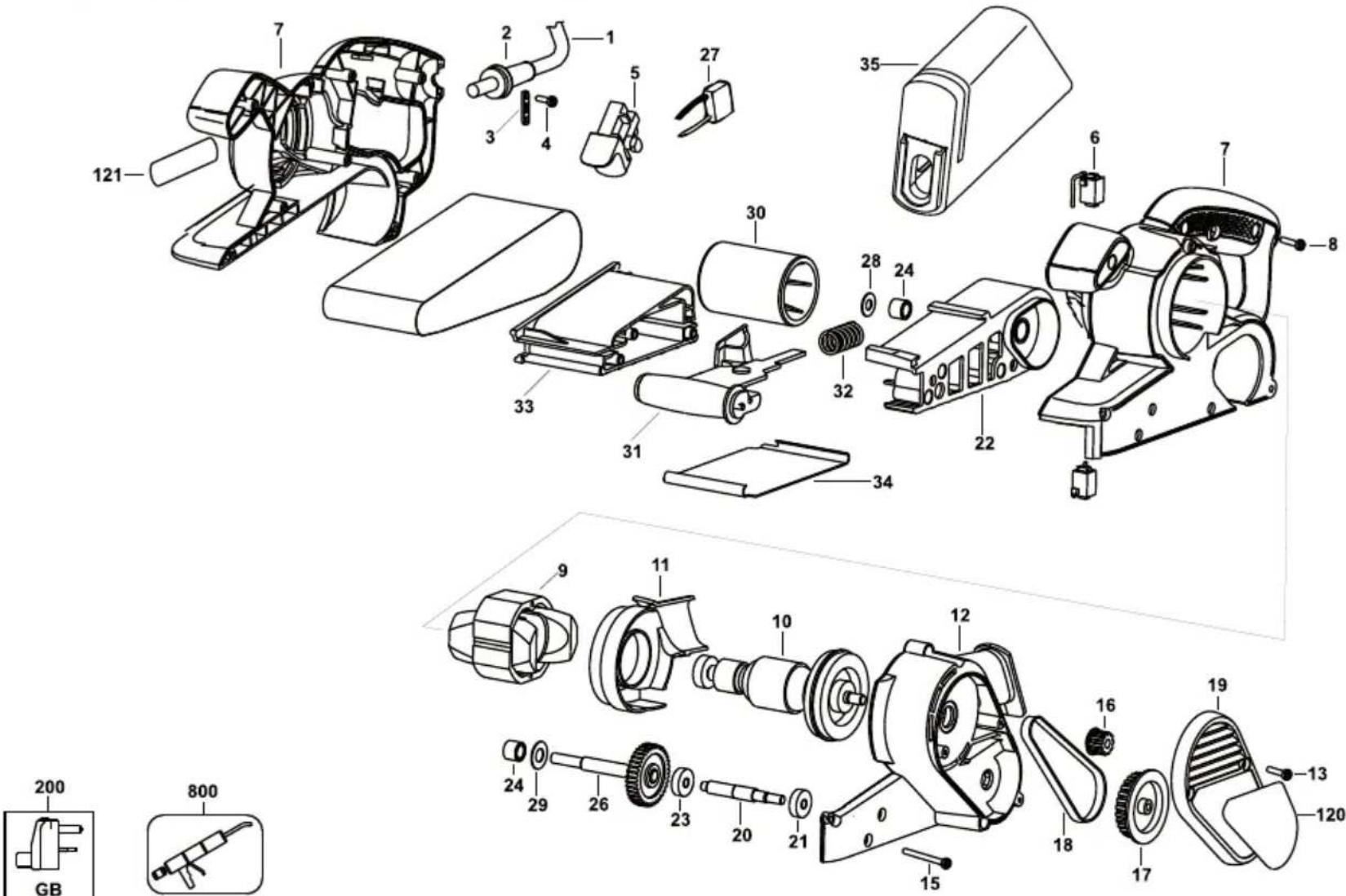 | |||
| E15082 | www.2helpU.com | 14 - 05 - 07 | |
ENGLISH
Do not forget to register your product!
www.blackanddecker.co.uk/productregistration
Register your product online at www.blackanddecker.co.uk/productregistration or send your name, surname and product code to Black & Decker in your country.
Australia
Black & Decker (Australia) Pty. Ltd. Tel. 03-8720 5100
20 Fletcher Road, Mooroolbark, Fax 03-9727 5940
Victoria, 3138
New Zealand
Black & Decker Tel. +64 9 259 1133
5 Te Apunga Place Fax +64 9 259 1122
Mt Wellington
Auckland 1060
United Kingdom
Black & Decker Tel. 01753 511234
210 Bath Road Fax 01753 551155
Slough, Berkshire SL1 3YD Helpline 01753 574277
- Intended use
- Safety instructions
- General power tool safety warnings
- Save all warnings and instructions for future reference.
- Work area safety
- Electrical safety
- Personal safety
- Power tool use and care
- Service
- Additional power tool safety warnings
- Safety of others
- Vibration
- Labels on tools
- Electrical safety
- Features
- Assembly
- Fitting a sanding belt (fig. A)
- Fitting and removing the dustbag (fig. B)
- Residual risks
- Use
- Switching on and off (fig. D)
- Emptying the dustbag
- Hints for optimum use
- Accessories
- Maintenance
- Mains plug replacement (U.K. & Ireland only)
- Protecting the environment
- Technical data
- EC declaration of conformity
- KA86
- Guarantee
- www.2helpU.com
- ENGLISH
- Do not forget to register your product!
- Australia
- New Zealand
- United Kingdom
Brand : BLACK & DECKER
Model : KA86
Category : Orbital sander