
7160-1418 - Docking Station Gamber-Johnson - Free user manual and instructions
Find the device manual for free 7160-1418 Gamber-Johnson in PDF.


| Product Type | Docking Station |
| Compatible Device | Samsung Galaxy Tab Active Pro |
| Model Variants | 7160-1418-00 (Bare Wire), 7160-1418-20 (Cigarette Adapter), 7160-1418-30 (MP205 Connector), 7160-1418-90 (Non-Powered Cradle) |
| Input Voltage Range | 10-40 VDC (direct input); optional adapters for AC and isolated DC |
| Locking Mechanism | Slam latch with key lock (CW lock, CCW unlock) |
| Release Button | Blue push-button for undocking |
| Cable Management | Strain relief features with zip ties (included) |
| Installation | Must be mounted to Gamber-Johnson mounting systems; bench test recommended; avoid airbag deployment zones |
| Security | Key lock provides theft deterrence |
| Certifications | EN 55032:2012/AC:2013 Class A, EN 50498:2010, FCC Part 15 |
| Regulatory Model | 7160-1418 |
| Warranty | Not specified; opening the dock voids warranty |
| Manufacturer | Gamber-Johnson LLC, 3001 Borham Ave., Stevens Point, WI 54481, USA |
Frequently Asked Questions - 7160-1418 Gamber-Johnson
User questions about 7160-1418 Gamber-Johnson
0 question about this device. Answer the ones you know or ask your own.
Ask a new question about this device
Download the instructions for your Docking Station in PDF format for free! Find your manual 7160-1418 - Gamber-Johnson and take your electronic device back in hand. On this page are published all the documents necessary for the use of your device. 7160-1418 by Gamber-Johnson.
USER MANUAL 7160-1418 Gamber-Johnson
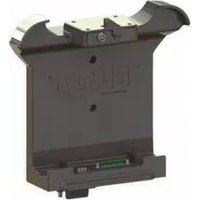
This instruction sheet is for the Samsung Galaxy Tab Active Pro docking station only. For instructions on features, set-up, and operation of the computer, please refer to the manual provided by Samsung with the computer.
This docking station is designed to be used with a variety of Gamber-Johnson mounting systems. Installation instructions for other Gamber-Johnson products are provided with each individual product.
This instruction sheet is for the following products:
Item No. 7160-1418-00 Bare Wire (Auto)
Item No. 7160-1418-20 Cigarette Adapter
Item No. 7160-1418-30 MP205 Connector
Item No. 7160-1418-90 Non-Powered Cradle
Power Adapters are not needed in most applications as this docking station can handle 10-40V input. Isolated and AC Power Adapters and can be ordered for the MP205 dock from Gamber-Johnson separately. These are available as a separate KIT part number.
17794 - AC (100-264 Vac input) - KIT # 7170-0697-31
18868 - Isolated (12-32 Vdc input) - KIT # 7170-0697-32
18035 - Isolated (20-60 Vdc input) - KIT # 7170-0697-33
18869 - Isolated (70-110 Vdc input) - KIT # 7170-0697-34

natural_image
3D rendered black mechanical component with mounting holes and a central emblem (no text or symbols visible)Product Mounting Disclaimer
Gamber-Johnson is not liable under any theory of contract or tort law for any loss, damage, personal injury, special, incidental or consequential damages for personal injury or other damage of any nature arising directly or indirectly as a result of the improper installation or use of its products in vehicle or any other application. In order to safely install and use Gamber-Johnson products full consideration of vehicle occupants, vehicle systems (i.e., the location of fuel lines, brakes lines, electrical, drive train or other systems), air-bags and other safety equipment is required. Gamber-Johnson specifically disclaims any responsibility for the improper use or installation of its products not consistent with the original vehicle manufactures specifications and recommendations, Gamber-Johnson product instruction sheets, or workmanship standards as endorsed through the Gamber-Johnson Certified Installer Program.
© Copyright 2019 Gamber-Johnson, LLC
If you need assistance or have questions, call Gamber-Johnson at 1-800-456-6868
PRE-INSTALLATION RECOMMENDATIONS
Conduct a "Bench Test"
Gamber-Johnson strongly advises a "bench test" be conducted to verify all electronic and software issues are resolved prior to installation:
- Make sure the computer is operational by itself.
- Insert computer into the docking station and verify that the computer is operating in the dock.
- Interconnect entire assembly and verify start-up of all components, including other equipment (printers, modems, scanners, etc.)
Gamber-Johnson recommends positioning of all mounts and equipment in the vehicle prior to the actual install to verify that mounting locations are safe and practical.
IMPORTANT SAFETY INFORMATION FOR INSTALLERS
Safety is dependent on the proper installation and servicing of this docking station. It is important to read and follow all instructions before installing this product.
To properly install a Gamber-Johnson docking station you must have a good understanding of automotive electrical procedures and systems, along with proficiency in the installation and service of aftermarket vehicle equipment.
There are no adjustments required at any time of the electrical components within the docking station. Opening the docking station will void the product warranty.
During Installation:
DO NOT connect this docking station to the vehicle battery until:
- All other electrical connections are made
- Mounting of all components is complete
- Verification that no shorts exist in the entire system
DO NOT install equipment or route wires or cords in the deployment path of any air bag.
When drilling into the vehicle, DO make sure that both sides of the surface are clear of anything that could be damaged.
CAUTION: If wiring is shorted to the frame, high current conductors can cause hazardous sparks resulting in electrical fires or flying molten metal.
After installation:
Test the docking station to ensure that it is working properly.
File these instructions in a safe place and refer to them when performing maintenance or re-installing.
WARNING: Failure to follow all safety precautions and instructions may result in property damage, serious injury, or death.
FEATURE IDENTIFICATION

PORT IDENTIFICATION


CABLE MANAGEMENT FEATURES AND PROPER INSTALLATION
1.) Use Zip ties (provided) to secure each port cable to the specific strain relief feature on the dock 2.) Use Zip ties (provided) to secure bundled cables for improved routing - OPTIONAL

DOCKING AND UNDOCKING THE COMPUTER
OPERATION - DOCKING
- Insert the bottom of the tablet into the bottom cavity of the dock. The walls on the dock will guide the tablet into place.
- Rotate the top of the tablet into the dock, overcoming the resistance until the Release Button returns to the "Latched" position. The slam latch will come over the front of the tablet. There will also be an audible confirmation as the latch system springs downward.
- Optional - With the dock in the "Latched" position, turn the lock to the "LOCKED" position (CW).


- Turn the lock to the "UNLOCKED" position (CCW).
- With your hand on the top of the tablet, push up on the blue Release Button until the tablet is free to move forward. While the dock is "Un-Latched", pull the top of the tablet forward until it clears the dock. This can be done right or left handed.
- Remove the tablet by pulling it away from the dock.


Regulatory Certification Information
Regulatory Model #: 7160-1418
GJ Model #'s & Description:
7160-1418-00
7160-1418-20
7160-1418-30
Dock-Samsung Tab Active Pro-Bare Wire
Dock-Samsung Tab Active Pro-Cigarette Adapter
Dock-Samsung Tab Active Pro-MP205
Certifications:
• EN 55032: 2012/AC: 2013 Class A
• EN 50498: 2010
This device complies with Part 15 of the FCC Rules. Operation is subject to the following two conditions. (1) this device may not cause harmful interference, and (2) this device must accept any interference received, including interference that may cause undesired operation.




Gamber-Johnson LLC, 3001 Borham Ave., Stevens Point, WI, 54481, USA, 715-344-3482
Brand : Gamber-Johnson
Model : 7160-1418
Category : Docking Station