
CCTP644S - Cooker CANDY - Free user manual and instructions
Find the device manual for free CCTP644S CANDY in PDF.


| Product Type | Freestanding Cooker |
| Brand | Candy |
| Model | CCTP644S |
| Dimensions (W x D x H) | 60 cm x 60 cm x 85 cm |
| Weight | Approximately 50 kg |
| Power Supply | 220-240 V ~ 50-60 Hz, total power 10 kW |
| Cooking Type (hob) | 4 induction zones |
| Oven | Multifunction oven, 65 L capacity, fan-assisted |
| Oven Functions | Natural convection, fan-assisted, grill, bottom heat, defrost |
| Oven Cleaning | Pyrolytic (high-temperature cleaning) |
| Oven Door | Removable double glazing |
| Controls | Touch and/or rotary controls, digital display |
| Timer | Yes, programmable |
| Child Safety | Control lock |
| Automatic Shut-off | Yes, anti-overflow safety and delayed shut-off |
| Residual Heat Indicator | Yes, for each zone |
| Noise Level | Max 55 dB(A) |
| Energy Class (oven) | A+ |
| Maintenance | Clean with a damp cloth and mild detergent. Do not use steam cleaners. |
| Spare Parts | Available via Candy after-sales service or standard spare parts |
| Repairability | Repairability index: 7.5/10 (estimated) |
Frequently Asked Questions - CCTP644S CANDY
User questions about CCTP644S CANDY
0 question about this device. Answer the ones you know or ask your own.
Ask a new question about this device
Download the instructions for your Cooker in PDF format for free! Find your manual CCTP644S - CANDY and take your electronic device back in hand. On this page are published all the documents necessary for the use of your device. CCTP644S by CANDY.
USER MANUAL CCTP644S CANDY
Thank you for purchasing the CANDY induction hob. Please read this instruction manual carefully before using the hob and keep it in a safe place for future reference.
By placing the CE marking on this product, we declare, on our own responsibility, compliance to all the European safety, health and environmental requirements stated in the legislation for this product. As applicable, the parts of this appliance are compliant to:
REGULATION (EC) No 1935/2004 on materials and articles intended to come into contact with food.
Safety Reminders and Maintenance:
- WARNING: The appliance and its accessible parts become hot during use. Care should be taken to avoid touching heating elements.
- Children under 8 years of age must be kept away from the appliance unless they are continuously supervised.
- This appliance can be used by children aged 8 years and above and persons with reduced physical, sensory or mental capabilities or lack of experience and knowledge if they have been given supervision or instruction concerning use of the
- appliance in a safe way and understand the hazards involved. Children must not play with the appliance.
- Cleaning and user maintenance shall not be made by children without supervision.
- WARNING: Unattended cooking on a hob with fat or oil can be dangerous and may result in fire.
- NEVER try to extinguish a fire with water, but switch off the appliance and then cover flame e.g. with a lid or a fire blanket.
- WARNING: Danger of fire: do not store items on the cooking surfaces.
- - WARNING: If the surface is cracked, switch off the appliance to avoid the possibility of electric shock.
- - Do not use a steam cleaner for cleaning operations.
- - Metallic objects such as knives, forks, spoons and saucepan lids must not be placed on the hob surface as they can get hot. Any spillage should be removed from the lid before opening.
- The hob surface must be allowed to cool down before closing the lid.
- After use, switch off the hob element by its control. Do not rely on the pan detector.
- This appliance is not intended to be operated by means of an external timer or separate remote-control system.
- The means for disconnection must be incorporated in the fixed wiring in accordance with the wiring rules.
- The instructions state the type of cord to be used, taking into account the temperature of the rear surface of the appliance.
- If the supply cord is damaged, it must be replaced by the manufacturer, its service agent or similarly qualified persons in order to avoid a hazard.
- CAUTION: In order to avoid a hazard due to inadvertent resetting of the thermal cutout, this appliance must not be supplied through an external switching device, such as a timer, or connected to a circuit that is regularly switched on and off by the utility.
WARNING: Use only hob guards designed by the manufacturer of the cooking appliance or indicated by the manufacturer of the appliance in the instructions for use as suitable or hob guards incorporated in the appliance. The use of inappropriate guards can cause accidents.
- Always use the appropriate cookware.
- Always place the pan in the center of the unit that you are cooking on.
- Do not place anything on the control panel.
- Do not use the surface as a cutting board.
- The means for disconnection must be incorporated in the fixed wiring in accordance with the wiring rules. - The instructions state the type of cord to be used, taking into account the temperature of the rear surface of the appliance.
- The hob surface must be allowed to cool down before closing the lid. - CAUTION: the cooking process must be supervised. A short term cooking process has to be supervised continuously.
Dear Customer:
Thank you for purchasing the CANDY induction hob. We hope it will give you many years of service.
Please read this instruction manual carefully before using the hob and keep it for future reference.
Product Introduction
The induction hob caters for all kinds of cooking, with magnetic cooking zones, and its micro-computerised controls and multi-functions, making it an ideal choice for today's family.
Manufactured with specially imported materials, the CANDY induction hob is extremely user-friendly, durable, and safe.
Working Principle
The induction hob comprises a coil, a hotplate made of ferromagnetic material, and a control system. Electrical current generates a powerful magnetic field through the coil. This provides a large number of vortices which in turn generate heat that is then transmitted through the cooking zone to the cooking vessel.

Safety
Installation
This hob was specially designed for domestic use.
Cut a hole in the worktop of the dimension shown in the diagram below. A minimum of 50 mm space should be left around the hole. The worktop should be at least 30 mm thick and made of heat-resistant material.
As shown in Figure (1)
In its constant search to improve its product, CANDY reserves the right to modify any technical, programme, or aesthetic aspects of the appliance at any time.
● Protection from over-heating
A sensor monitors the temperature in the cooking zones. When the temperature exceeds a safe level, the cooking zone is automatically switched off.
- Detection of small or non-magnetic items
When a pan with a diameter of less than 80 mm, or some other small item (e.g. knife, fork, key) or a non-magnetic pan (e.g. aluminium) has been left on the hob, a buzzer sounds for approximately one minute, after which the hob goes automatically on to standby.

- Residual heat warning
When the hob has been operating for some time, there will be some residual heat. The letter "H" appears to warn you to keep away from it.
It is essential that the induction hob is well ventilated and that the air intake and exit are not blocked.
Auto shutdown
Make sure the hob is correctly installed as shown in Figure 2.
Another safety feature of the induction hob is auto shutdown. This occurs whenever you forget to switch off a cooking zone. The default shutdown times are shown in the table below:
Figure (2)
| Power level | The heating zone shut down automatically after |
| 1~3 | 8 hours |
| 4~6 | 4 hours |
| 7~9 | 2 hours |
When the pan is removed from the cooking zone, it stops heating immediately and switches itself off after the buzzer has sounded for one minute.
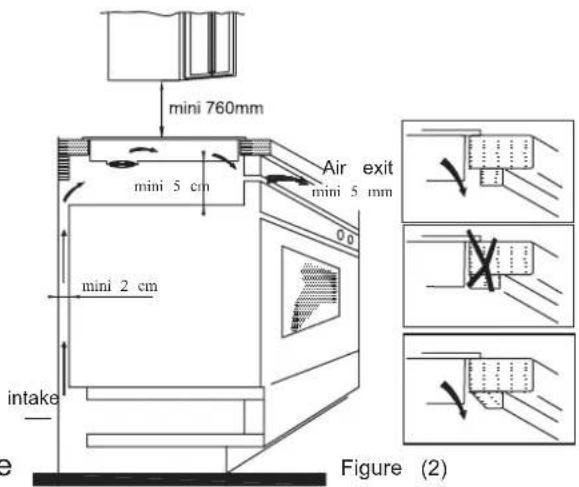
Warning: Anyone who has been fitted with a heart pacemaker should consult a doctor before using the induction hotplate. NB: For safety, the gap between the hob and any cupboard above it should be at least 7 mm.
- Fix the hob to the worktop using the brackets on the base of the hob. The position of the brackets can be adjusted according to the thickness of the top. If the appliance is being connected directly to the mains supply, an omnipolar circuit breaker must be installed with a minimum gap of 3 mm between the contacts.

The installer must ensure that the correct electrical connection has been made and that it complies with safety regulations.
The cable must not be bent or compressed. The cable must be checked regularly and only replaced by a properly qualified person.
Warnings:
(1) The induction hob must be installed by a properly qualified person. We have our own qualified installers. Never try to install the appliance yourself. (2) The induction hob must not be installed above refrigerators, freezers, dishwashers or tumble dryers. (3) The induction hob should be installed so that optimum radiation of heat is possible. (4) The wall and the area above the hob should be able to withstand heat. (5) To avoid any damage, the sandwich layer and adhesive should be heat-resistant.
Diagram of induction hob:
Schematic diagram of the control panel
4. Connection to power supply
The socket should be connected in compliance with the relevant standard, to a single-pole circuit breaker. The method of connection is shown in Figure 3.
| Voltage | Wire connection | |||
| 380-415V 3N~ | 1L1Black | 2L2Brown | 3NBlue | 5Yellow/Green |
| 220-240V~ | 1LBlack & Brown | 3NBlue | 5Yellow/Green | |
Figure (3)
If the cable is damaged or needs replacing, should be done by an after-sales technician using the proper tools, so as to avoid any accidents.

- Heating zone selection controls
- Power / Timer regulating key
- Keylock/Pause control
- ON/OFF control
- Timer control
- Flexible Area control
- WIFI control
Instructions for Use
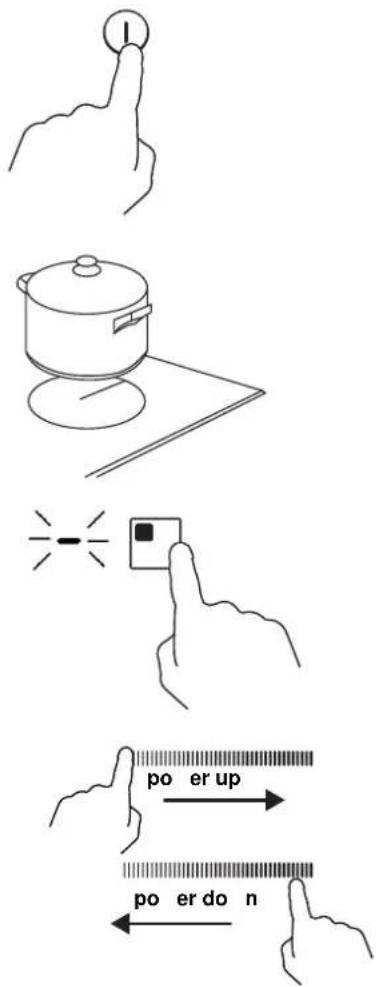
Start cooking
Touch the ON/OFF control for three seconds. After power on, the buzzer beeps once, all displays show "-" or "-", indicating that the induction hob has entered the state of standby mode.
Place a suitable pan on the cooking zone that you wish to use.
- Make sure the bottom of the pan and the surface of the cooking zone are clean and dry.
Touch the heating zone selection control, and an indicator next to the key will flash.
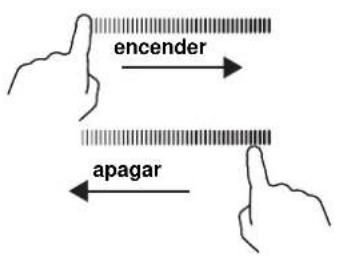
Select a heat setting by touching the slider control.
- If you don't choose a heat setting within 1 minute, the induction hob will automatically switch off. You will need to start again at step 1.
- You can modify the heat setting at any time during cooking.
If the display flashes "U" and "L" alternately with the heat setting,
this means that:
- you have not placed a pan on the correct cooking zone, or
- the pan you're using is not suitable for induction cooking, or
- the pan is too small or not properly centered on the cooking zone.
No heating takes place unless there is a suitable pan on the cooking zone.
The display will automatically turn off after 2 minutes if no suitable pan is placed on it.
Finish cooking
Touching the heating zone selection control that you wish to switch off.
Turn the cooking zone off by touching the slider to "O". Make sure the display shows "0".
Turn the whole cooktop off by touching the ON/OFF control.
Beware of hot surfaces
H will show which cooking zone is hot to touch. It will disappear when the surface has cooled down to a safe temperature. It can also be used as an energy saving function if you want to heat further pans, use the hotplate that is still hot.


Timer control
You can use the timer in two different ways:
- You can use it as a minute minder. In this case, the timer will not turn any cooking zone off when the set time is up.
- You can set it to turn one or more cooking zones off after the set time is up. The timer of maximum is 99min.
a) Using the Timer as a Minute Minder
If you are not selecting any cooking zone
Make sure the cooktop is turned on.
Note: you can use the minute minder even if you're not selecting any cooking zone.
Touch timer control, the "10" will show in the timer display and the "0" flashes.
Set the time by touching the slider control. (e.g. 5)

Touch timer control again, the "1" will flash
Set the time by touching the slider control (e.g.9), now the timer you set is 95 minutes.

When the time is set, it will begin to count down immediately. The display will show the remaining time
Buzzer will beep for 30 seconds and the timer indicator shows "-" when the setting time finished.

b) Setting the timer to turn one or more cooking zones off
Set one zone
Touching the heating zone selection control that you want to set the timer for.
Touch timer control, the "10" will show in the timer display and the "0" flashes.
Set the time by touching the slider control. (e.g. 5)
Touch timer control again, the "1" will flash.
Set the time by touching the slider control (e.g.9), now the timer you set is 95 minutes.

When the time is set, it will begin to count down immediately. The display will show the remaining time.
NOTE: The red dot next to power level indicator will illuminate indicating that zone is selected.
When cooking timer expires, the corresponding cooking zone will be switched off automatically.


Other cooking zones will keep operating if they were turned on previously.
Set more zones:
The steps for setting more zones are similar to the steps for setting one zone.
When you set the time for several cooking zones simultaneously, the decimal dots of the relevant cooking zones are on. The minute display shows the min. timer. The dot of the corresponding zone flashes.
As shown below:
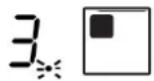
(set to 15 minutes)


(set to 45 minutes)
Once the countdown timer expires, the corresponding zone will switch off. Then it will show the new min. timer and the dot of the corresponding zone will flash.
As shown on the right:

(set to 30 minutes)

Touch the heating zone selection control, and the corresponding timer will be shown in the timer indicator.
c) Cancel the timer
Touch the heating zone selection control for the zone whose timer you want to cancel.
Touch the timer control, and the indicator flashes.
Touch the slider control to set the timer to "00", and the timer is cancelled.

Locking the Controls
- You can lock the controls to prevent unintended use (for example, children accidentally turning the cooking zones on).
- When the controls are locked, all the controls except the ON/OFF control are disabled.
| To lock the controls | |
| Touch and hold the lock control 🔒 for a while. | The timer indicator will show “ Lo ” |
| To unlock the controls | |
| Touch and hold the lock control 🔒 for a while. | |

When the hob is in lock mode, all the controls are disabled except the ON/OFF ①. You can always turn the induction hob off with the ON/OFF ① control in an emergency, but you shall unlock the hob first in the next operation.
Pause Mode
- You can pause the heating instead of shutting the hob off.
- When entering Pause mode, all the controls except the ON/OFF control are disabled.
| To enter pause mode | |
| Touch the lock/pause control. | All the indicator will show "11" |
| To exit pause mode | |
| Touch the lock/pause control. | |

When the hob is in pause mode, all the controls are disabled except the ON/OFF ①. You can always turn the induction hob off with the ON/OFF ① control in an emergency. The hob will shut down after 10 minutes if you don't exit pause mode.
Double zones (Only model CTP634SC)
In this zone, cookware with a diameter between 160mm and 290mm can be used to have more flexibility on the zone.
FLEXIBLE AREA
- This area can be used as a single zone or as two different zones, according to the cooking needs at any time.
- The free area is made of two independent inductors that can be controlled separately.
As a big zone
- To activate the free area as a single big zone, touch the Flexible Area control.

- As a large zone, we suggest the following usage:
Cookware: 250mm or 280mm diameter cookware (Square or oval cookware are acceptable)
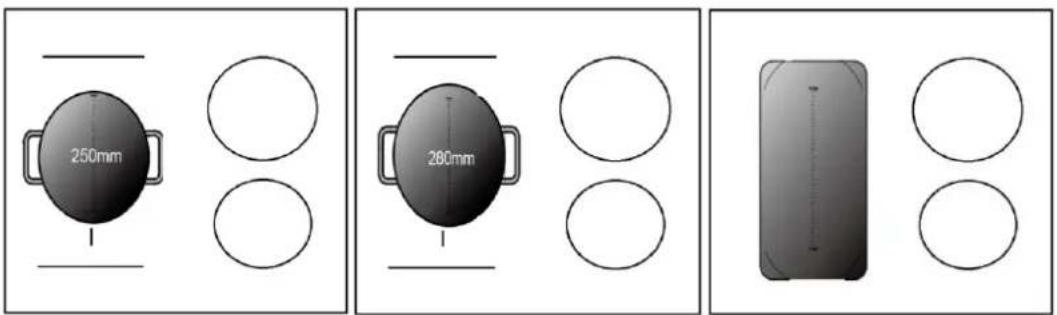
We do not recommend other operations except for the above-mentioned three operations because they might affect the heating of the appliance.
As two independent zones
To use the flexible area as two different zones, you can have two choices of heating.
(a) Put a pan on the right upper side or the right lower side of the flexible zone.
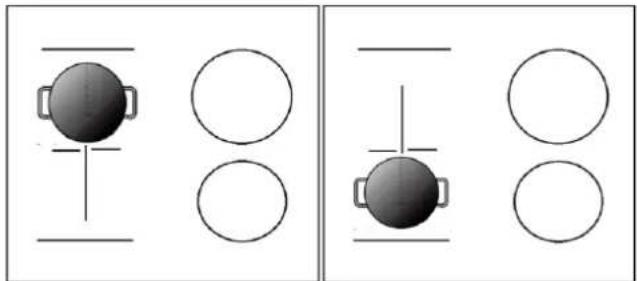
(b) Put two pans on both sides of the flexible zone.

Notice: Make sure the pan is larger than 12 cm.
WiFi function (ONLY FOR CTP644SCWIFI)
First of all, you should download Simply-Fy and install it on your portable device. Then enroll your induction hob.
Refer to the annex for details.
To use the WiFi function, switch the hob on and press the WiFi key. The WiFi LED flashes fast for 5 seconds, which means the WiFi module is booting. If the WiFi module connects to the router, the WiFi LED will remain on all the time. Otherwise, the WiFi LED will flash in cycles of 1 second on, 1 second off. If connected correctly, you can find many hob information from Simply-Fy, e.g., zone power, remaining heat time.

Boost mode
Activate the boost function
Touch the heating zone selection control

Touch the slider to "b". Make sure the display shows "b".

Cancel the Boost mode
Touch the heating zone selection control that you wish to cancel the boost function.
Select a heat setting by touching the slider control.

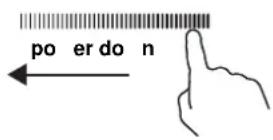
- The function can work in any cooking zone.
- The cooking zone returns to its original setting after 5 minutes.
- If the original heat setting equals 0, it will return to 9 after 5 minutes.
Note: It is recommended that the cooker hood suction is switched on a few minutes prior to cooking and switched off a few minutes after terminating cooking.
Pause Mode
- You can pause the heating instead of shutting the hob off.
- When entering the Pause mode, all the controls except the ON/OFF control are disabled.
| To enter pause mode | |
| Touch the lock/pause control. | All the indicator will show " 11" |
| To unlock the controls | |
| Touch the lock/pause control. | |

When the hob is in the pause mode, all the controls are disabled except the ON/OFF ①, you can always turn the induction hob off with the ON/OFF ① control in an emergency.
Power Management Function
- It is possible to set a maximum power absorption level for the induction hob, choosing up to different power ranges.
- Induction hobs are able to limit themselves automatically in order to work at lower power level, to avoid the risk of overloading.
To enter Power Management Function
Turn on the hob, then press the Timer control and key lock at the same time.
The timer indicator will show "P5", which means power level 5. The default mode is 7.0 kW.

To switch to another level
Select a power level by touching the slider control. There are 5 power levels, from "P1" to "P5". The timer indicator will show one of them.
"P1": the maximum power is 2.5 kW. "P2": the maximum power is 3.5 kW. "P3": the maximum power is 4.5 kW. "P4": the maximum power is 5.5 kW. "P5": the maximum power is 7.0 kW.

Confirmation and Exit Power Management Function
Press the Timer control and key lock at the same time for confirmation.
Then the hob will be turned off.

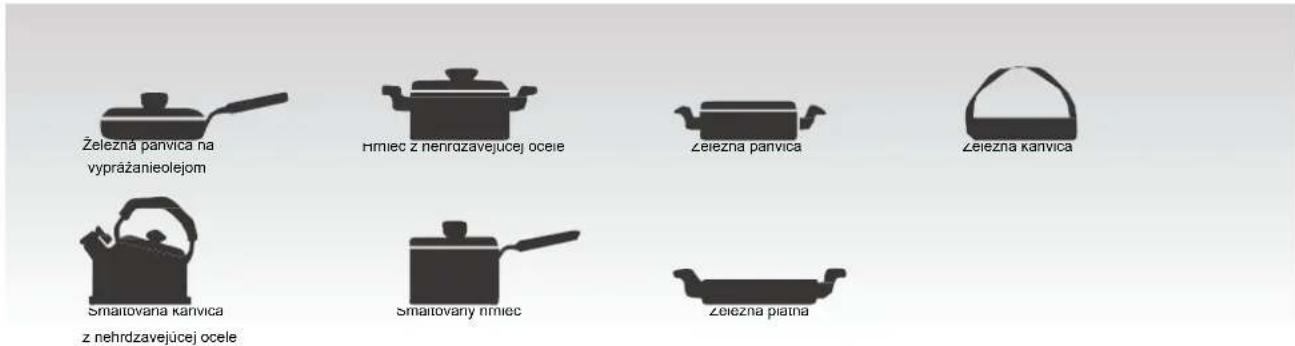
Selection of cooking vessels

Iron oil frying pan

Stainless steel pot, iron pan


Iron kettle

Enamel stainless steel kettle

Enamel cooking utensil

Iron plate
You may have a number of different cooking vessels.
1. This induction hob can identify a variety of cooking vessels. You can use one of the following methods:
Place the vessel on the cooking zone. If the corresponding cooking zone displays a power level, then the vessel is suitable. If not, the vessel is not suitable for use with the induction hob.
2. Hold a magnet to the vessel. If the magnet is attracted to the vessel, it is suitable for use with the induction hob.
NB: The base of the vessel must contain magnetic material.
It must have a flat bottom with a diameter of more than 14 cm.
3. Use pans whose diameter is as large as the graphic of the zone selected.
Using a pot that is slightly wider will use energy at its maximum efficiency. If you use a smaller pot, efficiency could be less than expected. Pots less than 140 mm could be undetected by the hob.
Cleaning and Maintenance
The surface of the induction hob may be easily cleaned in the following way:
| Type of contamination | Method of cleaning | Cleaning materials |
| Light Immersion | in hot water and wipe dry Cleaning sponge | |
| Rings and lime scale | Apply white vinegar to the area, wipe a soft cloth or use a commercially available product | Special adhesive for ceramic glass |
| Sweetmeat, melted aluminium or plastics | Use a special scraper for ceramic glass to remove residue (a silicon product best) | Special adhesive for ceramic glass |
NB: Disconnect the power supply before cleaning.
Failure Display and Inspection
If any abnormality occurs, the induction hob will automatically go into protective mode and display one of the following codes:
| Fault Possible cause Solutions | ||
| F0/F1/F2 | Fan failure | Contact the supplier |
| F3-F8 | Temperature sensor failure | Contact the supplier |
| E1/E2 | Abnormal voltage in power supply | Check if power supply is normal.Power on after power sup returns to normal. |
| E3/E4 | Abnormal temperature | Check the pan |
| E5/E6 | Poor heat radiation in cooking zone | Restart when cooking zone cools down |
The above table shows how to assess and check common faults. Do not dismantle the appliance yourself, otherwise you may damage the induction hob.
Customer Care Service
If a fault should occur, before calling After Sales Service, please do the following:
- Check that the appliance is correctly plugged in.
- Read the failure and display table above.
If you are still unable to resolve the problem, switch off the appliance, do not try to and call
After Sales Service.
Special Declaration
The contents of this manual have been carefully checked. However, the company cannot be held responsible for any misprints or omissions. Also, any technical modifications may be included in a revised version of the manual without notice. The appearance and colour of the appliance in this manual may differ from the actual one.

DISPOSAL: Do not dispose this product as unsorted municipal waste. Collection of such waste separately for special treatment is necessary.
This appliance is labelled in compliance with European directive 2012/19C for Waste Electrical and Electronic Equipment (WEEE).
By ensuring that this appliance is disposed of correctly, you will help prevent any possible damage to the environment and to human health, which might otherwise be caused if it were disposed of in the wrong way.
The symbol on the product indicates that it may not be treated as normal household waste. It should be taken to a collection point for the recycling of electrical and electronic goods.
This appliance requires specialist waste disposal. For further information regarding the treatment, recovery and recycling of this product please contact your local council, your household waste disposal service, or the shop where you purchased it.
For more detailed information about treatment, recovery and recycling of this product, please contact your local city office, your household waste disposal service or the shop where you purchased the product.
compatible utensil
magnetic circuit
● Overheat protection

Choosing cookware

"P5": maximum power is 7.0 kW.

Choosing pans

Select a heat setting by touching the slider.


Choosing suitable cookware
- SAFETY REMINDERS AND MAINTENANCE
- DEAR CUSTOMER
- PRODUCT INTRODUCTION
- WORKING PRINCIPLE
- SAFETY
- INSTALLATION
- ● PROTECTION FROM OVER-HEATING
- DETECTION OF SMALL OR NON-MAGNETIC ITEMS
- RESIDUAL HEAT WARNING
- AUTO SHUTDOWN
- WARNINGS
- CONNECTION TO POWER SUPPLY
- INSTRUCTIONS FOR USE
- START COOKING
- IF THE DISPLAY FLASHES "U" AND "L" ALTERNATELY WITH THE HEAT SETTING
- FINISH COOKING
- BEWARE OF HOT SURFACES
- TIMER CONTROL
- USING THE TIMER AS A MINUTE MINDER
- IF YOU ARE NOT SELECTING ANY COOKING ZONE
- SETTING THE TIMER TO TURN ONE OR MORE COOKING ZONES OFF
- SET MORE ZONES
- CANCEL THE TIMER
- LOCKING THE CONTROLS
- PAUSE MODE
- DOUBLE ZONES (ONLY MODEL CTP634SC)
- FLEXIBLE AREA
- AS A BIG ZONE
- AS TWO INDEPENDENT ZONES
- WIFI FUNCTION (ONLY FOR CTP644SCWIFI)
- BOOST MODE
- ACTIVATE THE BOOST FUNCTION
- CANCEL THE BOOST MODE
- POWER MANAGEMENT FUNCTION
- TO ENTER POWER MANAGEMENT FUNCTION
- TO SWITCH TO ANOTHER LEVEL
- CONFIRMATION AND EXIT POWER MANAGEMENT FUNCTION
- SELECTION OF COOKING VESSELS
- CLEANING AND MAINTENANCE
- FAILURE DISPLAY AND INSPECTION
- CUSTOMER CARE SERVICE
- SPECIAL DECLARATION
- ● OVERHEAT PROTECTION
- CHOOSING COOKWARE
- CHOOSING PANS
- CHOOSING SUITABLE COOKWARE
Brand : CANDY
Model : CCTP644S
Category : Cooker