Nescafé Dolce Gusto Genio S - Coffee maker KRUPS - Free user manual and instructions
Find the device manual for free Nescafé Dolce Gusto Genio S KRUPS in PDF.


| Product Type | Single-serve capsule coffee machine |
| Brand | Krups |
| Model | Nescafé Dolce Gusto Genio S |
| Dimensions (W x H x D) | 17.5 x 27 x 27 cm |
| Weight | 2.5 kg |
| Power Supply | 220-240 V, 50-60 Hz |
| Power Consumption | 1500 W |
| Water Tank Capacity | 0.8 L |
| Pump Pressure | 15 bar |
| Capsule Compatibility | Nescafé Dolce Gusto capsules |
| Beverage Types | Hot and cold coffee, espresso, cappuccino, latte, tea, chocolate |
| Adjustable Cup Height | Yes, up to 15 cm |
| Automatic Shut-off | Yes, after 5 minutes of inactivity |
| Descaling Indicator | Yes, LED indicator |
| Water Filtration | Recommended but not built-in |
| Drip Tray | Removable for easy cleaning |
| Capsule Ejector | Automatic used capsule ejection |
| Cleaning | Descale every 3 months or after 300 capsules |
| Repairability | Spare parts available; user manual guides basic maintenance |
| Safety Features | Auto shut-off, overheat protection |
Frequently Asked Questions - Nescafé Dolce Gusto Genio S KRUPS
User questions about Nescafé Dolce Gusto Genio S KRUPS
0 question about this device. Answer the ones you know or ask your own.
Ask a new question about this device
Download the instructions for your Coffee maker in PDF format for free! Find your manual Nescafé Dolce Gusto Genio S - KRUPS and take your electronic device back in hand. On this page are published all the documents necessary for the use of your device. Nescafé Dolce Gusto Genio S by KRUPS.
USER MANUAL Nescafé Dolce Gusto Genio S KRUPS
text_image
NESCAFE Dolce GustoGENIO s

USERMANUAL
natural_image
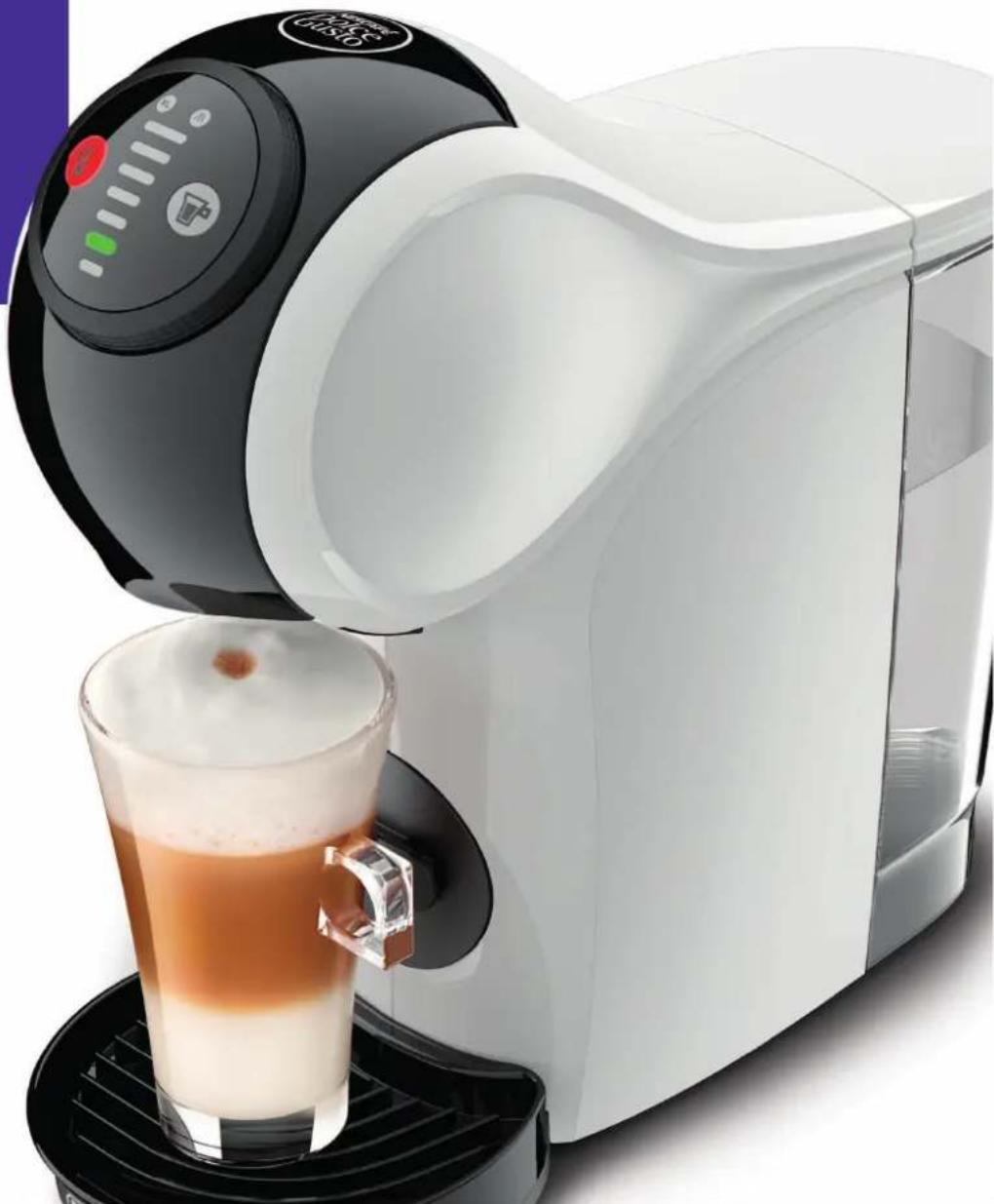
White and black DUSIO self-service milk dispenser with a glass of coffee being poured into it (no visible text or symbols)www.dolce-gusto.com

TABLE OF CONTENTS
- SAFETY PRECAUTIONS...4
- MACHINE OVERVIEW 6
- KEY FEATURES...7
- 1 INTUITIVE LED CONTROL RING...7
- 2 HOW TO START THE MACHINE...7
- 3 COLD MODE...8.....
- BEVERAGE EXAMPLES 9
- RECOMMENDATIONS FOR SAFE USE...10.....
- FIRST USE RINSING 11
- PREPARING A BEVERAGE...12
- 1 ONE CAPSULE (E. G. LUNGO)....
- 2 TWO CAPSULES (E. G. CAPPUCCINO).... 1
- CLEANING 15
- DESCALING AT LEAST EVERY 3-4 MONTHS.... 16
- TROUBLESHOOTING 18
- 1 ORANGE DESCALING INDICATOR LIGHT TURNS ON 18
10.2 NO LIQUID COMES OUT - NO WATER? 18 - 3 NO LIQUID COMES OUT - CAPSULE BLOCKED? 19
TABLE OF CONTENTS

- 4 NO LIQUID COMES OUT - INJECTOR BLOCKED? 19
- 5 VARIOUS 20
1. SAFETY PRECAUTIONS
Read all instructions and keep these safety instruction misuse of the appliance may result in a potential ^12 In case of any inappropriate use or failure to comply instructions, the manufacturer accepts no responsibility ^13 guarantee may not apply.
The guarantee does not cover appliances that do not work properly because they have not been maintained
INTENDED USE
- This appliance is intended to be used in household intended to be used in following applications, and not apply for:
- staff kitchen areas in shops, offices and other environments;
-
farm houses;
— by clients in hotels, motels and other residential environments;
— bed and breakfast type environments; -
Your appliance is intended for domestic use inside an altitude below 3400 m.
ELECTRICAL POWER SUPPLY
-
Connect the appliance to a mains power socket with connection only. Mains voltage must be the same at the rating plate. The use of incorrect connection will guarantee and may be hazardous.
-
To protect against fire, electric shock and injury to 2p immerse the power cord, plugs or the appliance in liquid. Avoid spillage on the plug. Never touch the wet hands. Do not overfill the water tank.
-
In case of an emergency remove the plug from the socket immediately.
-
Unplug from the mains power socket when not in _22
-
To disconnect, remove the plug from the mains pow unplug by pulling the cord.
-
Do not let the cord hang over the edge of a hot surfaces or sharp edges. Do not allow the cord tripping up). Never touch the cord with wet hands.
-
Do not operate any appliance with a damaged cord power cord is damaged, it must be replaced by the service agent or similarly qualified persons in order hazard. Do not operate any appliance that malfunctions damaged in any manner. Unplug cord immediately. Re damaged appliance to the nearest authorised service designated by the MEDADEGUSTO® hotline.
-
If the mains power socket does not match the plug, have the plug replaced with a suitable type by aft centres designated by the® NESEATÉsto® hotline.
CONDITIONS OF USE
-
Always use the appliance on a flat, stable, heat surface away from sources of heat or water spla Do not use the appliance without the drip tray injury except when a very tall mug is used. Do notus mply with the water preparation.
-
Never turn the machine upside down.
-
The use of accessory attachments not recommended not work or do not appliance manufacturer may result in fire, electric sh and/or to persons.
-
Do not place on or near a hot gas or electric ld heated. I over. not
-
Do not put fingers under the outlet during bever. the guarantee will preparation.
-
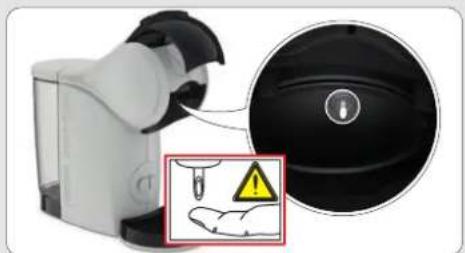
Do not touch the injector of the machine head.
-
Never carry the appliance by the extraction head.
-
The capsule holder is equipped with a permanent Avoid placing the capsule holder near appliances that can be damaged by magnetism, e.g. credit drives and other data devices, video tapes, televis the computer monitor at with picture tubes, mechanical cl hearing aids and loud speakers.
-
Do not turn off the appliance during the descali with rinse the water tank and clean the appliance to residual earth descaling agent.
24s If the details on prolonged periods, on holiday, etc. th will negate the must be emptied, cleaned and unplugged. Rinse b Operate the net rinse cycle before re-using your applia
- We recommend using the ®NESCAUSTO® capsules designed and tested for the DONESCAUSTO® machine
e power cord with they were designed to interact together – the in- provides the in-cup quality that DolNEOAFE is the mains power known for. Each capsule is designed to prepare and cannot be reused.
23 Do not remove hot capsules by hand. Always use lower socket. Do not dispose of used capsules.
-
Always insert the capsule holder in the machine table or counter, or touch will not work if the capsule cord to triangle (risk of not inserted. Do not pull out the capsule holder s. indicator stops the blinking.
-
Machines equipped with a locking handle: Scalding the manufacturer its to the locking handle is opened during the brews not pull up the locking handle before the lights or has been stop hashing.
-
For health reasons, always fill the water tank with facility drinking water.
-
After use of the appliance always remove the capsule on the appliance clean the capsule holder. Empty and clean the d'after sales service capsule bin daily. Food allergy sufferers must rinse appliance according to cleaning procedure.
-
The heating element surface is subject to residual plastic housings may feel warm to touch several
- Patients with pacemakers or defibrillators: Do not holder directly over the pacemaker or defibrillator.
- The appliance shall not be placed in a cabinet
RECYCAfNG use and
4min Packaging ponis use de of recyclable materials. Contact
hold counted cap authority for further information on recycle programs. Your appliance contains valuable materials
when the recovered or recycled.
CHILDREN
- Keep the appliance and its cord out of reach of than 8 years. Children shall not play with the ap
-
This appliance can be used by children aged from and persons with reduced physical, sensory or mental lack of experience and knowledge if they have been supervision or instruction concerning use of the application way and if they understand the hazards involved.
-
This appliance is not intended for use by children, reduced physical, sensory or mental capabilities, or experience and knowledge, unless they have been given or instruction concerning use of the appliance by a responsible for their safety. Persons who have a line understanding of the operation and use of this application and fully understand the contents of the users where appropriate seek additional guidance on its operations from the person responsible for their safety.
-
Children should be supervised to ensure that they do not play with the appliance.
-
Cleaning and user maintenance shall not be made by children unless they are older than 8 and supervised by an adult.
-
Children should not use the appliance as a toy.
EUROPEAN MARKETS ONLY: Think of the environmen
childreny aged less. Your appliance contains valuable materials with apliance. can be recovered or recycled.
8 years and above leave it at a local civic waste collection capabilities or given an approved service centre, where it will be disposed of properly. European Directive 2012, on a safe on Waste Electrical and Electronic Equipment
(WEEE) stipulates that used household applia or persons with ack of must not be disposed of in normal unsorte en supervision municipal waste. Old appliances must be co person separately to optimise the sorting and recycle hited or their parts and to reduce the impact on liance health and the environment.
MAINTENANCE
-
Unplug from the mains power socket before cleaning. Allow to cool before putting on or taking off parts, before cleaning the appliance. Never clean wet or immerse appliance in any fluid. Never clean the appliance with running water. Never use detergents to clean the appliance. Clean the appliance only using soft sponges/brushes. The water tank should be cleaned with a clean food-safe brush.
-
Any operation, cleaning and care other than normal use must be undertaken by after-sales service centres designated by the NESCAFÉ® Dolce Gusté® hotline. Do not dismantle appliance and do not put anything into openings.
-
To reduce the risk of fire or electric shock, do not remove the cover. No user serviceable parts inside. Repair should be done by authorized service personnel only!
-
For additional guidance on how to use the appliance, refer to the user manual on www.dolce-gusto.com or call the NESCAFÉ® Dolce Gusto® hotline number.

2. MACHINE OVERVIEW
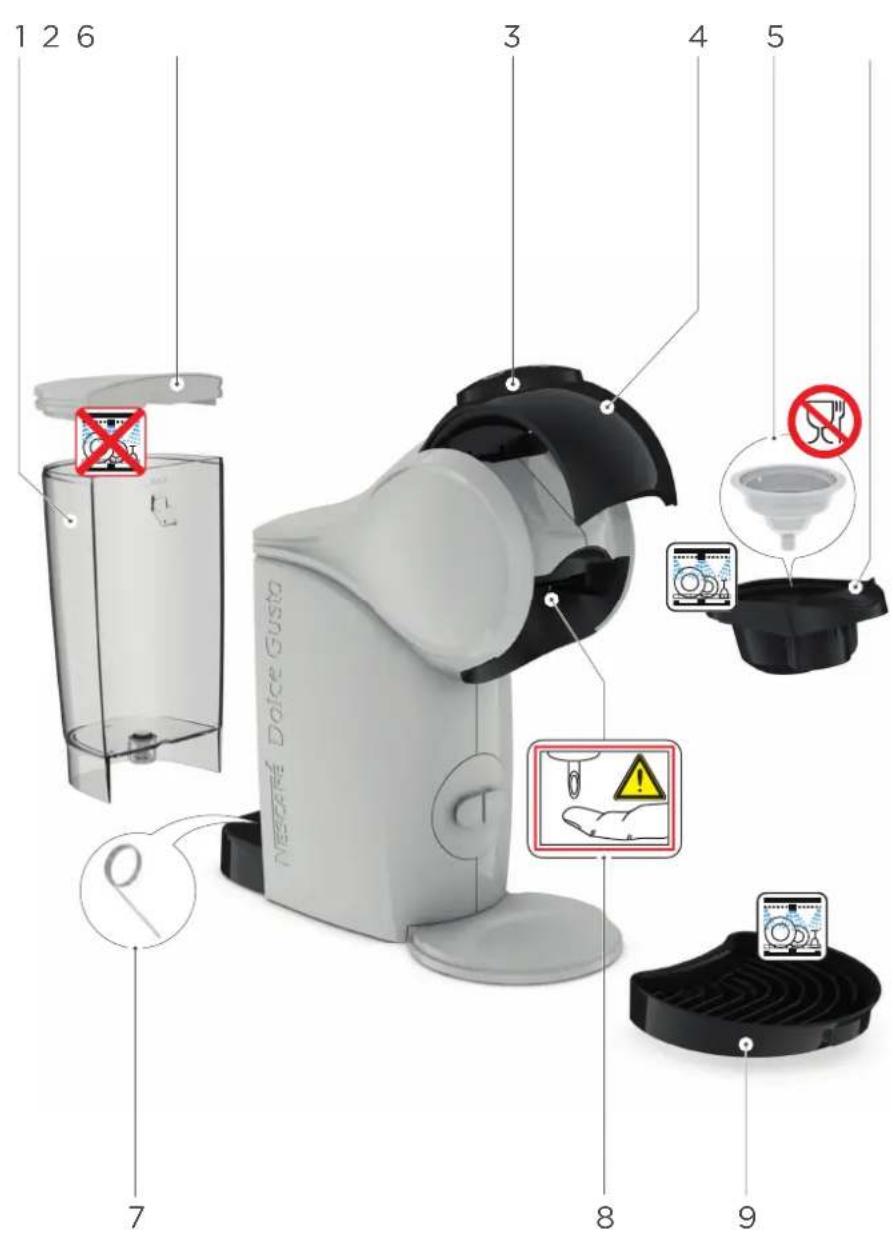
text_image
1 2 6 3 4 5 Negara Dolce Gusta 7 8 9- Water tank
- Water tank cover
- INTUITIVE LED CONTROL RING
- Locking handle
- Rinsing tool
- Capsule holder
- Cleaning needle
- Injector
- Drip tray
ECONOMY MODE:
After 1 minute of non-usage upon an extraction.
5 minutes upon switch-on if no extraction.
Please be aware that the appliance is still using electricity whilst in eco-mode (0.45 Wh).
TECHNICAL DATA

GB / IE
220-240 V, 50/60 Hz, 1340-1600 W

max. 15 bar

0.8 L

\~2 kg

5-45°C
41-113°F

A = 11.21 cm
B = 27.32 cm
C = 28.81 cm
3. KEY FEATURES
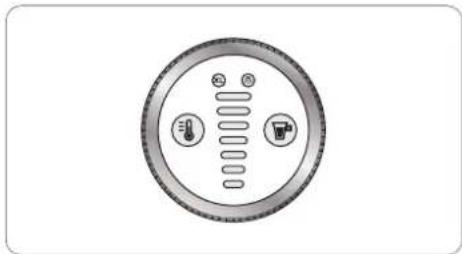
3. 1 INTUITIVE LED CONTROL RING
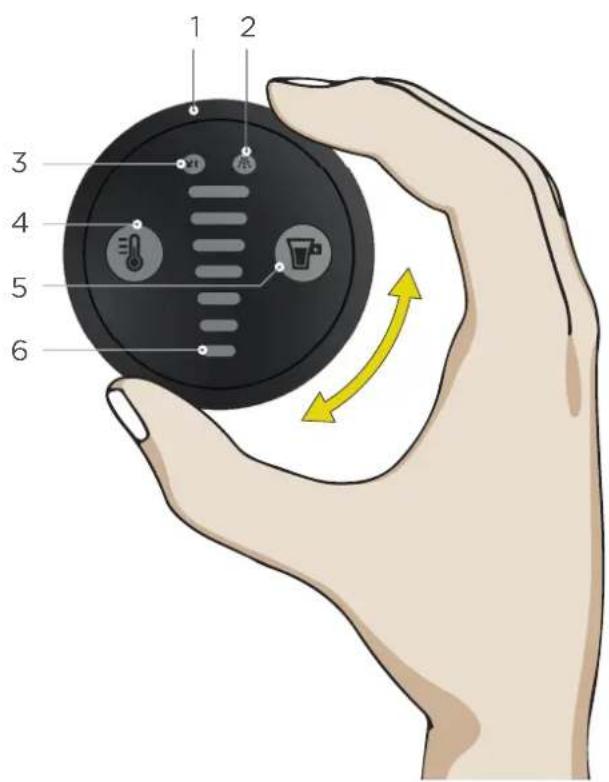
text_image
1 2 3 4 5 6
- Control ring
Select the volume for the beverage preparation - Descaling indicator
The machine needs to be descaled after 300 extractions - XL function
Prepare an extra large cup - HOT AND COLD SELECTION
The beverage temperature can be set (2 predefine settings):

Cold Hot


Cold, but the water temperature is still too high
- Start/Stop button
Start/Stop the beverage preparation
- Volume display
Shows the extraction progress by moving down from the selected volume until completion
3. 2 HOW TO START THE MACHINE
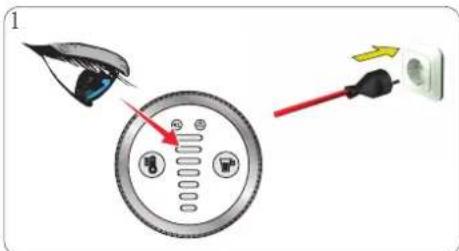
text_image
Diagram showing a device with labeled components and directional arrows indicating motion or flowEnsure to use the correct mains voltage "MACHINE OVERVIEW" on page 6. Connect the power plug to the mains power socket.
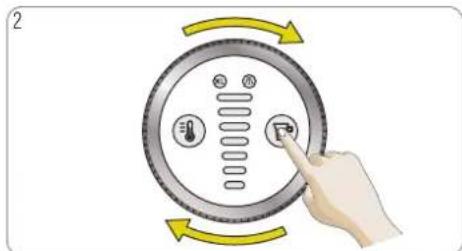
text_image
2as Pregisvery button or rotate the control ring to start the machine.
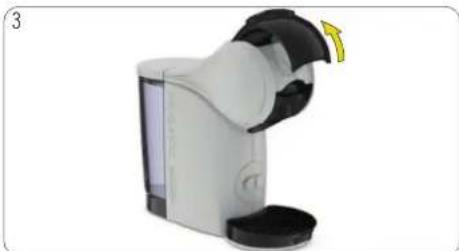
natural_image
Illustration of a white and black device with a yellow scroll wheel, resembling a smart water dispenser or pump unit (no text or symbols visible)The machine can also be switched on by opening the locking handle.

3. KEY FEATURES
3. 3 COLD MODE
natural_image
Circular diagram with three icons: thermometer, water drop, and thermometer inside a ring (no text or labels)Option A: The machine is switched off.
text_image
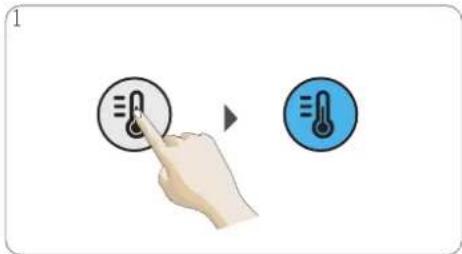
Diagram showing a hand pressing a thermometer on a button, with a second icon indicating temperature change.Press the temperature selection button to start their mabine cold mode must only be used with in cold mode. A cold beverage can be prepared cold products, e. g. Cappuccino Ice. immediately.
natural_image
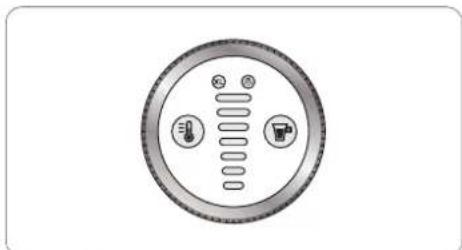
Circular diagram with three circular elements and a central vertical line, no text or symbols present.Option B: The machine is switched off.
text_image
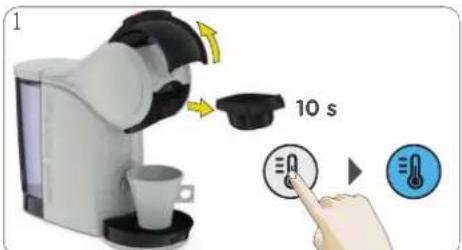
1 10 sOpen the locking handle. The machine switches on automatically. Press the temperature selection button within 10 seconds after starting the machine to change to cold mode (blue). A cold beverage can be prepared immediately.
natural_image
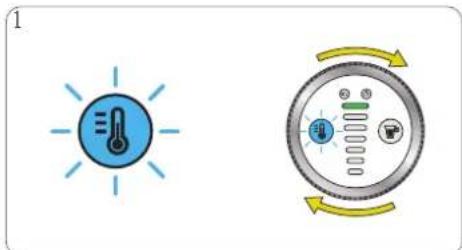
Two icons: a blue thermometer with light rays and a circular control dial with scroll arrows (no text or symbols)Option C: A hotbeverage has been prepared mode was notselected within 10 seconds af machine. Press the temperature selection butt cold mode. The temperature selection button to indicate thatthe machine needs to cool
text_image
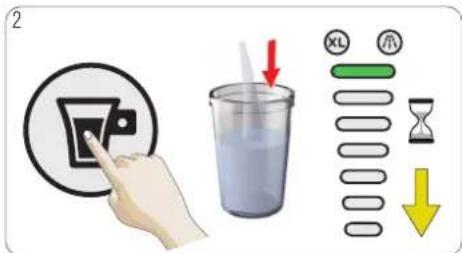
2 XL OH OH OHTor acelerated the cooling, selectlevel 7 on display perting the start/stop button. Machine the tovolone indisplay bar moves down until will blink blue down.
text_image
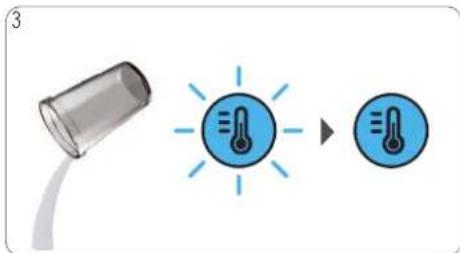
Diagram showing a temperature sensor connected to a heat sink, with a magnified view of the sensor's thermal effect.Emptywolthe container. The temperature selection by starts blueingto indicate that the machine is cooled in disappearance can be prepared.
4. BEVERAGE EXAMPLES

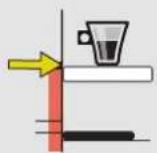
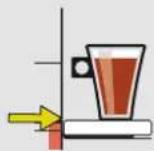
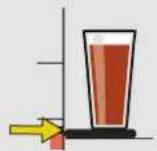
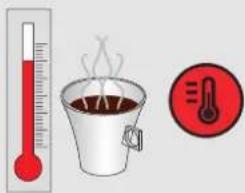
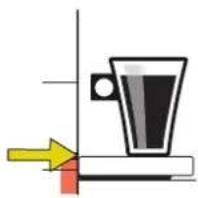
Adjust the drip tray Choose hot orcold
text_image
Illustration showing a thermometer, a steaming cup of coffee, and a thermometer with a flame symbol.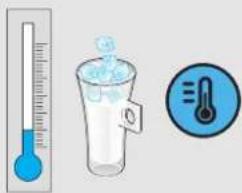
text_image
Illustration showing a thermometer measuring liquid, a glass of ice with a droplet, and a thermometer indicating temperature.ESPRESSO
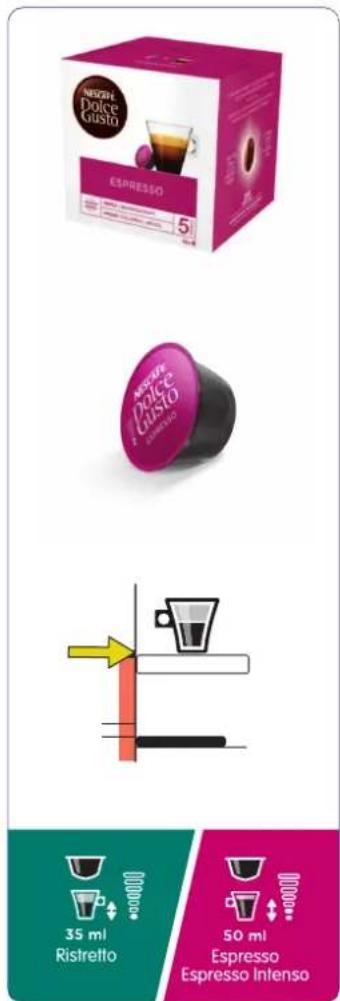
text_image
NBSPH Dolce Gusto ESPRESSO 5 NBSPH Dolce Gusto ESPRESSO 35 ml Ristretto 50 ml Espresso Espresso Intenso
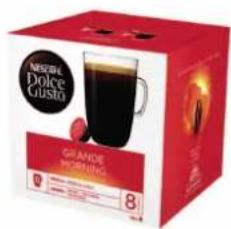
GRANDE/AMERICANO
MORNING CUP
text_image
NESTLE Dolce Gusta GRANDE MORNING 8
natural_image
Simple line drawing of a mug on a surface with arrows indicating direction (no text or symbols)
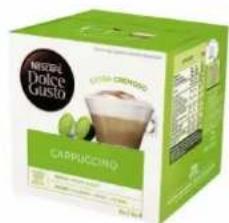
CAPPUCCINO
text_image
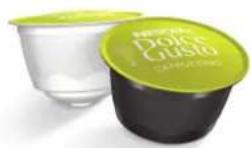
NESTLE Dolce Gusto CAPPUCINO CHEELED CABBAGE① + ②
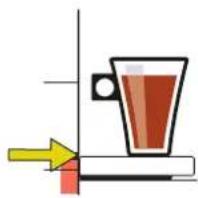
natural_image
Simple line drawing of a mug on a surface with an arrow pointing to it (no text or symbols)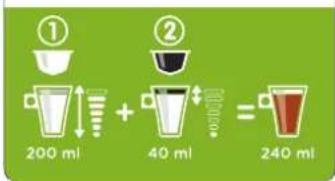
text_image
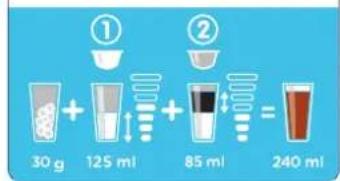
① 200 ml + 40 ml = 240 mlCAPPUCCINO ICE

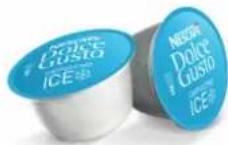
text_image
NICEFA Dolce Guisto CAPPUCINO +15g① + ②
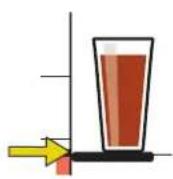
text_image
① 30 g + 125 ml + 85 ml = 240 ml
5. RECOMMENDATIONS FOR SAFE USE
text_image
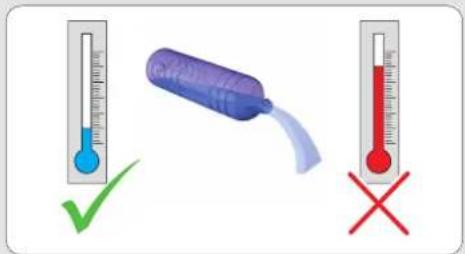
Illustration showing a thermometer with a blue liquid, a purple plastic bottle, and a red thermometer with a red cross, indicating incorrect and incorrect temperature conditions.
Never add hot water to the water

For rinsing and beverage preparation use only drinking water.
natural_image
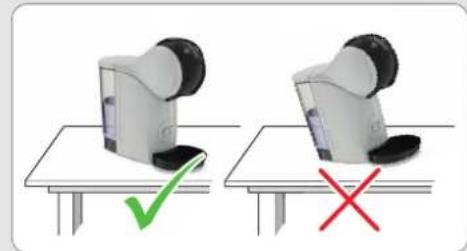
Two identical robotic devices on a table, one marked with a green checkmark and the other with a red X (no text or symbols)tank Always keep the machine upright!


natural_image
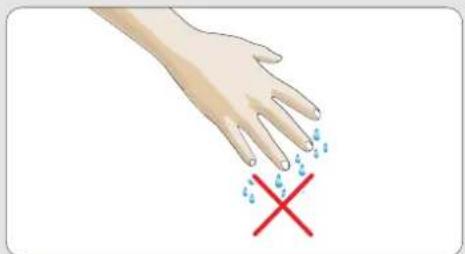
Illustration of a hand with blue droplets and a red X mark, indicating a medical or safety warning (no text or symbols present)
Do nottouch the plug with wet hands. the machine with wethands!

natural_image
Two 3D-rendered objects: a blue block with raindrops and a purple pillow, both marked with red X and green checkmark respectively (no text or symbols)
Never touch a wet sponge. Only use cloth to clean the top of the machine.
text_image
Illustration showing a thermometer and a hand holding a food item with a red X mark, indicating heat resistance or cooling.
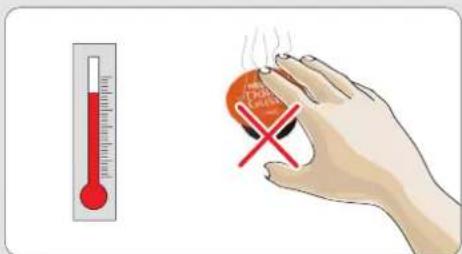
ftDodamqtouch the usedcapsule after the beve preparation!Hot surface, risk of burns!
natural_image
Close-up of a medical device with a warning symbol and magnified view of the lid (no text or labels visible)
Never touch the injector with the finger!
natural_image
White coffee maker with a red prohibition symbol indicating no waste or litter (no text or symbols on the device itself)
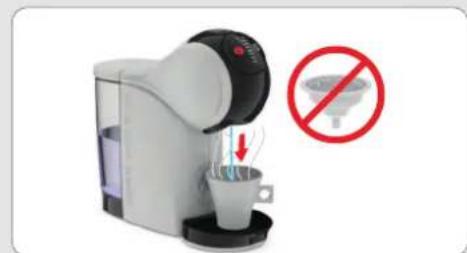
notuse the rinsing tool for teaor hot preparation.
natural_image
Diagram of a water dispenser with a container and directional arrows indicating flow (no text or symbols)
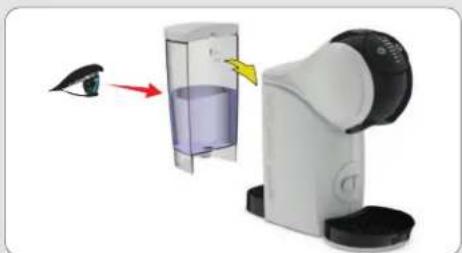
IF LEFT UNUSED FOR MORE THAN 2 DAYS the water tank, rinse it, refill it with fresh water and insert it into the machine. Bef rinse machine according to instructions in "CLEANING" on page 15, beginning with step 4 step 8.
6. FIRST USE RINSING

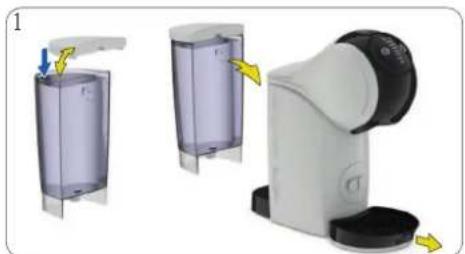
natural_image
Three-step diagram showing a hand holding a transparent cylindrical device, with arrows indicating motion (no text or symbols present)Fill the water tank with fresh drinking into the machine. Remove the drip tray.
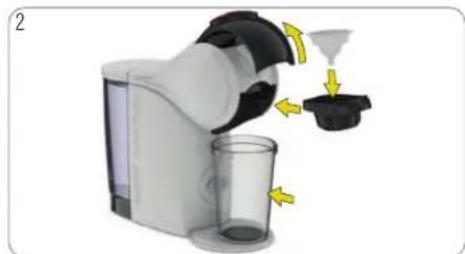
natural_image
Illustration of a hand mixer with yellow directional arrows indicating process flow (no text or symbols)waterpenth insert looking backle. Put the rinsingtool capsule holder. Insert the capsule holder Place a large empty container underneath
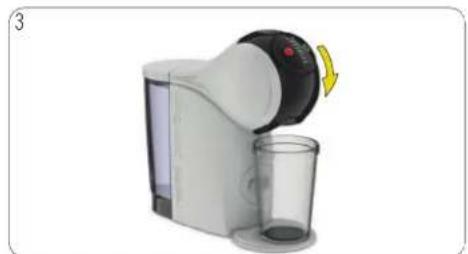
natural_image
Product photo of a white and black blender with a glass cup, showing a yellow arrow indicating rotation (no text or symbols visible)into Clothes the locking handle. into the machine. the coffee outlet.
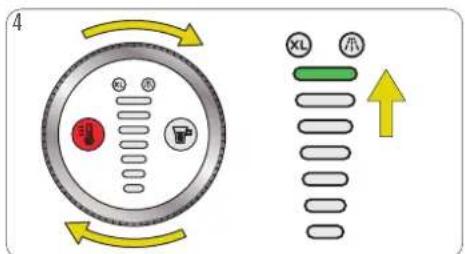
text_image
4 XL 小Use the control ring and selectlevel 7 on display (highestbar).
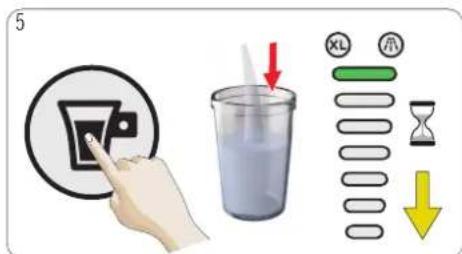
text_image
5 XL 示 Hour ↓Press vohme start/stopbutton. Machine starts
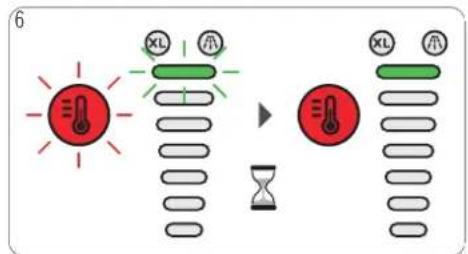
text_image
6 XL Air XL Airrins The. temperature selection button and the volume lightblink for up to 8 seconds.
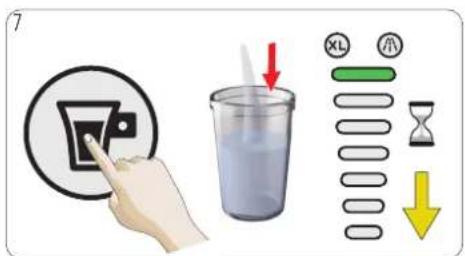
text_image
7 XL 小 ↓Press the start/stopbutton. Machine starts until the machine stops automatically. The selection button and the volume display 18 seconds.
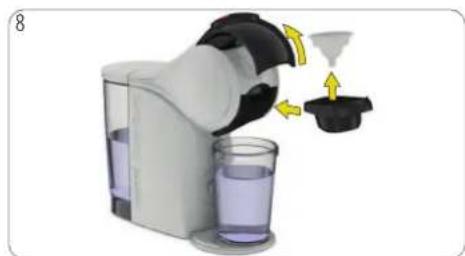
natural_image
Illustration of a coffee maker pouring liquid from a funnel into a glass (no text or symbols)rinsOgent waitlockinghandle. Pull out the capsule temperature the rinsing tool. Reinsert the capight blink for up to
natural_image
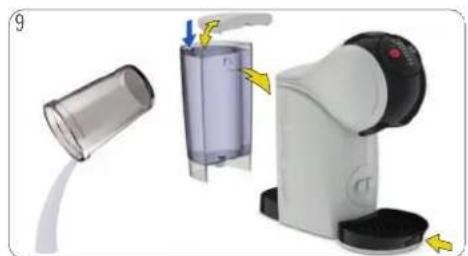
Illustration of a handwashing device with a clear container and handle, showing yellow arrows indicating force or movement (no text or symbols present)Empty. the container. Fill the water tank with f lowatholdeinsert the water tank into the machine. drip tray. The machine is ready to be used.

7. PREPARING A BEVERAGE
7. 1 ONE CAPSULE (E. G. LUNGO)
text_image
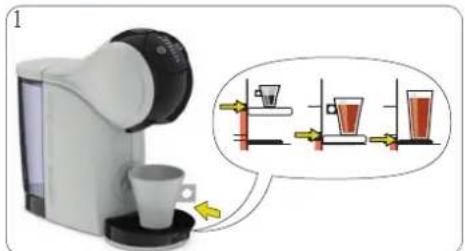
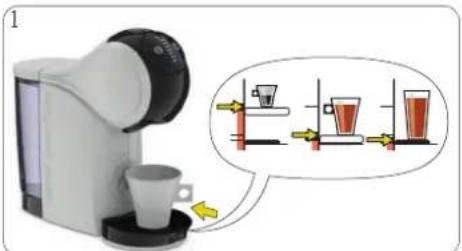
Diagram showing a coffee machine with cups and a magnified view of three glasses, illustrating a cooking process.Adjust the drip tray position. Place the cup cup size on the drip tray. See "BEVERAGE package. Check if the water tank contains drinking water.
text_image
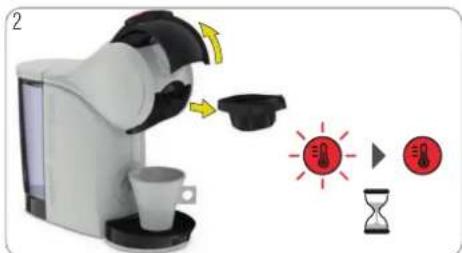
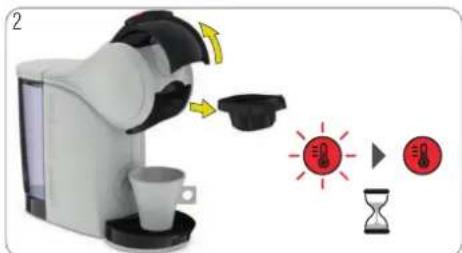
Illustration showing a coffee maker with a coffee cup, a coffee pod, and two warning icons for stress or damage.Optin the dockedghandle. The machine switchesMake sure the rinsing tool is not inside. Insert EXAMPLSCallyr The temperature selection button inblinke capsule holder. Insert it back into the whidgththfreshmachine is heating up for approximatelylocking handle. seconds. Afterwards, the temperature selection button lights steady red. The machine is ready to be used.
natural_image
Two identical coffee maker machines with cups and a coffee cup, one emitting a drop (no text or symbols visible)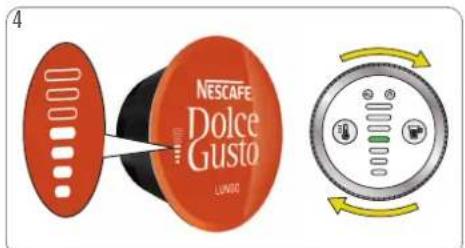
text_image
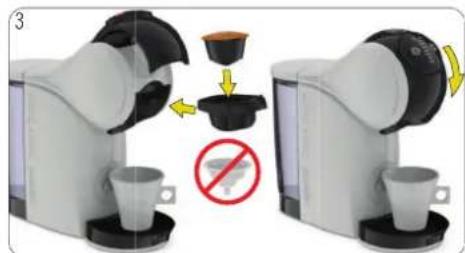
4 NESCAFE Dolce Gusta LUNDOUse the control ring to set the volume in accordance with stop button. The beverage preparation finishing the preparation, the temperature select the number of bars shown on the capsule starts, sell both not open the locking handle during then extraction volume display lightblink for up desired volume to your own taste. Choose XL Watergate for extraction stops. The machine depends the During that time do not open the low an extra bigcup. Waitaround 1.5 min if you preparations apteparically. The extraction can be stopped at a second extra big cup. any time manually by pressing the start/stop button.
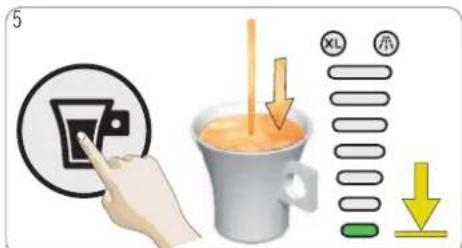
text_image
5 XL 示 ↓nressdthe wiat/stop button. The beverage preparationfinishingthe preparation, the temperature select e starts.sellBothnot open the locking handle dublton thend extraction volume display lightblink for up L Waiverige ther extraction stops. The machine dependsthe During that time do not open the loa ouwaphrationaptepracitally. The extraction can be stoppedat any time manually by pressing the start/stop button.
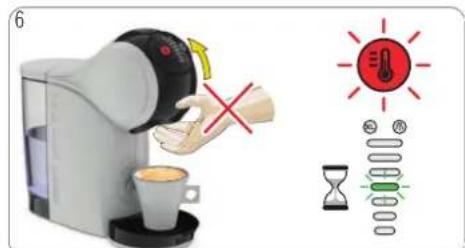
text_image
6 ×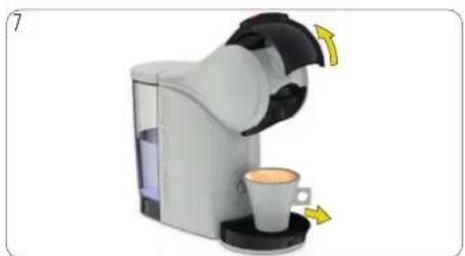
natural_image
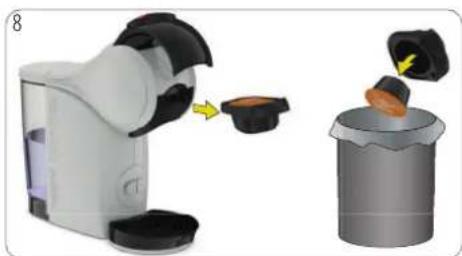
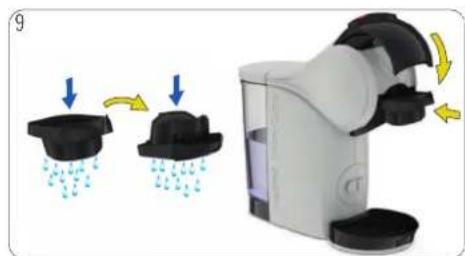
Product photo of a coffee maker with a cup and side arm, showing yellow directional arrows indicating motion (no text or symbols)After the extraction is finished open the Remove the cup from the drip tray.
natural_image
Illustration of a robotic device emitting powder into a trash can (no text or symbols)lockinghandle.the capsule holder. Remove the the used capsule in the dustbin.
natural_image
Illustration of a water dispenser with raindrops and water droplets, showing two different states (no text or symbols)use insecapsule. sRds of the capsule holder withfresh water. Dry the capsule holder. Insert it back in machine. Enjoy your beverage!
7. PREPARING A BEVERAGE

7. 2 TWO CAPSULES (E. G. CAPPUCCINO)
text_image
1 d dAdjust the drip tray position. Place the cup cup size on the drip tray. See "BEVERAGE package. Check if the water tank contains drinking water.
text_image
Illustration showing a coffee maker with a coffee cup, a coffee tray, and two red hourglass icons indicating stress or urgency.Optin the doctedg handle. The machine switch Make onsure the EXAMPLSCALLyr The temperature selectionbutton bankrule in the whidghthfresmachine is heatingup for approximatachine40 Close seconds. Afterwards, the temperature selectionbutton lights steady red. The machine is ready to be used.
natural_image
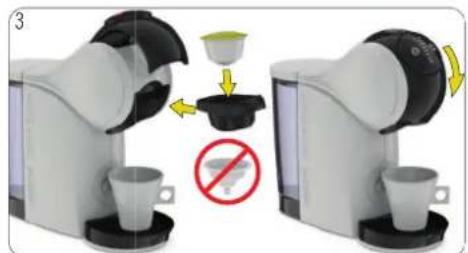
Two robotic coffee machines with cups and a coffee cup, one with a red prohibition symbol (no text or symbols on the devices themselves)rinsing tool is not inside. Insert capsule holder. Insert it back in the lockinghandle.
text_image
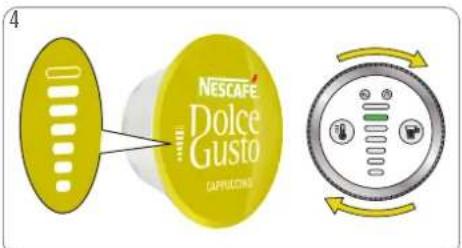
4 NESCAPE Dolce Gusto CAPRICLICUMUse the control ring to set the volume in the number of bars shown on the capsule desired volume to your own taste. Choose an extrabig cup. Wait around 1.5 min if a secondextra big cup.
text_image
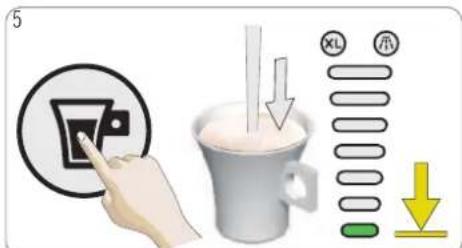
5 XL 小 ↓nPresscordancestartstop button. The beverage preparationfinishingthe preparation, the temperature selecte starts.selBot not open the locking handle dubinton then extraction volume display light blink for t Wait beverage thfor extraction stops. The machine seconds. tDuring that time do not open the lo y preparation teutopreparately. The extraction can be stopped at any time manually by pressing the start/stopbutton.
text_image
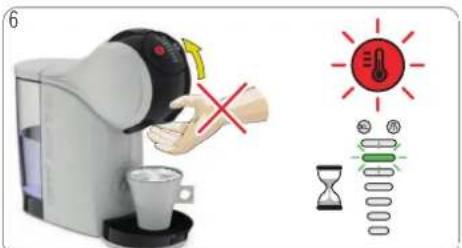
6 ×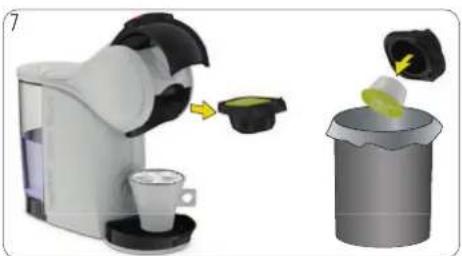
natural_image
Illustration of a coffee maker using a green cup to add a yellow cup into a trash bin (no text or symbols present)Open the locking handle. Pull out the the usedcapsule. Put the usedcapsule in
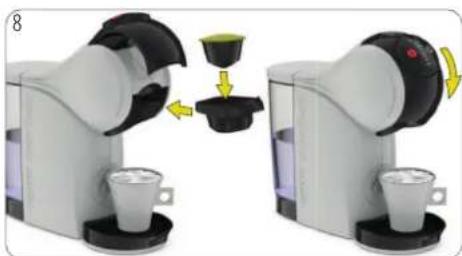
natural_image
Two robotic coffee machines with cups and a coffee cup, showing a coffee cup being inserted into a container (no text or symbols visible)capsuleertholder. Remove capsule inthe capsule thebackustinto the machine. Close the locking
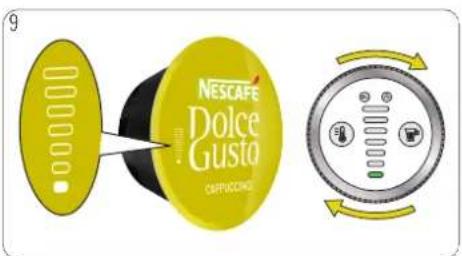
text_image
NESCAFE Dolce Gusta COMPRESSORSholdise lihert control ring to set the volume in acc g handle number of bars shown on the capsule or desired volume to your own taste.

7. PREPARING A BEVERAGE
7. 2 TWO CAPSULES (E. G. CAPPUCCINO)
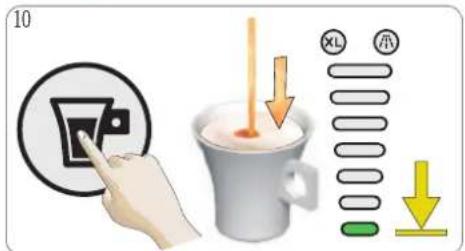
text_image
10 XL 示 ↓ ↓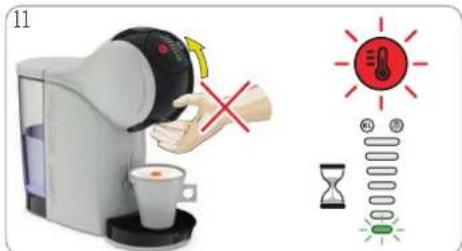
text_image
11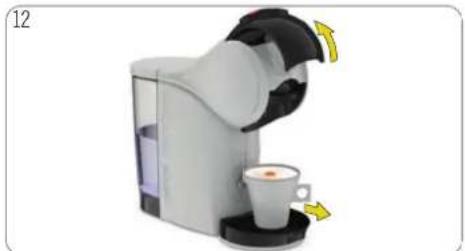
natural_image
Product photo of a coffee maker with a cup and side arm, no visible text or symbolsPress the start/stop button. The beverage starts. Do not open the locking handle Wait until the extraction stops. The mac preparation automatically. The extraction can any time manually by pressing the start/st
preparation finishing the preparation, during the trend extraction volume display one sections. During that time do be stopped at button.
the temperature Whereled then indicator light blink handlep Remove the not open the locking handle!
light is steady green open cup from the drip tray.
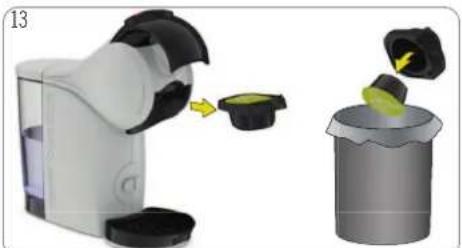
natural_image
Illustration of a handwashing a toothpaste into a trash bin (no text or symbols present)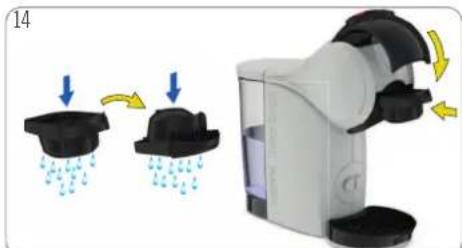
natural_image
Illustration of a water dispenser with raindrops and water droplets, showing mechanical components (no text or symbols)Pull out the capsule holder. Remove the the used capsule in the dustbin.
usehsecapsule. sRds ofthe capsule holder with fresh drinking water. Dry the capsule holder. Insert it back into the machine. Enjoy your beverage!
8. CLEANING

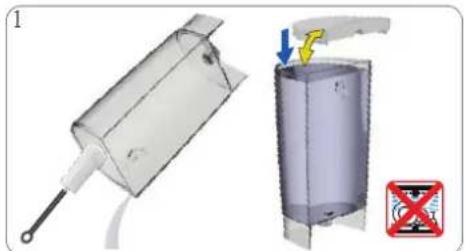
natural_image
Technical illustration of a mechanical device with a lever and a cylindrical component, showing no text or symbols.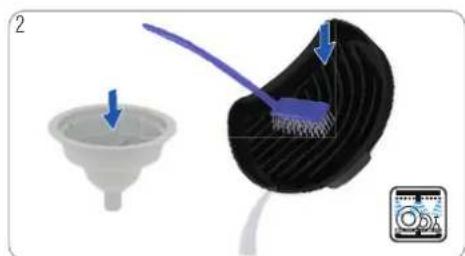
natural_image
Illustration showing a funnel being inserted into a black mesh component with blue brush (no text or symbols)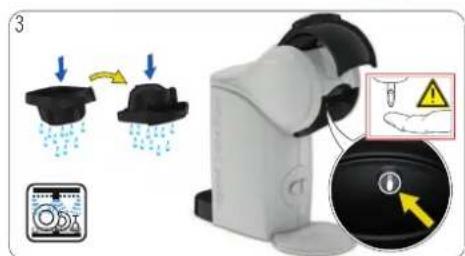
text_image
Diagram illustrating a water spray device with raindrops, a water level meter, and a warning symbol with arrows.Rinse and clean the water tank. Use a cleanse fords-sat-trip brtray and the rinsing tool with fresh bot drinkings of the capsule holder with wa and washing-up liquid as needed. Afterwards washill. O'can the drip tray with a clean fordusafeand brushesh drinking water. Alternatively wash fresh drinking water and insert it into the Altnacatively Twash the driptray inthe dishwashelishwasher. Dry it afterwards. Clean the head of water tank is not dishwasher proof! machine around the injector with a clean soft
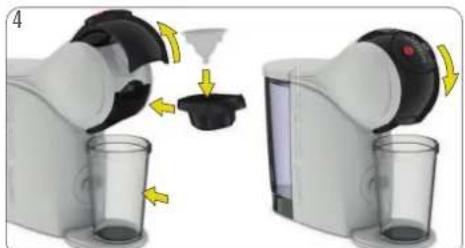
natural_image
Two robotic devices with arrows indicating a process or operation, showing a container being inserted into a glass (no text or symbols visible)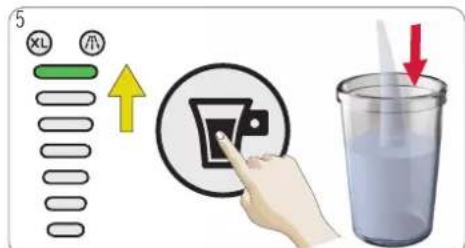
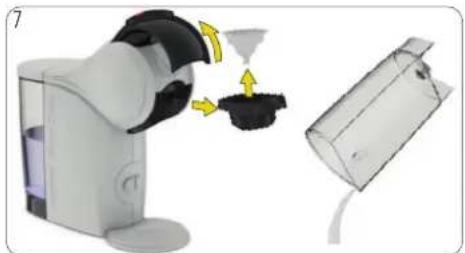
Open the locking handle. Put the rinsing to use in the thentrol ring and select level 7 or Empty and umlean the container. Warning: Hot wa capsule holder. Insert the capsule holder into display (higher bar). Press the start/stopbutton. with a care! Close the locking handle. Remove the drip stays Plasinga large empty container underneath the coffee outlet.
natural_image
Illustration of a robotic device emitting powder from a container, with no visible text or symbols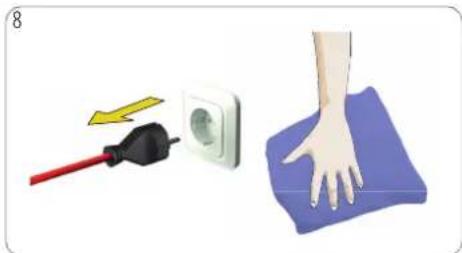
natural_image
Illustration showing a hand pressing down on a blue foam pad next to an electrical outlet with a red tool (no text or symbols)Open the locking handle. Pull out the caps/switchholdoff, the machine. Unplug the power plug! Clean the Remove the rinsing tool. Keep it in a safenacpliance with later soft damp cloth. Dry itafterwards with a cleaning or descaling. If any, remove the water drym cloth water tank.

9. DESCALING AT LEAST EVERY 3–4 MONTHS
text_image
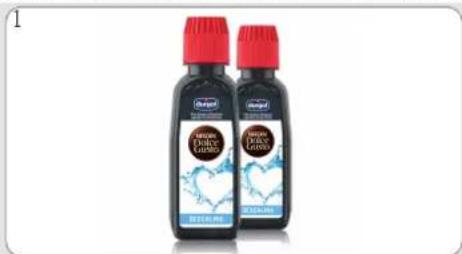
NEW DOLCE GUSTO www.dolce-gusto.comUse NESCAF Dolce Gust® liquid descaler. To order, call the NESCAF® Dolce Gust® hotline or the NESCAF Dolce Gust® website.
text_image
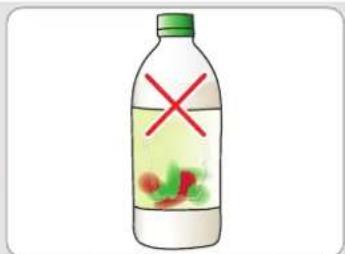
Illustration of a green water bottle with red X mark and green leaf inside, indicating a chemical or biological hazard symbol.Do notuse vinegar for descaling!
natural_image
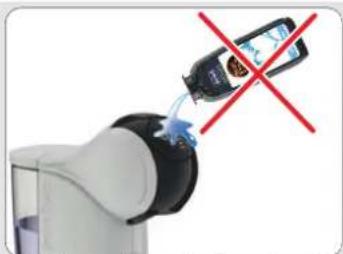
Robot arm with a blue tool inserted, crossed out by a red X (no text or symbols visible)Avoid contact of the descaling any part of the machine.
natural_image
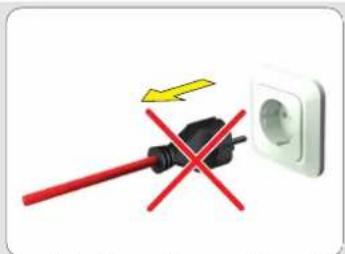
Electrical plug with red iron and black socket, no text or symbols presentDquichotwiblug the machine during desc.
text_image
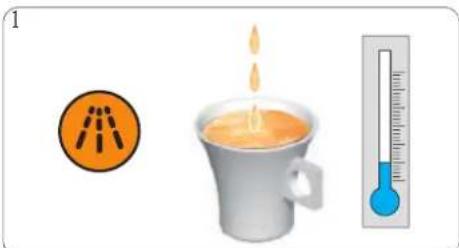
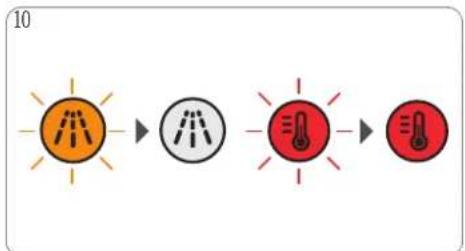
1 1If the orange descaling indicator light turns if any or remove the water from the water beverage comes out slower than usual (even of droplets, drinking water with the descaler in if it is cooler than usual, the machine has cup to pour the descalingsolution into the water insert the water tank into the machine.
text_image
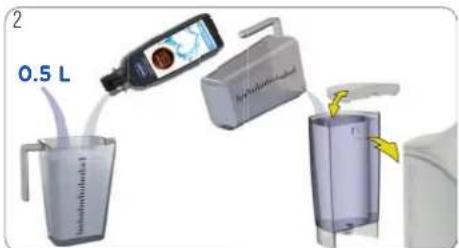
2 0.5 LIf on any or remove the water from the water of droplets, drinkingwater with the descaler in as up to Four the descalingsolution into the water insert the water tank into the machine.
natural_image
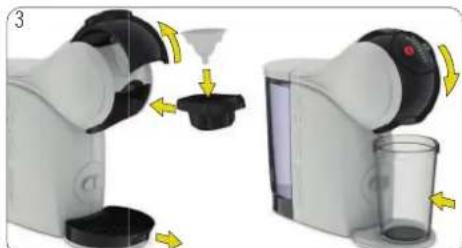
Two robotic devices with yellow arrows indicating process flow, one emitting a funnel and the other holding a glass (no text or symbols visible)topen Mie cooking handle. Putthe rinsing tool into capsauring holder. Insert the capsule holder into the close tank and docking handle. Place a large empty underneath the coffee outlet.
text_image
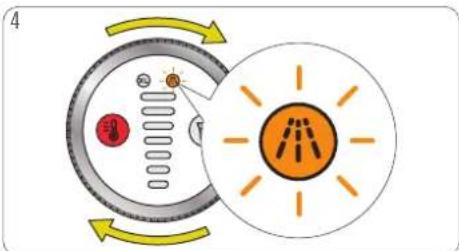
4To enter the descaling mode, select XL a ringfour times clockwise until the descaling blinking.
text_image
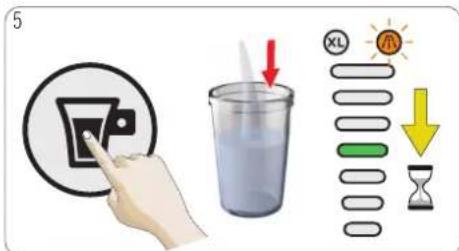
5 XL AL ↓ OHdPreturn the start/stop button. The machine is the whole display bar moves from the threshold level. The machine descales with hot water operation. The machine stops descaling once is empty.
text_image
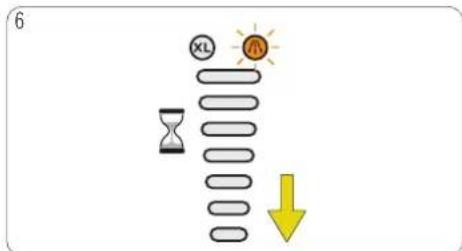
6 XL R Hourglass Yellow Arrowstails alkorsaling, better descalingefficiency, the machine topholdowapproximately 42 minutes. The volume displayer movestadestop until it disappears. The water tank
9. DESCALING AT LEAST EVERY 3–4 MONTHS

text_image
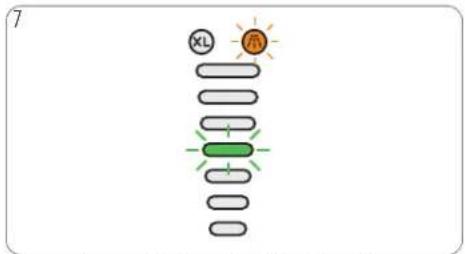
7 XL HThe volume display bar thflueles (4
natural_image
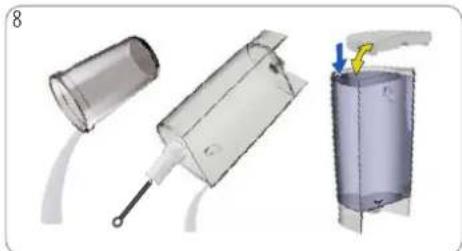
3D mechanical assembly diagram showing a tool interacting with a cylindrical component, with no visible text or symbols.Empty and clean the container. Rinse and Pheathewasert/stopbutton. The machine rinses tank. Use a clean food-safe brushand washing nuolishyid with hot water. The volume display needed. Refill the water tank with fresh drinking water itandisappears. The machine stops rins insert it into the machine. Place the container waternetank is empty.
the beverage outlet.
text_image
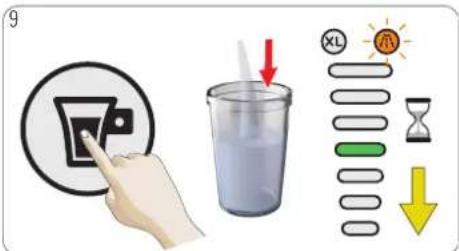
9 XL HR Hour ↓Ehesethewasert/stopbutton. The machine rinses icngdpuolislyid was hot water. The volume display rinking untailer itandisappears. The machine stops rins ither waternetzahk is empty.
flowchart
graph LR
    A["Light Lighting"] --> B["Heat Transfer"]
    B --> C["Temperature Warning"]
    C --> D["Final Temperature Measurement"]
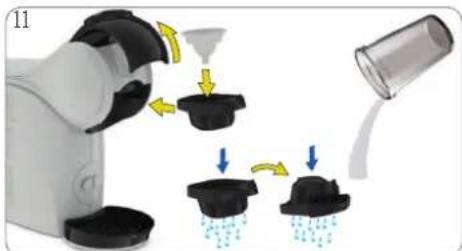
The descaling indicator turns off, the temperature of the solution container. Empty and clean the cleaner machine with a soft damp cloth. Dry blinks and turns steady red once the machine the recapsule to holder. Remove the rinsing with a keep soft it dry cloth. safe place for later cleaning or descaling. Rinse both sides of the capsule holder with fresh drinkingwater. Reinsert the capsule holder.
natural_image
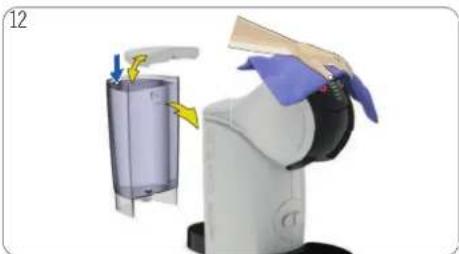
Illustration of a robotic arm pouring liquid into a container with arrows indicating flow (no text or symbols)Remove selection container. Empty and clean the Cleaner machine with a soft damp cloth. Dry hold the recapsule holder. Remove the rinsing with a keep of it dry cloth. safe place for later cleaning or descaling. Rinse both sides of the capsule holder with fresh drinkingwater. Reinsert the capsule holder.
natural_image
Robot arm with blue gloves and yellow directional arrows indicating motion (no text or symbols)
10. TROUBLESHOOTING
10. 1 ORANGE DESCALING INDICATOR LIGHT TURNS ON
natural_image
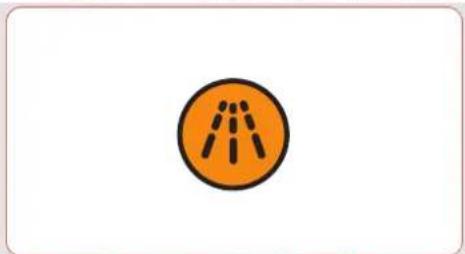
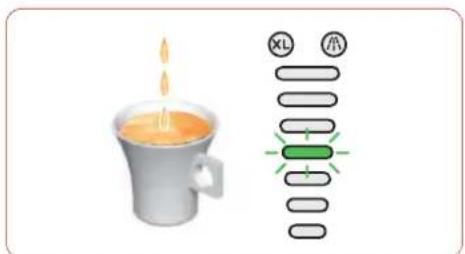
Orange circular icon with dashed lines inside, no text or symbols presentThe orange descalingindicator light turns on. This means that the machine needs to be descaled. To do so, please follow the descaling instructions. See 9. " DESCALING AT LEAST EVERY 3-4 MONTHS" on page 16.
text_image
1 Darmel Darmel Darmel Darmel Darmel Darmel Darmel Darmel Darmel Darmel Darmel Darmel Darmel Darmel Darmel Darmel Darmel Darmel Darmel Darmel Darmel Darmel Darmel Darmel Darmel Darmell Darmell Darmell Darmell Darmell Darmell Darmell Darmell Darmell Darmell Darmell Darmell Darmell Darmell Darmell Darmell Darmell Darmell Darmell Darmell Darmell Darmell Darmell Darmell Darmell Darmcell10. 2 NO LIQUID COMES OUT - NO WATER?
text_image
Image showing a steaming cup with flame and a vertical diagram labeled 'XL' and '票' indicating a process or sequence.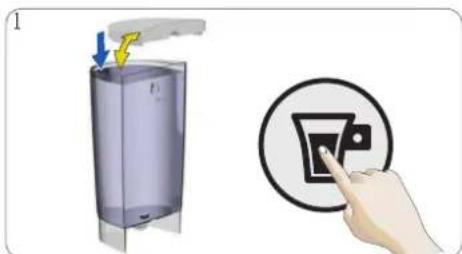
text_image
Diagram showing a hand pressing a button on a device, with a magnified view of the button's action.The beverage preparationstops part way duringCheckle if the water tank contains enough fresh drinking delivery or does not start at all. The voluwater displaynotlas fill withfresh drinking water and press the at the current level. No liquid comes out: stand/stwaterbuttanko continue the preparation. In case there may be empty. is still no liquid coming out check 10.3 "NO LIQUID COMES OUT - CAPSULE BLOCKED?".
10. TROUBLESHOOTING

10. 3 NO LIQUID COMES OUT - CAPSULE BLOCKED?
natural_image
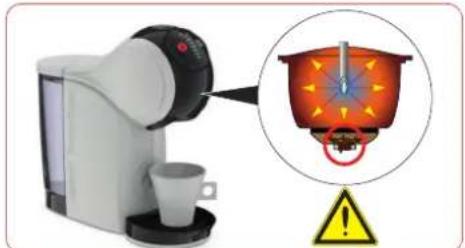
Illustration of a coffee maker with a magnified view showing its heat distribution (no text or symbols)No liquid comes out: The capsule may be pressure.
text_image
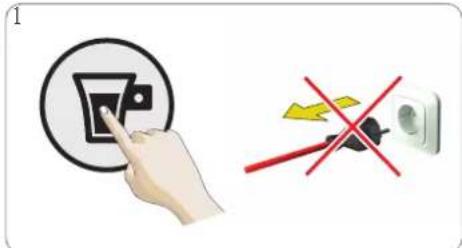
1Always take up the machine upright! To stop press the start/stop button again. Do not machine!
text_image
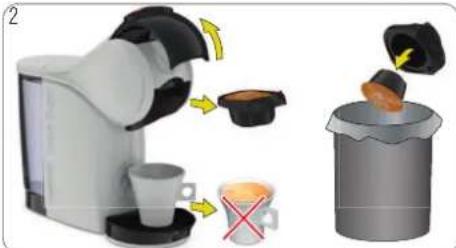
Diagram illustrating coffee maker's processing steps: adding a cup, removing a coffee cup with a red X mark, and pouring into a trash can.Dthe nqreparation, the coffee! Open the locking handle. umphrine the releases pressure. Remove the capsule ho Put the used capsule in the dustbin.
natural_image
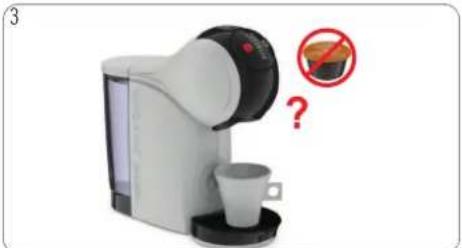
Illustration of a coffee maker with a cup and a red prohibition symbol (no text or labels)Try to operate the machine without capsule. If the water flows, it shows that the issue was with the capsule. Just use a different capsule. If not, follow with 10.4 "NO LIQUID COMES OUT - INJECTOR BLOCKED?".
10. 4 NO LIQUID COMES OUT – INJECTOR BLOCKED?
natural_image
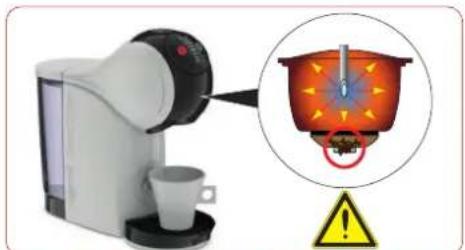
Illustration of a coffee maker with a cup and a magnified view showing its interior heat or vapor (no text or symbols)No liquid comes out: The injector may be pressure.
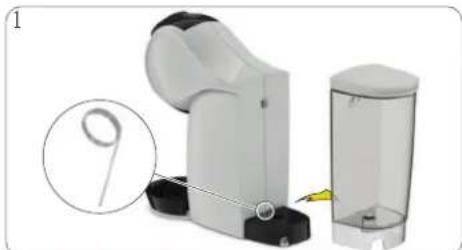
natural_image
Mechanical device with a magnified inset showing a numbered component (no text or symbols visible)Enlsorred the under tray is empty. Take out Keep the needle out of reach of children
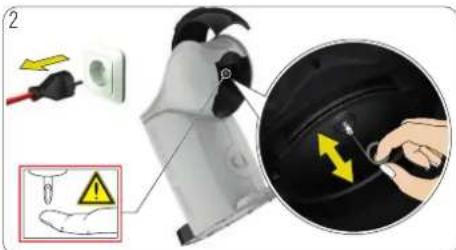
text_image
Diagram showing a device being cleaned with an electrical outlet, highlighting safety warning and warning symbolRemo eantheneedsule holder. Open the locking ha the injector with the cleaning needle. Follow inst 9. "DESCALING AT LEAST EVERY 3-4 MONTHS" on pag

10. TROUBLESHOOTING
10. 5 VARIOUS
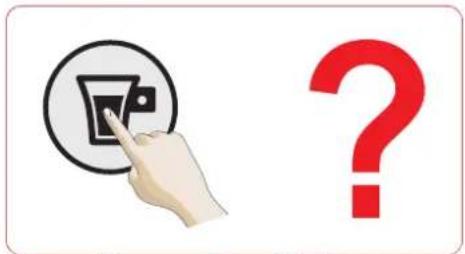
text_image
Image showing a hand pressing a circular button labeled 'A' with a question mark symbol nearby, suggesting a UI or interface element.The machine cannot be switched on.
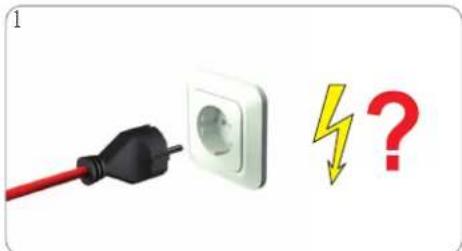
text_image
1 ▼?Check if the power plug is correctly plugged power socket. If yes, check your electricity
natural_image
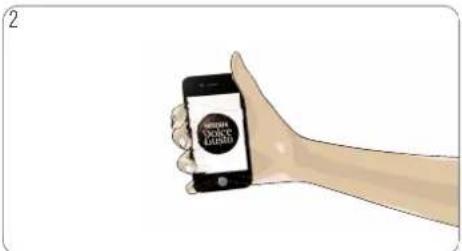
Illustration of a hand holding a smartphone displaying a 'NEW YORK LEASES' logo (no text or symbols on the device itself)Ifinthe a machine still cannot be switched on, cal NEQDAF® Dolce Gusto® hotline. For the hotline number: see "Machine Hotlines".
natural_image
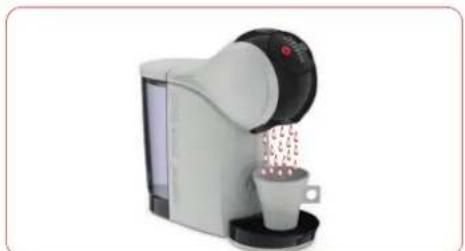
Product photo of a coffee maker with a cup and spool of coffee beans (no visible text or symbols)The beverage is splashing out of the
text_image
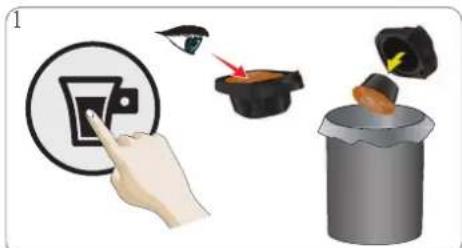
Diagram illustrating a hand pressing a button with an arrow, next to a device emitting a flame, and finally adding a trash can.coffee Press the start/stopbutton to stop the prepare the capsule holder. Put the usedcapsule in
natural_image
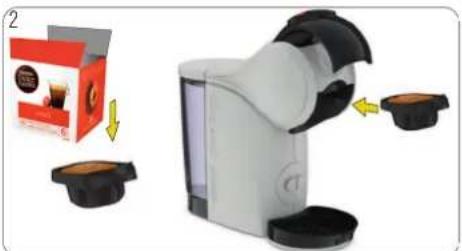
Product photo showing a white coffee maker with black buttons and a red package box, alongside a yellow arrow indicating rotation (no text or symbols)reteam thell capsule holder. Insert a new capsule capsule dustholder and insert it back into machine.
natural_image
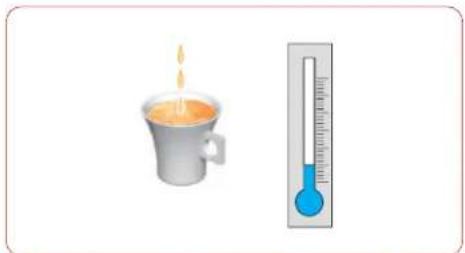
Illustration of a steaming cup and a thermometer (no text or symbols present)If the beverage comes out slower than droplets), or if it is cooler than usual descaled.
text_image
NICE DOLCE-GUSTO www.dolce-gusto.comusually, please follow the descaling instructions. See 9. the" DESCALING AT LEAST EVERY 3-4 MONTHS" on page 16.
10. TROUBLESHOOTING

10. 5 VARIOUS
natural_image
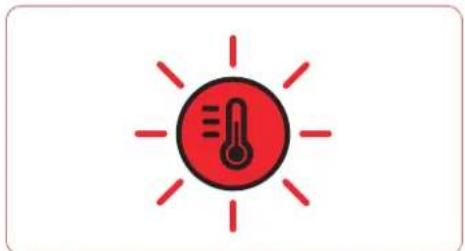
Red thermometer icon with radiating lines, no text or symbols presentThe temperature selectionbutton blinks fast.
text_image
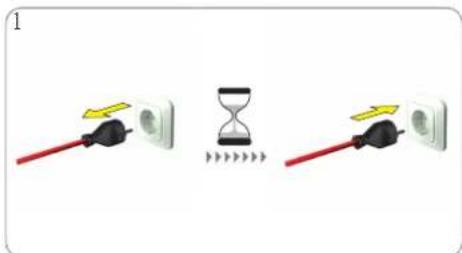
1Check ifcapsule is blocked, see 10.3.
" NO LIQUID 'COMES OUT - CAPSULE BLOCKED?" or NESCAPS Dolce Gusto® hotline. For the hotline number: Unplug the power plug and wait 20 minutes see Afterwpage. insert the power plug into the mains power socket and switch the machine on.
natural_image
Illustration of a hand holding a smartphone displaying a 'NEW YORK LEASES' logo (no text or symbols on the device screen)If the temperature selection button still flashes 1
natural_image
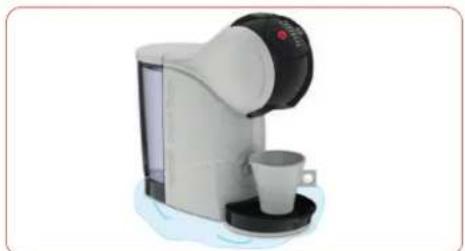
White and black milk dispenser with a cup, no visible text or symbolsWater accumulates underneath or around the Umpulginethe power plug! Clear water leaks around the capsule holder during the beverage preparation.
natural_image
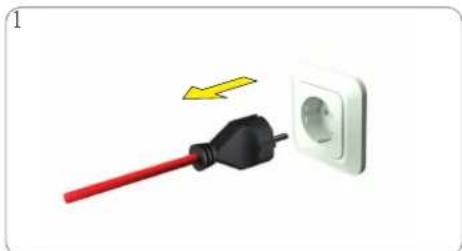
Electrical plug with red cable and black connector next to a white socket (no text or symbols visible)Unpluginethe power plug! during the
natural_image
Illustration of a hand holding a smartphone displaying the 'Green Policy License' logo (no text or symbols on the device itself)Call the NESCAFE Gusto® hotline or go on the NESCAFE® Dolce Gusto® website. For the hotline number see last page.
natural_image
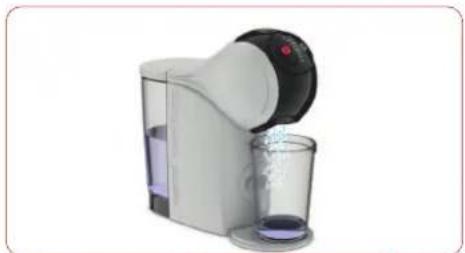
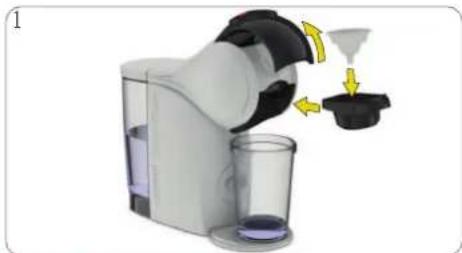
Modern kitchen brush unit with glass and black lid, no visible text or symbolsWater is splashing out of the coffee outlet Pudurthe rinsing dool into the capsule holder. Insert the descaling. capsule holder into the machine.
natural_image
Illustration of a coffee maker with a funnel and cups, showing mechanical components (no text or symbols)


text_image
NESCAFE Dolce Gusto

HOTLINES