
UL 18DA - Cooler HiKOKI - Free user manual and instructions
Find the device manual for free UL 18DA HiKOKI in PDF.


| Product Type | Portable Cooler |
| Brand | HiKOKI |
| Model | UL 18DA |
| Power Source | 18V DC (HiKOKI 18V battery compatible) |
| Cooling Technology | Thermoelectric |
| Capacity | 23 liters (typical for this model) |
| Temperature Range | Approx. 20°C below ambient |
| Dimensions (W x D x H) | 500 x 300 x 400 mm |
| Weight (without battery) | Approx. 7 kg |
| Maximum Load | 20 kg |
| Battery Compatibility | HiKOKI BSL18XX series |
| Operating Time (on battery) | Up to 8 hours (with 5.0Ah battery) |
| Charging Time | Varies with charger, approx. 45 min via fast charger |
| Housing Material | High-density polyethylene (HDPE) and polyurethane foam |
| Sealing | Gasket seal for moisture protection |
| Maintenance | Wipe with damp cloth, avoid solvents |
| Cleaning | Use mild soap and water; dry thoroughly |
| Safety Features | Overheat protection, low voltage cutoff |
| Spare Parts Availability | Through HiKOKI service centers |
| Repairability | Moderate; replaceable fan and thermoelectric module |
| Accessories | Shoulder strap, beverage holder (optional) |
| Warranty | 2 years (subject to terms) |
Frequently Asked Questions - UL 18DA HiKOKI
User questions about UL 18DA HiKOKI
0 question about this device. Answer the ones you know or ask your own.
Ask a new question about this device
Download the instructions for your Cooler in PDF format for free! Find your manual UL 18DA - HiKOKI and take your electronic device back in hand. On this page are published all the documents necessary for the use of your device. UL 18DA by HiKOKI.
USER MANUAL UL 18DA HiKOKI
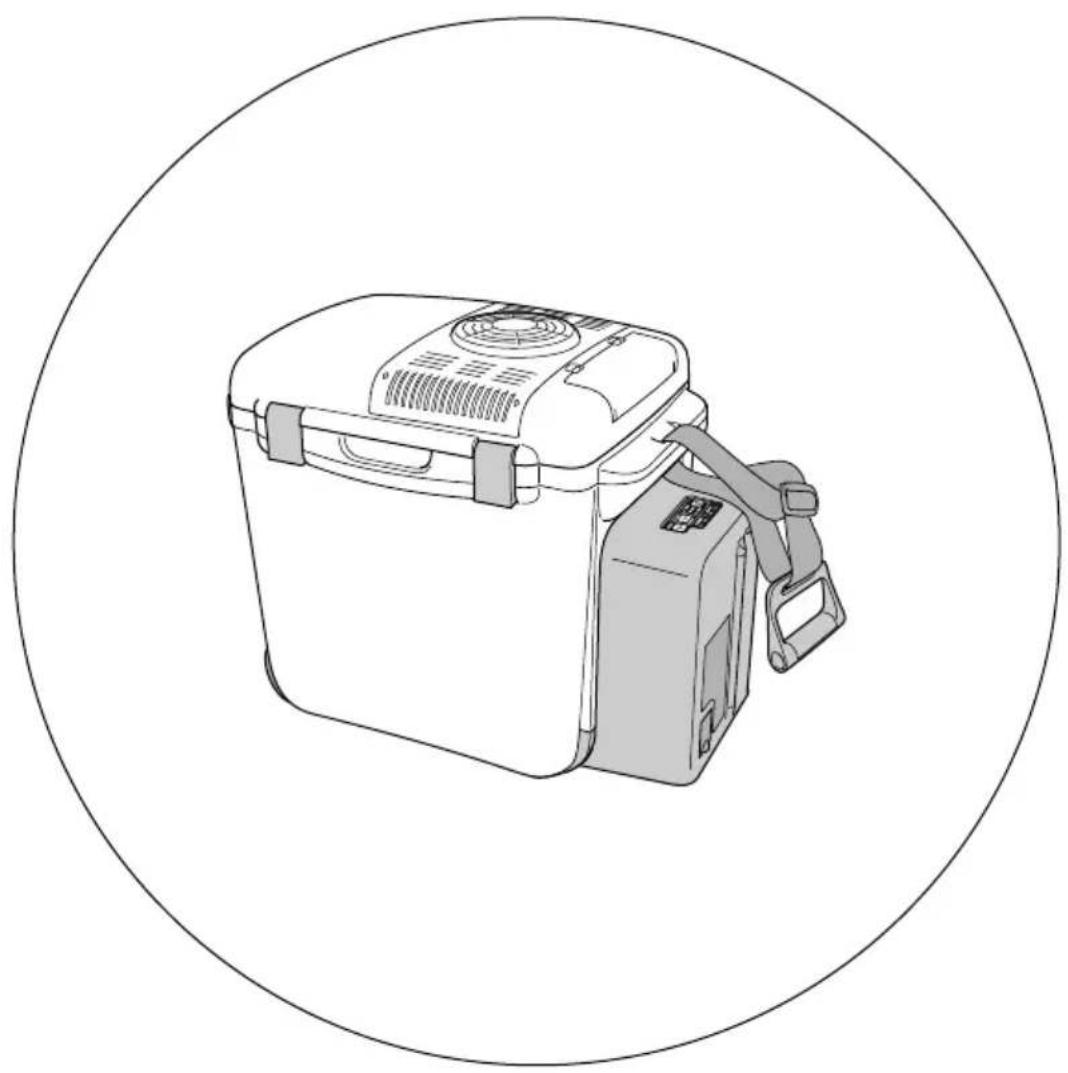
Cordless Cooler and Warmer BOX
UL 18DA
natural_image
Line drawing of a portable electric oven with attached air bag and handle, enclosed in a circular border (no text or symbols)保留备用
Keep for future reference

使用说明书
Handling instructions
中文
目次
natural_image
Diagram of a device with a scroll wheel and directional arrow indicating rotation (no text or symbols)图4
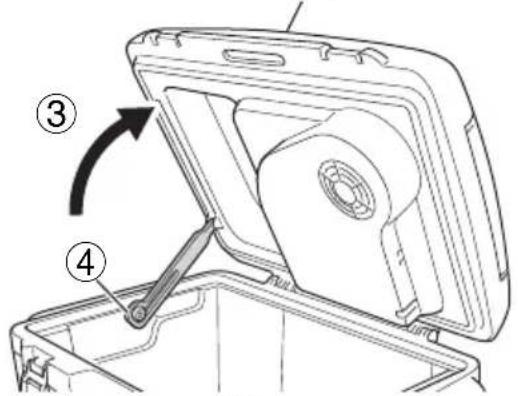
图5
(2) 关闭箱盖
图6
卡扣
natural_image
Diagram of a device with a lever and directional arrow, no text or symbols present图7
natural_image
Diagram of a computer monitor rear panel showing ventilation slots and scroll (no text or symbols)图8
2. 电池充电和输出 (2 节)
natural_image
Diagram of a device interior showing internal components and a directional arrow (no text or symbols)图 12
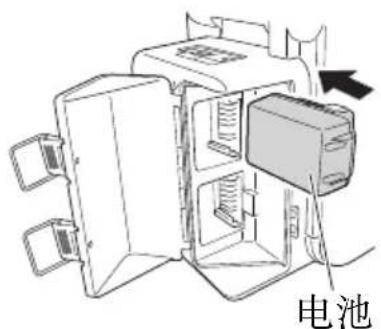
图 13
注:
natural_image
Simple line drawing of a plug with an arrow pointing to a wall-mounted power outlet (no text or symbols)图 16
注:
natural_image
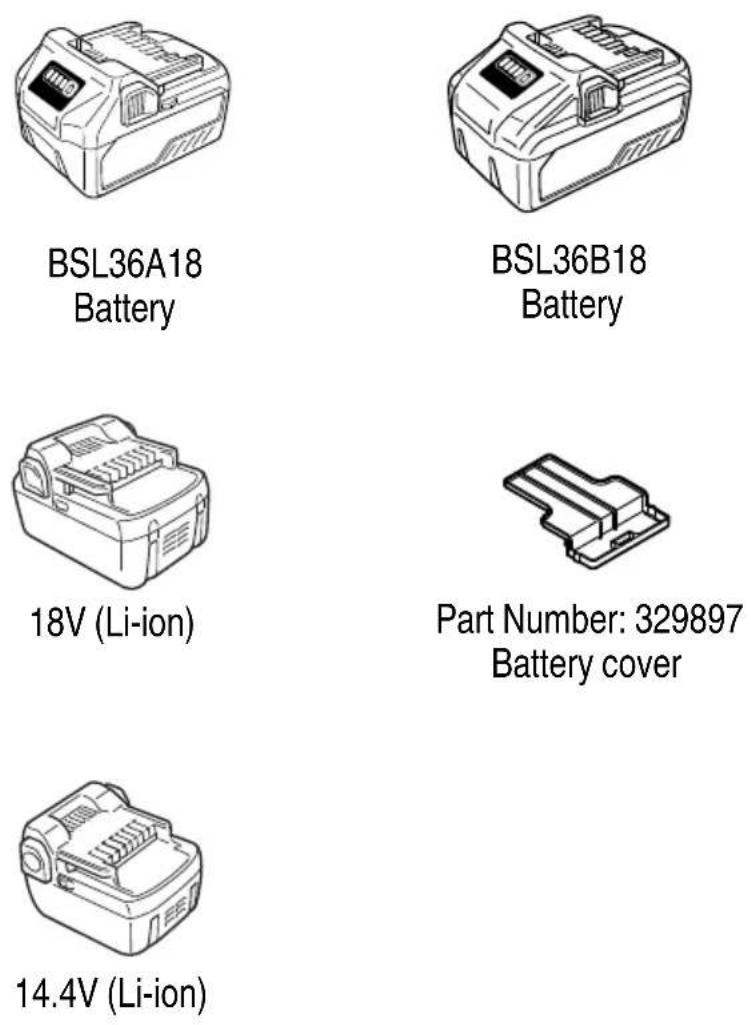
Line drawing of a battery pack with control panel and display (no text or symbols)BSL36A18 电池
natural_image
Line drawing of a portable electronic device with buttons and display (no text or symbols)BSL36B18 电池
natural_image
Line drawing of a rectangular electronic device with internal compartments (no text or symbols)18V (Li-ion)
产品编号:329897
电池盖
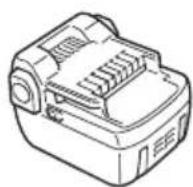
14.4V (Li-ion)
CONTENTS
COOLER AND WARMER BOX SAFETY WARNINGS ....23
CAUTION ON LITHIUM-ION BATTERY 28
REGARDING LITHIUM-ION BATTERY TRANSPORTATION ....30
SYMBOLS....30
SPECIFICATIONS....31
STANDARD ACCESSORIES 32
APPLICATIONS....32
PRIOR TO OPERATION ....33
HOW TO USE 34
CHARGING 38
MAINTENANCE AND INSPECTION 40
TROUBLESHOOTING....42
SELECTING ACCESSORIES 44
COOLER AND WARMER BOX SAFETY WARNINGS

WARNING
Read all safety warnings and all instructions.
Failure to follow the warnings and instructions may result in electric shock, fire and/or serious injury.
Save all warnings and instructions for future reference.
-
Use power tools only with specifi cally designated battery packs.
Use of any other battery packs may create a risk of injury and fire. -
Use only the specified power supply voltage.
Use of any other voltage may lead to fire or electric shock.
Do not use with DC power sources, engine generators, boosters or other transformers than what has been specified. Failure to comply may result in abnormal heat and fire.
If the temperature is less than 0^ C or higher than 40^ C, do not charge the battery. Doing so will not only fail in charging the battery but may also shorten battery life. In addition, it may cause the battery to explode or could result in fire.
Please charge the battery in a well-ventilated area. While charging the battery, do not cover the main unit with items such as a cloth. Doing so may cause the battery to explode or could result in fire.
- Do not touch the power plug (cigarette lighter connection plug) with wet hands.
Doing so may result in electric shock.
- Do not use the cooler and warmer box in wet or damp places or in the rain.
Doing so may result in electric shock, fi re or explosion.
English
- Do not operate cooler and warmer box in explosive atmospheres, such as in the presence of flammable liquids, gases or dust.
Doing so may result in electric shock, fire or explosion. - Do not immerse or splash the unit with water. Doing so may result in short circuit or electric shock.
- Do not use the AC adapter when outdoors. Doing so may result in smoke emission or ignition.
- In the event of any of the following, switch off the power to the product and remove the battery. Also, disconnect the power plug (cigarette lighter connection plug) from the socket (cigarette lighter outlet).
○ When the unit is not in use or the unit is to be adjusted or inspected.
○ Other situations that could be dangerous or may cause unexpected accidents. - Only use specified accessories and attachments.
Using accessories and attachments other than those specified in the instruction manual or in HiKOKI catalogs may result in accidents or injuries and must be avoided at all costs.
- Do not dispose of the battery in fi re.
If the battery is burnt, it may explode.
- Never use a deformed or damaged battery.
Doing so may result in smoke emission, ignition or explosion of the battery.
- If the use time of the battery is significantly short even after properly charging the battery, the battery life is expended, and the battery should be exchanged.
Continued use of a dead battery may result in damage.
- Remove any dust accumulated on the blades of the power plug and the surface from which the blades extend.
Failure to do so may result in smoke emission or ignition.
- When using the unit with a car power source, set the unit securely in the luggage space or at the foot of the rear seat where it will not be suddenly jogged out of position. Also, do not place the unit in an unstable position on the car seat.
Sudden braking may cause the unit to slide or fall if it is placed on a seat.
- Do not place the unit or battery at the foot of the driver's seat. Also, do not place the DC cord of the car power source anywhere in the vicinity of the shift lever, brakes or other control pedals.
An unexpected accident may occur should the cord become entangled.
- Do not operate the main unit or the battery while driving the car.
Doing so could cause an unexpected accident.
- Use the provided DC cord of the car power source.
Use of a cord other than the provided DC cord could result in abnormal heat which could cause smoke emission or ignition.
- Do not charge the battery on top of a blanket-like seat cover, floor mat or other similar protective material.
Doing so may result in fi re.
- Remain near the car when using a car power source.
Failure to do so can result in an unexpected accident.
- Do not store combustible items such as gasoline or thinner.
Doing so may result in fire or explosion.
- Do not store medical supplies or scientific samples.
Doing so could cause an unexpected accident.
- Do not store dry ice.
The sublimation of Dry Ice to Carbon Dioxide gas will cause any airtight container to expand or possibly explode. Also, any abrupt temperature change may result in damage.
-
Do not place any container with liquid or other unstable objects on top of the product. An unstable object may fall and cause injury. Also, any liquid spillage may damage the insulation of electrical components which can cause a short circuit fire.
-
Do not use the product if the cooler and warmer box or the battery terminals (battery mount) are deformed.
Installing the battery could cause a short circuit that could result in smoke emission or ignition.
- Keep the cooler and warmer box's terminals (battery mount) free of dust.
○ Prior to use, make sure that dust have not collected in the area of the terminals.
During use, try to avoid dust on the cooler and warmer box from falling on the battery.
When suspending operation or after use, do not leave the tool in an area where it may be exposed to falling dust.
Doing so could cause a short circuit that could result in smoke emission or ignition.
- Do not use the included AC adapter or car power source DC cord with anything other than this product.
Doing so may cause smoke emission or ignition.
- Do not place pins, wires and other metal or foreign objects in the intake or exhaust ports or other gaps.
Doing so may result in accident or damage.
- Do not use the product if there are any abnormalities during operation such as foul smell, overheating or smoke emission.
Immediately discontinue use and contact the store where you purchased this product.
CAUTION
- Do not allow children to operate the product. Please be careful when there are children in the vicinity.
Store idle cooler and warmer boxes out of the reach of children and do not allow persons unfamiliar with the cooler and warmer box or these instructions to operate the cooler and warmer box.
Failure to do so may result in unexpected injury.
English
- Stay alert, watch what you are doing and use common sense when operating a cooler and warmer box. Do not use a cooler and warmer box while you are tired or under the influence of drugs, alcohol or medication.
A moment of inattention while operating cooler and warmer box may result in serious personal injury.
-
Store idle cooler and warmer box. When not in use, cooler and warmer box should be stored in dry, high or locked-up place — out of reach or children. Store cooler and warmer box in a place in which the temperature is less than 50^ C.
-
Do not use the cooler and warmer box in inappropriate ways.
○ Use the cooler and warmer box within the limits of its capabilities to ensure safe and efficient results.
○ Do not use the cooler and warmer box for any purpose other than that for which it was designed.
-
Don't abuse cord. Never carry cooler and warmer box by cord or yank it to disconnect from receptacle (cigarette lighter outlet). Keep cord from heat, oil and sharp edges. Be careful where you store or use the cord and avoid stepping on or hooking the cord to where any unnecessary pressure may be applied to cause damage. Doing so could result in shock or short circuit which may cause fire.
-
Pay close attention to maintaining the cooler and warmer box.
○ Regularly check the power cord of the cooler and warmer box and ask your dealer for repairs in the event of it being damaged.
○ If using an extension cord, check it regularly and replace it in the event of it being damaged.
- Maintain cooler and warmer box.
○ Check for misalignment or binding of moving parts, breakage of parts and any other condition that may affect the cooler and warmer box's operation.
○ If damaged, have the cooler and warmer box repaired before use.
Do not use the cooler and warmer box if the switch does not turn it on and off. Any cooler and warmer box that cannot be controlled with the switch is dangerous and must be repaired.
Many accidents are caused by poorly maintained cooler and warmer box.
- Cooler and warmer box repairs to be performed only by experts.
○ The cooler and warmer box conforms to all relevant safety regulations and must not be modified.
○ All repairs must be requested to HiKOKI authorized service centers. Attempting to carry out repairs without the correct skills may result in accidents or injuries.
- Do not sit or stand on the cooler and warmer box.
Doing so may lead to accidents or malfunction.
- Do not block the intake or exhaust ports (vents).
Doing so may result in damage.
-
When setting the unit on a carpet, tatami mat or vinyl chloride flooring, lay out a board or similar item between the unit and the surface.
-
Do not lay the unit down or use it upside down.
Doing so may cause the contents to flow out.
- Keep the unit away from high temperatures and do not place near a stove or other heating equipment.
Doing so could deform the unit or cause an accident.
- Set the unit in a well-ventilated location. When using near a wall, make sure there is over 10 cm of space between the unit and the wall's surface.
○ Do not set the unit inside other pieces of furniture or in a case.
○ Make sure that the unit is set where the air is flowing.
☐ Do not set up in a place with high humidity or a place exposed to direct sunlight. Doing so could not only adversely affect product performance but could also cause accident or damage.
- Do not leave the unit out with the cover open.
Doing so could adversely affect performance.
- Do not store ice cream, frozen foods or fresh foods.
Doing so may result in change or degradation of food quality.
- Do not store food and drink products for a prolonged period of time after they have been opened.
Doing so may result in change or degradation of food quality.
- Do not store food materials directly in the cooler and warmer box.
The box is not antibacterial treated so the food materials should be wrapped or placed in a polyethylene bag.
- Do not place ice or water directly into the cooler and warmer box.
Doing so may result in damage.
- If the surrounding temperature is below 5^ C while cooling, do not store bottled products or other breakable items.
Doing so could result in cracking or shattering which could cause injury.
- When storing PET bottles for thermal insulation, use heat resistant bottles.
Some PET bottles have low heat resistance and are prone to deformation and damage.
- Do not drag across the floor with any part other than the casters touching the floor surface.
Doing so could cause damage to the product or to the floor's surface.
-
Before using the product, make sure that the shoulder belt and handle will not detach or cause any problems.
-
Do not carry the unit with the cover open.
-
When the cover is closed on the unit, make sure to use the latch to secure the cover.
-
Be careful not to catch your fingers when opening or closing the cover.
-
Do not carry the unit by the cover.
-
When carrying the unit, make sure the cover is secured with the latch.
-
Do not inflict any strong impact to the cover when it is open.
-
Do not spray the unit with insecticide, fragrance or deodorizer.
-
Do not immerse in water or seawater and do not directly spray with water at high pressures.
English
- Do not leave unattended with moisture in the unit.
Leaving it unattended in this manner can result in mold growth. Wipe away any remaining moisture and make sure the unit is dry.
-
Pulling the unit on poor pavement surfaces or when it is full can result in accidents such as falling.
-
Do not fully wash the unit.
Water could leak through gaps and soak the insulation, resulting in mold growth.
-
Do not wash the unit with polishing powder, a scrubbing brush, boiling water, thinner, benzine or other organic solvents.
-
Avoid strong impacts and vibrations when transporting the unit.
Failure to do so may result in damage.
- When not in use, make sure that the jack cover of the power jack and the battery cover remains closed.
Failure to do so may result in damage.
- When using the DC 12V car power source, always disconnect the connection plug before switching off the engine.
The power of certain vehicles do not cut off when the engine is switched off.
Leaving the connection plug connected could result in overcharging the battery.
- Do not use the product in the trunk of a car.
High temperatures could result in damage.
CAUTION ON LITHIUM-ION BATTERY
To extend the lifetime, the lithium-ion battery equips with the protection function to stop the output.
In the cases of 1 to 2 described below, when using this product, even if you are pulling the switch, the motor may stop. This is not the trouble but the result of protection function.
- When the battery power remaining runs out, the motor stops.
In such case, charge it up immediately.
- If the battery is overheated under overload work, the battery power may stop.
In this case, stop using the battery and let the battery cool. After that, you can use it again.
Furthermore, please heed the following warning and caution.
WARNING
In order to prevent any battery leakage, heat generation, smoke emission, explosion and ignition beforehand, please be sure to heed the following precautions.
- Make sure that swarf and dust do not collect on the battery.
During work make sure that swarf and dust do not fall on the battery.
○ Make sure that any swarf and dust falling on the power tool during work do not collect on the battery.
○ Do not store an unused battery in a location exposed to swarf and dust.
Before storing a battery, remove any swarf and dust that may adhere to it and do not store it together with metal parts (screws, nails, etc.).
- Do not pierce battery with a sharp object such as a nail, strike with a hammer, step on, throw or subject the battery to severe physical shock.
- Do not use an apparently damaged or deformed battery.
- Do not use the battery in reverse polarity.
- Do not connect directly to an electrical outlets or car cigarette lighter sockets.
- Do not use the battery for a purpose other than those specified.
- If the battery charging fails to complete even when a specified recharging time has elapsed, immediately stop further recharging.
- Do not put or subject the battery to high temperatures or high pressure such as into a microwave oven, dryer, or high pressure container.
- Keep away from fire immediately when leakage or foul odor are detected.
- Do not use in a location where strong static electricity generates.
- If there is battery leakage, foul odor, heat generated, discolored or deformed, or in any way appears abnormal during use, recharging or storage, immediately remove it from the equipment or battery charger, and stop use.
- Do not immerse the battery or allow any fluids to flow inside. Conductive liquid ingress, such as water, can cause damage resulting in fire or explosion. Store your battery in a cool, dry place, away from combustible and flammable items. Corrosive gas atmospheres must be avoided.
CAUTION
- If liquid leaking from the battery gets into your eyes, do not rub your eyes and wash them well with fresh clean water such as tap water and contact a doctor immediately.
If left untreated, the liquid may cause eye-problems.
- If liquid leaks onto your skin or clothes, wash well with clean water such as tap water immediately.
There is a possibility that this can cause skin irritation.
- If you find rust, foul odor, overheating, discolor, deformation, and/or other irregularities when using the battery for the first time, do not use and return it to your supplier or vendor.
WARNING
If a conductive foreign matter enters in the terminal of lithium ion battery, the battery may be shorted, causing fi re. When storing the lithium ion battery, obey surely the rules of following contents.
Do not place conductive debris, nail and wires such as iron wire and copper wire in the storage case.
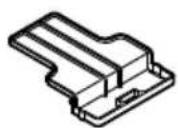
☐ Either install the battery in the power tool or store by securely pressing into the battery cover until the ventilation holes are concealed to prevent short-circuits (See Fig. 1).
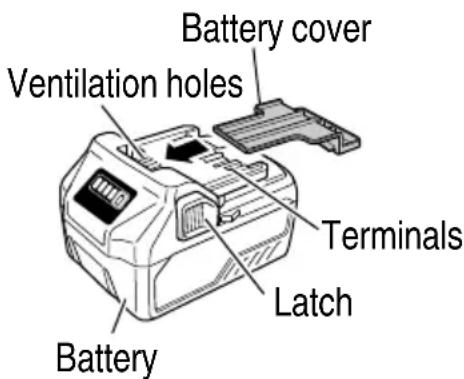
Fig. 1
REGARDING LITHIUM-ION BATTERY TRANSPORTATION
When transporting a lithium-ion battery, please observe the following precautions.
WARNING
Notify the transporting company that a package contains a lithium-ion battery, inform the company of its power output and follow the instructions of the transportation company when arranging transport.
● Lithium-ion batteries that exceed a power output of 100Wh are considered to be in the freight classification of Dangerous Goods and will require special application procedures.
- For transportation abroad, you must comply with international law and the rules and regulations of the destination country.
- If the BSL36B18 and BSL1860 are installed in the power tool, the power output will exceed 100 Wh and the unit will be classified as Dangerous Goods for freight classification.
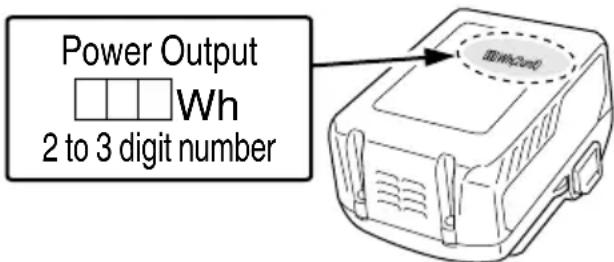
Fig. 2
SYMBOLS
WARNING
The following show symbols used for the machine. Be sure that you understand their meaning before use.
 | To reduce the risk of injury, user must read instruction manual. | V Rated voltage | |
| --- | Direct current Warning |  | |
SPECIFICATIONS
| Model UL18DA | |||||
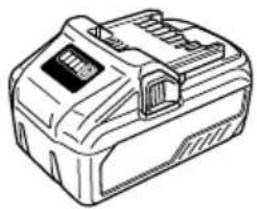
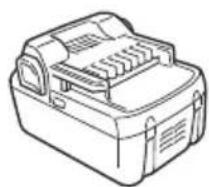
| Power supply | Slide battery: DC 14.4 V, 18 V, Multi volt battery | ||||
| Household power supply (using provided AC adapter) | |||||
| DC12 V (in-Car) (using provided DC cord) | |||||
| Capacity 25 L | |||||
| Cooling System Electronic Cooling System | |||||
| Cooling & Heating Performance | Inside Temperature | Time required to achieve set inside temperature*1 | |||
| COLD | HIGH | -25°C as opposed to the outside temp | (Minimum 5°C) | Approx. 4 h. | |
| MID | -20°C as opposed to the outside temp | Approx. 3 h. | |||
| LOW | -10°C as opposed to the outside temp | Approx. 40 min. | |||
| HOT | HIGH | +45°C as opposed to the outside temp | (Maximum 55°C) | Approx. 3 h. | |
| MID | +40°C as opposed to the outside temp | Approx. 2 h. | |||
| LOW | +25°C as opposed to the outside temp | Approx. 40 min. | |||
| Continuous operation time when using BSL36A18*2 (For one battery) | HIGH Approx. 2 h. 30 min. | ||||
| MID Approx. 3 h. 10 min. | |||||
| LOW Approx. 5 h. | |||||
| Number of batteries that can be installed | 2 | ||||
| Charging time, approx. (AT 20°C)*3 (For one battery) | BSL1860 : BSL36A18 : 3 h. 20 min. BSL36B18 : 5 h. 20 min. | ||||
| Operating temperature range 0°C - 40°C | |||||
| External dimensions (LxWxH) 340 x 560 x 445 mm | |||||
| Weight 8.0 kg (without battery) | |||||
English
*1 Varies with contents, operating environment and other factors.
*2 When cooled or heated with the inside temperature set at a constant. Varies with contents, operating environment and other factors.
*3 Varies with the type of battery, state of charge, operating environment and other factors. Batteries are charged one at a time.
STANDARD ACCESSORIES
In addition to the main unit (1 unit), the package contains the accessories listed in the below.
Table 1
| UL18DA | ||
| AC adapter | 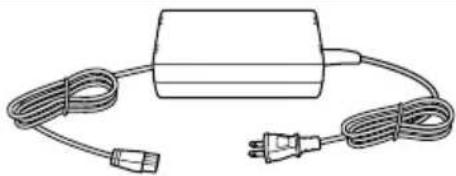 | 1 |
| DC cord | 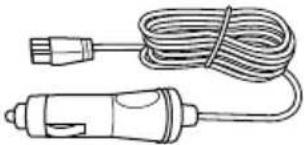 | 1 |
| Shoulder belt | 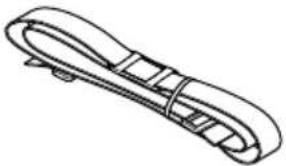 | 1 |
| Handle | 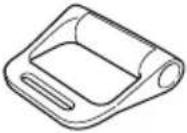 | 1 |
The charger and battery supplied are different depending on the set specification.
APPLICATIONS
Cooling or heating of drinking water, etc.
Charging a lithium ion battery
PRIOR TO OPERATION
1. Opening and closing the cover
(1) Opening the cover
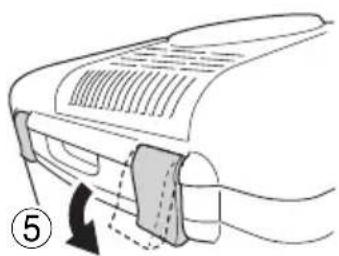
Unlatch the cover in two places and lift the cover until the stopper locks it into position. (see Fig. 3 - 5).
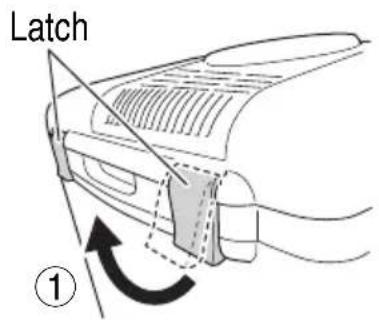
Fig. 3
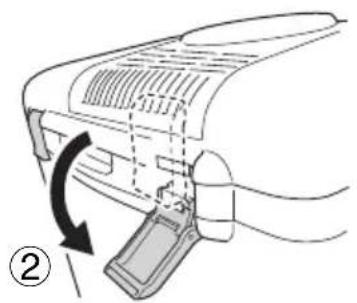
natural_image
Diagram of a device with a scroll wheel and directional arrow indicating rotation (no text or symbols)Fig. 4
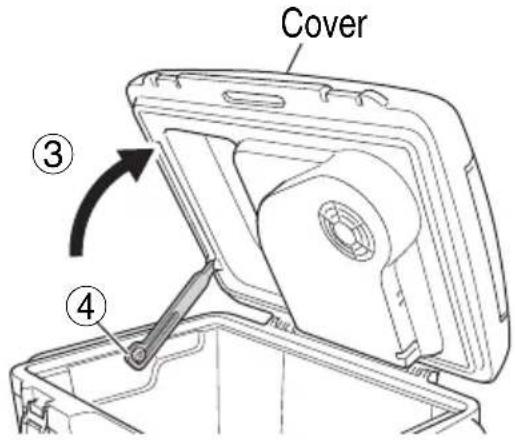
Fig. 5
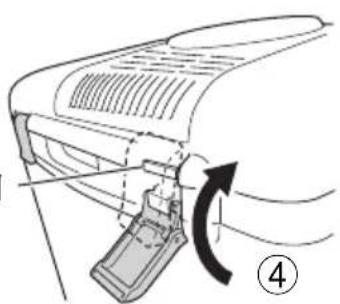
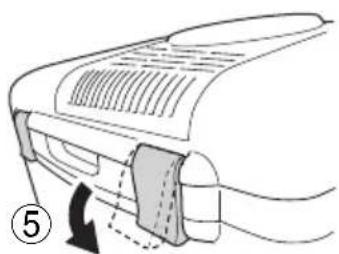
(2) Closing the cover
When closing the cover, release the stopper and gently close the cover. (see Fig. 6 - 8).
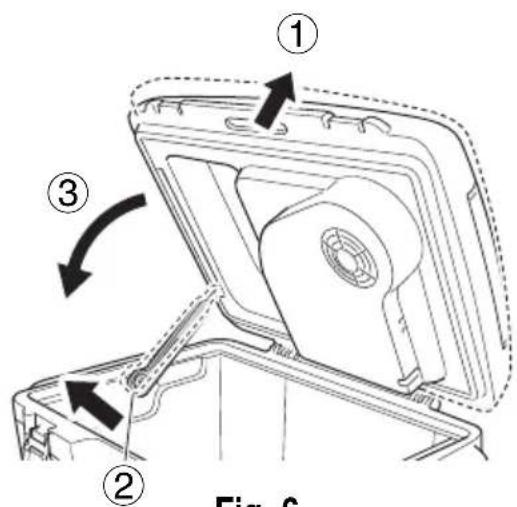
Fig. 6
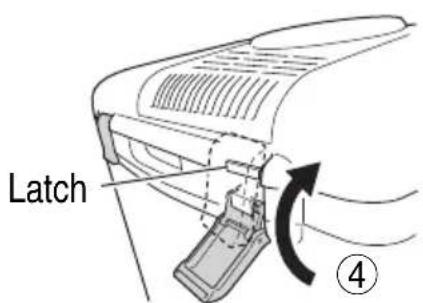
Fig. 7
natural_image
Diagram of a device handle with arrows indicating movement or force (no text or symbols)Fig. 8
2. Charge and output of batteries (two)
When two batteries are installed, the charge or output are conducted with each battery. The numbers "1" and "2" on the switch panel indicate the battery numbers displayed on the battery mount. (see Fig. 9, 10 on page 34). Lit lamps indicate whether a battery is being charged or the battery is outputting current.
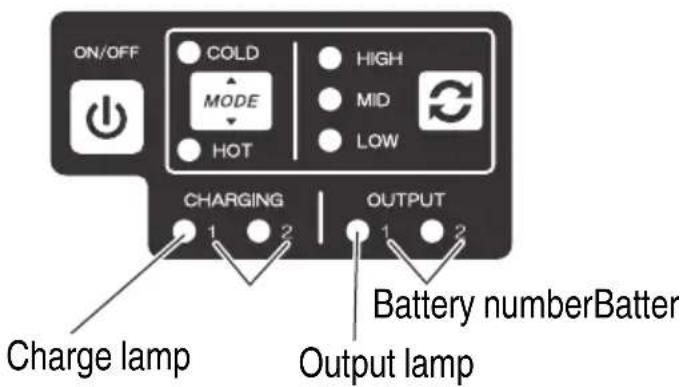
Fig. 9
English
NOTE
○ The unit can be operated with just a single battery.
○ Normally, the batteries switch over in the order of "1" to "2". However, if you place a battery in the "1" slot while the "2" slot is in use, the batteries will switch over in the order of "2" to "1".
When two batteries are installed, removing one battery during operation will automatically switch operation to the remaining battery.
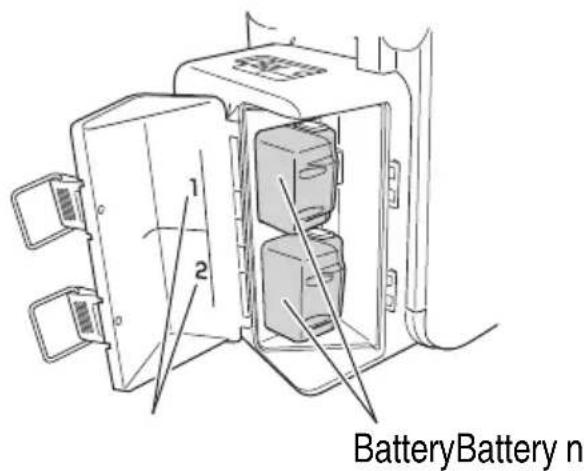
Fig. 10
HOW TO USE
1. Battery installation/removal
CAUTION
○ Never short-circuit the battery.
○ Do not touch the terminals.
Doing so may result in cuts to the hand or other injuries.
NOTE
When operating with a battery, set the unit approximately 1 m away from televisions, radios and antenna wires. Failure to do so may result in video or audio noise.
(1) Battery installation
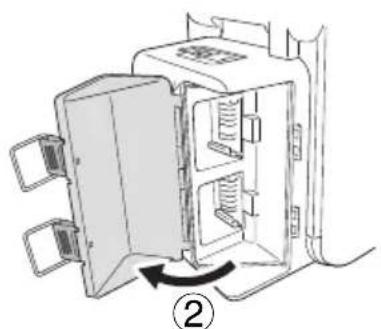
Unlatch the tab and open the battery cover. (see Fig. 11, 12) Align the battery with the grooves of this device and slide it all the way in. (see Fig. 13)
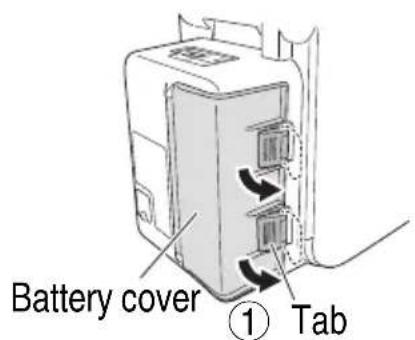
Fig. 11
natural_image
Diagram of a refrigerator interior showing door, shelves, and ventilation slots (no text or labels)Fig. 12
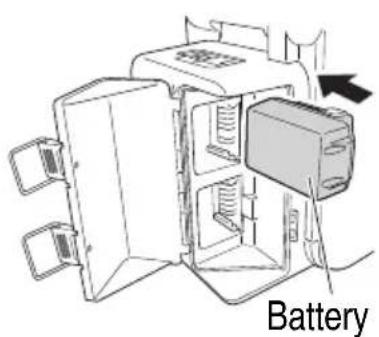
Fig. 13
NOTE
Do not apply any excessive pressure when inserting the battery. If the battery does not easily slide into place, it is not being inserted properly.
Check to see if the battery is facing the correct direction and that there is nothing obstructing the path of insertion.
(2) Battery removal
Press the latches on both sides and slide out. (see Fig. 14)
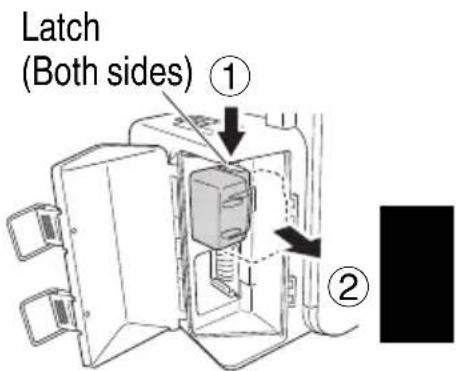
Fig. 14
2. AC adaptor / DC cord installation
You can draw power from a household outlet or from the car using the included AC adapter or DC cord.
Open the jack cover and connect the connection plug of either the AC adapter or DC cord into the AC adapter port. (see Fig. 15)
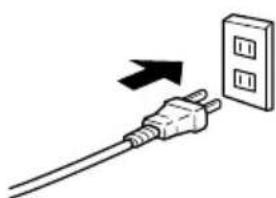
Next, plug the AC adapter or the DC cord into either a household outlet or a cigarette lighter socket. (see Fig. 16, 17)
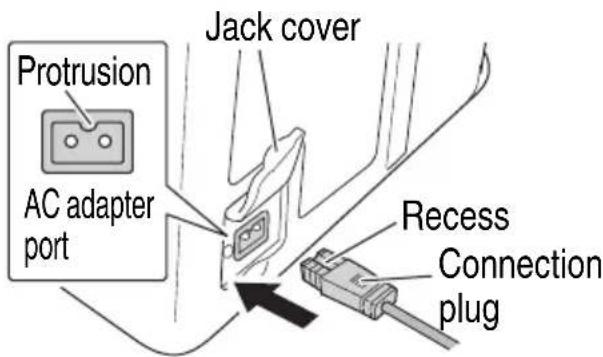
Fig. 15
NOTE
When used together with the batteries, the AC adapter is the main power source and no battery power is consumed.
○ Always make sure that the top and bottom of the connection plug is correct before plug in. If the top and bottom are incorrect, it may result in damage to the unit.
○ Make sure that the connection plug is inserted all the way. If incorrectly inserted, the unit could overheat and result in damage.
When using a car as power source, connect while the engine is running. It can cause the battery to die.
○ Do not use the cordless cooler and warmer box other than with a DC 12V in-car power source. The cordless cooler and warmer box is solely for use on
minus-grounded vehicles. Make sure that the minus pole of the car battery is connected to the car body.
If you use the cordless cooler and warmer box while driving, fasten the cordless cooler and warmer box in place so that it does not move inadvertently and distract your attention from driving.
natural_image
Simple line drawing of a plug with an arrow pointing to a wall-mounted power outlet (no text or symbols)Fig. 16
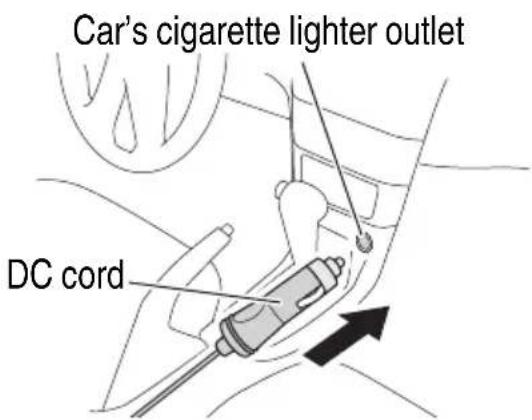
Fig. 17
English
○ Be sure to use the cable provided.
Using a different cable could result in a fire or accident due to overheating.
When the power plug is plugged into an outlet when a battery is installed, the battery will charge whether the power switch is ON or OFF.
3. Power switch/mode setting
After connecting to a power source, switching the power ON will operate the cooling/heating function. Select and set your desired mode.
(1) Turn ON the power switch. The mode indicator lamp and temperature indicator lamp will light up.
(The mode that will be indicated by the lamp will be the mode that was previously set when the unit's power was last switched off.)
(2) Press the mode selector switch and choose either COLD (green) or HOT (green).
NOTE
To switch between COLD (green) or HOT (green) during operation, switch off the power, wait approximately 1 hour and then make your selection.
(3) Press the temperature selector switch to select either HIGH, MID or LOW.
NOTE
- The unit's fan will automatically switch on or off to control temperature. This is not a malfunction.
- Should all lamps flash on and off, there is a problem with this product. Immediately discontinue use and contact the store where you purchased this product.
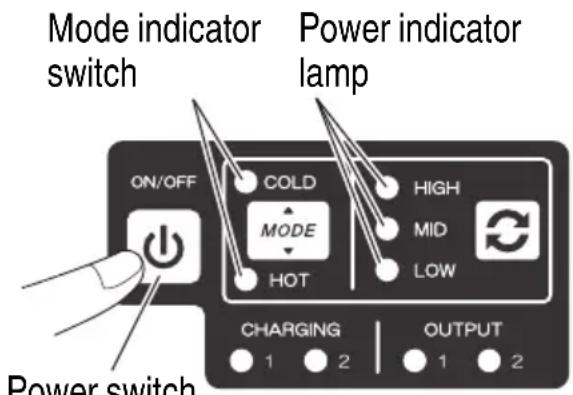
Fig. 18
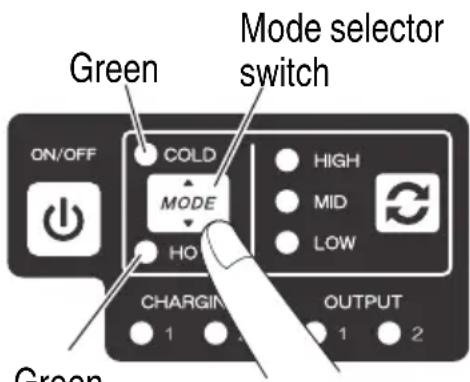
Fig. 19
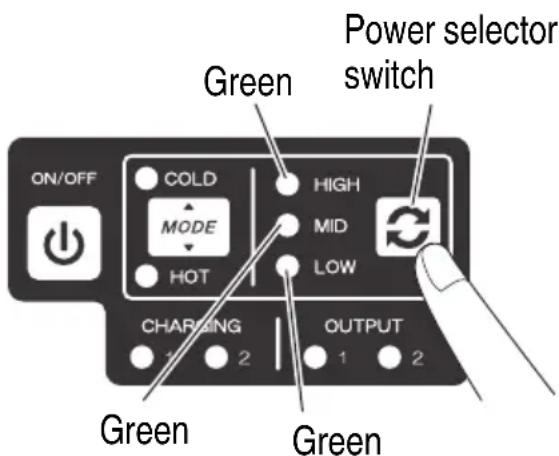
Fig. 20
4. Storing food and drink
CAUTION
○ Do not store ice cream, frozen foods or fresh foods.
Doing so may result in change or degradation of food quality.
○ Do not place ice or water directly into the cooler and warmer box.
Doing so may result in electric shock or rupture.
○ If the outside air temperature is below 5^ C while cooling, do not store bottled products or other breakable items.
Doing so could result in cracking or shattering which could cause injury.
○ When storing PET bottles for thermal insulation, use heat resistant bottles.
Some PET bottles have low heat resistance and are prone to deformation and damage.
○ Do not store food and drink products for a prolonged period of time after they have been opened.
Doing so may result in change or degradation of food quality.
○ Do not store food materials directly in the cooler and warmer box.
The box is not antibacterial treated so the food materials should be wrapped or placed in a polyethylene bag.
Place food and drink in the unit and securely close the cover.
Be careful where you set the unit as the cooling and heating temperatures within the unit can be affected by outside temperatures.
Tips on product use
In rush situations, cool (heat) the unit's interior in advance and place cooled (heated) products in the unit. Heating and cooling requires time when there is a temperature difference with the interior of the unit.
○ Make sure there is enough space between the items stored in the unit.
Packing items too tight will adversely affect the flow of air from the fan and lower the unit's cooling/heating capability.
○ Wipe away any moisture or dirt before storing items.
○ Place food materials in sealed containers, plastic bags or wraps.
Doing so will help prevent odor transfer, quality deterioration and drying.
To avoid reducing the effectiveness of cooling or heating, securely close the cover and do not open and close with frequency.
CHARGING
Presented below are the combination of functions for power source, battery charging, and cooling/heating.
| Power Source Status Power | Switch Battery Charge | Operation of Cooling / Heating Function | |
| Connected to a power source (household outlet or car outlet) and with battery installed | OFF | √ | — |
| ON | √ | √ | |
- Connect to a power source (using either an AC adapter or DC cord).
- Install a battery.
The charge lamp will continuously light green and the charging begins. - Turn the power switch ON to conduct charging with either cooling or warming.
NOTE
With a battery installed, disconnecting the AC adapter or DC cord from the power source will switch off the cooling/heating function.
To switch the power supply to the battery, press the power switch.
When the power is switched ON, the cooling/heating function will begin operating once again.
- Charge complete
The charge lamp will repeatedly blink green to indicate that the charge is complete.
Disconnect the AC adapter or DC cord from the power source and remove the battery.
- Charge indicator lamp indication
The indications of the charge indicator lamp will be as shown in Table 2, according to the condition of the charger or the rechargeable battery.
Table 2
| Indications of the charge indicator lamp | ||||
| Charge indicator lamp | While charging | Lights (GREEN) | Lights continuously | |
| Charging complete | Blinks (GREEN) | Lights for 0.5 seconds. Does not light for 0.5 seconds.(off for 0.5 seconds) | ||
| Overheat standby | Blinks (GREEN) | Lights for 1 second. Does not light for 0.5 seconds.(off for 0.5 seconds) | Battery overheated.Unable to charge.(Charging will commence when battery cools) | |
| Charging impossible | Flickers (GREEN) | Lights for 0.1 seconds. Does not light for 0.1 seconds.(off for 0.1 seconds)■■■■■■■■■■■■■■■■■■■■■■■■■■■■■■■■■■■■■■■■■■■■■■■■■■■■■■■■■■■■■■■■■■■■■■■■■■■■■■■■■■■■■■■■■■■■■■■■■■■■□□□□□□□□□□□□□□□□□□□□□□□□□□□□□□□□□□□□□□□□□□□□□□□□□□□□□□□□□□□□□□□□□□□□□□□□□□□□□□□□□□□□□□□□□□□□□□□□□□□□○□□□□□□□□□□□□□□□□□□□□□□□□□□□□□□□□□□□□□□□□□□□□□□□□□□□□□□□□□□□□□□□□□□□□□□□□□□□□□□□□□□□□□□□□□□□□□□□□□□□ □□□□□□□□□□□□□□□□□□□□□□□□□□□□□□□□□□□□□□□□□□□□□□□□□□□□□□□□□□□□□□□□□□□□□□□□□□□□□□□□□□□□□□□□□□□□□□□□□□□□口□□□□□□□□□□□□□□□□□□□□□□□□□□□□□□□□□□□□□□□□□□□□□□□□□□□□□□□□□□□□□□□□□□□□□□□□□□□□□□□□□□□□□□□□□□□□□□□□□□□☐□□□□□□□□□□□□□□□□□□□□□□□□□□□□□□□□□□□□□□□□□□□□□□□□□□□□□□□□□□□□□□□□□□□□□□□□□□□□□□□□□□□□□□□□□□□□□□□□□□□△□□□□□□□□□□□□□□□□□□□□□□□□□□□□□□□□□□□□□□□□□□□□□□□□□□□□□□□□□□□□□□□□□□□□□□□□□□□□□□□□□□□□□□□□□□□□□□□□□□□×□□□□□□□□□□□□□□□□□□□□□□□□□□□□□□□□□□□□□□□□□□□□□□□□□□□□□□□□□□□□□□□□□□□□□□□□□□□□□□□□□□□□□□□□□□□□□□□□□□□√ | Battery overheated.Unable to charge.(Charging will commence when battery cools) | |
NOTE
When the charge lamp rapidly blinks (0.1 second on/0.1 second off), check and remove any foreign substances on the connectors of the battery or on the terminal of the battery charger.
If there are no foreign substances, the problem may either be the unit or the battery. If this is the case, take both items to the store where you purchased this product.
Once a charge is complete, wait 5 minutes before attempting another charge.
Charging in succession will generate heat from the unit which may cause problems.
○ A battery is hot right after use. Wait for it to cool before attempting to charge.
Trying to charge the battery right away will reduce the battery's life.
☐ If the use time of the battery is significantly short even after properly charging the battery, the battery life is expended, and the battery should be exchanged.
Continued use of a dead battery may result in damage not only to the battery but to the unit itself.
Regarding electric discharge in case of new batteries, etc.
As the internal chemical substance of new batteries and batteries that have not been used for an extended period is not activated, the electric discharge might be low when using them the first and second time. This is a temporary phenomenon, and normal time required for recharging will be restored by recharging the batteries 2 – 3 times.
How to make the batteries perform longer.
(1) Recharge the batteries before they become completely exhausted.
When you feel that the power of the tool becomes weaker, stop using the tool and recharge its battery. If you continue to use the tool and exhaust the electric current, the battery may be damaged and its life will become shorter.
(2) Avoid recharging at high temperatures.
A rechargeable battery will be hot immediately after use. If such a battery is recharged immediately after use, its internal chemical substance will deteriorate, and the battery life will be shortened. Leave the battery and recharge it after it has cooled for a while.
CAUTION
☐ If the battery is charged while it is heated because it has been left for a long time in a location subject to direct sunlight or because the battery has just been used, the charge indicator lamp of the charger lights for 0.3 seconds, does not light for 0.3 seconds (off for 0.3 seconds). In such a case, first let the battery cool, then start charging.
When the charge indicator lamp flickers (at 0.2-second intervals), check for and take out any foreign objects in the charger's battery connector. If there are no foreign objects, it is probable that the battery or charger is malfunctioning. Take it to your authorized Service Center.
○ Since the built-in micro computer takes about 3 seconds to confirm that the battery being charged with UL18DA is taken out, wait for a minimum of 3 seconds before reinserting it to continue charging. If the battery is reinserted within 3 seconds, the battery may not be properly charged.
MAINTENANCE AND INSPECTION
- Inspection of terminals (cooler and warmer box and battery)
Check to make sure that dust have not collected on the terminals.
On occasion check prior, during and after operation.
CAUTION
Remove any swarf or dust which may have collected on the terminals.
Failure to do so may result in malfunction.
- Cleaning of the outside
When the cooler and warmer box is stained, wipe with a soft dry cloth or a cloth moistened with soapy water. Do not use chloric solvents, gasoline or paint thinner, as they melt plastics.
NOTE
Do not fully wash the unit. Doing so may result in damage.
English
3. Cleaning the intake/exhaust ports
Periodically check the unit and clean the intake/exhaust ports with a vacuum cleaner or other device. (see Fig. 21)
NOTE
Dust accumulation can reduce the eff ectiveness of cooling/heating.
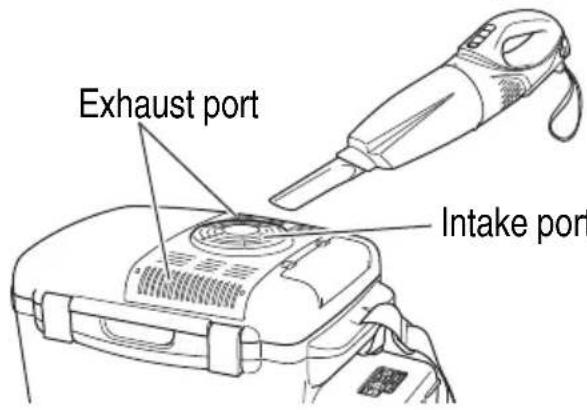
Fig. 21
4. Clean/check AC adapter and casters
Check to see if there are any problems such as cord disconnection or damages to the AC adapter and the casters.
5. Transportation
Adjust the length of the shoulder belt, making sure that the handle is in a position where the cooler and warmer box can be easily carried.
During transport, be careful to avoid rubbing the box's bottom surface against the floor or letting the box fall down.
If the box cannot be pulled on caster wheels, carry it using the shoulder belt.
NOTE
Make sure the caster wheels are clean and undamaged.
6. Storage
The DC cord can be stored under the cable storage cover of the unit's cover. (see Fig. 23)
Store the cooler and warmer box in a place in which the temperature is less than 50^ C, and out of reach of children.
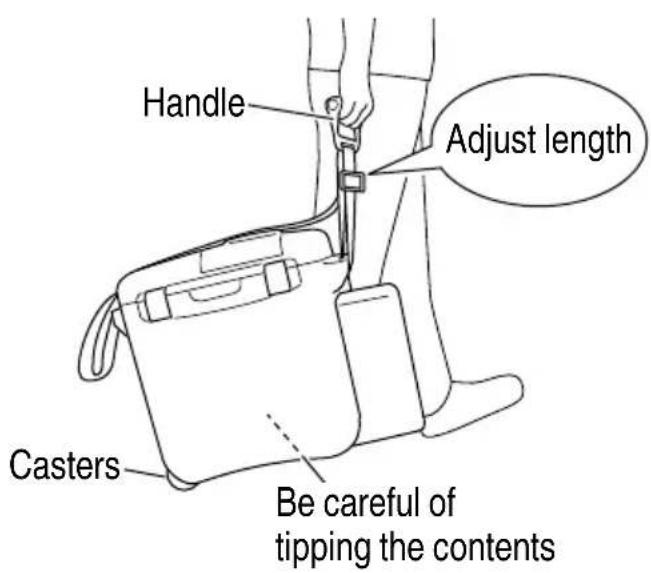
Fig. 22
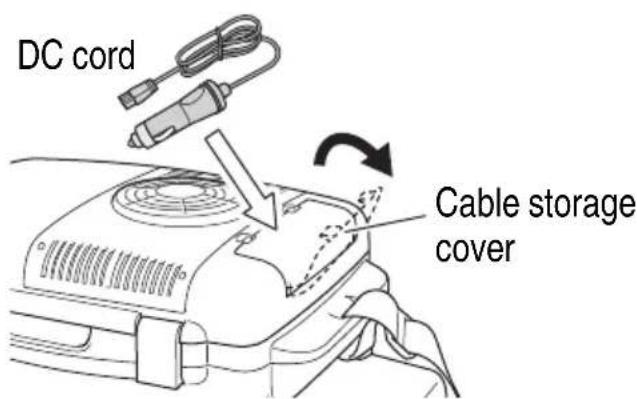
Fig. 23
NOTE
Storing Lithium-ion Batteries
Make sure the batteries have been fully charged before storing them.
Prolonged storage (3 months or more) of batteries with a low charge may result in performance deterioration, significantly reducing battery usage time or rendering the batteries incapable of holding a charge.
English
However, significantly reduced battery usage time may be recovered by repeatedly charging and using the batteries two to five times.
If the battery usage time is extremely short despite repeated charging and use, consider the batteries dead and purchase new batteries.
CAUTION
In the operation and maintenance of power tools, the safety regulations and standards prescribed in each country must be observed.
Important notice on the batteries for the HiKOKI cordless power tools
Please always use one of our designated genuine batteries. We cannot guarantee the safety and performance of our cordless power tool when used with batteries other than these designated by us, or when the battery is disassembled and modified (such as disassembly and replacement of cells or other internal parts).
TROUBLESHOOTING
Use the inspections in the table below if the tool does not operate normally. If this does not remedy the problem, consult your dealer or the HiKOKI Authorized Service Center.
- Cooling/Heating
| Symptom Possible cause Remedy | |||
| Cooling/heating function fails to operate | Battery | No remaining battery power Charge the battery. | |
| Battery not properly installed Insert battery until a click is heard. | |||
| Household power supply | Connection plug of the AC adapter is loose from the unit | Make sure that the AC adapter's connection plug is connected. | |
| DC12 V (in-Car) | Connection plug of the car power source DC cord is loose from the unit | Make sure that the DC cord's connection plug is connected. | |
| The car's engine is OFF Start the engine. | |||
| The cigarette lighter socket is blocked with ashes and dust | Remove the ashes and dust. | ||
| The power switch is OFF Turn the power switch ON. | |||
| Not enough cooling, not enough heating | Unit is set in a location exposed to direct sunlight, near an area where the temperature is high or close to a fi re | Set the unit in a location away from direct sunlight or in a shaded area where the ventilation is good. | |
| The intake/exhaust ports are blocked | Keep the intake/exhaust ports clear of any blockage. | ||
| The intake/exhaust ports are dirty Clean the intake/exhaust ports. | |||
| The unit is packed with food and drink, cutting off air circulation | Open an adequate amount of space between items. | ||
| Battery cannot be installed | Attempted to install a battery other than those stipulated (BSL3660/3626/3620/BL36200) | Use either a 14.4/18V sliding lithium-ion battery or a multi-volt battery. | |
- Charge
| Symptom Possible cause Remedy | ||
| The charge lamp does not light up when the unit is connected to a power source or a battery is installed | There is a problem with either the unit or its battery | Contact the store where you purchased this product for repairs. |
| The charge lamp rapidly blinks green, and the battery will not charge | The battery is not fully installed Insert battery until a click is heard. | |
| There is a foreign substance on the battery's connectors or terminals | Remove the foreign substance. | |
| There is something wrong with the unit or the battery | Contact the store where you purchased this product for repairs. | |
| Use time of the battery is signifi cantly short even after properly charging the batter | Battery life is expended Exchange with a new battery. | |
- Others
| Symptom Possible cause Remedy | ||
| All lamps are fl ashing | There is something wrong with the unit or the battery | Contact the store where you purchased this product for repairs. |
SELECTING ACCESSORIES
Select accessories that are suited to a specific task. For details contact HiKOKI Authorized Service Center.
natural_image
Line drawing of a quill pen in an inkwell (no text or symbols)
natural_image
Line drawing of a quill pen in an inkwell (no text or symbols)
natural_image
Line drawing of a quill pen in an inkwell (no text or symbols)服务中心
工机商业(中国)有限公司
- Cordless Cooler and Warmer BOX
- UL 18DA
- 使用说明书
- Handling instructions
- 中文
- 目次
- 关闭箱盖
- 电池充电和输出 (2 节)
- 注:
- CONTENTS
- COOLER AND WARMER BOX SAFETY WARNINGS
- WARNING
- English
- CAUTION
- CAUTION ON LITHIUM-ION BATTERY
- REGARDING LITHIUM-ION BATTERY TRANSPORTATION
- SYMBOLS
- STANDARD ACCESSORIES
- APPLICATIONS
- PRIOR TO OPERATION
- Opening and closing the cover
- Opening the cover
- Closing the cover
- Charge and output of batteries (two)
- NOTE
- HOW TO USE
- Battery installation/removal
- Battery installation
- Battery removal
- AC adaptor / DC cord installation
- Power switch/mode setting
- Storing food and drink
- Tips on product use
- CHARGING
- Regarding electric discharge in case of new batteries, etc.
- How to make the batteries perform longer.
- MAINTENANCE AND INSPECTION
- Cleaning the intake/exhaust ports
- Clean/check AC adapter and casters
- Transportation
- Storage
- Important notice on the batteries for the HiKOKI cordless power tools
- TROUBLESHOOTING
- SELECTING ACCESSORIES
Brand : HiKOKI
Model : UL 18DA
Category : Cooler