
DW-UG721W - Dishwasher SAMSUNG - Free user manual and instructions
Find the device manual for free DW-UG721W SAMSUNG in PDF.
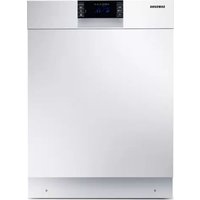


| Product Type | Built-in Dishwasher |
| Brand | Samsung |
| Model | DW-UG721W |
| Dimensions (W x D x H) | 60 x 60 x 85 cm |
| Weight | 45 kg |
| Power Supply | 220-240 V, 50 Hz |
| Energy Consumption | 0.92 kWh/cycle |
| Water Consumption | 9.5 L/cycle |
| Number of Place Settings | 14 |
| Wash Programs | Auto, Intensive, Normal, Eco, Quick, Glass, Delicate |
| Drying System | Condensation drying with heat exchanger |
| Noise Level | 44 dB |
| Control Type | Electronic touch buttons with LED display |
| Safety Features | Child lock, leak protection system, overflow protection |
| Interior Material | Stainless steel tub |
| Cutlery Basket | Third rack for cutlery |
| Adjustable Racks | Height-adjustable upper rack |
| Delay Start | Yes, up to 24 hours |
| Panel Color | White |
| Energy Efficiency Class | E (EU 2019 scale) |
| Spare Parts Availability | Manufacturer support |
Frequently Asked Questions - DW-UG721W SAMSUNG
User questions about DW-UG721W SAMSUNG
0 question about this device. Answer the ones you know or ask your own.
Ask a new question about this device
Download the instructions for your Dishwasher in PDF format for free! Find your manual DW-UG721W - SAMSUNG and take your electronic device back in hand. On this page are published all the documents necessary for the use of your device. DW-UG721W by SAMSUNG.
USER MANUAL DW-UG721W SAMSUNG
DW-SG72, DW-UG72 series
DW-UG62 series
DW-SG52 series
| 1 | ∅verste spulearm (ikke vist) | 8 | Sæbeskuff e |
| 2 | Bestikbakke (DW-SG97, DW-SG72 / DW-UG97, DW-UG92, DW-UG72)Bestikkurv (DW-SG52 / DW-UG62)(se side 19) | 9 | Beholder til afspændingsmiddel |
| 3 | Overkurv | 10 | Betjeningspanel(I lågens front: DW-SG72, DW-SG52 / DW-UG92, DW-UG72, DW-UG62) |
| 4 | ∅verste spulearm | 11 | Nederste spulearm |
| 5 | Spuledisken til den intensive zone(DW-SG97, DW-SG72 / DW-UG97, DW-UG92, DW-UG72, DW-UG62) | 12 | Afl obsslange |
| 6 | Filterkombination | 13 | Strømkabel |
| 7 | Saltbeholder | 14 | Aqua-Stop |
DW-SG72, DW-SG52 / DW-UG92, DW-UG72, DW-UG62

COMPLIANCE WITH INSTALLATION REQUIREMENTS

Using the cutlery basket (DW-SG97, DW-SG72 / DW-UG97, DW-UG92, DW-UG72)

18_ Loading your dishwasher
Using the cutlery basket (DW-SG52 / DW-UG62)
The cutlery basket has a lid, so each knife, spoon, or fork can be placed individually to prevent them from touching or discoloring.
- Place the different types of cutlery in the basket as shown.


- Place the cutlery basket in the lower basket.


USING DETERGENT
Using multi-tablets
You can also use 2-in-1, 3-in-1, or 4-in-1 multi-tablets.
- Remove the fine filter (flat, rectangular).

CLEANING THE SPRAY ARMS

- Use a pointed object, such as a toothpick, to remove food particles from the spray arm nozzles.

- Rinse thoroughly under running water.
- Reinstall the spray arms and check that they can rotate freely.

STORING THE DISHWASHER


| 1 | Suppetallerken: havregryn | 6 | Kop: te | 12 | Suppeske: havregryn |
| 2 | Middagstallerken: æg | 7 | Underkop: te | 13 | Gaff el: æg |
| 3 | Middagstallerken: kød | 8 | Glas: mælk | 14 | Kniv |
| 4 | Desserttallerken: spinat | 9 | Lille skål, mellemstor skål: Spinat | 15 | Dessertske |
| 5 | Desserttallerken: æg | 10 | Stor skål: kød | 16 | Teske |
| 11 | Oval tallerken: margarine | 17 | Serveringsbestik |
For standard test
13 place settings


| 1 | Suppetallerken: havregryn | 6 | Kop: te | 12 | Suppeske: havregryn |
| 2 | Middagstallerken: æg | 7 | Underkop: te | 13 | Gaff el: æg |
| 3 | Middagstallerken: kød | 8 | Glas: mælk | 14 | Kniv |
| 4 | Desserttallerken: spinat | 9 | Lille skål, mellemstor skål: Spinat | 15 | Dessertske |
| 5 | Desserttallerken: æg | 10 | Stor skål: kød | 16 | Teske |
| 11 | Oval tallerken: margarine | 17 | Serveringsbestik |
34. For standard test
Product overview
REGULATION (EC) No. 1059/2010
| Leverandør SAMSUNG | |||||||
| Modelnavn | DW-SG97 | DW-UG97, DW-UG92 | DW-SG72 | DW-UG72 | DW-UG62 | DW-SG52 | |
| Angivet kapacitet (kuverter) 14 14 14 14 13 | 13 | ||||||
| Energieff aktivitetsklasse A+++ A+++ A++ | A++ A++ A+ | ||||||
| ∅ko-mærket No No No No No No | |||||||
| Årligt energiforbrug, (AE C) (kWh/år) 1) | 236 23 | 7 256 266 | 262 276 | ||||
| Energiforbrug ved standardcyklus, (E t) (KWh) | 0,83 0, | 83 0,90 0, | 93 0,92 0, | 97 | |||
| Strømforbrug ved afbrudt tilstand, P o (W) | 0,45 0, | 45 0,45 0, | 45 0,45 0, | 45 | |||
| Strømforbrug ved tændt tilstand, P o (W) 3 | 3 | 3 | 3 | 3 | 3 | ||
| Årligt vandforbrug (AW C), (I) 2) | 2800 | 2884 | 2800 | 2884 | 2884 | 3360 | |
| Vandforbrug ved standardprogram, (I) | 10 10 | 3 10 10,3 | 10,3 12 | ||||
| Eff aktivitetsklasse - tørring | A | A | A | A | A | A | |
| Standardprogram 3) | Eco Eco Eco Eco Eco Eco | ||||||
| Programtid for standardcyklus | 145 145 145 145 | ||||||
| Varighed for efterladt tændt-tilstand, (T I) (min.) | 10 | 10 | 10 | 10 | 10 | 10 | |
| Luftbåren akustisk støjudsendelse (dBA re 1 pW) | 40 43 | 41 44 45 45 | |||||
| Installation | Indbygget | Yes | Yes | Yes | Yes | Yes | Yes |
| Bygget under | - | Yes | - | Yes | Yes | - | |
| Fritstående | - | - | - | - | - | - | |
DW-SG72, DW-UG72 Series
DW-UG62 Series
DW-SG52 Series
Dishwasher user manual

100%
Recycled Paper
This manual is made with 100% recycled paper.
imagine the possibilities
Thank you for purchasing this Samsung product. To receive a more complete service, please register your product at

www.samsung.com/register

Features of your new Samsung dishwasher
Your new dishwasher will change the way you feel about washing kitchenware. From its specialised features to its energy efficiency, your new Samsung dishwasher ensures that washing your kitchenware is as easy and enjoyable as possible.
1. A Sleek Digital Touch Panel (DW-SG97 / DW-UG97)
Your new Samsung dishwasher comes with a sleek control panel that incorporates digital touch sensors for greater ease-of-use.
2. 3-Tier Filtration System
Your new Samsung dishwasher's 3-tier filtration system filters every last bit of food from your dishes, cups, cooking utensils and cutlery. The advanced filtration system thoroughly filters out and collects all food remains so that you can rest assured knowing that your dishes will come out spotless.
Samsung dishwashers have the most powerful filtration systems in their class.
3. Condensing Drying Technology (DW-SG72, DW-SG52 / DW-UG72, DW-UG62)
Your new Samsung dishwasher utilizes the latent thermal energy from the final rinse cycle to dry the load. This not only saves energy, but also prevents steam from escaping the dishwasher and injuring you and your loved ones.
4. SDP Drying Technology (DW-SG97 / DW-UG97, DW-UG92)
Your new Samsung dishwasher utilizes Super Desiccant Polymer (SDP) technology to dry your dishes following the last rinse cycle. This not only saves energy, but also prevents steam from escaping the dishwasher and injuring you and your loved ones.
This user manual contains important information concerning the use and care of your new Samsung dishwasher. Refer to the manual for detailed instructions on using the control panel and for tips on how to get the best out of the latest features and technologies of your new dishwasher. The “Programme Chart” section contains a summarised table of the available programmes, and the “Troubleshooting” section contains information on solving common problems.
2_ Features of your new Samsung dishwasher
Safety instructions
Congratulations on your new Samsung dishwasher. This manual contains important information on the installation, use and care of your appliance. Please take time to read this manual to take full advantage of your dishwasher's many benefits and features.
WHAT YOU NEED TO KNOW ABOUT SAFETY INSTRUCTIONS
Please read this manual thoroughly to ensure that you know how to safely and efficiently operate the extensive features and functions of your new appliance and retain it at a safe place near the appliance for your future reference. Use this appliance only for its intended purpose as described in this user manual.
Warning and important safety instructions in this manual do not cover all possible conditions and situations that may occur. It is your responsibility to use common sense, caution, and care when installing, maintaining, and operating your dishwasher.
Because the following operating instructions cover various models, the characteristics of your dishwasher may differ slightly from those described in this manual and not all warning signs may be applicable. If you have any questions or concerns, contact your nearest service center or find help and information online at www.samsung.com.
IMPORTANT SAFETY SYMBOLS AND PRECAUTIONS
Important safety symbols
 WARNING WARNING | Hazards or unsafe practices that may result in severe personal injury and/or property damage. |
 CAUTION CAUTION | Hazards or unsafe practices that may result in personal injury and/or property damage. |
 CAUTION CAUTION | To reduce the risk of fi re, explosion, electric shock, or personal injury when using your dishwasher, follow these basic safety precautions: |
 | Do NOT attempt. |
 | Do NOT disassemble. |
 | Do NOT touch. |
 | Follow directions explicitly. |
 | Unplug the power plug from the wall socket. |
 | Make sure the appliance is grounded to prevent electric shock. |
 | Call the service centre for help. |
 | Note |
These warning symbols are here to prevent injury to you and others.
Please follow them explicitly.
Keep these instructions in a safe place and ensure that new users are familiar with the content. Pass them on to any future owner.
Safety instructions
Safety instructions
Important safety precautions

This appliance conforms to current safety requirements. Inappropriate use can, however, lead to personal injury and damage to property.
To avoid the risk of accidents and damage to the appliance, please read these instructions carefully before using it for the first time. They contain important information on its safety, use and maintenance.

As with any equipment using electricity and moving parts, potential hazards exist. To safely operate this appliance, become familiar with its operation and exercise care when using it.

Do not let children (or pets) play on or in your dishwasher. The dishwasher door does not open easily from the inside, and children may be seriously injured if trapped inside.

Children should be supervised to ensure that they do not play with the appliance.

If the plug (power supply cord) is damaged, it must be replaced by the manufacturer or its service agent or a similarly qualified person in order to avoid a hazard.

This appliance must be positioned to be accessible to the power plug after installation, the water supply tabs and the drain pipes.
INSTRUCTION ABOUT THE WEEE MARK
Correct Disposal of This Product (Waste Electrical & Electronic Equipment)
(Applicable in countries with separate collection systems)
This marking on the product, accessories or literature indicates that the product and its electronic accessories (e.g. charger, headset, USB cable) should not be disposed of with other household waste at the end of their working life. To prevent possible harm to the environment or human

health from uncontrolled waste disposal, please separate these items from other types of waste and recycle them responsibly to promote the sustainable reuse of material resources.
Household users should contact either the retailer where they purchased this product, or their local government office, for details of where and how they can take these items for environmentally safe recycling.
Business users should contact their supplier and check the terms and conditions of the purchase contract. This product and its electronic accessories should not be mixed with other commercial wastes for disposal.
- Safety instructions
INSTRUCTIONS WHEN USING YOUR DISHWASHER

This dishwasher is not designed for commercial use. It is intended for use in domestic households and in similar working and residential environments such as:
- Shops, offices and showrooms, and by residents in establishments such as:
- Hostels and guest houses.

It must only be used as a domestic appliance as specified in this user manual, for cleaning domestic crockery and cutlery.
Any other usage is not supported by the manufacturer and could be dangerous.

The manufacturer cannot be held liable for damage resulting from incorrect or improper use or operation.

Do not use solvents in the dishwasher. Danger of explosion.

Do not inhale or ingest dishwasher detergent. Dishwasher detergents contain irritant or corrosive ingredients which can cause burning in the nose, mouth and throat if swallowed, or inhibit breathing. Consult a doctor immediately if detergent has been swallowed or inhaled.

Avoid leaving the door open unnecessarily, as you could trip over it.

Do not sit or lean on the opened door. This could cause the dishwasher to tip and be damaged, and you could get injured.

Only use detergent and rinse aid formulated for domestic dishwashers. Do not use washing-up liquid. Do not use the strong acid cleaning agent.

Do not fill the rinse aid reservoir with powder or liquid detergent. This will cause serious damage to the reservoir.

Inadvertently filling the salt reservoir with powder or liquid dishwasher detergent will damage the water softener. Make sure you have picked up the correct packet of dishwasher salt before filling the salt reservoir.

Please only use special coarse grained dishwasher salt for reactivation, as other salts may contain insoluble additives which can impair the functioning of the softener.

In an appliance with a cutlery basket (depending on model), cutlery is cleaned and dried more if placed in the basket with the handles downwards. However, to avoid the risk of injury, place knives and forks etc. with the handles upwards.

Plastic items which cannot withstand being washed in hot water, such as disposable plastic containers, or plastic cutlery and crockery should not be cleaned in the dishwasher. The high temperatures in the dishwasher may cause them to melt or lose shape.

On models with Delay Start function, make sure that the dispenser is dry before adding detergent. Wipe dry if necessary. Detergent will clog if poured into a damp dispenser and may not be thoroughly dispersed.

Knives and other utensils with sharp points must be loaded in the basket with their points down or placed in a horizontal position.
INSTRUCTIONS FOR PROTECTING YOUR CHILDREN

This appliance is not a toy! To avoid the risk of injury, keep children well away and do not allow them to play in or around the dishwasher or to use the controls. They will not understand the potential dangers posed by it. They should be supervised whenever you are working in the kitchen.
There is also a danger that children playing might shut themselves in the dishwasher.
Safety instructions
Safety instructions

This appliance can be used by children aged from 8 years and above and persons with reduced physical, sensory or mental capabilities or lack of experience and knowledge if they have been given supervision or instruction concerning use of the appliance in a safe way and understand the hazards involved. Children shall not play with the appliance.
Cleaning and user maintenance shall not be made by children without supervision.

Older children may only use the dishwasher when its operation has been clearly explained to them and they are able to use it safely, recognizing the dangers of misuse.

KEEP CHILDREN AWAY FROM DETERGENTS! Dishwasher detergents contain irritant and corrosive ingredients which can cause burning in the mouth, nose, and throat if swallowed, or inhibit breathing. Keep children away from the dishwasher when the door is open.
There could still be detergent residues in the cabinet.
Consult a doctor immediately if your child has swallowed or inhaled detergent.
INSTRUCTIONS FOR INSTALLING YOUR DISHWASHER

Before setting up the appliance, check it for any externally visible damage. Under no circumstances should you use a damaged appliance. A damaged appliance could be dangerous.

The dishwasher must only be plugged into the electricity supply via a suitable switched socket. The electrical socket must be easily accessible after the dishwasher is installed so that it can be disconnected from the electricity supply at any time. (Refer to the “Checking the accessories” section on page 11).

There must be no electrical sockets behind the dishwasher. Danger of overheating and fire risk if the dishwasher were to be pushed up against a plug.

The dishwasher must not be installed under a hob. The high radiant temperatures which are sometimes generated by a hob could damage the dishwasher. For the same reason it should not be installed next to open fires or other appliances which give off heat, such as heaters etc.

Do not connect the dishwasher to the mains supply until it has been fully installed and any adjustment has been made to the door springs.

Before connecting the appliance, check that the connection data on the data plate (voltage and connected load) match the mains electricity supply. If in any doubt, consult a qualified electrician.

The electrical safety of this appliance can only be guaranteed when continuity is complete between it and an effective grounding system. It is most important that this basic safety requirement is present and regularly tested and where there is any doubt the electrical system in the house should be checked by a qualified electrician.
The manufacturer cannot be held liable for the consequences of an inadequate grounding system (e.g. electric shock).

Do not connect the appliance to the mains electricity supply by a multi-socket unit or an extension lead. These do not guarantee the required safety of the appliance (e.g. danger of overheating).

This appliance may only be installed in mobile installations such as ships if a risk assessment of the installation has been carried out by a suitably qualified engineer.

The plastic housing of the water connection contains an electrical component. The housing must not be submerged in water.

There are electrical wires in the hose of Aqua-Stop. Never cut the water inlet hose, even if it is too long.

Installation, maintenance and repairs may only be carried out by a suitably qualified and competent person in strict accordance with current national and local safety regulations. Repairs and other work by unqualified persons can be dangerous. The manufacturer cannot be held liable for unauthorised work.
6_ Safety instructions

The integrated waterproof system offers protection from water damage, provided the following conditions are met:
- The dishwasher is correctly installed and plumbed in.
- The dishwasher is properly maintained and parts are replaced where it can be seen that this is necessary.
- The stopcock has been turned off when the appliance is not used for a longer period of time (e.g. during holidays).
- The waterproof system will work even if the appliance is switched off. However, the appliance must remain connected to the electricity supply.

A damaged appliance can be dangerous. If the dishwasher gets damaged, switch it off at the mains and call your dealer or the service department.

Unauthorised repairs could result in unforeseen dangers for the user, for which the manufacturer cannot accept liability. Repairs should only be undertaken by an approved service technician.

Faulty components must only be replaced by original spare parts. Only when these parts are fitted can the safety of the appliance can be guaranteed.

Always disconnect the dishwasher from the electrical supply for maintenance work (switch off at the wall socket and remove the plug).

If the connection cable is damaged it must be replaced with a special cable, available from the manufacturer. For safety reasons, this must only be fitted by the service department or an authorised service technician.

In countries where there are areas which may be subject to infestation by cockroaches or other vermin, pay particular attention to keeping the appliance and its surroundings in a clean condition at all times. Any damage which may be caused by cockroaches or other vermin will not be covered by the guarantee.

In the event of a fault or for cleaning purposes, the appliance is only completely isolated from the electricity supply when:
- it is switched off at the wall socket and the plug is withdrawn, or
- it is switched off at the mains, or the mains fuse is disconnected, or
- the screw-out fuse is removed (in countries where this is applicable).

Do not make any alterations to the appliance, unless authorised to do so by the manufacturer.

Never open the casing/housing of the appliance.
Tampering with electrical connections or components and mechanical parts is highly dangerous and can cause operational faults or electric shock.

While the appliance is under guarantee, repairs should only be undertaken by a service technician authorised by the manufacturer. Otherwise the guarantee will be invalidated.

When installing the product, make sure there is space at the top, left, right and back of the product to ensure proper ventilation.
If there is insufficient space between the product and the sink, it may damage the sink or allow mold to grow.

Make sure that your dishwasher's hardness level setting is correct for your area. (Refer to the “Setting the water hardness level” section on page 13)
Safety instructions
7
Contents
SETTING UP YOUR DISHWASHER
9 Checking the parts and control panel
11 Meeting the installation requirements
BEFORE USING THE PRODUCT FOR THE FIRST TIME
13
13 Using the water softening system
14 Using the Sound On/Off function
14 Using dishwasher salt
15 Using rinse aid
LOADING YOUR DISHWASHER
16
16 Dishwashing guidelines
16 Using the baskets
20 Using detergent
OPERATING YOUR DISHWASHER
22
22 Basic instructions
22 Using the programme selection buttons
23 Using the Delay Start function
23 Using the digital display
24 Using additional functions
CLEANING AND MAINTAINING YOUR DISHWASHER
25
25 Cleaning the exterior
25 Cleaning the wash cabinet
25 Cleaning the filters
26 Cleaning the spray arms
27 Storing your dishwasher
8_ Contents
TROUBLESHOOTING AND INFORMATION CODES
28
28 Check these points if your dishwasher...
30 Information codes
PROGRAMME CHART
31
31 Programme chart
APPENDIX
32
32 Disposing the dishwasher and helping the environment
32 Declaration of conformity
32 Specifications
FOR STANDARD TEST
33
PRODUCT FICHE
35
Setting up your dishwasher
Be sure to have your technician follow these instructions closely to ensure the safe and normal operation of your new dishwasher.
CHECKING THE PARTS AND CONTROL PANEL
When your dishwasher has been unpacked, make sure that you've received all the parts shown below. If your dishwasher was damaged during shipping, or if you do not have all the parts, contact Samsung Customer Service or your Samsung dealer.

Keep the packaging out of the reach of children to ensure their safety, after unpacking your dishwasher.

| 1 | Top spray arm (not shown) | 8 | Detergent dispenser |
| 2 | Cutlery tray (DW-SG97, DW-SG72 / DW-UG97, DW-UG92, DW-UG72)Cutlery basket (DW-SG52 / DW-UG62)(see page 19) | 9 | Rinse aid reservoir |
| 3 | Upper basket | 10 | Control panel(In front of the door : DW-SG72, DW-SG52 / DW-UG92, DW-UG72, DW-UG62) |
| 4 | Upper spray arm | 11 | Lower spray arm |
| 5 | Intensive zone spray disk(DW-SG97, DW-SG72 / DW-UG97, DW-UG92, DW-UG72, DW-UG62) | 12 | Drain hose |
| 6 | Filter combination | 13 | Power cord |
| 7 | Salt reservoir | 14 | Aqua-Stop |
Setting up your dishwasher
Setting up your dishwasher
DW-SG97, DW-UG97


DW-SG72, DW-SG52 / DW-UG92, DW-UG72, DW-UG62

10_ Setting up your dishwasher
| 1 | Power button | 9 | Wash indicator |
| 2 | Programme selection buttons | 10 | Rinse indicator |
| 3 | Half Load button | 11 | Dry indicator |
| 4 | Delay Start button | 12 | Intensive Zone button (DW-SG97, DW-SG72 / DW-UG97, DW-UG92, DW-UG72, DW-UG62)Prewash button (DW-SG52) |
| 5 | Child Lock indicator | 13 | Sanitize/Child Lock button |
| 6 | Salt Refi II indicator | 14 | Multi Tabs button |
| 7 | Rinse Refi II indicator | 15 | Start/Reset button |
| 8 | Delay Start indicator |
Checking the accessories
- User manual
- Warranty card
- Funnel (Refer to the "Filling the salt reservoir" section on page 14)
- Energy label • Installation manual
- Installation kit
- Kick plate (DW-UG97, DW-UG92, DW-UG72, DW-UG62)
- Felt lower (DW-UG97, DW-UG92, DW-UG72, DW-UG62)
MEETING THE INSTALLATION REQUIREMENTS
Power supply and grounding

Do not use an extension cord.
Only use the power cord that came with the dishwasher.
When preparing for the installation, ensure that your power supply offers:
- An AC 220-240 V / 50 Hz fuse or a circuit breaker.
- An individual branch circuit serving your dishwasher.
Your dishwasher must be grounded. If your dishwasher malfunctions or breaks down, grounding will reduce the risk of electric shock by providing a path of least resistance for the electric current.
Your dishwasher comes with a power cord and a grounded, three-prong plug that can be inserted into a properly installed and grounded outlet.

Do not connect the ground wire to a plastic plumbing line, gas line, or hot water pipe.
Improperly connecting the grounding conductor can result in electric shock.
Check with a qualified electrician or technician if you are unsure whether your dishwasher has been properly grounded.

Do not modify the plug provided with the dishwasher. If it does not fit the outlet, have a proper outlet installed by a qualified electrician.
Setting up your dishwasher _11
Setting up your dishwasher
Water supply

Do not drink the water from inside the dishwasher.
- The dishwasher may be connected to a cold or hot water supply, max 60°C.
- A stopcock with a 3/4" male thread must be provided on tap.
- The water pressure must be between 0.05MPa and 0.8MPa. If the water pressure is too low, the water supply valve may not operate properly, causing the dishwasher to turn off. If the water pressure is too high, a pressure reducer valve must be fitted.

You can reduce the risk of leaks and water damage by:
- Making water taps easily accessible.
- Turning off the taps when the dishwasher is not in use. Periodically checking the fittings for leaks.
Using Aqua-Stop
The Aqua-Stop was invented as the perfect leakage protection system.
It is attached to the water supply hose and automatically cuts off the water flow in the event of damage to the hose.

Aqua-Stop is an electrical component.
• Take care that you do not damage the Aqua-Stop. - Do not twist or bend the water supply hose connected to the Aqua-Stop.

If the Aqua-Stop has been damaged, shut off the water taps and pull out the power plug right away.
Once these steps have been taken, contact Samsung Customer Service or a qualified technician.
Drain
If you are using a drain exclusively for the dishwasher, connect the drain hose to a drain that is between 30cm to 70cm off the ground.
Connecting the drain hose to a drain more than 80cm off the ground can result in the water in the dishwasher flowing back or draining incompletely.
Flooring
For best performance, your dishwasher must be installed on a solid, even floor.
Wooden floors may need to be reinforced to minimize vibrations. Carpeting and soft tiles are contributing factors to vibrations and may cause your dishwasher to move slightly while operating.

Never install your dishwasher on a platform or poorly supported structure.
Ambient temperature
Do not install your dishwasher in an area exposed to freezing temperatures. Your dishwasher always retains some water in the water valve, pump and hose and if the water freezes in the machine or hoses, it may damage the appliance and its components.
Test run
Make sure that you install your dishwasher correctly by running the Quick or Prewash cycle after the installation is complete.
12_ Setting up your dishwasher
Before using the product for the first time
USING THE WATER SOFTENING SYSTEM
Better washing results require the use of soft water.
Hard water contains impurities that can hinder the washing performance.
You will need to soften the water if the water supply is harder than 1.0 mmol/l (6 °d – German scale). To do this, you need:
- Dishwasher salt.
- Configuration of the water hardness level according to your area.
For more information about the water hardness level in your area, contact your local water department.
If the hardness level of your water supply is unsteady, set the dishwasher to the highest measurement. For example, if the water hardness reading ranges from 6.7 mmol/l to 9.0 mmol/l, set the dishwasher to 9.0 mmol/l.
The dishwasher's default water hardness level setting is 3 (4.0-5.5 mmol/l). If this setting matches the water hardness level in your area, there is no need to change it.
If you need to change the water hardness level, follow the instructions below.
Setting the water hardness level
- While holding down the Delay Start ⏻ and Half Load 1/2 buttons, press the Power ⏻ button to access the setting for the water hardness level.
- Once you enter the setting for the water hardness, the current hardness level setting is displayed.
- Use the Half Load 1/2 button to select the water hardness level from Level 0 to Level 5. (Refer to the table below for the water hardness level setting in your area.)
If the water hardness level in your area is very low, you do not need to use dishwasher salt. However, you should set the water hardness setting for the dishwasher to 0.
- To exit the water hardness setting, press the Power ⏻ button.
Water hardness level chart
The water hardness is measured using German degrees (°dH), French degrees (°TH), or mmol/l (International unit for the water hardness).
| Level | Water hardness | Regeneration softening/ washing cycle(ECO program) | Salt injection | |||
| °dH °TH mmol/l Range | ||||||
| 0 | <6 | <10 | <1.0 | No recycle | No | No |
| 1 | 6~14 | 10~25 | 1~2.5 | 1/8 | Yes | Yes |
| 2 | 14~23 | 25~40 | 2.5~4.0 | 1/5 | Yes | Yes |
| 3 | 23~31 | 40~55 | 4.0~5.5 | 1/3 | Yes | Yes |
| 4 | 31~40 | 55~70 | 5.5~7.0 | 1/2 | Yes | Yes |
| 5 | >40 | >70 | >7.0 | 1/1 | Yes | Yes |
Before using the product for the first time
USING THE SOUND ON/OFF FUNCTION
- While holding down the Delay Start ⏻ and Half Load 1/2 buttons, press the Power ⏻ button to access the setting to activate/deactivate the Sound On/Off function.
- Press the Sanitize 🔒 button to activate or deactivate the Sound On/Off function.
- "Rinse Refi II ✦" indicator turns on to indicate that Sound On function has been activated.
- "Rinse Refi II *" indicator turns off to indicate that Sound Off function has been activated.
Even though Sound Off function has been activated, the error sound plays when an error occurs.
- To exit the Sound On/Off setting, press the Power ⏻ button.
USING DISHWASHER SALT
Filling the salt reservoir
In order to use soft water, you need to fill the salt reservoir with dishwasher salt.

Use dishwasher salt only.
Do not use any other type of salt or solvent. This may damage the salt reservoir and the water softening system.

Always fill the salt reservoir just before running one of the complete washing programmes to prevent corrosion due to the excess salt or salty water.
- Open the door.
- Open the salt reservoir cap by rotating it counterclockwise.

- Fill the salt reservoir with water (only required when switching on the appliance for the first time).
- Add the dishwasher salt.

The salt reservoir's capacity is about 1 kg. Do not overfill the salt reservoir.
- Remove excess salt from around the salt reservoir opening and cap seal.

If the excess salt is not removed, the salt reservoir cap may not close properly and allow salt water to flow out, with a negative impact on performance.

- Rotate the salt reservoir cap clockwise until it is completely shut.

It is recommended that if a lot of salt or salty water is spilled inside the tub, run the Prewash to clean the inside of the tub. Any remaining salt grains or salty water can cause corrosion.

Depending on the size of the salt grains, it may take a while for the salt to dissolve and the "Salt Refill" indicator to turn off.

- Before using the product for the first time
Checking the Salt Refill indicator
If the "Salt Refill" indicator is lit, add dishwasher salt as described above.

A lit "Salt Refill" indicator means that there remains salt for three more cycles from the first switched on.
USING RINSE AID
Filling the rinse aid reservoir
As soon as the rinse aid refill indicator lights up on the control panel, refill with rinse aid. Your dishwasher has been designed to use liquid rinse aid only.
Using a powdered rinse aid will clog up the reservoir opening and cause the dishwasher to malfunction.
Rinse aid improves the drying performance of the dishwasher.

Do not add regular detergent into the rinse aid reservoir.
- Remove the rinse aid reservoir cap by rotating it counterclockwise.

- Fill the rinse aid reservoir with rinse aid.

Use the viewing port when filling the rinse aid.

Do not fill the reservoir above the rinse aid level as the rinse aid may overflow during the wash cycle.

- Turn the rinse aid setting to a rinse aid amount between 1 and 6. The higher the level, the more rinse aid will be used.
If you are unable to rotate the rinse aid leveller with ease, try using a coin.
- Close the rinse aid reservoir cap by rotating it clockwise.

Loading your dishwasher
DISHWASHING GUIDELINES
Follow these simple guidelines to get the best results and save energy.
Before loading dishes

Remove food remains such as bones, fruit seeds, etc. and waste such as toothpicks, paper napkins, etc. from your dishes. Food remains and waste can damage your dishes, make noise and even result in a product malfunction.

Do not wash items that are covered with ash, sand, wax, lubricating grease or paint. These materials will damage the dishwasher and ash does not dissolve and will distribute in hole interior.
Items not suitable for the dishwasher
• Copper, brass, tin, ivory and aluminium items or with an adhesive • Non-heat resistant plastics - Craft items, antiques, valuable vases and decorative glassware • Colours painted over a glaze - Wooden cutlery and crockery or items with wooden parts - Delicate glassware, or glassware containing lead crystal

Silverware that has been in contact with foods containing sulphur can become discoloured. These include egg yolks, onions, mayonnaise, mustard, fish, fish brine and marinades.
- Clouding may occur on glasses after frequent washing. Do not wash delicate glassware, or glassware containing lead crystal in the dishwasher.

Aluminium components (e.g. grease filters) must not be cleaned with caustic, alkaline cleaning agents. These may damage the material, or in extreme cases, cause a severe chemical reaction. Use only items e.g. glasses, porcelain and cutlery which the manufacturer declare as dishwasher-proof.
USING THE BASKETS
Handling the baskets

Do not use excessive force to slide the baskets in or out. This may damage the baskets and the items inside the baskets.
16 Loading your dishwasher
Using the upper basket
Use the upper basket for mainly small, light or delicate items such as cups, saucers, glasses, dessert bowls, etc.
Adjusting the upper basket
You can adjust the height of the upper basket for additional clearance for placing large items in either the upper or lower basket.

Remove all items from the cup shelves before adjusting the height. Failing to do so may damage the items and the basket.
- Pull out the upper basket.
- To raise the upper basket: Hold the upper basket on both sides and gently pull it up as far as possible.

- To lower the upper basket: Hold the upper basket on both sides, and lift it up for a short step. And then push it down gently.


Whenever you adjust the height, make sure that the upper spray arm will not become caught on the dishes loaded in the lower basket as it spins.

Make sure that the upper basket is level. If the upper basket is raised on one side, it will prevent the door from closing fully and cause problems with the dishwasher operation.

Do not raise the upper basket on one side only. Doing so will prevent the door from closing fully and consequently cause problems with the dishwasher's operation.
Using the lower basket
Use the lower basket for large plates and heavy items such as serving platters, pans, pots, bowls, etc. Small items such as saucers can also be placed in the lower basket.

Do not place delicate glassware in the lower basket.
Loading your dishwasher _17
Loading your dishwasher
Using the hinged spikes
Foldable hinged spikes allow you to make room in the lower basket for large items.
- Flatten the hinged spikes by pressing them down.

Using the cutlery tray (DW-SG97, DW-SG72 / DW-UG97, DW-UG92, DW-UG72)

The cutlery tray inserts can be detached from the cutlery tray.
For example, you can remove one side of the inserts to make room for larger items in the upper basket.
- Arrange the cutlery in the cutlery tray inserts as shown.

- Attach the inserts to the cutlery tray.

Placing large items such as cake cutters in the tray can result in interference with the top spray arm.

If spoon handles do not fit between the holders, then place them the other way round.

- Remove the cutlery tray inserts from the cutlery tray after the end of the programme.

18_ Loading your dishwasher
Using the cutlery basket (DW-SG52 / DW-UG62)
The cutlery basket has a cover so that each knife, spoon, or fork can be placed on individual stands to prevent chipping and discolouration.
- Place the different types of cutlery in the baskets as shown.

For safety purposes, place knives in the knife rack.


- Place the cutlery basket in the lower basket.

If you are washing a small amount of cutlery only, you may separate the cutlery basket and use only one side.


Do not place long items inside the cutlery basket. The handle may be too long and interfere with the upper spray arm.

The cutlery basket can be used with the cover opened.
- Raise the cover and attach it to the handle as shown in the diagram.

To separate the cutlery basket into two baskets, pull one side of the cutlery basket in the direction of the arrow in the figure while holding the other side.

Loading your dishwasher _19
Loading your dishwasher
Using the cup shelves
You can place cups, small items, and long cooking utensils on the cup shelves. This is also a very convenient way to wash wine glasses. Place wine glasses on the pegs of the cup shelves. The cup shelves can also be folded back when not in use.

Do not adjust the level of the upper basket with the glass supports propped up. This will make it impossible to push in the upper basket.

USING DETERGENT
All dishwasher programmes, except for Prewash, require detergent in the detergent compartment. Add the correct amount of detergent for the selected programme to ensure the best performance.

Use dishwasher detergent only. Regular detergent produces too much foam, which may decrease the dishwasher's performance or cause it to malfunction.

Do not breathe in the fumes of dishwasher detergent or swallow it. Dishwasher detergent contains irritants and caustic chemicals that can induce respiratory conditions. If you have inhaled the fumes of detergent or swallowed it, seek medical attention immediately.

Keep dishwasher detergent out of the reach of children.
Filling the detergent dispenser
- Open the detergent dispenser flap by pushing the detergent dispenser release catch.

The flap is always opened at the end of a dishwashing cycle.

- Add the recommended amount of detergent into the main wash detergent compartment.
- Close the flap by pushing it to the left and then pressing it down.

20_ Loading your dishwasher
- For better cleaning results, especially if you have very dirty items, add a small amount (about 8 g) of detergent on the door. That will act in the prewash phase.

Using multi tabs
You can also use 2-in-1, 3-in-1, or 4-in-1 multi tabs.
Multi tabs, depending on the type, combine dishwasher detergent with rinse aid and/or dishwasher salt.

Refer to the manufacturer's instructions before using a multi tab product and verify that it is suitable for the water hardness level in your area.
- Push the detergent dispenser's release catch and open the detergent dispenser flap.
- Add the multi tab into the main wash detergent compartment and close the flap.
- Push the Multi Tabs button on the control panel to activate the Multi Tabs function.

Operating your dishwasher
BASIC INSTRUCTIONS
- Open the door.
- Load the baskets.

Do not overload the baskets.
- Make sure the spray arms are not obstructed.
- Add the appropriate amount of dishwasher detergent into the dispenser and on the door (if required).
- Push the Power ⏻ button to turn on the dishwasher.
- Select a programme appropriate for the type of load using the PROG. button. (Refer to the "Using the programme selection buttons" section on page 22.) The indicator for the selected programme illuminates.
- Select any additional functions.
This turns on the corresponding indicators.
- Push the Start/Reset ◆ button and close the door to start.
- When the wash cycle is completed, the dishwasher sounds a chime. The power is automatically turned off after 10 minutes.
- Unload the baskets.

Unload the lower basket, the upper basket, and the cutlery tray (if loaded) in this order.
This will prevent water from the upper basket dropping onto items in the lower basket.
USING THE PROGRAMME SELECTION BUTTONS
Select a programme appropriate for the type of load and soiling using the PROG. button.
| Symbol Programme Description | ||
 | Intensive 70 °C Heavily soiled items include pots and pans | |
| Auto | Auto 40 ~ 65 °C | Lightly to heavily soiled daily using items, automatic detection of the amount of soils |
 | Express 65 °C Normally soiled daily using items, with short cycle time | |
| ECO | ECO 45 °C | Normally soiled daily using items, with reduced energy and water consumptions |
 | Quick 50 °C Lightly soiled with very short cycle time | |
 | Delicate 40 °C Lightly soiled delicate items | |
 | Prewash | Cold rinse for remove only dirt on dishes stored for a long time or soaking dishes which are dried up before other programme running. |

Using the Prewash function (DW-SG52)
Press the Prewash button to use the Prewash function.
22_ Operating your dishwasher
Interrupting a programme
If you open the door while a programme is in progress, the programme is temporarily halted. To resume the programme, simply close the door.

The water in the dishwasher may be extremely hot.
Only open the door when absolutely necessary and exercise extreme caution.
Changing a programme
If a programme has already started and you want to change it, follow the instructions below:

If the detergent dispenser flap has been opened, do not change the programme.
- Open the door to interrupt the programme.
- Push and hold the Start/Reset ◆ button for 3 seconds to reset the programme.

- Once the programme is reset, the dishwasher will perform a 1 minute drain. You will be able to change the programme once the draining ends.
- To skip the draining process, press the Power ⏻ button to turn the dishwasher off and then press the button again to turn it back on. You will have to select additional functions again.
- Change the programme and push the Start/Reset ◊ button.
- Close the door to start the new programme.
USING THE DELAY START FUNCTION
You can set the dishwasher to start a programme at a later time by choosing a delay of between 1 and 24 hours (in 1 hour increments).
- Open the door and load the baskets.
- Add the appropriate amount of dishwasher detergent into the dispenser and on the door (if required).
- Push the Power ⏻ button to turn on the dishwasher.
- Select the programme and functions.
- Set the delay time using the Delay Start ⏻ button.
- Push the Start/Reset ◇ button. The Delay Start ◎ indicator lights up, and the clock begins to count down.
- To cancel the Delay Start function, press and hold the Start/Reset button for 3 seconds to reset the programme.
USING THE DIGITAL DISPLAY
The digital display shows the remaining wash time, status information (Delay Start, Salt Refill, Rinse Refill, and Child Lock) and error codes.
If an error occurs while the product is operating, the code associated with the error is displayed and a beeping sound will be played. Refer to the “Information codes” section on page 30.
Time display
The time display area indicates the time remaining until the end of the selected programme in hours and minutes.
The time remaining may vary even with the same programme. This can be due to differences in water temperature, the reactivation cycle, and the size and state of the load.
Operating your dishwasher
23
Operating your dishwasher
Salt Refill indicator
If the "Salt Refill S" indicator is lit, it means the dishwasher is low on dishwasher salt and needs to be refilled.
To refill the salt reservoir, refer to the "Filling the salt reservoir" section on page 14.
Rinse Refill indicator
If the "Rinse Refill" indicator is lit, it means the dishwasher is low on rinse aid and requires a refill. To refill the rinse aid reservoir, refer to the "Filling the rinse aid reservoir" section on page 15.
USING ADDITIONAL FUNCTIONS
Intensive Zone (DW-SG97, DW-SG72 / DW-UG97, DW-UG92, DW-UG72, DW-UG62)
Use this function for hard-to-clean, heavily soiled dishes, pots and pans, and dishes with heavy oil. Locate items above the Intensive zone spray disk (Refer to the "Checking the parts and control panel" section on page 9) and press the Intensive Zone button.
Half Load
For small amounts of loading items, use either the upper or lower basket only to save energy. Press the Half Load 1/2 button to select the upper or lower basket.
Multi Tabs
If you wish to use a 2-in-1, 3-in-1, or 4-in-1 multi tablet detergent, select a programme and then push the Multi Tabs button. (The Multi Tabs function is available with all programmes except Prewash.) When you select the Multi Tabs function, the "Rinse Refill" indicator turns off.
Sanitize
Push the Sanitize button for the best possible hygiene in your dishwasher. At the final rinse it heats up to 70 °C and holds this temperature for several minutes. This function is available with all programmes except Prewash and Delicate.
Child Lock
The Child Lock function locks all buttons so that the selected programme cannot be changed.
Activating/Deactivating
To activate or deactivate the Child Lock function, push and hold the Sanitize button for 3 seconds. The "Child Lock" indicator turns on to indicate that the Child Lock function has been activated. Activating the Child Lock function locks all buttons.
24. Operating your dishwasher
Cleaning and maintaining your dishwasher
Keeping your dishwasher clean improves its performance, reduces unnecessary repairs, and prolongs its life.
CLEANING THE EXTERIOR
It's best to clean spills on the exterior of your dishwasher as they occur.
Use a soft, damp piece of cloth to gently wipe away spills and dust from the control panel.

Do not use benzene, wax, thinner, chlorine bleach, or alcohol. These chemicals may discolour the inner walls of the dishwasher and cause stains.

Do not clean the dishwasher by sprinkling water over it. In particular, protect the electrical components from coming into contact with water.

If your dishwasher has a stainless steel door panel, it can be cleaned with a stainless steel cleaner for Home Appliances or similar product using a clean, soft cloth.
CLEANING THE WASH CABINET
If there are limescale or grease deposits in the cabinet, remove these by damp cloth or run a programme which has highest rinsing temperature without any loading items after filling detergent dispenser with dishwasher detergent.

Do not remove the front seal on the container. Removing the seal can cause the dishwasher to leak or malfunction.
CLEANING THE FILTERS
- Turn off the dishwasher.
- Rotate the filter insert counterclockwise to unfasten and then detach the filter insert.

- Remove the fine filter (flat rectangular).

Cleaning and maintaining your dishwasher
25
Cleaning and maintaining your dishwasher
- Disassemble the coarse filter and micro filter.

- Remove any dirt or other remains from the filters and rinse them under running water.

- Reassemble the filters in the reverse order of the disassembly, replace the filter insert, and rotate clockwise to the close arrow.

If the filter insert is not closed properly, the performance will be decreased.

CLEANING THE SPRAY ARMS
If the dishwasher continues to perform poorly or the jets on the spray arms seem clogged, clean the spray arms. When removing the spray arms, take care as they break easily.

Turn off the dishwasher before removing the spray arms.
Cleaning the spray arms
- Remove the cutlery tray insert. (DW-SG97, DW-SG72 / DW-UG97, DW-UG92, DW-UG72) (Refer to the "Using the baskets" section on page 16.)
- Rotate the handle on the middle of the top spray arm in the counterclockwise direction and detach the arm.

- Unfasten and remove the nut holding the upper spray arm in place and detach the arm.

26_ Cleaning and maintaining your dishwasher
- Remove the lower basket.
- Firmly pull the lower spray arm upward at once to remove it.

- Use a pointed object such as a toothpick to push out food particles in the spray arm's jets.

- Rinse thoroughly under running water.
- Reattach the spray arms and check that they rotate freely.

STORING YOUR DISHWASHER
If you need to store your dishwasher for an extended period of time, first drain the unit fully and then disconnect the water hose.
Your dishwasher can become damaged if water is left in the hoses and internal components before storing it. After draining and disconnecting the dishwasher, be sure to turn off the water supply valve and circuit breaker.
Troubleshooting and information codes
CHECK THESE POINTS IF YOUR DISHWASHER...
| PROBLEM POSSIBLE CAUSE SOLUTION | ||
| Will not start. | The door is not closed completely. The Start/Reset button is not selected. | Check that the door is latched and closed completely. Press the Start/Reset button before closing the door. |
| No programme is selected. Select a programme. | ||
| The power cord is not connected. Connect the power cord. | ||
| There is no water supplied. | Check that the water supply valve is open. | |
| The control panel is locked. | Deactivate the Child Lock function to unlock the control panel. | |
| Has a bad odour. | There is water left over from the last cycle. | Add detergent without loading dishes and run the Auto Auto programme to clean the dishwasher. |
| Has water remaining after the programme has finished. | The drain hose is folded or clogged. Straighten and unclog the hose. | |
| Has food particles remaining on the dishes. | An inappropriate programme was been selected. | Select a programme according to the soil level of the dishes as directed in this manual. |
| The filter is contaminated or not correctly fasten. | Clean the filter and make sure the filters are fitted properly. | |
| No dishwasher detergent or not enough detergent is being used. | Use an automatic dishwasher detergent or use more detergent. | |
| The pressure of the supplied water is low. | The water supply pressure must be between 0.05 MPa and 0.8 MPa. | |
| Spray arm jets are clogged. Clean the spray arms. | ||
| The dishes are improperly loaded. | Rearrange the dishes so they have good water access and do not interfere with spray arm and dispenser operation. | |
| The water is too hard. | Check salt refi ll indicator and refi ll dishwasher salt. | |
| Does not dry dishes well. | There is no rinse aid in the dispenser or not enough rinse aid was used. | Check the dispenser and add rinse aid. Check rinse aid setting. |
| Multi taps were used without selecting the Multi Tap function. | Select the Multi Tap function or use rinse aid. | |
| Glasses and cups with concave bottoms hold water. This water may spill onto other items when you are unloading. | After fi nishing the cycle, empty the lower rack fi rst and then the upper, this will avoid water dripping from the upper rack onto the dishes in the lower rack. | |
28 Troubleshooting and information codes
| PROBLEM POSSIBLE CAUSE SOLUTION | ||
| Is too noisy. | The dishwasher beeps when the dispenser cover is opened and during the initial stage of draining the pump operation. | This is a normal operation. |
| The dishwasher is not level. Ensure that the dishwasher is level. | ||
| There is a ‘chopping’ sound because an arm is bumping against the dishes. | Rearrange the dishes. | |
| Leaves a yellow or brown fi lm on cups or dishes | This can occurs from coffee and tea soils. | Use programme with higher temperature. |
| Does not have any indicators lit. | The power cord is not connected. Connect the power cord. | |
| Does not have smoothly rotating arms. | The arms are clogged with food particles. | Clean the arms. |
| Leaves a white coating on cutlery or crockery after cleaning. | Hard water was used. | Check the salt fi ll indicator and softener setting is correct according to the water hardness of your area. Check salt reservoir cap is correctly fitted. |
| Starts by itself. (DW- SG97) | The dishwasher has not been turned on for more than two days. | This is an automated drying cycle that keeps the SDP clean and is not a malfunction. (If you wish to stop the cycle, press the Power button.) |
Troubleshooting and information codes
INFORMATION CODES
Information codes are displayed to help you better understand what is occurring with your dishwasher. If any of the codes below occur, you should select the Reset option and follow the respective instruction.
| CODE SYMBOL MEANING SOLUTION | ||
| bE2 Button key error | Check any button is pressed more than 30 sec. | |
| 3E, AE Internal communication error Turn off and restart | the appliance. | |
| 5E Drain error | Check whether the drain hose is clogged or folded. | |
| 4E Water supply error | Make sure the water supply valve open. | |
| 4E1 Hot water supply | Make sure the temperature of supplied water is not higher than 80 °C. | |
| HE, HE1 Heater error | Turn off and unplug the power plug, close water supply valve and contact service center. | |
| tE Temperature sensor error | ||
| 1E Low water level error | ||
| PE Flow changer error Turn off and restart the appliance. | ||
| LE Leakage error | Turn off and unplug the power plug, close water supply valve and contact service center. | |
| OE Over water level error | ||

For more information about the error codes, or if you are unable to resolve the problem using the suggested solution, refer to the back of this manual and contact your Samsung Customer Service centre.

Troubleshooting and information codes
Programme chart
PROGRAMME CHART
| Soil level Intensive 70 Auto | 40-65 Express | 65 Eco 45 Quick 50 Delicate 40 Prewash | |||||
| Amount of food remains | Heavy | Very light to Heavy | Normal Normal Light Light Very light | ||||
| Program sequence | Prewash ▶Mainwash ▶1st rinse ▶2nd rinse ▶Hot rinse ▶Dry ▶End | Prewash ▶Mainwash ▶1st rinse ▶(2nd rinse) ▶Hot rinse ▶Dry ▶End | Prewash ▶Mainwash ▶1st rinse ▶Hot rinse ▶Dry ▶End | Prewash ▶Mainwash ▶1st rinse ▶Hot rinse ▶Dry ▶End | Mainwash ▶1st rinse ▶Hot rinse ▶End | Prewash ▶Mainwash ▶1st rinse ▶Hot rinse ▶Dry ▶End | Cold rinse ▶End |
| Water consumption (L) | 17,3 | 9.1~18.5 | 11.6 | 10(DW-SG97, DW-SG72)10.3(DW-UG97, DW-UG92, DW-UG72, DW-UG62)12(DW-SG52) | 10.5 | 10.1 | 3.7 |
| Energy consumption (kWh) | 1.5 | 0.8-1.6 | 1.2 | 0.83(DW-SG97)0.90(DW-SG72)0.97(DW-SG52)0.83(DW-UG97, DW-UG92)0.93(DW-UG72)0.92(DW-UG62) | 1.0 | 0.7 | - |

The wash time varies depending on the options you add, and on the pressure and temperature of the supplied water.
Programme chart _31
Appendix
DISPOSING THE DISHWASHER AND HELPING THE ENVIRONMENT
Your dishwasher is manufactured from recyclable materials. If you decide to dispose of it, please observe your local waste disposal regulations. Cut off the power cord so that the appliance cannot be connected to a power source.
Remove the door so that animals and children cannot get trapped inside the appliance.
Do not exceed the detergent quantities recommended in the detergent manufacturers' instructions.
DECLARATION OF CONFORMITY
This product complies with the requirements of these directives:
EMC-Directive 2004/108/EC
Low Voltage Directive 2006/95/EC
SPECIFICATIONS
| MODEL | DW-SG97, DW-SG72, DW-SG52 / DW-UG97, DW-UG92, DW-UG72, DW-UG62 | ||
| Power | AC 220 ~ 240 V / 50 Hz | ||
| Type Semi built-in / Built-under | |||
| Water pressure | 0.05 - 0.8 MPa | ||
| Wash capacity (place settings) | 14 (DW-SG97, DW-SG72 / DW-UG97, DW-UG92, DW-UG72), 13 (DW-SG52 / DW-UG62) | ||
| Rated power | 2000 ~ 2300 W | ||
| Dimension | 598 mm (W) X 817 mm (H) X 575 mm (D) | ||
| Weight | Model | DW-SG97, DW-SG72 / DW-UG97, DW-UG92, DW-UG72 | DW-SG52 / DW-UG62 |
| Unpacked | 46.0 kg | 44.5 kg | |
| Packed | 49.0 kg | 47.5 kg | |
32_ Appendix
For standard test

The diagrams below show the proper way to load the baskets based on the European Standards (EN50242).
- Washing capacity:4 (DW-SG97, DW-SG72 / DW-UG97, DW-UG92, DW-UG72) / 13 (DW-SG52 / DW-UG62) place settings • Test standard: EN50242/IEC60436
- Position of upper basket: Low
- Programme: Eco • Additional options: None
- Rinse aid setting: 6 • Dosage of the standard detergent
- 14 PS : 7 g + 28 g
- 13 PS : 6 g + 26.5 g
- For the arrangement of the items, refer Figure A, B, C.
14 place settings


< Figure A-1: Lower basket> < Figure B-1: Upper basket> < Figure C-1: Cutlery tray>
| 1 | Soup plate : Oat fl ake | 6 | Cup : Tea | 12 | Soup spoon : Oat fl ake |
| 2 | Dinner plate : Egg | 7 | Saucer : Tea | 13 | Fork : Egg |
| 3 | Dinner plate : Meat | 8 | Glass : Milk | 14 | Knife |
| 4 | Dessert dish : Spinach | 9 | Small bowl, Middle bowl : Spinash | 15 | Dessert spoon |
| 5 | Dessert dish : Egg | 10 | Big bowl : Meat | 16 | Tea spoon |
| 11 | Oval plate : Margarine | 17 | Serving cutlery |
For standard test _33
For standard test
13 place settings


| 1 | Soup plate : Oat fl ake | 6 | Cup : Tea | 12 | Soup spoon : Oat fl ake |
| 2 | Dinner plate : Egg | 7 | Saucer : Tea | 13 | Fork : Egg |
| 3 | Dinner plate : Meat | 8 | Glass : Milk | 14 | Knife |
| 4 | Dessert dish : Spinach | 9 | Small bowl, Middle bowl : Spinash | 15 | Dessert spoon |
| 5 | Dessert dish : Egg | 10 | Big bowl : Meat | 16 | Tea spoon |
| 11 | Oval plate : Margarine | 17 | Serving cutlery |
34 For standard test
Product fi che
REGULATION (EU) No 1059/2010
| Supplier SAMSUNG | |||||||
| Model name | DW-SG97 | DW-UG97, DW-UG92 | DW-SG72 | DW-UG72 | DW-UG62 | DW-SG52 | |
| Rated Capacity (place setting) 14 14 14 14 | 13 13 | ||||||
| Energy efficiency class A+++ A+++ A++ A++ A++ A+ | |||||||
| Eco label | No | No | No | No | No | No | |
| Annual energy consumption, (AE C) (kWh/year) 1) | 236 | 237 | 256 | 266 | 262 | 276 | |
| Standard cycle energy consumption, (E t) (Kwh) | 0.83 | 0.83 | 0.90 | 0.93 | 0.92 | 0.97 | |
| Power consumption off mode, P o (W) | 0.45 | 0.45 | 0.45 | 0.45 | 0.45 | 0.45 | |
| Power consumption left-on mode, P I (W) | 3 | 3 | 3 | 3 | 3 | 3 | |
| Annual water consumption (AW C), (L) 2) | 2800 | 2884 | 2800 | 2884 | 2884 | 3360 | |
| Standard programme water consumption, (L) | 10 10.3 | 10 10.3 | 10.3 | 12 | |||
| Drying efficiency class | A | A | A | A | A | A | |
| Standard programme 3) | Eco | Eco | Eco | Eco | Eco | Eco | |
| Programme time for the standard cycle | 145 | 145 | 145 | 145 | 145 | 160 | |
| Duration of the left-on mode, (T l) (min) | 10 | 10 | 10 | 10 | 10 | 10 | |
| Airborne acoustical noise emissions (dBA re 1pW) | 40 43 | 41 44 45 45 | |||||
| Installation | Built-in | Yes | Yes | Yes | Yes | Yes | Yes |
| Built-under | - | Yes | - | Yes | Yes | - | |
| Free standing | - | - | - | - | - | - | |
1) based on 280 standard cleaning cycles using cold water fill and the consumption of the low power modes. Actual energy consumption will depend on how the appliance is used.
2) based on 280 standard cleaning cycles. Actual water consumption will depend on how the appliance is used.
3) 'Standard programme' is the standard cleaning cycle which is suitable to clean normally soiled tableware, and that it is the most efficient programme in terms of combined energy and water consumption.
Note
Note

QUESTIONS OR COMMENTS?
| TA ENILN | ||
| AUSTRIA | 0810 - SAMSUNG(7267864, € 0.07/min) | www.samsung.com |
| BELGIUM 02-201-24-18 | www.samsung.com/be (Dutch)www.samsung.com/be_fr (French) | |
| CZECH | 800 - SAMSUNG (800-726786) | www.samsung.com |
| DENMARK | 70 70 19 70 | www.samsung.com |
| FINLAND | 030-6227 515 | www.samsung.com |
| FRANCE | 01 48 63 00 00 | www.samsung.com/fr |
| GERMANY | 0180 5 SAMSUNG bzw.0180 5 7267864* | www.samsung.com |
| HUNGARY | 06-80-SAMSUNG (726-7864) | www.samsung.com |
| ITALIA | 800-SAMSUNG (726-7864) | www.samsung.com |
| LUXEMBURG | 261 03 710 | www.samsung.com |
| NETHERLANDS | 0900-SAMSUNG (0900-7267864)(€ 0,10/Min) | www.samsung.com |
| NORWAY | 815 56480 | www.samsung.com |
| POLAND | 0 801-1 SAMSUNG (172-678) *lub +48 22 607-93-33 ** | www.samsung.com/pl |
| PORTUGAL | 808 20-SAMSUNG (808 20 7267) | www.samsung.com |
| SLOVAKIA | 0800 - SAMSUNG (0800-726 786) | www.samsung.com |
| SPAIN | 902 - 1 - SAMSUNG (902 172 678) | www.samsung.com |
| SWEDEN | 0771 726 7864 (SAMSUNG) | www.samsung.com |
| SWITZERLAND | 0848 - SAMSUNG(7267864, CHF 0.08/min) | www.samsung.com/ch (German)www.samsung.com/ch_fr (French) |
| U.K | 0330 SAMSUNG (7267864) | www.samsung.com |
| AUSTRALIA | 1300 362 603 | www.samsung.com |
| NEW ZEALAND | 0800 SAMSUNG (0800 726 786) | www.samsung.com |
| TURKEY | 444 77 11 | www.samsung.com |
| SOUTH AFRICA | 0860-SAMSUNG(726-7864 ) | www.samsung.com |
| U.A.E | 800-SAMSUNG (726-7864) | www.samsung.com |
| IRAN | 021-8255 | www.samsun rgo |
| NIARHAB 02-08 | www.samsung.com/ae (English)www.samsung.com/ae_ar (Arabic) | |
| JORDAN | 800-22273065777444 | www.samsung.com/Levant(English) |
Code No.: DD68-00135C-04_EN

CLEANING AND CODES
28
DW-SG72, DW-SG52 / DW-UG92, DW-UG72, DW-UG62


USE OF DETERGENTS
CLEANING THE SPRAY ARMS

STORING THE DISHWASHER


QUESTIONS AND COMMENTS
| MAA SOITA NUMEROON TAI VIERAILE OSOITTEESSA | ||
| AUSTRIA | 0810 - SAMSUNG(7267864, € 0.07/min) | www.samsung.com |
| BELGIUM 02-201-24-18 | www.samsung.com/be (Dutch)www.samsung.com/be_fr (French) | |
| CZECH 800 - SAMSUNG (800-726786) www.samsung.com | ||
| DENMARK | 70 70 19 70 | www.samsung.com |
| FINLAND | 030-6227 515 | www.samsung.com |
| FRANCE | 01 48 63 00 00 | www.samsung.com/fr |
| GERMANY | 0180 5 SAMSUNG bzw.0180 5 7267864* | www.samsung.com |
| HUNGARY | 06-80-SAMSUNG (726-7864) | www.samsung.com |
| ITALIA | 800-SAMSUNG (726-7864) | www.samsung.com |
| LUXEMBURG | 261 03 710 | www.samsung.com |
| NETHERLANDS | 0900-SAMSUNG (0900-7267864)(€ 0,10/Min) | www.samsung.com |
| NORWAY | 815 56480 | www.samsung.com |
| POLAND | 0 801-1SAMSUNG (172-678) *lub +48 22 607-93-33 ** | www.samsung.com/pl |
| PORTUGAL | 808 20-SAMSUNG (808 20 7267) www.samsung.com | |
| SLOVAKIA | 0800 - SAMSUNG (0800-726 786) | www.samsung.com |
| SPAIN | 902 - 1 - SAMSUNG (902 172 678) | www.samsung.com |
| SWEDEN | 0771 726 7864 (SAMSUNG) | www.samsung.com |
| SWITZERLAND | 0848 - SAMSUNG(7267864, CHF 0.08/min) | www.samsung.com/ch (German)www.samsung.com/ch_fr (French) |
| U.K | 0330 SAMSUNG (7267864) | www.samsung.com |
| AUSTRALIA | 1300 362 603 | www.samsung.com |
| NEW ZEALAND | 0800 SAMSUNG (0800 726 786) www.samsung.com | |
| TURKEY | 444 77 11 | www.samsung.com |
| SOUTH AFRICA | 0860-SAMSUNG(726-7864 ) | www.samsung.com |
| U.A.E | 800-SAMSUNG (726-7864) | www.samsung.com |
| IRAN | 021-8255 | www.samsung.com |
| BAHRAIN | 8000-4726 | www.samsung.com/ae (English)www.samsung.com/ae_ar (Arabic) |
| JORDAN | 800-22273065777444 | www.samsung.com/Levant(English) |
Code number: DD68-00135C-04_EN

DW-SG97, DW-UG97 series
DW-UG92 series
DW-SG72, DW-UG72 series
DW-UG62 series
DW-SG52 series
| 1 | ∅verste sprayarm (vises ikke) | 8 | Oppvaskmiddeldispenser |
| 2 | Bestikkbrett (DW-SG97, DW-SG72 / DW-UG97, DW-UG92, DW-UG72)Bestikkurv (DW-SG52 / DW-UG62)(se side 19.) | 9 | Skyllemiddelbeholder |
| 3 | ∅vre kurv | 10 | Kontrollpanel(Foran på døren: DW-SG72, DW-SG52 / DW-UG92, DW-UG72, DW-UG62) |
| 4 | ∅vre sprayarm | 11 | Nedre sprayarm |
| 5 | Intensiv sonesprayplate(DW-SG97, DW-SG72 / DW-UG97, DW-UG92, DW-UG72, DW-UG62) | 12 | Avløpsslange |
| 6 | Filterkombinasjon | 13 | Strømledning |
| 7 | Saltbeholder | 14 | Vannstopper |
DW-SG72, DW-SG52 / DW-UG92, DW-UG72, DW-UG62

10_ Configuring the dishwasher
| 1 | Power-knapp (På/Av) | 9 | Vask-indikator |
| 2 | Programvalgknapper | 10 | Skylling-indikator |
| 3 | Halvfull-knapp | 11 | Tørking-indikator |
| 4 | Utsatt start-knapp | 12 | Intensiv sonesprayplate (DW-SG97, DW-SG72 / DW-UG97, DW-UG92, DW-UG72, DW-UG62) Forvask-knapp (DW-SG52) |
| 5 | Barnesikringsindikator | 13 | Rense-/Barnesikringsknapp |
| 6 | Saltpåfyllingsindikator | 14 | Multitabletter-knapp |
| 7 | Skyllemiddelpåfyllingsindikator | 15 | Start/Reset-knapp (Start/Tilbakestill) |
| 8 | Utsatt start-indikator |
Checking the accessories
- User manual
- Warranty card
- Funnel (See the section "Filling the salt container" on page 14.)
- Energy label • Installation manual
- Installation kit
- Kickplate (DW-UG97, DW-UG92, DW-UG72, DW-UG62)
- Lower filter (DW-UG97, DW-UG92, DW-UG72, DW-UG62)
MEETING THE INSTALLATION REQUIREMENTS
Setting the water hardness level
Table of water hardness levels
- Fill the rinse aid dispenser with rinse aid.

- To lower the upper rack: Hold the upper rack on both sides and lift it up a short step. Then push it down gently.


Using the cutlery tray (DW-SG97, DW-SG72 / DW-UG97, DW-UG92, DW-UG72)


- Place the cutlery basket in the lower rack.


USING DETERGENT
Using multi-tablets
CLEANING THE SPRAY ARMS

STORING THE DISHWASHER

If you need to store the dishwasher for a longer period, first empty the unit completely and then disconnect the water hose.


< Figure A-1: Lower rack>
| 1 | Suppetallerken: Frokostblanding | 6 | Kopp: Te | 12 | Suppeskje: Frokostblanding |
| 2 | Middagstallerken: Egg | 7 | Skål: Te | 13 | Gaff el: Egg |
| 3 | Middagstallerken: Kjøtt | 8 | Glass: Melk | 14 | Kniv |
| 4 | Desserttallerken: Spinat | 9 | Liten bolle, mellomstor bolle: Spinat | 15 | Dessertskje |
| 5 | Desserttallerken: Egg | 10 | Stor bolle: Kjøtt | 16 | Teskje |
| 11 | Oval tallerken: Margarin | 17 | Serveringsbestikk |
For standard test _33
For standard test
13 place settings


<Upper basket>
| 1 | Suppetallerken: Frokostblanding | 6 | Kopp: Te | 12 | Suppeskje: Frokostblanding |
| 2 | Middagstallerken: Egg | 7 | Skål: Te | 13 | Gaff el: Egg |
| 3 | Middagstallerken: Kjøtt | 8 | Glass: Melk | 14 | Kniv |
| 4 | Desserttallerken: Spinat | 9 | Liten bolle, mellomstor bolle: Spinat | 15 | Dessertskje |
| 5 | Desserttallerken: Egg | 10 | Stor bolle: Kjøtt | 16 | Teskje |
| 11 | Oval tallerken: Margarin | 17 | Serveringsbestikk |
34 For standard test
Product card
REGULATION (EU) No. 1059/2010
| Leverandør SAMSUNG | |||||||
| Modellnavn | DW-SG97 | DW-UG97, DW-UG92 | DW-SG72 | DW-UG72 | DW-UG62 | DW-SG52 | |
| Nominell kapasitet (plassinnstilling) 14 14 | 14 14 13 | 13 | |||||
| Energibesparelsesklasse A+++ A+++ A++ | A++ A++ | A+ | |||||
| ∅komerket No No No No No | |||||||
| Årlig energiforbruk (AE C) (kWt/år) 1) | 236 237 | 256 266 | 262 276 | ||||
| Energiforbruk standardprogram (E t) (kWt) | 0,83 0,83 | 0,90 0,93 | 0,92 0,97 | ||||
| Strømforbruk i avslått modus, P o (W) | 0,45 | 0,45 | 0,45 | 0,45 | 0,45 | 0,45 | |
| Strømforbruk i påslått modus, P I (W) | 3 | 3 | 3 | 3 | 3 | 3 | |
| Årlig vannforbruk (AW C), (L) 2) | 2800 | 2884 | 2800 | 2884 | 2884 | 3360 | |
| Vannforbruk ved standardprogram, (I) | 10 10 | 3 10 10,3 | 10,3 12 | ||||
| Tørkeeffektivitetsklasse | A | A | A | A | A | A | |
| Standardprogram 3) | Eco Eco | Eco Eco | Eco Eco | ||||
| Programtid for standardprogram | 145 145 | 145 145 | 145 160 | ||||
| Varighet for påslått modus (T I) (min) | 10 | 10 | 10 | 10 | 10 | 10 | |
| Luftbårne utslipp av akustisk støy (dBA re 1pW) | 40 43 | 41 44 45 | 45 | ||||
| Installasjon | Innebygd | Yes | Yes | Yes | Yes | Yes | Yes |
| Underbygd | - | Yes | - | Yes | Yes | - | |
| Frittstående | - | - | - | - | - | - | |
DW-SG72, DW-UG72 series
DW-UG62 series
DW-SG52 series
11 Meet the installation requirements
BEFORE USING THE PRODUCT FOR THE FIRST TIME
13
| 1 | Övre sprayarm (visas ej) | 8 | Diskmedelsbehållare |
| 2 | Besticksbricka (DW-SG97, DW-SG72 / DW-UG97, DW-UG92, DW-UG72) Bestickskorg (DW-SG52 / DW-UG62) (se sidan 19.) | 9 | Sköljglansbehållare |
| 3 | Övre korg | 10 | Kontrollpanel(På dörrens framsida: DW-SG72, DW-SG52 / DW-UG92, DW-UG72, DW-UG62) |
| 4 | Övre sprayarm | 11 | Nedre sprayarm |
| 5 | Intensivzon(DW-SG97, DW-SG72 / DW-UG97, DW-UG92, DW-UG72, DW-UG62) | 12 | Utloppsslang |
| 6 | Filterkombination | 13 | Strömkabel |
| 7 | Saltbehållare | 14 | Aqua-Stop |
DW-SG72, DW-SG52 / DW-UG92, DW-UG72, DW-UG62
10_ Install the dishwasher
MEET THE INSTALLATION REQUIREMENTS

Using the cutlery tray (DW-SG97, DW-SG72 / DW-UG97, DW-UG92, DW-UG72)


- Place the cutlery basket in the lower basket.


USING DETERGENT
USING THE PROGRAM SELECTION BUTTONS
CLEANING THE SPRAY ARMS

STORING THE DISHWASHER


| 1 | Sopptallrik: Havregryn | 6 | Kopp: Te | 12 | Soppsked: Havregryn |
| 2 | Middagstallrik: Ägg | 7 | Tefat: Te | 13 | Gaff el: Ägg |
| 3 | Middagstallrik: Kött | 8 | Glas: Mjölk | 14 | Kniv |
| 4 | Desserttallrik: Spenat | 9 | Liten skål, mellanstor skål: Spenat | 15 | Dessertsked |
| 5 | Desserttallrik: Ägg | 10 | Stor skål: Kött | 16 | Tesked |
| 11 | Oval tallrik: Margarin | 17 | Serveringsfat |


<Upper basket>
| 1 | Sopptallrik: Havregryn | 6 | Kopp: Te | 12 | Soppsked: Havregryn |
| 2 | Middagstallrik: Ägg | 7 | Tefat: Te | 13 | Gaff el: Ägg |
| 3 | Middagstallrik: Kött | 8 | Glas: Mjölk | 14 | Kniv |
| 4 | Desserttallrik: Spenat | 9 | Liten skål, mellanstor skål: Spenat | 15 | Dessertsked |
| 5 | Desserttallrik: Ägg | 10 | Stor skål: Kött | 16 | Tesked |
| 11 | Oval tallrik: Margarin | 17 | Serveringsfat |
- COMPLIANCE WITH INSTALLATION REQUIREMENTS
- USING THE CUTLERY BASKET (DW-SG97, DW-SG72 / DW-UG97, DW-UG92, DW-UG72)
- USING THE CUTLERY BASKET (DW-SG52 / DW-UG62)
- USING DETERGENT
- USING MULTI-TABLETS
- CLEANING THE SPRAY ARMS
- STORING THE DISHWASHER
- FOR STANDARD TEST
- PRODUCT OVERVIEW
- DISHWASHER USER MANUAL
- IMAGINE THE POSSIBILITIES
- FEATURES OF YOUR NEW SAMSUNG DISHWASHER
- A SLEEK DIGITAL TOUCH PANEL (DW-SG97 / DW-UG97)
- TIER FILTRATION SYSTEM
- CONDENSING DRYING TECHNOLOGY (DW-SG72, DW-SG52 / DW-UG72, DW-UG62)
- SDP DRYING TECHNOLOGY (DW-SG97 / DW-UG97, DW-UG92)
- SAFETY INSTRUCTIONS
- WHAT YOU NEED TO KNOW ABOUT SAFETY INSTRUCTIONS
- IMPORTANT SAFETY SYMBOLS AND PRECAUTIONS
- IMPORTANT SAFETY PRECAUTIONS
- INSTRUCTION ABOUT THE WEEE MARK
- CORRECT DISPOSAL OF THIS PRODUCT (WASTE ELECTRICAL & ELECTRONIC EQUIPMENT)
- (APPLICABLE IN COUNTRIES WITH SEPARATE COLLECTION SYSTEMS)
- INSTRUCTIONS WHEN USING YOUR DISHWASHER
- INSTRUCTIONS FOR PROTECTING YOUR CHILDREN
- INSTRUCTIONS FOR INSTALLING YOUR DISHWASHER
- CONTENTS
- SETTING UP YOUR DISHWASHER
- BEFORE USING THE PRODUCT FOR THE FIRST TIME
- LOADING YOUR DISHWASHER
- OPERATING YOUR DISHWASHER
- CLEANING AND MAINTAINING YOUR DISHWASHER
- TROUBLESHOOTING AND INFORMATION CODES
- PROGRAMME CHART
- APPENDIX
- PRODUCT FICHE
- CHECKING THE PARTS AND CONTROL PANEL
- CHECKING THE ACCESSORIES
- MEETING THE INSTALLATION REQUIREMENTS
- POWER SUPPLY AND GROUNDING
- WATER SUPPLY
- USING AQUA-STOP
- DRAIN
- FLOORING
- AMBIENT TEMPERATURE
- TEST RUN
- USING THE WATER SOFTENING SYSTEM
- SETTING THE WATER HARDNESS LEVEL
- WATER HARDNESS LEVEL CHART
- USING THE SOUND ON/OFF FUNCTION
- USING DISHWASHER SALT
- FILLING THE SALT RESERVOIR
- CHECKING THE SALT REFILL INDICATOR
- USING RINSE AID
- FILLING THE RINSE AID RESERVOIR
- DISHWASHING GUIDELINES
- BEFORE LOADING DISHES
- ITEMS NOT SUITABLE FOR THE DISHWASHER
- USING THE BASKETS
- HANDLING THE BASKETS
- USING THE UPPER BASKET
- ADJUSTING THE UPPER BASKET
- USING THE LOWER BASKET
- USING THE HINGED SPIKES
- USING THE CUTLERY TRAY (DW-SG97, DW-SG72 / DW-UG97, DW-UG92, DW-UG72)
- USING THE CUP SHELVES
- FILLING THE DETERGENT DISPENSER
- USING MULTI TABS
- BASIC INSTRUCTIONS
- USING THE PROGRAMME SELECTION BUTTONS
- INTERRUPTING A PROGRAMME
- CHANGING A PROGRAMME
- USING THE DELAY START FUNCTION
- USING THE DIGITAL DISPLAY
- TIME DISPLAY
- SALT REFILL INDICATOR
- RINSE REFILL INDICATOR
- USING ADDITIONAL FUNCTIONS
- INTENSIVE ZONE (DW-SG97, DW-SG72 / DW-UG97, DW-UG92, DW-UG72, DW-UG62)
- HALF LOAD
- MULTI TABS
- SANITIZE
- CHILD LOCK
- ACTIVATING/DEACTIVATING
- CLEANING THE EXTERIOR
- CLEANING THE WASH CABINET
- CLEANING THE FILTERS
- STORING YOUR DISHWASHER
- INFORMATION CODES
- DISPOSING THE DISHWASHER AND HELPING THE ENVIRONMENT
- DECLARATION OF CONFORMITY
- PLACE SETTINGS
- PRODUCT FI CHE
- NOTE
- CLEANING AND CODES
- USE OF DETERGENTS
- TABLE OF WATER HARDNESS LEVELS
- PRODUCT CARD
- MEET THE INSTALLATION REQUIREMENTS
- USING THE PROGRAM SELECTION BUTTONS
Brand : SAMSUNG
Model : DW-UG721W
Category : Dishwasher