PENTAX K30 - Digital SLR Camera

K30 - Digital SLR Camera PENTAX - Free user manual and instructions

Find the device manual for free K30 PENTAX in PDF.

📄 328 pages English EN Download 💬 AI Question 13 questions ⚙️ Specs
Notice PENTAX K30 - page 324
View the manual : Français FR English EN
Pick your language and provide your email: we'll send you a specifically translated version.
SensorCMOS APS-C 23.7 x 15.7 mm
Effective resolution16.28 megapixels
Maximum image format4928 x 3264 pixels
ISO sensitivity100 - 12800 (expandable to 25600)
Shutter speed1/6000 s to 30 s + Bulb
Digital videoFull HD 1920 x 1080 at 30 fps (H.264)
Burst rate6 fps
Image stabilizationSensor shift (Shake Reduction)
Autofocus11 points (AF-S, AF-C, AF-A, Manual)
Optical viewfinder100% coverage, x0.92 magnification
LCD screen3 inches, 921,000 dots
Weather sealing81 seals, water and dust resistant down to -10°C
Lens mountPentax KAF (K bayonet)
BatteryLi-ion D-LI109
Memory supportSD / SDHC / SDXC
File formatsJPEG, RAW (PEF, DNG)

Frequently Asked Questions - K30 PENTAX

Why is the PENTAX K-30 described as "weather-sealed"?
The K-30 is protected by 81 sealing parts that make it resistant to water splashes, dust, and temperatures down to -10°C. Note: this protection is fully effective only with a weather-sealed lens, marked WR (Weather Resistant).
Which lenses are compatible with the PENTAX K-30?
The K-30 uses the Pentax KAF mount (K bayonet), compatible with all K-mount lenses produced since 1975. The DA, DA L, FA, and A series work on this body. To benefit from weather sealing, choose a WR-marked lens.
What is the ISO range of the K-30 and can it be extended?
The native ISO range extends from 100 to 12800. It can be extended up to 25600 via the custom settings menu, at the cost of more visible noise at high sensitivities.
Can the K-30 record videos in Full HD?
Yes, the K-30 records in Full HD 1920 x 1080 pixels at 30 fps in H.264 format. The Shake Reduction stabilization by sensor shift remains active during video recording.
How does the K-30's Shake Reduction image stabilization work?
The Shake Reduction (SR) stabilization works by physically shifting the CMOS sensor. It compensates for micro-blurs due to camera shake and works with all lenses mounted on the body, without needing a stabilized lens.
Which memory card should be used for the PENTAX K-30?
The K-30 accepts SD, SDHC, and SDXC formats. For continuous shooting or Full HD video recording, use a card with a class 10 or U1 minimum to avoid interruptions due to insufficient write speed.
The K-30's autofocus is slow or inaccurate, what should I do?
Ensure the AF mode is suitable for the subject: AF-S for stationary subjects, AF-C for moving subjects. In low light, the central focus point is more sensitive. Clean the electrical contacts between the lens and body with a dry cloth. Ensure the lens has a compatible AF motor.
The D-LI109 battery drains quickly, how can it be optimized?
The typical battery life is about 480 shots per charge (CIPA standard). To extend battery life: reduce the LCD screen brightness, disable Wi-Fi or GPS accessories, and use the optical viewfinder rather than the screen. Only use original or certified compatible D-LI109 batteries.
How to save photos in RAW format on the K-30?
In the "Shooting" menu, set the image quality to RAW (Pentax native PEF format) or RAW + Fine to simultaneously obtain a JPEG. The DNG format is also available for broader software compatibility.
Does the K-30 have built-in GPS?
No, the K-30 does not have built-in GPS. However, it is compatible with the external Pentax O-GPS1 module, which attaches to the hot shoe and enables automatic geotagging of photos with GPS coordinates.
How to reset the PENTAX K-30 in case of a malfunction?
For a quick reset, simultaneously press and hold the Fn and INFO buttons for a few seconds. For a full reset, access the "Setup" menu and then the factory reset option.
What is the maximum burst rate of the K-30?
The K-30 achieves 6 frames per second in continuous burst mode in JPEG. In RAW, the effective rate is reduced by the buffer capacity. Using a fast memory card (UHS-I) improves buffer clearing between series.

User questions about K30 PENTAX

1 question about this device. Answer the ones you know or ask your own.

Ask a new question about this device

The email remains private: it is only used to notify you if someone responds to your question.

How to take photos in RAW format with the PENTAX K30?
Frequently Asked Questions - 23/11/2025
Response Notice-Facile

To take photos in RAW format with your PENTAX K30 digital SLR camera, follow these simple steps:

Steps to activate RAW format

  1. Turn on the camera: Power on your PENTAX K30 by turning the power switch.
  2. Access the main menu: Press the MENU button located on the back of the camera.
  3. Open image quality settings: Navigate through the menu using the directional arrows until you find the Image Quality or Recording Format option.
  4. Select RAW format: Choose RAW to save only in RAW, or RAW + JPEG if you want to have a JPEG copy in addition to the RAW file.
  5. Confirm your choice: Press the OK or SET button to validate the selection.
  6. Check the format: On the LCD screen, an indicator should confirm that RAW format is activated.
  7. Take your photos: You can now take pictures normally, the images will be saved in RAW format.

RAW format retains all the raw data captured by the sensor, offering greater flexibility for retouching and editing images compared to JPEG. Make sure you have a memory card with enough space, as RAW files are larger.

Respond (be the first)

Download the instructions for your Digital SLR Camera in PDF format for free! Find your manual K30 - PENTAX and take your electronic device back in hand. On this page are published all the documents necessary for the use of your device. K30 by PENTAX.

USER MANUAL K30 PENTAX

The Excellent digital development technology

PENTAX K30 - 1

PENTAX K30 - 2

PENTAX K30 - 3

PENTAX K30 - 4

PENTAX K30 - 5

PENTAX K30 - 6
Batterie lithium-ion rechargeable D-LI109

① Bouton (Correction IL)

Incréements ILValeur de correction de l'exposition
1/3 IL±0,3; ±0,7; ±1,0; ±1,3; ±1,7; ±2,0; ±2,3; ±2,7; ±3,0; ±3,3; ±3,7; ±4,0; ±4,3; ±4,7; ±5,0
1/2 IL±0,5; ±1,0; ±1,5; ±2,0; ±2,5; ±3,0; ±3,5; ±4,0; ±4,5; ±5,0

Affichage 4/9/16/36/81 imagettes

Menu [C Reglag.someone]

Assistance AF 19, 72, 116

Batteries rechargeables Ni-MH 52

Bouton (Correction IL) 21, 23, 104

Bouton INFO .... 21, 23, 30, 202

Bouton de navigation (▲▼▲▶) 21, 23, 40, 82

Bouton (Lecture) 21, 23, 78

Bouton V/ (Live View/ Supprimer) 21, 23, 73, 79, 26

Bouton MENU 21, 23, 43

Bouton OK 21, 23, 118

Bouton RAW/Fx 21, 185

Bouton vert 21, 181

Portrait nocturne 95

Réglages capture image ....156

Réglages capture video 144

Réglages plaque dynamiq ....167

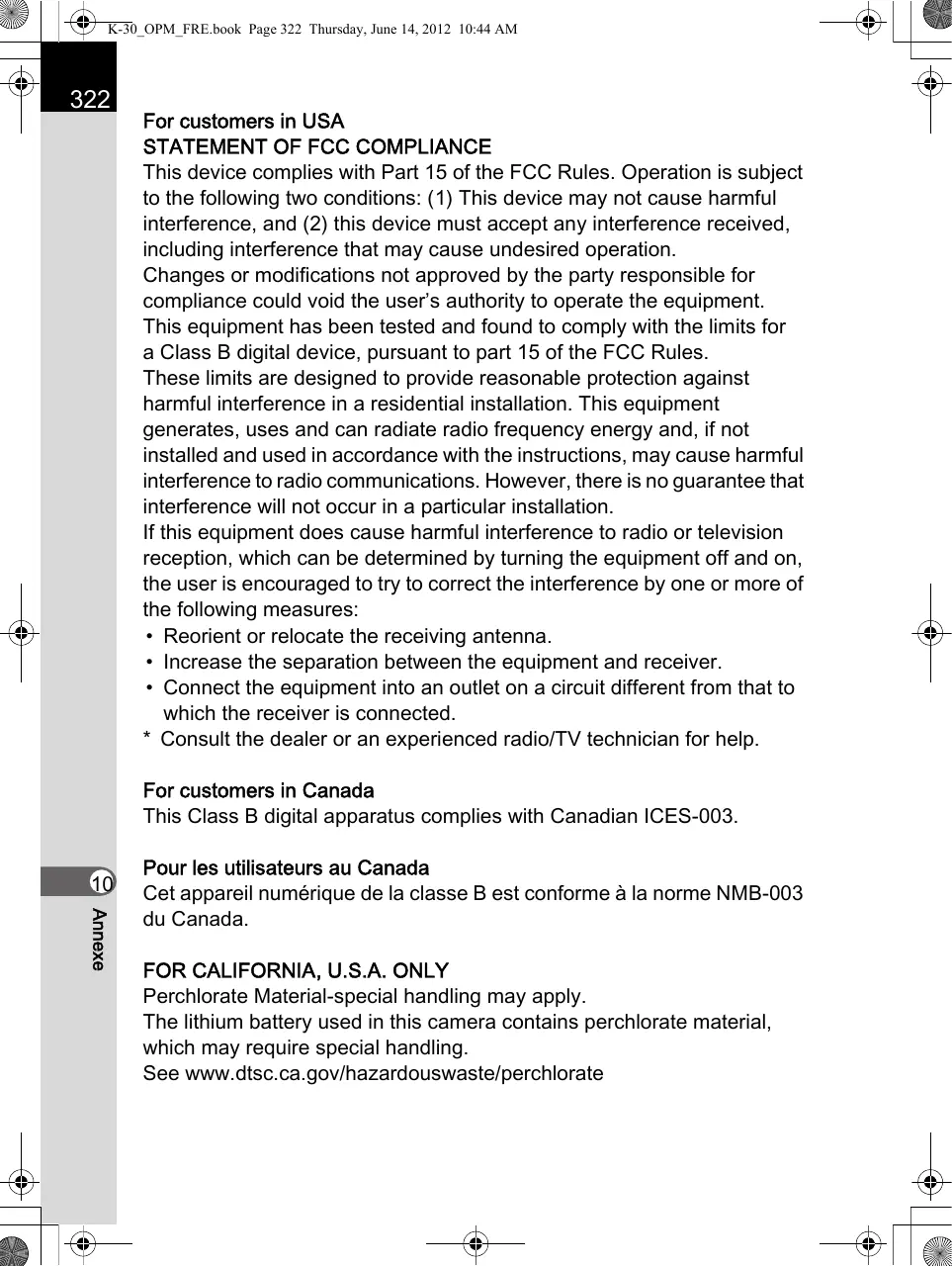
For customers in USA

STATEMENT OF FCC COMPLIANCE

This device complies with Part 15 of the FCC Rules. Operation is subject to the following two conditions: (1) This device may not cause harmful interference, and (2) this device must accept any interference received, including interference that may cause undesired operation.

Changes or modifications not approved by the party responsible for compliance could void the user's authority to operate the equipment.

This equipment has been tested and found to comply with the limits for a Class B digital device, pursuant to part 15 of the FCC Rules.

These limits are designed to provide reasonable protection against harmful interference in a residential installation. This equipment generates, uses and can radiate radio frequency energy and, if not installed and used in accordance with the instructions, may cause harmful interference to radio communications. However, there is no guarantee that interference will not occur in a particular installation.

If this equipment does cause harmful interference to radio or television reception, which can be determined by turning the equipment off and on, the user is encouraged to try to correct the interference by one or more of the following measures:

  • Reorient or relocate the receiving antenna.
  • Increase the separation between the equipment and receiver.
  • Connect the equipment into an outlet on a circuit different from that to which the receiver is connected.
  • Consult the dealer or an experienced radio/TV technician for help.

For customers in Canada

This Class B digital apparatus complies with Canadian ICES-003.

Perchlorate Material-special handling may apply.

The lithium battery used in this camera contains perchlorate material, which may require special handling.

See www.dtsc.ca.gov/hazardouswaste/perchlorate

Declaration of Conformity

According to 47CFR, Parts 2 and 15 for

Class B Personal Computers and Peripherals

We: PENTAX RICOH IMAGING AMERICAS CORPORATION

Located at: 633 17th Street, Suite 2600 Denver, Colorado 80202 U.S.A. Phone: 800-877-0155 FAX: 303-790-1131

Declare under sole responsibility that the product identified herein complies with 47CFR Parts 2 and 15 of the FCC rules as a Class B digital device. Each product marketed is identical to the representative unit tested and found to be compliant with the standards. Records maintained continue to reflect the equipment being produced can be expected to be within the variation accepted, due to quantity production and testing on the statistical basis as required by 47CFR §2.909. Operation is subject to the following two conditions: (1) This device may not cause harmful interference, and (2) This device must accept any interference received, including interference that may cause undesired operation. The above named party is responsible for ensuring that the equipment complies with the standards of 47CFR §15.101 to §15.109.

Product Name: Digital Camera

Model Number: K-30

Contact person: Customer Service Manager

Date and Place: June, 2012, Colorado

Manual assistant
Powered by Anthropic
Waiting for your message
Product information

Brand : PENTAX

Model : K30

Category : Digital SLR Camera