
OBJECTIFS DA - Lenses PENTAX - Free user manual and instructions
Find the device manual for free OBJECTIFS DA PENTAX in PDF.


| Product type | Interchangeable lens for digital SLR |
| Brand | PENTAX |
| Series | SMC PENTAX-DA |
| Mount | KAF / KAF2 mount |
| Compatibility | PENTAX digital SLR cameras only (not compatible with film) |
| Focus | Autofocus (AF) and manual (MF); Quick-Shift focus system on most models |
| Motor | SDM (Supersonic Direct-drive Motor) on DA* models (e.g., DA* 16-50mm, DA* 50-135mm, DA* 200mm, DA* 300mm) |
| Protection | Dust and moisture seals on DA* models (DA* 200mm, DA* 300mm, DA* 16-50mm, DA* 50-135mm) |
| Diaphragm | Automatic (no aperture ring) |
| Filter diameter | Varies by model (e.g., 52 mm for DA 18-55mm, 77 mm for DA* 300mm) |
| Lens hood | Supplied, bayonet or screw type depending on model |
| Minimum focusing distance | Varies (e.g., 0.25 m for DA 18-55mm, 1.4 m for DA* 300mm) |
| Maximum magnification | Varies (e.g., 0.34x for DA 18-55mm, 0.24x for DA* 300mm) |
| Weight | Varies (e.g., 220 g for DA 18-55mm, 1070 g for DA* 300mm) |
| Dimensions (diameter x length) | Varies by model (e.g., 68 x 67.5 mm for DA 18-55mm) |
| Supplied accessories | Front cap, mount cap, lens hood, soft case (depending on model) |
| Care and cleaning | Clean with a soft, dry cloth; do not use solvents; store in a dry, well-ventilated place |
| Safety | Do not look directly at the sun through the lens; do not leave the lens uncapped in direct sunlight to avoid fire risk |
| Serviceability | Have it serviced by an authorized dealer every 1 to 2 years |
Frequently Asked Questions - OBJECTIFS DA PENTAX
User questions about OBJECTIFS DA PENTAX
0 question about this device. Answer the ones you know or ask your own.
Ask a new question about this device
Download the instructions for your Lenses in PDF format for free! Find your manual OBJECTIFS DA - PENTAX and take your electronic device back in hand. On this page are published all the documents necessary for the use of your device. OBJECTIFS DA by PENTAX.
USER MANUAL OBJECTIFS DA PENTAX
e_kl567_16.fm Page -1 Wednesday, April 23, 2008 11:52 AM
PENTAX
smc PENTAX-DA
OBJECTIF INTERCHANGEABLE
MODE D'EMPLOI
AVANT-PROPOS
DA* 300 mm f/4ED [IF] SDM 19
e_kl567_16.fm Page 5 Wednesday, April 23, 2008 11:52 AM
5
K20D, K200D, K10D, K100D Super
Remarque :
e_kl567_16.fm Page 11 Wednesday, April 23, 2008 11:52 AM
BOUCHON D'OBJECTIF
e_kl567_16.fm Page 13 Wednesday, April 23, 2008 11:52 AM
MISE AU POINT
13
e_kl567_16.fm Page 16 Wednesday, April 23, 2008 11:52 AM
16
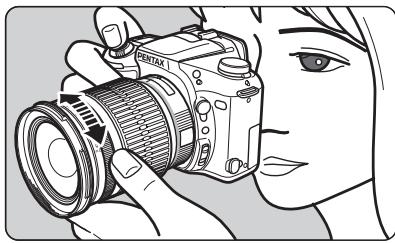
Mise au point DA\* 200 mm f/2.8ED [IF] SDM, DA\* 300 mm f/4ED [IF] SDM
e_kl567_16.fm Page 20 Wednesday, April 23, 2008 11:52 AM
20
e_kl567_16.fm Page 22 Wednesday, April 23, 2008 11:52 AM
22
![PENTAX OBJECTIFS DA - Mise au point DA\* 200 mm f/2.8ED [IF] SDM, DA\* 300 mm f/4ED [IF] SDM - 1](/content/2019/11/87384/images/76d4926faeea131a605bd7ad72a3058afde514643fdf078173fbba28d473f288.jpg)
e_kl567_16.fm Page 23 Wednesday, April 23, 2008 11:52 AM
![PENTAX OBJECTIFS DA - Mise au point DA\* 200 mm f/2.8ED [IF] SDM, DA\* 300 mm f/4ED [IF] SDM - 2](/content/2019/11/87384/images/6d92278de6be45c96d9f14ca74188556885666137f207ca785ffd4f8ffdd50a0.jpg)
e_kl567_16.fm Page 24 Wednesday, April 23, 2008 11:52 AM
24
OBJECTIFMACRO
e_kl567_16.fm Page 25 Wednesday, April 23, 2008 11:52 AM
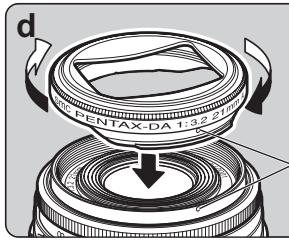
FIXATION DU PARASOLEIL
25
e_kl567_16.fm Page 27 Wednesday, April 23, 2008 11:52 AM
e_kl567_16.fm Page 33 Wednesday, April 23, 2008 11:52 AM
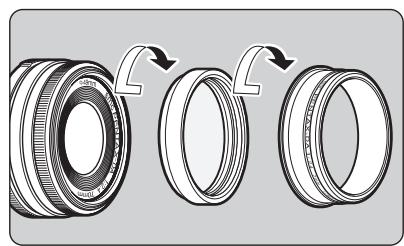
DA 14 mm f/2.8ED [IF]
Fish-eye DA 10-17 mm f/3.5-4.5ED [IF]
DA 12-24 mm f/4ED AL [IF]
DA\* 16-50 mm f/2.8ED AL [IF] SDM
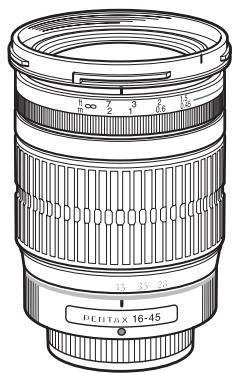
DA 16-45 mm f/4ED AL
e_kl567_16.fm Page 42 Wednesday, April 23, 2008 11:52 AM
42
ADAPTATEUR TREPIED
For customers in USA
STATEMENT OF FCC COMPLIANCE
This device complies with Part 15 of the FCC Rules. Operation is subject to the following two conditions: (1) This device may not cause harmful interference, and (2) this device must accept any interference received, including interference that may cause undesired operation.
Changes or modifications not approved by the party responsible for compliance could void the user's authority to operate the equipment.
This equipment has been tested and found to comply with the limits for a Class B digital device, pursuant to part 15 of the FCC Rules. These limits are designed to provide reasonable protection against harmful interference in a residential installation. This equipment generates, uses and can radiate radio frequency energy and, if not installed and used in accordance with the instructions, may cause harmful interference to radio communications. However, there is no guarantee that interference will not occur in a particular installation. If this equipment does cause harmful interference to radio or television reception, which can be determined by turning the equipment off and on, the user is encouraged to try to correct the interference by one or more of the following measures:
Reorient or relocate the receiving antenna.
Increase the separation between the equipment and receiver.
Connect the equipment into an outlet on a circuit different from that to which the receiver is connected.
*Consult the dealer or an experienced radio/TV technician for help.
For customers in Canada
This Class B digital apparatus complies with Canadian ICES-003.
e_kl567_16.fm Page 54 Wednesday, April 23, 2008 11:52 AM
HOYA CORPORATION
PENTAX Imaging System Division
2-36-9, Maeno-cho, Itabashi-ku, Tokyo 174-8639, JAPAN (http://www.pentax.jp)
PENTAX Europe GmbH Julius-Vosseler-Strasse 104, 22527 Hamburg, GERMANY (HQ - http://www.pentaxeurope.com)
(European Headquarters) (Germany - http://www.pentax.de) Hotline: 0180 5 736829 / 0180 5 PENTAX
Austria Hotline: 0820 820 255 (http://www.pentax.at)
PENTAX U.K. Limited PENTAX House, Heron Drive, Langley, Slough, Berks SL3 8PN, U.K. (http://www.pentax.uk)
Hotline: 0870 736 8299
PENTAX France S.A.S. 112 Quai de Bezons, B.P. 204, 95106 Argenteuil Cedex, FRANCE (http://www.pentax.fr)
Hotline: 0826 103 163 (0,15€ la minute) Fax: 01 30 25 75 76
PENTAX Imaging Company
A Division of PENTAX of America, Inc.
(Headquarters)
600 12th Street, Suite 300 Golden, Colorado 80401, U.S.A.
(PENTAX Service Department)
12000 Zuni Street, Suite 100B Westminster, Colorado 80234, U.S.A
(http://www.pentaximaging.com)
PENTAX Canada Inc. 1770 Argentina Road Mississauga, Ontario L5N 3S7, CANADA (http://www.pentax.ca)
PENTAX Trading 23D, Jun Yao International Plaza, 789 Zhaojiabang Road, Xu Hui District, Shanghai, 200032
( SHANGHAI ) Limited CHINA ( http://www.pentax.com.cn)

Copyright © HOYA CORPORATION 2008
FOM 01.04.2008 Printed in Europe
AP070102/FRE
- PENTAX
- AVANT-PROPOS
- Remarque :
- BOUCHON D'OBJECTIF
- MISE AU POINT
- Mise au point DA\* 200 mm f/2.8ED [IF] SDM, DA\* 300 mm f/4ED [IF] SDM
- OBJECTIFMACRO
- FIXATION DU PARASOLEIL
- DA 14 mm f/2.8ED [IF]
- Fish-eye DA 10-17 mm f/3.5-4.5ED [IF]
- DA 12-24 mm f/4ED AL [IF]
- DA\* 16-50 mm f/2.8ED AL [IF] SDM
- DA 16-45 mm f/4ED AL
- 42
- ADAPTATEUR TREPIED
- For customers in USA
- STATEMENT OF FCC COMPLIANCE
- For customers in Canada
- HOYA CORPORATION
Brand : PENTAX
Model : OBJECTIFS DA
Category : Lenses